The GMKtec NucBox M5S is an ultra-small computer that bets on energy efficiency, absolute silence, and network connectivity typical of much more expensive machines, featuring a 4-core AMD Ryzen 3 5400U processor.
After testing it in day-to-day use, it is clear that it is a little gem for remote work, home use, media centers, and lightweight home servers, although its entry-to-mid-range processor and the pricing of certain configurations make it important to choose the right version to buy.
-
✅ Pros:
-
Virtually inaudible operation thanks to its dual-fan cooling system.
-
Outstanding connectivity: dual 2.5 Gbps Ethernet ports, WiFi 6E, and triple display output (up to 8K).
-
Great internal upgradeability (two DDR4 RAM slots and two M.2 SSD slots).
-
Multi-function front USB-C port capable of powering the unit and outputting video with a single cable.
-
-
❌ Cons:
-
Many listings mistakenly advertise it as a "Ryzen 5", when it actually houses a Ryzen 3 5400U.
-
Modest integrated graphics: not suitable for demanding modern video games or heavy video editing.
-
The price jump between versions is disproportionate.
-
🛒 Buy on Amazon 🔍 Search on AliExpress
📦 Unboxing and Box Contents
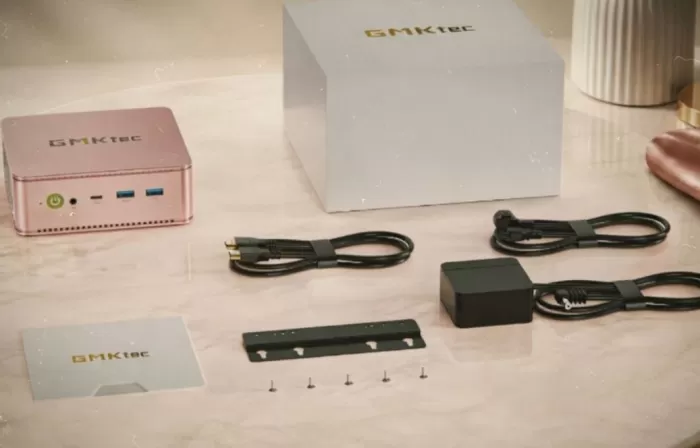
GMKtec maintains its minimalist presentation in a well-protected rigid box where each component comes separated to prevent damage during shipping. Upon opening it, we find everything needed to get started without having to buy extra cables:
-
1 × GMKtec NucBox M5S Mini PC.
-
1 × 65 W Power adapter (19 V / 3.42 A).
-
1 × Standard-length HDMI cable to connect it directly to your monitor or TV.
-
1 × Metal VESA mount along with its screw set (ideal for hiding it behind the screen and keeping your desk clutter-free).
-
1 × User manual and quick start guide.
📋 Key Technical Specifications Table
| Feature | GMKtec NucBox M5S Specification |
| Processor (CPU) | AMD Ryzen 3 5400U (4 cores / 8 threads, up to 4.0 GHz, 8 MB L3 cache) |
| Graphics (GPU) | Integrated AMD Radeon Graphics (6 graphics cores at 1600 MHz) |
| RAM Memory | 16 GB DDR4 at 3200 MT/s (expandable up to 64 GB via 2 SO-DIMM slots) |
| Storage | 256 GB or 512 GB M.2 2280 PCIe 3.0 ×4 NVMe SSD |
| Storage Expansion | 2 M.2 2280 slots (up to 16 TB total; slot 1 hybrid SATA/NVMe, slot 2 NVMe only) |
| Wireless Connectivity | WiFi 6E (tri-band 2.4 / 5 / 6 GHz) and Bluetooth 5.2 |
| Wired Network | Dual 2.5 Gbps RJ45 LAN ports (Realtek RTL8125 controller) |
| Video Outputs | Simultaneous triple display: HDMI 2.0 (4K@60Hz), DisplayPort 1.4 (8K@60Hz), and USB-C |
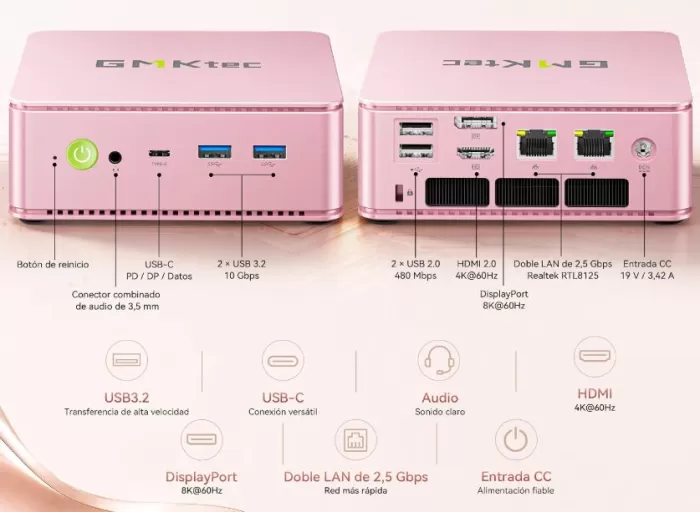
| Front Ports | 1× USB-C (PD/DP/Data), 2× USB 3.2 Gen 2 (10 Gbps), 1× 3.5 mm audio jack |
| Rear Ports | 2× USB 2.0, 1× HDMI 2.0, 1× DisplayPort, 2× 2.5G LAN, 1× DC In |
| Dimensions & Weight | 12.88 × 12.7 × 4.78 cm — 528 grams |
| Extra Features | Wake on LAN, auto power-on after power outage, BIOS power profiles |
🎨 Design and Build Quality
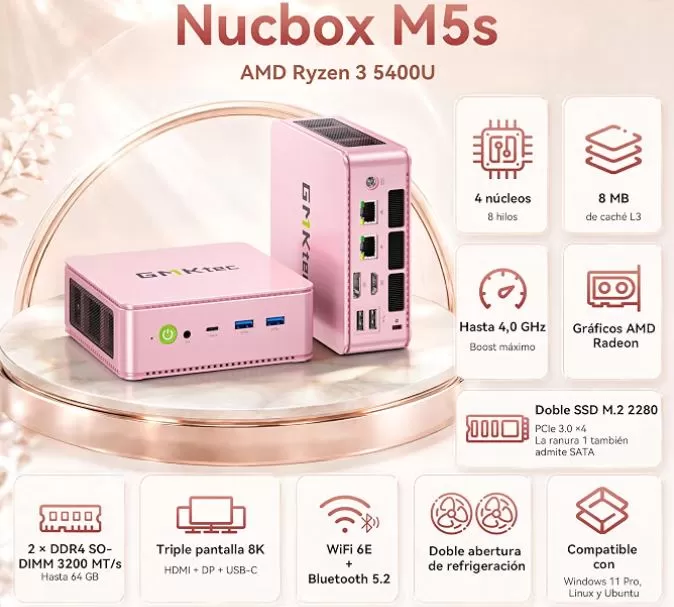
Right out of the box, its compact and lightweight footprint is immediately striking: it takes up virtually the palm of one hand (12.88 × 12.7 cm at less than 4.8 cm thick) and weighs just 528 grams, meaning it easily fits into any backpack or desk corner without getting in the way.
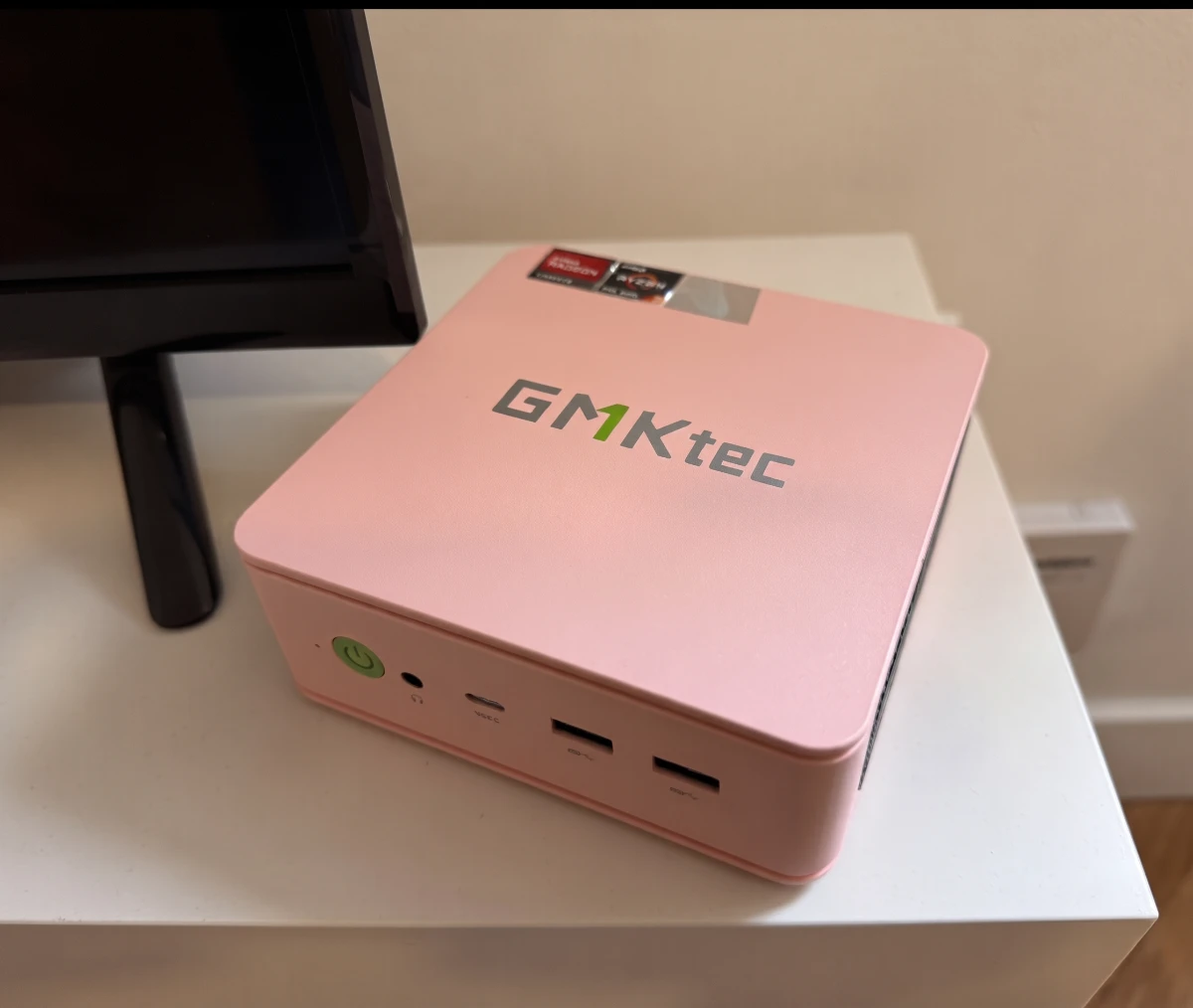
The chassis is crafted from high-density ABS plastic with a very clean satin finish —also available in an eye-catching metallic pink alongside classic color options—, paired with micro-perforated metal grilles on both sides to facilitate fresh air intake. In the hand, it feels solid with no creaking when pressing on the top lid, and four rubber feet on the bottom prevent it from sliding around when plugging cables into the front.
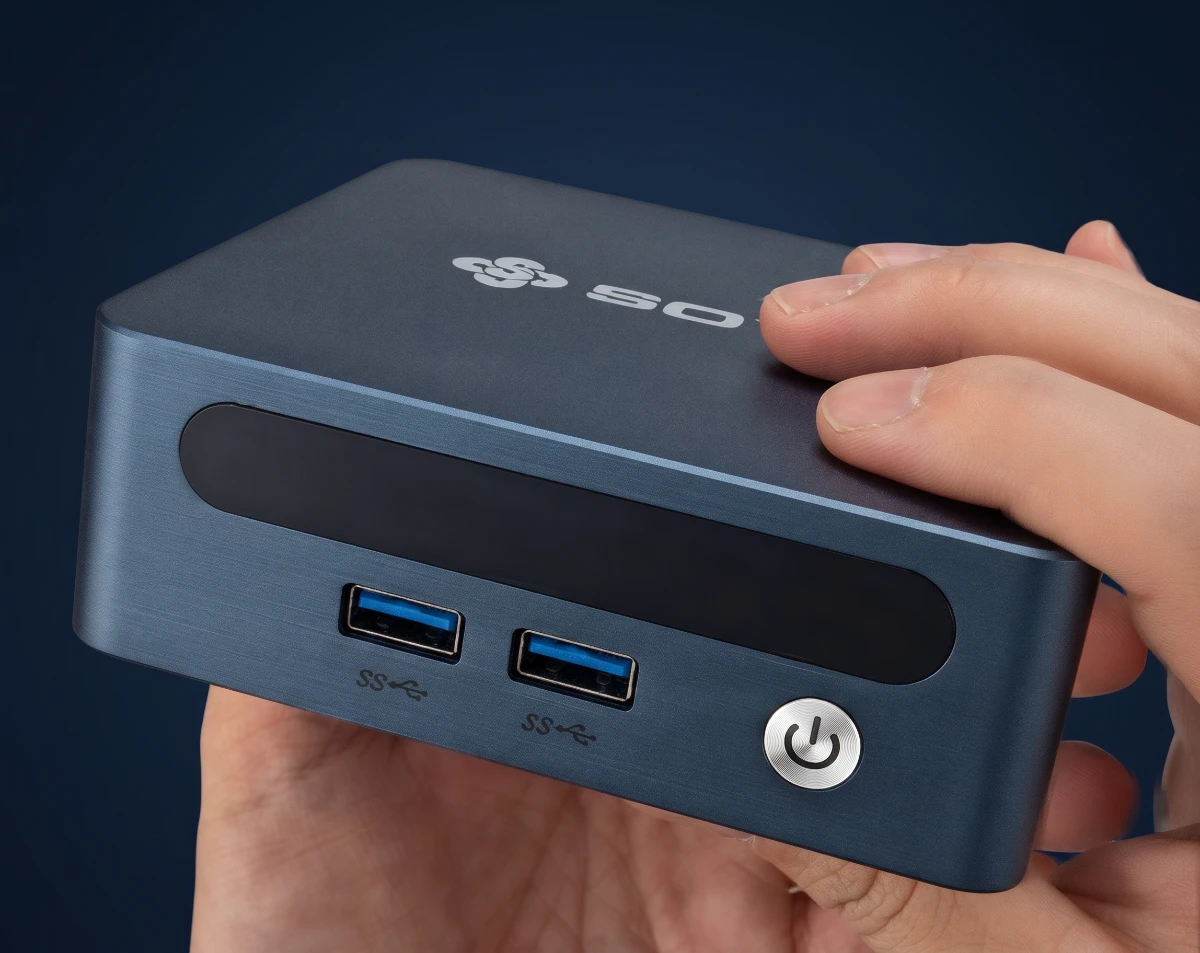
The physical layout is thoughtfully arranged: on the front, we find the green LED-lit power button, a small reset pinhole, the headphone jack, and quick-access ports (USB-C and two blue USB 3.2 ports), while all the thicker network, power, and display cables stay neatly tucked away at the rear.
🖥️ Display and Multimedia
Being a desktop mini PC, it does not feature a built-in screen, yet its video output capabilities are far above average for this price bracket. It allows connecting up to three independent monitors simultaneously by combining its HDMI 2.0 output (up to 4K at 60 Hz), its DisplayPort 1.4 (capable of reaching 8K resolution at 60 Hz), and its front USB-C port (4K at 60 Hz).
In the multimedia department, when hooked up to a living room TV, it acts as a flawless entertainment hub: it plays 4K streaming content (Netflix, YouTube, Prime Video, Plex) smoothly without stuttering thanks to the hardware decoding of the Radeon graphics. For audio, you can output clean digital sound via HDMI/DisplayPort to your monitor or TV, use the front 3.5 mm combo jack for headsets with a microphone, or pair wireless speakers via Bluetooth 5.2 with very low latency.
⚡ Performance and Software
An important clarification is worth making before buying: many online stores title the product as AMD Ryzen 5 5400U, but the actual chip inside is the AMD Ryzen 3 5400U (7 nm Zen 3 architecture with 4 cores and 8 threads boosting up to 4.0 GHz).
-
Day-to-day fluidity: For office tasks, browsing with 25 or 30 tabs open in Chrome/Edge, working with heavy spreadsheets, video calls on Teams or Zoom, and basic photo editing, the machine runs like a charm. The 16 GB of DDR4 memory at 3200 MHz prevents bottlenecks in everyday multitasking.
-
Operating system and cleanliness: It comes with Windows 11 Pro pre-installed and activated, completely free of third-party bloatware. Within just a few minutes of turning it on and completing Windows Update patches, it is ready to work.
-
Internal speeds: The included M.2 2280 NVMe SSD uses a PCIe 3.0 ×4 interface, delivering sequential read speeds around 3,000–3,500 MB/s. Windows boots in under 10 seconds and applications launch instantaneously.
🔌 Power Consumption and Cables
One of this model's biggest advantages over a traditional desktop tower is your electricity bill. The Ryzen 3 5400U has a base TDP of just 15 W (configurable in the BIOS between 10 W silent, 15 W balanced, and 25 W performance modes).
-
At idle or during light web browsing, it draws between 8 W and 12 W (less than an old LED light bulb).
-
Under maximum load, it rarely exceeds 30–35 W at the wall, well below the limit of its external 65 W power supply (19 V / 3.42 A).
Furthermore, it features a very handy trick to cut down on cable clutter: its front USB-C port supports Power Delivery (PD). If you own a modern USB-C monitor capable of delivering at least 65 W, you can run a single cable between the monitor and the mini PC to transmit video, data, and electrical power all at once, leaving the power brick stored away in a drawer.
🌡️ Temperature and Noise (Real-World Thermals)
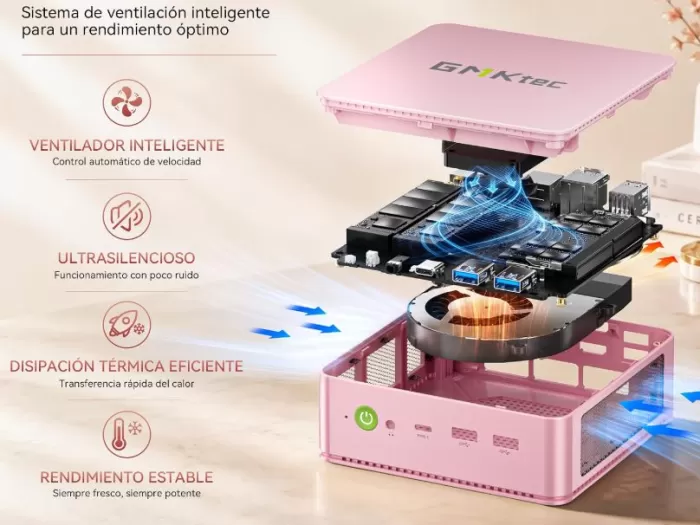
GMKtec equipped the M5S with a dual-fan cooling system: a main blower turbine at the bottom dedicated to the processor and a second auxiliary fan at the top that directly cools the RAM modules and SSD drives.
In real-world use, this thermal design is one of its standout strengths. Throughout full workdays of office tasks, browsing, and media playback, the unit is virtually silent; at a normal sitting distance in front of your desk, you can barely hear a faint murmur even in a dead-quiet room. Only when stressing the processor at 100% for several minutes does the airflow become gently audible without any annoying high-pitched whine, keeping CPU temperatures well within safe margins (between 65 °C and 75 °C under sustained load).
🌐 Connectivity and Extras
In terms of wired and wireless connections, the NucBox M5S punches well above what its processor class suggests:
-
Dual 2.5 Gbps LAN ports (Realtek RTL8125): Having two high-speed network interfaces allows using it not only as a desktop PC, but also as a dedicated router/firewall (running OPNsense or pfSense), a home server hooked up to a NAS, or a lightweight virtualization node.
-
WiFi 6E and Bluetooth 5.2: Takes advantage of the 6 GHz band on compatible routers to provide ultra-fast, stable wireless speeds without needing to run Ethernet cables.
-
Remote management extras: The BIOS includes support for Wake on LAN (powering it on remotely from another device on your network) and Auto Power On (automatically boots back up after a power outage, vital if used as a server).
-
Note on sensors: As is standard for mini PCs in this form factor, it does not include a fingerprint reader, NFC chip, cellular 5G connectivity, or an IP water-resistance rating.
🛠️ Expansion and Upgrades
Opening up the GMKtec M5S is remarkably straightforward: simply remove the bottom screws to gain immediate access to the entire motherboard. Its expansion headroom is excellent:
-
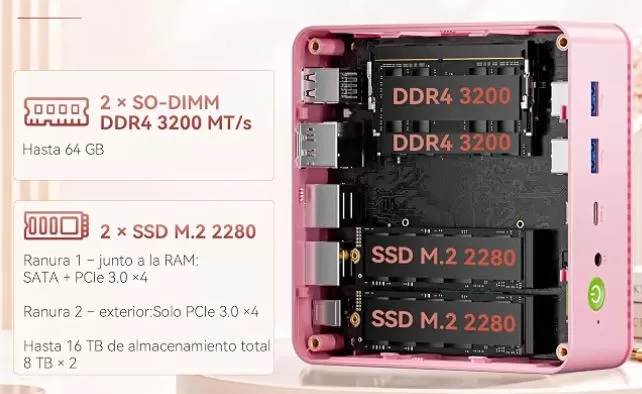
RAM Memory: Features 2 DDR4 SO-DIMM slots supporting up to 64 GB (2 × 32 GB at 3200 MHz). Out of the box, it typically ships with a single 16 GB stick installed, meaning adding a second matching 16 GB module not only doubles capacity to 32 GB, but also enables Dual Channel mode and boosts integrated graphics performance.
-
👉 Check out DDR4 3200MHz SO-DIMM RAM options on AliExpress to upgrade to Dual Channel.
-
-
SSD Storage: Includes 2 M.2 2280 slots supporting up to 8 TB each (16 TB total).
-
Slot 1 (next to the RAM): Hybrid slot; accepts both PCIe 3.0 ×4 NVMe drives and older M.2 SATA drives you may want to repurpose.
-
Slot 2 (outer slot): Comes empty from the factory and exclusively supports PCIe 3.0 ×4 NVMe drives.
-
Note: There is no internal bay for 2.5-inch mechanical hard drives or SATA SSDs due to its slim chassis.
-
👉 Explore 1TB M.2 2280 PCIe NVMe SSDs on AliExpress to expand storage affordably.
-
⚖️ Comparison with Direct Competitors
To see how well the GMKtec M5S stacks up on price and specs, we compare it against two popular direct rivals in the budget and mid-range segment:
| Feature | GMKtec NucBox M5S | NiPoGi / Beelink EQR6 (Ryzen 5 6600H) | GMKtec NucBox M5 Ultra / M6 |
| Processor | AMD Ryzen 3 5400U (4C/8T) | AMD Ryzen 5 6600H (6C/12T) | AMD Ryzen 7 7730U (8C/16T) |
| Integrated Graphics | Radeon Vega 6 (1600 MHz) | Radeon 660M (RDNA 2) | Radeon Vega 8 (2000 MHz) |
| RAM Memory | DDR4 3200 MHz (up to 64 GB) | DDR5 4800 MHz (up to 64 GB) | DDR4 3200 MHz (up to 64 GB) |
| Wired Network | Dual 2.5 Gbps LAN | Dual 1 Gbps LAN | Dual 2.5 Gbps LAN |
| Noise Level | Ultra-quiet (15 W TDP) | Very quiet (35 W TDP) | Quiet (15-28 W TDP) |
| Reference Link | Check deals on Amazon | View Beelink EQR6 on AliExpress | View GMKtec M5 Ultra on AliExpress |
What does this table tell us? If you prioritize minimal power draw and whisper-quiet operation for office work or a home server, the M5S delivers in spades. However, if pricing hovers around €350–400, models like the GMKtec M5 Ultra or the Beelink SER5 / EQR6 double the core count for a very small price difference.
💬 Reviews on Popular Platforms
When reviewing verified buyer ratings from European shoppers on platforms like Amazon, there is a very clear consensus on the device's real strengths —along with a few important nuances worth interpreting carefully—:
-
Silence and remote work are the most praised aspects: Verified buyers in France (Isabelle, 5/5-star rating) particularly highlight how effortless setup is ("just connect the monitor, keyboard, and power, and it boots in seconds without needing manual driver installations"). They note that even with dozens of browser tabs open simultaneously, the system experiences no noticeable slowdowns and the dual-fan cooling is barely audible even when sitting right next to the unit.
-
Versatility as a home media center: In verified reviews from Germany (joy, 5/5 stars), users appreciate its lightweight portability and understated design for placing in the living room as a media hub connected directly via DisplayPort or HDMI, alongside solid performance in casual home photo editing.
-
Manage gaming expectations realistically: Although one user review mentions playing demanding titles by lowering graphics settings, as reviewers we must keep expectations grounded: the 6-core Radeon iGPU on the Ryzen 3 5400U is built for multimedia and light gaming, not heavy modern AAA titles.
🎮 Gaming and Emulation
This is neither a console nor a gaming rig, yet its integrated AMD Radeon chip (6 cores at 1600 MHz) lets you enjoy plenty of games if you know where its limits lie:
-
Light competitive and indie games: Titles like League of Legends, Valorant, CS2 (at 720p/900p low settings), Minecraft, Stardew Valley, or Hollow Knight run smoothly above 60 FPS.
-
Modern AAA games: Demanding titles such as Cyberpunk 2077, Starfield, or Black Myth: Wukong are not satisfactorily playable on this hardware.
-
Retro emulation: This is where it shines. It effortlessly handles classic emulators up to PlayStation 2, GameCube, Wii, and PSP at native or upscaled resolutions, turning it into a great living-room retro machine.
❓ Frequently Asked Questions (FAQ)
1. Is the processor a Ryzen 5 or a Ryzen 3? Although some online store listings mistakenly put "Ryzen 5 5400U" in the title, the official processor inside the GMKtec M5S is the AMD Ryzen 3 5400U with 4 cores and 8 threads.
2. Which version is better value: 16+256 GB or 16+512 GB? Without a doubt, the 16+256 GB version (€351.49). Paying nearly €118 extra for the 512 GB version (€468.96) makes no financial sense when the unit has a free second M.2 slot where you can install a 1 TB NVMe SSD yourself for around €55–65.
3. Can it be mounted behind a monitor? Yes, the box includes a metal VESA mounting bracket and the necessary screws to attach it to the back of any compatible monitor.
4. Is it suitable for running 24/7 as a home server? Yes. Thanks to its ultra-low power draw, dual 2.5 Gbps Ethernet ports, and BIOS auto power-on feature, it is ideal for running Home Assistant, Plex, Pi-hole, or Docker containers around the clock.
🏁 Final Conclusion
The GMKtec NucBox M5S is a remarkably well-balanced mini PC if you know exactly what you are looking for. It is ideal for remote workers, students, offices setting up dual- or triple-monitor workstations, and power users seeking a tiny, silent machine with dual 2.5G networking for a home server or router.
Is it worth it? Yes, provided you buy it in its base 16+256 GB configuration (or catch a good sale) and upgrade the storage yourself if you need more space. If your priority is heavy video editing, playing modern AAA titles, or squeezing maximum raw horsepower out of every euro spent, you will be better off stepping up to a Ryzen 7 model like the GMKtec M5 Ultra or exploring higher-tier options on Amazon.
🛒 Where to Buy at the Best Price
-
👉 Buy GMKtec M5S on Amazon: Check availability and updated prices on Amazon.
-
👉 Buy GMKtec NucBox M5S on AliExpress: Check GMKtec M5S deals on AliExpress.
-
👉 Recommended accessories to upgrade your Mini PC: 1TB NVMe SSD Upgrade | DDR4 3200MHz RAM Memory