
The Apple Mac mini M4 represents a significant qualitative leap in the compact computer segment.
With its 10-core M4 chip, 16GB of unified RAM and ultra-compact design, it delivers exceptional performance for everyday tasks, content editing and multitasking.
Pros: outstanding performance, premium design in recycled aluminum, energy efficiency (4W in standby), modern connectivity with Thunderbolt 4, competitive price (€639-719).
Cons: Limited base storage (256GB), RAM not expandable after purchase, power button on the bottom.
Conclusion: It's the best mini PC option for macOS users and a serious alternative to Windows PCs due to its performance-to-price ratio.
🛒 Where to buy it at the best price?
The Mac mini M4 16GB/256GB is available on AliExpress with competitive prices and international shipping.
Some stores offer up to a 15% discount on Apple's official price.
🛒 Mac mini M4 DEALS (Amazon)
👉 See Mac mini M4 deals on AliExpress : aliexpress.com
Technical Specifications
| Component | Details |
|---|---|
| Processor | Apple M4 (10 cores: 4 performance + 6 efficiency) |
| GPU | 10 cores with hardware-accelerated ray tracing |
| RAM | 16GB of unified memory (120GB/s bandwidth) |
| Storage | 256GB SSD (removable but not officially accessible) |
| Neural Engine | 16 cores for Apple Intelligence |
| Rear connectivity | 3× Thunderbolt 4, HDMI, Gigabit Ethernet (10Gb opcional) |
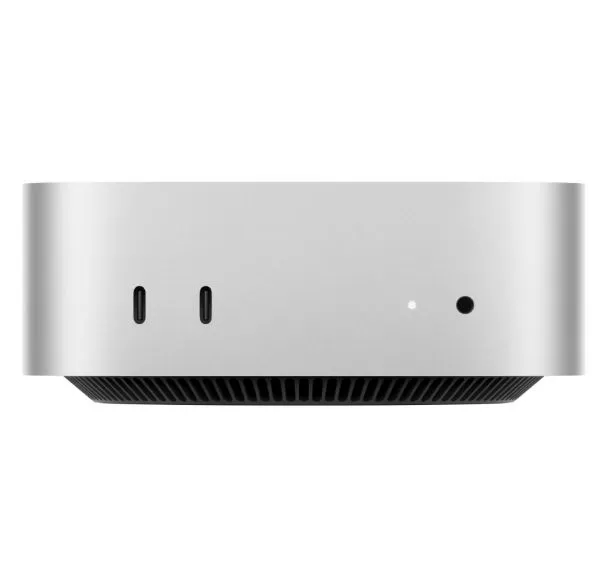
| Front-end connectivity | 2× USB-C (USB 3), jack de audio |
| Supported screens | Up to 2 x 6K + 1 x 5K simultaneous |
| Consumption | 4W (standby) / 65W (maximum) |
| Dimensions | Ultra-compact, smaller design than previous generations |
| Operating System | macOS Sequoia |

Design and Construction Quality
The Mac mini M4 continues Apple's tradition with a recycled aluminum chassis that exudes premium quality.
The new design is even more compact than previous versions, maintaining a minimal footprint on the desktop without compromising robustness.
The metal construction offers excellent heat dissipation, with virtually inaudible ventilation even under heavy loads.
The front ports add practical versatility for quick connections of USB drives or temporary peripherals.
The only controversial aspect is the placement of the power button at the bottom, although in practice few people completely shut down their Macs daily.
Screen and Sound
Note: The Mac mini is a desktop computer without a built-in display. It requires an external monitor, keyboard, and mouse to function. However, its video output capabilities are exceptional: it supports up to two 6K displays at 60Hz simultaneously, plus an additional 5K display, totaling more than 60 million pixels.
HDMI connectivity makes it easy to connect to TVs or monitors without the need for adapters.
The front audio jack supports high-impedance headphones, offering excellent quality for audio professionals. The hardware-accelerated Media Engine handles H.264, HEVC, ProRes, ProRes RAW codecs and AV1 decoding effortlessly.
Performance and Software
The M4 chip offers outstanding performance that surpasses even the M2 Max in single-core CPU tasks.
In Geekbench 6 benchmarks, the base M4 is approximately 131% faster than the M1 in multi-core performance, more than double the output. The GPU shows improvements of 70-74% compared to the M1, nearly doubling the graphics performance.
For everyday tasks like web browsing, office applications, and multimedia consumption, the system responds instantly. macOS Sequoia includes Apple Intelligence with enhanced writing tools, automatic summaries in Safari, and smart focus in notifications.
The system boots up quickly and applications load without any noticeable delays. It doesn't include bloatware, and macOS updates are fast and seamless.
Electricity Consumption
The Mac mini requires a constant power connection. It stands out for its exceptional energy efficiency: it consumes just 4W in standby mode and up to 65W under maximum load. This efficiency makes it ideal for 24/7 operation without a significant impact on your electricity bill.
Some users have even reported being able to power it with portable batteries for extended periods thanks to its low power consumption.
Connectivity and Extras
The Mac mini M4 offers full connectivity by 2026.
On the back, it includes three Thunderbolt 4 ports (40Gb/s each), HDMI for direct connection to monitors or TVs, and Gigabit Ethernet with the option to upgrade to 10Gb for ultra-fast networks.
The two front USB-C ports facilitate quick connections without accessing the rear.
Although the base M4 model uses Thunderbolt 4, the M4 Pro includes Thunderbolt 5 with speeds up to 120Gb/s.
It does not include WiFi 7 but it does include WiFi 6E, Bluetooth 5.3, and support for up to three simultaneous 6K displays.
The audio jack supports high impedance headphones.
All components are soldered except for the SSD, which is technically removable but Apple does not consider it user-accessible.

Reviews on Well-Known Websites
Summary of Reviews on Well-Known Websites
- AppleInsider gives it 4.5/5 stars, highlighting its versatile compact design and the performance of the M4 chip, although it notes that SSD and RAM upgrades quickly increase the price.
- TechRadar believes that "it could be the best Mac ever created" because of its combination of performance, price, and size.
- MacRumors describes it as "the best desktop Mac for most users," emphasizing that the 16GB of base RAM (vs. the previous 8GB) represents a significant change.
- Reddit users highlight moderate temperatures (46°C without active fan) and outstanding performance for AutoCAD, Revit and professional applications.
- The consensus in specialized forums confirms that the base M4 offers better value than higher-end configurations for general use.
TechRadar - "The best Mac ever created?"
TechRadar awards exceptional scores in its detailed review of the Mac mini M4: 5/5 for value , highlighting its phenomenal value for money. It receives 4.5/5 for design , praising the small footprint and additional ports, though criticizing the power button placement. Performance also scores 4.5/5 , with the verdict: "simply amazing performance for a mini PC at this price, though it struggles with modern games."
The reviewer notes that the Mac mini remained "virtually silent" even when editing 4K video in Adobe Premiere Pro, navigating between scenes without slowdown. In gaming, it managed to run Shadow of the Tomb Raider at 44fps on high graphics settings, surpassing the 30fps minimum for smooth gameplay. TechRadar recommends buying it if you're looking for "the most affordable way to enter the Mac ecosystem" or if you need a mini PC, concluding: "No Windows 11 mini PC can come close."
The Verge - "A small wonder"
The Verge emphasizes the device's revolutionary design: "It measures just 5 inches wide and deep, and 2 inches high. This 2024 Mac Mini is significantly smaller than its Intel-based predecessor." The publication praises the cooling system, which ensures quiet operation even during intensive tasks such as photo editing in Lightroom.
Regarding performance, they explain that "the M4 Mini matches the performance of the M4 iMac and MacBook Pro in benchmarks," although they suggest that for intensive video editing, the M4 Pro might be necessary. The Verge particularly highlights the addition of front ports, eliminating "the need to fumble around at the back, as was common in previous models."
Tom's Guide - "More than an iteration"
Tom's Guide delivers a resounding verdict: "The Mac mini M4 is more than just an iteration of previous versions of Apple's smallest Mac." They highlight the following positive aspects: the absolutely tiny redesigned chassis, the fact that the base model has double the standard RAM, the M4 chip that performs even better in desktop form, and the front and rear ports.
The publication emphasizes that "at just 5 x 5 x 2 inches, the Mac mini M4 is absolutely tiny and fits easily in your hand," comparing it favorably to the M2, which measured 7.7 x 7.7 x 1.4 inches. They also highlight that it includes an integrated power supply, eliminating "the need to carry around a bulky adapter like with the Acemagic F2A and almost all Windows-based mini PCs." Cons they mention include: the awkward placement of the power button, the fact that it's not user-repairable or upgradeable, and that it should include more than 256GB of base storage.
PCMag - Editor's Choice Award
PCMag awarded its prestigious Editor's Choice Award to the Mac mini M4 Pro, noting that "the mini seems confident in being a top-tier value among budget desktops at its starting price of $599, if only for the included software and smooth performance." The publication praised its "excellent level of versatility and power."
Regarding noise, they acknowledge that "the cooling system works hard at full power and you'll hear it," but they compare the Mac mini to mini PCs, like the MacBook Air to ultraportable laptops. Test data shows "a marked improvement over the previous Mac mini with M2 Pro, and quite competitive results with some of the best iterations of Intel desktop and mobile chips." Negative aspects they point out include: the base storage capacity remains limited, the fans can be noisy under load, and internal memory and storage are not upgradeable after purchase.
CNET - "Small on the outside, big on the inside"
CNET published a video review titled "Apple's M4 Mac Mini Is a Big Surprise" where they highlight that the Mac mini is "big on the inside" despite its small size.
Real User Reviews on Reddit
On the r/macmini subreddit, real users share detailed experiences. One user with the base model (16GB/256GB) reports: "The Mac Mini is fantastic, there's not much to say, it's really powerful despite being the basic configuration." This same user, who works with Revit and AutoCAD, explains: "If they were very slow on the M1, on the M4 you can use them without too many problems. Perhaps in more demanding projects you start to experience some slowdowns, but nothing terrible."
Regarding temperatures, one user reports: "Temperatures remain around 46 degrees Celsius without using the fan I bought as a precaution." Another user confirms: "It operates quickly, is more efficient, and has a lower cost compared to rivals in the same category. Currently, it offers the best value." The community agrees that the base M4 with 16GB is sufficient for most users, although some recommend 24GB for intensive professional tasks.
Technical Tests
Summary of Technical Tests
- Cinebench R24: The M4 shows substantial increases over previous generations, setting new standards in its category.
- Geekbench 6 CPU: 131% faster than M1 in multi-core, demonstrating more than double the performance.
- Geekbench 6 GPU: 70-74% improvements over M1 in OpenCL and Metal tests.
- Video editing: Adobe Premiere Pro and DaVinci Resolve Studio work smoothly with 4K footage, although heavy 8K projects could benefit from the M4 Pro.
- Photoshop: Rendering and filters are executed instantly thanks to the Neural Engine.
- Blender: Both CPU and GPU rendering show significant improvements, especially with hardware-accelerated ray tracing.
- Gaming: Selected App Store and Steam titles work correctly, although the gaming ecosystem on Mac remains limited.
- Energy consumption: Tests confirm 4W at idle and a maximum of 65W, significantly lower than equivalent Windows PCs.
Geekbench 6 - CPU Performance
The 10-core Apple M4 scores 3,781 points in single-core and 14,858 points in multi-core on Geekbench 6. These results position the M4 as 131% faster than the M1 in multi-core tasks, more than double the generational performance. Compared to its direct predecessor, the M4 offers a 30-50% improvement over the base M2, depending on the specific benchmark.
The most noteworthy aspect is that the base M4 comes very close to the high-end M2 Pro in overall computing performance , although with slightly lower raw GPU performance. The first benchmarks uploaded to Geekbench after launch confirmed these impressive figures, generating considerable enthusiasm within the community. The architecture of 4 high-performance cores + 6 efficiency cores demonstrates an exceptional balance between raw power and energy efficiency.
Cinebench 2024 - Rendering Test
In Cinebench 2024, the M4 achieved 176 points in single-core and 972 points in multi-core CPU tests. The 10-core GPU scored 4,005 points in the Cinebench 2024 graphics test. During these intensive tests, power consumption remained below 50W and the maximum temperature reached only 43.4 degrees Celsius , demonstrating exceptional thermal management.
Compared to previous generations of Apple Silicon, the M4 significantly outperforms the M3 Pro (142 single-core points) and approaches the results of the M2 Max (1,025 multi-core points), although the latter has more cores. The M4's efficiency per watt is outstanding: it achieves performance comparable to high-end Intel desktop chips while consuming a fraction of the power.
3DMark - Native Graphics Performance
In 3DMark's native Mac benchmarks, the base Mac mini M4 shows solid, though modest, results compared to Pro/Max configurations. In Steel Nomad Light , the base M4 scores between 3,583 and 3,839 points , while in Solar Bay it achieves approximately 18,187–18,352 points .
For comparative context, the M4 Max with 16 GPU cores scores 27,561 in Solar Bay and 26,676 in Steel Nomad , while the M4 Pro with 16 GPU cores achieves 14,394 in Steel Nomad Light . The base M4 is clearly focused on general productivity rather than hardcore gaming, but it offers sufficient graphics performance for casual gaming and light creative work.
Blender - Professional 3D Rendering
In tests with Blender, the base Mac mini M4 demonstrates surprising capabilities for its price. A 3D reviewer tested the base M4 (16GB/256GB) running Blender on a 49-inch Samsung G9 ultrawide display, working with high-poly models and complex lighting scenes.
Official Blender benchmarks show substantial improvements over the M1, although exact times vary depending on the specific scene. The M4 Max subsequently scored 13,495 points in Blender benchmarks, significantly faster than an NVIDIA RTX 4060, although the base M4 is obviously several steps behind. For occasional 3D work or learning, the base M4 is perfectly viable; professionals who render constantly should consider Pro/Max configurations.
Xcode - iOS/macOS Development
For developers, compilation times are critical. The Mac mini M4 Pro compiles large projects in 42 seconds , compared to 103 seconds on a MacBook Air M1 with 16GB of RAM, representing a 2.45x improvement . While this data pertains to the M4 Pro, the base M4 also shows substantial improvements over previous generations.
In GitHub's standard XcodeBenchmark benchmark, the base M1 with 16GB of RAM completed the test in 116 seconds . Extrapolating the generational improvements, it can be estimated that the base M4 would take around 75-85 seconds in the same test, although there is no official confirmed data yet. For professional iOS/macOS development, the base M4 with 16GB of RAM is perfectly capable of handling medium-sized projects without frustration.
Video Editing - DaVinci Resolve and Premiere Pro
In DaVinci Resolve Studio , real users report excellent experiences with the base M4. One professional editor works with 6K BRAW and 4K H.265 footage from iPhones on a base Mac mini M4, editing in 1080p timeline with DaVinci installed on the internal SSD and a ProRes HQ render cache on a Thunderbolt 4 drive. This setup allows for faster-than-real-time rendering , running "flawlessly" according to the user.
Another user reported that while their previous Mac struggled with DaVinci Resolve, consuming 18-20GB of RAM and causing severe lag during Envato transitions, the M4 handled these tasks much more smoothly. TechRadar confirmed that the Mac mini M4 remained virtually silent while editing 4K video in Adobe Premiere Pro , navigating between scenes without slowdowns.
For 1080p and 4K projects, the base M4 is more than sufficient; heavy 8K content or complex multi-camera setups would benefit from the M4 Pro.
Gaming - Performance in Real Games
A specialized channel tested 10 Mac games on the base M4 with 16GB of RAM. The results show modest but functional gaming capabilities:
-
Resident Evil 4: 63 FPS average at 1080p High with TAA, minimums of 50 FPS and maximums of 88 FPS - "pretty damn good" according to the reviewer
-
Shadow of the Tomb Raider: 44 FPS at 1080p High, exceeding the minimum 30 FPS for smooth gameplay.
-
Total War: Warhammer III: 62.9 FPS in battle and 46.1 FPS in campaign at 1080p Medium with AMD FSR at 81%
-
No Man's Sky, Baldur's Gate 3, Lies of P: Playable, although with necessary quality adjustments.
One user with the M4 Pro reported superior performance in strategy games:
-
Minecraft: Over 400 FPS without shaders (Sodium, 16 chunks, 2K); 60-80 FPS with Sildur's Extreme shaders
-
Project Zomboid: 60-120+ FPS depending on the zoom
-
RimWorld: 60+ stable FPS
The consensus is clear: the Mac mini M4 can play games, but macOS is still not a primary gaming platform. For serious gaming, consider Windows PCs or consoles.
Agisoft Metashape - Photogrammetry and 3D Processing
In tests with Agisoft Metashape (professional photogrammetry software), the base M4 showed substantial improvements over the M1 in feature matching using OpenCL and working with high-poly models. A specialized reviewer compared the M1 vs. M4 against a desktop RTX 4080, demonstrating that the base M4 offers competitive performance for small-to-medium projects, although the RTX 4080 dominates in large-scale scenes.
Energy Consumption and Temperatures under Real Loads
Multiple sources confirm the extraordinary efficiency of the M4:
-
Standby: 4W minimum consumption
-
Normal load: 15-20W during typical use
-
Maximum load: 65W absolute peak
-
Temperature under intensive loads: 43-46°C without audible fan
This efficiency allows you to use the Mac mini 24/7 without worrying about electricity costs or ambient noise.
Final Conclusion
The Apple Mac mini M4 with 16GB/256GB is the best mini PC buy for 2026 if you're looking for exceptional performance, energy efficiency, and premium design in an ultra-compact form factor.
It's ideal for content creators working with 4K video, web developers, university students, professional office users, and those looking for their first Mac.
Priced at 639-719, it offers unbeatable value considering the macOS ecosystem and integration with other Apple devices.
Limitations: The base 256GB configuration may fall short for users with large photo/video libraries (consider upgrading to 512GB or using external Thunderbolt storage).
Where to buy it?
🛒 Mac mini M4 DEALS (Amazon)
Although the Apple Store and authorized resellers offer a full warranty, you can find the Mac mini M4 ( aliexpress.com ) on AliExpress at significant discounts, especially during sales. Make sure the seller has good ratings (95%+) and ships from your region to avoid customs fees.
Windows alternatives such as the Blackview MP100 (€439, Ryzen 7) or Beelink SER9 (€1100+, 32GB RAM) offer more RAM/storage but less software-hardware optimization.
Ready to buy the Mac mini M4?
Recommended Purchase Options:
🔥 Best price : Mac mini M4 on AliExpress: aliexpress.com - Up to 15% off the official price, international shipping, sellers with 98%+ positive feedback.
✅ Official alternative : Apple Store Spain - Full Apple warranty, component customization option.
📦 Local alternative : MediaMarkt, Amazon - In-store pickup guarantee.
Recommended Accessories
- 7-in-1 USB-C Hub - Expands the ports of the Mac mini (€30-40)
- External Thunderbolt SSD - Cheaper than expanding internal storage (€80-150)
- Wireless Keyboard + Mouse - Budget alternatives to the Magic Keyboard (€25-60)
💡 Tip : Buy the base 16GB/256GB model and add external storage. You'll save €200-300 compared to higher-end configurations.



