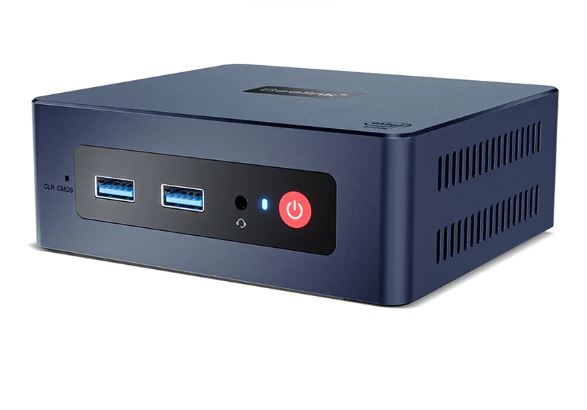
The Beelink Mini S12 Pro is, without exaggeration, one of the most well-rounded entry-level mini PCs you can buy today.
With the Intel N100 processor (12th generation Alder Lake-N), 16 GB of RAM, 500 GB NVMe SSD, Wi-Fi 6 and dual HDMI 4K@60Hz, it offers a proposition that is hard to beat for its price.
✅ Pros:
-
12th Gen Intel N100: More efficient and faster than N95 and N5095
-
Wi-Fi 6 + Bluetooth 5.2 as standard
-
Dual HDMI 2.0 with 4K@60Hz on both ports
-
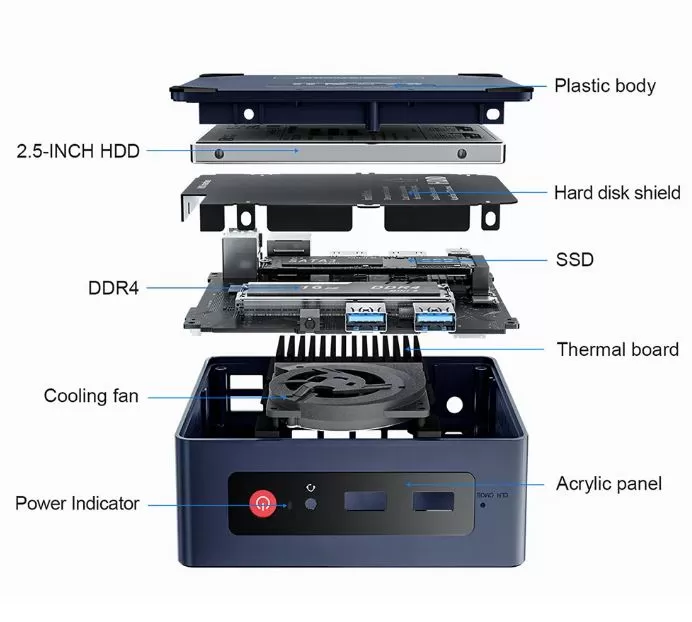
Extra bay for 2.5" SATA3 drive (very practical expansion)
-
Ultra-low power consumption: 6–8W in standby mode
-
Windows 11 Pro with included license
-
Lifetime technical support offered by Beelink
❌ Cons:
-
No 2.5G LAN port in the basic version (only GbE 1G)
-
Wi-Fi: Intel AX101 with 1 antenna (no 160 MHz)
-
The integrated GPU is very limited for modern gaming.
-
The included SSD is a basic model (no recognized brand)
-
No functional USB-C for video or fast charging
📌 Quick conclusion: For office work, HTPC, Plex/Home Assistant server, or retro emulation, the S12 Pro is an excellent purchase. If you need a more powerful GPU or 2.5G network, consider the higher-end versions with N95 or the S13 Mini.
👉 🛒 See all versions and offers for the Beelink Mini S12 Pro
👉 🛒 Check Beelink S12 Pro Prices on Amazon
📦 Unboxing and Box Contents
Beelink S12 Pro Mini PC
The Beelink Mini S12 Pro comes in compact and well-designed packaging, with all accessories securely protected. Inside you'll find:
-
🖥️ The Beelink Mini S12 Pro mini PC
-
📺 Two HDMI 2.0 cables (one short one for behind the monitor, one long one for the desktop)
-
🔌 12V/3A power adapter (max. 36W)
-
🔩 VESA mounting bracket with complete hardware
-
📄 Multilingual Quick Installation Guide
One positive detail: the box includes a yellow sticker explaining how to create a local account without an internet connection during Windows 11 setup. A small but valuable touch that saves headaches.
📋 Technical Specifications by Version
| Feature | N5095 / 8G / 128G | N5095 / 8G / 256G | N95 / 8G / 256G 2.5G | N95 / 12G / 256G 2.5G | N100 / 16G / 500G | N95 / 16G / 500G |
|---|---|---|---|---|---|---|
| Processor | Intel N5095 | Intel N5095 | Intel N95 | Intel N95 | Intel N100 | Intel N95 |
| RAM | 8 GB DDR4 | 8 GB DDR4 | 8 GB DDR4 | 12 GB DDR4 | 16 GB DDR4 | 16 GB DDR4 |
| SSD | 128GB NVMe | 256GB NVMe | 256GB NVMe | 256GB NVMe | 500GB NVMe | 500GB NVMe |
| AND | 1GbE | 1GbE | 2.5G LAN | 2.5G LAN | 1GbE | 1GbE |
| Wi-Fi | Wi-Fi 6 | Wi-Fi 6 | Wi-Fi 6 | Wi-Fi 6 | Wi-Fi 6 | Wi-Fi 6 |
| Bluetooth | BT 5.2 | BT 5.2 | BT 5.2 | BT 5.2 | BT 5.2 | BT 5.2 |
| HDMI | 2× HDMI 2.0 4K | 2× HDMI 2.0 4K | 2× HDMI 2.0 4K | 2× HDMI 2.0 4K | 2× HDMI 2.0 4K | 2× HDMI 2.0 4K |
| Disco 2.5" | ✅ SATA3 Bay | ✅ SATA3 Bay | ✅ SATA3 Bay | ✅ SATA3 Bay | ✅ SATA3 Bay | ✅ SATA3 Bay |
| YOU | Win 11 Pro | Win 11 Pro | Win 11 Pro | Win 11 Pro | Win 11 Pro | Win 11 Pro |
| Price | ~281$ | ~291€ | ~358€ | ~405€ | ~188$ | ~395$ |
💡 Which one to choose? The N100 16GB/500GB is the best option for 80% of users. If you need 2.5G connectivity (Plex, NAS, fast transfers), the N95 12GB/256GB 2.5G version at ~€405 is highly recommended. The N5095 is clearly at a disadvantage compared to the N100.
🔨 Design and Construction Quality
Beelink Mini PC S12 Pro
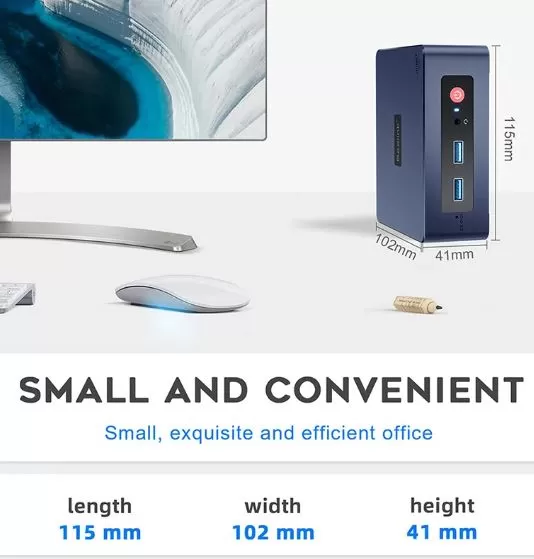
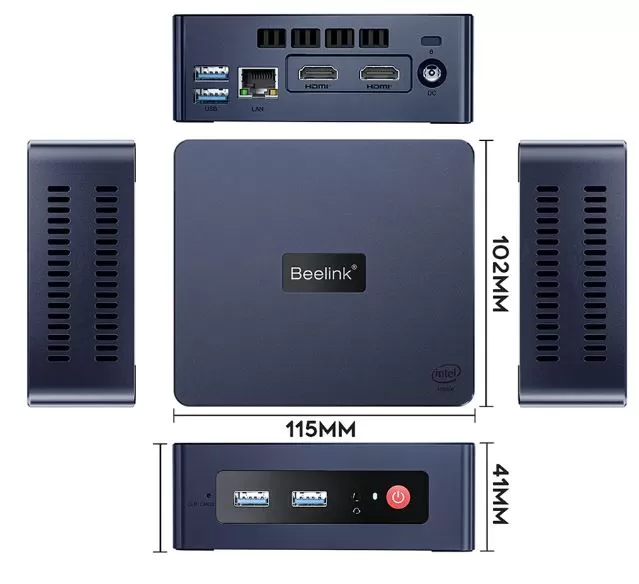
The Beelink Mini S12 Pro retains the square form factor of 115×102×39 mm, weighing a mere 335 grams. Its casing is made of plastic with a matte, bumpy texture on the top cover (a redesign compared to the SEi12), giving it a premium look without being metallic. The side ventilation grilles are well-sized, and the overall impression is one of solidity for its price range.
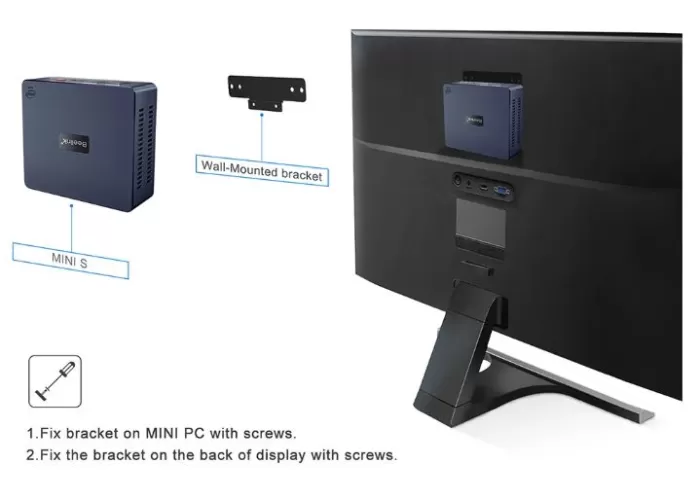
The included VESA mount allows you to attach it behind the monitor, completely eliminating its footprint on your desk. The internal components are easily accessible from the bottom with just four screws, requiring no special tools. The clear CMOS button on the front is a valuable technical feature that advanced users will appreciate.
👉 🛒 See all versions and offers for the Beelink Mini S12 Pro
🎬 Screen and Multimedia
The S12 Pro features two HDMI 2.0 outputs, each supporting 4K@60Hz resolution, enabling dual-monitor setups at high resolution. For HTPC use, it plays 4K content from Netflix, YouTube, or Plex via hardware decoding by the Intel N100, although NotebookCheck tests detected occasional 3-frame drops in 4K@60fps video.
Audio output is via a 3.5mm 4-pole jack on the front panel (headphones + microphone) or via HDMI to a monitor or TV. It does not include built-in speakers. HDMI audio works correctly with compatible TVs and monitors.
⚡ Performance and Software
Booting from the NVMe SSD is fast, with Windows 11 Pro ready in under 20 seconds. In daily use, the computer handles effortlessly:
-
🌐 Multi-tab browsing in Chrome or Edge
-
📊 Microsoft Office completo (Word, Excel, PowerPoint, Outlook)
-
📹 Seamless Zoom/Teams video calls
-
🎵 Streaming 4K de Netflix, YouTube, Plex
-
🖥️ Lightweight virtual machines (VirtualBox, Proxmox)
-
🏠 Home Assistant + additional services (MQTT, Tailscale)
The system runs on a valid Windows 11 Pro license and has very little bloatware. Beelink doesn't include any unnecessary proprietary software. There's no control panel for adjusting power profiles, but you can do so directly from Windows.
👉 🛒 See all versions and offers for the Beelink Mini S12 Pro
🔋 Energy Consumption and Cables
The S12 Pro stands out for its energy efficiency, ideal for 24/7 use:
| State | Approximate consumption |
|---|---|
| Idle | ~6–8W |
| Office use | ~12–15W |
| Maximum load (Prime95) | ~25W |
| Pico PL2 | up to 25W |
The included adapter delivers 12V/3A (36W max.), oversized to ensure stability even with USB drives or 2.5" drives connected. Compared to a conventional desktop PC (~150–300W), annual electricity savings using the S12 Pro can exceed €60 with continuous use.
🌡️ Temperature and Noise (Actual Thermal)
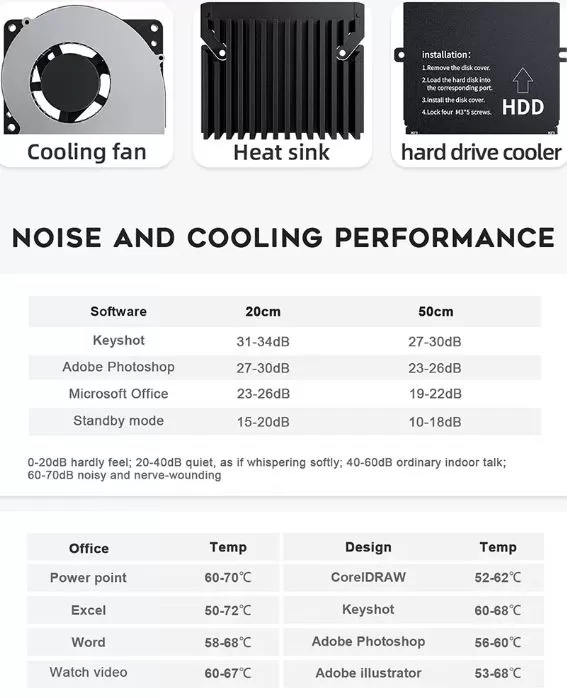
Temperatures under load are acceptable, though not perfect. Under normal conditions, the fan is virtually inaudible.
| Scenery | CPU temperature | Noise |
|---|---|---|
| Repose | ~45–50°C | ~30 dBA |
| Medium load | ~65–75°C | ~34 dBA |
| Full charge (Prime95) | up to ~96°C | ~38 dBA |
⚠️ During a 30-minute stress test with Prime95, the CPU reached 96°C with slight, sporadic throttling. This only occurs under sustained extreme load; in everyday use, the temperature remains fine. For servers or 24/7 use under heavy load, it may be advisable to improve the thermal paste or add a cooling pad.
🔌 Connectivity and Extras
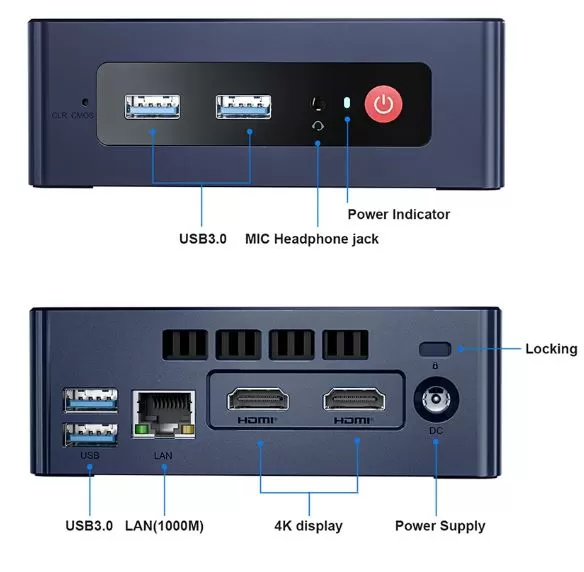
The Mini S12 Pro offers complete connectivity for its category:
Available ports:
-
🔵 4× USB-A 3.2 Gen 2 (10 Gbps) — 2 front + 2 rear
-
📺 2× HDMI 2.0 (4K@60Hz) — rear
-
🌐 1× RJ45 LAN (GbE 1G in basic / 2.5G in specific N95 versions)
-
🎧 1× Jack 3.5mm combo — parte frontal
-
📡 Wi-Fi 6 (Intel AX101) — 2.4/5 GHz, 1 antenna, up to 600 Mbps on 5GHz
-
📲 Bluetooth 5.2
❌ What it DOESN'T have:
-
No functional USB-C for video or charging
-
Without Wi-Fi 6E or 160 MHz channel width
-
No SD card reader
-
No NFC or fingerprint reader
-
No IP rating (not water/dust resistant)
The actual Wi-Fi measured at 5 GHz reaches ~450 Mbps out of the theoretical 600 Mbps, enough for 4K streaming and video calls.
👉 🛒 See all versions and offers for the Beelink Mini S12 Pro
🔧 Expansion and Upgrades
The Mini S12 Pro is one of the most expandable mini PCs in its price range.
| Component | Detail |
|---|---|
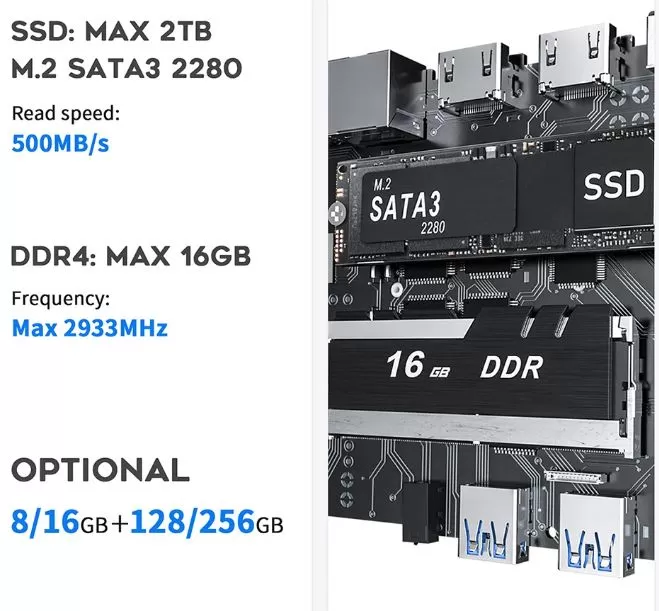
| RAM | 1× SO-DIMM DDR4 3200MHz — máx. 16 GB |
| SSD principal | M.2 2280 NVMe PCIe — up to 2 TB |
| Extra storage | Internal 2.5" SATA3 bay (HDD or SSD) — up to 4 TB |
| Maximum total | ~6 TB combined (NVMe 2 TB + 2.5" 4 TB) |
| Interior access | 4 screws on base, no special tools required. |
💡 Practical tip: If you have the 128–256 GB version, the most cost-effective upgrade is to replace the SSD with a brand-name NVMe drive (Samsung 870 EVO, WD Blue SN570) and add a 2 TB HDD in the 2.5" bay for mass storage. This will give you a very complete system for less than €100 extra.
🆚 Comparison with Direct Competitors
| Feature | Beelink S12 Pro (N100) | Beelink Mini S13 (N150) | GMKtec NucBox G3 (N100) | Minisforum UM350 (Ryzen 5 3500U) | NiPoGi Essenx E2 (N95) |
|---|---|---|---|---|---|
| CPU | Intel N100 (12ª gen) | Intel N150 (13th gen) | Intel N100 | AMD Ryzen 5 3500U | Intel N95 |
| RAM | 16 GB DDR4 | 16 GB DDR4 | 16 GB DDR4 | 16 GB DDR4 | 16 GB DDR4 |
| SSD | 500GB NVMe | 500GB NVMe | 512 GB | 512 GB | 512 GB |
| Wi-Fi | Wi-Fi 6 (1T1R) | Wi-Fi 6 | Wi-Fi 5 | Wi-Fi 6 | Wi-Fi 5 |
| AND | 1G (basic) | 2.5G (+ versions) | 1G | 1G | 1G |
| 2.5" bay | ✅ Yes | ❌ No | ❌ No | ✅ Yes | ❌ No |
| USB-C | ⚠️ Data only | ❌ No | ❌ No | ✅ Yes | ❌ No |
| Approx. price | ~188–405€/$ | ~290–523€ | ~180–220€ | ~250€ | ~180€ |
| GPU (EUs) | UHD 24 EUs | UHD 24 EUs | UHD 24 EUs | Vega 6 (512 SP) | UHD 16 EUs |
| Brand support | ⭐⭐⭐⭐⭐ | ⭐⭐⭐⭐⭐ | ⭐⭐⭐ | ⭐⭐⭐⭐ | ⭐⭐ |
🏆 Winner for value: Beelink S12 Pro N100/16GB/500GB at ~$188. The Minisforum UM350 wins in GPU (AMD Vega 6 is noticeably more powerful), but the S12 Pro is cheaper and quieter.
💬 Reviews on Well-Known Pages
We gather the most prominent assessments from expert sources and communities:
🏆 NotebookCheck — Score: 73.1/100
"The N100 is a decent upgrade over the old Celeron/Atom processors while keeping costs below $200. Barely better than the N95, but with a more modern and efficient platform."
🏆 RedesZone (Spain) — Rating: 9/10 ⭐⭐⭐⭐⭐
"Considering the hardware specifications, the actual performance achieved in all tests, and the price of just €250, our rating is 9/10." It
was especially praised for its four USB 3.2 Gen 2 ports, the extra 2.5" drive bay, and its extremely low power consumption.
🏆 XDA Developers — Featured Review:
"A budget mini PC that ticked all the boxes. The N100 and N95 offer around 20% more performance than the previous generation Celeron/Pentium Jasper Lake."
🏆 PCVarge — Detailed Review:
"The S12 Pro is affordable, flexible, and has a striking design. Perfect as a home-office PC, with enough power for most tasks and ready for 4K entertainment."
🏆 6ixNetwork — Positive rating:
"A small but powerful desktop computer that offers exceptional performance for its size. The N100 with 16 GB of RAM can handle a wide range of tasks."
💬 Reddit r/linuxmint:
"The Beelink Mini S12 Pro is a fantastic mini PC and runs the Cinnamon edition of Linux Mint flawlessly. I bought it for under $155 including shipping."
💬 Reddit r/homeassistant:
"I have it with an N100, 16 GB, and 500 GB for Home Assistant. The performance is impressive with only 5–10W of power consumption."
📊 Average ratings on platforms:
-
Amazon: ⭐ 4.4/5
-
AliExpress: ⭐ 4.5/5
-
RedesZone Spain: ⭐ 9/10
🔬 Technical Tests
Actual results obtained by independent reviewers with the N100/16GB/500GB version:
🧪 CPU — Cinebench R23:
| Processor | Single Core | Multi Core |
|---|---|---|
| Intel N5095 (ref. Beelink U59) | ~621 pts | ~2.219 pts |
| Intel N95 | ~914 pts | ~2.686 pts |
| Intel N100 | ~885 pts media | ~2.449 pts media |
| Intel Core i5-1235U (ref.) | ~1.610 pts | ~8.128 pts |
🧪 CPU — Geekbench 5.5:
-
N100 Single-core: ~981 puntos
-
N100 Multi-core: ~2.598 puntos
🧪 PCMark 10 — Real Productivity Performance:
| Test | Punctuation |
|---|---|
| PCMark 10 Score total | ~3.099–3.164 pts |
| Essentials (basic use) | ~6.887 pts |
| Productivity (office automation) | ~4.867 pts |
| Digital Content Creation | ~2.411 pts |
🧪 Storage — SSD included as standard:
-
Sequential read: ~850 MB/s
-
Sequential write speed: ~850 MB/s
*(Entry-level off-brand SSD, with SATA interface in some models. Replacing it with a branded NVMe SSD significantly improves performance)*
🧪 Wi-Fi real (Intel AX101):
-
2.4 GHz band: ~100 Mbps actual speed
-
5 GHz band: ~450 Mbps actual speed out of 600 Mbps theoretical speed
🧪 USB 3.2 Gen 2 (10 Gbps):
-
Sequential read speeds: excellent, no bottleneck with external NVMe SSD
🎮 Gaming and Emulation
The S12 Pro isn't a gaming machine, but it shines in retro emulation thanks to the Intel UHD Graphics 24EUs:
🟢 Works perfectly:
-
NES, SNES, GBA, Nintendo DS — 60 constant fps
-
PS1, N64 — no problems
-
GameCube / Wii — playable in the vast majority of titles
-
PS2 — mostly playable with tweaks in PCSX2
-
Dreamcast, PSP — good overall performance
🟡 Variable performance:
-
Nintendo 3DS — playable with drops in demanding titles
-
Xbox Original — works with optimization
🔴 Out of reach:
-
Nintendo Switch (Yuzu/Ryujinx) — GPU insufficient
-
PS3 (RPCS3) — not compatible with most games
-
Modern AAA games (2022+) — not recommended
🎯 Gaming casual en PC:
-
Minecraft (Java/Bedrock) — works well on medium settings
-
League of Legends, CS:GO/CS2 (minimal settings) — playable
-
Fortnite / GTA V — very tight, mediocre experience
💡 If emulation up to PS2 is your main goal, the S12 Pro is an excellent option. For Switch or PS3, consider the Minisforum UM350 with AMD Vega.
❓ Frequently Asked Questions (FAQ)
❓ Can I connect two 4K monitors simultaneously?
Yes. Both HDMI 2.0 ports independently support up to 4K@60Hz.
❓ What is the maximum RAM it supports?
One SO-DIMM DDR4 3200MHz slot with a maximum capacity of 16 GB.
❓ Can I add an additional hard drive or SSD?
Yes. In addition to the M.2 NVMe slot (up to 2 TB), it has an internal 2.5" SATA3 bay for an HDD or SSD.
❓ Does it work well with Linux?
Absolutely. Reddit and various communities confirm full compatibility with Ubuntu, Debian, and Linux Mint Cinnamon.
❓ Is it good for Home Assistant?
It's one of the best options due to its low power consumption (5–10W in standby) and sufficient power for HA + additional services (Mosquitto, Tailscale, Node-RED).
❓ Is the N100 or the N95 better?
They are very similar (5–10% difference). The N100 has a more modern Alder Lake architecture and hardware AES-NI encryption, making it more efficient.
❓ Is the factory-installed SSD any good?
It's functional (~850 MB/s) but it's a basic model from an unrecognized brand. For intensive use, it's recommended to replace it with a brand-name NVMe drive.
❓ Which version should I buy?
-
Basic/educational use: N5095 8GB/256GB (~$281)
-
Best overall value: N100 16GB/500GB (~$188) 🏆
-
Con red rápida (NAS/Plex): N95 12GB/256GB 2.5G (~405€)
📅 Price Evolution (N100 16GB/500GB Version)
| Date | Approx. price |
|---|---|
| January 2023 (launch) | ~$200 |
| July 2023 | ~$185 |
| January 2024 | ~$175 |
| July 2024 | ~$165 |
| January 2025 | ~$170 |
| July 2025 | ~$180 |
| March 2026 | ~$188 |
📌 The S12 Pro has maintained a very stable price, with occasional drops during 11.11, Black Friday, and Amazon Prime Day. To find all-time lows on Amazon, use Camelcamelcamel.com .
🏁 Final Conclusion
The Beelink Mini S12 Pro has been on the market for over two years and remains one of the smartest buys in entry-level mini PCs. It hasn't aged badly: the Intel N100 is still more than enough for 90% of home users, and the option to add a 2.5" hard drive sets it apart from many competitors.
It is ideal for:
-
👨💼 Teleworkers and students with office needs
-
🏠 Media Center (HTPC) with Plex or Kodi
-
🏡 Home Assistant and home automation
-
🖧 Lightweight home server (NAS, downloads, Proxmox)
-
🎮 Retro emulation up to PS2/GameCube
It is not ideal for:
-
🎮 Gaming AAA o Switch/PS3
-
🎬 4K video editing or professional 3D rendering
-
💻 Users who need USB-C with DisplayPort or Thunderbolt
Alternatives to consider:
-
Beelink Mini S13 — if you want a more modern CPU (N150) or 2.5G LAN as standard
-
Minisforum UM350 — if the AMD Vega GPU is a priority (better Switch/PS3 emulation)
-
GMKtec NucBox G3 — if you're looking for the lowest possible price with N100
🛒 Where to buy the Beelink Mini S12 Pro?
👉 AliExpress: 🛒 Buy Beelink Mini S12 Pro — See all versions and offers
👉 Amazon: 🛒 Check Beelink S12 Pro Prices