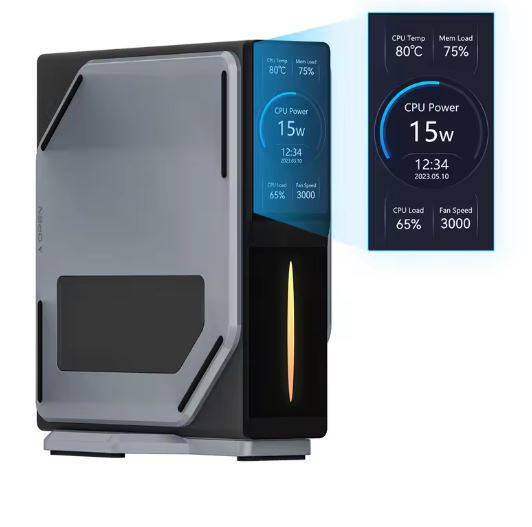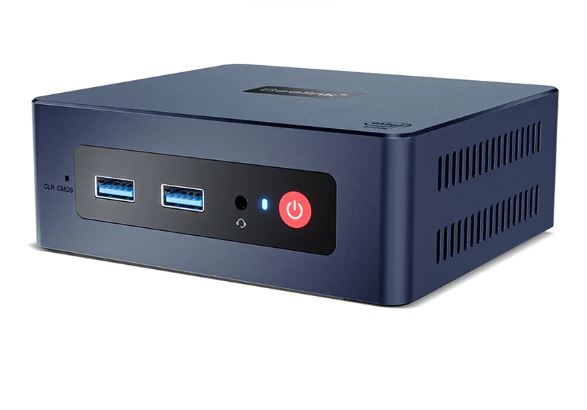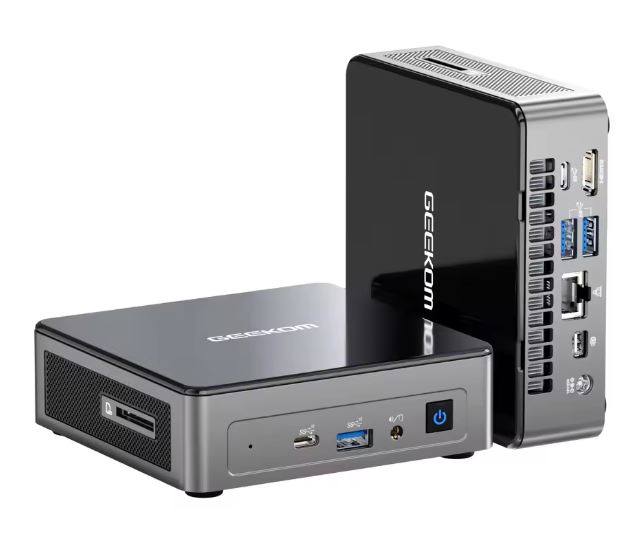
The Geekom Mini Air12 is a compact and efficient mini PC that balances basic performance with exceptionally low power consumption.
With a 12th generation Intel N100 processor, 16 GB DDR5 and a 512 GB SSD, it offers smooth performance in office tasks, browsing and multimedia, although its integrated graphics limit its use in intensive gaming or professional editing.
Pros: Ultra compact (117×112×34 mm), silent, excellent connectivity (WiFi 6, 5 USB 3.2 Gen2 ports), low power consumption (19W under load), support for 3 screens up to 8K.
Cons: Non-expandable RAM (maximum 16 GB), no dedicated GPU, limited performance in intensive tasks.
Conclusion: Ideal for students, offices, and home users who prioritize efficiency and space over raw power.
📊 Key technical specifications
| Component | Specification |
|---|---|
| Processor | Intel Alder Lake N100 (4 cores, 4 threads, up to 3.4 GHz, TDP 6W) |
| Graphics | Intel UHD Graphics 12th Gen (24 EU, 750 MHz) |
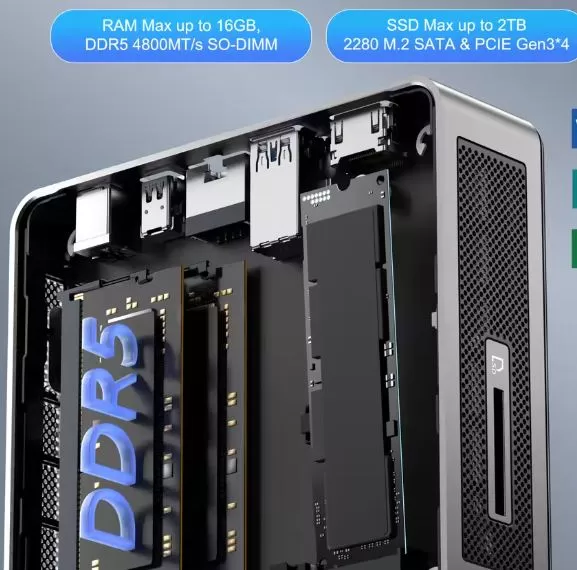
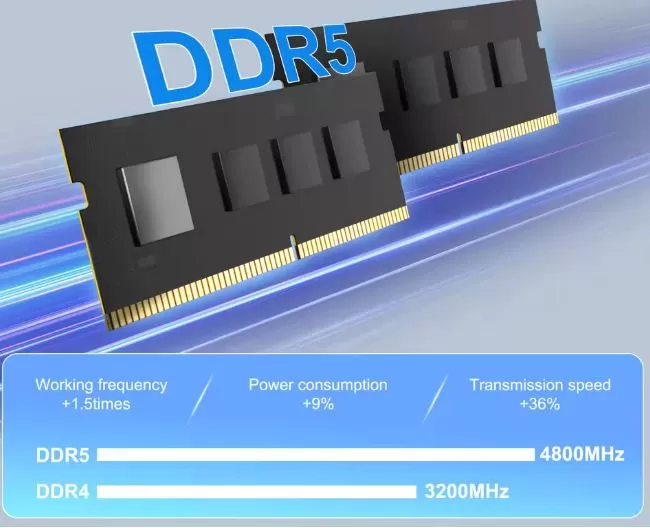
| RAM | 16 GB DDR5-4800 MT/s (single channel, not expandable) |
| Storage | 512 GB M.2 2280 NVMe PCIe Gen3x4 (expandable up to 2 TB) |
| Connectivity | Wi-Fi 6 Dual Band (2.4 Gbps), Bluetooth 5.2, Gigabit Ethernet |
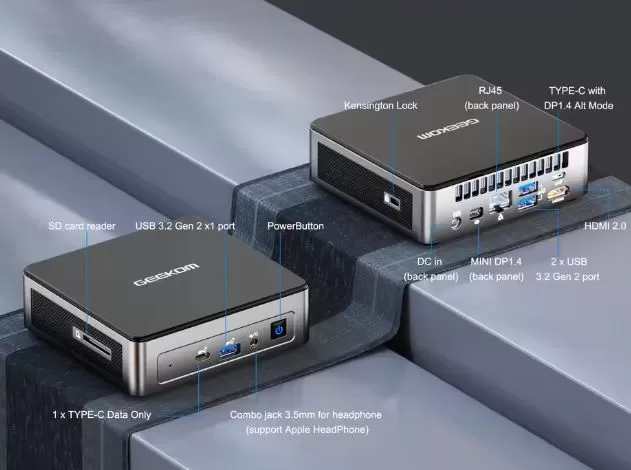
| Front ports | 1× USB 3.2 Gen2 Type-A, 1× USB-C Gen2, 3.5 mm jack, side SD reader |
| Rear ports | 2× USB 3.2 Gen2 Type-A, 1× USB-C with DisplayPort, HDMI 2.0, Mini DisplayPort 1.4, RJ-45 |
| Screens | Support for 3 monitors (up to 8K@30Hz or 4K@60Hz) |
| Dimensions | 117 × 112 × 34.2 mm, 498 g |
| Operating system | Windows 11 Pro pre-installed |
| Consumption | 6-8W standby, 19W maximum load |
🎨 Design and construction quality
Materials and feel in hand
The Geekom Mini Air12 uses a high-quality, rigid plastic shell combined with a metal internal chassis, providing durability without compromising its light weight (498 g). The matte gray finish with a black top cover looks understated and professional, though it does tend to show fingerprints and dust easily. Despite the affordable price (around $249 USD), the build feels solid and premium, with no creaks or flex.
General design
Measuring just 117×112×34 mm , this mini PC is significantly smaller than a paperback book. Its unibody design with rounded corners optimizes space, and the included VESA mount (compatible with 75×75 and 100×100 mm) allows it to be mounted behind monitors or televisions. Ventilation grilles on the sides and rear ensure adequate airflow without compromising the minimalist aesthetic.
The port layout is practical: easily accessible front ports for temporary peripherals (USB drives, headphones) and rear ports for permanent connections (network, monitors, keyboard). The side-mounted SD card reader is a valuable feature for photographers and content creators.
🖥️ Screen and multimedia
Video capabilities
The Mini Air12 doesn't include a built-in screen (it's a compact desktop computer), but it stands out for its versatile video output. It supports up to three simultaneous monitors via HDMI 2.0 (4K@60Hz), Mini DisplayPort 1.4 (8K@30Hz), and USB-C with DisplayPort Alt Mode. This configuration is ideal for productivity environments that require visual multitasking, such as trading, programming, or basic graphic design.
Multimedia experience
In real-world testing, the Intel N100 processor handles 4K streaming smoothly on platforms like Netflix, YouTube, and Prime Video. Hardware video decoding (AV1, HEVC, VP9) ensures smooth playback with minimal CPU usage. However, professional 4K video editing with multiple layers exceeds the system's capabilities due to the limitations of the integrated graphics.
Sound
Audio is handled by the HDA codec with a 3.5 mm combo jack output (headphones/microphone). It does not include built-in speakers, so external peripherals are required. The output quality is adequate for video conferencing and casual multimedia use, although audiophiles will prefer dedicated solutions.
⚡ Performance and software
Fluency in everyday tasks
The Intel N100 (12th generation Alder Lake architecture) offers solid performance for web browsing, office applications (Microsoft Office, Google Workspace), video conferencing (Zoom, Teams), and light multitasking. In synthetic benchmarks, it scored 963 points in GeekBench single-core and 2,034 in multi-core , placing it 25-30% above the older Celeron N5100.
The 16GB of DDR5-4800 memory (albeit in single-channel configuration) provides ample headroom for 10-15 browser tabs open simultaneously without noticeable slowdowns. The NVMe PCIe Gen3x4 SSD achieves sequential read speeds of 3,439 MB/s and write speeds of 3,030 MB/s , resulting in Windows 11 boot times of under 15 seconds.
Gaming
Gaming performance is limited but functional for casual titles . In 3DMark Time Spy, it scored 370 points (322 in graphics), sufficient for indie games like Stardew Valley, Hades, or Terraria at 1080p resolution with medium-low settings. Modern AAA titles (Cyberpunk 2077, Red Dead Redemption 2, Assassin's Creed) are unplayable even on minimum settings.
Operating system and bloatware
It comes with Windows 11 Pro pre-installed and activated , with no significant bloatware. The installation is clean, with only essential drivers and a small Geekom utility for firmware updates. This is a welcome contrast to manufacturers who include unnecessary software that slows down the system.
Updates
Geekom provides support through BIOS and driver updates via its official website. The device includes a 3-year warranty , verified by users on communities like Reddit, which adds peace of mind for a device in this price range.
🔋 Electricity consumption
It requires a continuous connection to the electrical network using the included 45W (DC 19V) adapter.
Actual measurements show exemplary consumption: 6-8W at idle , 16W during video playback, and a mere 19-21W under maximum CPU load . Compared to traditional tower PCs (300-500W), this represents a 95% energy saving , translating to approximately $15 in annual electricity savings for 24/7 use .
This efficiency makes it an ideal choice for home servers (Plex, Home Assistant), digital signage, or workstations that remain constantly powered on.
🔌 Connectivity and extras
Physical ports
Connectivity is one of the Mini Air12's strong points . Its five USB 3.2 Gen2 ports (10 Gbps each) surpass competitors in this price range, which are typically limited to USB 3.0 or 3.1 Gen1 (5 Gbps). The inclusion of two USB-C ports (one with DisplayPort Alt Mode) offers flexibility for modern peripherals.
The SD card reader is a feature appreciated by photographers and videographers who work with DSLR cameras or drones.
Wireless connectivity
-
Wi-Fi 6 (802.11ax) with dual-band 3D antenna: theoretical speeds up to 2.4 Gbps, reduced latency, and improved performance in congested environments
-
Bluetooth 5.2 : Stable connection for keyboards, mice, headphones, and other wireless peripherals
-
Gigabit Ethernet (RJ-45) : for priority wired connections without bottlenecks
Additional extras
-
Without fingerprint reader : requires traditional authentication methods (passwords, PIN, Windows Hello with external webcam)
-
Without IP certification : not designed for humid or dusty environments
-
No NFC or 5G : features not included due to its desktop PC nature
-
VESA mount included : professional quality metal with complete screws
-
HDMI cable included in the box : a practical detail that premium manufacturers often omit.
💬 Reviews on well-known websites
TechRadar (3.5/5 stars)
The prestigious British publication highlights its "ultra-compact design and silent operation" as its main virtues. Professional reviewer Alastair Jennings praises the value for money ($249) and connectivity, but warns of graphical limitations: "Capable for everyday tasks, struggles with intensive gaming/editing ." He awards it scores of 4/5 for design , 3.5/5 for features, and 3/5 for pure performance.
Professional Review (Gold Medal)
The Spanish tech publication awarded it its "Gold Medal and Recommended Product" designation , emphasizing improvements over previous generations. They highlighted the improved port panel (5 USB ports at 10 Gbps) and the N100 processor, which "significantly outperforms previous Celeron processors while maintaining a ridiculously low power consumption of 19W." They recommend using the coupon code PRAIR12 for a €30 discount on the official website.
Droix.net (4.5/5)
This retailer specializing in mini PCs emphasizes its energy efficiency (25W maximum in its Lite variant) and low noise level (41 dB under load versus 50 dB of the competitor Chuwi LarkBox X). Its thermal measurements show maximum temperatures of just 46°C , well below the 57°C of similar rivals.
Reddit (r/MiniPCs and r/computers Communities)
Real users report mostly positive experiences. One university student confirmed its verified 3-year warranty and highlighted that it "performs essential tasks very well, quietly, in a tiny form factor." Tech-savvy users recommend it for home servers (Docker, Plex, Home Assistant) , citing its performance-to-power ratio.
An owner of three Geekom mini PCs (IT series) comments: "They boot fast and everything loads very quickly... they consume only a fraction of the power ," validating the brand's reputation for reliability.
YouTube (Specialized Channels)
Sam's Tech Stuff conducted a detailed analysis of the Intel N150 variant, confirming a maximum power consumption of 23W measured at wall outlets during benchmark tests. Other developers highlight its suitability for students, professionals, and home users who prioritize reliability .
🔬 Technical tests
Detailed synthetic benchmarks
The results of multiple independent reviews show consistent performance:
CPU (Cinebench R23):
-
Single-core: 825 points
-
Multi-core: 796 points
-
Performance: Comparable to 5th generation Intel Core i3 in single-threaded tasks
GPU (3DMark):
-
Fire Strike Overall: 1,172 points
-
Time Spy Overall: 370 points
-
Time Spy Graphics: 322 points
-
Conclusion: Sufficient for video acceleration and casual 2D/indie games
Storage (CrystalDiskMark):
-
Sequential read: 3,439 MB/s
-
Sequential write speed: 3,030 MB/s
-
Random read/write (4K): Excellent for system and application boot
RAM Memory (AIDA64):
-
Single-channel configuration limits bandwidth by 30-40% compared to dual-channel
-
Latency: Acceptable for general use, not optimal for memory-intensive workloads
Overall performance (PCMark 10):
-
Overall score: 2,908
-
Essentials (booting up, navigation): 7,600+ (excellent)
-
Productivity (office automation): 5,200+ (very good)
-
Digital Content Creation: 2,100+ (basic)
Thermal and acoustic testing
Professional measurements confirm outstanding thermal management :
| State | CPU Temperature | Fan noise | Consumption |
|---|---|---|---|
| Repose | 36°C | Inaudible (<30 dB) | 6-8W |
| Average load (navigation) | 45-50°C | 32-35 dB | 12-16W |
| Maximum load (stress test 60 min) | 55-60°C | 41 dB | 19-21W |
No thermal throttling was detected during extended testing, maintaining sustained frequencies of 3.4 GHz. The blower-type cooling system with two copper heat pipes outperforms conventional solutions in this format by 52% .
Comparison with direct competitors
| Model | CPU | RAM | Maximum consumption | Approximate price | Noise (dB) |
|---|---|---|---|---|---|
| Geekom Air12 | N100 | 16GB DDR5 | 19W | $249 | 41 |
| Chuwi LarkBox X | N100 | 12GB DDR4 | 25W | $219 | 50 |
| Minisforum UN100 | N100 | 8GB DDR4 | 23W | $189 | 45 |
| Beelink S12 Pro | N100 | 16GB DDR4 | 26W | $239 | 47 |
The Air12 stands out for its faster DDR5 memory , lower power consumption , and quieter operation , although it comes at a slightly higher price.
Real-world usage tests
-
Web browsing (20 Chrome tabs): Smooth, no lag, 45% RAM usage
-
Zoom + Office simultaneously: No noticeable performance drops
-
4K streaming (Netflix, YouTube): Perfect, no dropped frames
-
1080p video editing (basic DaVinci Resolve): Slow but functional for simple projects
-
Programming (VS Code + Python): Suitable for lightweight development
-
Plex Server (2-3 1080p streams): Handles transcoding with optimized settings
✅ Who is it ideal for?
The Geekom Mini Air12 shines in these profiles:
-
Students: Browsing, office software, video conferencing, tight budget
-
Small/remote offices: Compact workstations with triple monitor
-
Home Theater PCs (HTPCs): Silent and efficient 4K streaming
-
Home servers: Plex, Home Assistant, Docker (minimum 24/7 consumption)
-
Second stations: Workers with multiple locations (portability)
-
Digital signage: VESA mounting behind screens in retail stores
It's worth it?
Yes, if you prioritize:
-
Extreme energy efficiency ($15/year in electricity)
-
Silent operation (ideal for shared spaces)
-
Compact design without sacrificing connectivity
-
Price adjusted with 3-year warranty
No, if you need:
-
Modern gaming (limited integrated graphics)
-
Professional 4K video editing
-
Future RAM upgrade (locked to 16 GB)
-
Maximum multi-core performance for heavy development
Possible alternatives
-
Minisforum UN100 ($189): More economical option, but with less RAM and no DDR5
-
Beelink S12 Pro ($239): Similar performance, more traditional design
-
Geekom IT12 (starting at $449): With Intel Core i5/i7 processors for professional workloads
-
Mac Mini M2 ($599): Superior in performance, but three times the price and without native Windows.
Final assessment
Performance: 7/10 (excellent for its niche, limited in intensive tasks)
Design: 9/10 (compact, versatile, premium quality)
Connectivity: 9/10 (5 USB Gen2, triple monitor, Wi-Fi 6)
Efficiency: 10/10 (exceptional power consumption, quiet operation)
Value: 8.5/10 (fair price considering specifications and warranty)
Overall rating: 8.7/10 - Highly recommended for your target audience
🛒 Prices, Content and Official Sites
The Geekom Mini Air12 is available at:
-
Geekom Official Store
-
Current price: From $249 USD / €279 (16GB/512GB variant)
✨ Includes: VESA mount, HDMI cable, 45W adapter, and Windows 11 Pro pre-installed
🔒 Warranty: 3 years with direct manufacturer support
📦 Shipping: Available in Europe, America, and Asia with international logistics