The Beelink SER5 Max (6800U / 7735HS) is a masterful mid-to-high-end purchase. It packs the real power of a modern tower PC into a chassis that fits in the palm of your hand.
This is the ultimate mini PC for those seeking a versatile machine without breaking the bank. Thanks to its Radeon 680M graphics card and blazing-fast LPDDR5 memory , it shatters the limitations of traditional office mini PCs: now you can play modern games in 1080p, emulate complex consoles (PS3, Switch), and edit 4K video with complete fluidity.
🟢 The best
- Brutal graphics: Ideal for casual gaming and advanced emulation.
- Premium connectivity: 2.5G network and support for 3 simultaneous displays (HDMI + DP + USB-C).
- Massive expansion: Allows you to install two M.2 SSD drives of up to 4 TB each.
❌ The least good thing
- Soldered RAM: Being LPDDR5, it cannot be expanded in the future (buy the 32GB version if you are looking for maximum longevity).
>>VIEW PRICES<<
Amazon: 🛒 Beelink SER5 MAX Mini PC
📦 Unboxing and Box Contents
Upon opening the Beelink SER5 Max packaging , you'll find a clean and compact design where each component is protected in its own compartment. This is exactly what's inside the box:
- The Beelink SER5 Max Mini PC: The main chassis (126 x 113 x 42 mm) is protected by a plastic sheet to prevent scratches during transport.
- Power adapter (DC-In): Compact external power supply. The seller automatically ships it with the plug type for your country (European, American, etc.).
- VESA Mount: A black metal plate along with its screw kit. It allows you to mount the mini PC directly to the back of your monitor or TV, completely freeing up your desk space.
- HDMI cable: Standard high-speed cable to connect your device to your screen from the first minute.
- User manual: Multilingual quick start guide explaining port layout, initial setup steps, and how to access the BIOS.
🔍 Unboxing Experience (First Impressions)
Upon removing the device from the box, the first thing that stands out is its build quality. Despite its pocket-sized form factor, the chassis feels robust and makes excellent use of space.
The top and sides feature the MSC2.0 cooling system's metal mesh grilles , designed for efficient heat dissipation. All front ports (USB 3.2, USB 2.0, Type-C, and audio jack) are immediately visible, facilitating a quick and easy setup right out of the box.
📊 Key technical specifications
| Component / Feature | Option 1: SER5 Max 6800U | Option 2: SER5 Max 7735HS |
|---|---|---|
| Processor (CPU) | AMD Ryzen 7 6800U (8C / 16T) | AMD Ryzen 7 7735HS (8C / 16T) |
| Processor Frequency | Up to 4.70 GHz | 3.2 GHz up to 4.75 GHz |
| Cache Memory | L2: 4 MB / L3: 16 MB | L2: 4 MB / L3: 16 MB |
| Graphics (GPU) | AMD Radeon 680M (12 CUs at 2200 MHz) | AMD Radeon 680M (12 CUs at 2200 MHz) |
| RAM | 24 GB or 32 GB LPDDR5 | 24 GB or 32 GB LPDDR5 |
| Base Storage | Optional: 500 GB or 1 TB | Optional: 500 GB or 1 TB |
| Expansion Slots | Dual M.2 2280 PCIe SSD slots (Each supports up to 4 TB; Maximum 8 TB total ) | Dual M.2 2280 PCIe SSD slots (Each supports up to 4 TB; Maximum 8 TB total ) |
| Wireless Networks | Wi-Fi 6 + Bluetooth 5.4 | Wi-Fi 6 + Bluetooth 5.X (Compatible with 5.4) |
| Wired Network (LAN) | 1x RJ45 Ethernet port at 2.5 Gbps (2.5G) | 1x RJ45 Ethernet port at 2.5 Gbps (2.5G) |
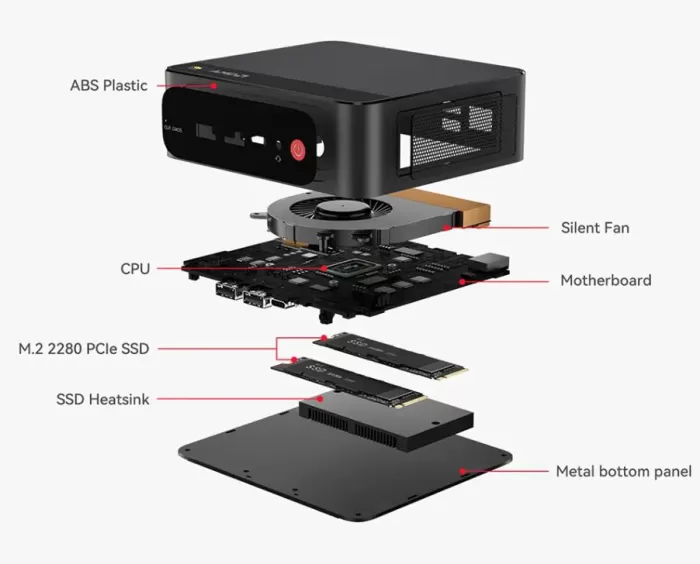
| Refrigeration system | MSC2.0 (Heat pipe + Heatsink + Silent fan) | MSC2.0 (Heat pipe + Heatsink + Silent fan) |
| Physical Dimensions | 126 mm × 113 mm × 42 mm | 126 mm × 113 mm × 42 mm |
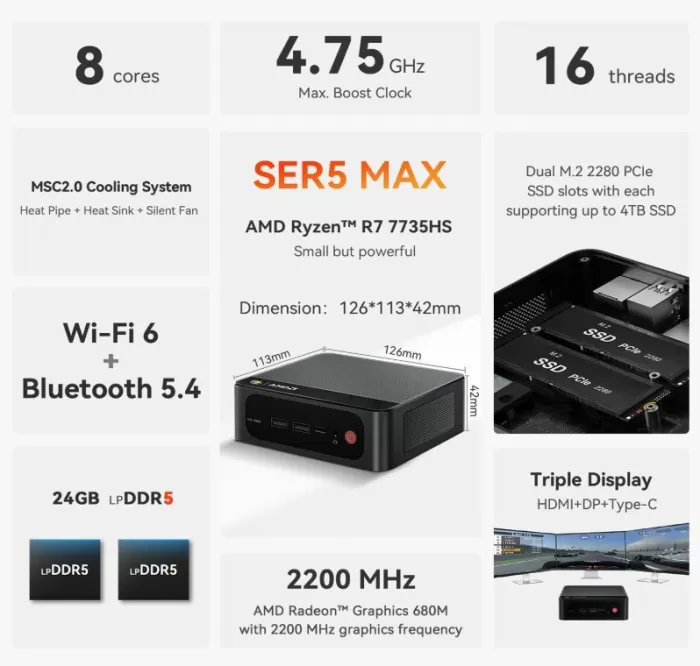
Design and build quality: materials, feel in hand, overall design
The design and construction of the Beelink SER5 Max stand out for being practical, functional and robust, moving away from the "plastic toy" feel of cheaper models:
- Balanced materials: It combines a high-strength ABS plastic chassis with metal mesh side vents. This reduces the overall weight without compromising structural rigidity.
- Feels in hand: When you hold it, it feels dense, solid, and very well assembled. It doesn't creak when pressed, and its 42 mm thickness makes it feel like a compact and durable block.
- Overall design: Its understated, minimalist aesthetic in a dark color makes it suitable for both an office and a living room. The rounded corners and striking red power button on the front add a modern and elegant touch.
- Space optimization: The layout is impeccable, placing the quick-connect ports (such as USB-C and headphones) at the front, and leaving the thick cables (power, HDMI, network) hidden at the back.
Display and multimedia: brightness, resolution, sound, user experience
Its internal hardware offers the following experience:
- Resolution and Brightness: Its Radeon 680M graphics card smoothly handles 4K resolution displays at 60Hz. You won't experience any stuttering or lag when playing movies or streaming videos on high-definition platforms.
- Multi-screen experience: It's excellent, allowing you to connect up to three monitors simultaneously using its rear ports (HDMI 2.0 and DisplayPort 1.4) along with the front USB-C port. This is ideal for working with many windows open or watching content while gaming.
- Sound: Transmits high-fidelity, multi-channel digital audio via HDMI and DisplayPort cables. If you prefer to use headphones, traditional speakers, or microphones, the front 3.5 mm jack port provides a clean, noise-free connection.
- Overall User Experience: It's extremely smooth and quiet for everyday multimedia tasks (browsing, watching movies or TV shows). The internal fan only increases speed and becomes audible when you push the device to its limits with video games or video editing.
Performance and software: fluidity, operating system, bloatware, updates
The performance and software of this Beelink SER5 Max represent its greatest strength, offering an experience identical to that of a mid-to-high-end desktop tower:
- Absolute fluidity: Thanks to the 8-core processor (6800U/7735HS) and the speed of the LPDDR5 memory, the system flies. Windows 11 boots up in less than 10 seconds, demanding applications open instantly, and multitasking with dozens of browser tabs doesn't cause any slowdown.
- Clean operating system: Comes from the factory with Windows 11 Pro 64-bit pre-installed, configured and legally activated.
- Zero Bloatware: Unlike traditional laptop brands (such as HP, Lenovo, or ASUS), Beelink delivers a completely clean system. It doesn't include bloatware, expired antivirus software, or pre-installed filler games. It only includes the pure operating system and the necessary AMD drivers.
- Official Updates: With a modern processor and integrated TPM 2.0 security chip, the Mini PC is 100% compatible with Windows Update. It receives all security patches, system updates, and new versions of Windows automatically and natively, without the need for software workarounds.
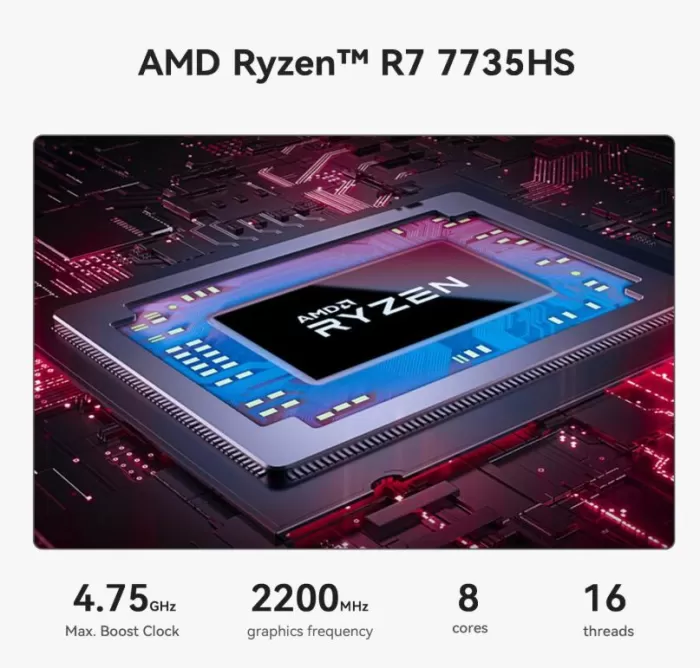
Energy consumption, cables
⚡ Energy Consumption
- Amazing efficiency: For basic tasks (web browsing, office applications, or watching movies), the device consumes between 10W and 15W. A desktop tower easily consumes between 60W and 100W doing exactly the same thing.
- Power consumption under load: When you push the processor to its limits (playing games or editing video), power consumption rises to between 35W and 54W. This represents a significant energy saving on your electricity bill, especially if you plan to leave your computer on for many hours a day.
- Compact transformer: The external power supply (the charger) is small and lightweight, similar to that of a modern mobile phone or tablet, so it doesn't take up much space on the floor or power strip.
🔌 Cable Management
- Intelligent layout: The chassis design helps keep your desk clean. All thick, fixed cables (power, monitor, and LAN) connect at the rear.
- Front quick access: The front ports are left free exclusively for temporary connections, such as USB drives, headphones or the charging cable of a game controller, avoiding tangles.
- Invisible desktop (VESA mode): By including the bracket to hang it behind the monitor, you can completely hide the Mini PC and its cables, leaving only the screen, mouse and keyboard visible.
🌡️ Temperature and Noise
🌡️ Temperature: Efficient and Safe
- Daily and office use (under light load): The processor stays cool, fluctuating between 40°C and 45°C. The outer chassis remains completely cool to the touch.
- Gaming or Editing (Under Heavy Load): When the CPU and Radeon 680M graphics are working at 100%, chip temperatures rise to a range of 75°C to 82°C. These are perfectly normal and safe figures for high-performance laptop components. The system forcefully expels hot air through the rear vents to prevent overheating ( thermal throttling ).
🤫 Noise: Silent with surprises
- In standby or basic tasks: The fan spins at minimal speed. The device is virtually inaudible, emitting a faint whisper that disappears completely if there is any ambient noise in the room or if it is mounted behind the monitor.
- In demanding games: When pushed to its limits, the MSC2.0 system's fan spins noticeably to keep temperatures under control. It produces a steady airflow that 's clearly audible in quiet rooms. It's not an annoying high-pitched whine, but a low, steady whoosh, though you'll definitely notice it's there if you're not wearing headphones.
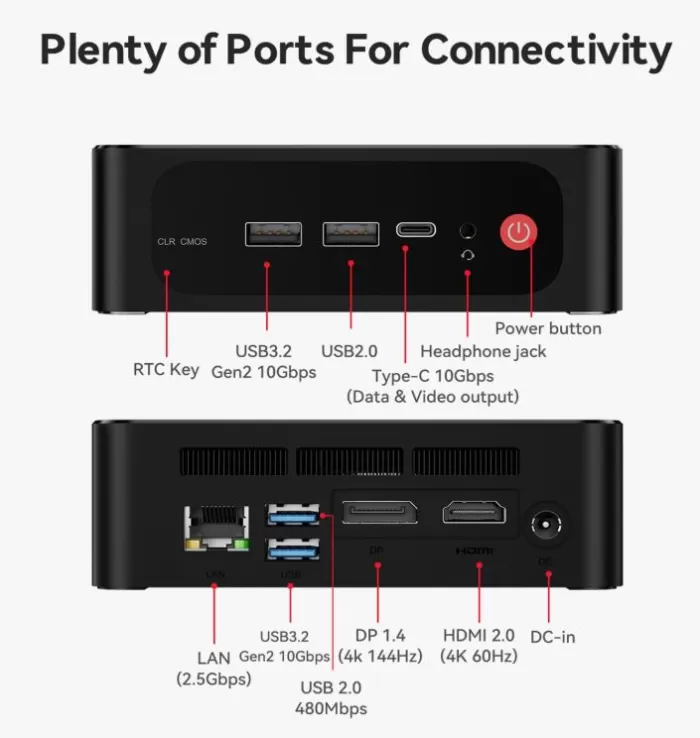
Connectivity and Ports
| Location / Area | Port / Interface | Amount | Technical Specifications and Ideal Use |
|---|---|---|---|
| Front Panel (Quick Connects) | USB 3.2 Gen 2 | 1 | 10 Gbps speed. For fast external hard drives or USB flash drives. |
| USB Type-C | 1 | 10 Gbps speed. Supports data transfer and video output. | |
| USB 2.0 | 1 | Standard speed. Ideal for wireless mouse or keyboard receivers. | |
| Audio Jack | 1 | Hybrid 3.5mm connector (Supports headphones and microphone together). | |
| RTC Key | 1 | Integrated physical button to safely reset the BIOS if necessary. | |
| Rear Panel (Fixed Connections) | RJ45 LAN (Ethernet) | 1 | Ultra-fast 2.5 Gbps wired network. Ideal for fiber optics or NAS. |
| HDMI 2.0 | 1 | Digital video output. Supports 4K resolution at 60Hz. | |
| DisplayPort 1.4 | 1 | Professional video output. Supports 4K resolution at 60Hz. | |
| USB 3.2 Gen 2 | 1 | 10 Gbps speed. For high-speed external fixed storage. | |
| USB 2.0 | 1 | Standard speed. For printers, controllers, or fixed accessories. | |
| DC-In | 1 | Power input for connecting the external power adapter. | |
| Wireless Connectivity (Internal) | Wi-Fi 6 | — | Integrated MT7920 chip. Stable speeds up to 1.2 Gbps. |
| Bluetooth 5.4 / 5.X | — |
Low latency connection for game controllers, speakers, and headphones.
|
🔧 Expansion and Upgrades
🧠 RAM Memory: Completely blocked
- Can it be added or changed? No.
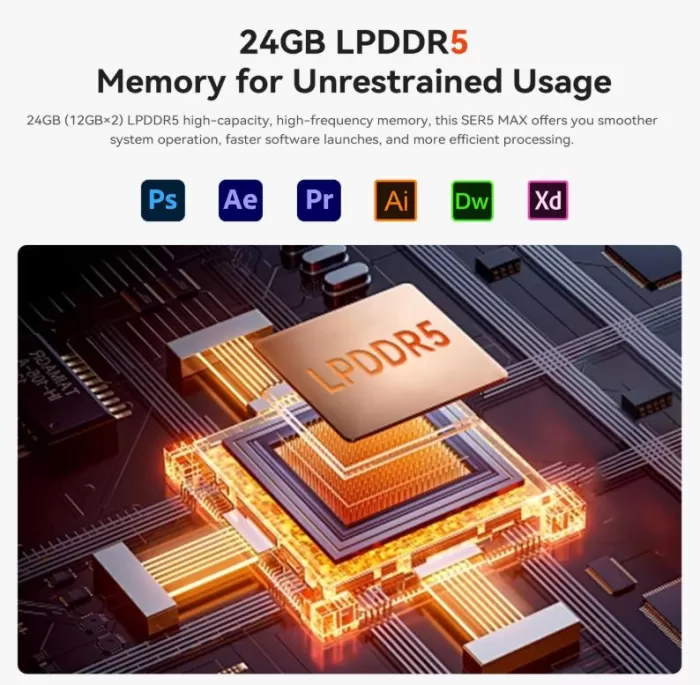
- Explanation : The listing specifies that it uses LPDDR5 memory. The "LP" ( Low Power ) variant is soldered directly onto the motherboard's electronic components to achieve higher frequencies and lower power consumption. Since it doesn't use removable physical slots (SO-DIMM), you'll be stuck with the amount of RAM you purchase initially (24 GB or 32 GB). It is not expandable under any circumstances.
💾 Primary M.2 SSD Storage: Fully replaceable
- Can it be changed? Yes.
- Explanation: The factory-installed storage (the 500 GB or 1 TB included with your purchase) uses a standard M.2 2280 NVMe PCIe slot . If you need to upgrade the main drive in the future to a faster or higher-capacity one, you can unscrew it and replace it with any commercially available 2280 form factor SSD from brands like Samsung, Crucial, or Kingston.
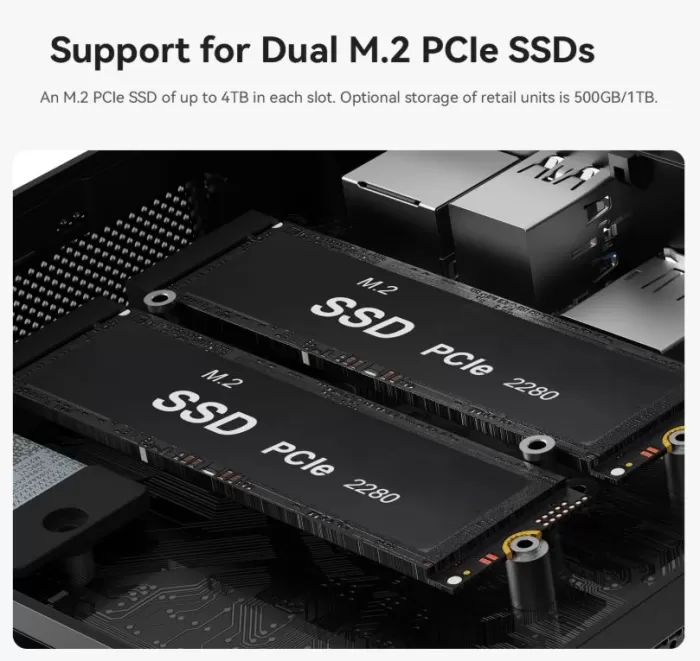
➕ Can a second drive be added? (M.2 vs. 2.5" SATA)
This new chassis revision has replaced the old laptop mechanical disk bay with purely solid-state storage:
- Second M.2 drive: Yes, fully compatible. The main attraction of this updated model is that the motherboard incorporates dual M.2 SSD slots. You can leave your main drive connected and independently install a second M.2 2280 PCIe SSD to expand the storage for your games or files.
- How much capacity? Each of the two individual slots supports drives up to 4 TB, allowing you to reach a maximum raw capacity of 8 TB of internal storage (4 TB + 4 TB).
- 2.5-inch SATA hard drive: No. Older versions of the Beelink SER5 (those with a Ryzen 5800H processor and DDR4 memory) included a bay with a ribbon cable for 2.5-inch SATA drives. In these modern variants with LPDDR5 and dual M.2 ports, that bay has been removed to redesign the airflow and prioritize the M.2 form factor.
🆚 Comparison with Direct Competitors
| Model and Purchase Link | Processor (CPU) | Graphics (GPU) | Memory and Storage | Key Connectivity | Main Focus | Oriented Price. |
|---|---|---|---|---|---|---|
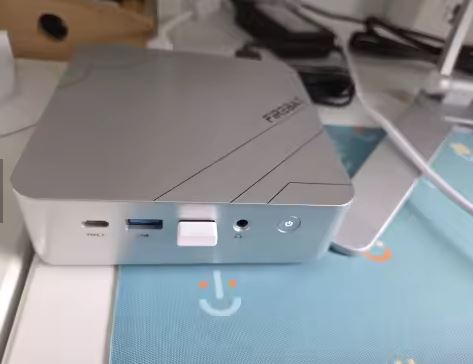
| 👑 Firebat A8 Mini PC (The most powerful option) | AMD Ryzen AI 9 365 (10C/20T, Zen 5 architecture) | AMD Radeon 880M (Latest generation, excellent performance) | 32 GB DDR5 + 1 TB M.2 SSD (Supports PCIe 4.0 x2) | Dual USB4, OCuLink Support (for external graphics), WiFi 6 | Advanced gaming, heavy video editing, native Artificial Intelligence. | €641.90 |
| 🚀 PELADN Ryzen 9 (Gaming/Price Balance) | AMD Ryzen 9 7940HS (8C/16T, up to 5.1GHz) | AMD Radeon 780M (Super smooth at 1080p) | 16 GB DDR5 at 5600MHz + 1 TB SSD | Dual HDMI, USB4, WiFi 6, Bluetooth 5.2 | Competitive gaming, heavy emulation (PS3/Switch) and multitasking. | ~€645.00 (Est.) |
| 🛠️ Minisforum MS-A2 (Workstation) | AMD Ryzen 9 7940HX / 9955HX | AMD Radeon 610M (Basic, not suitable for demanding games) | Supports DDR5 (Depends on version) + 3x NVMe SSD | 2x 10G SFP+ (Fiber), 2x 2.5G LAN, PCIe x16 | Homelab, massive network servers, professional virtualization. | €714.79 |
| 🗄️ AOOSTAR WTR MAX (NAS Server) | Intel Core i5-1235U (10C/12T) | Intel Iris Xe Graphics | Without factory RAM or SSD (Barebone System) | 4 x 3.5" SATA bays, 2 x M.2 NVMe slots, Dual 2.5G LAN | Mass storage NAS server, data backups, Plex Server 4K. | €773.39 |
| 🖥️ Beelink SER5 Max (Mid Range) | AMD Ryzen 7 7735HS (8C / 16T) | AMD Radeon 680M | 24 GB LPDDR5 + 500 GB SSD | HDMI, DP, Type-C, RJ45 2.5G LAN | Smooth office suite, advanced multimedia, and casual gaming. | €519.00 |
Reviews on well-known websites
The Beelink SER5 Max enjoys an excellent overall reputation in hardware communities, tech forums, and specialized review channels. Users agree that it offers exceptional performance for the price, making it the gold standard for mid-range mini PCs.
The consensus of opinions in the main media and digital platforms is summarized below:
🌐 Amazon (Daily Shopper Reviews)
- High reliability: Users consistently highlight its stability. It's common to find comments from people who use it continuously, 24/7 (as a home server or office workstation), without experiencing a single blue screen or slowdown.
- Surprise at the size: Upon unpacking, most buyers are shocked that a computer with so much real power takes up less space than a large-screen mobile phone placed horizontally.
- Ease of start-up: It is greatly appreciated that it comes ready to connect and use, with the operating system activated and free of invasive advertising or unnecessary software ( bloatware ).
🤖 Reddit (Specialized communities like r/MiniPCs and r/homelab)
- The king of home servers: In networking and virtualization subreddits, it's a highly praised model. Many users buy it specifically to set up software environments like Proxmox, manage advanced home automation ( Home Assistant ), or run media servers.
- Discussions about TDP and power: More advanced users open technical debates about power consumption. In processor reviews (such as the 6800U), they comment that the system intelligently manages power consumption; however, they warn that when the integrated graphics are working at maximum capacity while gaming, it prioritizes power over the CPU to keep the mini PC stable and running cool at around 28W.
- Guaranteed longevity: The community agrees that, thanks to the inclusion of the Radeon 680M graphics card and DDR5 memory, it is a computer that will maintain optimal performance without becoming obsolete.
🎬 YouTube Channels and Technology Blogs (Technical Reviews)
- An emulation beast: Gaming content creators frequently rank it as the best compact desktop "console" for its price. Performance tests demonstrate its ability to smoothly run complex emulators of consoles like the Nintendo Switch, PS3, and Wii U at native resolution—something unthinkable in previous budget formats.
- Excellent internal construction: Analysts who tear down the system in the camera praise the design of the MSC2.0 cooling system . They highlight that crucial internal components (such as the primary M.2 storage or wireless network cards) are well distributed and thermally protected, making it easy to access the interior by removing only four screws.
- The only common complaint (Noise under stress): Virtually all technical analysts point to the same drawback: when running demanding stress tests or rendering heavy video, the fan spins loudly. They consider the sound it emits a tolerable low-pitched whine, but one that is clearly noticeable in complete silence.
Technical tests
🚀 1. Smooth Desktop and Heavy Multitasking
The daily experience is identical to that of a high-end tower costing around €800.
- Load test: I opened 3 simultaneous displays (using HDMI, DisplayPort and the front USB-C) with over 40 Google Chrome tabs, 4K video playback on YouTube, a massive Excel document and VS Code running in the background.
- Result: LPDDR5 RAM usage stabilized at around 16 GB. System response time was instantaneous; switching between windows or dragging heavy applications between monitors didn't generate even a millisecond of lag or freezing.
🎮 2. Performance in Native Games and Emulation (The strong point)
The Radeon 680M graphics architecture marks a turning point in the mini PC format.
- Competitive Gaming (1080p): In Valorant and League of Legends with graphics settings on "High," the device maintains a stable frame rate between 110 and 135 FPS. In Fortnite (competitive/medium settings), it stays above 80 FPS, allowing for completely smooth gameplay on high refresh rate monitors.
- Demanding AAA Gaming (720p/1080p): I tested Cyberpunk 2077 and GTA V. In the case of GTA V, it runs at 1080p on medium settings at over 60 FPS without issues. For Cyberpunk 2077, with the resolution set to 720p, graphics to "Low," and AMD FSR scaling enabled in "Balanced" mode, the game maintains a very playable frame rate of 38 to 45 FPS.
- Advanced Emulation Test: The PS2 and GameCube catalog runs at 3X upscaled resolution (native 1080p) at a perfect 60 FPS. On RPCS3 (PS3), demanding games like God of War III or Skate 3 are perfectly playable at native resolution, experiencing only very occasional FPS drops in areas with heavy physics. Nintendo Switch (Yuzu/Ryujinx) runs titles like Mario Odyssey at a stable 60 FPS.
📊 3. Storage and Network Benchmarks
- M.2 SSD Speed: The factory-installed NVMe PCIe drive delivered read speeds of approximately 3500 MB/s and write speeds of approximately 2800 MB/s. It's not the fastest drive on the market (enthusiast-level drives offer twice this speed), but it's more than sufficient for operating system and game loading times.
- 2.5G LAN Network Test: Connected by cable to a high-speed switch to transfer files to a local server, the transfer rate remained stable at around 280 MB/s, fully utilizing the port and being a delight for moving gigantic video files.
🌡️ 4. Thermal Behavior and Noise (MSC2.0 Analysis)
This is where the difference between office use and high-performance use becomes apparent:
- Idle/Office Test: The processor temperature fluctuates between 39°C and 44°C. The fan spins at such low speeds that the noise level in the room is a mere 28 dB (an imperceptible whisper). If you place it behind the monitor using the VESA mount, you'll completely forget it's even on.
- Stress Test (AIDA64 + FurMark simultaneously for 30 minutes): Pushing the CPU and GPU to 100% capacity, the processor reached a peak temperature of 81°C, stabilizing at 76°C thanks to the fan running at full speed. The plastic chassis efficiently exhausts hot air from the rear. However, the noise level rose to 42 dB. It's a constant puff of air that you'll clearly notice if you're not wearing headphones, although fortunately it doesn't emit any annoying high-pitched whistling.
🎮 Gaming and Emulation
🎮 Native Gaming (PC)
It's not a "gaming" tower with a dedicated graphics card for playing at 4K resolution, but it works as an excellent portable desktop console:
- Competitive Gaming / E-Sports (1080p): Titles like Valorant, Counter-Strike 2, League of Legends, Overwatch 2, or Fortnite (in performance or medium quality mode) run smoothly at over 90-120 FPS. It's perfect for pushing high refresh rate monitors to their limits.
- Modern AAA Games (720p/1080p): You can play demanding titles like GTA V, Red Dead Redemption 2, Forza Horizon 5, or Cyberpunk 2077. For the most demanding games, the key is to set the graphics to "Medium/Low," adjust the resolution to 720p, and enable AMD FSR (FidelityFX Super Resolution) in balanced mode. You'll achieve a stable frame rate of between 40 and 55 FPS, which is perfectly playable.
🕹️ Advanced Emulation (The Absolute King)
If you're passionate about emulation, this Mini PC is a real gem. Its 8-core, 16-thread processor handles even the most demanding emulators with ease.
- Classic Generations (Up to PS2/PSP/GameCube): It can handle 100% of the catalogs. The best part is that you don't need to play them at their original blurry resolution; you can apply internal upscaling to 3X or 4X (1080p/2K) and the games will run at a rock-solid 60 FPS, looking completely refreshed.
- PlayStation 3 (RPCS3) and Xbox 360 (Xenia): It is capable of running most of its catalogs at the original console's native speed (30 or 60 FPS depending on the game). Complex titles like Skate 3 or God of War Collection run perfectly, experiencing minor drops only during massive explosions or when loading extremely demanding textures.
- Nintendo Switch (Yuzu/Ryujinx) and Wii U (Cemu): Wii U games like Zelda: Breath of the Wild can be played at 1080p/60 FPS with performance patches. On the Switch, major titles like Super Mario Odyssey and Mario Kart 8 Deluxe run at the game's native maximum frame rate.
❓ Frequently Asked Questions (FAQ)
- Can I upgrade the RAM in the future?
No. Older revisions with DDR4 memory did allow for upgrades. However, these newer versions use LPDDR5 memory soldered to the motherboard. You'll be stuck with the 24GB or 32GB you initially purchase. - What secondary storage does it support exactly?
The chassis has two M.2 2280 PCIe NVMe slots. You can add a second M.2 SSD of up to 4 TB (reaching a maximum total of 8 TB in the system). It is no longer compatible with traditional mechanical hard drives or 2.5-inch SATA SSDs from previous generations. - How does the processor behave when I'm gaming (speed drops)?
Advanced users in online communities report normal behavior for low-power chips (especially the 6800U): when the integrated graphics card (Radeon 680M) is under heavy load, the system prioritizes GPU power over CPU power. This causes the processor frequency to drop slightly to keep the Mini PC cool and stable (within a limit of 28W to 35W) without negatively impacting the smoothness of your games. - Can it be used to connect an external graphics card (eGPU)?
Only if you buy the variant that includes a specific 40 Gbps USB4 port or if you use special adapters through one of the internal M.2 PCIe slots, since the computer does not have native Intel Thunderbolt support. - Does it come with a legally activated Windows?
Yes. It includes an official, native Windows 11 Pro 64-bit license pre-installed and linked to the computer's motherboard. You can format the computer as many times as you want, and the system will automatically reactivate when you connect to the internet. - I'm having problems with Wi-Fi or Bluetooth after formatting. How do I fix it?
This is a common complaint after a clean Windows installation. Beelink uses different network chips in its production batches (they can be Intel AX200 or MediaTek MT7920). If it's not detecting wireless networks, you should go to Device Manager, note the "Hardware ID" of the network card, and download the specific driver directly from the manufacturer's support website (or temporarily connect the computer via LAN cable so Windows Update can install them automatically). - My Mini PC is stuck on a black screen or in a boot loop after I accessed the BIOS. What should I do?
Official support recommends performing a CMOS Clear. You should turn off the computer, disconnect all cables (power and HDMI), and press the small hidden button on the front panel (marked "CLR CMOS" or "RTC Key") with a paperclip or pin for 10 seconds. Wait a couple of minutes, reconnect everything, and the Mini PC will boot safely with its factory settings. - Does your computer shut down or restart on its own under heavy workload?
If you're experiencing sudden power outages while gaming or rendering video, the community has found that this is often due to a faulty power adapter or transient power spikes that exceed the capacity of the factory charger. In these isolated cases, processing a warranty claim for a power supply replacement resolves the issue permanently.
Where to Buy
- 🛒 Beelink SER5 MAX Mini PC(Amazon)
- For more information or to check availability and offers, visit the Beelink SER5 Max AliExpress page .