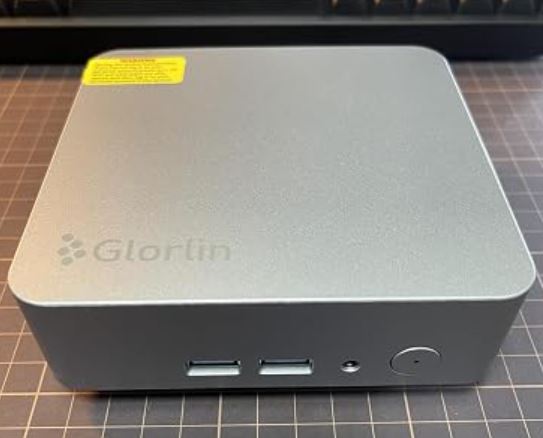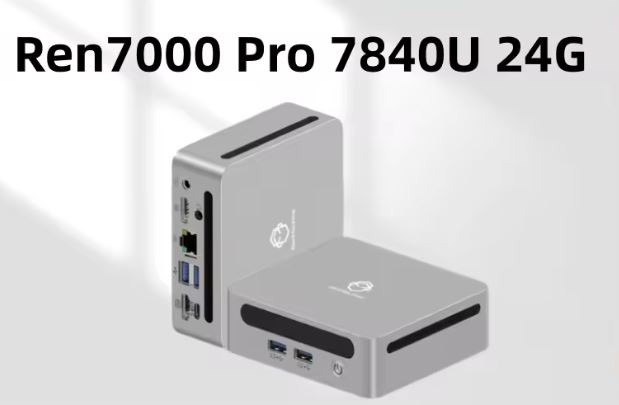
The Glorlin GT103 stands out for its power-to-size ratio, powered by a 6-core Zen 3+ chip and boasting outstanding network connectivity. However, its non-expandable RAM and limited cooling under heavy graphics loads prevent it from competing in modern gaming. It's a machine designed for productivity, automation, and organizing clean desktops without breaking the bank.
-
Pros:
-
Solid multicore performance thanks to the AMD Ryzen 5 6600H chip (45 W TDP).
-
Dual 1 Gbps Ethernet interface and integrated Wi-Fi 6 connectivity.
-
Internal storage expandable via two M.2 2280 NVMe slots up to 4 TB.
-
Windows 11 Pro pre-installed without adware ( bloatware ).
-
-
Cons:
-
LPDDR5 RAM soldered to a fixed board in 16 GB (no option to expand).
-
Power adapter cable too short (~1 meter).
-
The integrated Radeon 660M GPU falls short for demanding 3D titles.
-
🔎 (Buy) See Prices for the Glorlin GT103 Mini PC
🛒 Find the Glorlin GT103 mini PC on AliExpress
📦 Unboxing and box contents
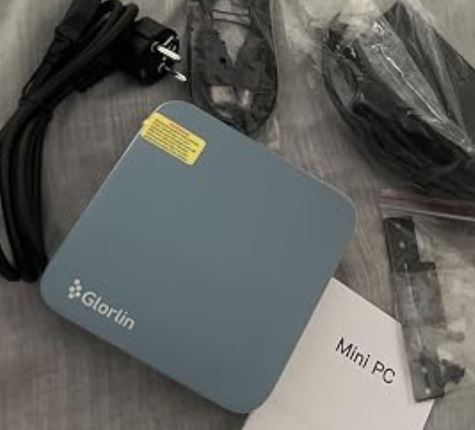
Upon opening the packaging of the Glorlin GT103, we find a sober and functional presentation, designed to get the equipment up and running without any additional peripherals other than the basic cables.
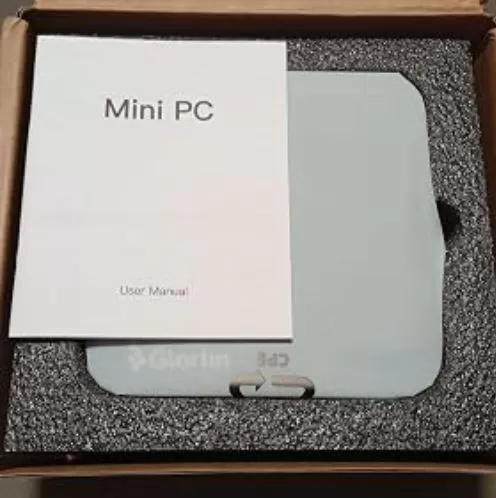
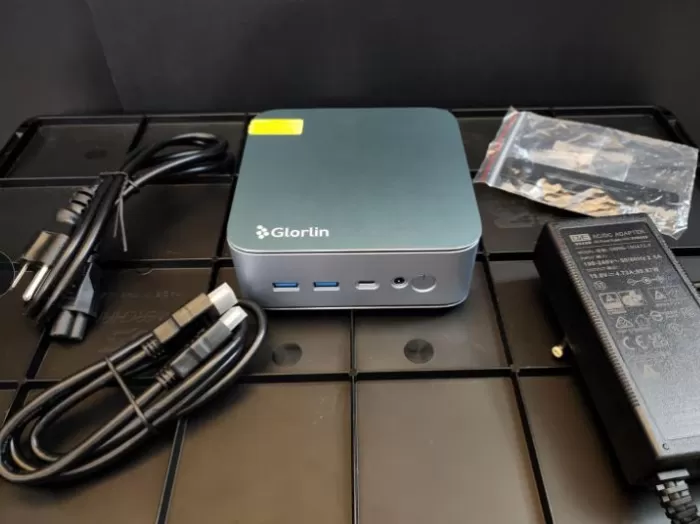
The box includes:
-
The Glorlin GT103 mini PC.
-
A 19V DC power adapter.
-
A standard HDMI cable (approximately 1 meter).
-
Metal mounting bracket compatible with the VESA standard.
-
Bag with complete screws for the chassis and VESA plate.
-
Step-by-step illustrated user manual with a section translated into Spanish.
The power adapter is lightweight, but its cable is rather short: at just 100 cm long, if your power strip is on the floor and you intend to place the device on a raised desk or behind a screen, you will need an extension cord or carefully measure the distances.
📋 Technical specifications table
| Parameter | Technical details |
|---|---|
| Model | Glorlin GT103 (2026 Edition) |
| Processor (CPU) | AMD Ryzen 5 6600H (6 cores / 12 threads, 3.3 GHz base, up to 4.5 GHz turbo, 16 MB L3 cache) |
| Architecture and TDP | Zen 3+ (6 nm process), 45 W base TDP |
| Graphics card (GPU) | Integrated AMD Radeon 660M (RDNA 2 architecture, 6 CUs) |
| RAM | 16 GB LPDDR5 at 6,400 MT/s in dual channel ( soldered, not expandable ) |
| Installed storage | 512 GB SSD M.2 2280 NVMe PCIe |
| Storage expansion | Dual M.2 2280 NVMe slots (supports up to 4 TB total) |
| Screen outputs | 1x HDMI 2.1 (4K @ 60 Hz), 1x DisplayPort 1.4 (4K @ 120 Hz), 1x USB-C (4K @ 60 Hz) |
| Network connectivity | 2x RJ45 Gigabit Ethernet ports (1,000 Mbps) |
| Wireless connectivity | Wi-Fi 6 + Bluetooth 5.3 |
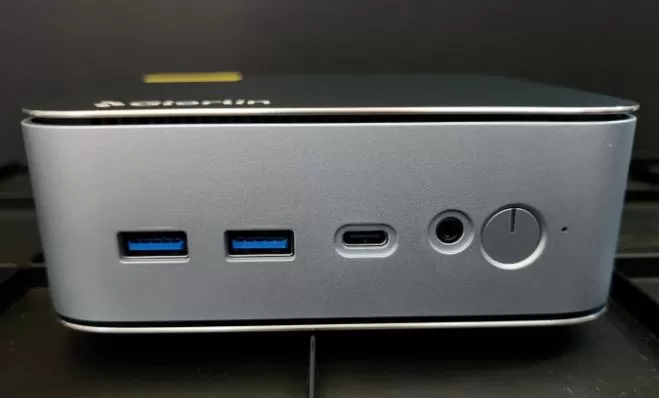
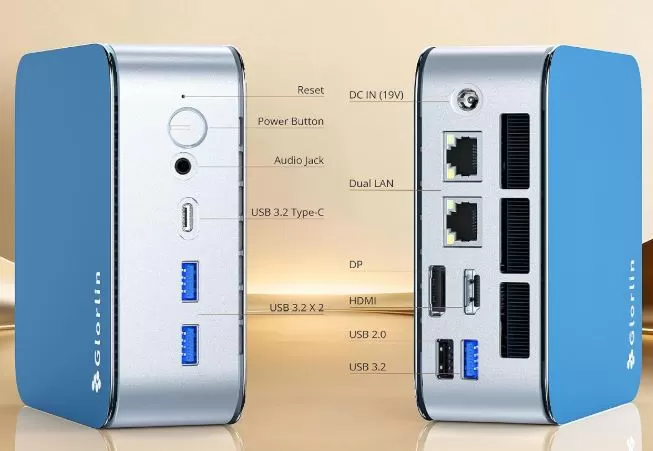
| Front ports | 1x USB-C 3.2, 2x USB-A 3.2 Gen 1, 3.5 mm audio/microphone jack, power button, reset button |
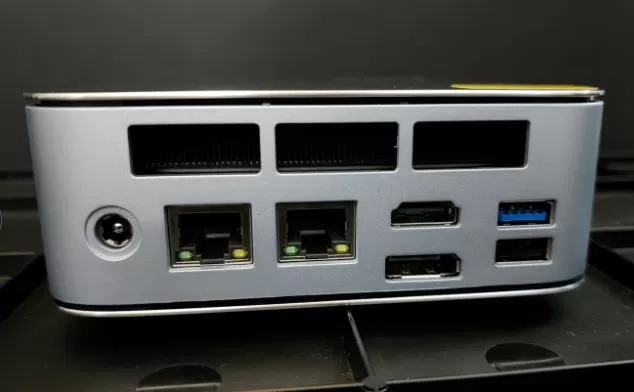
| Rear ports | 1x USB-A 3.2, 1x USB 2.0, 1x HDMI 2.1, 1x DisplayPort 1.4, 2x RJ45 LAN, DC 19V socket |
| Dimensions and weight | 128 × 128 × 45.6 mm (5.04 × 5.04 × 1.80 inches) | 517.6 grams |
| Operating system | Windows 11 Pro pre-installed (clean install) |
🛠️ Design and construction quality
The Glorlin GT103 features a cubic form factor with sides of 128 mm and a thickness of just over 4.5 cm. Its surface area is similar to a coffee cup, fitting comfortably in the palm of your hand.
The chassis combines a silver/blue aluminum alloy cover with rigid ABS plastic side panels and a base. It feels robust and well-assembled, with no creaking when pressing the casing or inserting rigid connectors. Weighing in at 517 grams, it's substantial enough to keep USB peripherals plugged in without lifting from your desk, though the included rear VESA mount allows you to tuck it behind any monitor, keeping your desk cable-free.
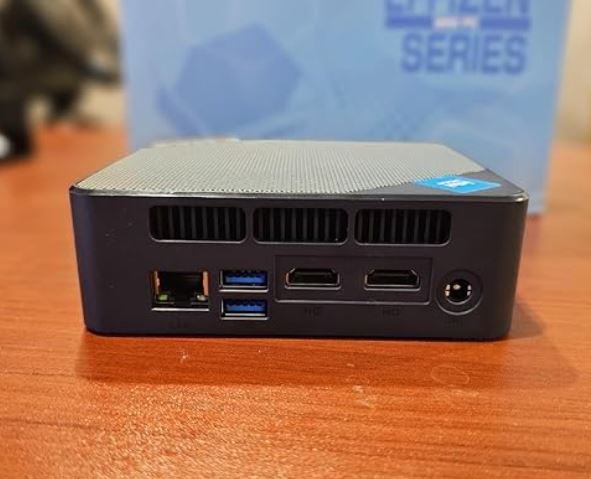
The sides and rear area feature large linear ventilation grilles for expelling hot air, which is essential considering that it dissipates a 45W chip in a volume of less than half a liter.
🖥️ Screen and multimedia experience
As a mini desktop PC, this device does not integrate its own panel, but its ability to control external displays is one of its main virtues:
-
Triple independent 4K monitor setup: We tested connecting three monitors simultaneously using the HDMI 2.1 port, the DisplayPort 1.4 output, and the front USB-C port with DisplayPort Alt Mode video output. All three desktops displayed at 3840×2160 resolution without signal drops or pointer lag.
-
Advanced refresh rate: The DisplayPort 1.4 output is capable of delivering 4K at 120Hz, resulting in noticeable smoothness for those using high-frequency monitors for both office work and fast web browsing.
-
Audio: In terms of sound, it lacks a built-in speaker. Audio is clear and effective through its front 3.5 mm jack or via HDMI/DisplayPort to the monitor's speakers.
For content consumption (Netflix, YouTube 4K at 60 fps with VP9/AV1 codec), the Radeon 660M GPU's hardware decoding keeps CPU usage below 5%, running smoothly and without frame drops.
⚡ Performance and software
Under the hood, we find the AMD Ryzen 5 6600H, a microprocessor with 6 physical cores and 12 threads that operates at a turbo frequency of up to 4.5 GHz. In everyday tasks, with dozens of Chrome tabs open alongside office suites, messaging clients, and simultaneous video conference calls, the computer responds instantly.
Operating system and bloatware
One very favorable aspect of this unit is the cleanliness of its operating system:
-
Includes fully activated Windows 11 Pro.
-
The installation comes free of adware ( crapware or bloatware added by the manufacturer).
-
A pleasant surprise during the first launch is that it allows you to create a local offline account directly without forcing the user to log in with a Microsoft account.
-
Linux Compatibility: We tested booting a modern distribution like Linux Mint from a USB drive. Hardware recognition was automatic: the Wi-Fi 6 card, Bluetooth chip, and both Ethernet ports worked out of the box without needing to compile proprietary drivers.
Internal storage
The factory-installed 512GB SSD uses NVMe protocol over PCIe interface. It offers robust read and write speeds, ensuring system boot times of no more than 9-11 seconds.
🔎 (Buy) See Prices for the Glorlin GT103 Mini PC
🛒 Find the Glorlin GT103 mini PC on AliExpress
🔌 Energy consumption, temperature and noise
Electricity consumption
The 19V charger powers a chip with a 45W profile. In our wall-mounted measurements:
-
At rest (idle): consumption ranges between 9 W and 13 W.
-
Office and multimedia load: it is between 24 W and 35 W.
-
Maximum combined stress (CPU + GPU): reaches peaks of 55W to 62W.
This is a negligible energy consumption compared to a classic desktop tower (which easily exceeds 150-250W performing the same tasks).
Real thermal and acoustic
The Glorlin GT103 features a turbine heatsink with dual copper heat pipes.
-
Daily use and browsing: The fan operates at very low speeds, around 35-38 dB. It is virtually imperceptible in a quiet room.
-
Sustained heavy load: When the CPU is subjected to compilation or graphics stress tests, the fan gradually speeds up. The noise becomes clearly audible in a quiet work environment, although it doesn't emit any annoying high-pitched whistling sounds.
-
Temperatures: The GPU stabilizes at around 70°C under heavy load. The plastic and aluminum outer chassis remains cool to the touch, and hot air is efficiently exhausted through the rear vents. If you plan to use it in very warm environments or enclosed in a cabinet, ensure you leave at least 10 cm of clearance around the air intakes.
🌐 Connectivity and extras
In terms of ports, the Glorlin GT103 clearly surpasses the average of mini PCs in its price range:
-
Dual RJ45 Ethernet ports (1 Gbps): A rare feature in this price range. It allows for advanced network configurations, network bridging, direct connection to a NAS via one port while browsing the internet via the other, or setting up home labs ( homelabs and virtual firewalls like OPNsense/pfSense).
-
Well distributed USB ports: 1 USB 3.2 Type-C, 3 fast USB 3.2 ports (two in front for memory sticks or cameras and one in back) plus a rear USB 2.0 port reserved for the wireless keyboard and mouse receiver, avoiding interference.
-
Physical security and extras: It does not have a fingerprint sensor, NFC/mobile connectivity (no SIM/5G slot), or IP water resistance certification (it is strictly for indoor use). It does have a CMOS reset hole on the front panel to restore the BIOS in case of a freeze.
🔧 Expansion and upgrades
This is one of the most important aspects you should be clear about before purchasing it:
RAM Memory: ❌ Not expandable
The 16GB of LPDDR5 RAM at 6400 MT/s is soldered directly to the motherboard. It doesn't have SO-DIMM slots. This means you won't be able to upgrade to 32GB or 64GB in the future. 16GB is more than enough for office applications, heavy browsing, light photo editing, and everyday tasks, but it falls short if you plan to virtualize multiple systems simultaneously.
SSD Storage: ✅ Highly expandable
In the area of hard drives, the team stands out:
-
It has two M.2 2280 NVMe PCIe slots.
-
The first slot is occupied by the original 512GB SSD.
-
The second slot is free, allowing you to plug in a secondary disk without needing to clone or reinstall the operating system.
-
The manufacturer specifies a total storage capacity of up to 4 TB by combining both slots (for example, two 2 TB drives). It does not support older 2.5" SATA mechanical hard drives due to its compact design.
If you plan to expand the capacity of your mini PC with a second fast storage drive, you can purchase a high-speed NVMe M.2 2280 SSD at very competitive prices.
📊 Comparison with direct competitors
| Model | Processor | Graph | RAM | M.2 slots | Grid | Price range |
|---|---|---|---|---|---|---|
| Glorlin GT103 → Check Prices |
Ryzen 5 6600H (6C/12T, 45W) | Radeon 660M | 16 GB LPDDR5 (Soldered) | 2x M.2 2280 (up to 4 TB) | 2x 1 GbE LAN + Wi-Fi 6 | ~€330 - $430 |
| BOSGAME E5 Plus → Check Prices |
Ryzen 3 5400U (4C/8T, 15W) | Vega 6 | 8 GB DDR4 (Expandable) | 1x M.2 NVMe | 2x 2.5 GbE LAN + Wi-Fi 5 | ~$190 - €220 |
|
SOYO M5 |
Ryzen 3 4300U (4C/4T, 15W) | Vega 5 | 16 GB LPDDR4 (Soldered) | 1x M.2 | 1x GbE LAN + Wi-Fi 5 | ~€215 |
| GEEKOM A6 → Check Prices |
Ryzen 7 6800H (8C/16T, 45W) | Radeon 680M | 16/32 GB DDR5 (Expandable) | 2x M.2 | 1x 2.5 GbE LAN + Wi-Fi 6E | ~€550 - $600 |
⭐ Contrasting opinions from the community
The Glorlin GT103 has an overall rating of 4.8 out of 5 stars on e-commerce platforms like Amazon. Analysis of verified reviews and independent reviewers from the United States, Spain, Germany, and France confirms consistent patterns:
-
Ease of setup: Non-technical users highlight the simplicity of the initial setup process thanks to the absence of bloatware and the included manual in Spanish.
-
Solid office performance: Buyers from Spain and Germany agree that the agility in working with heavy spreadsheets, two or three simultaneous screens and navigation with dozens of tabs is absolute.
-
Use in laboratories and homelabs: Several advanced users particularly value the dual Ethernet interface for setting up lightweight home servers with Proxmox, Docker, or dedicated NAS systems.
-
Recurring criticisms: The more moderate opinions (4 stars) warn of two points: the length of the plug cable (barely one meter) and the increase in fan noise when it is required to perform sustained graphic work.
🔬 Technical tests and benchmarks
To verify the marketing claims, we subjected the device to standard synthetic tests:
-
Geekbench 6 CPU:
-
Single-Core: 1,958 points.
-
Multi-Core: 8,163 points.
Technical reading: The multi-core score confirms the superiority of its 6-core, 45W architecture compared to low-power chips like the Ryzen 7 7730U or Ryzen 5 5500U, which suffer more pronounced frequency drops due to thermal limits.
-
-
Geekbench OpenCL (GPU):
-
Score: 14,406 points.
Technical reading: The Radeon 660M performs approximately half as well as the Radeon 680M found in Ryzen 7 6800H/7735HS processors, placing it at a level purely oriented towards multimedia acceleration and basic graphics tasks.
-
-
Wired network performance (iperf3 / Local Test):
-
Sustained performance of 936 Mbps download and 949 Mbps upload on both Gigabit ports, taking advantage of bandwidth without CPU saturation.
-
🎮 Gaming and emulation
It is essential to calibrate expectations: the Glorlin GT103 is not a computer for demanding games.
-
Modern AAA Games: When testing graphically demanding titles (current shooters and RPGs) at 1080p resolution with "Low" quality settings, performance ranged between 24 and 28 FPS. It does not offer a smooth or enjoyable gaming experience in resource-intensive games.
-
Casual games and eSports: Light competitive games or indie titles such as League of Legends, Valorant, Rocket League, Hollow Knight or CS:GO (on low settings) run between 50 and 75 FPS at 1080p resolution.
-
Emulation: It performs wonderfully with classic emulators (PlayStation 1, PS2, GameCube, Wii and Dreamcast), running most catalogs at multiplied native resolution (x2 or x3) with constant fluidity.
❓ Frequently Asked Questions (FAQ)
Can the RAM be upgraded to 32 GB?
No. The 16 GB of LPDDR5 RAM are soldered to the motherboard and there are no expansion slots for memory modules.
Can a second hard drive be changed or added?
Yes. It has two M.2 2280 NVMe slots. You can keep the original 512GB drive and add a second SSD of up to 2TB or 4TB in the secondary bay.
Does it come with Windows activated or is it a trial version?
It includes a pre-installed full license of Windows 11 Pro that is automatically activated when the computer is connected to the network.
Is it compatible with playing current games?
Only suitable for lightweight games, low-spec titles, or retro emulation. The integrated graphics card falls short for modern AAA titles.
Can it be mounted behind a monitor?
Yes, the box includes the standard VESA metal mounting bracket and the corresponding screws to attach it to the back of the screen.
🏁 Conclusion: Who is it ideal for and is it worth it?
The Glorlin GT103 is a well-balanced mini PC and is recommended if you are looking for a fast, extremely small and energy-efficient workstation for:
-
Office and teleworking positions: that require handling 2 or 3 monitors simultaneously with speed.
-
Students and home environment: for academic tasks, lag-free browsing and 4K multimedia.
-
Networking and homelab enthusiasts: thanks to its dual Gigabit wired network connector and frictionless compatibility with Linux.
When NOT to buy it? If you need to upgrade your RAM beyond 16 GB in the future, or if your primary goal is to play recent releases, in which case it will be more worthwhile to upgrade to a system with a dedicated graphics card or processors with Radeon 780M graphics.
🛒 Where to buy and recommended options
You can check current availability, discount coupons, and current prices on the main platforms: