The Glorlin GT101 is an affordable mini PC for working, studying, browsing, watching videos, and setting up a small media server.
It's sold under two processor names, Ryzen 5 3500U and Ryzen 5 3501U, which offer the same performance. The real difference between the versions lies in the memory and storage.
| 👍 Strengths | 👎 Weak points |
|---|---|
| Very low price for a PC with Windows 11 Pro | Older generation processor (12 nm) |
| Gigabit Ethernet, WiFi 6 and Bluetooth 5.3 | It's not suitable for video editing or current games. |
| Up to three screens (2 HDMI and USB-C) | Audible fan under prolonged load |
| RAM expandable up to 32 GB | A rear USB-C port only transmits data at USB 2.0 speed. |
| VESA mount included | Lightweight chassis, designed to stay put. |
Our recommendation: the version with 16 GB of RAM and 512 GB of SSD storage. The 8 GB RAM and 256 GB SSD version falls short for Windows 11 with many tabs open.
👉 See Glorlin GT101 prices on Amazon
👉 Check if the Glorlin GT101 mini PC is available on AliExpress
📋 Main specifications
| Feature | Detail |
|---|---|
| Processor | AMD Ryzen 5 3500U or 3501U, 4 cores and 8 threads, from 2.1 to 3.7 GHz |
| Manufacturing | 12nm, Zen+ architecture (Picasso) |
| Graphics | integrated Radeon Vega 8 |
| RAM | 8 GB or 16 GB DDR4-2400 in a single channel, expandable to 32 GB in dual channel |
| Storage | 256GB or 512GB NVMe SSD |
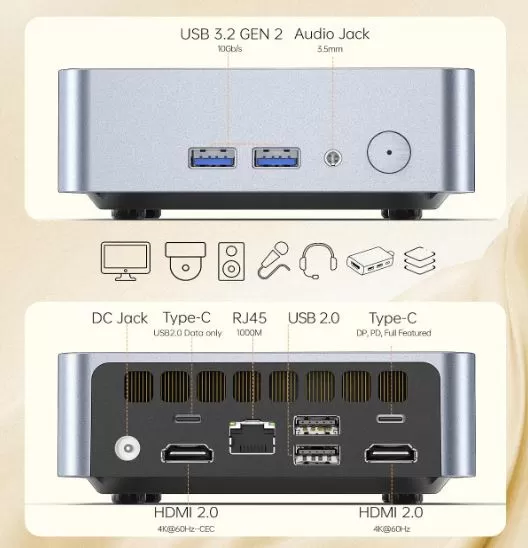
| Connectivity | WiFi 6, Bluetooth 5.3 and Gigabit Ethernet (RJ45) |
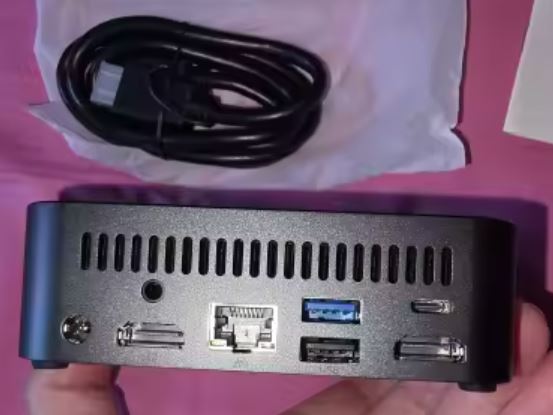
| Video outputs | 2 × HDMI 2.0 (4K at 60 Hz) and USB-C with DisplayPort |
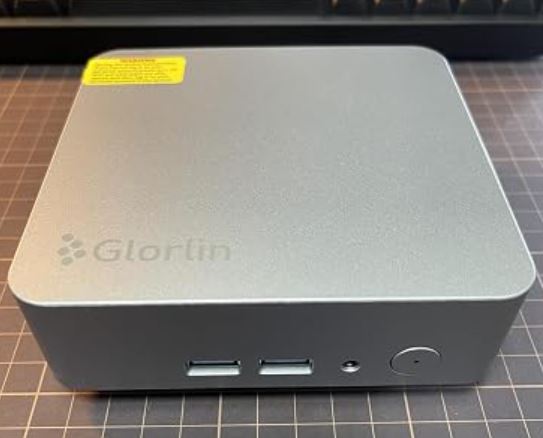
| Front ports | 2 × USB 3.2 Gen 2 (10 Gb/s) and 3.5 mm audio |
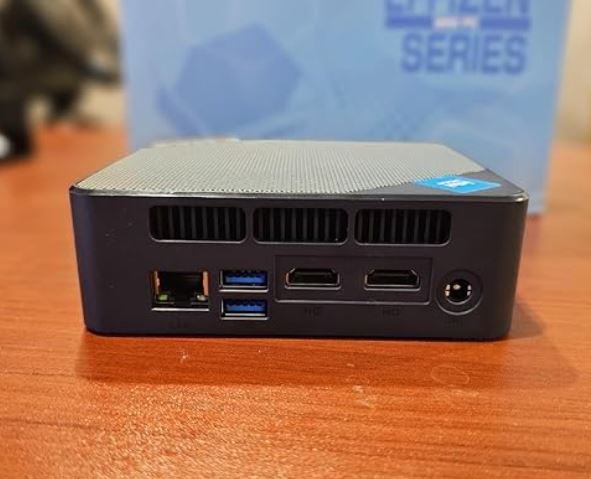
| Rear ports | 2 x USB 2.0, USB-C with video and charging, USB-C data only, 2 x HDMI and RJ45 |
| Operating system | Windows 11 Pro |
| Consumption (TDP) | 15 W, up to 25 W |
| Warranty | 1 year |
The 3501U is a rebranded version of the 3500U, released in 2019. They share architecture, cores, frequencies, graphics, and 6MB cache, so you can choose either one without performance differences.
📦 Box contents
-
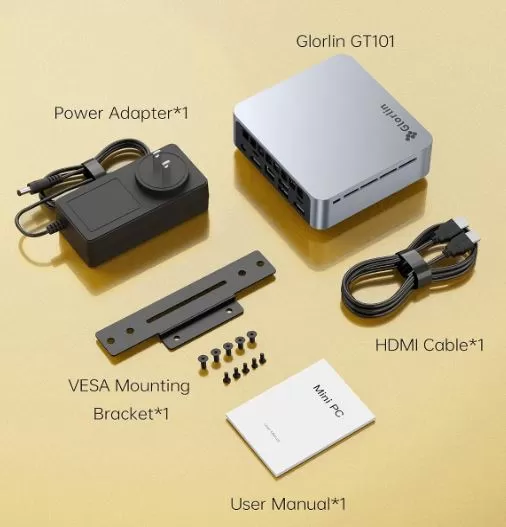
Glorlin GT101 Mini PC.
-
Power supply.
-
VESA mount with screws, for attaching it behind a monitor.
-
HDMI cable.
-
User manual.
🧱 Design and construction
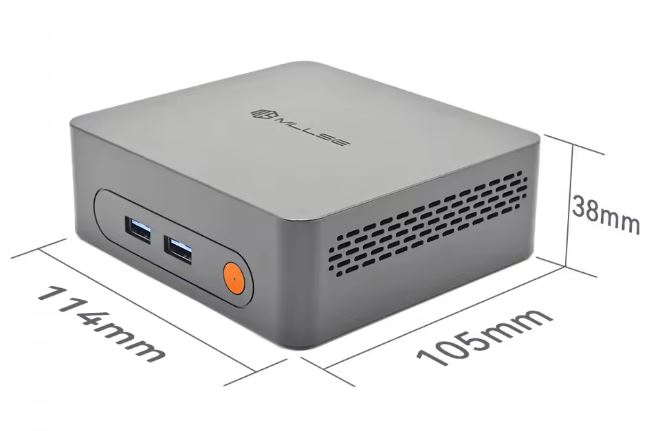
The GT101 is a flat cube made of gray aluminum, with ventilation slots on the sides and the Glorlin logo on the lid.
It fits on any desk and can be hidden behind a monitor with the VESA mount.
The chassis is light and compact, designed more to stay put than to be transported.
It's a simple machine, with a decent finish for its price, no frills but no flashy plastic elements either.
🖥️ Image and multimedia
The GT101 offers three video outputs: two HDMI 2.0 and one USB-C with DisplayPort. This is sufficient for a multi-monitor desktop setup and for connecting a television.
Radeon Vega 8 graphics cards play high-resolution video smoothly, although they don't decode the AV1 format in hardware. For YouTube, Netflix, or a media center with Kodi, it works without problems.
⚙️ Performance and software
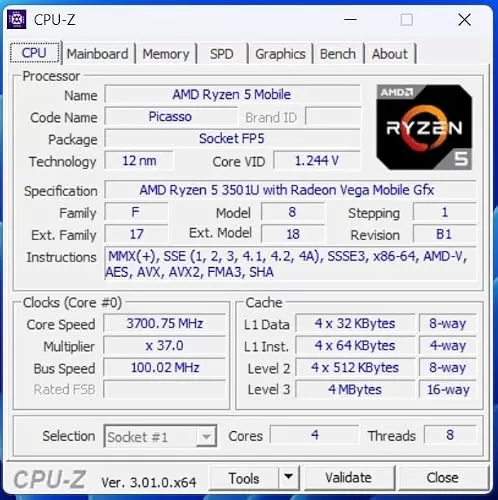
The Ryzen 5 3500U/3501U is a low-end laptop processor. In the PassMark benchmark, it scores around 6,690 points in multi-threaded tests and 1,881 in single-threaded tests. In CPU-Z, the system registers 421.9 points in single-threaded tests and 2,068.9 in multi-threaded tests.
In practice, it performs well with:
-
Office suite, email, and multi-tab browsing.
-
Video calls and online classes.
-
Video and music playback.
-
A media server or a small dedicated Windows machine.
It is not suitable for video editing, 3D design, or modern gaming.
Memory: The system uses single-channel RAM, which somewhat limits the integrated graphics. Adding a second identical module switches to dual-channel, significantly improving performance.
Operating system: It comes with Windows 11 Pro pre-installed and ready to use. Many buyers install Linux, but be aware that the BIOS can revert to the original system after some changes, so make a backup before modifying anything. The Windows product key is not printed, but it can be retrieved from within the system itself.
🔌 Power consumption and cables
The manufacturer states a power consumption of 15W, with peaks up to 25W. This is a very low level, similar to that of a laptop charger, making it an economical option for extended use. It includes a power supply and HDMI cable.
🌡️ Temperature and noise
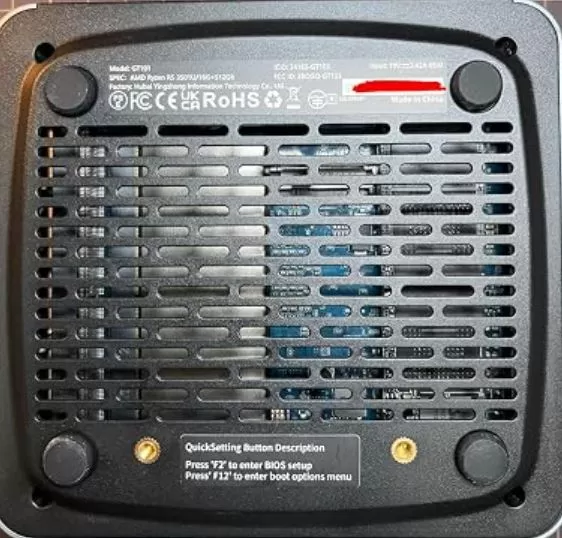
Glorlin advertises temperatures below 65°C in office use and 38 dB of noise. This is a low level, comparable to a library. During light tasks, the fan is almost imperceptible.
Under prolonged load, such as a performance test or video conversion, the fan speeds up and becomes audible, as in any mini PC of this size.
If you are going to put it next to the bed or in a quiet room, place it with free ventilation and avoid closing it up in a piece of furniture.
🔗 Connectivity
| Connection | Detail |
|---|---|
| WiFi / Bluetooth | WiFi 6 / Bluetooth 5.3 |
| Network cable | 1 x Gigabit Ethernet |
| Fast USB | 2 × USB 3.2 Gen 2 (front) |
| slow USB | 2 × USB 2.0 (rear) |
| USB-C | 1 with video and charging and 1 data only |
| Video | 2 × HDMI 2.0 and DisplayPort over USB-C |
| Audio | 3.5 mm jack |
| Extras | VESA mount included; no 5G, NFC, fingerprint reader or IP certification |
The high-speed USB ports are on the front. Reserve the rear ports for your keyboard, mouse, or other accessories that don't require high speed.
🛠️ How to Enlarge It
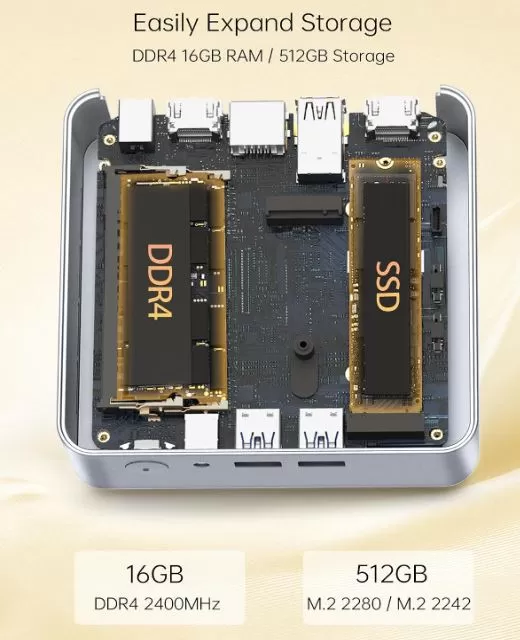
The GT101 can be upgraded without special tools: two memory slots, a swappable SSD, and fast USB ports for external storage. It doesn't have a second M.2 slot or a 2.5" drive bay, so extra storage is added via USB.
🧠 RAM memory: the most cost-effective upgrade
The device uses DDR4 memory in SO-DIMM format (the type used in laptops) and has two slots. The 16GB version comes with a single module, as does the 8GB version, so in both cases one slot remains free. Glorlin indicates a maximum of 32GB.
The processor only supports DDR4 memory up to 2400 MT/s, which is its official speed. If you buy faster modules (2666 or 3200), they will still operate at 2400 MT/s. It's not worth paying more for them.
| Configuration | Channel | Theoretical bandwidth | For whom |
|---|---|---|---|
| 1 × 8 GB (standard on the basic version) | Only | ~19 GB/s | Very lightweight office suite |
| 1 × 16 GB (standard on the 16 GB version) | Only | ~19 GB/s | Daily use |
| 2 × 8 GB | Double | ~38 GB/s | Better graphics performance with the same capacity |
| 2 × 16 GB | Double | ~38 GB/s | Maximum recommended (32 GB) |
The figures are theoretical: a DDR4-2400 module reaches a maximum of 19,200 MB/s, and dual-channel doubles that. Radeon Vega 8 graphics cards use system RAM, so they benefit the most from dual-channel, with noticeable improvements in light gaming and emulation.
Buying advice:
-
Choose 1.2V DDR4 SO-DIMM modules, the same size as the one already in the computer, to form a balanced pair.
-
If you have the 8GB version, adding another 8GB drive (16GB total, dual-channel) is the cheapest option. For extra storage, install 2 x 16GB.
-
Dual-range modules tend to perform somewhat better than single-range modules.
🛒 8 GB DDR4 SO-DIMM RAM on AliExpress
🛒 16 GB DDR4 SO-DIMM RAM on AliExpress
🛒 2 × 16 GB DDR4 SO-DIMM kit on AliExpress
💾 Internal storage: change the SSD
The GT101 uses an NVMe SSD in M.2 2280 form factor. The 512GB version also supports the 2242 short form factor. Since it's NVMe PCIe 3.0, this is the type of SSD you should choose.
| Unit type | Approximate reading | approximate writing |
|---|---|---|
| SSD included (256 GB version) | ~1,800 MB/s | ~1,600 MB/s |
| Mid-range NVMe PCIe 3.0 SSD | ~2,000–3,000 MB/s | ~1,500–2,500 MB/s |
| Theoretical limit of PCIe 3.0 x4 | ~3,500 MB/s | ~3,500 MB/s |
| SATA SSD (reference) | ~550 MB/s | ~500 MB/s |
A PCIe 4.0 or 5.0 SSD will work, but it's limited to PCIe 3.0 speeds, so it's not worth paying more. In everyday use, going from ~1,800 MB/s to ~3,000 MB/s is barely noticeable when opening programs; it's more noticeable when copying large files.
Before changing it:
-
Back up or clone the disk, because the BIOS can restore the original Windows after system changes.
-
Retrieve your Windows key from the system itself, as it is not printed on the computer.
🛒 512 GB NVMe M.2 2280 SSD on AliExpress
🛒 1 TB NVMe M.2 2280 SSD on AliExpress
🔌 External storage: the way to add more space
Since there is no second internal slot, the way to gain capacity is through USB.
| Port | Theoretical speed | Approximate actual speed | Recommended use |
|---|---|---|---|
| USB 3.2 Gen 2 (front) | 10 Gb/s | ~900–1,000 MB/s with an external SSD | External hard drive, backups |
| USB 2.0 (rear) | 480 Mb/s | ~35–40 MB/s | Keyboard, mouse, accessories |
An external M.2 SSD enclosure on the front USB port allows you to reuse an NVMe SSD at around 900–1,000 MB/s, enough for a multimedia library or backups.
🛒 USB 3.2 Enclosure for NVMe SSD on AliExpress
🔧 What to expand first
-
8GB version: Add a second 8GB module. This increases the total to 16GB in dual-channel mode and is the most significant upgrade.
-
16GB version: A second 16GB module (32GB total) is only worthwhile if you work with many applications or virtual machines. For light gaming or emulation, dual-channel memory offers more than just extra storage capacity.
-
SSD: Upgrade when you need more storage, not for speed. The performance improvement is minimal.
-
Extra space: a USB enclosure for an NVMe SSD is the alternative to a second internal slot.
If you need more internal expansion, there are mini PCs with the same processor and more features: the GMKtec NucBox G10 with a Ryzen 5 3500U supports 64 GB of RAM and two M.2 SSDs, with a maximum combined capacity of 16 TB. The trade-off is a higher price than the GT101.
💶 Price: Which version to choose
| Version | Approximate price on Amazon | Net with coupon |
|---|---|---|
| 8 GB/256 GB | $229–280 | $207–210 |
| 16 GB/512 GB | $300–310 | ~$265 |
Prices change frequently, and shipping from Amazon.com to Spain adds about $33 to some listings. For about $55 more, the 16GB/512GB version doubles the memory and storage, making it the best value.
⚖️ Similar mini PC alternatives
| Model | Processor | Grid | Indicative price | Ideal for |
|---|---|---|---|---|
| Glorlin GT101 | Ryzen 5 3500U/3501U | 1 × Gigabit | $210–265 | Office and multimedia 👉 See Glorlin GT101 Prices |
| Glorlin GT103 | Ryzen 5 6600H | 2 x Gigabit | ~$360 | More power and emulation 👉 See Glorlin GT103 Prices |
| Glorlin GT103 | Ryzen 7 6800H | 2 x Gigabit | ~$370 | Multitasking and light gaming 👉 See Glorlin GT103 Prices |
| Chuwi Aubox | Ryzen 7 8745HS | 2 × 2.5G | ~$300 | Much more information available 👉 See Chuwi Aubox Prices |
| Intel N100 Mini PC | Intel N100 | Variable | Variable depending on brand | Low consumption 👉 See Prices |
The GT103 with the 6600H costs around $359 and adds a metal casing, 6 cores, and dual Ethernet. If your budget allows, it's a significant upgrade. The Minix ZR535 uses the same chip as the GT101 but costs considerably more.
⭐ Buyer Reviews
On Amazon, the GT101 with 16GB/512GB has a rating of 4.5 out of 5 based on 121 reviews, and monthly sales exceed 300 units. This figure is shared with other models in the same product family.
What is valued most:
-
Its small size and ease of concealment.
-
It works right out of the box.
-
Compatibility with Windows and Linux distributions.
-
Its value for money.
The most criticized aspects:
-
The fan under high load.
-
Lightweight construction.
-
The difficulty in changing operating systems due to BIOS protection.
-
The Windows key should not be visible.
Layer3Labs considers it suitable for office applications, with the caveat that the brand doesn't have much of a track record.
🎮 Games and emulation
With Vega 8 graphics and single-channel memory, the GT101 is suitable for light gaming and classic emulation. On systems with this same chip, most games run at 720p with medium or low settings and over 30 fps.
| Game type | What to expect |
|---|---|
| Classic 8-bit and 16-bit consoles | Very fluid |
| PlayStation 1 and Nintendo 64 | Fluid in most titles |
| PSP and Dreamcast | Playable in many titles, with adjustments |
| PS2, GameCube and Switch | Not recommended |
| Lightweight PC games | 720p with low detail |
With dual-channel RAM, you'll notice an improvement in the integrated graphics.
🧪 Technical tests
Approximate values for the Ryzen 5 3500U/3501U (same chip with two names) in the most common tests, plus data from the manufacturer. Performance may vary between units depending on the BIOS, temperature, and installed memory.
⚙️ Processor
| Proof | Approximate result | What does it mean |
|---|---|---|
| CPU-Z, a core | 421.9 points | Speed in simple tasks |
| CPU-Z, all cores | 2,068.9 points (ratio 4.90) | Multitasking performance |
| Cinebench R23, a core | ~780 points | Basic laptop level |
| Cinebench R23, all cores | ~3,450–3,550 points | Sufficient for office work and light multitasking |
| Geekbench 6, a core | ~880 points | Quick response in the system |
| Geekbench 6, all cores | ~2,500–2,900 points | Entry level |
| PassMark, one core / all | ~1,880 / ~6,690 points | General reference |
The CPU-Z results correspond to a real GT101 unit with a 3501U, and the rest are averages from databases of the 3500U chip, which is the same processor.
🎮 Graphics (Radeon Vega 8)
| Proof | Approximate result |
|---|---|
| 3DMark Time Spy | ~1,400 points |
| 3DMark Fire Strike | ~4,500 points |
| 3DMark Night Raid | ~17,900 points |
With the standard single-channel memory, these values can drop between 10% and 20%. With a second module and dual-channel configuration, they approach the values shown in the table.
🕹️ Games and emulation (indicative estimate)
| Game type or emulator | Expected performance |
|---|---|
| 8-bit and 16-bit emulators | 60 stable fps |
| PlayStation 1 and Nintendo 64 | 60 fps in most titles |
| PSP and Dreamcast | 30–60 fps depending on the game, with settings |
| eSports games (CS2, League of Legends) at 720p with low quality | ~40–60 fps |
| Light PC games at 720p with low details | 30 fps or more in most |
| PS2, GameCube and Switch | Not recommended |
🧠 RAM Memory
| Configuration | Speed | Theoretical bandwidth |
|---|---|---|
| 1 DDR4 module (standard) | 2400 MT/s | ~19 GB/s |
| 2 modules in dual channel | 2400 MT/s | ~38 GB/s |
💾 Storage (NVMe SSD)
| Proof | Approximate result |
|---|---|
| Sequential reading | ~1,800 MB/s |
| Sequential writing | ~1,600 MB/s |
| Copy of a 10 GB file | ~6 seconds for reading and ~6–7 seconds for writing |
| Windows 11 startup | ~15–25 seconds (estimated) |
| USB 3.2 Gen 2 (front) with external SSD | ~900–1,000 MB/s |
| USB 2.0 (rear) | ~35–40 MB/s |
The SSD speeds are those advertised by the manufacturer for the 256GB version. The 512GB version may vary depending on the drive model.
🌡️ Consumption, temperature and noise
| Extent | Manufacturer's data | Realistic estimate |
|---|---|---|
| Maximum processor power consumption | 15 W (up to 25 W) | ~20–30 W in the complete unit under load |
| Standby power consumption | Not indicated | ~6–10 W |
| Office temperature | Less than 65 °C | ~45–65 °C |
| Temperature under prolonged load | Not indicated | ~75–90 °C |
| Noise in light use | 38 dB | ~35–38 dB |
| Noise under load | Not indicated | ~40–45 dB, audible fan |
The estimates are based on a 15W mini PC with similar cooling, not on direct measurements of the GT101. At 15–25W consumption, the electricity cost of having it on all day is very low, around 150–250 Wh per day at rest.
📌 Performance Summary
| Use | Result |
|---|---|
| Office automation, browsing and video | ✅ Very good |
| Media server and 24-hour use | ✅ Very good for the low consumption |
| Classical emulation | ✅ Good |
| Light gaming at 720p | ⚠️ Acceptable |
| Video editing and current games | ❌ Not recommended |
❓ Frequently Asked Questions
Which is better, the 3500U or the 3501U? Neither. They're the same chip, and you should choose based on your RAM and SSD.
Is the 8GB version worth it? Only if you find a very low price. For Windows 11 with multiple tabs, 16GB works better.
How much RAM does it support? Up to 32 GB, with two SO-DIMM slots.
Can I install another SSD? Yes, an NVMe M.2 2280. It does not include a second slot.
Does it have Ethernet? Yes, a Gigabit RJ45 port.
Can I connect three monitors? Yes, using the two HDMI outputs and the USB-C video output.
Is it suitable for games? For lightweight games and classic emulation, yes. For modern games, no.
🏁 Conclusion
The GT101 is a good buy for anyone looking for a small, quiet, and inexpensive PC for everyday use, for the office, studies, or a multimedia center.
The 16GB/512GB version, priced at around $265 net at this time, is the one we recommend. If you need more power, the GT103 with a Ryzen 5 6600H or Ryzen 7 6800H is the next step up, for about $95-105 more.
🛒 Where to buy it
👉 See Glorlin GT101 prices on Amazon
👉 Check if the Glorlin GT101 mini PC is available on AliExpress