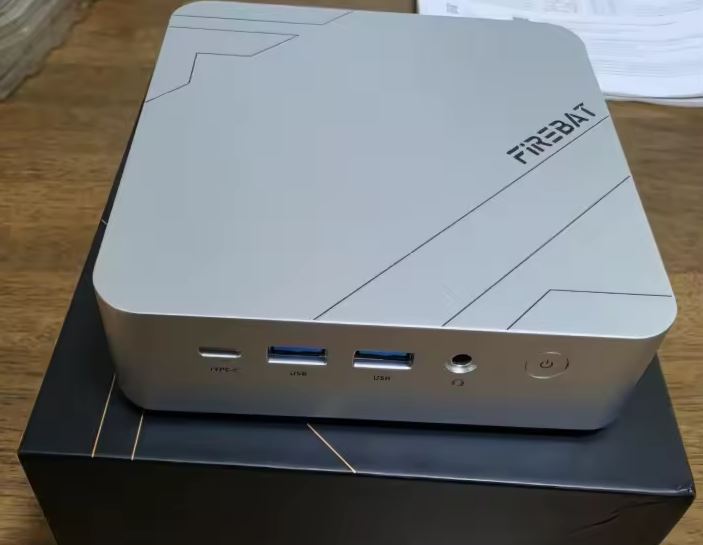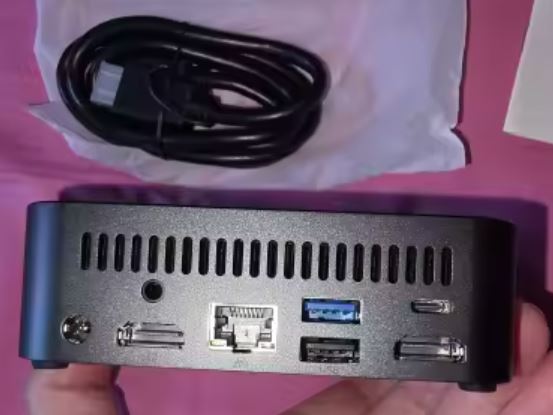
The MLLSE G5 Pro has quickly become one of the best-selling and most talked-about mini PCs in the entry-level to high-performance range, accumulating over 600 units sold with an outstanding rating of 4.8 out of 5 stars on AliExpress as of the publication of this post.
The secret to its success? Offering a genuine high-end mobile processor, the AMD Ryzen 7 5800H (8 cores and 16 threads Zen 3), along with 16 GB of RAM and triple 4K video output in an ultra-compact chassis for an affordable price.
After analyzing test bench data and direct feedback from users who have purchased and thoroughly tested it, we break down in this comprehensive analysis everything good and what could be improved about this small machine.
⚖️ Initial Verdict: Pros and Cons
The MLLSE G5 Pro offers an almost unbeatable power/price ratio for those seeking raw processing power for multitasking, video editing, programming, or virtualization without paying the extra costs of traditional brands.
Its 8 Zen 3 cores perform excellently, although its compact 114mm chassis forces the fan to work at high speeds under continuous stress and it has only one M.2 storage slot.
✅ Pros:
-
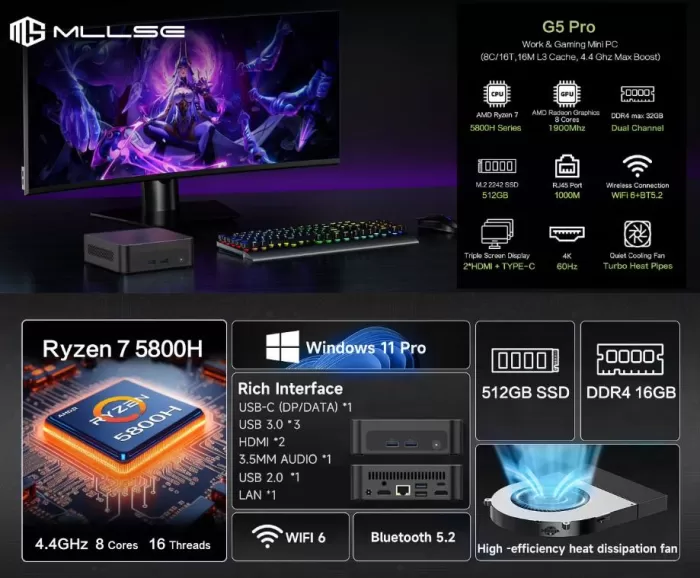
Outstanding performance with the AMD Ryzen 7 5800H (8 real cores, 16 threads up to 4.40 GHz)
-
Excellent community rating: 4.8/5 stars with over 600 units sold
-
Triple synchronous 4K display output (2x HDMI 2.0 + 1x USB Type-C with DisplayPort and data)
-
Expandable RAM in Dual Channel up to 64 GB (2 SO-DIMM slots)
-
AMD Radeon Vega 8 graphics (8 CUs at 2,000 MHz) with great compatibility in games and emulators
-
Easy opening and maintenance using only 4 screws on the base
-
Windows 11 Pro pre-installed and ready to set up with no bloatware
❌ Cons:
-
It has a single M.2 SSD slot (to upgrade, the existing drive must be replaced)
-
The cooling fan gets quite noisy and blows strongly under heavy loads.
-
The mini PC body gets hot to the touch during extended use sessions
-
The standard M.2 SSD operates at SATA3 speeds (~530-550 MB/s) instead of faster NVMe
-
Wired network limited to Gigabit Ethernet (1000 Mbps) instead of 2.5G
👉 See the price of the MLLSE G5 Pro on AliExpress
📦 Unboxing and Box Contents
The MLLSE G5 Pro packaging arrives well protected in a neutral cardboard box with dense foam inserts to prevent any damage during international shipping:
-
MLLSE G5 Pro Mini PC (black finish)
-
External DC power adapter (19V / 3.42A - 4.74A depending on batch, up to 90W)
-
Standard HDMI cable compatible with 4K@60Hz signal
-
Metal VESA mounting bracket with its respective screws
-
User manual and quick start guide
⚙️ Technical Specifications Sheet
| Component / Feature | Technical Details |
|---|---|
| Processor (CPU) | AMD Ryzen 7 5800H (Cezanne/Zen 3 architecture, 7nm FinFET) |
| Cores and Threads | 8 physical cores / 16 threads (3.20 GHz base / up to 4.40 GHz Turbo) |
| Cache | 16 MB L3 Cache + 4 MB L2 Cache (20 MB total) |
| Energy consumption (TDP) | 35W – 45W base TDP (configurable in BIOS) |
| Integrated graphics (GPU) | AMD Radeon™ Graphics (Vega 8 architecture, 8 CUs / 512 Shaders up to 2,000 MHz) |
| RAM | 16 GB DDR4 SO-DIMM at 3200 MHz (expandable up to 64 GB in Dual Channel) |
| Standard storage | 512 GB SSD M.2 2280 (SATA3 interface / PCIe compatible) |
| Storage slot | 1x single M.2 2280 slot (supports SATA and NVMe PCIe up to 1TB/2TB) |
| Video outputs | Triple 4K@60Hz: 2x HDMI 2.0 + 1x USB Type-C (DP Alt Mode + Data) |
| Wired network (LAN) | 1x RJ45 Gigabit Ethernet (1000 Mbps) |
| Wireless connectivity | Wi-Fi 6 (802.11ax dual band) + Bluetooth 5.2 |
| USB ports | 3x USB 3.0 (Type A), 1x USB 2.0 (Type A), 1x USB Type-C (multifunction) |
| Audio | 3.5 mm combined jack connector for headphones and microphone |
| Refrigeration | Active, improved quiet copper fan and multiple air outlets |
| Dimensions and weight | 114 × 106 × 42.5 mm (~420 grams) |
| Operating system | Windows 11 Pro (64-bit, compatible with Linux distributions) |
🧱 Design and Construction Quality
The MLLSE G5 Pro uses a compact chassis with identical dimensions to the M6 model ( 114 × 106 × 42.5 mm ), taking up less than half a liter of volume on the desktop.
The exterior combines a robust, matte black frame with perforated grilles on the sides and back. Users who have received it highlight that the device feels solid, well-assembled, and not at all flimsy.
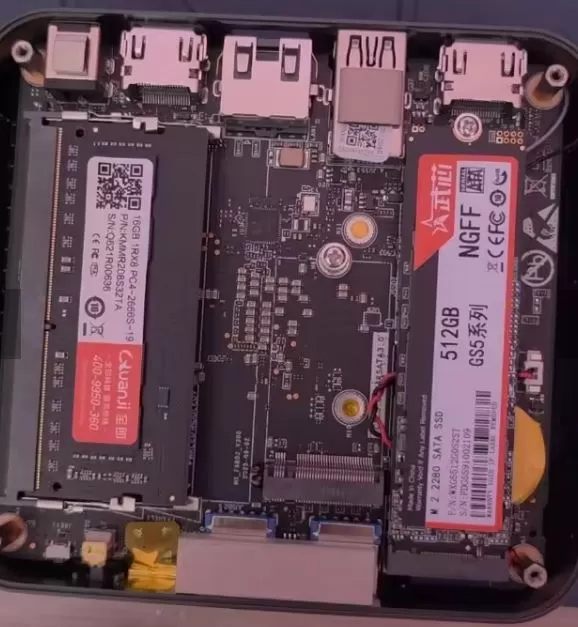
One aspect highly praised by the community, contrary to certain internet myths, is its ease of opening: you only need to remove 4 screws located under the lower rubber feet to immediately access the two SO-DIMM RAM memory slots and the single M.2 SSD socket.
🖥️ Screen and Multimedia Experience
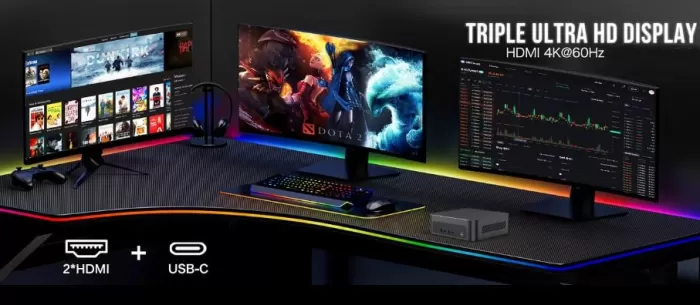
In terms of image and sound, this small computer stands out for its ability to power three 4K 60Hz displays simultaneously and independently:
-
Output distribution: It has 2 full-size HDMI 2.0 ports and 1 front USB Type-C port with native support for DisplayPort video output (DP Alt Mode).
-
Multimedia performance: The integrated AMD Radeon graphics handle Ultra HD resolutions with absolute ease, both on the desktop and when streaming video (YouTube 4K, Netflix or local players like VLC).
-
User experience: Buyers who have connected it to large-format TVs in the living room note that it is a perfect machine for streaming from a main desktop PC using Moonlight, Steam Link or Sunshine, handling 4K resolutions at 60 FPS with minimal decoding latency.
⚡ Performance, Software and Storage
The real strength of the MLLSE G5 Pro lies in the power of its AMD Ryzen 7 5800H processor. Unlike chips that combine slow and fast cores, this one boasts eight full high-performance Zen 3 cores capable of processing 16 threads simultaneously.
Operating system and startup
The computer comes with Windows 11 Pro pre-installed but not initialized, meaning that upon first use, the user is immediately greeted by the official Microsoft setup wizard (OOBE) to choose language, account, and personal preferences. The units received by buyers confirm 100% new components: analysis with CrystalDiskInfo reveals drives with only 10-11 factory boot cycles resulting from quality control testing.
Internal storage speeds
The standard 512GB drive comes installed in its M.2 slot using SATA3 bus. Real-world tests recorded with CrystalDiskMark yielded the following results:
-
Sequential Read (SEQ1M Q8T1): 549.04 MB/s
-
Sequential Read (SEQ1M Q1T1): 529.60 MB/s
-
Sequential Write (SEQ1M Q8T1): 422.61 MB/s
-
Sequential Write (SEQ1M Q1T1): 411.12 MB/s
-
Random Read (RND4K Q32T1): 218.50 MB/s
-
Random Write (RND4K Q32T1): 207.30 MB/s
Although these figures are more than enough for the system to boot in about 12 seconds and office tasks to feel instantaneous, this unique M.2 slot is of a hybrid type: it is compatible with both the SATA standard and the high-speed PCIe NVMe protocol, allowing you to replace the original drive with a 1 TB or 2 TB NVMe drive to multiply transfer rates by higher speeds.
👉 See the price of the MLLSE G5 Pro on AliExpress
🔌 Energy Consumption and Cables
Despite using a 45W H-series chip, TSMC's 7nm lithography for AMD provides remarkable power efficiency:
-
Standby/Idle Desktop: Ranges between 9W and 13W.
-
Office use and web browsing: Between 22W and 35W.
-
Rendering load or heavy games: It stabilizes around 48W – 58W, with occasional peaks of up to 65W during the first few seconds of boost.
The transformer included in the box (19V) provides enough headroom to keep the equipment powered along with several hard drives or peripherals connected to its USB ports.
🌡️ Temperature and Noise: Actual Thermal Behavior
The thermal aspect is the point where real user reviews most agree, and it's important to be completely transparent about it:
-
Improved copper heatsink: The manufacturer has incorporated a pure copper radiator assisted by multiple air openings in the casing to keep the 8 cores of the Ryzen 7 under control.
-
Chassis temperature: At idle, the CPU temperature remains between 45°C and 52°C. During sustained demanding tasks, the internal temperature rises to 82°C–86°C. The mini PC's body feels warm to the touch, but not to extreme levels that would compromise the circuitry.
-
Fan noise level: As reported by AliExpress buyers: "The fan is noisy, it activates automatically and blows strongly. The chassis is always warm, but not alarmingly so." When the processor is under heavy load, the small turbine accelerates decisively to expel the hot air. For light tasks or watching a movie, it remains at a moderate level, but if you're going to be rendering video or playing games daily, you'll hear a constant and noticeable airflow on the desktop.
🌐 Connectivity and Ports
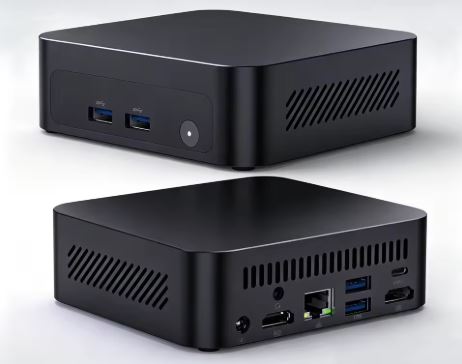
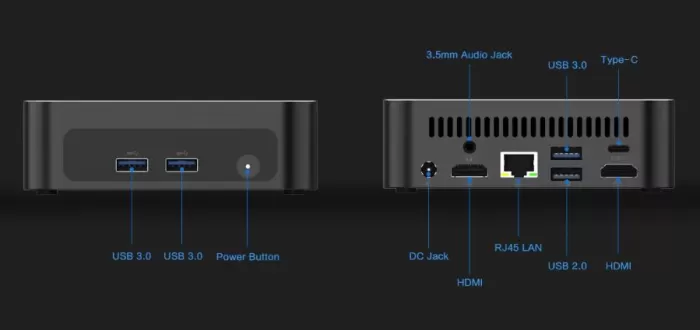
The port distribution in this model is extremely balanced:
-
Front panel:
-
1x Multifunction USB Type-C Port (DisplayPort video output + data transfer)
-
2x High-speed USB 3.0 Type-A ports
-
1x 3.5mm combo audio jack connector
-
Power button with integrated LED
-
-
Rear panel:
-
2x HDMI 2.0 video outputs (4K at 60 Hz)
-
1x USB 3.0 Type A Port
-
1x USB 2.0 Type A port (ideal for mouse and keyboard receiver)
-
1x RJ45 Gigabit Ethernet network port (1000 Mbps)
-
1x DC Power In (19V)
-
-
Wireless section: It incorporates a card with Wi-Fi 6 and Bluetooth 5.2, offering great coverage and connection stability without the need for network cables.
🛠️ Expansion and Upgrades: What Can We Improve?
The MLLSE G5 Pro's motherboard allows for upgrading its key components, with one important feature being storage:
-
RAM: It has two DDR4 SO-DIMM slots. The stock configuration includes 16 GB at 3200 MHz. The motherboard supports modules up to 32 GB per slot, allowing for a maximum of 64 GB of RAM in dual channel for users working with virtual machines, heavy analytics, or intensive editing.
-
SSD Storage (Single Slot): The computer has only one M.2 2280 slot, which comes pre-installed with a 512 GB drive. This slot is compatible with both SATA and PCIe NVMe (Gen3/Gen4) protocols, supporting drives up to 1 TB or 2 TB. To expand storage capacity, a second internal drive cannot be added; the original 512 GB drive must be removed and replaced with the new SSD (after cloning the system or performing a clean installation of Windows).
💡 Pro upgrade tip:
With only one M.2 slot, the best investment if you need more space or speed is to replace the stock SATA drive with a 1TB or 2TB M.2 2280 NVMe PCIe SSD, which will increase read/write speeds sixfold and unleash the full potential of the Ryzen 7 processor.🛒 If you want to upgrade your mini PC with the best prices and offers:
You can purchase a 3200 MHz DDR4 SO-DIMM RAM memory module to upgrade your system to 32 GB or 64 GB.
Or buy a high-speed M.2 NVMe PCIe SSD (1 TB or 2 TB) to replace the original drive and speed up the system.
📊 Comparison with Direct Competitors
| Feature | MLLSE G5 Pro | Blackview MP100 | FIREBAT A6 | SOYO M5 |
|---|---|---|---|---|
| Processor (CPU) | AMD Ryzen 7 5800H (8C/16T up to 4.4 GHz) | AMD Ryzen 5 7430U (6C/12T up to 4.3 GHz) | AMD Ryzen 7 7735HS (8C/16T up to 4.75 GHz) | AMD Ryzen 3 4300U (4C/4T up to 3.7 GHz) |
| Architecture | Zen 3 (7 nm) | Zen 3 (7 nm) | Zen 3+ (6 nm) | Zen 2 (7 nm) |
| TDP base | 35W – 45W (High performance) | 15W – 25W (Low consumption) | 35W – 54W (Gamer/Creator) | 15W (Low consumption) |
| Integrated graphics | Radeon Vega 8 (2,000 MHz) | Radeon Vega 7 (1,800 MHz) | Radeon 680M (RDNA2) | Radeon Vega 5 (1,400 MHz) |
| RAM | 16 GB DDR4 (expandable to 64 GB) | 16 GB DDR4 (expandable to 64 GB) | 16 GB DDR5 (expandable to 64 GB) | 16 GB LPDDR4 ( soldered on board ) |
| Storage | 512 GB M.2 (SATA/NVMe) | 512 GB M.2 NVMe PCIe | 512 GB M.2 NVMe PCIe | 512 GB M.2 SSD |
| Video outputs | Triple 4K: 2x HDMI + USB-C | Triple 4K: HDMI + DP + USB-C | Triple 4K: HDMI + DP + USB-C | Dual 4K: HDMI + Type-C |
| wired network | 1x RJ45 Gigabit (1000M) | 1x RJ45 Gigabit (1000M) | 1x RJ45 2.5G (2500M) | 1x RJ45 Gigabit (1000M) |
| Wi-Fi connection | Wi-Fi 6 + BT 5.2 | Wi-Fi 6 + BT 5.2 | Wi-Fi 6 + BT 5.2 | Wi-Fi 5 + BT 4.2 |
| Regular price | ~€250 – €350 | ~€260 – €370 | ~€420 – €445 | ~€230 – €240 |
| Purchase link | View on AliExpress | Buy on AliExpress | Buy on AliExpress | Buy on AliExpress |
💬 Real Buyer Reviews on AliExpress
With an average rating of 4.8/5 and over 600 sales accumulated, verified reviews from real users provide a reliable picture of the shopping experience:
-
Component verification: Users highlight the hardware's authenticity: "Perfect, Windows pre-installed but not initialized, verified with CPU-Z and CrystalDiskInfo. All specifications are consistent with the Ryzen G5 Pro 5800H. 16GB DDR4 and 512GB hard drive. New hard drive with only 11 boot times. "
-
General performance: Its fast startup and multitasking capabilities are appreciated: "The mini PC turned on without problems and updated itself within an hour. It is suitable for common tasks, browsing, editing documents, multimedia, and not very demanding games. "
-
Honest feedback about the fan: As an area for improvement, users honestly warn: "The only comment: the fan is noisy, it turns on automatically and blows strongly. The chassis is always warm, but not alarmingly so. "
-
Ease of access: Faced with doubts about expansions, buyers debunk myths: "I read that it was impossible to open. It's just 4 screws under the legs! "
-
Fast logistics: Numerous European customers point out the advantage of local shipping: "Black color, shipped from France: arrived quickly and with very robust packaging. "
🔬 Technical Tests and Real Benchmarks
1. Cinebench R15
-
OpenGL: 70.23 FPS (Ref. match: 97.9%), demonstrating the agility of the Vega 8 graphics engine in hardware rendering.
-
Multi-Core CPU: 1,476 cb (very solid multi-core computing power for its size).
-
Single-Core CPU: 216 cb (excellent single-core response for browsing and opening applications).
-
MP Ratio: 6.82x (magnificent utilization of the 16 processing threads).
2. Storage Speed (CrystalDiskMark - Serial Disk)
-
Sequential Read (SEQ1M Q8T1): 549.04 MB/s
-
Sequential Read (SEQ1M Q1T1): 529.60 MB/s
-
Sequential Write (SEQ1M Q8T1): 422.61 MB/s
-
Sequential Write (SEQ1M Q1T1): 411.12 MB/s
-
Random Read (RND4K Q32T1): 218.50 MB/s | RND4K Q1T1: 35.86 MB/s
-
Random Write (RND4K Q32T1): 207.30 MB/s | RND4K Q1T1: 90.34 MB/s
🎮 Gaming and Emulation Performance
The AMD Radeon Vega 8 graphics card (up to 2,000 MHz) integrated into the Ryzen 7 5800H clearly outperforms the integrated Intel UHD graphics in compatibility and optimization under DirectX 11, DirectX 12 and Vulkan:
-
Esports games and popular titles: Titles like League of Legends, Valorant, and Rocket League run very stably at 1080p on medium-high settings between 70 and 90 FPS. Games like GTA V or CS2 run smoothly between 45 and 60 FPS at 1080p or 900p resolution with low settings.
-
Modern AAA games: Very demanding titles like Cyberpunk 2077 or Red Dead Redemption 2 require dropping to 720p with FSR enabled to get around 30-35 FPS at minimum quality.
-
Console emulation: It's a little beast for emulation. It smoothly runs PlayStation 2 (PCSX2) and Nintendo GameCube/Wii (Dolphin) emulators upscaled to 1080p at a stable 60 FPS. In more demanding emulators like RPCS3 (PlayStation 3) or Nintendo Switch emulators, its 8 cores and 16 threads allow you to play a large part of the catalog with performance superior to that offered by Intel processors in the same price range.
❓ Frequently Asked Questions (FAQ)
Can a second SSD or 2.5-inch drive be added?
No. The computer only has one M.2 2280 slot. To expand storage capacity, you must remove the original 512 GB hard drive and replace it with a new 1 TB or 2 TB drive.
Does the M.2 slot support fast NVMe drives or only SATA?
It is a hybrid slot compatible with both SATA and PCIe NVMe drives, allowing the installation of fast, latest-generation drives.
What exactly is the name of the integrated graphics card?
It is commercially known as AMD Radeon™ Graphics. Technically, it is a Radeon Vega 8, with 8 GPU cores (512 shaders) operating at a frequency of up to 2,000 MHz.
How much RAM can be expanded?
It has 2 SO-DIMM DDR4 slots and supports up to 64 GB of RAM (2 x 32 GB modules) running in Dual Channel.
Is it difficult to open it to change the hard drive or RAM?
Not at all. You simply need to remove the four screws located under the lower rubber feet to remove the cover and access the motherboard.
Can you connect 3 monitors simultaneously in 4K resolution?
Yes. The device allows you to connect three 4K displays at 60 Hz using its two HDMI 2.0 ports and the USB Type-C port with DisplayPort Alt Mode.
🏁 Final Conclusion: Is the MLLSE G5 Pro Worth It?
The MLLSE G5 Pro is currently one of the most highly recommended options on the market for those seeking maximum performance for their money. Getting an 8-core, 16-thread processor with Zen 3 architecture, 16 GB of RAM, and triple 4K output for just over 200 euros is hard to beat.
While its fan blows loudly under heavy loads and it only has one M.2 SSD slot (which forces you to replace the drive to free up space), its expandability to 64GB of RAM and compatibility with NVMe drives up to 2TB make it a true all-rounder for productivity, programming, home servers, and living room emulation.
🛒 Where to Buy at the Best Price
You can check the updated price, apply discount coupons, and get the device with fast European shipping from the following links: