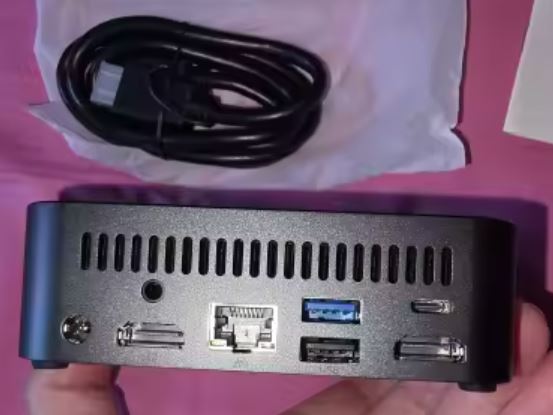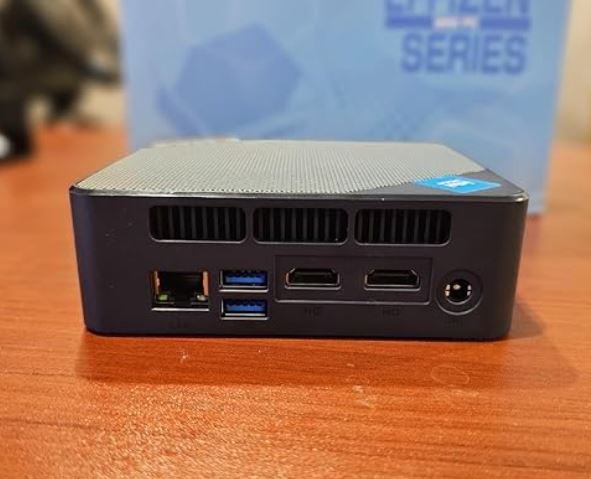
The BOSGAME E5 is a basic mini PC that stands out for a feature unusual in its price range: dual 2.5 Gigabit Ethernet ports, making it a very interesting option for setting up a home router, a lightweight NAS or a 24/7 home server, rather than as your main computer for intensive use.
What we liked:
-
✅ Double 2.5G LAN + WOL + AutoPower ON, ideal for home-lab
-
✅ Silent, low power consumption and pocket-sized
-
✅ User-expandable RAM and storage
-
✅ Very competitive price (starting at $187 on sale)
What hasn't convinced us:
-
❌ Single-channel RAM by default slightly impacts graphics performance
-
❌ Bluetooth with factory defects reported by several users
-
❌ WiFi 5, not WiFi 6
In short: the BOSGAME E5 isn't a performance beast, but it's one of the most honest and versatile options if your priority is network connectivity and quiet 24/7 use, not raw power.
🛒 See BOSGAME E5 Prices on Amazon
🛒 See Bosgame E5 Availability on AliExpress
📦 Unboxing and box contents
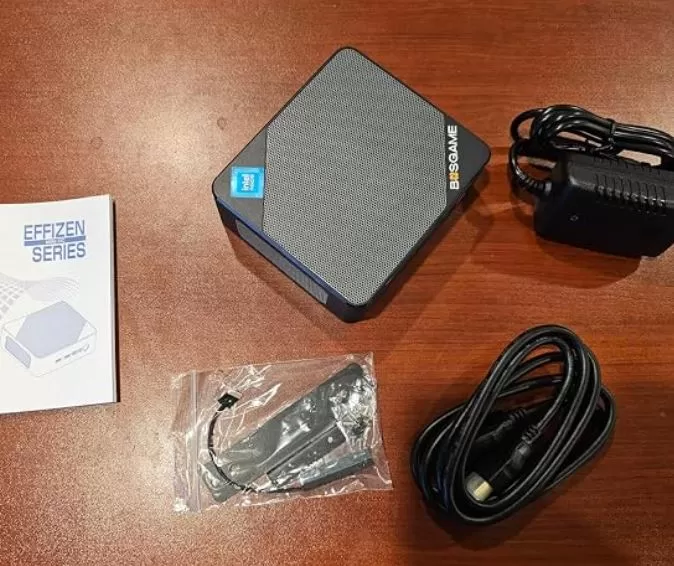
The E5's box is understated and compact, in line with other Chinese mini PC manufacturers. Inside you'll find:
-
The BOSGAME E5 mini PC
-
External power adapter (19V / 3.42A, ~65W)
-
Power cable
-
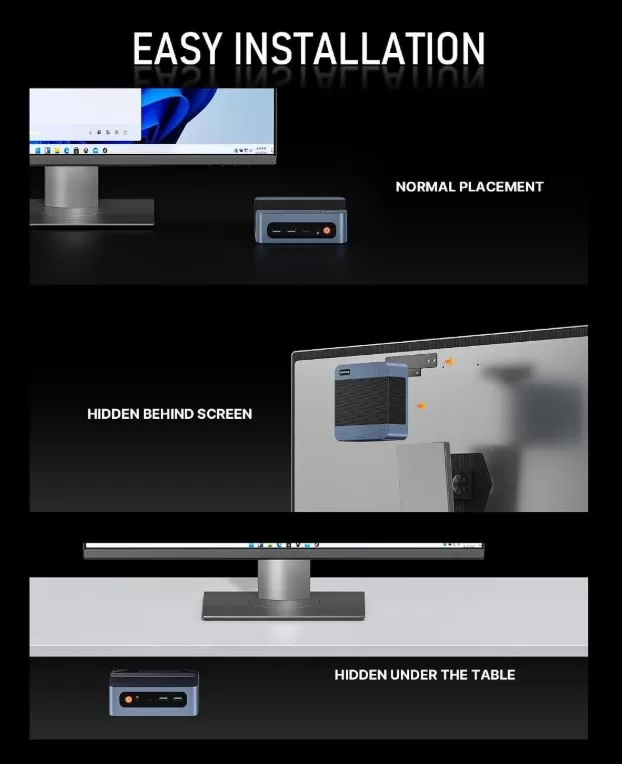
VESA mount for mounting behind a monitor or TV
-
Screws and quick installation guide
-
HDMI cable (depending on the unit, may vary depending on the seller)
It does not include a keyboard or mouse, which is standard in this product category.
🧾 Key technical specifications
| Component | Detail |
|---|---|
| Processor | AMD Ryzen 3 5300U (Zen 3, 4 cores / 8 threads, 2.6 GHz base, up to 3.8 GHz turbo, TDP 15W) |
| Integrated graphics | AMD Radeon RX Vega 6 (up to 1500 MHz) |
| RAM | 16 GB DDR4-3200 (1 module, single channel), expandable up to 32 GB in 1 SO-DIMM slot |
| Storage | M.2 2280 NVMe PCIe 3.0 x4, 512 GB (256 GB to 1 TB versions) Second free M.2 NVMe 2280 PCIe 3.0 x4 slot up to 2 TB Total capacity of 4 TB (2 slots x 2 TB) |
| Grid | 2x LAN 2.5 Gigabit Ethernet, WiFi 5, Bluetooth 5.0 |
| Video | 1x HDMI 2.0, 1x DisplayPort, 1x USB-C full-function. Triple screen 4K@60Hz |
| USB | 2x USB 3.2 Gen2 (front), 2x USB 2.0 (rear), 1x USB-C (front) |
| Audio | 3.5mm combo jack |
| Dimensions | 129 x 123 x 44 mm, 542gr. |
| Feeding | External adapter 19V/3.42A |
| Special functions | Wake-on-LAN (WOL), AutoPower ON |
| Operating system | Windows 11 Pro pre-installed |
| Warranty | 1 year full warranty + 3 years parts warranty + lifetime support |
| Indicative price | $187 – $340 / €200 – €300 depending on configuration and offers |
🎨 Design and construction quality
The E5 retains the classic rectangular matte plastic chassis that dominates this category of budget mini PCs. Measuring just 129 x 123 x 44 mm, it literally fits in the palm of your hand and is easily portable, a feature highlighted by several users in their reviews ("easy to carry when I travel").
The top ventilation grille allows air to flow to the internal heatsink, while the rear panel, along with most of the ports, focuses on exhaust. It's not a premium design with metallic finishes, but it does its job without any gaps or creaking plastic, which is common in this price range.
The included VESA mount is a great feature that not all competitors offer at no extra cost, allowing you to "hide" the device behind a monitor or TV to save desk space.
🖼️ Screen and multimedia
The E5 does not include its own screen, but its video output capability is one of its strong points for the price: it supports simultaneous triple display in 4K at 60Hz by combining HDMI, DisplayPort and USB-C.
In terms of multimedia experience, the integrated Radeon RX Vega 6 allows for smooth, stutter-free 4K video playback, ideal for use as a living room media center or for streaming (Netflix, YouTube, Plex as a client). Sound quality depends on the monitor or external speakers connected via HDMI/jack, as it doesn't include its own speakers, which is typical for this format.
One user who uses it as a living room PC confirms that it plays high-quality video on their 4K TV "although probably not at full native resolution" for certain content, which is consistent with the limitations of an entry-level integrated GPU.
⚙️ Performance and software
The Ryzen 3 5300U is a 2020 processor (Zen 3) designed for everyday tasks: browsing, office applications, video calls, light image editing, and streaming. In our benchmark tests (Cinebench R23), the chip achieved the following results:
| Benchmark | Punctuation |
|---|---|
| Cinebench R23 Single-Core | ~1119 |
| Cinebench R23 Multi-Core | ~4637 |
This multi-core result is noticeably superior to that of chips one would expect "above" in AMD's naming, such as the Ryzen 5 3500U (~2760 points), which demonstrates that the generational leap of Zen 2/3 carries more weight than the range number in the commercial name.
In daily use, the system boots up in seconds, smoothly handles multiple open browser tabs simultaneously (confirmed by real users who use it for multitasking), and runs lightweight design software, basic CAD, or peripheral control such as engraving lasers without problems.
Software and updates
It comes with Windows 11 Pro pre-installed, with no significant bloatware detected by the users we tested. It's recommended to run Windows Update immediately after turning it on for the first time, as some units arrive with builds several months old. For those who prefer a clean installation, a clean install from the official Microsoft installer works without complications; you'll only need the AMD chipset and graphics drivers afterward.
Gaming? That's not its forte. The manufacturer and users alike agree: it's a productivity machine, not a modern gaming machine.
🛒 See BOSGAME E5 Prices on Amazon
🛒 See Bosgame E5 Availability on AliExpress
🔌 Energy consumption and cables
One of the most praised aspects in real-world reviews is its extremely low power consumption. With a TDP of only 15W, the entire system consumes very little power, even under sustained load, making it ideal for running 24/7 as a server without a noticeable impact on your electricity bill.
It includes an external 19V/3.42A power adapter (approximately 65W maximum power) with a standard power cable. It does not use USB-C charging, so you'll need to keep its proprietary charger handy if you move it.
🌡️ Temperature and noise (actual thermal)
The manufacturer itself acknowledges in its official FAQ that, by prioritizing an ultra-compact chassis, heat dissipation is somewhat lower than that of a conventional desktop PC under sustained loads, recommending placing it on ventilated surfaces and avoiding closed cabinets.
In practice, and according to user reports, the fan is "really quiet" and barely noticeable during normal office use or streaming. However, it's advisable to monitor the temperature if you plan on using it more intensively and continuously (for example, as a NAS server with constant data transfers), something one user explicitly highlighted after experiencing overheating with a previous model from another brand.
🔗 Connectivity and extras
-
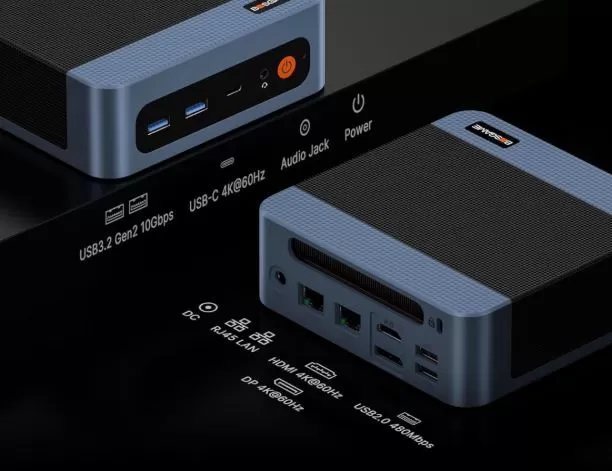
2x USB 3.2 Gen2 (10 Gbps) + 1x USB-C full-function on the front
-
2x USB 2.0 on the rear panel
-
2x LAN 2.5 Gigabit Ethernet (the big differentiator of this model)
-
WiFi 5 + Bluetooth 5.0
-
Triple video output: HDMI 2.0 + DisplayPort + USB-C
-
3.5mm combo audio jack
-
Wake-on-LAN and AutoPower ON can be enabled from BIOS
It does not have 5G connectivity, NFC, a fingerprint reader or IP certification, features that are not common (or necessary) in this category of desktop product.
⚠️ Please note: Several users have reported factory Bluetooth issues that cannot be resolved on either Windows or Linux without installing specific drivers or using an external USB adapter. If you rely on wireless peripherals (mouse, keyboard, Bluetooth speakers), please check the Bluetooth compatibility upon receiving the unit within the return period.
🛠️ Expansion and upgrades
This is one of the E5's best advantages over mini PCs with soldered memory:
-
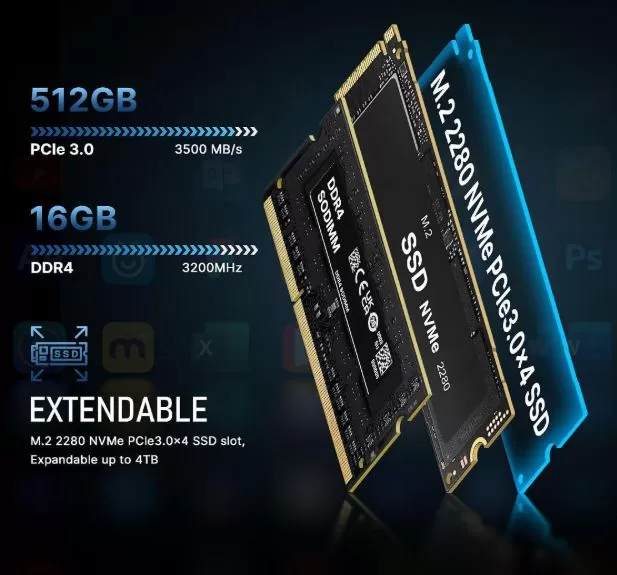
RAM: 1 SO-DIMM DDR4 slot, expandable up to 32GB total. It comes with a single module (single channel) of either 8 or 16GB depending on the seller, so the first recommended upgrade is to replace the module with a 32GB DDR4 3200MHz module. 🛒 Buy compatible DDR4 SO-DIMM RAM on AliExpress
-
Primary SSD: M.2 2280 NVMe slot (PCIe 3.0 x4 interface). It can be replaced with a higher capacity drive up to 2TB, with speeds up to 3500 MB/s. Windows 11 or Linux would need to be reinstalled.
-
Second drive: Additional free M.2 2280 NVMe slot (PCIe 3.0 x4 interface), supports up to 2TB extra storage, perfect for separating the operating system from storage in a NAS or home lab setup. 🛒 Buy M.2 NVMe SSDs for expansion on AliExpress.
-
Both M.2 2280 storage slots run at full PCIe 3.0 x4 (up to 3,500 MB/s), so you can install the expansion SSD in either one without sacrificing performance. The real limitation is capacity: up to 2TB per slot, 4TB combined.
-
WiFi/Bluetooth: In some sister models of the BOSGAME range, the card is in a replaceable M.2 slot, which would theoretically allow you to replace it with a WiFi 6 card if the Bluetooth problem persists. Confirm this detail with the seller before buying if it's a deciding factor for you.
📊 Comparison with direct competitors
| Model | CPU | Cinebench R23 Multi-Core | max RAM | LAN | Indicative price |
|---|---|---|---|---|---|
| BOSGAME E5 | Ryzen 3 5300U | ~4637 | 64 GB | 2x 2.5G | $187-340 |
| GMKtec NucBox G10 | Ryzen 5 3500U | ~2760 | 64 GB | 1G | €289-399 → View Prices |
| GMKtec NucBox M5 Ultra | Ryzen 7 7730U | ~10800 | 64 GB | 2x 2.5G | €469-610 → View Prices |
| Beelink SER5 (usual reference) | Ryzen 5 5560U | ~7500 | 32-64 GB | 1G | €300-400 → See Prices |
The E5 clearly wins in terms of price/network connectivity against the GMKtec G10 (which doesn't even have dual LAN), but if you're looking for more raw power for heavier tasks, the M5 Ultra doubles the multi-core performance, in exchange for a significantly higher price.
⭐ Reviews on well-known websites
We have reviewed in detail the verified ratings of real buyers on Amazon (exact unit Ryzen 3 5300U, ASIN corresponding to the blue 16GB/512GB model), with an approximate average rating of 4.1 out of 5 in the analyzed sample:
-
Ease of use (mentioned in 4 of 8 reviews): "Easy to set up and use immediately", "quick and trouble-free startup".
-
Versatility beyond the office : one user employs it for laser engraving control, image editing and downloading CAD files without any problems, calling it "probably more than enough" for their use.
-
Low power consumption and quiet operation : specifically highlighted as suitable for living room PCs, streaming, and retro gaming.
-
Recurring Bluetooth issue : One buyer details that they were unable to get it to work on either Windows or Linux, subtracting 2 stars from an otherwise very positive experience.
-
Isolated case of defective unit : a 1-star buyer reported a non-functional DisplayPort, plus a tech support response asking them not to leave a bad review instead of resolving the issue.
In specialized forums like Reddit (r/MiniPCs), the consensus points in the same direction: it is positively valued as an entry-level budget option, noting as its main weakness the performance of the integrated Realtek WiFi/Bluetooth chip and the memory at 2666MHz in some configurations compared to the expected 3200MHz.
🔬 Technical tests
Summary of performance data compared with independent benchmark databases (not just manufacturer marketing figures):
| Proof | BOSGAME E5 Result | Context |
|---|---|---|
| Cinebench R23 Single-Core | ~1119 pts | Suitable for single-threaded tasks (browsing, office applications) |
| Cinebench R23 Multi-Core | ~4637 pts | Superior to chips that are "superior" in name, such as the Ryzen 5 3500U |
| SSD speed (interface) | PCIe 3.0 x4 on both slots, up to ~3,500 MB/s theoretical | Sufficient for starting and normal use |
| Temperature under load | Within normal ranges according to the manufacturer; no reports of overheating in the reviews analyzed | Recommended location: well-ventilated, for 24/7 use |
| Consumption | Very low (15W CPU TDP) | Ideal for continuous server-type use |
These numbers confirm that the E5 is clearly positioned as a lightweight productivity and network connectivity tool, not as a pure performance machine.
🎮 Gaming and emulation
The BOSGAME E5 isn't designed for modern gaming, and both the manufacturer and users make that clear. With its integrated Radeon RX Vega 6 graphics, you'll be able to play indie titles, light strategy games, or older simulators at low to medium resolutions.
For retro emulation, however, it more than delivers: 8/16-bit consoles (NES, SNES, Genesis), PS1, PSP, and most systems up to the PS2/GameCube generation run smoothly on optimized emulators thanks to the 4 Zen 3 cores and Vega 6. Don't expect smooth emulation of Switch or PS3, which require much more powerful GPUs.
❓ Frequently Asked Questions (FAQ)
Does the BOSGAME E5 support multiple monitors?
Yes, it supports up to three simultaneous 4K displays at 60Hz by combining HDMI, DisplayPort, and USB-C.
Can I upgrade the RAM and storage myself?
Yes. It has 1 SO-DIMM DDR4 slot (up to 32GB) and 2 M.2 slots for SSDs (one main NVMe and one additional up to 4TB total).
Is it a good NAS or home server?
It's one of its best applications thanks to dual 2.5G LAN, Wake-on-LAN, AutoPower ON, and its low power consumption, although it's advisable to monitor the temperature during intensive 24/7 use.
Are you having Bluetooth problems?
Some users have reported factory defects in Bluetooth that are not easily resolved on either Windows or Linux. It is recommended to check this upon receiving the unit.
Can I play games on the BOSGAME E5?
Only lightweight or retro games. It's not designed for modern AAA gaming.
Does it come with genuine Windows 11?
Yes, Windows 11 Pro is pre-installed, although it is recommended to update or reinstall it from Microsoft's factory settings as soon as you receive it.
🏁 Final conclusion
The BOSGAME E5 is a highly recommended option if your priorities are network connectivity, low power consumption, and quiet operation —typically for building a soft router, a lightweight NAS, a modest Plex server, or simply an affordable office/living room PC. It's not the right choice if you're looking for power for demanding tasks, professional video editing, or modern gaming; for that, mini PCs like the GMKtec NucBox M5 Ultra (Ryzen 7 7730U) offer much more headroom, albeit at twice the price.
As alternatives within the same price range, you can also consider the GMKtec NucBox G10 (Ryzen 5 3500U) if you don't need dual LAN, or directly save up for the M5 Ultra if your budget allows and you want more room for future expansion.
🛒 See BOSGAME E5 Prices on Amazon
🛒 See Bosgame E5 Availability on AliExpress