The Origimagic C3 is an affordable, expandable mini PC suitable for office work, web browsing, use as a home server with Linux, and as a secondary computer. Its main drawbacks are that it only supports Windows 10 and Linux, and its processor is from 2015.
-
👍 Pros: very low price ($169 on Amazon), expandable RAM and SSD, extra 2.5" bay, two HDMI ports, 3-year warranty, VESA mount included.
-
👎 Cons: Windows 11 cannot be installed, only 2 cores, very limited graphics, automatic startup on some computers (confirm with seller).
-
🎯 Conclusion: It's worth it if you want something cheap for basic tasks or for Linux. If you're looking for more power for a little more money, a Ryzen or an Intel N100 clearly perform better.
🌍 See prices for the Origimagic C3 mini PC on Amazon
🔎 Search for the Origimagic C3 on AliExpress
📦 Unboxing and box contents
According to the seller, the box includes:
-
Mini PC C3.
-
Power adapter.
-
User manual.
-
VESA mount with screws.
-
HDMI cable.
It's a complete package for this price: with the HDMI cable and stand, you can mount it behind a monitor from day one.
📋 Key technical specifications
| Paragraph | Fact |
|---|---|
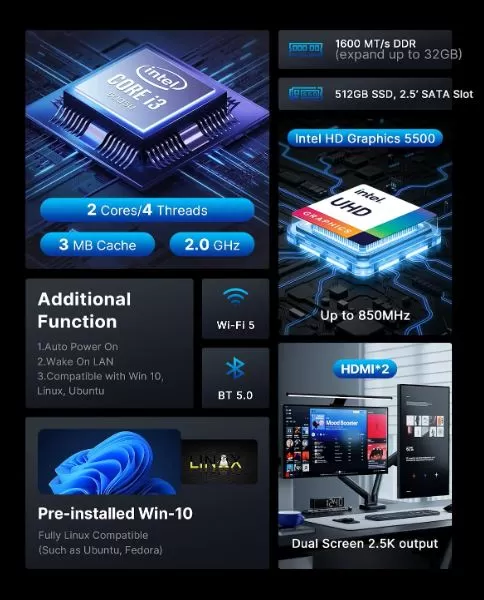
| Processor | Intel Core i3-5005U, 2 cores / 4 threads, 2.0 GHz, 3 MB cache, TDP 15 W |
| Graphics | Intel HD Graphics 5500, up to 850 MHz |
| RAM | 8 GB DDR3L SODIMM at 1600 MT/s. Expandable up to 16GB |
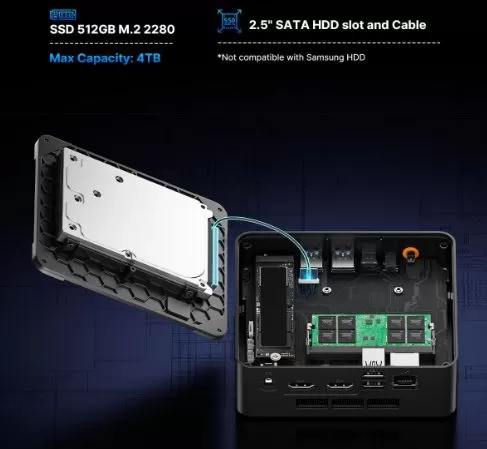
| Storage | 512GB M.2 2280 SSD + 2.5" SATA bay with cable. Expandable up to 4TB |
| Video output | 2x HDMI, up to 2560x1600 at 60 Hz |
| Connectivity | Gigabit Ethernet, WiFi 5, Bluetooth 5.0 |
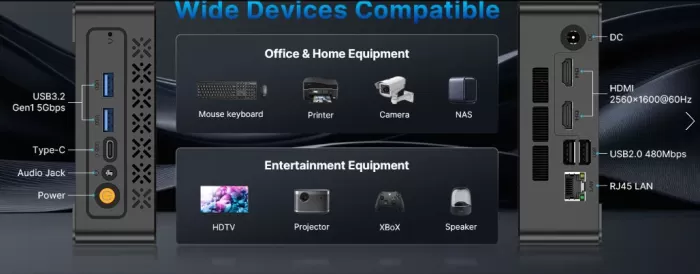
| Ports | Front: 2x USB 3.2 Gen1, USB-C (data only), audio jack. Rear: 2x USB 2.0, 2x HDMI, RJ45, DC |
| System | Windows 10 pre-installed. Compatible with Linux. Does not support Windows 11. |
| Declared noise | 36 dB |
| Warranty | 3 years |
| Price | $169 on Amazon (as of October 2026) |
🛠️ Design and construction quality
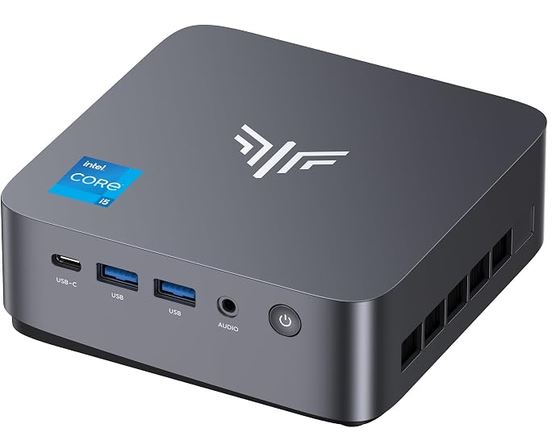
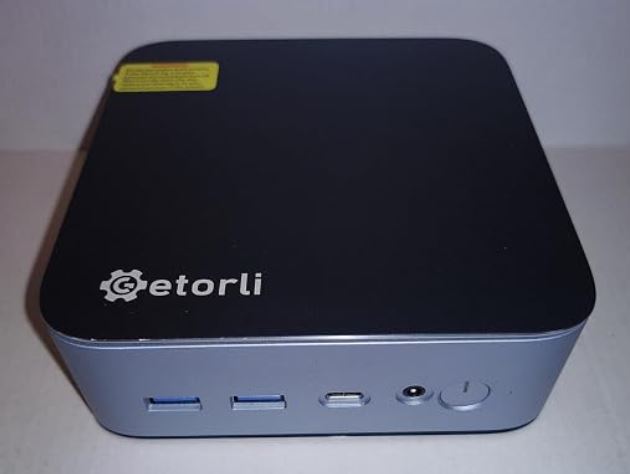
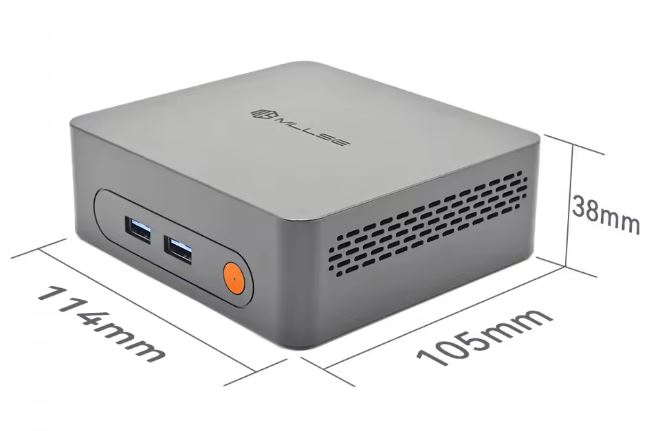
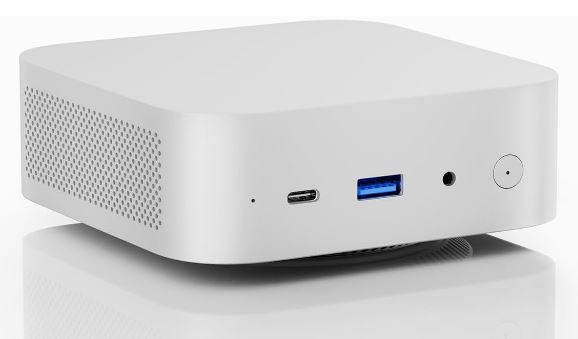
The C3 is a compact black box weighing less than 1 kg, with cross-shaped grilles on the sides.
The chassis is made of PC+ABS, a resistant plastic, and comes with VESA mount for attaching it to the back of the monitor or under the desk.
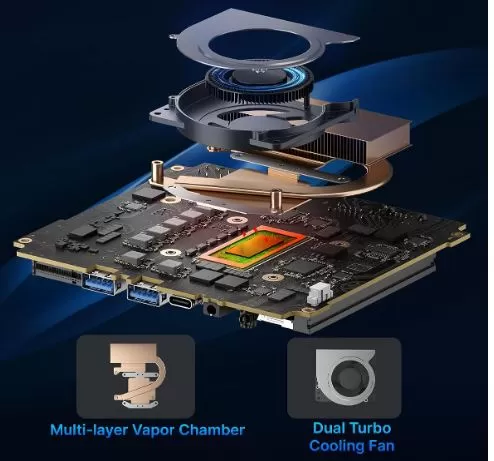
It is suitable for industrial use, with a copper heat sink and "+52% cooling efficiency".
In terms of aesthetics and layout, the device meets the classic standard of square-format Mini PCs very well.
- Compact and lightweight: Fits well on small desks and in commercial environments.
- Very comprehensive port layout: For its price, the range of connections is surprisingly generous:
- Front: 2 USB 3.2 Gen1 ports (high speed at 5Gbps) and the power button.
- Rear/Side: 2 classic USB 2.0 ports, 1 USB Type-C port (for data), 2 HDMI 2.0 outputs and 1 RJ45 Gigabit Ethernet network port.
- Wireless connectivity: It integrates an internal network card with support for dual-band Wi-Fi 5 (2.4G + 5G) and Bluetooth 5.0, ensuring stable connections with wireless peripherals.
🖥️ Screen and multimedia
- Resolution and displays: The device features two HDMI 2.0 ports and supports displays with resolutions up to 2.5K/4K. It allows you to connect two monitors simultaneously without any issues.
- Streaming Capabilities: Its hardware is perfectly capable of playing Full HD (1080p) content on platforms like Netflix, YouTube, and Prime Video. However, it lacks the modern video codecs used by current platforms (such as AV1). While it can handle very basic 4K workflows, playing demanding YouTube videos at 4K@60fps will push the processor to its limits and may cause occasional stuttering.
- Audio: It includes the classic 3.5 mm combo jack for headphones and microphone. Digital audio is transmitted directly via the HDMI ports.
⚙️ Performance and software
The Intel Core i3-5005U processor (2 cores, 4 threads at a fixed frequency of 2.0 GHz and a 3 MB L3 cache) falls far short by modern standards. In synthetic benchmarks like PassMark, the CPU barely manages a multi-threaded score of just over 2,000 points and a single-threaded score of around 1,120 points. For comparison, a modern budget chip like the Intel N100 performs more than twice as well.
- Performance in the Office and at Home: Thanks to Hyper-Threading technology (which simulates 4 logical cores), the computer doesn't freeze when performing basic tasks in parallel. You can open your browser with 5 to 8 tabs, listen to music on Spotify, and have a Word document open simultaneously.
- System Speed: With a 512GB M.2 SSD, the Mini PC boots up in just 15-20 seconds. Opening folders and loading the operating system feels quick, which largely masks the age of the processor.
- Integrated Graphics (Intel HD Graphics 5500): Its graphics performance is negligible. Forget about modern 3D video games. It's only suitable for running very lightweight older titles (like League of Legends on minimum settings) or classic retro console emulators.
- Factory Operating System: The device comes pre-installed with Windows 10 Pro (or Home depending on the region) 64-bit. It runs stably because Windows 10 is excellently optimized for older components.
- The Windows 11 Problem: Officially, the Intel Core i3-5005U is not compatible with Windows 11 because Microsoft requires 8th generation Intel processors or later. Although there are unofficial methods online to force the installation of Windows 11 by bypassing these restrictions, it is not recommended for this specific hardware, as performance drops significantly.
- Third-Party Software Support: The latest versions of resource-intensive programs (such as the Adobe Creative Cloud suite or complex code editors) may experience incompatibilities or demand too many resources for this chip's architecture (originally released in 2015). Cloud applications (Google Workspace, Office 365 web) work without any issues.
- Linux compatibility: If you enjoy experimenting, this is an excellent candidate for Linux. Lightweight distributions like Ubuntu LTS, Linux Mint, or Debian run exceptionally fast on this hardware, completely revitalizing the Mini PC and providing security support for many more years without the barrier imposed by Microsoft.
🌍 See prices for the Origimagic C3 mini PC on Amazon
🔎 Search for the Origimagic C3 on AliExpress
🔌 Energy consumption and cables
- Processor efficiency: The Intel Core i3-5005U processor has a maximum TDP (Thermal Design Power) of only 15W. This means that, even under maximum demand, it consumes a fraction of what a traditional desktop computer uses (which typically exceeds 65W to 200W).
- Actual power consumption: For basic office tasks or web browsing, the device consumes between 7W and 10W. In idle mode , consumption drops to just 3W-5W. It's an excellent choice if you're looking for a device to leave on 24/7 (as a home server or for downloads), as you'll barely notice it on your electricity bill.
- Power and cables: It operates using an external power adapter (power block) similar to that of a small laptop, which connects to a round DC port on the back of the Mini PC. Since it doesn't require bulky internal cables or heavy ATX power supplies, your desktop cabling stays neat and tidy.
🌡️ Temperature and noise (actual thermal)
- Thermal management: Generating only 15W of heat, the ABS plastic chassis dissipates heat extremely efficiently through its side and rear vents.
- Temperature ranges: In everyday use (office applications, videos, browsing), the CPU remains within a very safe range of 40°C to 50°C. Under 100% load for extended periods, the temperature may rise to 65°C–70°C, always remaining well below the overheating threshold ( thermal throttling ), which for this chip begins above 90°C. The device feels only slightly warm to the touch.
- Silent active cooling: Unlike some powerful modern Mini PCs that incorporate noisy high-speed fans, the OrigiMagic C3's internal fan is small and spins at low revolutions.
- Noise level in decibels: During basic tasks, the device is virtually inaudible in a typical home environment (remaining below 30 dB ). Under heavy load, the fan subtly increases its speed, reaching a reported maximum of between 35 dB and 38 dB. This equates to a very soft hum, similar to the sound of a modern refrigerator in the distance, so it won't be bothersome if you have it placed on your desk next to your monitor.
🔗 Connectivity and extras
-
📶 WiFi 5 and Bluetooth 5.0
-
🌐 Gigabit Ethernet.
-
🔌 2x USB 3.2 Gen1 and USB-C (data only) on the front, 2x USB 2.0 on the back.
-
🎧 Combined audio jack.
-
❌ No card reader, no DisplayPort or USB-C with video, no fingerprint or NFC.
🔧 Expansion and upgrades
It is one of the C3's strong points.
💾 Storage (The best upgrade option)
This is the most flexible part of the device and where you can really expand its capabilities if the factory space isn't enough:
- 2.5-inch SATA bay: The chassis interior features a dedicated space and the necessary connectors for installing a second 2.5" SSD or HDD (with a standard thickness of 7mm). This allows you to easily add an extra 1TB or 2TB for storing movies, music, or backups without affecting the main operating system.
- Primary M.2 slot: The primary storage that comes with the computer (usually a 512GB SSD) uses an M.2 slot. If you need to replace it with a higher-capacity drive, you can, but keep in mind that the motherboard uses the SATA /NVMe Gen 3 interface, so it won't take advantage of the speeds of newer Gen 4 or Gen 5 SSDs (although they are compatible, they will be limited to the motherboard's speed). Maximum recommended limit: 2TB.
- The maximum storage officially supported by both slots is 4TB.
🧠 RAM Memory
The device does not come with the memory soldered to the motherboard (which is a plus), but it uses older technology:
- Memory type: Uses memory slots in SO-DIMM DDR3L format (the low voltage variant at 1.35V).
- Capacity limit: The Intel Core i3-5005U processor has a manufacturer-imposed physical limit of 16 GB of RAM. If your computer came with an 8 GB module, you can replace it or add another (depending on whether your motherboard has one or two physical slots) to reach 16 GB. Upgrading from 8 GB to 16 GB will improve performance if you frequently have many browser tabs and programs open simultaneously.
🚫 Components that CANNOT be updated
As is the norm in virtually all Mini PCs, there are vital components that are completely soldered to the motherboard and will die with the computer:
- The Processor (CPU): The Intel Core i3-5005U is not upgradeable. If you find its performance insufficient in the future, you will not be able to install a more powerful processor.
- The Graphics (GPU): The Intel HD 5500 graphics are integrated into the processor. There are no PCIe slots or physical space to add a dedicated graphics card.
Options to expand it:
Check that the module is DDR3L (1.35V) and not regular DDR3.
⚔️ Comparison with direct competitors
| Model | CPU | RAM / SSD | Geekbench 6 (1 / multi) | Prices |
|---|---|---|---|---|
| Origimagic C3 | i3-5005U (2N/4H) | 8 GB DDR3L / 512 GB | 621 / 1244 | Check Prices |
| Origimagic C4 Air | Ryzen 5 3500U (4N/8H) | 8 GB DDR4 / 256 GB | 877 / 2511 | Find out |
| FIREBAT R3 | Ryzen 3 4300U | 8 GB / 256 GB | Not available | Find out |
| Intel N100 Mini PC | N100 (4N/4H) | It varies | 974 / 1750 | Find out |
💬 Reviews on well-known websites
👍 What users like most (The "Pros")
- Unbeatable value for money: Those who buy it with a discount or coupons on Amazon agree that getting a computer with a 512 GB SSD for that price is an excellent deal for a tight budget.
- Surprisingly easy to expand: Several Reddit threads highlight that the C3's chassis is much easier to open and upgrade than those of competing brands like Beelink. Users confirm that adding an extra 2.5" drive for storing movies or music works flawlessly.
- Excellent as a lightweight home server: In the Home Lab communities there are good reviews from people who have bought it to install Linux or Proxmox, using it as a media server (Plex), DNS (Pi-hole) or home automation server, praising that it stays cool, consumes very little energy and is very quiet.
👎 Common Complaints and Warnings (The "Cons")
- Beware of the pre-installed software: A common reminder in the community when buying low-cost Mini PCs (like OrigiMagic or Acemagic) is that it's recommended to perform a clean Windows reinstallation upon receipt. This is because some pre-installed operating systems may include unusual configurations or unwanted software ( malware/bloatware ). However, no complaints of this kind have been found for this particular Mini PC.
- Strict Windows limitations: Many buyers are frustrated to discover after purchase that the computer does not officially upgrade to Windows 11. Although it comes with Windows 10 Pro activated and functional, the end of support for this system forces users to either stay with it or migrate to Linux.
🧪 Technical Testing and Gaming
📊 Processor (CPU) Performance
In standardized tests that measure the pure computing power of the processor, the following scores are obtained:
- Geekbench 6:
- Single-Core: ~628 points. This shows that for linear and individual tasks (opening a folder, loading a static website) the processor responds in time, but without much slack.
- Multi-Core (Multi-Threaded): ~1,243 points. With 2 cores and 4 threads thanks to Hyper-Threading technology, it performs well in very light office multitasking.
- Cinebench R20 (Rendering Performance):
- Multi-Core: ~486 points. This score is low by today's standards. It clearly indicates that this is not a suitable machine for video editing or 3D rendering, tasks that would push the processor to its limits very quickly.
- PassMark CPU Mark (Overall Performance):
- It achieves an aggregate score of 2,008 points. To put this into perspective with current low-cost architectures: a modern, inexpensive chip like the Intel N100 surpasses 5,500 points in this same test, performing almost three times as well.
🎮 Graphics Performance (Intel HD Graphics 5500)
The integrated graphics unit operates at a frequency between 300 and 850 MHz with 24 execution units. Graphics tests in real-world environments yielded the following metrics:
- Classic Video Games / eSports: It can run older games like League of Legends or Counter-Strike at 720p (HD) resolution with minimum graphics settings, achieving stable frame rates between 30 and 45 FPS. Modern 3D games (such as Cyberpunk 2077 or recent Call of Duty titles ) won't even run due to a lack of compatibility with modern DirectX libraries.
- Emulation: It passes tests with retro console emulators up to the PlayStation 1 and Nintendo 64 generation with flying colors. With PlayStation 2 or GameCube, it starts to suffer noticeable frame rate drops.
🗄️ Storage Speed (SSD)
Although the primary M.2 slot supports modern physical drives, the motherboard limits the communication channels.
- In read and write tests like CrystalDiskMark, the factory M.2 SSD offers sequential transfer speeds close to 500-550 MB/s.
- Real-world impact: This means it uses the internal SATA protocol. While this is about 5 times faster than a traditional mechanical hard drive (allowing Windows to boot in under 20 seconds), it falls far short of the speeds of modern NVMe PCIe SSDs, which easily exceed 3,500 MB/s.
❓ Frequently Asked Questions
Can Windows 11 be installed on the Origimagic C3?
No. The seller warns against it, and several buyers have tried unsuccessfully.
How much RAM does it support?
The seller says 32 GB, but Intel indicates a maximum of 16 GB for this processor.
Can I add a second drive?
Yes. It has a 2.5" SATA bay with included cable, in addition to the M.2 slot. It is not compatible with Samsung HDDs.
Is it good for gaming?
Only for very light games and emulation of old consoles.
Is it suitable as a home server?
Yes, with Linux. It's a reasonable use given its low power consumption and the 24/7 operation advertised by the manufacturer.
🏁 Final conclusion
Who it's ideal for: anyone who needs an inexpensive computer for office work, browsing, or a home server with Linux, and wants to easily upgrade RAM and disk space.
When it's not: if you want Windows 11, gaming, video editing, or current performance. Its multi-core performance is half that of a Ryzen 5 3500U and significantly lower than that of an N100.browser.geekbench+1
Alternatives: the C4 Air with a Ryzen 5 3500U from the same brand, the FIREBAT R3, or an Intel N100. If the price difference is small, any of these would be a more sensible purchase.