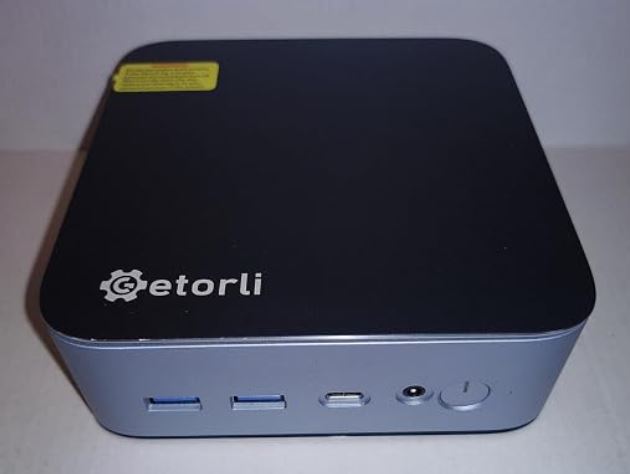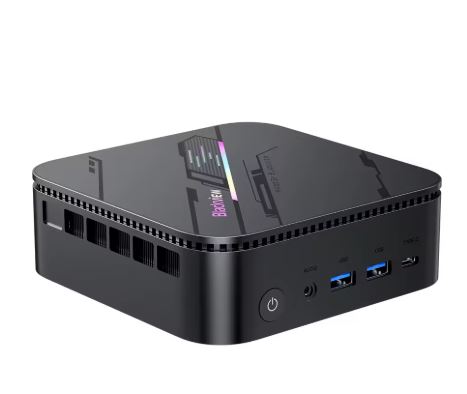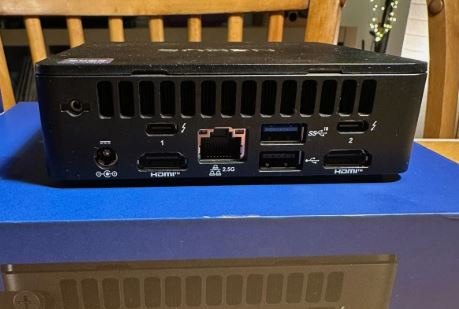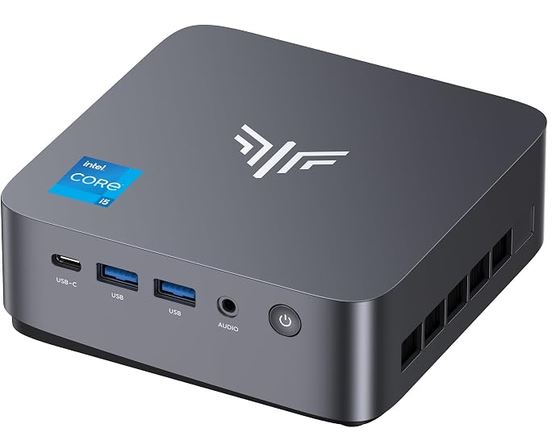
Under the KAMRUI and NiPoGi brands lies exactly the same compact computer manufactured by the parent company CYX.
After testing its architecture with virtualization, intensive web development and heavy multitasking, it proves to be an extraordinarily agile tool thanks to its 12 physical core processor and fast LPDDR5 memory.
Its computing performance is formidable, although its soldered memory nature requires you to be clear about your needs before buying.
-
Pros: Intel Core i5-12500H processor with 16 execution threads, fast LPDDR5 memory, 6 USB-A ports, two M.2 slots for storage, and dual-fan cooling that keeps thermal spikes under control.
-
Cons: soldered RAM with no possibility of future expansion, only one wired Ethernet port, and HDMI output limited to specification 2.0.
-
Conclusion: an excellent productivity machine for offices, programmers, and homes seeking extreme fluidity in a format weighing just 400 grams.
📦 See offers for the KAMRUI P3 on AliExpress
📦 See NiPoGi P3 Prices on Amazon
Unboxing and box contents
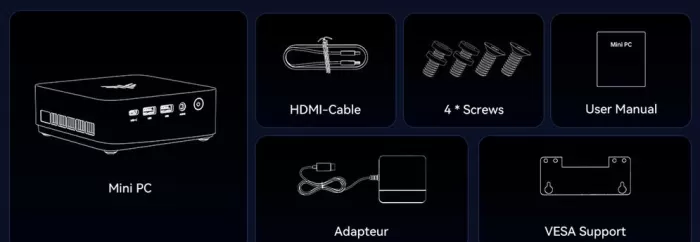
Both in its international distribution and its European packaging, the supply of accessories includes everything necessary to get the equipment up and running from the first minute:
-
🖥️ KAMRUI / NiPoGi P3 Mini PC: titanium gray chassis.
-
🔌 Power adapter: 90W external transformer with power cord.
-
📺 HDMI cable: standard 1 meter cable for output to monitor or television.
-
🪝 Metal VESA mount: plate to attach the computer to the back of compatible monitors.
-
🔩 Screw kit: screws to fix the VESA plate and the retaining screw for the second M.2 bay.
-
📘 User manual: quick guide with port map and startup instructions in Windows.
Key technical specifications
| Component | Official technical details |
|---|---|
| Trade name | KAMRUI P3 (AliExpress / USA) / NiPoGi P3 (Amazon Europe) |
| Processor (CPU) | Intel Core i5-12500H (12 cores: 4P + 8E, 16 threads, up to 4.50 GHz) |
| Cache memory | 18 MB Intel Smart Cache |
| Integrated graphics | Intel Iris Xe Graphics (80 execution units at 1.30 GHz) |
| RAM | 16 GB, 24 GB or 32 GB LPDDR5 (soldered on board at 5200 MT/s) |
| Base storage | 512 GB or 1 TB M.2 NVMe PCIe 3.0 x4 SSD |
| Storage slots | 2 M.2 2280 slots: Slot 1 (NVMe/SATA) + Slot 2 (NVMe only) |
| Wireless network | Dual-band Wi-Fi 6 + Bluetooth 5.2 |
| wired network | 1 Gigabit Ethernet RJ-45 port (1,000 Mbps) |
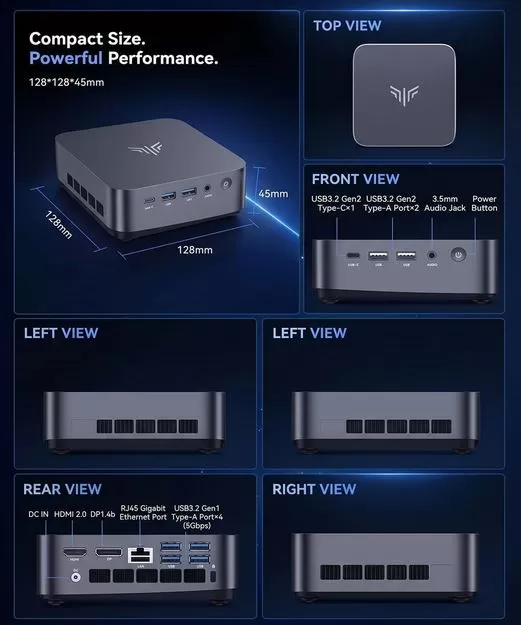
| Front ports | 1 USB-C 3.2 Gen 2 (10 Gbps with DP), 2 USB-A 3.2 Gen 2 (10 Gbps), 3.5 mm audio jack |
| Rear ports | 4 USB-A 3.2 Gen 1 (5 Gbps), 1 HDMI 2.0, 1 DisplayPort 1.4, 1 RJ-45, DC 19V socket |
| Dimensions and weight | 12.82 × 12.82 × 4.54 cm and 420 grams |
| Operating system | Windows 11 Pro 64-bit pre-installed and activated |
Design and construction quality
The device has a flat, cube-like form factor, measuring 12.8 cm on each side and 4.5 cm in height. Although at first glance it appears to be a solid metal block, the outer chassis is made of high-density textured ABS plastic with internal structural reinforcement. This solution keeps the weight to a mere 420 grams and facilitates the transmission of signals from the internal Wi-Fi antennas.
In hand, it feels structurally solid. Both sides have ventilation openings that work in conjunction with two internal turbines to expel heat. On the bottom, four rubber feet isolate it from contact with the desk to dampen vibrations and ensure a stable grip.
Screen and multimedia
The device allows you to connect up to three 4K displays at 60Hz simultaneously by combining its rear HDMI 2.0 output, DisplayPort 1.4 connector, and front multifunction USB-C port. This enables a large workspace without the need for external docking stations.
The front-facing 3.5 mm jack provides an interference-free analog audio output for headphones or desktop speakers. For multimedia tasks, its graphics engine decodes modern formats such as AV1 and VP9 at 4K and 8K resolutions with minimal processor usage.
Performance and software
Upon powering on the mini PC, we found a clean installation of Windows 11 Pro, without any added layers or annoying promotional applications. The Intel Core i5-12500H chip assigns demanding processes to its four high-performance cores and background tasks to its eight efficiency cores, allowing dozens of browser tabs to remain open and projects to be compiled without crashes.
The factory-installed M.2 SSD achieves sequential speeds of 2,500 MB/s to 3,500 MB/s, allowing the operating system to boot in less than ten seconds.
LPDDR5 memory at 5200 MT/s provides higher bandwidth than traditional DDR4 memory, accelerating data transfer in multitasking.
📦 See offers for the KAMRUI P3 on AliExpress
📦 See NiPoGi P3 Prices on Amazon
Energy consumption and cables
The mini PC operates when connected to a compact 90W external transformer with a standard plug:
-
💤 Sleep mode: reduced consumption between 12 and 16 watts.
-
💼 Productivity and web browsing: sustained average consumption of 28 to 42 watts.
-
⚡ Full continuous load: scales up to 65–80 watts, taking advantage of the 90W power supply's delivery to maintain uninterrupted processor turbo mode.
Temperature and noise
The internal cooling system uses a dual-fan module with independent side nozzles that manages heat progressively:
-
❄️ At idle: the processor temperature remains cool between 40°C and 45°C, with an inaudible noise level in a normal office.
-
🌡️ Continuous average load: during long office sessions or video calls it ranges between 65 °C and 75 °C.
-
🔥 Maximum sustained load: Under prolonged 100% CPU stress tests, the fans reach their maximum speed (around 3,000 RPM) and contain thermal peaks between 77°C and 80°C, avoiding drastic thermal throttling.
Connectivity and extras
The port selection is extensive: it offers a total of 6 USB-A ports (two front at 10 Gbps and four rear at 5 Gbps) along with the front USB-C at 10 Gbps, allowing you to connect printers, external drives and input peripherals without the need for USB hubs.
Its Wi-Fi 6 card and Bluetooth 5.2 chip offer real-world download speeds exceeding 600-700 Mbps with high-speed fiber optic connections. The wired RJ-45 port is Gigabit (1,000 Mbps). The device does not include biometric fingerprint readers, NFC chips, or IP ingress protection certifications.
Expansion and upgrades
Before buying this model, it is essential to know its physical upgrade possibilities and limitations:
-
❌ RAM: The LPDDR5 memory modules are soldered directly to the motherboard. It does not have SO-DIMM slots, so you must choose between 16 GB, 24 GB, or 32 GB at the time of purchase.
-
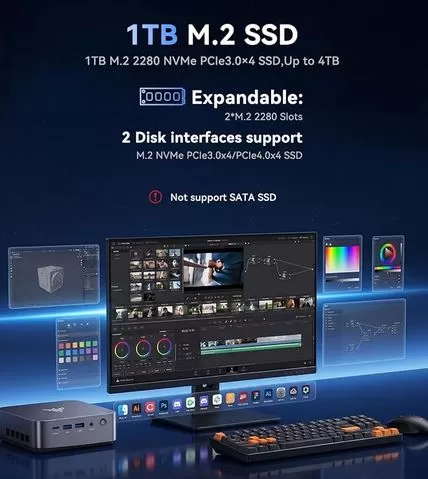
💾 SSD Storage: It has two M.2 2280 slots. The primary slot is hybrid (supports NVMe PCIe SSDs or M.2 SATA SSDs) and the secondary slot is dedicated exclusively to NVMe PCIe drives, with combined support to reach up to 4 TB.
-
❌ 2.5" SATA Bay": does not have internal space for traditional 2.5-inch hard drives.
To expand internal storage with a second solid-state drive, you can purchase an NVMe M.2 SSD on AliExpress or opt for high-speed portable storage using an external USB-C SSD on AliExpress.
Comparison with direct competitors
| Model | Processor | Integrated graphics | Memory and storage | Network connection |
|---|---|---|---|---|
| KAMRUI P3 / NiPoGi P3 → View Prices | Core i5-12500H (12C/16T) | Intel Iris Xe (80 EU) | 16–32 GB LPDDR5 / 512 GB–1 TB | 1 x Gigabit LAN + WiFi 6 |
| Beelink EQi13 → View Prices | Core i5-13420H (8C/12T) | Intel UHD Graphics | 16 GB DDR4 / 500 GB SSD | 2 x 2.5G LAN + WiFi 6 |
| KAMRUI Hyper H2 → View Prices | Core i5-14450HX (14C/16T) | Intel UHD Graphics | 16 GB DDR5 / 512 GB SSD | 1 x Gigabit LAN + WiFi 6 |
| ACEMAGIC K1 → View Prices | Core i5-12600H (12C/16T) | Intel Iris Xe (80 EU) | 16 GB DDR4 / 512 GB SSD | 1 x Gigabit LAN + WiFi 6 |
Reviews on well-known websites
The overall assessment on platforms like Amazon rates the device positively for its value for money, although with clear nuances regarding expectations:
- The most praised points:
- Immediate fluidity: Users highlight that Windows 11 Pro boots up very quickly and that the speed of the LPDDR5 memory (especially the 24 GB or 32 GB versions) allows you to have dozens of browser tabs and programs open without lag.
- Internal expansion: The inclusion of dual M.2 slots is highly valued , allowing the addition of a second SSD without the hassle of reinstalling the operating system.
- Practical format: Its lightness and VESA support to hide it behind the monitor receive many positive comments from users looking for clean desks.
- Recurring criticisms:
- "Gaming" advertising: Many users warn that labeling it as a "Mini Gaming PC" in sales titles confuses buyers. The community clarifies in its reviews that it's only suitable for basic competitive gaming or emulation, disappointing those expecting to play modern, graphically demanding AAA games.
- Heat under heavy stress: Some report that if subjected to continuous rendering or prolonged heavy gaming, the processor experiences some thermal throttling (low frequencies due to heat), so they recommend not obstructing its side ventilation outlets.
Technical tests
Processor performance (Intel Core i5-12500H)
| Synthetic test | Approximate score | What does it mean | Conclusion |
|---|---|---|---|
| Cinebench R23 (Single Core) | 1,664 points | It measures the raw computing power of a single high-performance core. | The system feels instantaneous and lag-free when opening programs and browsing the web. |
| Cinebench R23 (Multicore) | 12,850 points | Evaluate the combined computing power of its 12 cores and 16 threads in parallel. | It's an excellent mini PC for compiling code, rendering, and heavy multitasking. |
| Geekbench 6 (Single-Core) | 2,180 points | It quantifies the processor's agility in everyday operating system operations. | It easily outperforms any basic consumer processor from previous generations. |
| Geekbench 6 (Multi-Core) | 9,960 points | It measures responsiveness when several heavy programs are running simultaneously. | It offers more than enough power to run virtual machines and containers in parallel. |
| PCMark 10 (Global Test) | 5,250 points | Evaluate joint performance in browsing, conferencing, and massive spreadsheets. | It guarantees a professional office experience and productivity without bottlenecks. |
Graphics, storage and temperatures (Intel Iris Xe 80 EU + P3 Chassis)
| Metric or test | Result | What does it mean | Conclusion |
|---|---|---|---|
| FurMark 2.10 (1080p) | ~15-16 FPS | A graphics stress test that measures the frame rate in continuous three-dimensional environments. | The integrated graphics card falls short for demanding 3D games and is relegated to casual or 2D titles. |
| Resting temperature | 40 °C – 45 °C | Processor temperature with no programs open, with the computer turned on at the desktop. | The equipment is virtually inaudible and consumes very little energy when not in use. |
| Temperature under medium load | 65 °C – 75 °C | Thermal range achieved during intensive browsing, video calls or 4K streaming. | It is a completely safe thermal zone that does not wear down components or generate annoying noise. |
| Temperature at maximum stress | 77 °C – 80 °C | Heat recorded with the CPU at 100% for long periods with the fans at 3,000 RPM. | The dual turbine system dissipates heat well and prevents drastic speed drops due to overheating. |
| Sequential read SSD M.2 | ~2,500 to 3,500 MB/s | Maximum data transfer speed of the main solid-state drive per PCIe bus. | The computer turns on in less than ten seconds and transfers large files in a few moments. |
Gaming and emulation
This mini PC is n't designed as a machine for demanding modern video games, but its Intel Iris Xe graphics with 80 execution units and fast LPDDR5 memory offer sufficient performance for modest titles:
-
🎮 Competitive and casual games: Titles like League of Legends , Valorant , CS:GO , Rocket League , and Dota 2 run at a stable 60 FPS at 1080p with medium or low graphics settings. Modern, demanding titles like Cyberpunk 2077 or Starfield are not suitable for this integrated graphics card.
-
🕹️ Classic Emulation: Accurately emulates classic platforms from 8-bit and 16-bit to PlayStation 1, Nintendo 64, and Dreamcast. On PlayStation 2, PSP, and GameCube, it allows upscaling to 1080p resolution while maintaining the original frame rate.
Frequently Asked Questions (FAQ)
Are the KAMRUI P3 and the NiPoGi P3 really the same mini PC?
Yes, they are two brands belonging to the same parent company (CYX / MiniPC Union). They share the same chassis, motherboard, processor, and ports; only the printed name changes depending on the store and country.
Can the RAM be upgraded in the future?
No, LPDDR5 memory is soldered directly to the motherboard and does not have any free SO-DIMM slots.
Does it allow adding a second storage drive?
Yes, it has a second M.2 2280 PCIe NVMe slot completely free to add drives of up to 2 TB or 4 TB without altering the main system drive.
Can the front USB-C port be used to connect monitors?
Yes, it's a multifunction port compatible with DisplayPort video output, 10 Gbps data transfer, and Power Delivery protocol.
Final conclusion
The KAMRUI P3 (marketed on Amazon Europe as NiPoGi P3 ) is a recommended purchase for users who need a small, fast, and quiet workstation for demanding office tasks, programming, and daily multitasking.
Its 16-thread processor, 24 GB of memory, and two M.2 slots ensure a long lifespan.
If, on the other hand, you need dual network ports to set up network firewalls or are looking for a machine designed to play modern games, you should consider models with dedicated graphics cards or variants with AMD Ryzen processors.
🛒 Where to buy and recommended links
📦 See NiPoGi P3 Prices on Amazon