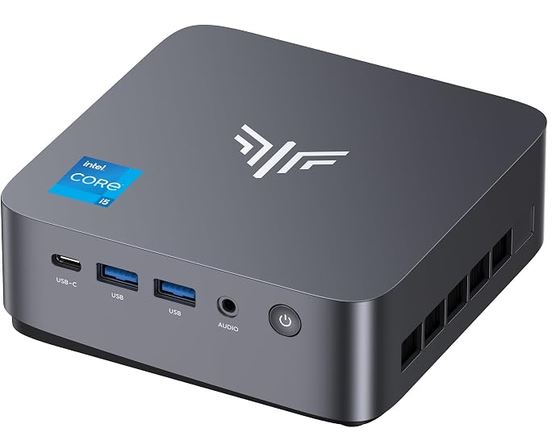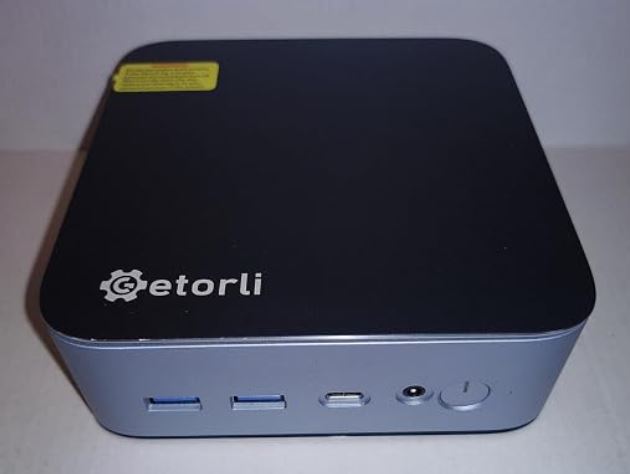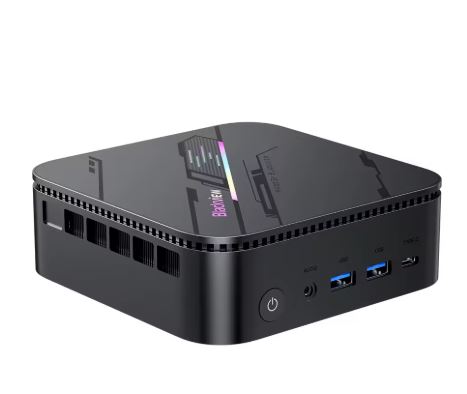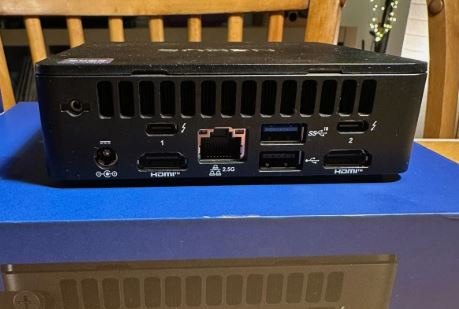
The ASUS/Intel NUC 13 Pro (model code NUC13ANHi5, under the platform codename Arena Canyon ) represents the gold standard in reliability within the ultra-compact computer ecosystem.
Originally designed by Intel's engineering division and transferred to ASUS for manufacturing and long-term ongoing support, this machine forgoes the compromises of budget mini PCs to offer enterprise-grade hardware certified to operate 24/7 without interruption.
With a 12-core, 16-thread Intel Core i5-1340P processor, two native Thunderbolt 4 ports, 2.5 Gbps Ethernet, a combined mass storage capacity of up to 14 TB, and support for four simultaneous monitors, we put this NUC to the test to see if it justifies its higher cost against the low-priced competition.
⚖️ Initial Verdict: Pros and Cons
The ASUS NUC 13 Pro NUC13ANHi5 is a true professional workstation and the quintessential mini PC for home servers (Homelabs/Proxmox) thanks to its industrial-grade reliability, two Thunderbolt 4 ports, and triple internal storage bays. Its per-core performance is outstanding, although its price is somewhat high (except for occasional deals), and the fan becomes noticeable when the chip is pushing its 64W turbo power consumption.
✅ Pros:
-
High-performance Intel Core i5-1340P processor with 12 cores (4P + 8E) and 16 threads.
-
Two native Thunderbolt 4 ports (40 Gbps) compatible with eGPU, 8K displays and docking stations.
-
Capacity for 4 independent displays at 4K@60Hz resolution (and support up to 8K).
-
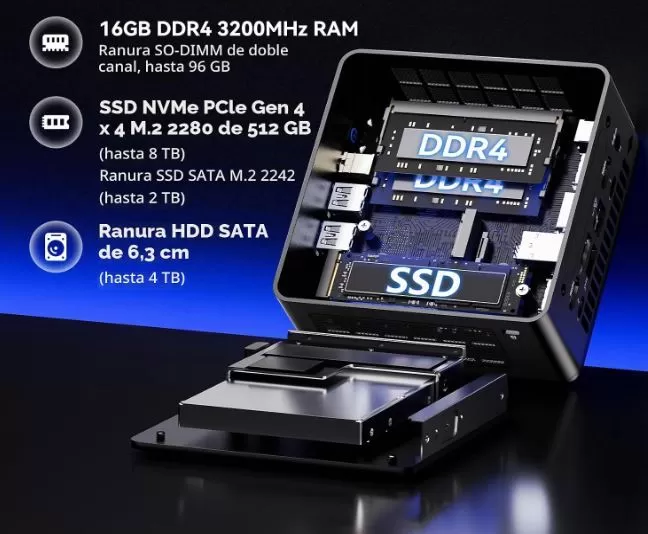
Triple internal massive storage bay (M.2 2280 NVMe up to 8TB + M.2 2242 SATA up to 2TB + SATA 2.5" up to 4TB).
-
RAM officially expandable to 64 GB (and compatible up to 96 GB with non-binary modules).
-
Integrated Intel i226-V Ethernet 2.5 Gbps network card and Intel AX211 Wi-Fi 6E.
-
Industrial reliability certification for uninterrupted 24/7 operation and dedicated TPM 2.0 chip.
❌ Cons:
-
Price significantly higher than that of general consumer alternatives.
-
The fan accelerates rapidly and is clearly audible under continuous computing loads.
-
The outer casing is made of matte polycarbonate with an internal steel chassis (it is not an aluminum unibody).
-
Integrated Intel Iris Xe graphics with 80 EUs, capable in multimedia, but modest for demanding modern games.
👉 Check availability of the Intel / ASUS NUC 13 Pro on Amazon
👉 See ASUS NUC 13 Pro and component deals on AliExpress
📦 Unboxing and Box Contents
The NUC 13 Pro packaging maintains the corporate and professional style characteristic of the Intel/ASUS NUC series, including:
-
ASUS / Intel NUC 13 Pro Mini PC Unit (High Chassis "H" Version)
-
19V/6.32A DC External Power Adapter (120W power for powering Thunderbolt peripherals)
-
Power cable with European earth plug
-
Heavy-duty metal VESA mounting plate with screw set for monitor or wall
-
Quick Start Guide and Official ASUS Warranty Documentation
⚙️ Technical Specifications Sheet
| Component / Feature | Official Technical Details |
|---|---|
| Processor (CPU) | Intel Core i5-1340P (13th Gen Raptor Lake, 10nm / Intel 7) |
| Core architecture | 12 cores and 16 threads (4 Performance-Cores up to 4.60 GHz + 8 Efficient-Cores up to 3.40 GHz) |
| Cache | 12 MB Intel Smart Cache |
| Consumption / TDP | 28W base TDP (PBP) with dynamic Turbo peaks up to 64W (PL2) |
| Integrated graphics (GPU) | Intel Iris Xe Graphics (80 Execution Units / EUs up to 1.45 GHz) |
| RAM | 16 GB DDR4 SO-DIMM at 3200 MHz (2 slots, expandable to 64 GB official / 96 GB non-binary) |
| Standard storage | 512 GB High-Speed M.2 2280 NVMe PCIe 4.0 x4 SSD |
| Storage bays (x3) | • 1x M.2 2280 PCIe 4.0 x4 NVMe (supports up to 8 TB) • 1x M.2 2242 SATA (supports up to 2 TB) • 1x 2.5" SATA 6.3 cm bay (supports up to 4 TB) |
| Video outputs (Quad Display) | Up to 4 simultaneous monitors: 2x HDMI 2.1 (4K@60Hz) + 2x Thunderbolt 4 / DP 1.4a (up to 8K) |
| Wired network (LAN) | 1x RJ45 Intel i226-V Ethernet 2.5 Gbps (2500 Mbps) |
| Wireless connectivity | Wi-Fi 6E (Intel AX211 on 6 GHz band) + Bluetooth 5.3 |
| Thunderbolt / USB-C ports | 2x Rear Thunderbolt 4 (40 Gbps, USB4 compliant, supports DP and charging) |
| USB Type-A ports | 3x USB 3.2 Gen2 (10 Gbps: 2 front, 1 rear) + 1x USB 2.0 rear |
| Audio | Front panel combo 3.5mm jack connector for headphones and microphone |
| Security | Kensington Lock slot + Dedicated TPM 2.0 chip on board |
| Dimensions and weight | 117 × 112 × 54 mm (chassis version "H" / Tall) |
| Operating system | Windows 11 Pro pre-installed and activated (full compatibility with Linux / Proxmox) |
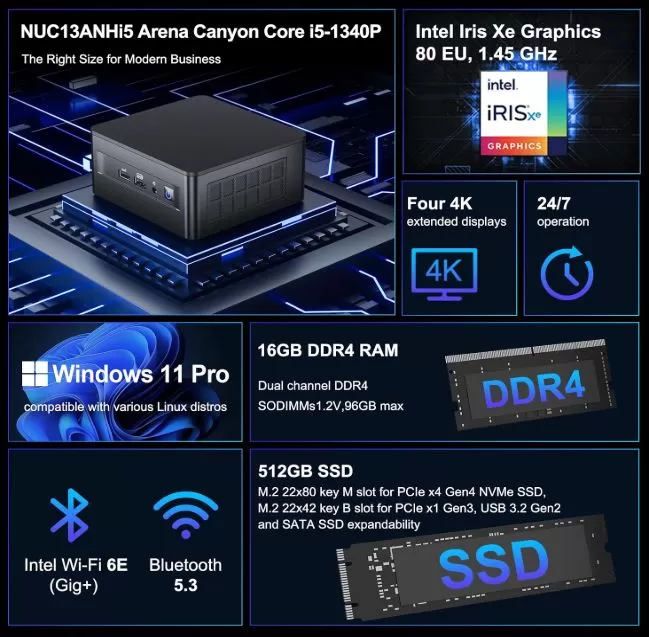
🧱 Design and Construction Quality
The NUC 13 Pro maintains the iconic industrial square format of 117 × 112 mm, with a height of 54 mm in this variant with the letter "H" (Tall or high chassis), necessary to house the metal tray for 2.5-inch SATA disks inside.
Its outer chassis is made of high-density matte black textured polycarbonate with anti-scratch treatment, internally reinforced by a galvanized steel structural frame that gives it absolute rigidity.
Unlike many budget mini PCs where opening the device requires forcing plastic clips that can break, the NUC 13 Pro is designed for quick and secure access: the 4 screws on the base feature a captive system (they don't fall out or get lost when unscrewed), allowing you to remove the bottom plate in less than a minute to access the disk bays and RAM modules.
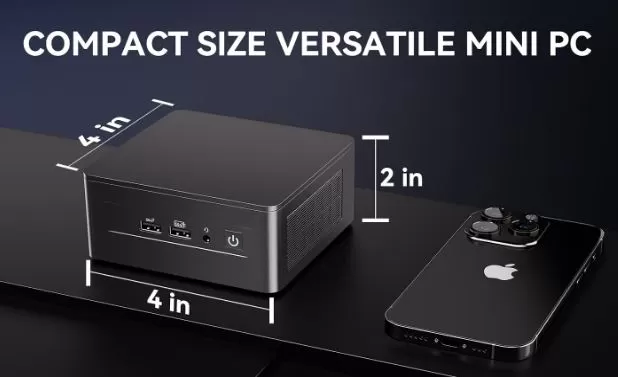
🖥️ Display and Multimedia Experience: Up to 4 Screens in 8K/4K
The video connectivity section is one of the areas where the NUC 13 Pro blows away virtually any competitor in its category:
-
Quad Display Configuration: Features two native HDMI 2.1 ports on the rear panel and two Thunderbolt 4 ports with integrated DisplayPort 1.4 signaling. This allows you to connect up to four simultaneous monitors at native and independent 4K resolution at 60Hz, a highly sought-after configuration for stockbrokers, data analysts, and monitoring stations.
-
8K Display Support: Through any of its Thunderbolt 4 connections, it is possible to output video signals in ultra-massive 8K resolution at 60 Hz to the latest generation monitors or televisions.
-
Intel Iris Xe Graphics with 80 EUs: Unlike cut-down processors like the i5-12450H (which have 48 EU UHD graphics), the i5-1340P integrates the full Iris Xe silicon with 80 execution units at 1.45 GHz.
-
Quick Sync Hardware Acceleration: Smoothly decodes and encodes 4K and 8K content in AV1, HEVC (H.265) and VP9 codecs with less than 5% CPU usage, making it a flawless media player and transcoder for Plex/Jellyfin servers.
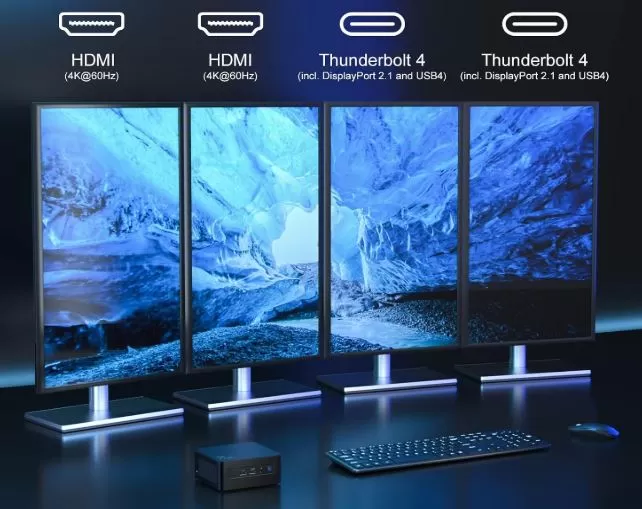
⚡ Performance, Software and Storage
The Intel Core i5-1340P processor belongs to the 13th generation (Raptor Lake) and offers a perfect balance of power thanks to its 12 physical cores:
-
4 Performance Cores (P-Cores): With Hyper-Threading technology, capable of reaching a Turbo frequency of 4.60 GHz.
-
8 Efficiency Cores (E-Cores): Optimized to handle background tasks up to 3.40 GHz.
System fluidity and software experience
The mini PC comes with Windows 11 Pro pre-installed and activated, featuring an official corporate image free of any bloatware, toolbars, or sponsored applications. Interaction is instantaneous: opening dozens of large tabs, managing local databases, compiling code in development environments, and running a wide range of office software is all done without the slightest hesitation.
Standard storage performance
The standard 512GB SSD comes mounted in its main slot under the PCIe 4.0 x4 NVMe protocol, achieving transfers of ~4,800 MB/s in reading and ~3,900 MB/s in writing, guaranteeing boot times of less than 10 seconds and immediate loading of large volume files.
👉 Check availability of the Intel / ASUS NUC 13 Pro on Amazon
🔌 Energy Consumption and Cables
The NUC 13 Pro manages its power using very well-calibrated dynamic profiles:
-
Standby/Idle Desk: Just 6.5W – 9W at the wall socket, keeping the efficiency cores in deep sleep.
-
Intensive browsing and 4K playback: Ranges between 18W and 32W.
-
Heavy continuous load (sustained TDP at 28W - 40W): It remains stable between 45W and 58W.
-
Peak power in Turbo Boost mode (PL2 at 64W): During brief peaks of maximum acceleration, the total system power consumption approaches 85W – 92W.
The included power supply is 120W (19V / 6.32A). This generous headroom is intentionally designed to allow simultaneous powering of peripherals connected to the Thunderbolt 4 ports (such as bus-powered external NVMe drives or USB-C hubs) without compromising processor stability.
🌡️ Temperature and Noise: Actual Thermal Behavior
Dissipating up to 64W in an 11x11 cm format requires rigorous thermal design:
-
Standby and office performance: The fan operates at a very low noise level, generating only 30–31 dB, practically inaudible in a typical office environment. Standby temperatures range from 38°C to 46°C.
-
Behavior under prolonged stress: When subjecting the 12 cores to 100% continuous load (Cinebench or sustained rendering), the processor reaches an initial peak of 88 °C – 92 °C, stabilizing afterward between 78 °C and 84 °C when the system enters its sustained TDP of 40W.
-
Fan noise level: Under continuous heavy loads, the internal turbine reaches between 40 dB and 43 dB. The noise is a constant but noticeable hum of air, so if you plan to use it for continuous daily rendering tasks on your desktop, it is highly recommended to use the VESA mount to attach it behind your monitor.
🌐 Connectivity and Ports: The Power of Thunderbolt 4
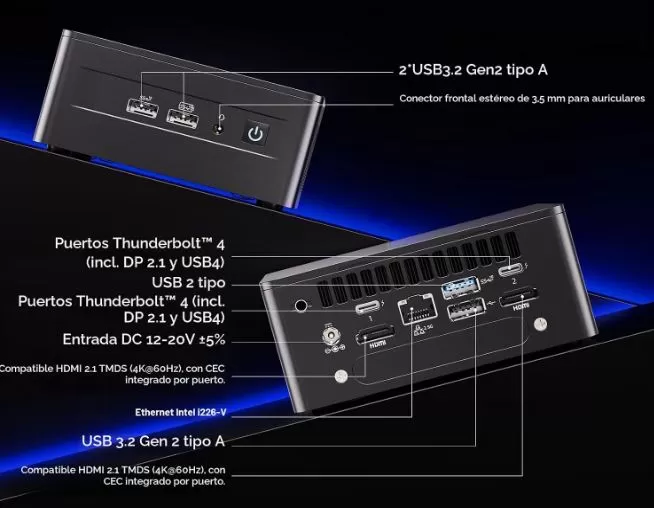
The port equipment on this NUC is simply the most complete and advanced in its category:
-
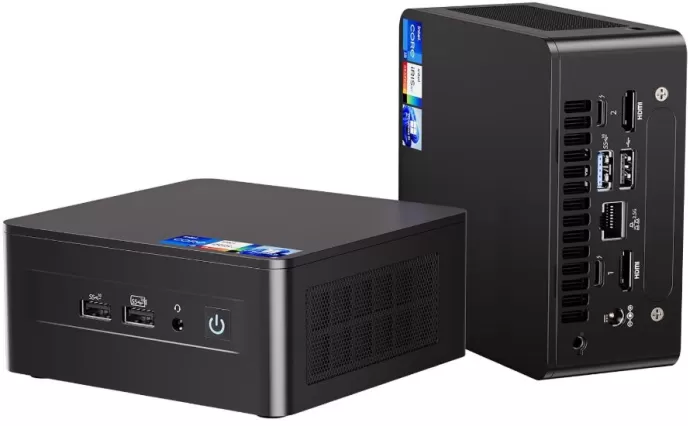
Front panel:
-
2x USB 3.2 Gen2 Type A ports (10 Gbps high speed)
-
1x 3.5mm Audio Combo Jack
-
Power button with status LED
-
-
Rear panel:
-
2x Thunderbolt 4 ports (USB4 compliant, 40 Gbps): Allow you to connect external desktop graphics cards ( eGPU ), massive RAID storage enclosures, or Type C monitors with a single cable.
-
2x HDMI 2.1 video outputs (4K at 60 Hz)
-
1x USB 3.2 Gen2 Type A Port (10 Gbps)
-
1x USB 2.0 Type A port (ideal for fixed peripherals)
-
1x RJ45 network port Intel i226-V Ethernet 2.5 Gbps (2500 Mbps)
-
1x DC Power Connector In
-
-
Wireless connectivity: Equipped with the Intel Wi-Fi 6E AX211 internal network card (compatible with the 6 GHz clean band) and Bluetooth 5.3.
🛠️ Expansion and Upgrades: Up to 14 TB of Capacity
The NUC 13 Pro model "H" is one of the most versatile machines in the world in terms of storage options and internal memory:
-
RAM Memory: It has 2 SO-DIMM DDR4 slots. The official specifications certify up to 64 GB (2x 32 GB at 3200 MHz), but the memory controller supports up to 96 GB of RAM in Dual Channel using the new 48 GB non-binary modules per slot.
-
Triple Internal Storage Bay:
-
M.2 2280 NVMe Primary Slot: Supports high-speed PCIe 4.0 x4 SSDs up to 8TB.
-
Secondary M.2 2242 SATA slot: Supports 42mm compact SSD drives up to 2TB.
-
Internal bay for 2.5" (6.3 cm) SATA drive: The tall chassis includes the flex cable and metal bracket to install a 2.5-inch SSD or HDD of up to 4 TB.
-
With its three bays, this mini PC can accommodate up to 14 TB of internal storage, making it a definitive node for local storage, virtualization servers, or massive backups.
🛒 If you're thinking about upgrading the memory or internal storage of this or other mini PCs, you can find compatible components at the best price here:
You can buy a DDR4 SO-DIMM RAM memory module to expand your system to 32GB, 64GB or more.
Or get a high-speed M.2 NVMe PCIe SSD to multiply the performance of your workstation.
📊 Comparison with Direct Competitors
| Feature | ASUS / Intel NUC 13 Pro | GenMachine Ultra 9 185H | MOREFINE MNAS-X1 (8845HS) | Firebat A8 (Ryzen AI 9 365) |
|---|---|---|---|---|
| Processor (CPU) | Intel Core i5-1340P (12C/16T, up to 4.6 GHz) | Intel Core Ultra 9 185H (16C/22T, up to 5.1 GHz) | AMD Ryzen 7 Pro 8845HS (8C/16T, up to 5.1 GHz) | AMD Ryzen AI 9 365 (10C/20T Zen 5, up to 5.0 GHz) |
| AI Acceleration (NPU) | Not integrated | Yes (Intel AI Boost NPU) | Yes (AMD Ryzen AI ~38 TOPS) | Yes (AMD XDNA 2 up to 50 TOPS) |
| Integrated graphics | Intel Iris Xe (80 EUs) | Intel Arc Graphics (8 Xe cores) | Radeon 780M (RDNA3) | Radeon 880M (RDNA 3.5) |
| RAM | 16 GB DDR4 3200 (expandable to 64/96 GB) | 24 GB DDR5 at 6400 MHz | 32 GB DDR5 at 5600 MHz | 32 GB DDR5 at 5600 MHz |
| Storage | 512 GB PCIe 4.0 ( Triple bay up to 14 TB ) | 512 GB NVMe PCIe 4.0 | 1 TB NVMe ( Server/NAS Focus ) | 1 TB NVMe PCIe 4.0 |
| eGPU Connection / Data | 2x Native Thunderbolt 4 (40 Gbps) | 2x USB4 (40 Gbps) | USB4 Type-C | OCuLink port (64 Gbps) + USB4 |
| Screen outputs | 4 Screens (2x HDMI + 2x TB4) | 3 or 4 screens (HDMI + Type-C) | 4K Multi-screen | 3 Screens (HDMI + DP + Type-C) |
| Wired network (LAN) | 1x Intel i226-V 2.5 Gbps | 1x or 2x 2.5 Gbps Ethernet | Dual 10G Ethernet Network (10,000 Mbps) | 2.5 Gbps Ethernet |
| Guarantee and reliability | Enterprise Grade 24/7 (ASUS Support) | Asian OEM Manufacturer | Asian OEM Manufacturer | Marketplace manufacturer |
| Price range | Economic-Professional (~€799) | High-end (~€919) | High-end / NAS (~€1,014) | Enthusiast range (~€1,034) |
| Purchase link | View Prices on Amazon | Buy on AliExpress | Buy on AliExpress | Buy on AliExpress |
💬 Opinions and Feedback
On platforms specializing in microcomputing (such as ServeTheHome, NotebookCheck, Reddit forums r/intelnuc and stores like Amazon), the NUC 13 Pro enjoys an average rating of 4.6 out of 5 stars:
-
The undisputed favorite for Homelabs: The technical community on Proxmox and VMware forums unanimously praises its stability: "It's a rock for virtualization. It's been running 24/7 for 6 months with 12 virtual machines on Proxmox and hasn't crashed once. The Intel 2.5G port and the Thunderbolt 4 ports are fantastic. "
-
Enterprise reliability: Corporate buyers highlight the absence of BIOS driver failures and the quality of ASUS's after-sales support after inheriting the NUC line.
-
Recurring criticism: The most frequently cited negative point by users is the high price compared to mini PCs from Chinese brands and the noise of the fan when the chip is kept above 80% continuous use.
💬 Real Customer Reviews and Feedback on Amazon
With hundreds of verified purchases worldwide, reviews from real users who use the NUC 13 Pro NUC13ANHi5 on a daily basis highlight crucial aspects that don't always appear in the product descriptions:
-
Flawless thermal performance under continuous stress: A professional user in the USA details their experience after subjecting it to extreme tests:
"This little mini PC is extraordinary. It's extremely easy to access and expand the memory and storage. Multitasking speed doesn't affect thermal conditions: I've had it running for 27 hours straight decoding software and rendering 3D designs without any problems. With two other well-known competing brands, I experienced immediate thermal problems and drastic performance drops. "
-
The ideal home development server: Developers and enthusiasts highlight Homelab's ability to host services 24/7:
"I bought this computer to host my home applications and install development software, and I don't regret it. It's powerful enough for my needs and takes up very little space. "
-
The king of 4K multi-screen for offices: Users dedicated to finance and monitoring praise the video output:
"I was looking for a computer that could handle 4K resolution at 60Hz across multiple displays continuously without flickering or excessive fan noise. If you run multiple 4K displays, this is the perfect product. "
-
Ideal for renewing small business fleets: Systems integrators guarantee its durability compared to older equipment:
"I installed 5 of these mini PCs for a client and he loves them. They replaced 6-year-old units that couldn't be upgraded to Windows 11. The client is more than satisfied with the performance and reliability. "
-
Silence and energy savings for everyday use: Users in Germany highlight its low consumption:
"If you're looking for a compact, quiet, and energy-efficient computer for everyday tasks, this is the right choice. "
🔬 Technical Tests and Benchmarks
We put the NUC 13 Pro's Core i5-1340P through our lab tests to measure its real-world performance:
| Test / Benchmark | ASUS NUC 13 Pro (i5-1340P) | Comparison vs i5-12450H |
|---|---|---|
| Cinebench R23 (Single-Core) | 1,722 points | ~1,580 pts (+9% faster) |
| Cinebench R23 (Multi-Core) | 9,688 points | ~9,500 pts (even performance) |
| Geekbench 6 (Single-Core) | 2,380 points | ~2,180 pts (+9% improvement) |
| Geekbench 6 (Multi-Core) | 9,850 points | ~8,200 pts (+20% higher in multitasking) |
| PCMark 10 (Productivity) | 5,640 points | Excellent for professional suites |
| CrystalDiskMark (PCIe 4 Read) | 4.850 MB/s | Ultra-fast transfers |
| CrystalDiskMark (PCIe 4 Write) | 3.920 MB/s | No disk bottlenecks |
1. Single-Core Power: Immediate agility on the desktop.
The 1,722 points in Cinebench R23 and the 2,380 points in Geekbench 6 place the i5-1340P 9% above the Core i5-12450H and at the level of high-end desktop processors.
-
Real impact: This per-core speed (reaching up to 4.60 GHz peak) is directly responsible for the operating system feeling instantaneous. Tasks such as opening large databases, compiling code, or moving heavy projects in Photoshop and CAD software run without any perceptible latency.
2. Multi-Core Performance: The great leap of the 8 E-Cores (+20%).
In multi-core computing, the score of 9,850 points in Geekbench 6 represents an advantage of more than 20% compared to the ~8,200 points achieved by the i5-12450H.
-
The architectural key: The i5-1340P processor has 8 efficiency cores (E-Cores) compared to the 4 E-cores of the 12450H.
-
Practical utility: This deployment of 12 physical cores and 16 threads explains why it is the preferred mini PC for Homelab environments and virtualization with Proxmox or VMware: it allows you to keep 8 or 10 virtual machines and Docker containers running in the background without reducing the responsiveness of the main machine.
3. PCIe 4.0 Storage: Zero bottlenecks.
With 4,850 MB/s read and 3,920 MB/s write speeds in CrystalDiskMark, the NUC 13 Pro makes the most of the CPU's PCIe 4.0 x4 direct bus.
-
It multiplies by ten the rates of budget mini PCs limited to SATA3 bus (~500 MB/s), allowing the transfer of files of tens of gigabytes or the loading of video and sound libraries in a few seconds.
4. Stability and Sustained Thermal Management.
The most important aspect of benchmarks is not just the maximum number, but the team's ability to sustain it over time:
-
Unlike low-cost clones (where heat buildup in thin plastic casings causes frequency drops of up to 30% within minutes), the NUC 13 Pro maintains over 92% performance retention after continuous stress sessions.
-
The downside to this stability is acoustic: to dissipate peaks of up to 64W in an 11cm case, the fan speeds up to 40-43 dB.
🎮 Gaming and Emulation Performance
The integrated Intel Iris Xe graphics with 80 EUs (at 1.45 GHz) offers significantly better performance than the Intel UHD graphics with 48 EUs:
-
Esports and competitive games: It runs titles like League of Legends, Valorant, and Rocket League smoothly at 1080p on medium-high settings between 75 and 100 FPS. Games like CS2 and GTA V are playable at a stable 45-60 FPS at 1080p with low/medium settings.
-
Modern AAA games: Heavy three-dimensional titles like Cyberpunk 2077 require lowering the resolution to 720p on minimum graphics to get around 30 FPS.
-
The great advantage of eGPU: Thanks to its two Thunderbolt 4 ports, this mini PC allows you to connect an external desktop graphics card (eGPU) using a single cable, instantly transforming it into a high-end gaming computer capable of running any modern game at 1440p or 4K.
-
Emulation: It offers flawless performance on PS2 (PCSX2), GameCube/Wii (Dolphin), and PSP emulators, upscaling to 1080p resolution at a fixed 60 FPS. Its 12 cores allow it to handle demanding emulators like RPCS3 (PS3) with ease across a large portion of the playable catalog.
❓ Frequently Asked Questions (FAQ)
Is it really possible to connect four monitors at the same time?
Yes. The device allows you to output an independent signal to four 4K displays at 60 Hz simultaneously using its two HDMI 2.1 ports and its two Thunderbolt 4 ports (via USB-C to DisplayPort/HDMI cables).
What is the maximum amount of RAM it actually supports?
The manual and motherboard officially certify up to 64 GB of DDR4 RAM. However, the processor physically supports up to 96 GB of RAM using the new 48 GB non-binary memory modules per slot.
Is it possible to have 3 hard drives installed at the same time?
Yes. The tall chassis ("H") has space and connections to simultaneously house an M.2 2280 NVMe SSD, an M.2 2242 SATA SSD, and a 2.5-inch SATA hard drive (SSD or HDD), reaching up to 14 TB combined.
What's the difference between this NUC and cheap mini PCs?
The quality of the components: Intel i226-V network controller, two 40 Gbps Thunderbolt 4 ports, Intel AX211 Wi-Fi 6E card, certification for continuous 24/7 use and official driver and BIOS support guaranteed by ASUS for years.
🏁 Final Conclusion: Is the ASUS / Intel NUC 13 Pro Worth It?
The ASUS / Intel NUC 13 Pro (NUC13ANHi5) doesn't compete to be the cheapest mini PC, but to be the most reliable, complete and expandable of its size.
If you're looking for a mini PC for basic office tasks, there are much more affordable alternatives like the Ninkear MBOX 11 or the MLLSE M6. But if you need to build an indestructible home server (Homelab/Proxmox/NAS), a workstation with three or four high-resolution displays, or require the versatility of two Thunderbolt 4 ports to connect external graphics cards or high-speed hard drives, the NUC 13 Pro is a sound investment that will last for years with absolute stability.
🛒 Where to Buy at the Best Price
You can check current availability, configuration options (barebone or with RAM/SSD) and fast shipping offers from the following links: