The Beelink SER9 MAX is undoubtedly one of the most balanced and complete mini PCs released in 2025.
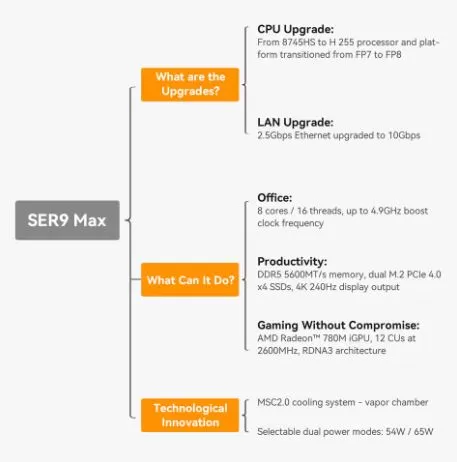
It features the AMD Ryzen 7 H 255 processor (Zen 4 architecture), 32 GB of DDR5 RAM, PCIe 4.0 SSD, and connectivity rarely seen in this segment: 10 GbE network, USB4 at 40 Gbps and DisplayPort 2.1.
For office use, multimedia, home lab and casual gaming, it's hard to ask for more from this size.
✅ Pros
-
10 Gigabit Ethernet port (very rare in mini PCs)
-
USB4 40 Gbps with eGPU support
-
MSC 2.0 cooling system with vapor chamber: truly quiet
-
Triple display output up to 4K@240Hz
-
Dual M.2 2280 PCIe 4.0 slots for expanding storage
-
DDR5 RAM at 5600 MT/s expandable up to 64 GB (some report up to 128 GB)
-
Windows 11 Pro included, no relevant bloatware
❌ Contras
-
The Ryzen 7 H 255 does not include an NPU, so it is not compatible with Windows Copilot+ features.
-
No VESA mounting support included
-
Internal access is somewhat complicated (screws under rubber plugs)
-
A single USB4 port (on the back)
🛒 Check Availability and Prices
📦 Unboxing and Box Contents
Beelink SER9 Max mini PC
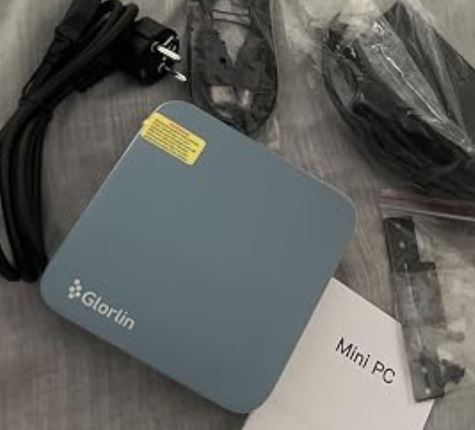
The Beelink SER9 MAX box arrives well protected with molded foam. Inside you'll find:
-
🖥️ The mini PC (available in Silver and Space Grey )
-
🔌 Power adapter (19V / 6.32A, compatible with 200–240V)
-
📡 External Wi-Fi antennas
-
🔩 Screw kit for optional installation
-
📄 Quick Start Guide
The packaging stands out from Chinese competitors: there are no loose parts, and the device arrives protected like a premium product. It does not include a VESA mount, HDMI cable, or mouse/keyboard.
📊 Key Technical Specifications
| Component | Detail |
|---|---|
| Processor | AMD Ryzen 7 H 255 — 8 cores / 16 threads, up to 4.9 GHz, 4nm, Zen 4 |
| Integrated GPU | AMD Radeon 780M — 12 CUs a 2600 MHz (RDNA 3) |
| RAM | 32 GB DDR5 5600 MT/s (2×16 GB, expandable) |
| Storage | 1 TB M.2 2280 PCIe 4.0 ×4 (Crucial P3 Plus) |
| M.2 slots | 2 x M.2 2280 PCIe 4.0 |
| Red | LAN 10 Gbps (Realtek) + Wi-Fi 6 (Intel AX200) + BT 5.2 |
| Screens | Triple output: HDMI 2.1 + DisplayPort 2.1 + USB4 — up to 4K@240Hz |
| USB | 2 × Front USB-A 10 Gbps, 1 × Front USB-C, 2 × Rear USB-A 2.0, 1 × USB 3.2, 1 × USB4 40 Gbps |
| Audio | 2 x 3.5mm jacks (front and rear) |
| Refrigeration system | MSC 2.0 — Steam chamber + quiet fan |
| Operating system | Windows 11 Pro (pre-installed) |
| Dimensions | 135 × 135 × 44.7 mm / 780 g |
| Consumption | ~8.5W at rest / ~77W under maximum load |
| Warranty | 1 year |
🎨 Design and Construction Quality
Beelink SER9 Max mini PC
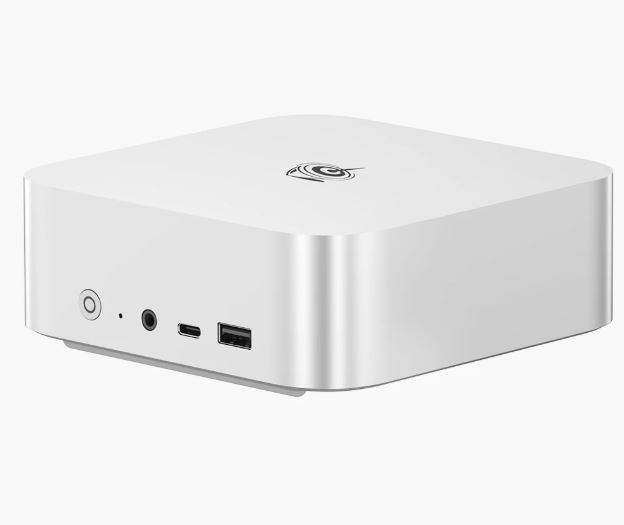
The Beelink SER9 MAX looks like a premium product. The top cover is a single piece of metal, which provides rigidity and also acts as a passive radiator. Air enters through the bottom grille (plastic with holes) and exits hot through the rear vents.
Measuring 135 × 135 × 44.7 mm and weighing 780 grams, it fits on any desk without drawing attention. Reviewers visually compare it to a miniature Mac Studio: understated, modern, and solid. The power button is smooth and well-placed on the front. The only aesthetic drawback is the lack of integrated VESA mount support, a noticeable omission for a device in this price range.
🖥️ Screen and Multimedia
The SER9 MAX supports triple simultaneous displays thanks to its HDMI 2.1, DisplayPort 2.1, and USB4 outputs—all capable of reaching 4K@240Hz. This makes it a highly capable workstation: you can have one monitor for work, another for reference, and a third for communications, all from a box the size of a vinyl record.
4K video playback is flawless. There are no drops or stutters thanks to the Radeon 780M's hardware decoder. Audio via the two 3.5mm jacks (unique in this segment, with one on the front and one on the back) offers a practical solution for headphones and speakers without constantly changing cables.
🚀 Performance and Software
The AMD Ryzen 7 H 255 is essentially a Ryzen 7 8745H under a different name, built on a 4nm Zen 4 process with a sustained TDP of 65W. The real-world benchmarks speak for themselves:
| Test | Punctuation |
|---|---|
| Geekbench 6 Single-Core | 2,497 points |
| Geekbench 6 Multi-Core | 12,134 points |
| Cinebench 2024 Single | 100 points |
| Cinebench 2024 Multi | 836 points |
| Crossmark | 1,814 points |
| 3DMark Fire Strike | 8,493 points |
| 3DMark Time Spy Extreme | 1,350 points |
| PCMark 10 Productivity | 11,891 points |
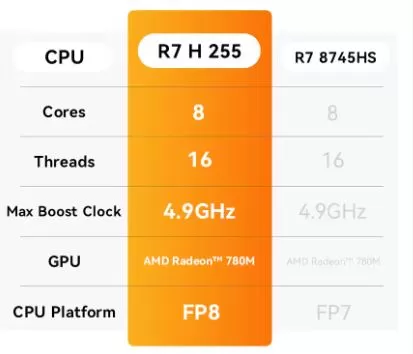
These figures put it on par with the Ryzen 7940HS and 8945HS, with which it shares the same product range. For multitasking, photo/video editing, programming, and intensive office use, the performance is more than sufficient. What it lacks is the NPU of the Ryzen AI chips, so if you need AI features in Windows 11 Copilot+, you'll have to look at the Beelink SER9 AI.
The system comes with Windows 11 Pro pre-installed. The installation is clean, without any annoying bloatware. Beelink's driver updates are regular, though not as frequent as those from larger brands.
🛒 Check Availability and Prices
🔌 Energy Consumption and Cables
The SER9 MAX is surprisingly efficient for its performance:
-
💤 Standby: ~8.5 W (ideal for leaving it on 24/7)
-
🖥️ Normal desktop use: ~25 W
-
🔥 Maximum CPU load at 100%: ~77 W
-
🎮 During intensive gaming: between 45–65 W
The included power adapter is a compact 19V/6.32A brick with universal 200–240V input support, perfect for the Canary Islands, Europe, or any trip abroad. Some versions do not include a European power cord, so it's best to check upon receipt.
🌡️ Temperature and Noise (Actual Thermal)
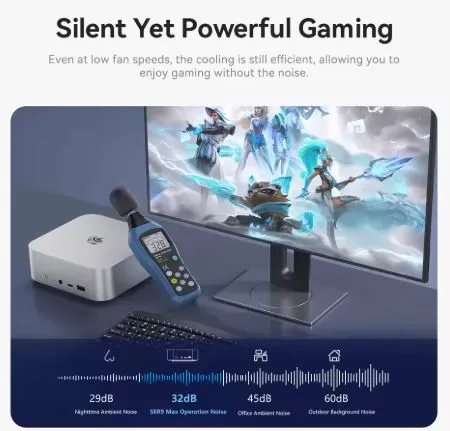
This is where the SER9 MAX truly shines. The MSC 2.0 vapor chamber cooling system distributes heat far more efficiently than traditional heat pipes. The practical result is that the fan is barely audible during normal use.
-
🔇 Noise level at rest: virtually inaudible (~32 dB according to Beelink)
-
🌬️ Under load: the fan starts, but it is smooth and continuous, without sudden spikes
-
🌡️ CPU temperatures under sustained stress: remain within safe ranges thanks to the well-managed 65W sustained power
Reviewers from Virtualization Howto and PCVarge confirm that there is no throttling in normal use, a common complaint in other mini PCs in this range.
🔗 Connectivity and Extras
Connectivity is one of the strongest points of the SER9 MAX:
🔵 Panel frontal:
-
1 × USB-A 3.2 (10 Gbps)
-
1 × USB-C 3.2 (10 Gbps)
-
1 × 3.5mm Jack (headphones/microphone)
-
Power button + reset hole
🔴 Rear panel:
-
1 × USB4 40 Gbps (DP 1.4, PD, compatible eGPU)
-
1 × USB-A 3.2 (10 Gbps)
-
2 × USB-A 2.0
-
1 × HDMI 2.1 (4K@240Hz)
-
1×DisplayPort 2.1 (4K@240Hz)
-
1 × 10 Gbps LAN (Realtek, backward compatible with 2.5 Gbps and 1 Gbps)
-
1 × Jack 3.5mm (audio)
-
1 × Feed inlet (barrel)
📶 Wireless:
-
Wi-Fi 6 (Intel AX200, dual band)
-
Bluetooth 5.2
❌ Does not include: NFC, fingerprint reader, SD card slot, Kensington security slot, 5G
💡 Realtek's 10 GbE port is backward compatible with 2.5 Gbps and 1 Gbps, unlike other cards that only work at maximum or minimum speed.
🔧 Expansion and Upgrades
The SER9 MAX is one of the most upgradeable mini PCs in its category:
-
🧠 RAM: Comes with 2 × 16 GB DDR5 SO-DIMM. Expandable to 2 × 32 GB = 64 GB confirmed; some users report compatibility with 128 GB (2 × 64 GB) but with specific modules.
-
💾 Primary SSD: M.2 2280 PCIe 4.0 x4 slot, currently with a 1TB Crucial P3 Plus. Upgrading to a 2TB or 4TB drive is easy.
-
➕ Second SSD: There is a second M.2 2280 PCIe 4.0 slot available from the factory, perfect for adding another drive dedicated to VMs, backups, or multimedia storage
-
🔌 eGPU: The USB4 40 Gbps port allows you to connect an external GPU to boost graphics performance if needed in the future.
⚠️ Internal access requires removing 4 rubber plugs + 4 screws + dust grille + 2 more screws + heatsink with another 2 screws. There are 8 screws of 2 different sizes, so don't mix them up.
🆚 Comparison with Direct Competitors
| Feature | Beelink SER9 MAX | Beelink SER8 | Minisforum UM870 | Apple Mac Mini M4 |
|---|---|---|---|---|
| CPU | Ryzen 7 H 255 (Zen 4) | Ryzen 7 8745HS (FP7) | Ryzen 7 8745HS | Apple M4 (10C) |
| GPU | Radeon 780M (12 CU) | Radeon 780M | Radeon 780M | GPU M4 10C |
| RAM | 32 GB DDR5 | 32 GB DDR5 | 32 GB DDR5 | 16 GB unified |
| SSD | 1 TB PCIe 4.0 | 1 TB PCIe 4.0 | 1 TB PCIe 4.0 | 256 GB |
| Red | 10 GbE | 2.5 GbE | 2.5 GbE | 10 GbE |
| USB4 | ✅ 40 Gbps | ❌ | ✅ | ✅ |
| DisplayPort | 2.1 | 1.4 | 1.4 | — |
| Triple screen | ✅ | ✅ | ✅ | ✅ |
| Refrigeration | Vapor chamber | Heat pipe | Heat pipe | Passive |
| Approx. price | ~$699–$779 | ~$450–$500 | ~$499 | ~$599 (256 GB) |
| NPU / Copilot+ | ❌ | ❌ | ❌ | ✅ |
| Availability | Check Availability | Check Availability | Check Availability | Check Availability |
🌐 Reviews on Well-Known Pages
Reviews on specialized websites are unanimously positive, with some important nuances:
📰 PCVarge gives it a 4.2/5 and describes it as "a little marvel that delivers desktop-level performance in a compact form factor." They highlight the good integrated GPU and multiple ports, although they point out the lack of VESA support and the absence of an NPU as areas for improvement.
📰 The Virtualization Howto focuses on its use as a home lab server with Proxmox. They confirm that the device works seamlessly with Proxmox VE 9, and that the 10 GbE port is the product's true differentiator in 2025 compared to rivals like the SER8.
📰 Clubic (France) performed tests with PCMark 10 and 3DMark, obtaining a Productivity score of 11,891 points (among the highest in mini PCs of this range) and a Fire Strike of 8,493, far superior to direct competitors such as the NiPoGi AM21-8745. They note that the score in Essentials is somewhat weak, but the overall performance is outstanding.
📺 YouTube / ETA Prime (a leading channel for mini PCs, with over 1 million subscribers) tests it in 1080p gaming with Fallout 4, Spider-Man 2, Forza Horizon 5, and Street Fighter 6, confirming playable performance at medium/high settings. They highlight the low temperature and the TDP change from the BIOS to 65W to get the most out of the system.
📺 TekSyndicate calls it "the fastest Ryzen 7 I've ever seen," competing with and even outperforming previous generation Ryzen 9 chips in some tests.
🔬 Technical Tests
Actual results recorded by independent reviewers:
CPU
| Benchmark | SER9 MAX result |
|---|---|
| Geekbench 6 (single) | 2.497 pts |
| Geekbench 6 (multi) | 12.134 pts |
| Cinebench 2024 (single) | 100 pts |
| Cinebench 2024 (multi) | 836 pts |
| Crossmark | 1.814 pts |
GPU (Radeon 780M)
| Benchmark | Result |
|---|---|
| 3DMark Fire Strike | 8.493 pts |
| 3DMark Time Spy Extreme | 1.350 pts |
| PCMark 10 Productivity | 11.891 pts |
| PCMark 10 Digital Content Creation | 9.380 pts |
Gaming a 1080p
| Game | Configuration | Average FPS |
|---|---|---|
| GTA V | Ultra | 60 stable fps |
| Cyberpunk 2077 | High | ~36 fps |
| Shadow of the Tomb Raider | High | ~28 fps |
| DOOM: The Dark Ages | High | ~28 fps |
| Fallout 4 | High | 60+ fps |
| Forza Horizon 5 | Medium | ~45 fps |
| Street Fighter 6 | High | 60 stable fps |
💡 By switching to Performance mode (65W TDP) from the BIOS, FPS improves between 10–20% in demanding games.
🎮 Gaming and Emulation
The SER9 MAX isn't a gaming PC, but it holds its own. The Radeon 780M with 12 Compute Units is the benchmark iGPU for mini PCs in 2025. You can play AAA titles at 1080p on medium settings with acceptable smoothness, and anything older than 2020 runs without any issues.
What can you emulate without problems?
-
🎮 PS2 / GameCube / Wii: Perfectamente (PCSX2, Dolphin)
-
🎮 PS3 (RPCS3): Most games at 30–60 fps
-
🎮 Switch (Yuzu/Ryujinx): Titles like Mario Kart 8 or Zelda BOTW at 60 fps
-
🎮 Partial PS4 (Shadps4): Some compatible titles in development
-
🕹️ Retro (NES, SNES, N64, GBA, PSP): Effortlessly at full scale
❓ Frequently Asked Questions (FAQ)
Is the Beelink SER9 MAX compatible with Linux?
Yes. Ubuntu, Fedora, and Debian all work well. The Realtek 10 GbE network drivers have native support in recent kernels.
Can Proxmox or VMware be installed?
Proxmox VE 8 and 9 work correctly. VMware ESXi has issues with the Realtek NIC, although there is an experimental Fling to work around it.
Does it support automatic startup (Auto Power On)?
Yes, it has Wake-on-LAN support and Auto Power On configurable from BIOS.
Does it come with a Windows 11 Pro license included?
Yes, the Windows 11 Pro license is factory activated.
Does it have video output for three simultaneous monitors?
Yes: HDMI + DisplayPort + USB4, all three up to 4K@60Hz simultaneously.
Is it possible to connect an eGPU?
Yes, the USB4 40 Gbps port with Thunderbolt 3 support allows you to connect an external GPU with an eGPU enclosure.
🏁 Final Conclusion
The Beelink SER9 MAX is the ideal mini PC for those who need high connectivity, reliable performance, and low power consumption in a compact space. It is especially recommended for:
-
👨💻 Remote workers and developers who need triple screens and seamless multitasking
-
🏠 Home lab enthusiasts who want Proxmox/Docker with a real 10 GbE network
-
🎬 Content creators who edit video or work with Premiere/DaVinci Resolve
-
🎮 Casual gamers who want 1080p gaming without building a tower PC
-
📺 HTPC users with 4K streaming and retro emulation
It's not ideal if you need Copilot+'s AI features (it requires an NPU), if your maximum budget is €400–500, or if you're looking for maximum raw performance in next-gen AAA games.
Alternatives to consider:
-
🔵 Beelink SER9 AI (with Ryzen AI 9 HX 370) if you want more power and NPU
-
🟡 Minisforum UM870 if you're looking for a more affordable option with similar features
-
⚪ Apple Mac Mini M4 if your ecosystem is Apple and you prioritize energy efficiency
🛒 Where to buy it?
You can purchase the Beelink SER9 MAX at the following trusted retailers:
| Store | Link |
|---|---|
| 🛒 Amazon | 🛒 Beelink SER9 MAX |
| 🛒 AliExpress | View on AliExpress → |