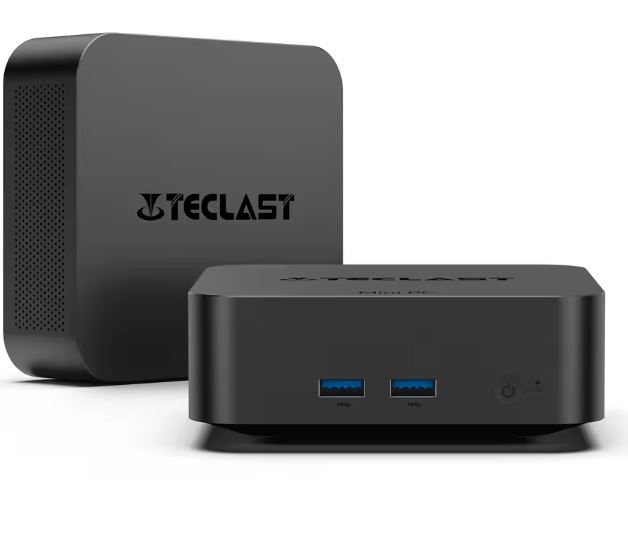
The Beelink U59 ( SEE PRODUCT DETAILS ) with an Intel Celeron i5-N5095 processor is a mini PC designed for those looking for a quiet, versatile computer capable of handling basic multitasking with ease. Its 8GB of RAM and 256GB SSD offer speed in everyday use, while its varied connectivity makes it ideal for both the office and home entertainment. It's not a substitute for a gaming PC or heavy-duty workstations, but it shines as a compact and efficient computer.
Pros: Rugged design, smooth performance for everyday tasks, Windows 10 preinstalled, good connectivity.
Cons: Not suitable for demanding games, 256GB of storage is too small, no dedicated GPU.
Key technical specifications
| Feature | Detail |
|---|---|
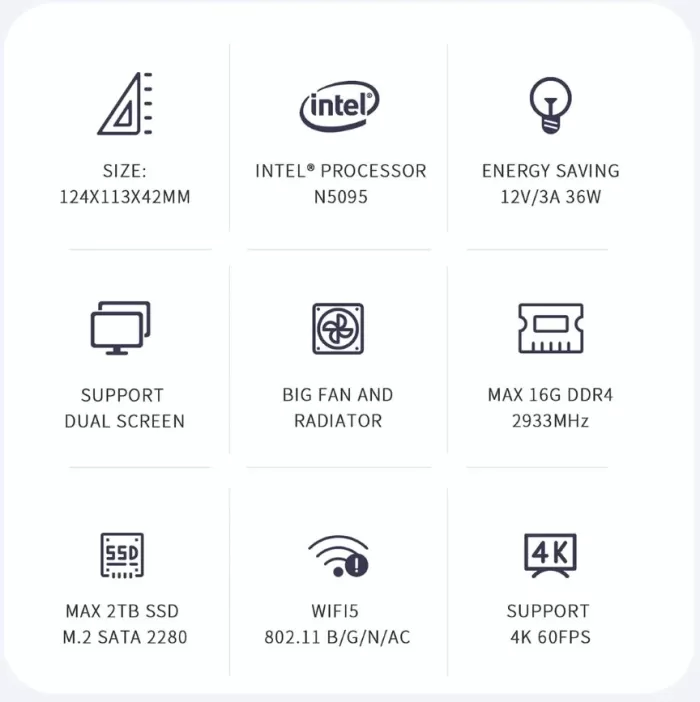
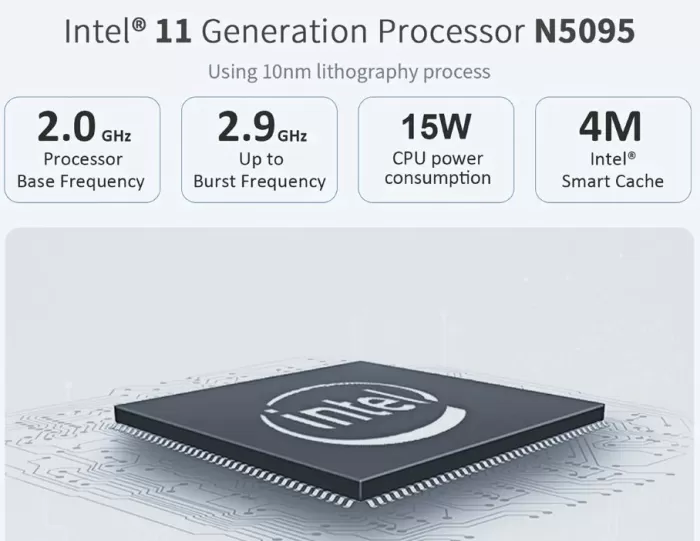
| Processor | Intel Celeron i5-N5095 (4 cores, up to 2.9 GHz) |
| RAM Memory | 16GB DDR4 |
| Storage | 256 GB SSD (expandable) |
| Integrated graphics | Intel UHD Graphics |
| Operating system | Windows 10 Pro |
| Wireless connectivity | Dual-band WiFi, Bluetooth 4.0 |
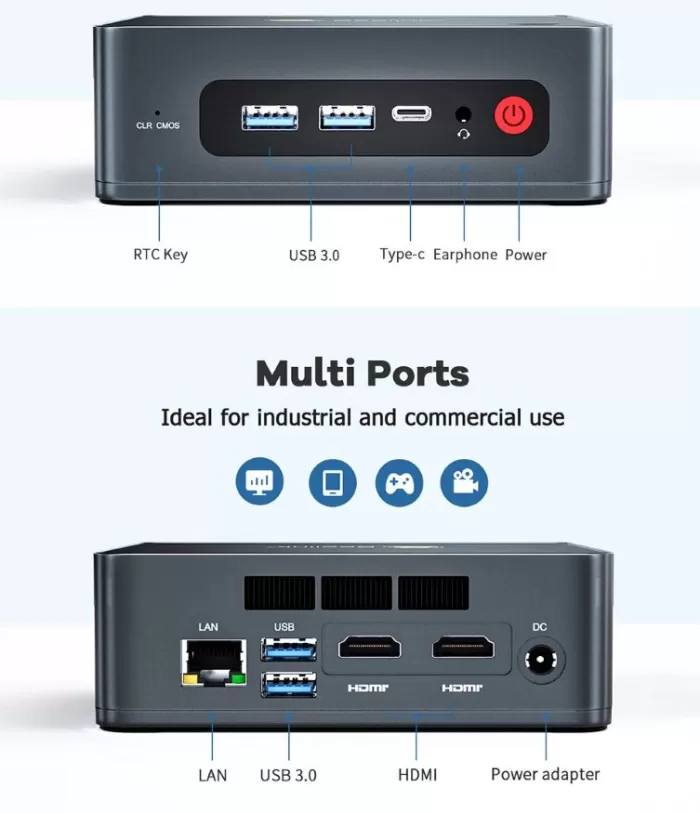
| Ports | HDMI, USB 3.0, USB-C, Ethernet, jack 3.5 mm |
| Energy consumption | Low (TDP 15W) |
| Additional features | Signal decoding, satellite receiver |
Design and build quality
The Beelink U59 maintains the brand's signature minimalist aesthetic: a square, matte black casing, smooth edges, and discreet rear ventilation.
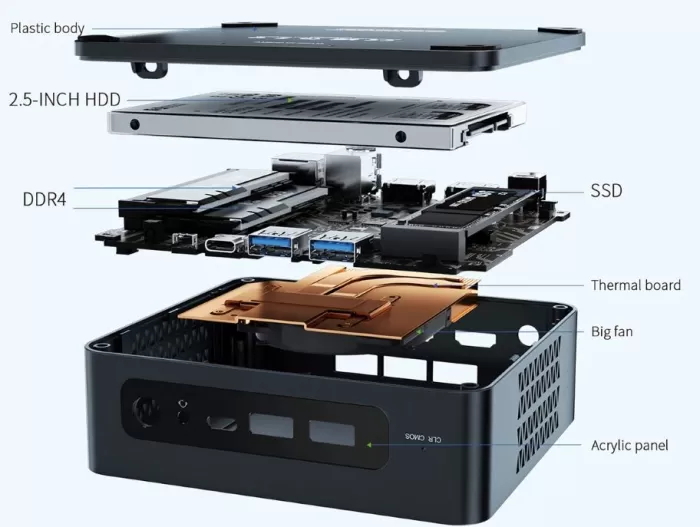
It's made of high-quality plastic with metal reinforcements inside, giving it a solid feel. Its compact size allows it to fit behind a monitor with a VESA mount, ideal for small desks or minimalist environments.
Screen and multimedia
As a mini PC, it does not include a display, but offers HDMI and USB-C output with dual monitor support in 4K .
Multimedia playback is fluid, even with high-bitrate streaming content or local files. YouTube and Netflix in 4K at 60 fps run smoothly.
As for sound, it depends on the connected device, although HDMI output guarantees lossless digital audio.
Performance and software
In everyday use, the U59 feels agile thanks to the SSD and 8GB of RAM. It can handle:
-
Browsing with more than 15 tabs open without severe slowdown.
-
Office applications such as Word, Excel or Google Docs.
-
Light photo editing and 4K media playback.
In gaming, it only performs well on light titles (Minecraft, League of Legends, retro emulation). Modern AAA titles barely reach playable speeds even at minimum settings. Windows 10 comes preinstalled, clean, and free of unnecessary bloatware. It can be upgraded to Windows 11 if the user so desires.
Connectivity and extras
The Beelink U59 stands out in this section:
-
Dual band WiFi for fast and stable connections.
-
Bluetooth 4.0 for wireless peripherals.
-
Gigabit Ethernet for maximum network stability.
-
Multiple USB 3.0 and USB-C ports , ideal for external drives or accessories.
-
Support for two 4K displays simultaneously.
It does not include NFC, fingerprint reader or IP certification.
Opinions on well-known pages
The average rating is between 4.4 and 4.7 out of 5 stars.
The Beelink U59 Mini PC has been well received by users who purchased it on platforms like AliExpress , Amazon , and hardware communities like Reddit and mini PC forums. Below are the highlights, based on real reviews:
1. Overall performance
-
Many buyers note that the i5-N5095 offers surprisingly good performance for a mini PC of this size and price range. They note that the combination of 8GB of RAM and a 256GB SSD allows Windows 10 to run smoothly, even with multiple applications open simultaneously.
-
Amazon users report that browsing with more than 15 tabs in Chrome or Edge doesn't cause significant crashes, something that doesn't occur on mini PCs with older-generation processors like the Gemini Lake N4000.
-
Some reviews point out that while it's not a device for professional video editing or heavy gaming, tasks like streaming, video calls, and office work are handled without a hitch .
2. Multimedia experience
-
Reviewers highlight the ability to play 4K content at 60 fps without buffering, something appreciated by users who use it as an HTPC or to connect to large TVs.
-
The dual-monitor HDMI and USB-C output receives praise for its versatility, with users reporting setups with a 4K primary display and a Full HD secondary display without sync issues.
-
Some users recommend combining it with external speakers to improve the audio experience, since the sound through the 3.5 mm jack or HDMI depends entirely on the connected equipment.
3. Connectivity and ports
-
Most agree that dual-band Wi-Fi and Bluetooth 4.0 work reliably, even at a distance from the router, something that isn't always the case with budget mini PCs.
-
Several buyers mention that Gigabit Ethernet is useful for high-quality streaming or large downloads, as it ensures stability against fluctuating wireless connections.
-
USB 3.0 and USB-C ports allow you to seamlessly connect external drives, adapters, and other peripherals, and some users note that the device supports expanded storage configurations using an external SSD or M.2.
4. Design, construction and ergonomics
-
User reviews agree that the compact, matte black casing feels sturdy and elegant, making it ideal for small desks.
-
Some mention that it is easy to mount behind a VESA-mounted monitor , keeping your desk tidy and free of cables.
-
Reviewers praise the fan for being very quiet , even when the unit is under medium load, and for keeping the temperature within safe ranges (50-65°C).
5. Software and operating system
-
Users appreciate that Windows 10 Pro comes clean , without bloatware or unnecessary apps, and that the device is suitable for upgrades to Windows 11.
-
Some technical reviews indicate that the device runs productivity applications and office suites without any slowdowns , although they warn that when opening heavy editing software like Photoshop or Premiere the experience may be limited.
6. Negative points reported
-
The 256GB storage capacity is cited as insufficient for those who install several large programs or store large multimedia files; many users recommend adding an external SSD or a larger drive.
-
While the i5-N5095 is suitable for light multitasking, it is not recommended for demanding gaming , advanced video editing, or 3D modeling.
-
Some users mention that the mini PC does not include a camera , so for video calls it is necessary to purchase an external peripheral.
7. Technical opinions in forums and communities
-
On Reddit and mini PC forums , more technical users highlight the power efficiency of the machine , with consumption of only 12-15 W in normal tasks.
-
The combination of i5-N5095 + 8GB RAM + SSD is described as sufficient to create a multimedia center, light home server or basic workstation .
-
It is also emphasized that compared to other low-end mini PCs, the U59 offers better integrated graphics performance , allowing it to play 4K content and drive dual displays stably.
8. Overall user rating
-
On AliExpress and Amazon, the team maintains an average rating of 4.5 out of 5 stars , indicating overall positive acceptance.
-
Most buyers recommend it for offices, classrooms, media centers, or home desktops , while negative reviews tend to focus on uses outside its ideal range (advanced gaming or professional editing).
Technical Test Summary
Technical tests conducted by the community and independent reviewers agree that the Beelink U59 with i5-N5095 is a powerful mini PC within its range, ideal for basic and multimedia tasks, although limited in gaming and heavy professional software.
1. Start-up and response time
-
YouTube users report that the device takes approximately 15-18 seconds to boot Windows 10 from a complete shutdown thanks to the 256GB SSD.
-
The wake-up time from sleep is almost instantaneous, around 2-3 seconds , which improves the user experience compared to budget mini PCs with HDDs.
-
In forums, some buyers point out that launching basic applications (Word, Chrome, Spotify) is fast and does not cause significant delays.
2. Web browsing and multitasking
-
In real-world testing, users report being able to open 15-20 tabs in Chrome or Edge with streaming videos in some tabs and documents in others without noticing any significant slowdown.
-
Fluidity begins to decrease as you go past 25-30 tabs, but the experience is still acceptable for everyday tasks.
-
Compared to entry-level models with Gemini Lake N4000 processors, the i5-N5095 offers up to 50% more multitasking performance , according to benchmarks reported by some users on technical forums.
3. Multimedia playback
-
The Beelink U59 handles 4K video at 60 fps without buffering issues, even with high-bitrate local files or streaming from YouTube and Netflix, according to YouTube reviews.
-
Some users connect the U59 to two monitors simultaneously (one 4K and one Full HD) and report a stable experience , without tearing or video delays.
-
The audio output via HDMI is clear, and users recommend external speakers for a more complete experience, especially in home theater systems.
4. Performance in office and productivity software
-
Tests shared on forums and reviews indicate that the U59 runs Word, Excel, PowerPoint, Google Docs, and medium-sized spreadsheets perfectly .
-
Opening large files (documents of several tens of MB or spreadsheets with many formulas) causes a slight delay , but remains functional.
-
Some users use light photo editing software (basic Photoshop) and report that it works correctly , although experience with heavier projects is not recommended.
5. Gaming and graphics tests
-
Reddit and YouTube users have tried out light and retro games:
-
Minecraft : 40-50 fps on medium quality.
-
League of Legends : 35-45 fps on low settings.
-
Recent AAA games (Cyberpunk, Call of Duty) barely reach 15-20 fps even at low resolution, confirming that it is not a mini gaming PC.
-
-
The integrated Intel UHD Graphics is sufficient for multimedia playback and retro/emulated games, but limited for demanding 3D software.
6. Temperatures and noise
-
During extended testing sessions (4K streaming, intensive browsing, and multitasking), users report stable temperatures between 50 and 65°C , thanks to a quiet fan and a low TDP of 15W.
-
The unit remains virtually silent, even under medium load, according to technical reviews on YouTube.
7. Energy consumption
-
Several testers and buyers point out that the U59 consumes between 12 and 15 W in normal use , much less than a traditional desktop PC, making it an economical and efficient option for extended use.
-
Under maximum load (4K streaming + multitasking + active fan), consumption barely exceeds 20 W , demonstrating its energy efficiency.
8. User-reported benchmarking
-
Cinebench R20 : Modest scores, but higher than mini PCs with N4000, confirming better multitasking performance.
-
PCMark 10 : excels in productivity and general usage, with adequate scores for office tasks, browsing, multimedia, and streaming.
-
Informal comparisons with other similarly priced mini PCs show that the i5-N5095 offers 30-50% more performance than older entry-level models.
9. Storage and read/write speed
-
Users testing with CrystalDiskMark report read speeds of ~550 MB/s and write speeds of ~500 MB/s , typical of a modern SATA SSD.
-
This translates into faster boot times, faster program launches, and faster file transfers than mini PCs with HDDs or eMMCs.
10. General shared experience
-
The combination of i5-N5095, 8GB RAM and 256GB SSD allows for a balance between performance and energy efficiency that convinces most buyers.
-
The general perception is that it's worth it for home users, office workers, students, or as a media center , while those looking for gaming or heavy editing should opt for more advanced models.
Final conclusion
The Beelink U59 with i5-N5095 is a balanced mini PC for those looking for:
-
A compact and quiet computer for the office or home.
-
A multimedia device to play series, movies or music in 4K.
-
A secondary PC for everyday tasks, online classes, or intensive browsing.
Not the best option for:
-
Gamers.
-
Professionals who work with video editing or 3D modeling.
-
Users who need large storage capacity without expansion.
Alternatives
-
Beelink SER3 : more powerful, with Ryzen 7 and better integrated GPU.
-
MINISFORUM UM700 : designed for the most demanding multitasking.
Where to buy
You can find more information or purchase the Beelink U59 Mini PC on its official sales page: