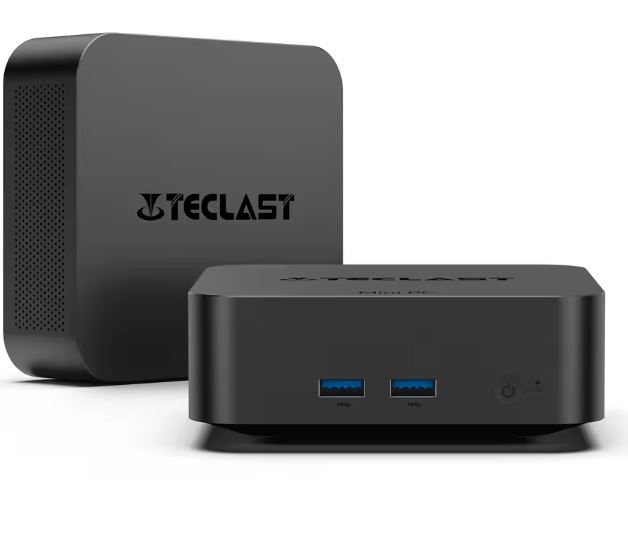
The Teclast N20 with Intel N5095 is a compact and well-connected mini PC for office, browsing, 4K multimedia and light home tasks.
Its 16GB of RAM, 512GB SSD, dual HDMI, USB-C with video output and 2.5G Ethernet make it more complete than many budget models.
✅ Pros: Excellent connectivity, ample RAM, compact form factor, Wi-Fi 6, VESA mount support, and low power consumption.
❌ Cons: The N5095 is an older processor and not suitable for modern gaming.
🏆 Quick conclusion: It's a viable option, but it should be carefully compared with more modern alternatives.
👉 See price and availability of the Teclast N20
📦 Unboxing and box contents
Teclast includes everything you need to start using the device without having to buy essential accessories separately. This is a plus, especially for those who want to install it behind a monitor or turn a television into a multimedia center.
Inside the box we found (check according to the seller):
-
🖥️ Teclast N20 Mini PC
-
🔌 12V/4A power adapter with European plug
-
🧵 HDMI cable
-
🧱 VESA mount for installation behind a monitor or TV
-
🔩 12 screws for anchoring
-
🦶 Four rubber pads for use on a table
-
📖 User Manual
The VESA mount is especially useful: it allows you to hide the mini PC behind the screen, reduce visible cables, and keep your desk clean.
⚙️ Technical specifications
| Feature | Teclast N20 |
|---|---|
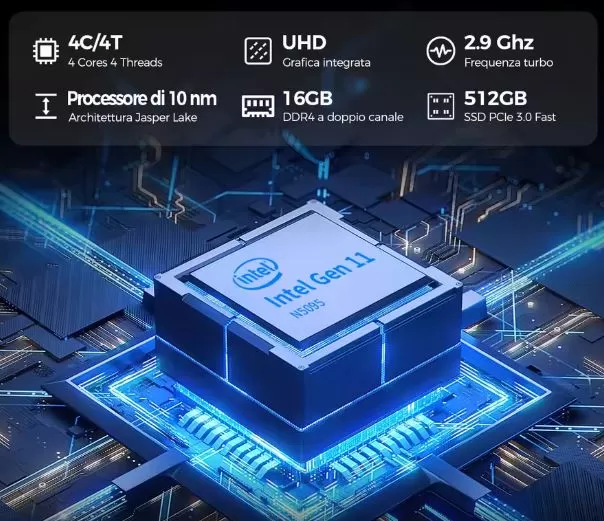
| Processor | Intel Celeron N5095 |
| Architecture | 4 cores / 4 threads |
| Maximum frequency | Up to 2.9 GHz |
| Graphics | Intel UHD Graphics |
| RAM | 16 GB DDR4 |
| Storage | 512GB M.2 NVMe SSD |
| RAM Expansion | Not expandable |
| SSD Upgrade | Yes, replacing the M.2 2280 |
| Video | 2 x HDMI 4K at 60 Hz + USB-C with video |
| USB ports | 4 x USB Type-A 3.2 + 1 x USB‑C |
| wired network | Ethernet 2.5G RJ45 |
| Wireless connectivity | Wi-Fi 6 and Bluetooth 5.2 |
| Audio | 3.5 mm combo jack |
| Operating system | Windows 11 Pro |
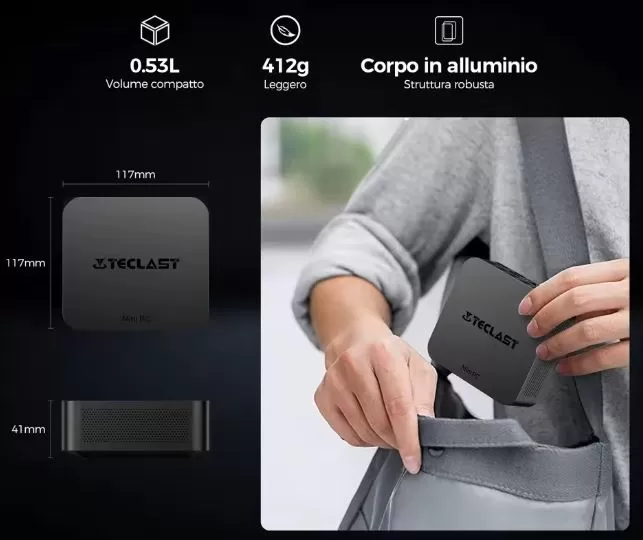
| Dimensions | 11.7 × 11.7 × 4.1 cm |
| Weight | Approximately 400 grams |
| Anchorage | VESA compatible, bracket included |
| Declared consumption | Approximately 15 W in normal use |
| Declared noise | Up to 39 dB under load |
🧱 Design and build quality
The Teclast N20 features a simple, understated, and functional design. Measuring just 11.7 cm on each side, it takes up very little space on a desk and can be easily placed next to a monitor, television, or router.
The aluminum alloy chassis feels more solid than the typical plastic casing found on some inexpensive mini PCs. In addition to providing rigidity, this material helps dissipate some of the heat generated by the processor and SSD.
Weighing around 400 grams, it's not a device you'd carry around in a backpack every day like a laptop, but it is compact enough to move between your home, office, or vacation home. The design also makes sense for businesses and classrooms: it can be mounted behind a monitor, leaving a clean workspace.
✅ Compact and easy to conceal.
✅ Seemingly solid construction.
✅ VESA mount included.
❌ Not designed for frequent opening and expansion.
🖥️ Screen and multimedia
Being a mini PC, the Teclast N20 does not have a built-in screen or speakers. Your multimedia experience depends on the monitor, television, and sound system you connect.
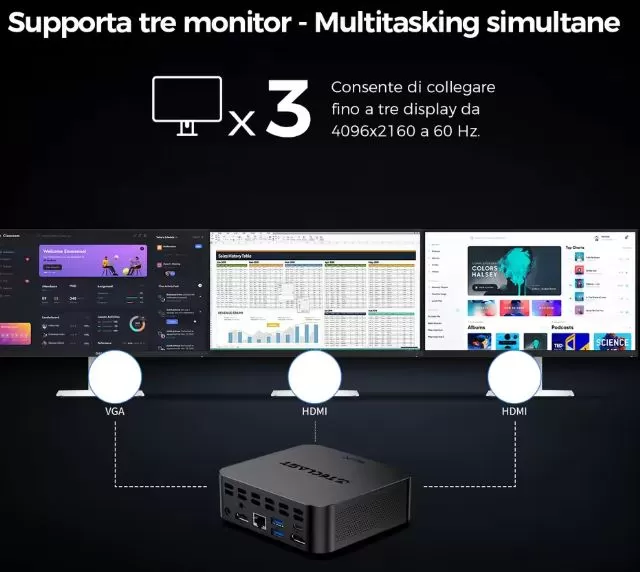
Its main advantage is the ability to connect up to three screens via its two HDMI ports and USB-C video output. The HDMI outputs support 4K resolution at 60Hz, an important feature for working with high-resolution monitors or playing audiovisual content on a modern television.
In everyday use, this configuration can be useful for:
-
🧑💻 Working with two monitors and an auxiliary screen.
-
📊 Check web analytics, Search Console, SEO tools and spreadsheets all at once.
-
📺 Use the device as an HTPC or multimedia center in the living room.
-
🏪 Install digital signage in shops, waiting rooms or shop windows.
-
🎬 Play 4K video locally or via compatible streaming platforms.
The 3.5 mm jack allows you to connect headphones, speakers, or a microphone with a combo jack. For a better audio experience, it's best to use HDMI audio connected to a TV or soundbar.
🚀 Performance and software
The Intel Celeron N5095 is a quad-core processor designed for low power consumption. It's not intended to compete with a modern Intel Core processor, but it still offers a suitable experience for light, everyday tasks when paired with 16GB of RAM and an NVMe SSD.
The combination of 16 GB of RAM and 512 GB of storage is one of the device's strengths. It allows you to use multiple browser tabs, document editors, video calls, and other work tools simultaneously with greater ease than 8 GB configurations.
| Use | Expected experience |
|---|---|
| Web browsing and email | ✅ Fluid |
| Office, Google Docs and PDF | ✅ Very suitable |
| WordPress, local Laravel and lightweight web editing | ✅ Suitable, with limitations in large projects |
| SEO management and analytics | ✅ Good with multiple tabs |
| 1080p video calls | ✅ Correct |
| 4K playback | ✅ Suitable for compatible codecs |
| Lightweight Photoshop and Canva | ⚠️ Valid for simple tasks |
| 1080p video editing | ⚠️ Possible, but slow in exports |
| Web programming and development | ⚠️ Good for modest projects; limited for heavy Docker or large builds |
| Current AAA games | ❌ Not recommended |
| Local AI or 4K editing | ❌ Not recommended |
Windows 11 Pro comes pre-installed, which is convenient for home and professional users who need remote desktop, BitLocker, or enterprise features. However, as with many mini PCs from Chinese brands, it's advisable to perform a clean installation of Windows from the official Microsoft website if you want to start with a fully controlled environment.
Bloatware and updates
Windows typically includes pre-installed system applications and possible utilities from the manufacturer. There shouldn't be too many, but it's worth checking:
-
Unnecessary factory-installed applications.
-
Pending Windows Updates.
-
Intel Wi-Fi, Bluetooth and graphics controllers.
-
Successful activation of Windows 11 Pro.
-
Privacy settings and startup programs.
💡 Tip: After receiving your mini PC, create a backup, update Windows and Intel drivers, and check the SSD's health with CrystalDiskInfo.
👉 See price and availability of the Teclast N20
🔌 Energy consumption and cables
Low power consumption is one of the clearest reasons to choose a mini PC like the Teclast N20. Its declared power consumption is around 15W in normal use, well below that of a conventional desktop computer with a dedicated graphics card.
This makes it an interesting option for having it switched on for many hours a day: office, monitoring, lightweight media server, family PC or teleworking equipment.
The included adapter is a desktop adapter with a 12V/4A output and connects via a DC power cable. It does not use USB-C Power Delivery, so you will need to keep your original charger or use one that is fully compatible with the required voltage and amperage.
Indicative electricity cost
If the equipment consumed an average of 15 W for 8 hours a day:
-
Approximate daily consumption: 0.12 kWh.
-
Approximate monthly consumption: 3.6 kWh.
-
Approximate annual consumption: 43.8 kWh.
The actual cost will depend on your electricity tariff and workload. It will consume less when idle, while under sustained load it may exceed the usual declared consumption.
🌡️ Temperature and noise: actual thermal
The Teclast N20 uses an aluminum chassis that helps to dissipate some of the heat, but the Intel N5095 still needs active cooling to maintain stable performance during prolonged tasks.
Teclast declares a noise level of around 39 dB under load, a figure that should be audible in a quiet room, but not bothersome in an office with ambient ventilation, a mechanical keyboard or a television turned on.
What to expect in normal use
-
🌐 Browsing, email and Office: discreet operation and controlled temperatures.
-
📺 4K video and streaming: the fan may slightly increase its speed.
-
🧪 Benchmarks, exports or prolonged loads: more heat and more noise.
-
🎮 Prolonged gaming or emulation: The system may increase fan speed to maintain stability.
It's not advisable to install it inside a closed cabinet or place it near a heat source. If you're using a VESA mount, leave sufficient space around the monitor's ventilation grilles.
🔗 Connectivity and extras
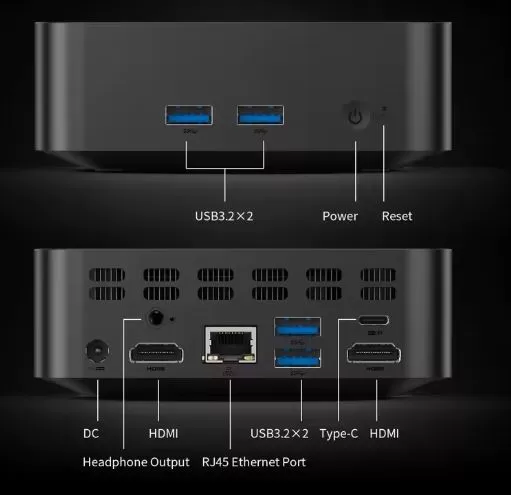
Connectivity is one of the Teclast N20's strongest selling points. It not only includes a generous number of USB ports, but also incorporates 2.5G Ethernet and USB-C with video output, features not always found on entry-level mini PCs.
| Connection | Detail |
|---|---|
| USB Type-A | 4 x USB 3.2 |
| USB Type-C | 1 x USB-C for data and video output |
| HDMI | 2 x HDMI with 4K at 60 Hz |
| Ethernet | 1 x RJ45 2.5G |
| Wi-Fi | Wi-Fi 6 |
| Bluetooth | Bluetooth 5.2 |
| Audio | 3.5 mm headphone/microphone jack |
| Feeding | DC Input |
| VESA | Yes, stand included. |
The 2.5G Ethernet port is particularly useful for a fast local network. It can be used to transfer files to a compatible NAS, edit network-stored content, or create a wired workstation.
🔧 Expansion and upgrades
Expansion is one of the most limited aspects of this model. Based on the configuration shown, its 16 GB of RAM is not expandable, so it's best to buy this version directly and avoid 8 GB variants if you plan to keep it for several years.
The M.2 2280 SSD can indeed be replaced with a higher-capacity drive. In theory, you could install a 1 TB or 2 TB NVMe SSD, provided it's physically compatible and doesn't have a heatsink that's too tall for the chassis.
| Component | Can it be enlarged? | Recommendation |
|---|---|---|
| RAM | ❌ No | Choose the 16 GB version directly |
| SSD M.2 2280 | ✅ Yes, by replacing the existing one | 1 TB or 2 TB NVMe from a recognized brand |
| Second M.2 | ❌ Not confirmed | Not counting on it before opening the equipment |
| 2.5" SATA hard drive | ❌ Not confirmed | It does not appear to have an internal bay. |
| Wi-Fi card | ⚠️ Not recommended | For advanced users only and after confirming compatibility |
Before upgrading your SSD, create a disk image or perform a clean install of Windows on the new drive. If you're using BitLocker, save your recovery key before unmounting anything.
👉 See price and availability of the Teclast N20
🆚 Comparison with direct competitors
At €228.39, the Teclast N20 faces a complicated reality: there are mini PCs with Intel N95, N97 and especially N100 that usually offer a newer platform and superior performance.
| Orientation model | Processor | Typical RAM/SSD | Grid | Main advantage | Weak point |
|---|---|---|---|---|---|
| Teclast N20 | Celeron N5095 | 16 GB / 512 GB | 2.5G LAN | Abundant USB ports, triple screen support, and VESA mount | Veteran CPU for its price |
| Mini PC with Intel N95 | Intel N95 | 8-16 GB / 256-512 GB | 1G or 2.5G | More modern architecture | Configuration varies by brand |
| Mini PC with Intel N100 | Intel N100 | 16 GB / 512 GB | 1G or 2.5G | Better balance of performance and consumption | It may cost a little more |
| Beelink Mini S12 Pro | Intel N100 | 16 GB / 500 GB | Normally 1G LAN | Popular brand and large community | Less complete in network |
| GMKtec G3 / similar | Intel N100 | 8-16 GB / 256-512 GB | According to version | Good value for money | Quality and support depend on the seller |
| Minisforum UN100 / similar | Intel N100 | 16 GB / 512 GB | According to version | Better brand focus and support | Price usually higher |
💡 Quick buying rule: If you find an N100 with 16GB of RAM, a 512GB SSD, and comparable warranties for a small difference, it will usually be a better buy than the N5095.
💬 Reviews on well-known websites
Technology Portals
Hardware review media outlets focus their opinions on the excellent value for money and the comfort of the chassis:
- Clean desks: They highlight the fact that, weighing only 400 grams and including the VESA mount, "no conventional desktop computer can compete in terms of space." It allows you to have a study or work environment completely free of the cumbersome traditional tower and with minimal visible cables.
- Amazing capabilities: Sites like Topes de Gama point out that its 16 GB of RAM and NVMe SSD are surprising for their fluidity in tasks that are not comfortable on mobiles or tablets, performing the same as much more expensive office computers.
Hardware User Community (Reddit - r/MiniPCs)
In computer enthusiast forums, opinions are more critical and focused on hardware durability:
- Quality of internal components: Some users in threads about the reliability of Chinese brands like Teclast mention that, in order to cut costs and offer low prices, manufacturers often skimp on the quality of storage (white label SSDs) or the internal network card.
E-commerce Platforms (Amazon / AliExpress)
Reviews from buyers who already have the device at home evaluate its day-to-day performance:
- Silent operation: Reviews on Amazon confirm that the aluminum alloy chassis and its 15W fan live up to the hype. The Mini PC is extremely quiet (those 39 dB feel like a gentle murmur), which is appreciated when using it at night in small rooms.
- Highly praised connectivity: The 2.5G LAN port and the 4 USB 3.2 ports receive excellent marks from users who use it as a home media server (Plex servers) or 24-hour download device, as it consumes very little power.
- Criticisms of after-sales support: On reputation platforms like Trustpilot, complaints about Teclast are not usually directed at the product itself, but at the difficulty of processing direct warranties or obtaining driver updates from their website if something goes wrong after a while.
🧪 Technical tests
Processor (CPU) Performance
The N5095 processor (4 cores, 4 threads, 10nm lithography) offers modest but efficient performance:
- Geekbench 5: Achieve an approximate score of 650 points in Single-Core and about 2100 points in Multi-Core.
- Cinebench R23: In the pure rendering test, it scores around 600 points (Single-Core) and 2000 points (Multi-Core).
- Real-world translation: These figures indicate that the processor is more than capable of opening browsers with over 15 tabs, streaming video, and running office programs (Word, Excel) smoothly. However, it lacks the power needed for compiling complex code, professional photo editing, or 3D rendering.
Graphics Performance (GPU) and Display Interfaces
The integrated Intel UHD Graphics (Jasper Lake) at 750 MHz has a purely multimedia focus:
- 4K Video Test: In video playback tests (YouTube, Netflix, or local files) at 4K 60 FPS with the AV1 or VP9 codec, CPU usage remains low (between 15% and 25%). Hardware decoding works excellently.
- Gaming Tests (3DMark Night Raid): Gets a low score (around 3000 points).
- Real-world translation: This isn't a computer for modern games. Very light competitive games like League of Legends or Counter-Strike 2 (even at 720p on very low settings) can reach 30-40 FPS, but with noticeable drops. It is, however, ideal for emulating classic consoles (up to PS1 and PSP without problems).
Storage Speed (SSD)
With an M.2 NVMe PCIe compatible slot , the disk's performance is far superior to that of older Mini PCs that used eMMC or SATA storage:
- CrystalDiskMark: Sequential read tests yield speeds between 1600 MB/s and 2000 MB/s, while write speeds are around 1200 MB/s.
- Real-world translation: The Windows 11 Pro operating system boots completely in less than 10-12 seconds and common applications open almost instantly.
Thermal, Consumption and Noise Tests (Stress Test)
In thermal stress tests (putting the processor at 100% capacity for 30 continuous minutes with programs like AIDA64):
- Temperatures: The processor reaches a maximum peak of between 75°C and 82°C. The aluminum alloy chassis helps to passively dissipate heat, preventing thermal throttling (performance loss due to overheating).
- Actual Power Consumption: In idle mode , it consumes a mere 6-7W. Under normal office use or multimedia playback, it stabilizes at 15W. Under maximum load with peripherals connected, the charger may register occasional peaks of 24-28W. This is ridiculously low consumption compared to a conventional tower (which exceeds 150W).
- Noise: The 39 dB measured at a distance of one meter confirms that the internal fan is audible in a completely silent room under maximum load, but becomes imperceptible if there is soft ambient noise or background music.
🎮 Gaming and emulation
The Intel UHD Graphics integrated into the N5095 is intended for desktop use, multimedia playback, and light gaming. It's not a modern gaming mini PC, although it can offer a fun experience with undemanding titles and retro systems.
PC Games
✅ Recommended for:
-
2D indies like Stardew Valley, Hades, Dead Cells or Cuphead.
-
Classic PC games.
-
Old or very lightweight competitive titles with low settings.
-
Cloud gaming via GeForce NOW, Xbox Cloud Gaming or Steam Link, depending on the connection.
⚠️ It may work with many limitations on:
-
Old eSports games at 720p or 1080p with low graphics.
-
3D titles from several years ago, with reduced resolution and detail.
❌ Not recommended for:
-
Current AAA games.
-
Ray tracing.
-
Serious 3D editing.
-
Demanding emulation of PS3, Xbox 360 or Nintendo Switch.
Emulation
| Platform | Expected experience |
|---|---|
| NES, SNES, Mega Drive, Game Boy, GBA | ✅ Excellent |
| PlayStation 1, Nintendo 64, Dreamcast | ✅ Very good |
| PSP | ✅ Very good |
| Nintendo DS, 3DS Lightweight | ✅ Good, depending on the game |
| GameCube | ⚠️ Variable; settings and native resolution recommended |
| PlayStation 2 | ⚠️ Variable; some titles will be playable, others will not |
| Wii | ⚠️ It will depend on the game and the settings |
| Wii U | ❌ Not recommended as a primary objective |
| PS3, Xbox 360, Switch | ❌ Not recommended |
For emulation, the best approach is to use native resolution or moderate scaling. Attempting to render at 1080p or 4K on complex systems will result in performance drops in many games.
❓ Frequently Asked Questions
1. Is it suitable for playing video games?
- Short answer: Only for very basic or old games.
- Note: It doesn't have a dedicated graphics card. It works perfectly for emulators (PS1, PSP, Nintendo 64), cloud gaming (Xbox Cloud Gaming, GeForce NOW), and undemanding casual titles like Minecraft or League of Legends at low settings. Don't try to run modern games like Cyberpunk 2077 or Call of Duty.
2. Can the RAM be expanded in the future?
- Short answer: No, it comes limited from the factory.
- Note: The Intel Celeron N5095 processor supports a strict maximum of 16 GB of RAM. In this model, the 16 GB already occupies the system limit (often soldered to the motherboard), so you will not be able to add more RAM in the future.
3. Does it come with Windows activated or do I need to buy a license?
- Short answer: It comes ready to use.
- Details: Includes Windows 11 Pro 64-bit pre-installed and activated with a legal digital license linked to the motherboard. Simply turn it on, configure your user account and language, and you're ready to go.
4. Is it completely silent or can you hear the fan?
- Short answer: It's very quiet, but not completely passive.
- Details: Unlike other Mini PCs that don't have a fan, the Teclast N20 does include a small internal fan to cool its 15W power consumption. It's virtually silent during normal use, and under maximum physical load it generates about 39 dB (a very soft murmur).
5. Can it be connected to a television and used as a media center?
- Short answer: Yes, it's one of its best uses.
- Details: Thanks to its two HDMI ports and USB-C port , you can connect it to your TV and play 4K content at 60Hz smoothly. It supports platforms like Netflix, YouTube, and Prime Video, and is excellent for setting up a home movie server (like Plex).
6. Does it turn on automatically if the power goes out? (Auto Power On function)
- Short answer: Yes, it can be configured.
- Note: This is a very common question for those who use it as a server or for home automation. By entering the computer's BIOS (by pressing the Delete or F7 key at startup), you can activate the "Auto Power On" function so that the computer turns on automatically as soon as it detects that power is restored.
7. Does it support Linux or other operating systems?
- Short answer: Yes, it is fully compatible.
- Detail: Although it comes with Windows 11, you can install Linux distributions (such as Ubuntu or Mint) or systems to transform the computer into a retro console (such as Batocera or Recalbox) using a bootable USB flash drive.
🏁 Final conclusion
The Teclast N20 N5095 is an attractive mini PC thanks to its form factor, connectivity, and memory configuration. Its 16GB of RAM, 512GB SSD, Wi-Fi 6, Bluetooth 5.2, 2.5G Ethernet, two HDMI ports, and USB-C with video provide a complete package for working, studying, browsing, consuming 4K content, or setting up a tidy desktop workstation.
It is ideal for:
-
🧑💼 Teleworking, office automation and small business management.
-
🌐 Intensive navigation, SEO, analytics dashboards and web administration.
-
📺 4K multimedia center and living room PC.
-
🏠 Home Assistant, lightweight server or computer connected to a NAS via 2.5G Ethernet.
-
🕹️ Retro emulation and undemanding games.
-
🖥️ Desks with one, two or three monitors.
It is not ideal for:
-
🎮 Modern or demanding competitive gaming.
-
🎞️ Professional video editing.
-
🧠 Local AI models.
-
🧩 Virtualization, intensive Docker or heavy development projects.
-
🛠️ Users who need to upgrade RAM in the future.
🛒 Price and where to buy
You can check the availability of the Teclast N20 Mini PC with Intel N5095, 16 GB of RAM and a 512 GB SSD on AliExpress: