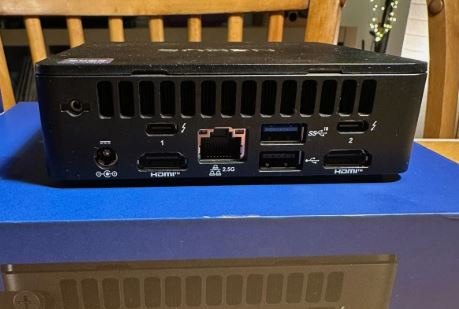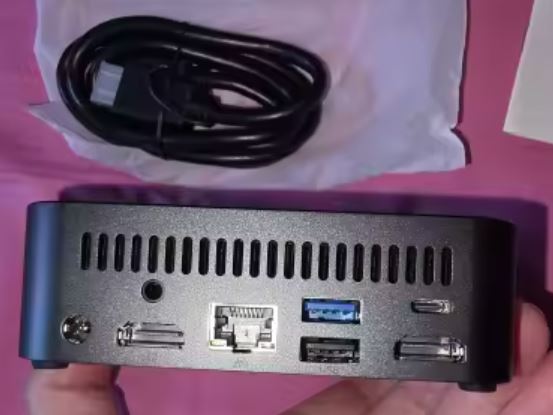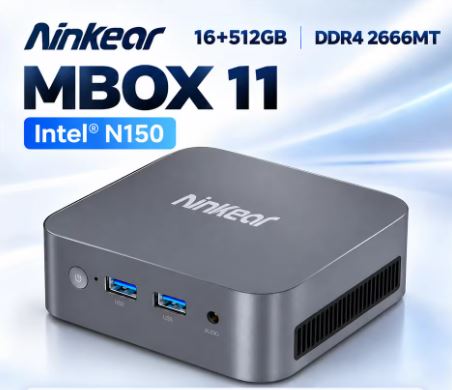
If you own a Mini PC, you know that one of its biggest drawbacks is the lack of ports.
The solution is clear: a good USB-C hub that multiplies your connectivity without sacrificing performance.
In 2026 the market offers options for all budgets and needs, from compact 5-port hubs to 15-in-1 docking stations with 4K output.
In this guide you will find everything you need to know to choose the perfect model.
What is a USB-C Hub and why does your Mini PC need it?
A USB-C hub is an adapter that converts a single USB-C or Thunderbolt port into multiple simultaneous connections: HDMI, USB-A, Ethernet, SD card reader, audio, and more. Modern Mini PCs like the Beelink, MINISFORUM, GMKtec, or Intel NUC typically include one or two USB-C ports, which can be insufficient when you connect a monitor, keyboard, mouse, external hard drive, and headphones at the same time.
A good USB-C hub for a Mini PC allows you to:
-
Connect one or two 4K monitors simultaneously
-
Expand to 4-7 additional USB-A ports for peripherals
-
Add Gigabit Ethernet for a stable wired connection
-
Read SD and microSD cards without additional adapters
-
Charge the device with Power Delivery up to 100W
What Should You Look At Before You Buy?
Before choosing your hub, consider these key factors:
| Factor | What to look for |
|---|---|
| USB-C Standard | USB 3.2 Gen 2 (10 Gbps) o Thunderbolt 4 (40 Gbps) |
| Video output | HDMI 4K@60Hz o DisplayPort 1.4 |
| Power Delivery | Minimum 60W, ideally 100W |
| Number of ports | Depending on your peripherals: minimum 7 in 1 |
| Ethernet | Gigabit (1000 Mbps) for streaming and remote work |
| Compatibility | Windows, Linux, macOS (verifica tu Mini PC) |
| Self-feeding | Recommended if you connect hard drives or many USB devices. |
The Best USB-C Hubs for Mini PCs in 2026
🥇 1. UGREEN Revodok Pro — Best Value for Money
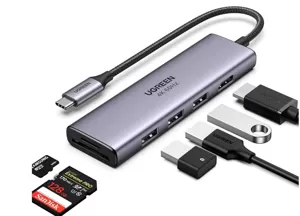
UGREEN USB-C Hub
The UGREEN Revodok Pro is one of the most highly recommended hubs of 2026 thanks to its excellent balance of price and performance. It offers up to 10 ports in 1, including HDMI 4K@60Hz, USB-A 3.2, USB-C with 100W Power Delivery, Gigabit Ethernet, and an SD/TF card reader. Its compact design and high-quality braided cable make it ideal for desktops with Mini PCs.
Strengths:
-
USB-A data transfer at 10 Gbps (Gen 2)
-
Support for 4K displays at 60 Hz
-
100W Power Delivery to avoid power loss
-
Compatible con Windows, Linux y macOS
🥈 2. Anker 11-in-1 USB-C Docking Station — The Most Complete
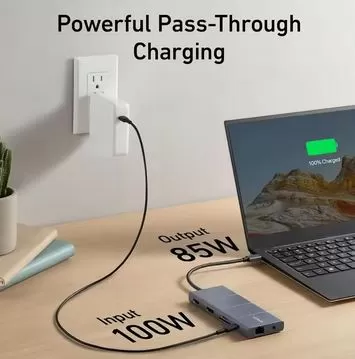
The Anker 11-in-1 is the preferred choice for users who need maximum connectivity in a single device. It includes two HDMI ports (dual monitor), USB-C data, three USB-A 3.0 ports, Gigabit Ethernet, an SD/microSD card reader, a 3.5mm audio jack, and 85W Power Delivery. Its robust construction and Anker's technical support make it a safe and long-lasting investment.
Strengths:
-
Support for two simultaneous monitors
-
11 ports in a single compact device
-
Stable Gigabit Ethernet for work and gaming
-
Driver-free, plug & play inmediato
🥉 3. Baseus 11-in-1 SpaceMate — The Most Elegant
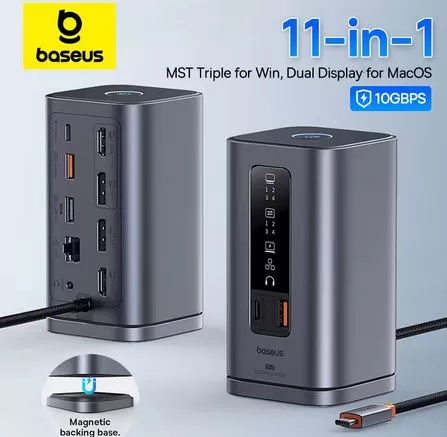
The Baseus SpaceMate 11-in-1 stands out for its ultra-slim aluminum design and excellent compatibility with mid-range Mini PCs. It offers HDMI 4K@30Hz, two USB-A 3.0 ports, two USB-A 2.0 ports, a 100W USB-C PD connection, Ethernet, an SD/TF card reader, and audio output. Its horizontal form factor makes it especially convenient on a desktop alongside a Mini PC.
Strengths:
-
Flat aluminum design, grease-resistant and non-slip
-
Complete 100W Power Delivery systems
-
Very competitive price for its features
-
Ideal for desktop setups with Beelink or MINISFORUM
4. WAVLINK Docking Station — Para Doble Monitor 4K
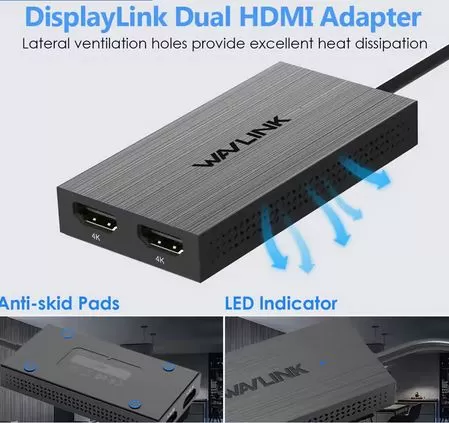
The WAVLINK Docking Station is the ideal choice if your Mini PC needs to power two 4K monitors simultaneously. It features HDMI and DisplayPort ports supporting up to 4K@60Hz on both outputs, along with USB 3.0, Gigabit Ethernet, audio, and Power Delivery. It's perfect for work or editing setups where an additional screen makes all the difference.
Strengths:
-
Dual 4K video output (HDMI + DisplayPort)
-
Up to 7 available USB-A ports
-
Self-powered (independent of the Mini PC)
-
Compatible with most Mini PCs with USB-C 3.1 or higher
5. Lemorele 15-in-1 USB-C Hub — The Most Complete on the Market
For those who don't want compromises, the Lemorele 15-in-1 offers the most ports of any hub in this price range. It includes two 4K HDMI ports, VGA, three USB-A 3.0 ports, two USB-A 2.0 ports, a 100W USB-C PD port, Ethernet, SD card slot, microSD card slot, and audio output. It's especially recommended for office setups with Mini PCs where many peripherals are connected simultaneously.
Strengths:
-
15 ports in a single device
-
Triple video output (HDMI x2 + VGA)
-
Very affordable price for the features it offers
-
Robust construction with high-quality chip
6. HyperDrive Next 8-in-1 — Compacto y Premium
HyperDrive Next USB-C Hub
The HyperDrive Next 8-in-1 is the most compact and premium option in this selection, featuring a sleek aluminum design. It offers HDMI 4K@60Hz, USB-A 3.2 Gen 2, USB-C with 140W PD, Gigabit Ethernet, and a high-speed SD card reader. Ideal for users who prioritize build quality and maximum performance over the number of ports.
Strengths:
-
Power Delivery up to 140W (the highest on the list)
-
USB-A 10 Gbps (Gen 2) for ultra-fast external SSD drives
-
Premium design in high-density aluminum
-
Very compact: it hardly takes up any space on the desk
Quick Comparison: Which One to Choose?
| Model | Ports | 4K | Ethernet | PD Max | Approx. price |
|---|---|---|---|---|---|
| UGREEN Revodok Pro | 10-in-1 | 60Hz | ✅ | 100W | €25–50 |
| Anker 11-in-1 | 11-in-1 | 60Hz | ✅ | 85W | €35–70 |
| Baseus SpaceMate | 11-in-1 | 30Hz | ✅ | 100W | €20–45 |
| WAVLINK Dock | 12-in-1 | 2×4K | ✅ | 85W | €40–80 |
| Lemorele 15-in-1 | 15-in-1 | 2×4K | ✅ | 100W | €15–40 |
| HyperDrive Next | 8-in-1 | 60Hz | ✅ | 140W | €50–90 |
Hub USB-C vs Docking Station: ¿Cuál Necesito?
Although the terms are used interchangeably, there is a key difference:
-
USB-C Hub: Compact, bus-powered (uses power from the Mini PC), ideal for 5-10 basic ports. Perfect if you only need to expand connectivity without additional displays.
-
Docking Station: It has its own power supply, supports multiple 4K monitors and more simultaneous ports. Recommended for complete desktop work setups with a Mini PC.
For a heavy-duty Mini PC (dual monitors, external SSD, multiple peripherals), a docking station with its own power supply is ideal. For basic use or portability, a compact hub is more than sufficient.
Tips to Get the Most Out of Your USB-C Hub
-
Check the USB-C standard of your Mini PC: not all support video output or Thunderbolt. Verify the specifications before purchasing.
-
For external SSD drives, choose hubs with USB-A or USB-C Gen 2 (10 Gbps) for real transfer speeds.
-
For dual 4K@60Hz monitors, you need a hub that explicitly supports MST (Multi-Stream Transport) or two independent HDMI outputs.
-
Avoid unbranded hubs or those with unknown chips for use with Mini PCs: they can cause stability problems or overheating during prolonged use.
-
Place the hub on a ventilated surface: active hubs with many ports generate heat, especially if you charge and stream video simultaneously.
Conclusion: What is the Best USB-C Hub for Mini PCs in 2026?
If you're looking for the best value for money, the UGREEN Revodok Pro is the most balanced choice on the market in 2026.
If you need dual monitors or maximum connectivity, the WAVLINK Docking Station or the Lemorele 15-in-1 are the most complete options.
And if budget isn't an issue and you're looking for the best of the best in a compact format, the HyperDrive Next 8-in-1 won't disappoint.