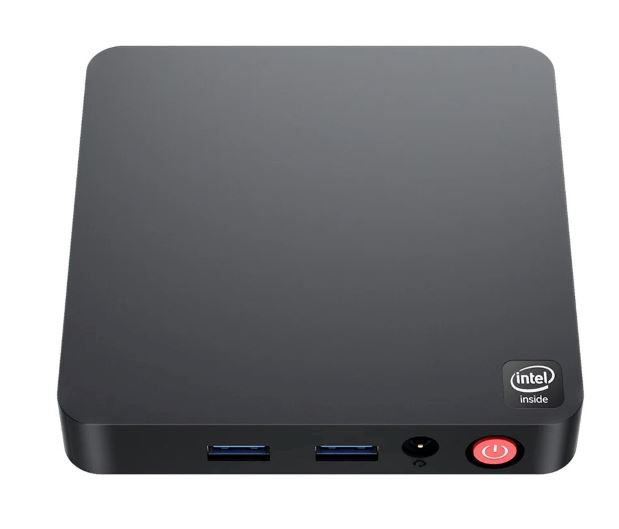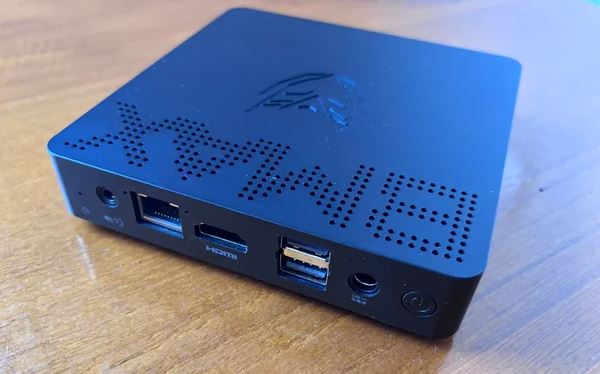
The BMAX B1 Pro is one of the most compact and affordable desktop computers on the market. Its main distinguishing feature compared to the low-cost competition is its 100% passive (fanless) design, which guarantees a complete absence of mechanical noise (0 dB) and zero maintenance since no dust accumulates inside.
⚖️ Initial Verdict: Pros and Cons
The BMAX B1 Pro is an excellent entry-level solution for those seeking an ultra-quiet device for basic web browsing, light office tasks, point-of-sale (POS) applications, or 24/7 home servers (Home Assistant/Pi-hole) with a ridiculously low power consumption of just 4W to 10W. However, its dual-core processor and soldered RAM prevent any heavy multitasking or editing.
✅ Pros:
-
100% passive cooling ( Fanless ): operation with 0 dB of absolute noise.
-
Minimal energy consumption (just 4W at rest and 10W at full load).
-
Accessible M.2 2280 SATA slot for expanding storage with SSDs up to 2TB.
-
Dual display output combining HDMI 2.0 (4K@60Hz) with analog VGA port.
-
Ultra-light flat format measuring only 12 × 12 × 2.2 cm and weighing 220 grams.
-
The package includes a MicroSD card reader and VESA mount.
❌ Cons:
-
Intel Celeron N4000 processor limited to 2 cores and 2 threads.
-
8GB non-expandable soldered RAM memory.
-
Serial storage in slow eMMC memory (~150-200 MB/s).
-
Without USB Type-C ports and with wireless connectivity via Wi-Fi 5 and Bluetooth 4.2.
👉 See prices and availability of the BMAX B1 Pro on AliExpress
📦 Unboxing and Box Contents
The packaging of the BMAX B1 Pro is austere and functional, including the essential accessories for immediate assembly:
-
BMAX B1 Pro Mini PC Unit
-
Compact external power adapter (12V / 2A - 24W) with European plug
-
Standard HDMI male-to-male cable
-
Metal VESA mounting plate with screw set for mounting behind a monitor or on a wall
-
User manual and warranty card
⚙️ Technical Specifications Sheet
| Component / Feature | Technical Details |
|---|---|
| Processor (CPU) | Intel Celeron N4000 (Gemini Lake, 14 nm), 2 cores / 2 threads up to 2.60 GHz |
| Integrated graphics (GPU) | Intel UHD Graphics 600 (12 Execution Units / EUs up to 650 MHz) |
| RAM | 8 GB LPDDR4 at 2400 MHz ( soldered on board, not expandable) |
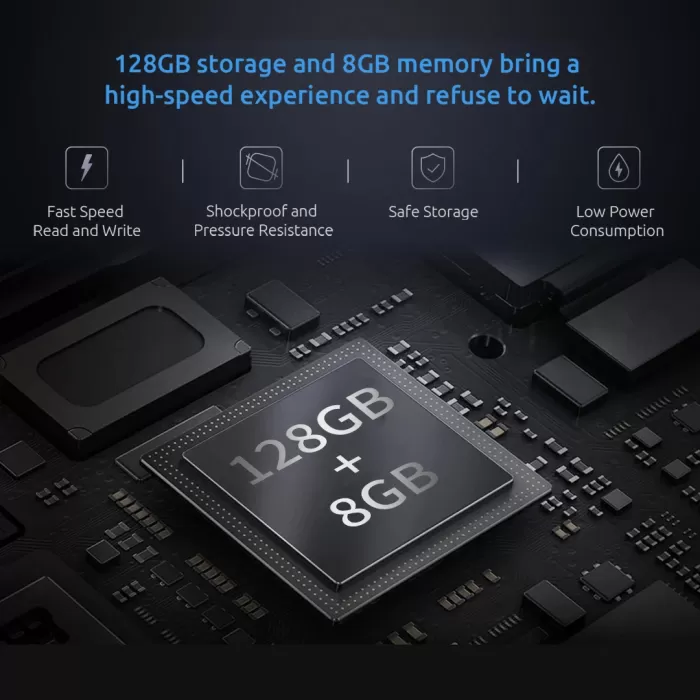
| Standard storage | 128 GB integrated eMMC 5.1 (~180 MB/s read) |
| Expansion slot | 1x M.2 2280 SATA3 slot (supports drives up to 1 TB or 2 TB) |
| Card reader | MicroSD card slot (TF card) |
| Video outputs | Dual display: 1x HDMI 2.0 (4K@60Hz) + 1x VGA (1080p@60Hz) |
| Wired network (LAN) | 1x RJ45 Gigabit Ethernet (1000 Mbps) |
| Wireless connection | Wi-Fi 5 (802.11ac dual band 2.4/5GHz) + Bluetooth 4.2 |
| USB ports | 2x USB 3.0 (Type A) + 2x USB 2.0 (Type A) |
| Audio | 3.5 mm combined jack connector for headphones and microphone |
| Refrigeration | 100% Passive (Fanless, internal heatsink without fan, 0 dB) |
| Dimensions and weight | 120 × 120 × 22 mm |
| Operating system | Windows 11 Pro preinstalled (supports Ubuntu/Debian Linux) |
🧱 Design and Construction Quality
The BMAX B1 Pro features a low-profile chassis reminiscent of a TV box . At just 2.2 cm tall and with a square footprint of 12 x 12 cm, it's an exceptionally slim and discreet device.
The outer casing is made of matte black ABS plastic, with a small decorative strip on the top cover displaying the BMAX logo. Weighing just 220 grams, it can be held effortlessly in one hand.
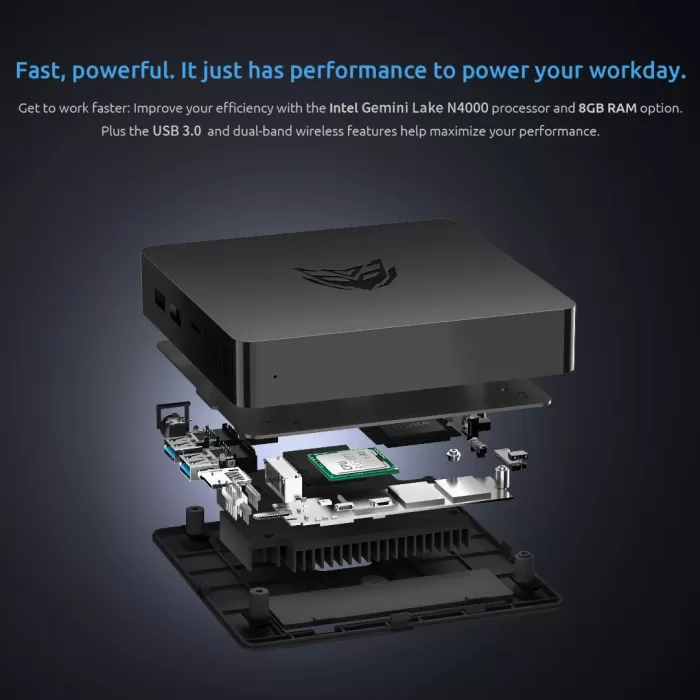
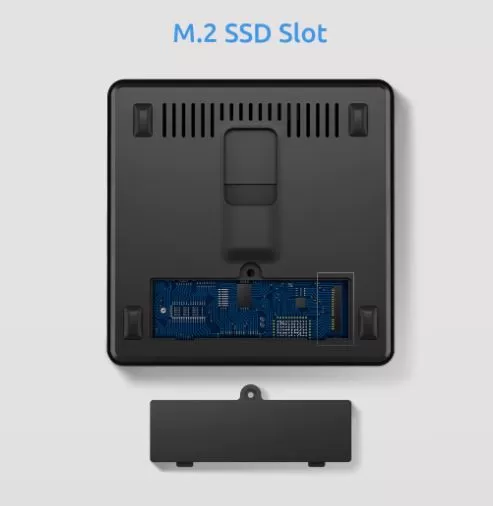
At its base, we find four non-slip rubber feet and a small door secured by screws that provides direct access to the M.2 bay. The absence of active ventilation slots completely prevents lint or dirt from entering the internal circuits, minimizing long-term cleaning tasks.
🖥️ Screen and Multimedia Experience
In the multimedia field, this device offers a very practical solution for mixed environments thanks to its dual video output:
-
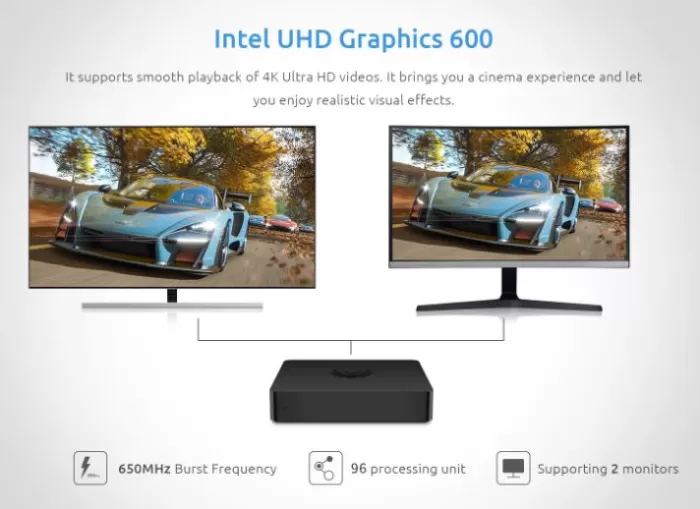
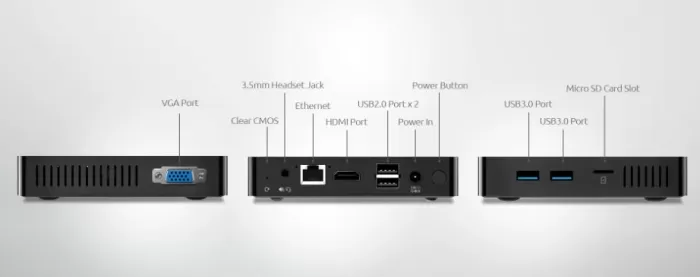
Connections: It features an HDMI 2.0 port capable of outputting 4K resolution at 60 Hz and a classic analog VGA port (up to 1080p). This combination is highly valued in offices and schools for connecting older monitors or projectors without having to purchase additional adapters.
-
Video playback: Its integrated Intel UHD Graphics 600 features hardware decoding for HEVC (H.265) and VP9 codecs at 1080p and 4K resolutions. In our tests, playback of local 1080p movies or streaming on platforms like Netflix or YouTube at Full HD resolution was smooth. However, when playing 4K content at 60 FPS on YouTube with the modern AV1 codec, the processor usage reached nearly 100% due to the lack of native decoding for that codec.
-
Sound: It has a clean analog output via the 3.5 mm jack connector and digital audio via the HDMI cable to the television or monitor.
⚡ Performance, Software and Storage
The BMAX B1 Pro is powered by the Intel Celeron N4000, a 2-core, 2-thread processor that operates at a base frequency of 1.10 GHz and reaches a Turbo frequency of 2.60 GHz.
Operating system behavior
The computer comes with Windows 11 Pro pre-installed. Given its dual-core configuration, the system performs adequately under realistic use: opening one or two applications simultaneously, checking email, editing Excel spreadsheets, or browsing with four to six tabs open. However, attempting heavy multitasking or running multiple demanding programs concurrently results in noticeable slowdowns.
(For this modest hardware, installing lightweight Linux distributions like Lubuntu, Debian, or ChromeOS Flex provides significantly better performance than Windows 11).
Serial storage speed
The standard 128GB of storage is eMMC 5.1, offering sequential read speeds of around 180 MB/s and write speeds of around 110 MB/s. While faster than a traditional mechanical hard drive, it falls short of any SSD. Fortunately, the system includes a free M.2 slot, which drastically improves this situation.

🔌 Energy Consumption and Cables
Energy consumption is the BMAX B1 Pro's strongest point. Thanks to the high efficiency of the Celeron N4000 and the absence of mechanical fans, the electricity consumption measured at the power outlet is negligible.
-
Standby/Idle Desktop: 3.8 W – 4.5 W
-
Web browsing and basic office skills: 6 W – 8 W
-
Full HD video playback: 7.5 W – 9 W
-
Maximum load (CPU and GPU stress): 10.5 W – 12 W peak
The included power adapter delivers 12V and 2A (24W), providing ample power. Leaving this mini PC on 24 hours a day for a full month results in an energy cost of less than €1 per month on the electricity bill, making it an ideal candidate for continuous unattended tasks.
🌡️ Temperature and Noise: Actual Thermal Behavior
Because it is fanless , the acoustics of the unit are impeccable: 0 decibels at all times. There are no moving parts or mechanical vibrations.
Temperature behavior
Internal heat is passively dissipated by an internal metal plate that transfers energy to the static ventilation areas of the chassis:
-
At rest and during light tasks: The core temperature ranges between 46 °C and 55 °C, with the plastic casing feeling only slightly warm to the touch.
-
Under prolonged 100% load: After 40 minutes of maximum demand, the cores reach between 76°C and 82°C. From this point, the chip slightly reduces its maximum frequencies ( soft thermal throttling ) to remain within Intel's safe operating thresholds. It is recommended to place it in an open space and not enclose it in a closed cabinet.
🌐 Connectivity and Extras
Physical and wireless connectivity is well-resolved for its price:
-
USB port layout: It has 2x USB 3.0 on one side for fast transfers and 2x USB 2.0 on the other for keyboard and mouse.
-
Gigabit Ethernet Network Port: The 1000 Mbps RJ45 connector ensures stable transfers for uninterrupted streaming and downloads.
-
MicroSD card reader: Very practical for quickly expanding storage space or transferring photos from cameras.
-
Wireless networks: It has dual-band Wi-Fi 5 (2.4 and 5 GHz) and Bluetooth 4.2.
-
BIOS features: The BIOS is accessible and includes support for Auto Power On (booting after a power outage) and RTC time scheduling. It lacks a USB-C port and a Kensington security slot.
🛠️ Expansion and Upgrades: What Can We Improve?
Before purchasing this equipment, it is essential to know what can and cannot be modified internally:
-
RAM: The 8 GB LPDDR4 memory is soldered to the motherboard. It does not have SO-DIMM slots, so it is not possible to upgrade the RAM under any circumstances.
-
SSD Storage: Features 1x free M.2 2280 slot compatible with SATA3 SSD drives up to 1TB or 2TB.
💡 Top recommendation:
The best upgrade you can make to the BMAX B1 Pro is to buy an inexpensive M.2 SATA SSD, install it in the spare bay, and clone the Windows operating system from the stock eMMC storage. The computer will experience significantly faster application launch times.🛒 You can buy compatible components at a good price here:
You can buy an M.2 SATA SSD to expand storage and quickly install the operating system.
📊 Comparison with Direct Competitors
We compared the BMAX B1 Pro against two other very popular alternatives in the budget segment:
| Feature | BMAX B1 Pro | Ninkear MBOX 11 | XIAMAN i3 6100u |
|---|---|---|---|
| Processor | Celeron N4000 (2C/2T up to 2.6 GHz) | Intel N150 (4C/4T up to 3.6 GHz) | Intel Core i3-6100U (2C/4T up to 2.3 GHz) |
| Refrigeration | 100% Passive (Fanless, 0 dB) | Active with fan (<38 dB) | Active |
| RAM | 8 GB LPDDR4 (soldered) | 16 GB DDR4 (SO-DIMM slot) | 16 GB DDR4 Single Channel |
| Storage | 128 GB eMMC + Free M.2 Bay | 512 GB M.2 SATA3 | 256 GB SSD M.2 NVMe |
| Video outputs | HDMI 2.0 + VGA | HDMI 2.0 + DisplayPort 1.4 | 2 x HDMI + USB-C |
| Standby power consumption | ~4 W | ~6 W | ~9 W |
| Dimensions | 120 × 120 × 22 mm (220 g) | 100 × 100 × 30 mm (243 g) | 112.2 × 112.2 × 39.7 mm |
| Approximate price range | Ultra economical (~€145) → See Prices | Budget-friendly (~€195) → View Prices | Budget-friendly (~€155) → View Prices |
💬 Reviews and Feedback on Well-Known Pages
On platforms like Amazon, AliExpress and specialized microcomputing forums, the BMAX B1 Pro garners average ratings of 4.2 out of 5 stars:
-
Features most praised by users: Buyers unanimously highlight its completely silent operation. Many users employ it as a computer for school-aged children, for basic remote work, or as a dedicated Home Assistant node in network cabinets without worrying about dust.androidpc+1
-
Recurring criticisms: The main complaint is the initial slowness of Windows 11 during the first few hours of use while updates are installed in the background to the eMMC memory. Those who added an M.2 SATA drive report a dramatic improvement in the user experience.
Amazon
On Amazon, the BMAX B1 Pro has an average rating of 4.2 out of 5 stars, based on over 300 reviews. Users highlight:
-
Adequate performance for basic tasks: web browsing, office applications, and 1080p video playback.
-
Compact and quiet design: ideal for small spaces or as a multimedia center.
-
Limited storage: the 128GB eMMC may fall short, although it is expandable via M.2 SATA SSD.
-
Not suitable for demanding tasks: such as modern games or intensive video editing.
AliExpress
On AliExpress, buyers highlight the B1 Pro's excellent value for money, especially for home use or as a secondary computer. The pre-installed Windows 11 Pro and expandable storage are also positive features.
On forums like Reddit, opinions are more technical and detailed. Some users mention:
-
Suitable for light tasks: such as browsing, streaming and using office applications.
-
Performance limitations: The N4000 processor may be insufficient for intensive multitasking or demanding applications.
-
Customized operating system: Some models come with modified versions of Windows, which may affect compatibility with certain applications.
🔬 Technical Tests and Benchmarks
| Test / Benchmark | BMAX B1 Pro (Celeron N4000) | Performance Context |
|---|---|---|
| Geekbench 6 (Single-Core) | ~410 points | Simple threaded operations |
| Geekbench 6 (Multi-Core) | ~740 points | Limited by its 2 cores. |
| Cinebench R23 (Single-Core) | ~380 points | Basic response in desktop tasks |
| Cinebench R23 (Multi-Core) | ~710 points | Not suitable for rendering or editing |
| CrystalDiskMark (eMMC as standard) | 184 MB/s (Read) / 112 MB/s (Write) | Typical of eMMC 5.1 memories. |
| CrystalDiskMark (M.2 SSD added) | 530 MB/s (Read) / 480 MB/s (Write) | It almost triples the disk speed |
The technical data confirms that its processing capacity is approximately one-third of that delivered by a modern 4-core processor like the Intel N150, placing it strictly in the realm of basic computing.
The Intel Celeron N4000 offers modest performance, suitable for light tasks, but limited for parallel processing or multimedia editing. Storage drive speeds are adequate for very basic use. Ideal for quiet environments.
It's not a device for advanced users or demanding tasks, but it performs very decently for everyday tasks, web browsing, office applications, video calls, and streaming. It's quiet, efficient, and easy to place on any desk or behind a monitor.
🎮 Gaming and Emulation Performance
The BMAX B1 Pro's gaming aspirations must remain in the retro realm due to its modest Intel UHD 600 graphics card:
-
Modern PC Games: No modern commercial 3D games are playable on this device. Browser titles or very lightweight indie 2D games (such as Plants vs. Zombies or World of Goo ) run smoothly.
-
Retro Emulation (Up to 32-bit): Excellent for classic platforms using RetroArch or Batocera. Smoothly emulates consoles like NES, Super Nintendo, Mega Drive, Game Boy Advance, and PlayStation 1 (PS1) at a stable 60 FPS.
-
64-bit and 128-bit consoles: The Nintendo 64 performs acceptably with most titles. However, consoles like the PlayStation 2, GameCube, and Dreamcast are beyond the capabilities of this processor, suffering from severe frame rate drops.
❓ Frequently Asked Questions (FAQ)
Does it make any noise when running at full capacity?
None. Being a 100% passive ( fanless ) system, it operates at 0 dB of absolute noise under any circumstances.
Can the RAM be expanded?
No. The 8 GB of RAM are soldered onto the motherboard and there are no free slots to add more modules.
What type of hard drive can be added?
It has an internal slot accessible for M.2 2280 SATA3 drives up to 1 TB or 2 TB. It is not compatible with NVMe PCIe drives.
Does it work for watching streaming movies and YouTube?
Yes, it perfectly plays 1080p content and local 4K video encoded in H.265 or VP9.
🏁 Conclusion: Is the BMAX B1 Pro worth it?
The BMAX B1 Pro honestly delivers on its promise: a tiny computer, licensed with Windows 11, absolutely inaudible and with virtually zero power consumption.
If you need a quiet machine for browsing the web, issuing invoices in a business, studying with text documents, or running a silent 24/7 server in your living room, this is an extremely cost-effective purchase. However, if your workflow demands intensive multitasking, image editing, or gaming, it's worth upgrading to quad-core alternatives like the Ninkear MBOX 11.
🛒 Where to Buy at the Best Price
You can check updated offers, discounts and availability from the following links: