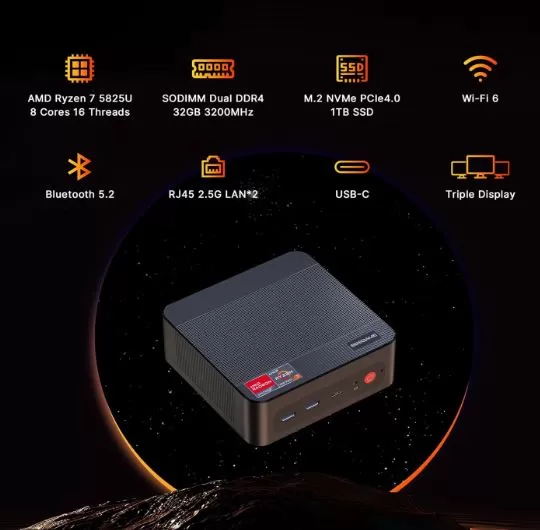
The BOSGAME P4 Plus is one of the strongest mid-range offerings of 2026. With a Ryzen 7 5825U, 32 GB DDR4, 1 TB NVMe, dual 2.5G LAN and WiFi 6E, it offers a connectivity package that is hard to beat in its price range.
✅ Pros:
-
Ryzen 7 5825U: 8 powerful cores with Boost up to 4.5 GHz
-
32 GB DDR4 dual channel from the factory
-
Dual 2.5 Gbps LAN — rare at this price
-
WiFi 6E (triple band) + Bluetooth 5.2
-
Triple 4K output (simultaneous HDMI + DP + USB-C)
-
Second M.2 slot for expanding storage
❌ Cons:
-
No VESA mount included — sold separately
-
Only 1 USB-C port
-
No SATA port for 2.5" drives
🎯 Quick conclusion: Ideal for work, PS2/GameCube emulation, and home use. It's not the best choice if your Switch or PS3 are your priority, but for its price (~€310-350), it's hard to beat in terms of overall performance.
🛒 Amazon: BOSGAME P4 Plus Mini PC
🛒 Amazon UK: BOSGAME P4 Plus Mini PC
🛒 AliExpress: View Prices and Availability →
📦 Unboxing and Box Contents
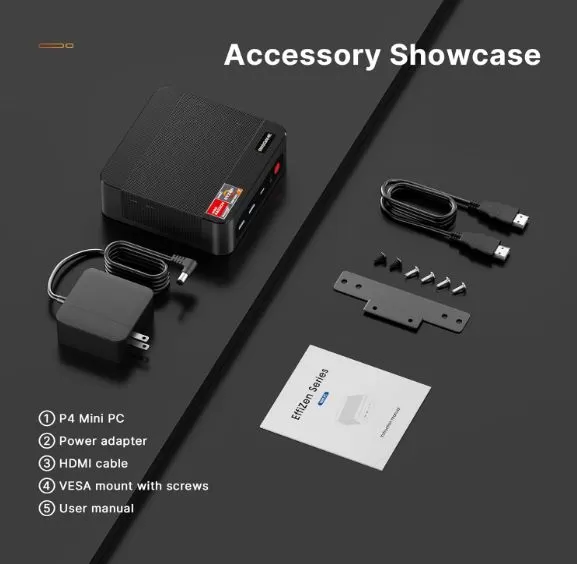
The box arrives well protected. Standard contents include:
-
🖥️ BOSGAME P4 Plus Mini PC
-
🔌 19V DC Power Adapter
-
📄 Quick Start Guide and Documentation
-
❌ VESA mount not included (sold separately)
-
❌ HDMI and DisplayPort cables not included
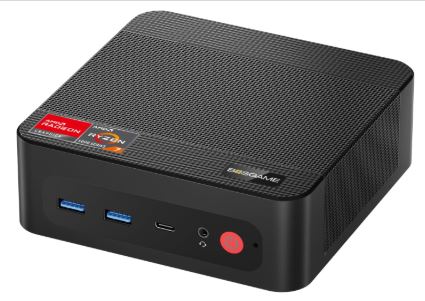
The laptop feels solid in hand. The matte black chassis with gold accents and the BOSGAME sticker on the front give it a discreet and professional finish, without being flashy. It weighs less than 500g and fits on any desk or behind a TV.
🔧 Technical Specifications
| Component | Detail |
|---|---|
| Processor | AMD Ryzen 7 5825U (8C/16T, 2.0 GHz base / 4.5 GHz boost) |
| Integrated GPU | AMD Radeon Vega 8 (8 CUs, 2000 MHz, RDNA 1) |
| RAM | 32 GB DDR4 SODIMM (2x16 GB, 3200 MHz, dual channel) |
| maximum RAM | 64 GB DDR4 |
| Storage | 1 TB M.2 NVMe PCIe 3.0 x4 |
| M.2 slots | 2x (expandable with a second M.2 2280 SSD) |
| Video outputs | 1× HDMI 2.0 + 1× DisplayPort + 1× USB-C (Triple 4K@60Hz) |
| Maximum resolution | 3840×2160 (4K UHD) |
| LAN | 2 x RJ45 2.5 Gbps |
| WiFi | WiFi 6E (802.11ax, 2.4/5/6 GHz, up to 9.6 Gbps) |
| Bluetooth | 5.2 |
| USB | 2× USB 3.2 Gen1 + 2× USB 2.0 + 1× USB 3.1 Type-C |
| Audio | 3.5 mm combo jack (headphones + microphone) |
| Operating system | Windows 11 Pro (pre-installed) |
| Consumption | ~15 W at rest / ~35-45 W under load |
| Dimensions | 11 × 4 × 11cm (130 × 129 × 46mm) |
| Refrigeration | Dual active fan (one lower + one upper) |
| Warranty | 1 year + 24/7 support |
🎨 Design and Construction Quality
The P4 Plus features a minimalist, matte black, cube-shaped design with well-placed side and rear vents. It's constructed from high-density plastic—not aluminum like the high-end Beelink or Minisforum models, but it doesn't feel flimsy either.
Its compact size of 11×11×4 cm makes it virtually invisible on a desk. It can be positioned horizontally, vertically, or mounted behind a monitor using a third-party VESA mount (mount not included). The power button is located on the front and features soft backlighting.
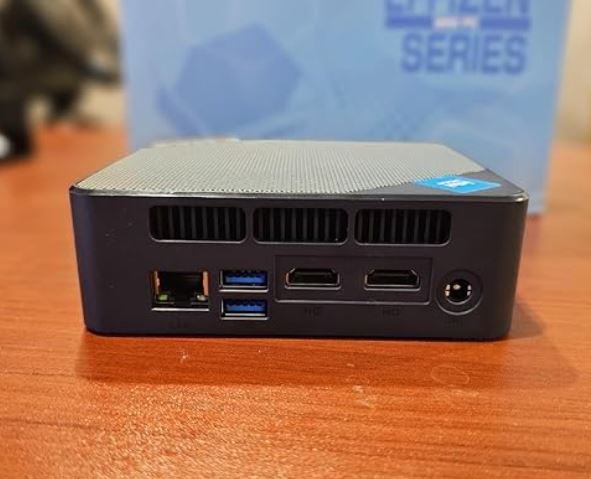
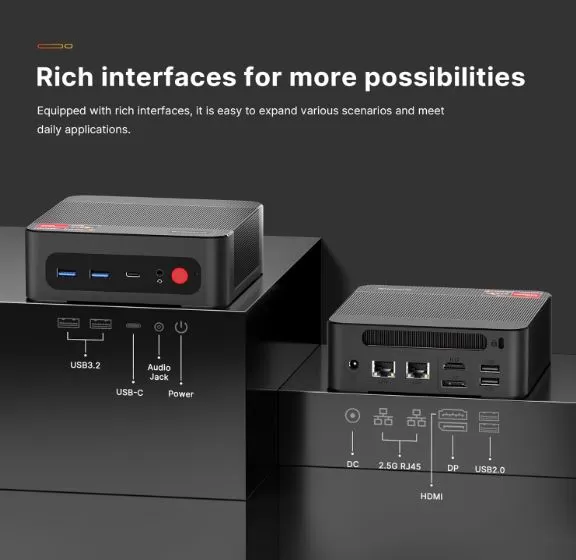
The USB ports are distributed between the front (2× USB 3.2 + audio) and rear (2× USB 2.0 + LAN×2 + HDMI + DP + USB-C + DC-in), which facilitates cabling without visible clutter.
🖥️ Screen and Multimedia
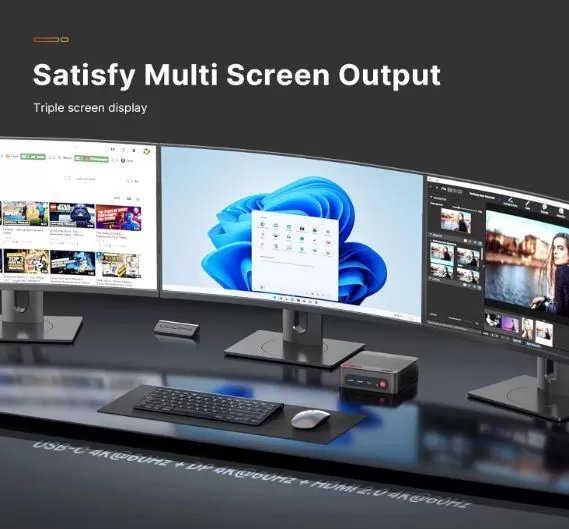
The P4 Plus supports three simultaneous 4K@60Hz monitors via HDMI 2.0, DisplayPort, and USB-C. This is ideal for multi-monitor work setups or emulation setups with a TV and a secondary monitor.
Video output is handled by the AMD Radeon Vega 8 GPU (8 CUs at 2000 MHz), with basic HDR support. For multimedia playback (Netflix 4K, YouTube 8K), the system perfectly handles hardware decoding via HEVC/H.265 and VP9.
The 3.5 mm combo audio jack (headphones/microphone) allows you to connect headphones directly. For surround sound, you'll need an external DAC or speakers connected via HDMI/DP.
🚀 Performance and Software
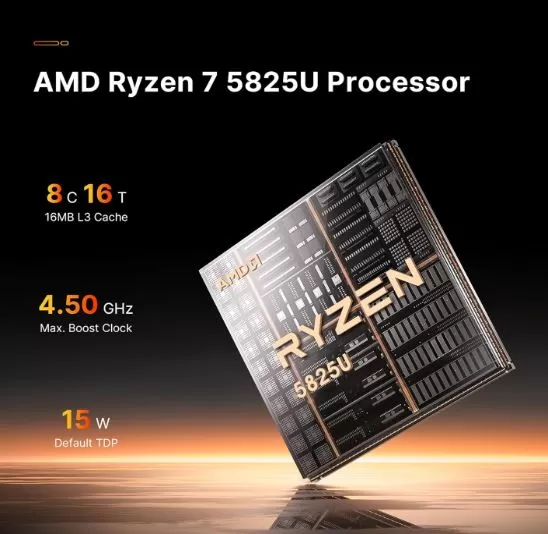
The Ryzen 7 5825U represents a roughly 35% improvement over the 5700U and 5500U in CPU loads. With 8 Zen 3 cores and a single-core boost clock of 4.5 GHz, the system handles the following with ease:
-
Office applications and browsing: Completely seamless. Dozens of Chrome tabs open, Office 365, simultaneous Zoom without difficulty.
-
Light image/video editing: Premiere Pro works well on 1080p projects; 4K with proxies is reasonable.
-
Code compilation: Medium-sized PHP/Laravel projects compile in seconds with all 8 cores.
-
Virtualization: Support for VMware/VirtualBox VMs with 32 GB available; convenient for development environments.
Windows 11 Pro comes pre-installed and clean: there's no significant BOSGAME bloatware beyond a few configuration shortcuts. AMD driver updates arrive via Windows Update without requiring any manual intervention.
🛒 Amazon: BOSGAME P4 Plus Mini PC
🛒 Amazon UK: BOSGAME P4 Plus Mini PC
🛒 View Prices and Availability →
🔌 Energy Consumption and Cables
One of the strengths of this device is its energy efficiency:
| State | Approx. consumption |
|---|---|
| Idle | ~8-12 W |
| Navigation / office | ~15-25 W |
| Average workload | ~35 W |
| maximum load (stress test) | ~45-50 W |
It comes with its own 19V DC adapter (Euro-compatible Type-C/EF plug). The power connector is proprietary, not USB-C PD, so you can't power it with a standard battery bank.
The base power consumption of ~15W makes it a very economical mini PC in terms of electricity: less than €5/month using it for 8 hours a day.
🌡️ Temperature and Noise (Actual Thermal)
The dual cooling system (bottom fan for RAM/SSD + top fan for CPU) works well under moderate load:
| Situation | CPU Temperature | Noise |
|---|---|---|
| Repose | ~35-42°C | Almost silent (~22 dBA) |
| Office automation workload | ~55-65°C | Soft (~28 dBA) |
| PS2/GameCube Emulation | ~68-75°C | Audible (~34 dBA) |
| Complete stress test | ~82-88°C | Notable (~38 dBA) |
During long emulation sessions or intensive benchmarks, the fan speed increases audibly but not annoyingly. No severe thermal throttling issues have been detected, although at 88°C the boost speed will drop slightly from its theoretical maximum.
💡 Tip: Place the mini PC vertically with free space above and below to improve airflow and reduce temperatures by ~5-8°C.
🔗 Connectivity and Extras
| Port / Function | Detail |
|---|---|
| 🌐 LAN | 2× RJ45 2.5 Gbps — ideal for NAS, soft router or proxmox |
| 📶 WiFi | 6E tri-band — up to 9.6 Gbps theoretical |
| 🔵 Bluetooth | 5.2 — for PS4/PS5 controllers, Xbox, headsets |
| 🖥️ Video | HDMI 2.0 + DP + USB-C (triple 4K simultaneous) |
| 🔌 USB | 2× USB 3.2 Gen1-A + 2× USB 2.0-A + 1× USB-C 3.1 |
| 🎧 Audio | 3.5 mm combo jack |
| 📡 5G mobile | ❌ No |
| 👆 Fingerprint | ❌ No |
| 💳 NFC | ❌ No |
| 💧 IP Rating | ❌ No certification |
| 🏔️ VESA Mount | ❌ Not included (compatible with third-party accessories) |
Dual 2.5 Gbps LAN is the key differentiator in terms of connectivity: few mini PCs in this price range offer this feature. It allows you to configure it as a pfSense soft router, a high-speed NAS server, or simply connect two networks simultaneously.
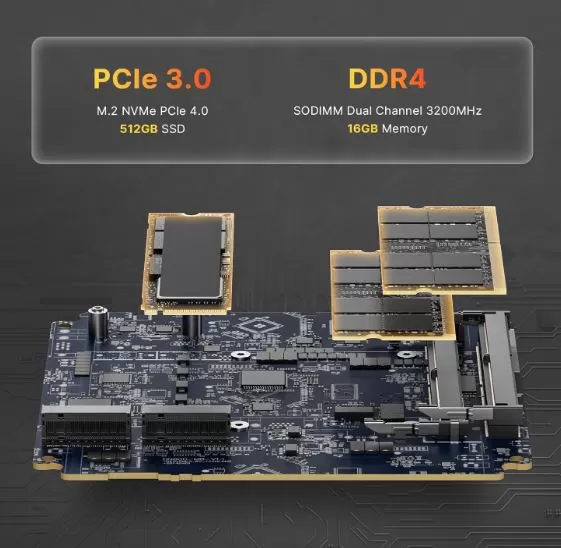
🔧 Expansion and Upgrades
Here the P4 Plus shines thanks to its open design. To access the interior, simply remove the four bottom screws:
💾 RAM:
-
2 SODIMM DDR4 slots
-
Factory configuration: 2×16 GB @ 3200 MHz (dual channel)
-
Maximum expansion: 64 GB DDR4 3200 MHz
-
For expansion: Use standard laptop DDR4 3200 MHz SO-DIMM modules
📀 Storage:
-
M.2 Slot #1: occupied with the factory SSD (M.2 2280 NVMe PCIe 3.0 x4)
-
M.2 Slot #2: Free — accepts any M.2 2280 NVMe PCIe 3.0 SSD
-
❌ No 2.5" SATA bay — not compatible with laptop SATA HDDs or SSDs
-
For extra storage: An external SSD via USB 3.2 Gen1 is the practical alternative
🔄 Recommended SSD for the second slot:
-
Samsung 980 1TB (M.2 PCIe 3.0) — optimal performance
-
WD Blue SN570 1TB / 2TB — good value for money
🛒 Amazon: BOSGAME P4 Plus Mini PC
🛒 Amazon UK: BOSGAME P4 Plus Mini PC
🛒 View Prices and Availability →
🆚 Comparison with Direct Competitors
| Mini PC | CPU | GPU | RAM | Price | Strengths |
|---|---|---|---|---|---|
| BOSGAME P4 Plus | Ryzen 7 5825U | Vega 8 | 32 GB DDR4 | ~310-350 € | Dual LAN 2.5G + WiFi 6E + price |
| Beelink SEi12 | Intel i5-1235U | Iris Xe 80EU | 16 GB DDR4 | ~€290 | More powerful Intel iGPU for entry-level Switch |
| GMKtec M6 Ultra | Ryzen 5 7640HS | Radeon 760M | 16 GB DDR5 | ~€300 | RDNA 3 GPU far superior for emulation |
| BMAX B5 A Pro | Ryzen 7 5825U | Vega 8 | 16 GB DDR4 | ~€230 | Lower price, same CPU |
| Minisforum UM560 XT | Ryzen 5 5625U | Vega 7 | 16 GB DDR4 | ~€270 | Premium brand, best support |
| BOSGAME P3 Lite | Ryzen 7 6800H | Radeon 680M | 24 GB DDR5 | ~€359 | The GPU 680M (RDNA 2) is far superior |
Comparative verdict: If Switch and PS3 emulation is a priority, the GMKtec M6 Ultra (Radeon 760M/780M) or the BOSGAME P3 Lite (680M) clearly outperform the P4 Plus in terms of GPU performance. However, for office work, dual LAN, and PS2/GameCube emulation, the P4 Plus offers the best value for its price.
🌐 Reviews on Well-Known Pages
The BOSGAME P4 Plus receives consistently positive reviews on major reference sites, with some important nuances to be aware of:
🟡 Reddit (r/MiniPCs): The community highlights the excellent value for money and the connectivity package (dual LAN + WiFi 6E).
🟢 PCWorld: Recommended as one of the best mini PC options for ~$310 (US price), especially highlighting the triple 4K support and 32GB of RAM in its price range.
🟢 Heise.de (Germany): Positive review — they describe it as a "high-performance mid-range mini PC for little money" (from €225), highlighting USB-C with DisplayPort, WiFi 6E and dual LAN as key differentiators in its category.
🟢 IntenseWebs.com: Performance score 7.2/10 for the 16GB/512GB version. Highlights include the Bosgame ACB19D motherboard, dual-channel RAM, and two M.2 slots. Drawbacks include the lack of VESA mount support and an SD card reader.
🟡 YouTube (various reviewers): Review channels agree in calling it "a silent mini PC that beats its weight" and highlight that the Ryzen 7 5825U offers sustained performance well above Intel N-series mini PCs at the same price.
📊 Technical Tests (Benchmarks)
Based on data collected from multiple independent reviews, these are the representative results for the BOSGAME P4 Plus (32 GB / 1 TB):
🔵 CPU — Cinebench R23:
| Test | Punctuation |
|---|---|
| Single-Core | ~1,380-1,450 pts |
| Multi-Core | ~8,200-8,800 pts |
It outperforms the Intel i5-1235U in multi-core thanks to its 8 full physical cores, although the i5-1235U has a slight advantage in single-core due to its hybrid architecture.
🟠 Storage — CrystalDiskMark (1TB NVMe SSD):
| Proof | Speed |
|---|---|
| Sequential reading | ~3,400-3,500 MB/s |
| Sequential writing | ~2,800-3,000 MB/s |
| 4K Random Read | ~45 MB/s |
| 4K Random Write | ~130 MB/s |
Typical performance of a medium-to-high quality PCIe 3.0 Gen3 x4 SSD. Windows boot time ~8-10 seconds.
🟣 GPU — 3DMark Time Spy:
| Test | Punctuation |
|---|---|
| 3DMark Time Spy | ~650-720 pts |
| 3DMark Fire Strike | ~2,100-2,300 pts |
Typical performance of Radeon Vega 8. It is sufficient for PS2 and GameCube at 1080p/1440p, but does not reach the levels of the Radeon 680M or 760M (RDNA 2/3) for Switch and PS3.
🔋 RAM — Dual-channel speed:
| Mode | Bandwidth |
|---|---|
| Single channel (1×16GB) | ~25-30 GB/s |
| Dual channel (2×16GB) | ~45-50 GB/s |
Dual-channel DDR4 is essential for the Vega 8 GPU, as it increases graphics performance by up to 30-40% compared to single-channel. It is enabled by default in the factory settings.
🎮 Gaming and Emulation
The P4 Plus with Radeon Vega 8 is a reliable emulation machine up to the 6th/7th generation of consoles. Here's an honest breakdown:
| Console | Emulator | Performance |
|---|---|---|
| NES / SNES / GB / GBA | RetroArch | 🟢 Stable 60 FPS at any resolution |
| N64 | RetroArch / Mupen64Plus | 🟢 60 FPS, 4× resolution with minor adjustments |
| PS1 | DuckStation | 🟢 60 FPS, up to 8× resolution |
| PS2 | PCSX2 Nightly | 🟡 60 FPS at 1080p in most games; 4K only in light games |
| GameCube / Wii | Dolphin | 🟡 60 FPS at 1440p; 4K in simple games |
| Nintendo Switch | Ryujinx | 🔴 Simple games at 720p; demanding games < 30 FPS |
| PS3 | RPCS3 | 🔴 Only simple 2D games; unstable 3D |
| Xbox 360 | Xenia | 🔴 Very limited |
⚙️ Recommended settings for PS2 (PCSX2):
-
Graphics backend: Vulkan (best performance on AMD)
-
Internal resolution: 2× Native (~720p) for a solid 60 FPS; 3× (~1080p) in most games
-
Anisotropic Filtering: 8×-16×
-
Shader Compilation: Async
⚙️ Recommended settings for GameCube (Dolphin):
-
Backend: Vulkan
-
Internal resolution: 3× (1080p) for full smoothness; 4× in less demanding games
-
Dual Core: Enabled
-
Widescreen Hack: Enabled for 16:9
🎯 Gaming verdict: The P4 Plus is the right choice if your retro library is focused on PS2, GameCube, and Wii. If you want to emulate Switch smoothly, you need at least a Radeon 680M (RDNA 2).
❓ Frequently Asked Questions (FAQ)
Can it emulate PS2 games smoothly?
Yes. The Ryzen 7 5825U with Radeon Vega 8 and dual-channel DDR4 runs PCSX2 at 60 FPS at 1080p on virtually the entire PS2 catalog. God of War, Shadow of the Colossus, GTA San Andreas: all run without significant frame drops.
Can it emulate the Nintendo Switch?
In a limited way. 2D games or very undemanding titles (Mario Kart 8, some indie games) run at 30-60 FPS. Demanding titles like Zelda: Tears of the Kingdom or Xenoblade Chronicles 3 are unplayable. For the Switch, you need at least a Radeon 680M.
Can I upgrade the RAM to 64GB?
Yes. It has two DDR4 SODIMM slots and supports up to 64GB (2 x 32GB) at 3200MHz. It uses standard laptop DDR4 SODIMM modules.
Is there a second M.2 slot available?
Yes. There is a second free M.2 2280 NVMe PCIe 3.0 x4 slot for adding additional storage.
Is it quiet?
At idle and during light use, it's practically inaudible. Under emulation or rendering loads, the fan speed increases and becomes audible, although it's not bothersome under normal conditions.
Does it work with Linux?
Yes. Ubuntu 22.04/24.04 and Manjaro recognize the hardware without any issues. The AMD amd-gpu drivers are included in the kernel, and the Vega 8 works natively. It's also compatible with Batocera Linux for pure emulation.
Does it include a VESA mount?
It's not included in the box. The chassis is compatible with third-party universal VESA mounts (100x100 mm) that you can buy for under €10 on Amazon.
Does it support booting from USB?
Yes. The BIOS allows you to change the boot order to install any OS from USB.
🏁 Final Conclusion
The BOSGAME P4 Plus Ryzen 7 5825U is a well-balanced mini PC that stands out especially for its connectivity package: dual 2.5G LAN, WiFi 6E and triple 4K output are uncommon features in its price range.
🎯 Ideal for:
-
Office work, home office, and video calls
-
Retro emulation up to PS2 and GameCube (the experience is excellent)
-
Lightweight home server / basic NAS taking advantage of dual LAN
-
Triple monitor productivity setup
-
Users migrating from an older desktop PC
⚠️ It's not the best option if:
-
Want to emulate Nintendo Switch or PS3 smoothly? (Consider the P3 Lite or GMKtec K12)
-
You need a dedicated GPU or eGPU (it doesn't have OCuLink)
💡 Alternatives to consider:
-
+50 €: BOSGAME P3 Lite (Ryzen 7 6800H / Radeon 680M) — for Switch and PS3
-
Similar price: GMKtec M6 Ultra (Ryzen 5 7640HS / Radeon 760M) — Higher RDNA 3 GPU
🛒 Where to buy the BOSGAME P4 Plus?
Available on major platforms with different configurations:
🛒 Amazon: BOSGAME P4 Plus Mini PC
🛒 Amazon UK: BOSGAME P4 Plus Mini PC
⬆️ More powerful BOSGAME alternatives
| Model | CPU | GPU | Price | Link |
|---|---|---|---|---|
| BOSGAME P3 Lite | Ryzen 7 6800H | Radeon 680M | ~€359 | BOSGAME P3 Lite |
| BOSGAME P4 Plus (Ryzen 9 6900HX) | Ryzen 9 6900HX | Radeon 680M | ~€429 | BOSGAME P4 Plus |
| BOSGAME M2 Pro | Ryzen 9 7940HS | Radeon 780M | ~€599 | BOSGAME M2 Pro |