When you're looking for an ultra-compact computer for just over 200 euros, the market usually forces you to choose between a Chinese Mini PC with a cheap processor (like an Intel N100) or a refurbished business computer from a few generations ago.
The Dell OptiPlex 7060 Micro (often listed in stores as the Dell OptiPlex 7060 Mini PC ) belongs to this second group: a corporate machine designed to run for years without rest that is now sold refurbished with 8th generation Intel Core processors ( i5-8400T or i7-8700T ), 16 GB of RAM and Windows 11 Pro.
After thoroughly analyzing its internal architecture, testing its expansion limits, and comparing the real-world experiences of hundreds of European buyers and home server enthusiasts, we'll tell you what this machine really offers in 2026 and what details you should look out for before buying it.
⚖️ Initial Verdict
The Dell OptiPlex 7060 Micro is one of the most reliable, quiet, and easily expandable compact platforms you can buy on the current refurbished market. Thanks to its 8th-generation 6-core processor (officially compatible with Windows 11 Pro), Intel i219-LM enterprise network card, and dual storage bays (NVMe + SATA 2.5"), it performs smoothly in demanding office environments as well as 24/7 home servers running Proxmox or Docker. However, purchasing one requires caution when choosing a seller: many units arrive without built-in Wi-Fi, without a native HDMI output, and in some batches, without a thorough internal cleaning.
✅ Pros:
-
1.1 liter business metal chassis with tool-free internal access.
-
Dual real storage (M.2 NVMe PCIe 3.0 x4 slot + 2.5" SATA bay).
-
It supports up to 64GB of DDR4 RAM (exceeding Dell's official 32GB).
-
Intel i219-LM Ethernet Controller with vPro support and low standby power.
-
Official native support for Windows 11 Pro.
❌ Cons:
-
No Wi-Fi card or internal antennas in most corporate buildings.
-
It only includes DisplayPort video outputs (requires an adapter for HDMI monitors).
-
Refurbishers usually deliver it with used 240/256 GB SATA SSDs and without renewing the thermal paste.
-
Intel UHD 630 integrated graphics limited for modern 3D games or local AI.
👉 See the price of a refurbished Dell OptiPlex 7060 Micro on Amazon | Find deals on the Dell OptiPlex 7060 Micro on AliExpress
📦 Unboxing and Box Contents
Since this is a certified refurbished unit, don't expect the original Dell factory box with printed manuals. The units sold arrive in plain cardboard packaging, well protected with foam or bubble wrap.
Inside the box we find only what is strictly necessary to get it up and running:
-
1x Dell OptiPlex 7060 Micro Drive.
-
1x External power supply (usually 65W or 90W; in many batches it is a generic compatible charger rather than the original Dell one).
-
Extras vary by seller: Some French or European refurbishers include a small USB Wi-Fi adapter (to compensate for the lack of an internal wireless card) or a basic keyboard (beware of keyboards that specify the French AZERTY layout). Vertical stand, VESA mount, and DisplayPort cables are not included.
📋 Key Technical Specifications Table
(Note: On Amazon, this model is sold in two main configurations depending on the refurbisher: with Intel Core i5-8400T or with Intel Core i7-8700T).
| Feature | Dell OptiPlex 7060 Micro (Refurbished Configuration) |
| Format / Chassis |
Micro Form Factor (MFF / ~1.1L Ultra-Compact Mini PC) |
| Processor (Variant A) | Intel Core i5-8400T (6 cores / 6 threads, 1.70 GHz base / 3.30 GHz Turbo, 35W TDP) |
| Processor (Variant B) |
Intel Core i7-8700T (6 cores / 12 threads, 2.40 GHz base / 4.00 GHz Turbo, 35W TDP) |
| Chipset | Intel Q370 (compatible with Intel vPro depending on configuration) |
| Integrated Graphics | Intel UHD Graphics 630 (up to 4096 × 2304 @ 60 Hz) |
| RAM |
16 GB DDR4 SO-DIMM (2400/2666 MT/s) · 2 slots (32 GB official / up to 64 GB tested) |
| Storage Included | 240 GB or 256 GB SSD (typically 2.5" SATA III) |
| Internal Expansion |
1x M.2 2280/2230 PCIe Gen3 x4 NVMe slot free + 1x 2.5" SATA III bay |
| Network Connectivity |
Intel i219-LM Gigabit Ethernet (10/100/1000 Mbps) Optional Wi-Fi (M.2 2230 or USB dongle) |
| Frontal Ports |
1x USB 3.1 Gen 2 Type-C (10 Gbps), 1x USB 3.1 Gen 1 Type-A (PowerShare), 1x Audio combo, 1x Line output |
| Rear Ports |
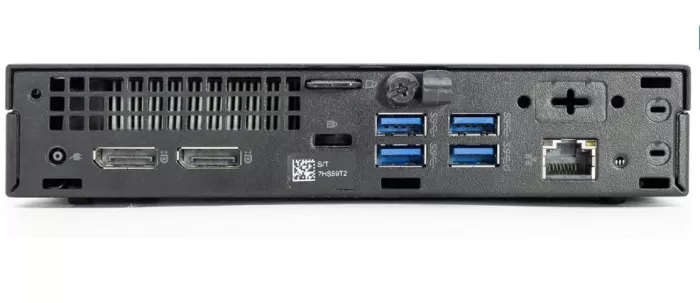
4x USB 3.1 Gen 1 Type-A (one with Smart Power On), 2x DisplayPort 1.2, 1x RJ-45, 1x DC-in |
| Dimensions and Weight | 18.2 × 17.8 × 3.6cm 1.18kg |
| Operating System | Windows 11 Pro 64-bit (digital activated license) |
🏗️ Design and Construction Quality
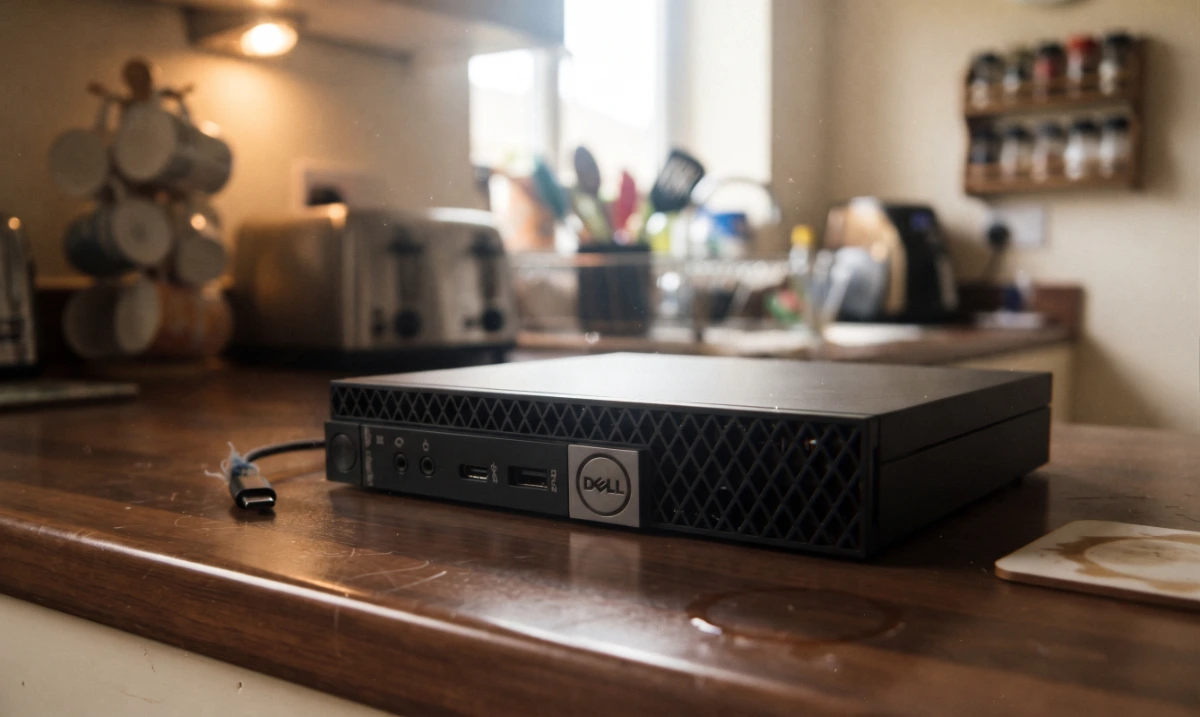
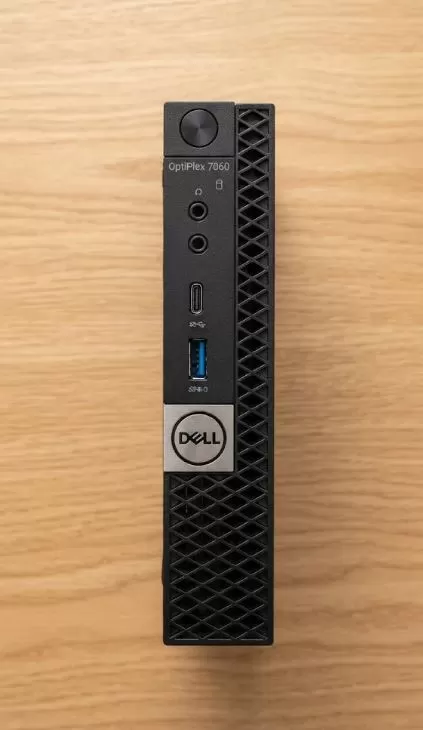
The moment you hold the Dell OptiPlex 7060 Micro, you notice the difference compared to lightweight plastic home Mini PCs. Weighing just 1.18 kg and measuring 18.2 × 17.8 × 3.6 cm, its chassis combines a rigid, matte black painted steel main structure with a high-density textured plastic front panel featuring a diamond-pattern grid.
It has four rubber feet on one of its long sides to support it horizontally on the desk, and the front Dell logo can be rotated 90 degrees if you decide to place it vertically.
The best thing about its design is its serviceability: at the rear, there's a single thumbscrew held in place by the chassis so it won't get lost. By unscrewing it with your fingers and sliding off the top cover, you immediately have access to the interior without needing a screwdriver. The 2.5" drive bay is tool -less and uses a rigid SATA connector integrated into the motherboard instead of fragile ribbon cables, a far superior feature to what we see in other compact systems.
🖥️ Screen and Multimedia
As a professional desktop computer, the OptiPlex 7060 Micro does not integrate a screen, but it handles multi-monitor office setups and multimedia playback with ease:
-
4K video output at 60 Hz: Its two rear DisplayPort 1.2 (DP++) ports support resolutions up to 4096 × 2304 pixels at 60 Hz simultaneously. Being multimode DisplayPort
++, they support inexpensive passive adapters to HDMI or DVI if your monitor does not have a DisplayPort input. -
Multimedia decoding (Intel Quick Sync): The integrated Intel UHD 630 GPU includes hardware acceleration for H.264, HEVC (10-bit H.265), and VP9 codecs. It plays 4K video on YouTube or streaming platforms with complete fluidity and makes this computer an excellent Plex or Jellyfin server capable of transcoding multiple simultaneous streams without overloading the processor.
-
Audio: It has a small internal mono speaker sufficient for system alerts and basic video calls, plus two 3.5 mm jack connectors on the front (one combo for headphones with microphone and another dedicated audio output for external speakers).
⚡ Performance and Software
Daily performance and the difference between i5-8400T vs i7-8700T
Intel's 8th generation represented a significant leap forward, going from 4 to 6 physical cores in the compact mid-range and high-end.
-
With the Intel Core i5-8400T (6 cores / 6 threads, up to 3.30 GHz), the system handles Windows 11 Pro, full office suites, browsing with dozens of tabs, ERP management, and video calls with complete ease.
-
If you opt for the variant with Intel Core i7-8700T (6 cores / 12 threads thanks to Hyper-Threading, up to 4.00 GHz), you gain a significant advantage in heavy multitasking, code compilation, simultaneous virtual machines, and background processes.
Storage: the main factory bottleneck
Most refurbished vendors ship this computer with a 240GB or 256GB SATA SSD, offering sequential speeds of around 500–550 MB/s. Windows 11 Pro boots in about 12–14 seconds and the system is responsive, but after installing updates and basic programs, you'll have less than 170GB of free space. Fortunately, the motherboard hides a free M.2 PCIe Gen3 x4 NVMe slot capable of reaching speeds of up to 3,200–3,500 MB/s if you decide to install a modern SSD.
Operating System and Bloatware
It comes pre-installed with Windows 11 Pro activated via a digital license linked to the motherboard ( MAR/OEM ), completely free of commercial advertising. Some refurbishers only add free suites like Apache OpenOffice. An important detail: since many batches come from companies in Italy, France, or Germany, be sure to configure the language and keyboard layout to Spanish during the first boot (or reinstall Windows 11 from scratch using an official Microsoft image).
🔌 Energy Consumption and Cables
Thanks to Intel's "T" series processors limited to a TDP of 35W, the Dell OptiPlex 7060 Micro is an exceptionally efficient machine, ideal for being powered on 24 hours a day:
-
At rest (desktop or lightweight server in Linux/Proxmox): It consumes between 6W and 10W, which means a minimal electricity cost on the monthly bill.
-
Office use and web browsing: It usually ranges between 14W and 25W.
-
Maximum sustained load (100% CPU stress): Reaches peaks of 38W to 45W at the plug.
Regarding the charger and cables: The device uses Dell's classic 7.4 mm center-pin connector. The package includes a European power cord and an external power supply (65W is sufficient for the 35W TDP versions). Upon receiving it, check that the power adapter doesn't emit any electrical buzzing noises if it's a generic one; if you prefer maximum 24/7 reliability, purchasing an original Dell 65W or 90W power supply is very affordable.
🌡️ Temperature and Noise (Actual Thermal)
The cooling system uses a turbine-type fan ( blower ) that takes in fresh air through the front grille and expels heat directly through the rear, onto a compact aluminum heatsink.
-
Acoustics: During light tasks, browsing, or as a home server in standby mode, the fan runs at low speeds and is virtually inaudible at a distance of one meter (around 26–28 dBA). Under sustained 100% load, the fan becomes audible (36–39 dBA), but maintains a low tone without annoying high-pitched whistling.
-
Temperatures: On a clean unit with thermal paste in good condition, the processor operates between 38°C and 45°C at idle and stabilizes around 72°C–78°C under continuous maximum load, without experiencing severe thermal throttling. However, on refurbished systems that are 5 or 6 years old, replacing the dried-out original thermal paste reduces maximum temperatures by 8°C to 12°C.
🔗 Connectivity and Extras
The connection panel is designed for professional environments and fixed workstations:
-
Frontal:
-
1x USB 3.1 Gen 2 Type-C (10 Gbps) for fast transfers with external drives.
-
1x USB 3.1 Gen 1 Type-A (5 Gbps) with PowerShare technology (allows charging devices even with the PC turned off).
-
1x Headphone/microphone combo jack + 1x Independent audio output.
-
-
Rear:
-
4x USB 3.1 Gen 1 Type-A (5 Gbps) (the lower right port supports Smart Power On to turn on the PC from a USB keyboard
Alt + P). -
2x DisplayPort 1.2.
-
1x RJ-45 Gigabit Ethernet controlled by Intel i219-LM enterprise chip (supports Wake-on-LAN, VLANs and vPro).
-
Optional modular bay above the network port (in most refurbished units it comes covered, although in some corporate batches it may have VGA, HDMI or serial port).
-
⚠️ Note regarding Wi-Fi and Bluetooth: This model does not have 5G, NFC, or a fingerprint reader, and the vast majority of refurbished units do not come with the internal M.2 Wi-Fi card or rear antennas installed (you'll see the two empty punched holes on the back). If you're not going to connect it via Ethernet cable, you'll need to use the USB Wi-Fi adapter that some sellers include or install an internal card.
🛠️ Expansion and Upgrades
One of the biggest advantages of the Dell OptiPlex 7060 Micro compared to many modern Mini PCs with soldered memory is its ease of expansion:
-
RAM (up to 64 GB): It has 2 DDR4 SO-DIMM slots (laptop format). Although Dell's official specifications state a limit of 32 GB (2 × 16 GB), it has been widely demonstrated by the community that it recognizes 64 GB (2 × 32 GB DDR4-2666 MHz) without problems.
-
Primary M.2 NVMe storage: It features a free M.2 2280/2230 PCIe Gen3 x4 NVMe slot right next to the SATA bay. You can add a 1TB or 2TB NVMe SSD for the operating system and increase the speed of the stock drive by up to six times.
-
Second 2.5" SATA drive bay": Keeps the tray tool-free for 2.5-inch SSD or HDD drives (up to 7mm thick), ideal for storing backups, media libraries, or virtual machines.
-
Internal Wi-Fi 6 / Bluetooth: If you want internal Wi-Fi without using USB ports, you can install an Intel AX200 or AX210 card in M.2 2230 format along with its internal/external antenna kit.
⚔️ Comparison with Direct Competitors
How does the Dell OptiPlex 7060 Micro compare to its direct rivals in the €180-€250 price range?
| Feature | Dell OptiPlex 7060 Micro (Refurbished) | Lenovo ThinkCentre M920q Tiny (Refurbished) | GMKtec G3 Plus / Intel N100 (New) |
| Processor | Intel Core i5-8400T / i7-8700T (6 cores, 35W) | Intel Core i5-8500T / i7-8700T (6 cores, 35W) | Intel Processor N100/N150 (4 E-cores, 6–15W) |
| Multi-core Power | High (superior in sustained load and VMs) | High (identical performance to Dell) | Medium-Low (~35–40% lower than i7-8700T) |
| Maximum RAM |
Up to 64 GB DDR4 (2 SO-DIMM slots) |
Up to 64 GB DDR4 (2 SO-DIMM slots) | Max. 16 GB / 32 GB (single slot, single-channel) |
| Storage |
1x M.2 NVMe + 1x SATA 2.5" |
1x M.2 NVMe + 1x SATA 2.5" | 1x M.2 NVMe + 1x M.2 SATA 2242 |
| Extra Expansion |
Optional rear modular port |
Internal PCIe x8 slot (supports 10GbE network) |
None |
| Video Outputs |
2x DisplayPort 1.2 |
1x HDMI + 1x DisplayPort | 2x HDMI 2.0 |
| Wi-Fi / Bluetooth |
Not included as standard (requires dongle/kit) |
Variable depending on batch | Integrated Wi-Fi 6 + Bluetooth 5.2 |
| Prices | VIEW PRICES | VIEW PRICES | VIEW PRICES |
-
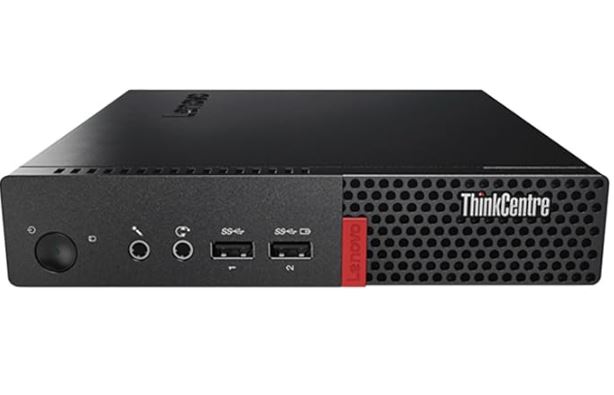
Compared to the Lenovo ThinkCentre M920q Tiny: The Lenovo wins if you want to install a 10 Gbps network card or a low-profile GPU thanks to its internal PCIe slot (with a riser adapter ) and its native HDMI port. The Dell is better in terms of the robustness of its cable-free SATA bay and is usually a bit cheaper.
-
Compared to a new Mini PC with Intel N100: The N100 consumes even less power in standby mode and comes with new Wi-Fi 6 and dual HDMI ports, but Dell's i7-8700T is significantly more powerful in multitasking, supports dual-channel memory up to 64GB, and offers far superior enterprise build quality.
🗣️ Reviews on Well-Known Pages and Real Buyers
To avoid relying solely on specifications on paper, we cross-referenced reviews from verified Amazon Europe buyers (Spain, France, Germany, Italy, and the Netherlands) with specialized technical analyses such as ServeTheHome ( Project TinyMiniMicro ) and user threads on Reddit ( r/homelab):
-
What Amazon buyers value most: The majority of users who give 4 and 5 stars highlight how quiet, fast, and compact it is for office tasks, accounting, or when connected to a TV/dual monitor. Several buyers confirm that its two DisplayPort outputs effortlessly drive high-resolution displays (even dual 4K/5K setups) and that it arrives well-packaged and ready to use.
-
The actual problems reported in refurbished batches (key before buying):
-
Uneven internal maintenance: Several European buyers (even on units listed as "Refurbished - Excellent" ) report that the equipment comes clean on the outside but with accumulated dust on the fan/heatsink and the original thermal paste not replaced.
-
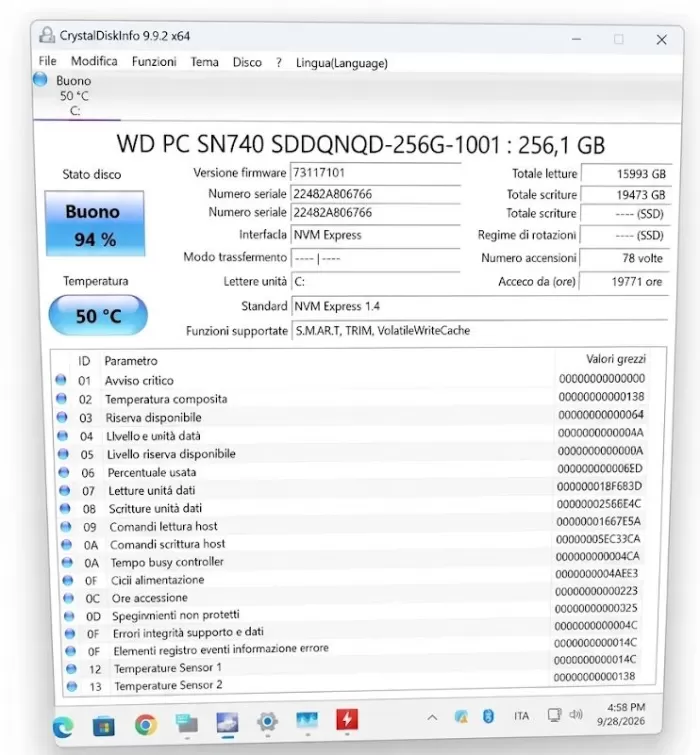
SSD with many hours of use: A technical user checked the included disk and found an SSD with 19,200 hours of operation (~2.2 years powered on), demonstrating that refurbishers reuse original enterprise disks if they pass the basic test.
-
Lack of Wi-Fi and need for HDMI adapter: This is a recurring complaint among home users who assumed it had built-in Wi-Fi or an HDMI port.
-
Software licenses and language: Some buyers in France reported receiving the system pre-configured in Italian (because it came from Italian refurbishers) or with a Windows Home key instead of Pro.
-
Returns to third-party sellers: When the order is not handled directly by Amazon but shipped by a foreign third party, processing a return due to a power supply failure may require shipping the package yourself.
-
-
The opinion of the technical community (
r/homelaband ServeTheHome ): In the realm of home servers, the OptiPlex 7060 Micro is a highly regarded classic. Usersr/homelabconfirm that it works flawlessly with Proxmox, VMware ESXi, and XCP-ng thanks to its Intel i219-LM networking chip, which allows for automatic power-on after a power outage to be configured via the BIOS, and that it supports 64 GB of RAM without issue. The only drawback for advanced lab environments is the limitation of its Gigabit Ethernet port due to the lack of an internal PCIe slot like the Lenovo M720q/M920q.
📊 Technical Tests and Real Performance
-
CPU Performance (Cinebench R23):
-
Intel Core i7-8700T (6C/12T): Achieves ~ 980–1,020 points in Single-Core and 5,800–6,200 points in Multi-Core. It clearly outperforms any Intel N100/N150 (~900 Single / ~2,900 Multi) and competes head-to-head with much newer laptop processors.
-
Intel Core i5-8400T (6C/6T): Scores ~ 910 – 950 points in Single-Core and 4,300 – 4,600 points in Multi-Core, sufficient for smooth office work, although with less margin in heavy virtualization due to the lack of Hyper-Threading.
-
-
Memory bandwidth: When configuring two DDR4-2666 modules in Dual-Channel, the bandwidth is around 36–38 GB/s, doubling the memory performance of single-channel budget Mini PCs.
-
Storage speeds:
-
Standard 2.5" SATA SSD: ~530 MB/s sequential read / ~480 MB/s sequential write.
-
Upgrade with M.2 NVMe PCIe 3.0 x4 SSD: ~3,400 MB/s sequential read / ~3,000 MB/s sequential write (substantial improvement in loading virtual machines and databases).
-
-
Virtualization and Containers: With 32 GB or 64 GB of RAM installed, it effortlessly runs a Proxmox VE node with 15–20 Docker containers (Home Assistant, Pi-hole, Jellyfin, Nginx Proxy Manager, Vaultwarden) while keeping average power consumption below 15W.
🎮 Gaming and Emulation
Let's be clear: the Dell OptiPlex 7060 Micro is not a gaming computer. Its integrated Intel UHD Graphics 630 isn't designed for modern AAA games, but it does allow for occasional gaming sessions with lighter titles and makes an excellent retro emulation machine.
-
Light PC gaming and eSports (720p / 1080p low):
-
League of Legends, Valorant or CS:GO / Counter-Strike 2 (at 720p low): playable between 50 and 80 FPS (especially if you have the RAM in Dual-Channel).
-
Minecraft Java / Bedrock: runs very smoothly with optimization mods like Sodium/Iris (60+ FPS at 1080p).
-
GTA V or Rocket League: playable in 720p with low details at around 35–45 FPS.
-
-
Retro Emulation:
-
Consoles up to PS2, GameCube, Wii and Dreamcast: They work at native resolution or upscaled to 720p/1080p with great stability in most of the catalog.
-
Arcade, PS1, N64, SNES, Mega Drive and PSP: Perfect performance at 100% speed.
-
PS3, Xbox 360 or Switch: They are out of reach due to graphical power.
-
(If your main priority is modern video games in a compact format, you should make the leap to a Mini PC with AMD Ryzen 7 and Radeon 780M graphics ).
❓ Frequently Asked Questions (FAQ)
1. Are the Dell OptiPlex 7060 Micro and the Dell OptiPlex 7060 Mini PC the same model?
Yes. The manufacturer's official name is OptiPlex 7060 Micro (ultra-compact form factor of 18.2 × 17.8 × 3.6 cm), but on Amazon and refurbished stores it's often listed as a "Mini PC" to make it easier to find. Just make sure the listing doesn't say SFF ( Small Form Factor ), which refers to the larger, slim tower.
2. Does it have Wi-Fi and Bluetooth included?
Most refurbished units sourced from businesses do not come with an internal Wi-Fi card installed. Some vendors include a small USB Wi-Fi adapter in the box to compensate. If you need a stable wireless connection and Bluetooth, you can add an Intel AX210 M.2 2230 card with its antenna kit in as little as 10 minutes.
3. Can I connect it to a monitor or TV that only has HDMI?
Yes, but you'll need a DisplayPort to HDMI active/passive cable or adapter, as the device only has two DisplayPort 1.2 outputs on the back and no native HDMI ports.
4. Does it really support 64GB of RAM if Dell says the maximum is 32GB?
Yes. When Dell published the specifications in 2018, extended 32GB DDR4 SO-DIMM modules were not readily available, so they set the official limit at 32GB (2 × 16GB). Numerous users with Proxmox and XCP-ng confirm that the 7060 Micro's Q370 chipset recognizes 64GB (2 × 32GB DDR4-2666) without issue.
5. What should I check as soon as I receive a refurbished OptiPlex 7060 Micro?
We recommend three quick checks in the first 10 minutes:
-
Open the top cover (one screw at the back) and check that the processor fan is clean of dust.
-
Run the free CrystalDiskInfo program to view the health and usage hours of the included SSD.
-
Check in Settings > System > About that Windows 11 Pro is properly activated and set to your language.
🏁 Final Conclusion
The Dell OptiPlex 7060 Micro remains a very smart purchase in 2026 if you know exactly what you're looking for. Compared to new entry-level Mini PCs with Intel N100 chips, it offers greater multi-core power (especially in the i7-8700T variant), better build quality, double the storage capacity, and expandability up to 64GB of RAM.
-
It's ideal for you if: You're looking for a quiet and reliable computer for the office, remote work, study, a 4K media center, or you want to set up your first 24/7 home server with Proxmox, Docker, Home Assistant, or Pi-hole with minimal power consumption.
-
You'd be better off looking for another option if: you need Wi-Fi 6 and native HDMI ports without buying adapters, you don't want to open the case to clean it or upgrade storage, or you plan to play demanding 3D games. In that case, a Mini PC with an AMD Ryzen 7 or a new Mini PC with an Intel N100/N150 will save you any initial setup.
🛒 Where to Buy the Dell OptiPlex 7060 Micro and its Upgrades
-
🔥 See offers for the Dell OptiPlex 7060 Micro (i5 / i7) on Amazon (Tip: prioritize units with Amazon fulfillment for easy returns and a 1-year warranty).
-
🌐 Check prices for the Dell OptiPlex 7060 Micro on AliExpress
-
🚀 Recommended kits to maximize its potential: