The CHUWI AuBox with Intel Core i9-13900HK is a compact mini PC that bets on CPU power and productivity. With 14 cores, Thunderbolt 4, double 2.5GbE port and video output up to 8K, is an ideal option for heavy multitasking, content creators and professionals.
Its weaknesses: the integrated GPU (Iris Xe) is modest, some units arrive with single channel RAM, and the included SSD is PCIe 3.0.
For those looking for a compact desktop PC for demanding tasks, or plan to use an eGPU, it's a highly recommended purchase.
CHUWI AuBox i9-13900HK in AliExpress
1) Main Specifications
| Characteristic | Details |
|---|---|
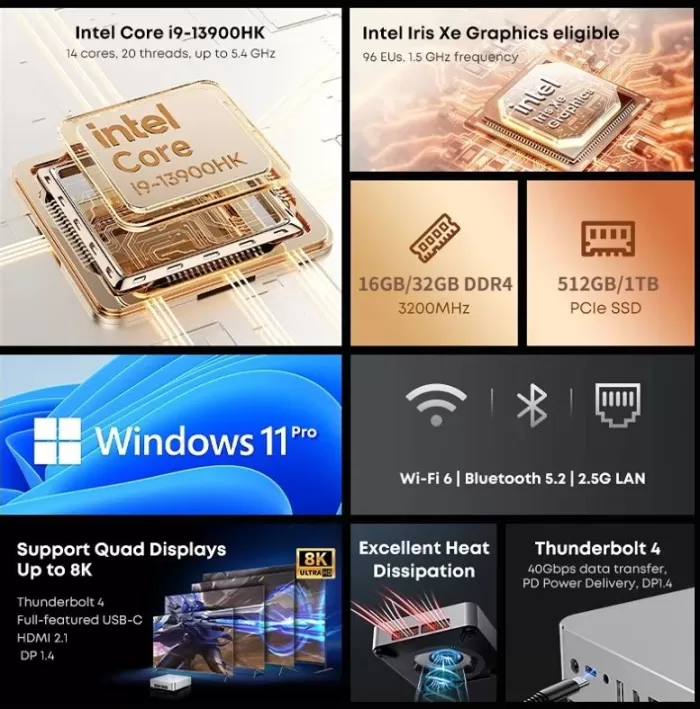
| CPU | Intel Core i9-13900HK (14 cores / 20 threads, up to 5.4 GHz) |
| GPU | Intel Iris Xe Graphics (96 EU) |
| RAM | Up to 32 GB DDR4 3200 (two SODIMM slots) |
| Storage | SSD PCIe 3.0 of 1 TB (enlargeable with 2 degrees M.2 2280, PCIe 4.0 supported) |
| Video output | Up to 8K, multi-monitor support |
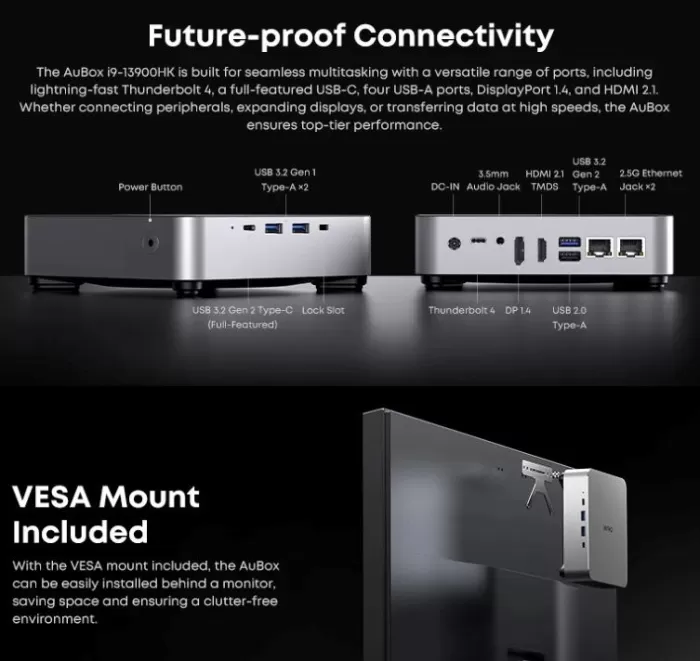
| Ports | 1th Thunderbolt 4 (USB4), 1 USB-C, 3o USB-A 3.2, 2o USB-A 2.0, HDMI 2.1, DP 1.4, audio 3.5 mm, 2nd 2.5GbE |
| Wireless connectivity | Wi-Fi 6, Bluetooth 5.x |
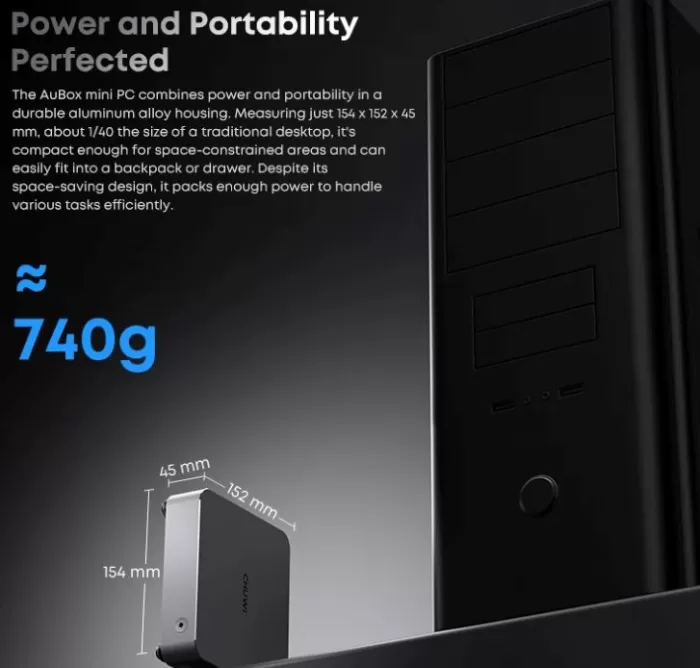
| Dimensions and weight | 154-152-45 mm; . |
| Food | Adapter 19V 120W (included) |
💻✨ Hilo: ¿Qué hace al mini PC #CHUWI AuBox i9-13900HK una opción tan atractiva para profesionales y gamers?
— Mini PC Review (@miniPcReview) August 28, 2025
Vamos a desglosarlo en detalle 🧵https://t.co/mFpYu8JB9M pic.twitter.com/G1hH1wVY8C
2) Design and quality of construction
The AuBox offers a premium finish in brushed aluminum, with a compact and minimalist design. It can be placed on the desktop without occupying space or setting behind the monitor using the included VESA support.
Internal access is simple: remove four screws at the bottom to change RAM, SSD or Wi-Fi module is enough. Its construction transmits robustness and practicality.
3) Screen and multimedia
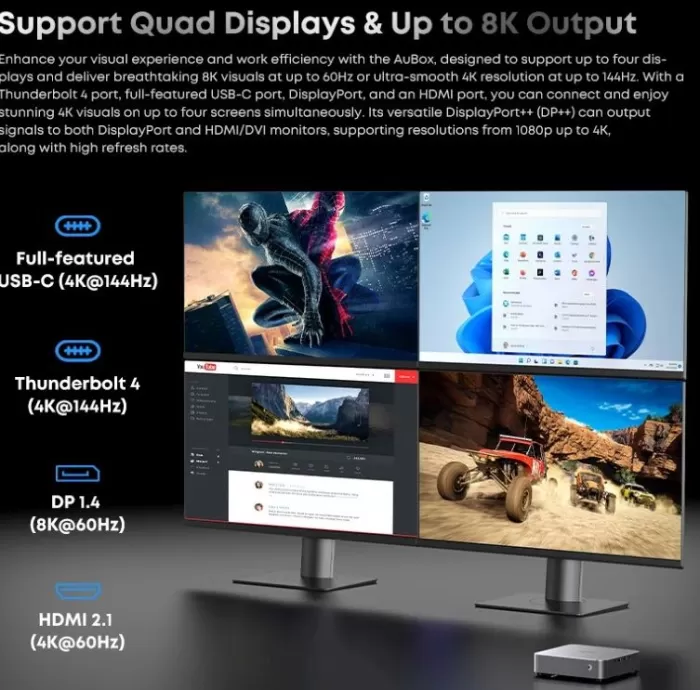
The Intel Core i9 model supports video output up to 8K, ideal for professional multi-monitor configurations.
The HDMI 2.1, DisplayPort 1.4, Thunderbolt 4 and USB-C ports allow great flexibility, from high-redator 4K refresher displays to ultra-HD monitors.
The integrated Intel Iris Xe is enough for 4K video, streaming and office, although it falls short in front of AMD options in games.
It does not include integrated speakers: audio is obtained using the jack 3.5 mm or digital outputs by HDMI/DP.
4) Performance and software
With its Intel Core i9-13900HK (14C/20T), the AuBox offers spare power in intensive tasks such as video editing, code compilation, rendering and virtual machines. In addition, Intel Quick Sync accelerates video encoding, making it ideal for creators.
The weak spot is in the Iris Xe integrated GPU, which works well for multimedia and lightweight games, but is not designed for modern AAA titles. The solution is to connect an external GPU (eGPU) via Thunderbolt 4 if you need additional graphic power.
The included SSD is fast (PCIe 3.0), but it is advisable to upgrade to PCIe 4.0 to get more advantage in heavy loads.
Windows 11 Pro comes pre-installed, clean and no annoying bloatware.
5) Connectivity and extras
-
Thunderbolt 4 (USB4): for ultra-fast, multi-monitor or eGPU connection.
-
Double 2.5GbE port: ideal for advanced networks, NAS or virtualization.
-
Wireless: Wi-Fi 6 and Bluetooth 5.x stable.
-
Varied ports: both modern and inherited, designed for office and multimedia.
-
Expansion: Two M.2 slots to expand storage.
(Does not include NFC, fingerprint reader or IP certification).
6) Is it possible to expand RAM and other internal components?
The AuBox i9-13900HK is designed to be easily accessible and expandable. You only need to remove the four screws from the base to lift the lid and access both the RAM and the M.2 slots for storage.
RAM: Can you expand, how much do you admit and how many channels you have?
-
It has two SO-DIMM DDR4 slots (double/double-channel channel), which allows you to obtain all the performance potential especially for tasks that use the integrated GPU or intensive multitasking.
-
It is configured with up to 32 GB of RAM, but is expandable up to 64 GB (2-32 GB) according to official specifications.
Can I swap the SSD for a more modern one?
Yes, the AuBox i9-13900HK allows you to update the storage:
-
It has two M.2 2280 slots, both support PCIe 4.0-4 SSDs, and the system supports up to 2-1 TB (total 2 TB) in these slots.
-
It comes with a PCIe 3.0 SSD up to 1 TB, but you can replace it with one faster and more capacity easily.
7) Can I put a modern graphics card (dedicated GPU) on it?
Yes, although the CHUWI AuBox i9-13900HK has no internal space for a desktop GPU (such as an RTX 4060 or RX 7800), it does allow you to connect an external GPU (eGPU) thanks to its Thunderbolt 4 port (USB4 to 40 Gbps).
This means you can use an eGPU box (enclosure) where you install a desktop graphics card, and the AuBox recognizes it as if it were a tower PC.
What's the limit?
-
Maximum GPU power: You can install virtually any modern GPU (NVIDIA RTX 3000/4000 or AMD RX 6000/7000) in the eGPU box, provided that the box source supports it.
-
Limitation by Thunderbolt 4: The maximum bandwidth is effective 32 Gbps (PCIe 3.0 x4 equivalent). This means that an RTX 4090 will not yield 100% as on a desktop PC, but it will do so between 70-80% of its actual power. For mid-to-high range GPUs (RTX 3060, RTX 3070, RTX 4060, RTX 4070), the impact is lower and the experience is excellent.
8) What modern games can you play?
With the integrated GPU (Intel Iris Xe) you can only play light or old titles (Fortnite, Valorant, LoL, CS:GO) in 1080p medium-low.
With a powerful eGPU connected by Thunderbolt 4:
-
1080p Ultra: almost any current game without problems (Cyberpunk 2077, Elden Ring, GTA V, Call of Duty, Hogwarts Legacy).
-
1440p Ultra: stable with GPUs such as RTX 3070, RTX 4060/4070 or RX 6800.
-
4K Ultra: fluent with GPUs such as RTX 4080, RTX 4090 or RX 7900XTX, although with a slight performance penalty for a tower PC.
Summary
-
No eGPU: lightweight games at 1080p low (LoL, Fortnite, Valorant, CS:GO).
-
With eGPU (RTX 3060/3070 or higher): modern AAA games at 1080p and 1440p ultra with great fluidity.
-
With high-end eGPU (RTX 4080/4090): you can play in 4K, although with 20-30% less performance than on a desktop PC.
9) External graphic cards
Basic GPU at a good price (53.) and what GPUs you admit?
-
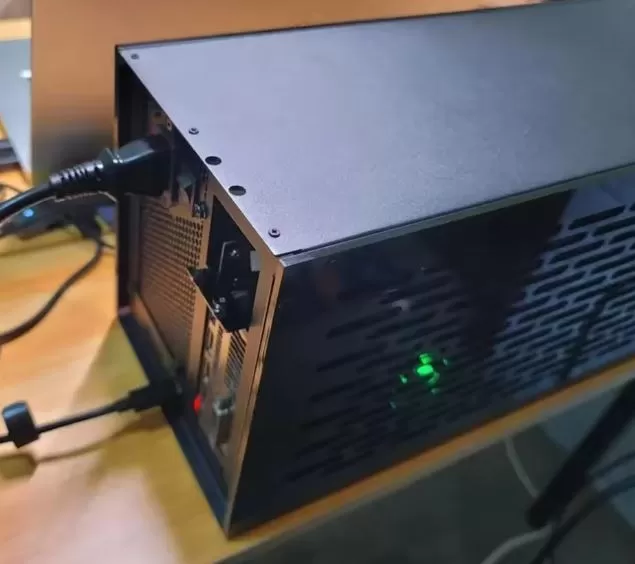
The TH3P4G3 is a compact eGPU box compatible with Thunderbolt 3 and 4, ideal for mini PCs such as your CHUWI AuBox i9-13900HK. Supports ATX, SFX or FLEX fonts, and allows up to 60 W of PD load to the connected computer. It has an effective bandwidth of PCIe 3.0 .
-
Although the manufacturer does not specify compatible exact graphics cards, users have successfully installed modern and powerful GPUs, such as:
-
NVIDIA RTX 3060 Ti works perfectly (they were able to play Lords of the Fallen in Ultra with DLSS 1080p to 60-75 FPS).
Installed Nvidia drivers and it works... game runs low settings 30 fps... with eGPU . ultra . DLSS = 60/75 fps.
-
NVIDIA RTX 3080 . Many users comment on a very positive experience.
I bought a TH3P4G3... to 750 W PSU...and a used 3080. Works great.
-
AMD RX 7800 XT . Also reported as fully functional.
I changed GPU from 3060 Ti to RX 7800 XT... I find it to have the best value for money.
-
NVIDIA RTX 4070 - Successful replacement experience.
Replace my 1080 Ti w/ to 4070 last week. Obviously check your GPU drivers...
-
-
There are also references to trying very powerful GPUs such as RTX 3090 Ti, although some compatibility issues are reported according to the host team.
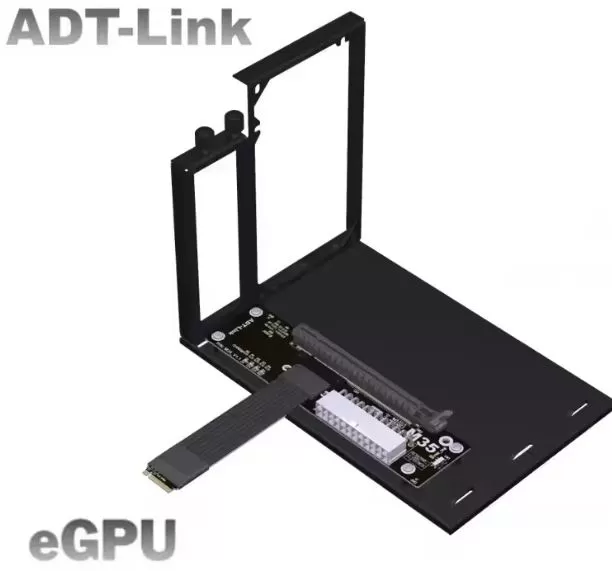
Adapter ADT-Link type M.2 NVMe to PCIe x16. Price around 20 euros.
This ADT-Link adapter (R43SG, K43SG, etc. models) is ideal for connecting an external dedicated GPU.
*
- What is this adapter and how does it work?
-
It is an extension cable/plate M.2 NVMe to PCIe x16, designed to assemble a desktop graphics card on compact systems (such as NUC, ITX, STX or notebooks) that feature an M.2 NVMe slot. The R43SG supports PCIe 3.0 4 (-32 Gbps), while the most advanced K43SG works with PCIe 4.0 4 (-64 Gbps) for greater transfer capacity.
-
These adapters require an external power supply, such as an ATX standard PSU or a Dell DA-2 (12V/18A/220W) font. Versions usually include options to connect the GPU and automatically boot the system when switched on.
-
-
Compatibility with modern graphics cards
-
Compatibility is guaranteed with graphics cards released after 2015, while previous models (2014 or earlier) may not be compatible.
-
In real use, many users have managed to install modern GPUs such as RTX 30 or even RTX 40 series, provided that the system detects them correctly and uses an appropriate power supply.
-
-
Real performance and experience
-
When using PCIe 3.0 . . . . . . . . . . . . . . . . . . . . . . . . . . . . 10-12 %. . . . . . . . . . . . . . . . . . . . . . . .
-
According to review, the K43SG model (PCIe 4.0 4) provides a much more generous bandwidth (64 Gbps), useful if you plan to take advantage of more demanding GPUs or reduce the overall bottleneck.
-
The installation is manual but simple: the GPU is fixed on a screw bracket, the fountain is connected, and the M.2 cable is inserted before the system is turned on.
-
-
Adplication pros and cons
-
Advantages:
-
Economical and compact solution to add a powerful GPU to mini systems.
-
Ideal if you already have a PSU or you can purchase a separate one.
-
It allows you to take advantage of modern graphics cards without the need for bulky eGPU boxes.
-
-
Disadvantages or risks to consider:
-
It needs an external source; it does not include integrated PSU.
-
It reduces graphical performance compared to PCIe 3.0 connectivity of desktop, although it remains very valid.
-
Variable compatibility according to BIOS, drivers and host system operating system.
-
Not suitable for use in laptops without slot M.2 NVMe accessible via Thunderbolt or other external mechanism.
-
-
-
Is it appropriate for your CHUWI AuBox i9-13900HK?
Yes, whenever:
-
Your model allows you to use the M.2 NVMe slot for eGPU (some may be occupied by the SSD, check if the system starts from another unit or uninstlasts the SSD for testing).
-
Counten with an ATX power supply or compatible.
-
You're comfortable with a DIY solution (do-it-yourself).
With a good fit, you can use current GPUs like RTX 3060, RTX 4070 or even 4080, getting excellent performance for gaming 1080p/1440p or intensive graphic tasks, substantially improving your mini PC's capabilities.
Total cheapest price with basic PSU: 42o
10) Pros and Cons
Users and reviewers stand out:
-
Pros: great CPU power, premium design, full connectivity, silent cooling.
-
Cons: Limited GPU, SSD PCIe 3.0 by default, and in some cases single channel RAM that penalizes performance until it is updated.
11) Outstanding views of specialized media
TechRadar
-
Highlights the elegant design, lots of ports (including USB 4.0 and double LAN 2.5 GbE) and ease of making updates.
-
It criticizes that comes with a single RAM module (16 GB DDR5) and an NVMe Gen 3 SSD, which limits performance, especially of the integrated GPU.
-
It highlights that they go from a remarkable performance to doubling the RAM: an increase of 70% with two SODIMMs in the graphic benchmarks.
Notebookcheck
-
It praises quality construction, the use of aluminum chassis, the well thought-out cooling system, and features such as USB 4 and double 2.5 GbE.
-
It points to the limited options of the BIOS, the absence of OCuLink and the memory in mono-channel configuration, which significantly degrades the iGPU.
AndroidPCtv
-
Defines the AuBox as an attractive mini PC and well assembled internally, with effective active ventilation.
-
Praise the powerful processor, the aluminum housing, the presence of double Ethernet 2.5 G, dual NVMe 4.0, output for four screens, USB4, all on a silent computer. It gives you a score of 8.6.
GizChina
-
It values the power of Ryzen 7 8745HS and the capacity of the Radeon 780M, along with memory expansion level (up to 64 GB) and storage (2 TB).
-
It highlights the promise to handle up to four 8K screens simultaneously, which attracts the attention of users with complex multitasking needs.
SuperFashion (technical analysis)
-
It praises thermal performance, indicating that the internal design - heat pipe, well distributed ventilation - keeps the CPU below 80 degrees CC even with sustained load.
-
Consider BIOS, although minimalist, offers useful adjustments such as automatic lighting after power outage (use in server-type applications). It also highlights that no thermal throttling was noticed in daily use.
iGeekPhone (idemodel i9-13900HK)
-
It refers to the model with Intel i9 as "compact and powerful," capable of handling demanding jobs and offering fluid performance in gaming, streaming and intensive tasks.
-
It praises its extremely small size (154-45-152 mm), connectivity (Wi-Fi 6, Bluetooth 5.0, multiple ports) and aesthetics - premium.
12) Technical summary
-
CPU: outstanding in multitasking, productivity and professional loads.
-
GPU: correct for multimedia, insufficient for serious gaming without eGPU.
-
Network: double 2.5GbE makes it perfect for IT professionals and home servers.
-
Refrigeration: efficient and silent.
13) Final conclusion: for whom is ideal?
The CHUWI AuBox i9-13900HK is perfect for:
-
Content creators that require fast video encoding thanks to Quick Sync.
-
Professionals and developers who manage multiple tasks or virtual environments.
-
Users planning to use eGPU for advanced gaming or graphic work.
It is not recommended if you are looking to play without external GPU, or if you expect a mini PC with high integrated graphic performance.
Alternatives: Geekom Mini IT13, GMKtec K8 or other mini PCs with Intel i9 and Thunderbolt 4.
14) Where to Buy
For more information and up-to-date prices, see the official product page:
CHUWI AuBox i9-13900HK in AliExpress