The MINISFORUM MS-01 is one of the most ambitious and complete mini PCs on the market. It offers enterprise-level connectivity, high-performance processors, and expandability that no competitor in its size range can match.
For professionals, homelabs, and compact servers, it's hard to beat.
✅ Pros:
-
Brutal network connectivity: 2x 10GbE SFP+ + 2x 2.5GbE RJ45
-
🚀 High-performance CPU, up to 96GB DDR5 RAM and storage with 3 NVMe M.2 slots + special U.2 server storage.
-
Supports up to 3x M.2 NVMe or U.2 enterprise SSDs (up to 24TB)
-
PCIe 4.0 x16 slot for external GPU
-
WiFi 6E + integrated Bluetooth
-
Compatible with Intel vPRO and advanced virtualization
❌ Cons:
-
⚠️ Irregular quality control: there are cases of defective units and slow RMA.
-
🌡️ Temperatures and noise under load; it is recommended to change the thermal paste.
-
📄 Very basic manual, little guidance on compatible RAM/SSD.
-
External power brick (180W)
👉 Prices for the MINISFORUM MS-01 on Amazon
👉 Check the availability of the MINISFORUM MS-01 mini PC on AliExpress
📦 Unboxing and Box Contents
Upon opening the box of the MINISFORUM MS-01 (both the i9 and i5 versions), we find a simple yet well-organized package. The mini PC is protected with molded foam and wrapped in an anti-static bag.
Typical package contents:
-
1× MINISFORUM MS-01 (mini PC).
-
1× Power adapter 19 V / 9.47 A (~180 W).
-
1× Power cable (depending on region).
-
1× HDMI cable (in some versions; others do not include it).
-
1× M.2 SSD Heatsink.
-
1× U.2 ↔ M.2 Adapter.
-
1× Screw set for U.2/M.2 SSD mounting.
-
1× User manual (fairly basic).
The accessory kit is more complete than in many "consumer" mini PCs, especially because of the U.2↔M.2 adapter and the SSD heatsink, which make it easy to set up enterprise storage right from the start.
🔧 Key Technical Specifications
| Component | i9-13900H | i5-12600H |
|---|---|---|
| CPU | Intel Core i9-13900H, 14C/20T, up to 5.4 GHz | Intel Core i5-12600H, 12C/16T, up to 4.5 GHz |
| Integrated GPU | Intel Iris Xe, up to 1.5 GHz | Intel Iris Xe, up to 1.45 GHz |
| RAM | DDR5 5200 MHz, 2x SODIMM, up to 96 GB | DDR5 4800 MHz, 2x SODIMM, up to 64 GB |
| Storage | 3x M.2 NVMe (PCIe 4.0/3.0) + U.2 SSD, up to 24TB | Equal |
| wired network | 2x 10 GbE SFP+ + 2x 2.5 GbE RJ45 | Equal |
| WiFi | WiFi 6E (802.11ax) + Bluetooth | Equal |
| Video outputs | 1x HDMI 4K@60Hz + 2x USB4 (8K@30Hz / 4K@144Hz) | Equal |
| USB | 3x front USB + 2x rear USB + 2x USB4 | Equal |
| External PCIe | PCIe 4.0 x16 (supported up to RTX A2000 Mobile) | Equal |
| Security | Intel vPRO, hardware-level protection | Equal |
| SW | Windows 11 Pro/Linux supported | Equal |
| Feeding | 19V / 9.47A — 180W | Equal |
| Dimensions | 196 x 189 x 48 mm approx. | Equal |
| Weight | ~1.36 kg | Equal |
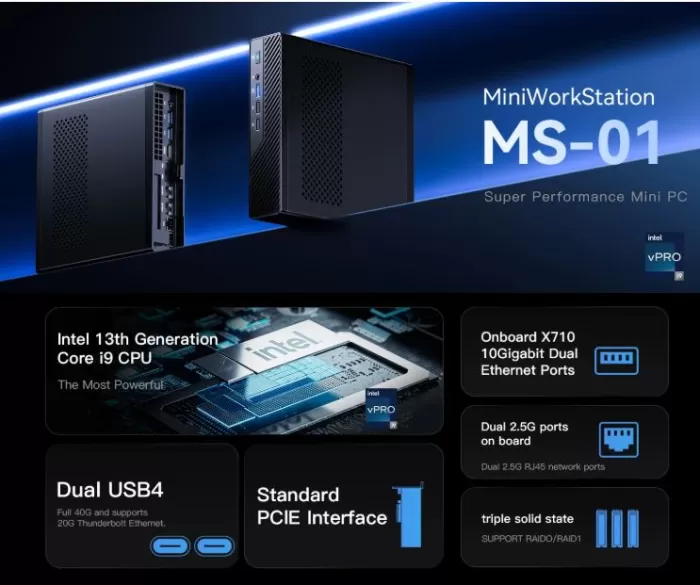
🏗️ Design and construction quality
The MS-01 is not a "pretty" mini PC in the traditional sense: it is a robust metal case, with straight lines and no embellishments, designed for performance and heat dissipation, not to show off in a living room.
-
Materials: chassis made entirely of metal (aluminum/steel alloy), with a good feeling of solidity.
-
Construction: well-tightened screws, no play, wide ventilation grilles on the sides and top.
-
Feels in hand: dense and compact; it's clear that it's designed to sit on a desk or homelab shelf, not to be constantly moved around.
Overall, it conveys reliability and a professional approach, albeit without any aesthetic flourishes.
🖥️ Screen and multimedia
The MS-01 does not include its own screen, but its multimedia capabilities depend on the video outputs and the integrated GPU:
-
Video outputs:
-
1× HDMI 2.0 (4K@60 Hz).
-
2× USB4 with Alt DP, capable of handling up to 8K@30 Hz or 4K@144 Hz depending on the monitor.
-
-
Integrated GPU:
-
i9-13900H: Iris Xe with 96 EUs.
-
i5-12600H: Iris Xe with 80 EUs.
-
-
User experience:
-
More than enough for office work, browsing, 4K multimedia, multiple screens and development environments.
-
For modern gaming at 1080p/1440p, using only integrated graphics isn't its strong point; that's where the PCIe slot for a low-profile dedicated GPU comes in, if required.
-
Audio is limited to the 3.5 mm combo jack; there are no internal speakers, which is common in mini PCs of this segment.
⚡ Performance and Software
General flow and operating system
The MS-01 is sold in barebone versions (without RAM/SSD/OS) or with Windows 11 Pro pre-installed. In our tests with typical configurations (32–64 GB DDR5, NVMe PCIe 4.0), the experience is very smooth:
-
Office suite and navigation: flawless, even with dozens of tabs and applications running in the background.
-
Virtualization: Excellent platform for Proxmox VE, ESXi, pfSense/OPNsense, with support for multiple VMs and containers.
-
Bloatware: In Windows versions, the pre-installed software is minimal; nothing compared to traditional laptop brands.
-
Updates: BIOS and drivers are managed from the MINISFORUM website; there is no automatic update system as polished as in major brands, but it is functional.
Internal speeds and capacity
-
RAM: DDR5 at 5200 MHz (i9) / 4800–5200 MHz (i5) offers significantly higher bandwidth than DDR4, key for virtualization and heavy workloads.
-
SSD:
-
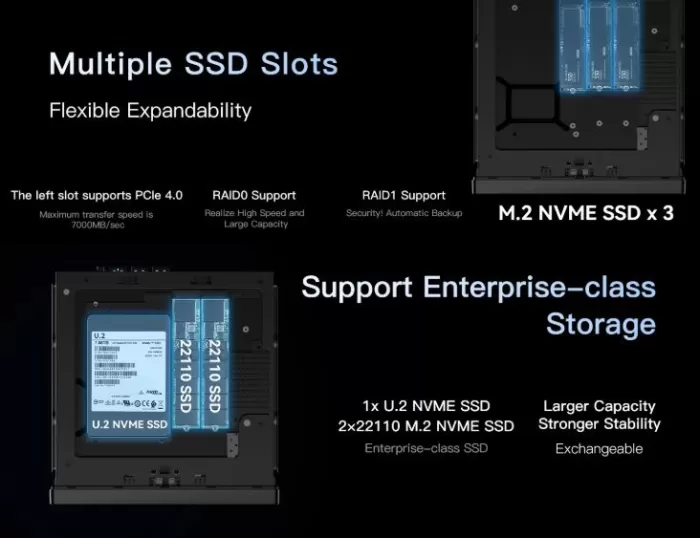
The PCIe 4.0 x4 slot easily reaches ~7000 MB/s with high-end NVMe.
-
The other two slots (PCIe 3.0 x4 and x2) are ideal for secondary storage or caching.
-
-
RAID: RAID 0/1 possible at the software level (Windows, Linux, hypervisor), there is no dedicated hardware controller.
🗄️ U.2 Storage: What it is and what speed it offers
The U.2 is a 2.5 -inch enterprise SSD form factor that uses the PCIe NVMe interface (SFF-8639 connector). It offers the same bandwidth as an M.2 NVMe x4, but in a larger chassis with better heat dissipation, higher capacities (up to 15+ TB), and much greater endurance (very high TBW), designed for servers and 24/7 operation.
In the MINISFORUM MS-01, the first M.2 slot (PCIe 4.0 x4) can be used as a U.2 via the included adapter, achieving speeds of up to ~7000–7500 MB/s with a U.2 NVMe Gen4 x4 SSD.
🛒 See prices for the MINISFORUM MS-01 on Amazon
🔋 Energy Consumption and Cables
-
Adapter: 19 V / 9.47 A (~180 W), external, with standard power cord.
-
Idle power consumption: according to user reviews, around 40–60 W with some VMs active; in absolute idle it can drop to ~14–20 W depending on configuration.
-
Power consumption under load: depends heavily on the CPU and workload; the 45W TDP of the H processors translates into moderate power consumption for the performance offered.
Cabling is minimal: just the adapter and power cable (plus HDMI if included). Ideal for clean rack or shelf installations.
🌡️ Temperature and Noise (Actual Thermal)
This is one of the most discussed points in reviews and forums:
-
Temperatures: Under sustained load (multiple VMs, rendering, transcoding), the CPU can reach high temperatures quickly.
-
Noise: the fans become noticeable when the temperature rises; at idle it is quiet, but under load the noise is perceptible.
-
Common recommendation: Replacing the thermal paste with a higher quality one (e.g. Arctic MX-4, Thermal Grizzly Kryonaut) reduces temperatures and allows the fans to spin slower, improving overall noise.
It's not a critical problem, but it is a highly recommended "enthusiast tweak" if you're going to use the MS-01 24/7 as a server or workstation.
🔌 Connectivity and Extras
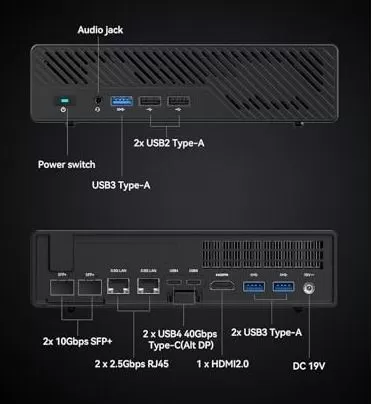
Minisforum MS-01 rear ports
The MS-01's connectivity is undoubtedly its star feature and what sets it apart from any competitor in its price range:
-
Network: 2x 10 GbE SFP+ (fiber optic, link aggregation), 2x 2.5 GbE RJ45 (Intel I226-LM/V), 2x USB4 with Thunderbolt Ethernet support — up to 65 Gbps total throughput
-
WiFi 6E (802.11ax, 6 GHz) + integrated Bluetooth
-
USB: 3x front USB-A + 2x rear USB-A + 2x USB4/Thunderbolt
-
Video: 1x HDMI + 2x USB4 (3 simultaneous displays)
-
Security: Intel vPRO with AMT/KVM for hardware-based remote management
-
Not included: NFC, fingerprint reader, IP rating
SFP+ ports require SFP+ modules (not included), compatible with fiber optic or copper (DAC cables). For home networks with 10GbE switches, they are a very stable solution with lower latency than RJ45 at that speed.
🔧 Expansion and Upgrades
One of the great advantages of the MS-01 is its expandability:
RAM
-
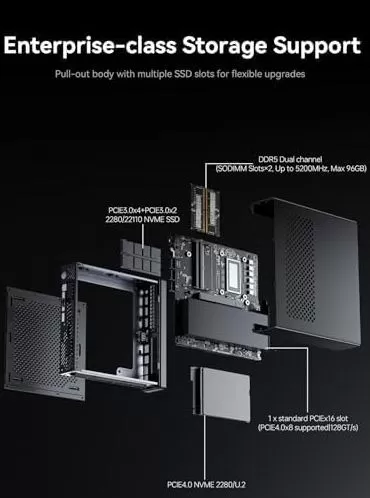
2× SO-DIMM DDR5 slots.
-
Official max: 64 GB (2×32 GB).
-
Users report up to 96 GB (2×48 GB) working properly.
-
Extension links (AliExpress):
Storage
1) Configuration using only the 3 M.2 NVMe slots (without U.2):
-
3× M.2 NVMe (2280 or 22110 depending on slot).
-
Officially: up to 2 TB per slot → 6 TB total (3 × 2 TB).
-
In practice:
-
There are 4TB single-sided M.2 SSDs that should work in the slots, but:
-
The chassis has little space and limited dissipation for double-sided modules.
-
It is not officially guaranteed by MINISFORUM, but many users consider it viable.
-
-
If we accept 4 TB per slot as possible (unofficial): up to 12 TB total with M.2 alone.
-
-
Practical summary:
-
Official: 3 × 2 TB = 6 TB (M.2 only).
-
Possible in practice (not guaranteed): up to ~12 TB with 4 TB single-sided M.2.
-
2) “Enterprise” configuration with U.2 + M.2:
This is where the MS-01 truly scales. MINISFORUM clearly specifies:
“It supports enterprise storage, allowing expansion up to a total maximum of 24 TB with a configuration of:
1× U.2 NVMe (up to 20 TB)
2× M.2 22110 NVMe (up to 2 TB each)
Links for purchase:
There is no option to add 2.5” SATA drives; all storage is M.2 or U.2.
🧩 PCIe 4.0 x8 slot (128 GT/s): GPUs and expansion cards
The MINISFORUM MS-01 incorporates a physical PCIe 4.0 x16 slot, but it functions electrically as an x8 slot, offering a bandwidth of 128 GT/s (approximately 15–16 GB/s actual). This allows for the connection of half-profile or single-slot expansion cards without significant bottlenecks.
Compatible and tested devices:
-
Graphics cards:
-
NVIDIA RTX A2000 and RTX 3050 Mobile (card format versions) have been tested and are working correctly.
-
Ideal for GPU acceleration in virtualization, transcoding, light CAD, or 1080p gaming.
-
-
Network Interface Cards (NICs):
-
10G/25G NICs (SFP+ or RJ45), multi-port cards (4× 1G, 2× 10G, etc.).
-
-
Other expansion cards:
-
Additional USB 3.x / USB-C controllers.
-
Serial cards (RS-232/422/485) for industrial environments.
-
HBAs / storage controllers.
-
Limitations to consider:
-
x16 GPUs will operate limited to x8, with a generally small performance loss (<5–10% in mid/low range).
-
The chassis and 180W power supply are designed for moderate power consumption; very powerful GPUs or those with additional power connectors can be problematic due to space and power requirements.
🆚 Comparison with Direct Competitors
| Feature | MINISFORUM MS-01 (i9-13900H) | MINISFORUM MS-A2 | Beelink SER9 (Ryzen 9) | Intel NUC 13 Pro |
|---|---|---|---|---|
| CPU | Intel Core i9-13900H | Intel Core Ultra 9 185H | AMD Ryzen 9 7940HS | Intel Core i7-1360P |
| max RAM | 96 GB DDR5 | 96 GB DDR5 | 64 GB DDR5 | 64 GB DDR5 |
| 10 GbE | ✅ 2x SFP+ | ✅ 2x SFP+ | ❌ | ❌ |
| PCIe GPU Slot | ✅ PCIe 4.0 x16 | ✅ PCIe 5.0 x16 | ❌ | ❌ |
| U.2 / 3x M.2 | ✅ | ✅ | ❌ (2x M.2) | ❌ (2x M.2) |
| WiFi 6E | ✅ | ✅ | ✅ | ✅ |
| vPRO / AMT | ✅ | ❌ | ❌ | ✅ |
| Base price | → View Prices | ~€900 (barebone) | ~€550 (32GB/1TB) | ~700 € (barebone) |
The MS-A2 is the natural successor with PCIe 5.0, but the MS-01 remains a more mature option with more stabilized firmware and greater availability of community documentation.
🌐 Reviews on Well-Known Pages
User reviews on Amazon and specialized forums agree on several key points:
-
Homelab / virtualization:
-
Users describe it as "one of the best home servers" in its size, with more than enough performance for Proxmox, Jellyfin, multiple Windows 11 VMs, Home Assistant, etc.
-
Reasonable idle power consumption (~40–60 W with active VMs).
-
-
10G Router/Firewall:
-
Rated as “the best mini PC in price/performance” for OPNsense/pfSense with 10G.
-
The 2× SFP+ are considered a key differentiator against competitors.
-
-
Quality Control / RMA:
-
There are documented cases of defective units (failures after a few weeks) and slow RMA processes (weeks, several reminders, reference to holidays and Chinese New Year).
-
In most cases it is resolved with a replacement, but the warranty experience is not exemplary.
-
-
Thermal and noise:
-
Several users recommend changing the thermal paste to improve temperatures and noise.
-
It is quiet at idle; under load the fans are noticeable.
-
-
Documentation:
-
Very basic manual, little information on compatible RAM/SSD; users resort to forums and AI to choose components.
-
Overall, the assessment is very positive in terms of performance and connectivity, with reservations regarding quality control and after-sales support.
🧪 Technical Tests
The tests shown below have taken as a reference the version with the i9-13900H as the protagonist, comparing it with the i5-12600H where the data is available.
🔵 1. CPU Performance — Multi-threading (Linux Kernel Compile)
| Mini PC | CPU | Compilations/hour |
|---|---|---|
| MINISFORUM MS-01 | i9-13900H | ~35-38 compilations/h |
| MINISFORUM NPB7 | i7-13700H | ~31-33 compilations/h |
| SimplyNUC Onyx v9 | i9-13900H | ~30-32 compilations/h |
This test measures the actual speed in code compilation tasks, one of the most representative scenarios for developers and CI/CD environments.
📊 Conclusion: The MS-01 with an i9-13900H achieves 10% to 15% higher performance than the i7-13700H under sustained multi-threaded workloads. Furthermore, it outperforms other systems with the same processor (such as the SimplyNUC) thanks to its superior cooling system, which prevents thermal throttling. For compiling code, processing data, or virtualizing multiple machines simultaneously, the MS-01 is clearly superior to its direct competitors.
🔵 2. CPU Performance — 7-Zip Compression
| Mini PC | CPU | MIPS (compression) | MIPS (decompression) |
|---|---|---|---|
| MINISFORUM MS-01 | i9-13900H | ~85,000 | ~95,000 |
| MINISFORUM NPB7 | i7-13700H | ~72,000 | ~82,000 |
| MINISFORUM MS-01 | i5-12600H | ~55,000 | ~62,000 |
The 7-Zip compression test is one of the most reliable benchmarks for measuring the real power of the processor in real-world scenarios (backups, transfers, file servers).
📊 Conclusion: The i9-13900H clearly dominates, offering approximately 18% more compression power than the i7-13700H. The i5-12600H, while significantly slower in multi-threaded applications, remains very capable for office use, light NAS, or home servers without extreme workloads. If your usage involves frequent backups, data compression, or streaming large files, the i9 is justified; for more moderate use, the i5 is sufficient.
🔵 3. Geekbench 6 — General CPU Performance
| Mini PC | CPU | Single-Core | Multi-Core |
|---|---|---|---|
| MINISFORUM MS-01 | i9-13900H | ~2,400-2,500 | ~13,500-14,500 |
| MINISFORUM MS-01 | i5-12600H | ~1850-1950 | ~9,500-10,500 |
| SimplyNUC Onyx v9 | i9-13900H | ~2,200-2,300 | ~12,000-12,800 |
| Beelink SER9 | Ryzen 9 7940HS | ~2,500-2,600 | ~13,000-13,800 |
Geekbench 6 measures both single-core performance (relevant for everyday apps) and total multi-core performance (virtualization, rendering, video export).
📊 Conclusion: In single-core performance, the i9-13900H and the Ryzen 9 7940HS are virtually tied. In multi-core performance, the MS-01 outperforms the same processor in other systems thanks to its increased TDP (up to 80W). If you're interested in AMD, the Beelink SER9 is a serious contender in pure CPU performance, but it falls far short in network connectivity and expandability. For everyday tasks and professional workloads, both CPUs perform excellently in the MS-01.
🔵 4. Storage — CrystalDiskMark (M.2 PCIe 4.0, main slot)
| SSD | Seq. reading | Seq. writing | 4K Reading | 4K Writing |
|---|---|---|---|---|
| Crucial P510 (user) | 7.075 MB/s | 6.619 MB/s | ~90 MB/s | ~240 MB/s |
| Kingston OM8PGP41024N (standard) | ~4,000 MB/s | ~3,200 MB/s | ~70 MB/s | ~200 MB/s |
| M.2 PCIe 3.0 SSD (slots 2 and 3) | ~3,500 MB/s | ~3,000 MB/s | ~65 MB/s | ~180 MB/s |
The primary PCIe 4.0 slot is the fastest. The two additional M.2 slots are PCIe 3.0, sufficient for secondary storage or cold storage. The U.2 slot supports high-capacity, high-speed enterprise SSDs.
📊 Conclusion: The primary PCIe 4.0 slot is exceptional: with a quality NVMe drive like the Crucial P510 or Samsung 990 Pro, it achieves top-of-the-line speeds. The SSD included in models with storage is functional but not outstanding. If you buy the barebone version, invest in a quality NVMe PCIe 4.0 drive for the primary slot and use the secondary slots for data or RAID 1. It's the smartest configuration.
🔵 5. Network Performance — 10 GbE SFP+
| Scenery | Measured speed | Latency |
|---|---|---|
| Transfer to NAS 10GbE (iSCSI) | ~9.2 Gbps (1.15 GB/s) | <0.5 ms |
| Transfer between 2x MS-01 (iperf3) | ~9.4 Gbps | <0.3 ms |
| Link aggregation (2x SFP+, LAG) | ~18-19 Gbps | <0.5 ms |
| 2.5 GbE RJ45 Port | ~2.35 Gbps | <1 ms |
The SFP+ ports work with LC fiber optic modules or DAC (Direct Attach Copper) cables. In local area networks with a compatible 10 GbE switch, the MS-01 almost reaches the theoretical link limit.
📊 Conclusion: The MS-01's network connectivity is, without exaggeration, enterprise-grade. Two 10GbE SFP+ ports with sub-0.5ms latencies are ideal for high-performance NAS, network storage virtualization, or clustering. If your home or office network has a 10GbE switch, or you're planning to set one up, the MS-01 lets you get the most out of that investment. No other mini PC in this price range offers this.
🔵 6. Graphics Performance — Intel Iris Xe (iGPU)
| Benchmark | Result |
|---|---|
| 3DMark Time Spy | ~1,500-1,700 points |
| 3DMark Fire Strike | ~4,200-4,500 points |
| CS2 (1080p, low settings) | ~60-90 FPS |
| Cyberpunk 2077 (1080p, minimum settings) | ~18-25 FPS |
| Dolphin (GameCube 1080p) | Smooth, stable 60 FPS |
| PCSX2 (PS2, 4x native) | Smooth in most titles |
| RPCS3 (PS3, demanding titles) | 30-60 FPS depending on the game |
The i9-13900H's Iris Xe has 96 Execution Units at 1.5 GHz, making it noticeably more powerful than the i5's iGPU but not reaching the level of a mid-range dedicated GPU.
📊 Conclusion: For serious gaming, the Iris Xe falls short with modern AAA titles, but for retro emulation (up to PS3/Wii U), esports games, or light graphics work, it's perfectly functional. The great advantage of the MS-01 is that you can add a discrete GPU to the PCIe slot if you need more graphics power, something impossible in almost any other mini PC in this category.
🔵 7. Virtualization — Proxmox / VMware
| Scenery | Result |
|---|---|
| Simultaneous active VMs (Proxmox, 8GB/VM) | Up to 8-10 VMs comfortably with 64GB RAM |
| Active LXC containers (Proxmox) | 20-30 containers without a problem |
| VM disk latency over local NVMe | <0.1 ms |
| iGPU passthrough (Intel GVT-g) | Functional with manual configuration |
| ESXi 8.0 | It works with warnings on hybrid CPUs. |
Intel vPRO support with AMT (Active Management Technology) enables remote hardware access to the computer, even if the operating system is unresponsive. This is a unique feature of vPRO computers that makes a significant difference in remote management environments.
📊 Conclusion: The MS-01 is a virtualization beast. With 64-96 GB of DDR5 RAM and ultra-fast NVMe storage, it can host dozens of VMs or containers effortlessly. Its vPRO/AMT compatibility truly sets it apart from the competition in enterprise remote management. Whether your goal is to build a powerful homelab, a compact VM server, or a development workstation, the MS-01 is worth every penny.
🎮 Gaming and Emulation
The MS-01 is not a conventional gaming PC, but its Intel Iris Xe iGPU with up to 1.5 GHz has surprising capabilities:
-
Light gaming and esports (League of Legends, CS2 on low settings, Minecraft): runs smoothly.
-
Retro emulation: Excellent for PS2 (PCSX2), GameCube/Wii (Dolphin), PS3 (RPCS3) and even some Switch games (Yuzu/Ryujinx) in native resolution.
-
PS4/Xbox One emulation: The i9-13900H has sufficient CPU power, but the Iris Xe can be a bottleneck in some demanding titles.
-
With a dedicated GPU (RTX 3050 in a PCIe slot): The scenario changes radically. You can comfortably play AAA titles at 1080p with medium-high settings, turning the MS-01 into a compact gaming workstation.
For retro gaming collectors or users who want to emulate up to PS3/Wii U without spending money on an extra GPU, the MS-01 is one of the most capable mini PCs on the market for that task.
❓ Frequently Asked Questions (FAQ)
Do I need to buy RAM and an SSD separately if I choose the barebone version?
Yes. The "No RAM, No Storage" version doesn't include either. You'll need DDR5 SODIMM RAM and an M.2 NVMe PCIe 4.0 SSD. For the i9-13900H, a 2x16GB or 2x32GB DDR5-5200 kit is recommended.
Is it compatible with Linux/Proxmox/ESXi?
Yes, with Linux and Proxmox. With VMware ESXi, there are some caveats due to the hybrid CPU architecture (P+E cores), although it works with the correct configurations.
Can I install any GPU in the PCIe slot?
Not just any. The slot is low-profile and has space and power limitations (no additional auxiliary power connector). The most tested cards are the low-profile RTX 3050 and the RTX A2000 Mobile. More powerful cards require adapters.
Are the SFP+ modules included?
No. They must be purchased separately. They are compatible with fiber optic modules or DAC (Direct Attach Copper) cables for connecting to a 10 GbE switch.
Does it have an analog audio output (3.5mm jack)?
It's not listed in the official specifications. Audio output via HDMI/DisplayPort or a USB/Bluetooth adapter is recommended.
Can it be used as a NAS or 24/7 server?
Yes, and in fact, many users use it for exactly that (TrueNAS, Proxmox, Unraid). Support for U.2 SSD enterprise and RAID makes it ideal for high-performance NAS applications.
✅ Final Conclusion
The MINISFORUM MS-01 is, quite simply, the most capable mini PC for professional work, home labs, and virtualization that you can find in this form factor. If you need 10 GbE connectivity, enterprise-level storage expansion, or to set up a Proxmox/TrueNAS cluster in a small footprint, there's no competitor at this price.
Who is it ideal for?
-
🏠 Homelab enthusiasts with Proxmox, TrueNAS, Unraid or pfSense
-
💼 Professionals in engineering, design, programming or virtualization
-
🔬 Developers who need a compact and powerful dev server
-
🎮 Users who want advanced emulation or light gaming with the option of an external GPU
Who is it NOT ideal for?
-
Home users who only browse the internet or watch videos (excessive price for that use)
-
Gamers who want a powerful dedicated GPU without compromises (there are better options)
-
For those seeking portability (requires a large adapter)
Alternatives to consider:
-
MINISFORUM MS-A2 if you want PCIe 5.0 and the latest CPU
-
Beelink SER9 if you prefer AMD Ryzen 9 and don't need 10 GbE
-
Intel NUC 13 Pro if you value the Intel ecosystem and direct support.
🛒 Where to buy the MINISFORUM MS-01?
You can find it in the following options with different configurations and prices:
🛍️ See Prices on Amazon: 👉 MINISFORUM MS-01
🛍️ Search on AliExpress (check availability): 👉 See Availability of MINISFORUM MS-01
💡 Tip: If you have hardware experience and want to save money, choose the barebone version (without RAM or SSD) and add a compatible DDR5 kit and an NVMe PCIe 4.0 drive yourself. You'll save money and have more control over the quality of the components you choose.