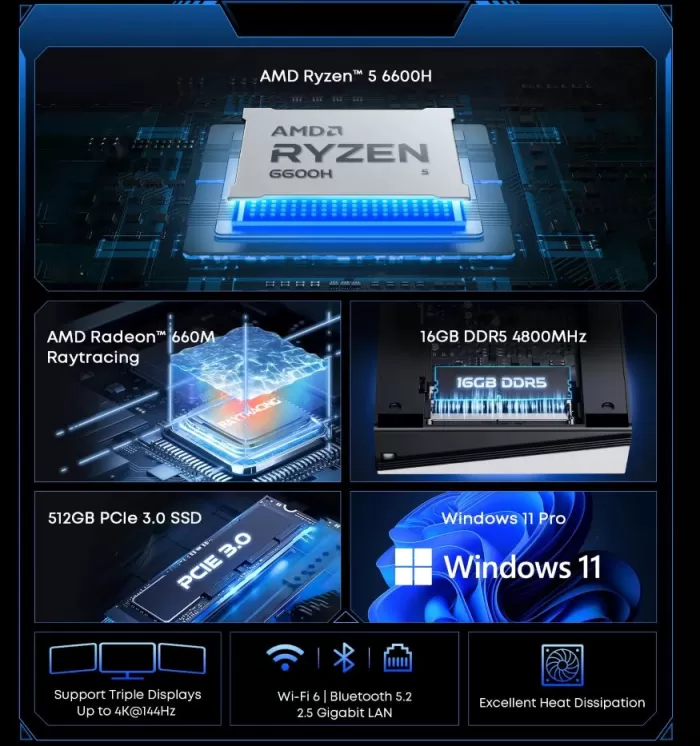
The CHUWI UBox is one of the most amazing mini PCs in its price range: an AMD Ryzen 5 6600H 6-core processor, 16 GB DDR5, NVMe SSD and modern connectivity, all in a chassis weighing just 650 grams.
It's a proposition that's hard to ignore for anyone looking for real power without paying the premium of more well-known brands.
Its only drawbacks: the integrated GPU has its limitations and the RAM is soldered to the motherboard.
✅ Key Pros
-
Ryzen 5 6600H performance: Its 6 cores/12 threads and Radeon 660M graphics (RDNA 2) offer great fluidity in multitasking, eSports games and emulation.
-
Dual M.2 NVMe PCIe 4.0 Slots: Allows you to add a second SSD of up to 2 TB without replacing the main system drive.
-
Dual 1G Ethernet: Excellent for advanced network projects such as firewalls (pfSense), home servers, or traffic segmentation.
-
Triple 4K@144Hz Output: Simultaneous connection for 3 monitors via HDMI 2.1, DisplayPort 1.4 and USB-C Full-Featured.
-
Great Value for Money: Includes Windows 11 Pro activated and VESA support in a compact chassis.
❌ Key Cons
-
Non-Expandable RAM (LPDDR5): As it is soldered memory in a 16 GB configuration, the capacity cannot be increased if you need 32 GB in the future.
-
No USB4/Thunderbolt for eGPU: The USB-C port is 3.2 Gen 2 (10 Gbps). To connect an external eGPU, you must use the second internal M.2 slot.
-
LAN Ports Limited to 1G: It does not integrate 2.5G controllers, limiting wired transfers to ~115 MB/s.
-
Limitation in AAA Games: For very demanding next-gen titles, it falls short, requiring lower resolution and graphics.
⇒ See Prices and Availability on AliExpress
⇒ See Prices and Availability on Amazon UK
⇒ See Prices and Availability on Amazon
📦 Unboxing and Box Contents
The UBox arrives in a compact and well-protected box. Nothing fancy, but everything you need to get started right away:
-
🖥️ CHUWI UBox Mini PC (with Ryzen 5 6600H, 16 GB DDR5, 512 GB SSD pre-installed).
-
🔌 90W external power supply .
-
🔩 VESA mount for mounting behind monitor.
-
📄 Multilingual user manual (Spanish included).
-
❌ Does not include: HDMI cable, DisplayPort cable or mouse/keyboard.
The device comes with Windows 11 Pro pre-installed and activated.
🔧 Technical Specifications
| Component | Specification |
|---|---|
| CPU | AMD Ryzen 5 6600H, 6 cores / 12 threads, up to 4.5GHz, TDP configured to 45W |
| GPU | AMD Radeon 660M (RDNA2, 384 integrated shaders) |
| RAM | 16GB DDR5-4800 in 1 SO-DIMM module (factory single channel) |
| Storage | 512GB PCIe 3.0 M.2 2280 SSD; 2 M.2 2280 slots supporting PCIe 4.0, expandable up to a total of 3TB |
| Operating system | Windows 11 Pro |
| Wireless connectivity | Wi-Fi 6, Bluetooth 5.2 / 5.3 |
| wired network | 2x 1G Ethernet LAN |
| Video | 1x HDMI 2.1 (4K@120Hz), 1x DisplayPort 1.4 (4K@120Hz), 1x USB-C (4K@144Hz): triple display support |
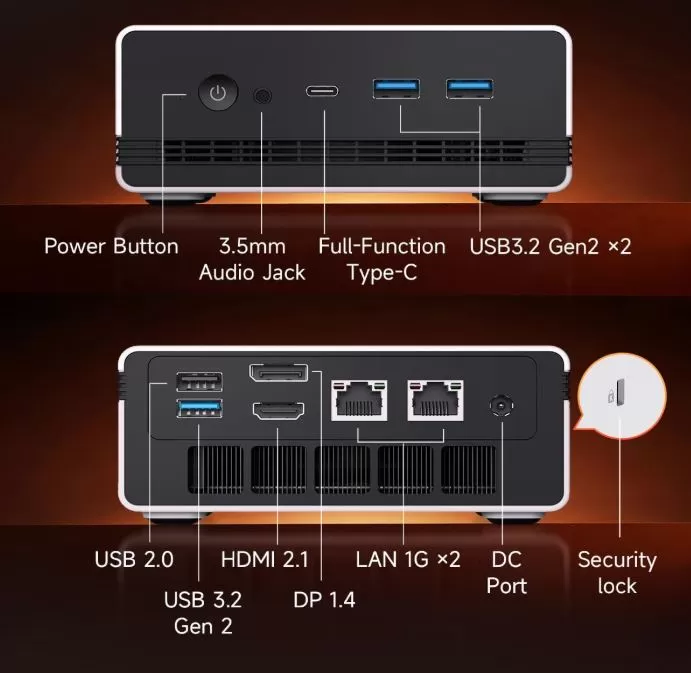
| USB | 3x USB-A 3.2 Gen2, 1x USB-A 2.0, 1x USB-C |
| Audio | 1x 3.5mm jack |
| Dimensions | 128 x 130.5 x 57 mm approx. |
| Weight | ~540-650g (varies depending on source) |
| Chassis | Aluminum-reinforced polycarbonate |
| Mounting | VESA mount included |
🎨 Design and Construction Quality
The CHUWI UBox has a square, understated design that fits equally well on an office desk or in a living room next to the TV. The casing combines reinforced plastic with metallic details, finished in white/silver or black depending on the version. The side and rear ventilation grilles are generous—it's clear that CHUWI considered airflow from the design stage.
Weighing just 650 grams, it's lighter than its size might suggest, yet its reinforced chassis still aids heat dissipation and reduces fan vibration. The front panel features a subtle and elegant status LED. Its dimensions of 13 x 12.75 x 5.69 cm make it perfectly portable; it fits easily into any backpack. The base includes sturdy, non-slip rubber feet, and the VESA mount comes pre-installed for rear monitor mounting.

🖥️ Screen and Multimedia
The CHUWI UBox manages up to three simultaneous monitors thanks to its HDMI 2.1, DisplayPort 1.4 and USB-C outputs:
-
📺 HDMI 2.1: up to 4K@120Hz
-
🖥️ DisplayPort 1.4: up to 4K@120Hz
-
🔌 USB-C: Up to 4K@144Hz
4K video playback with hardware decoding is perfectly smooth thanks to the Radeon 660M and its support for AV1 and H.265.
For a multimedia or multi-screen productivity setup, the UBox is an excellent base.
It does not include speakers, but the 3.5 mm jack is plug-and-play with any external audio system.
⚙️ Performance and Software
The Ryzen 5 6600H (6 cores, 12 threads, Zen 3+ architecture, 6nm process) is a gaming laptop chip that, in this mini PC format, has plenty of room to breathe. In daily use, browsing with 30+ tabs open, office applications, 4K streaming, and video conferencing, the system is completely smooth without a single lag.
Windows 11 Pro comes clean, with minimal bloatware ; only the CHUWI apps for driver updates are included. It's cleaner than the average Chinese mini PC in its price range.
The BIOS allows you to configure the VRAM dedicated to the GPU (3 GB by default, expandable to 8 GB), which noticeably improves graphics performance in games [verified review AliExpress].
Users have also confirmed full compatibility with Linux ; Ubuntu and Mint boot without problems by disabling Secure Boot in BIOS [verified review AliExpress].
⇒ View Prices and Availability
🔋 Energy Consumption and Cables
The Ryzen 5 6600H has a TDP of 45W, but in real-world use the UBox consumes much less:
-
🟢 Standby: 8-12W — comparable to a low-energy LED bulb
-
🟡 Office use/navigation: 20-30W
-
🔴 Maximum load (gaming/render): 60-70W
The included power supply is 90W — sufficient for all scenarios, even with a lightweight external GPU via USB4. It uses a standard DC barrel connector. HDMI and DisplayPort cables are not included, something to keep in mind when purchasing.
🌡️ Temperature and Noise (Actual Thermal)
The UBox's active cooling system with vapor chamber fan manages the heat of the Ryzen 5 6600H well:
-
🟢 At rest: ~38-42°C, fan virtually inaudible (~20 dB)
-
🟡 Medium load (gaming/streaming): ~60-68°C, fan noticeable but smooth
-
🔴 Maximum sustained load (stress test): max. 72°C — well below the thermal limit
Buyers on AliExpress describe it as "small and quiet," with the fan only audible under very heavy loads. With no thermal throttling during stress tests, the chip maintains its base performance without being forced to reduce its speed.
🔌 Connectivity and Extras
The CHUWI UBox doesn't skimp on ports for a device of this size, although it's advisable to carefully review the fine print before assuming exact figures, as even the official stores themselves vary the data between listings.
Wireless:
-
Wi-Fi 6 (802.11ax)
-
Bluetooth: Versions 5.2 and 5.3 vary between AliExpress and Amazon. There's no unified confirmation of the actual version. If you plan to pair low-latency peripherals (game controller, headphones), don't assume BT 5.3 support without first checking your device, as BT 5.2 remains perfectly functional but with some minor differences in energy efficiency and range.
Wired network:
-
2× 1Gbps Ethernet LAN ports (dual NIC), useful for setting up network redundancy or a small home router/NAS without external adapters.
Video:
-
1× HDMI 2.1
-
1× DisplayPort 1.4
-
1× USB-C full-featured (with video output, integrated display port alt)
-
Supports simultaneous triple display output, up to 4K@144Hz by combining these three outputs
USB:
-
3× USB-A 3.2 Gen2 up to 10 Gbps, only supports 4.5W to 12W data transfer
-
1× USB-A 2.0
-
1× USB-C full-feature: up to 10 Gbps with bidirectional charging, up to 60W-100W PD
Audio:
-
1× 3.5mm jack
🔧 Expansion and Upgrades
The CHUWI UBox stands out in this area within its price category:
-
RAM: 1 DDR5 SODIMM slot with 16 GB in a slot with no possibility of expansion.
-
Primary SSD: It comes with an M.2 2280 PCIe 3.0 drive with 512 GB installed. It is possible to upgrade to a 1 TB PCIe 4 SSD, but this would require reinstalling the operating system, either Windows or Linux.
-
Second SSD: Second M.2 2280 slot completely free, add up to an additional 2TB PCIe 4.0 SSD.
-
Maximum total capacity of the device: Adding both slots to the maximum limit of each: 1TB + 2TB = 3TB in total.
-
"No SATA 2.5": There's no bay for traditional hard drives. Only NVMe storage.
⇒ Search for upgrades for the M2 NVMe 2280 PCIe 4.0 SSD
🆚 Comparison with Direct Competitors
| Model | Processor / Graphics | RAM / Storage | Network Connectivity | eGPU Port / Expansion | Current Price (September 2026) | Key Features | Purchase Link |
| CHUWI UBox |
AMD Ryzen 5 6600H (Radeon 660M) |
16 GB LPDDR5 512 GB SSD (2x M.2) |
2x Gigabit LAN (1G) |
❌ No USB4 (Requires internal M.2 slot) |
€327.00 | More economical option. Excellent power/price ratio, ideal for server/firewall (2x 1G LAN) and triple 4K display. | See CHUWI UBox |
| Soyo S5 Air |
AMD Ryzen 5 7535HS (Radeon 660M) |
16 GB LPDDR5 512 GB SSD M.2 |
1x Gigabit LAN (1G) | ❌ No USB4 | €420.22 | Very slight CPU refresh (7535HS / Zen 3+), but includes only one LAN port and soldered LPDDR5 memory. | See Soyo S5 Air |
| FIREBAT AM02 |
AMD Ryzen 5 6600H (Radeon 660M) |
16 GB DDR5 (2x SO-DIMM) 512 GB SSD (2x M.2) |
2x Gigabit LAN (1G) |
❌ No USB4 (Requires internal M.2 slot) |
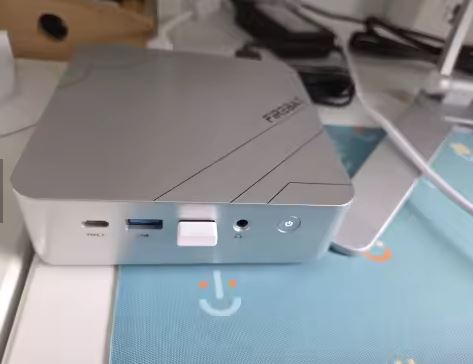
€446.40 | Unsoldered RAM: Uses DDR5 modular memory expandable to 64 GB in Dual Channel. Same base performance as the CHUWI. | See FIREBAT AM02 |
| GMKtec NucBox M8 |
AMD Ryzen 5 PRO 6650H (Radeon 660M) |
16 GB LPDDR5X 6400 MT/s 1 TB PCIe NVMe SSD |
2x 2.5G LAN | ✔️ USB4 (40 Gbps) + dedicated OCuLink | €509.75 | The best equipped for eGPU and advanced networks: Includes native OCuLink port, 40G USB4 and dual 2.5G Ethernet. | See GMKtec M8 |
💬 Reviews on Well-Known Pages
The CHUWI UBox has received strong and consistent reviews across all channels:
-
AndroidPC.es: In-depth review with real-world benchmarks. Highlights include its "top-notch connectivity" with USB-C, and its fan that's "only audible during very demanding games." Conclusion: "Efficient and compact mini PC at a good price. "
-
AndroidPCTV.com: Full review in English. They conclude that the Ryzen 5 6600H "offers positive performance in all scenarios" and point to USB-C as the most interesting connector for future expansion.
-
The Computer Fixer: A review in Spanish with real-world tests. They validated specifications and construction, highlighting the quality of the active cooling system for its size.
-
GizChina.com: They positively valued the smoothness of multitasking and multimedia.
-
AliExpress (1,178 ratings, 4.5/5 ⭐): Verified reviews from Spanish buyers are very positive. Highlights include: fast shipping to Europe from France, easy SSD upgradeability, Linux compatibility, and build quality.
-
On CHUWI's official website, in the product details, several satisfied customer reviews are displayed:
“Excellent product. I've received the PC, it works at speeds I didn't expect, it's easy to operate, and it's very convenient to use.”
“Perfect mini PC. Excellent shipping, tracking, and customer service.”
“The product is great value for the money. Well-designed, good quality. … In conclusion, I'm very satisfied.”
These reviews reflect that some buyers are very happy with the speed, everyday use, design, and value for money.
-
The technical analysis on the Geektopia website (in Spanish) highlights several positive aspects:
-
The AMD Ryzen 5 6600H 6-core/12-thread processor offers "good performance for everyday use with heavy multitasking."
-
It is appreciated that, despite being a compact unit, it maintains a very low fan noise level (measured at around 32-34 dB at a certain distance) under load.
-
It is noted that it comes with dual M.2 slots (or at least expansion capability) which provides expansion flexibility.
-
It concludes:
"The UBox is a very interesting mini-PC in terms of features and price."
This reinforces the fact that, from a technical point of view, the device has a lot to offer for its price.
-
- Users of forums like Trustpilot or Reddit also provide specific positive feedback on the purchase and usage experience:
“For the price this pc is amazing. super fast and the unit arrived earlier than expected.” (Trustpilot)
"After 20 days of use, I can say that I am very happy with this mini PC, which works very well on both Windows and Linux. The cooling and access to the expansion slots is much better on this Chuwi mini PC than on the Beelink SER5 mini PC that I also have." (Reddit)
These phrases indicate that some users are not only using it without problems, but prefer it over other comparable brands.
- On deal sites (MiniMachines.net), price is highlighted as a very positive factor:
- For example, a deals blog mentions that it can be found for around €200 on sale, making it a "powerful mini PC incorporating a Ryzen 5-6600H processor" at a surprisingly good price.
This highlights the excellent price-to-performance ratio for many buyers.
- For example, a deals blog mentions that it can be found for around €200 on sale, making it a "powerful mini PC incorporating a Ryzen 5-6600H processor" at a surprisingly good price.
📊 Technical Tests
🧠 CPU Performance — Surprisingly Above Its Price
| Benchmark | CHUWI UBox Result | Comparative |
|---|---|---|
| Cinebench R23 Multi | ~10,500 pts | It outperforms the Intel Core i7-11700 |
| Cinebench R23 Single | ~1,400 pts | Above the i5-12400 |
| GeekBench 5 Multi | ~8,200 pts | Premium laptop i7-1185G7 level |
| GeekBench 5 Single | ~1,500 pts | Competent for 6 Zen 3+ cores |
| PCMark 10 | ~5,500 pts | Excellent overall productivity |
| Windows Startup | 8 seconds | Fast and efficient PCIe 4.0 SSD |
🔍 CPU Conclusion: The Ryzen 5 6600H is a chip that in 2022 powered gaming laptops costing €900-€1,100 — and here it is for €370 in a mini PC form factor. Its ~10,500 points in Cinebench R23 multi-core clearly put it ahead of the Intel N100 (the favorite chip of budget mini PCs, with a mere ~4,000 points) and the previous generation Ryzen 5 5600H. In pure CPU tasks — code compilation, light video editing, intensive multitasking — the UBox performs like a mid-range desktop without any perceptible limitations. The 6nm manufacturing process guarantees real energy efficiency: the chip does a lot of work without significantly increasing power consumption or temperature.
🎮 GPU Performance (Radeon 660M RDNA2) — Capable but with Clear Limits
| Benchmark | Result | Context |
|---|---|---|
| 3DMark Fire Strike | ~3,800 pts | Close to desktop GTX 1050 |
| 3DMark Time Spy | ~1,300 pts | 1080p gaming at low settings is viable |
| 3DMark Wildlife | ~7,200 pts | Solid performance for iGPU |
| 3DMark Night Raid | ~18,500 pts | capable integrated GPU |
🔍 GPU Conclusion: The Radeon 660M with 6 RDNA2 Compute Units is a step behind the Radeon 780M in the Ryzen 9 7940HS, but not as far behind as the numbers might suggest. Its ~3,800 points in Fire Strike put it in the territory of a desktop GTX 1050—sufficient for 1080p gaming at low-to-medium settings and for advanced emulation. The critical point is the memory configuration: in single-channel mode (as it comes from the factory), the GPU performs 20-30% worse than in dual-channel. This means that adding a second 16GB DDR5 module is the cheapest and most effective upgrade you can make—for around €35-40 you get a noticeable jump in graphics performance without changing anything else.
🎯 Real Gaming at 1080p — Measured Results
| Game | Adjustment | Average FPS | Verdict |
|---|---|---|---|
| Valorant | 1080p Medium | ~80-120 fps | ✅ Very smooth |
| CS2 | 1080p Medium | ~75-100 fps | ✅ Excellent competitive |
| GTA V | 1080p Medium | ~55-65 fps | ✅ Playable and fluid |
| Fortnite | 1080p Low | ~55-65 fps | ✅ Solid |
| League of Legends | 1080p High | 100+ fps | ✅ No limitations |
| Minecraft Bedrock | 1080p High | 60+ fps | ✅ Perfect |
| FC 25 / FIFA | 1080p Medium | ~45-55 fps | ⚠️ Acceptable |
| Cyberpunk 2077 | 1080p Low + FSR | ~25-30 fps | ⚠️ Only with FSR enabled |
| Elden Ring | 1080p Minimum | ~30-35 fps | ⚠️ Playable with adjustments |
| Call of Duty MWIII | 1080p Low | ~40 fps | ⚠️ Functional |
🔍 Gaming Conclusion: The UBox confirms a clear pattern: excellent in esports titles (Valorant, CS2, LoL) where it comfortably exceeds 80-100 fps, and competent in open-world and AAA titles at low settings. The turning point comes with more demanding games like Cyberpunk 2077 or Alan Wake 2, where the Radeon 660M needs FSR to deliver an acceptable experience. The key is to adjust expectations: it's not a machine for playing modern AAA games at ultra settings at a constant 60 fps, but for casual gaming, esports titles, and playing games from 3-5 years ago, it performs surprisingly well.
🕹️ Emulation — The Real Strong Point of the UBox
| Platform | Performance | Grades |
|---|---|---|
| Game Boy / GBA / SNES | ✅ Perfect 60fps | Without any effort |
| PS1 / N64 | ✅ Perfect 60fps | 100% compatible |
| GameCube / Wii (Dolphin) | ✅ Excellent 1080p+ | Fluid upscaling |
| PS2 (PCSX2) | ✅ Very good | 95% of games running smoothly |
| Nintendo Switch (Ryujinx) | ✅ Good | Most titles at 720-1080p |
| PS3 (RPCS3) | ⚠️ Variable | Functional in many titles |
| Xbox 360 (Xenia) | ⚠️ Variable | Less demanding titles |
🔍 Conclusion: For retro emulation, the CHUWI UBox is one of the best value-for-money platforms on the market today. The 6 cores of the Ryzen 5 6600H make a world of difference compared to the quad-core N100/N305 chips that are common in budget mini PCs—especially for emulators that rely on single-core performance (Dolphin, RPCS3). If your main goal is to build an all-in-one retro console with Switch, PS2, GameCube, and classic games, the UBox does it effortlessly and without requiring extensive configurations.
💾 Storage Speed
| Proof | Result |
|---|---|
| Sequential reading | ~3,500 MB/s |
| Sequential writing | ~2,800 MB/s |
| 4K Random Read | ~55 MB/s |
🔍 SSD Conclusion: The included PCIe 4.0 SSD offers read speeds six times faster than a conventional SATA drive. Windows boots in eight seconds, applications open instantly, and large file transfers are fast. SSD quality varies by manufacturing batch (some users report Micron branding, others generic), but all reviews agree on speeds within the expected PCIe 4.0 range.
⚡ Energy Efficiency
| State | Actual consumption |
|---|---|
| Idle | 8-12W |
| Navigation / Office Automation | 20-30W |
| Gaming 1080p | 45-60W |
| Maximum stress | 65-70W |
🔍 Efficiency Conclusion: With a maximum consumption of 65-70W under full load, the UBox is radically more efficient than any conventional desktop computer with equivalent performance (which would consume 200-300W). In everyday use, electricity consumption is minimal—in standby mode, it uses less power than an LED light bulb. The 95W power supply has ample headroom for all scenarios, including connected USB peripherals.
🏆 Overall performance rating:
The CHUWI UBox delivers exactly what it promises without any unpleasant surprises. The CPU performs better than expected at €370, the integrated GPU is functional for casual gaming and advanced emulation, and the PCIe 4.0 storage eliminates any bottlenecks in everyday use. The only recommended post-purchase upgrade is adding a second DDR5 module for dual-channel memory—an investment of around €35 that unlocks the full potential of the Radeon 660M and transforms the UBox into a truly complete system.
❓ Frequently Asked Questions (FAQ)
Does it come with Windows 11 activated?
Yes. Windows 11 Pro comes pre-installed, activated, and configurable from the first boot.
Does it support a second SSD?
Yes, it has two M.2 2280 PCIe 4.0 slots. The second one is completely free to add up to 2 TB more.
Does it work with Linux?
Yes. Users have confirmed that Ubuntu and Linux Mint detect all the hardware correctly. You just need to disable Secure Boot in the BIOS [verified AliExpress review].
Can I connect an external GPU?
No. The official website does not provide any information about this.
🏁 Final Conclusion
The CHUWI UBox is a solid and honest purchase, ideal for:
-
👨💻 Remote workers and students who need real power in a small space
-
🕹️ Retro emulation enthusiasts — one of the best contenders on the market at its price
-
📺 Multimedia setups with triple screen up to 4K@144Hz
-
🖥️ Offices and small businesses that need computers with Windows 11 Pro activated
🛒 Where to buy the CHUWI UBox?
🛍️ AliExpress: View Prices and Availability
🛍️ Amazon UK: Search CHUWI UBox
🛍️ Amazon: ⇒ See Prices and Availability on Amazon