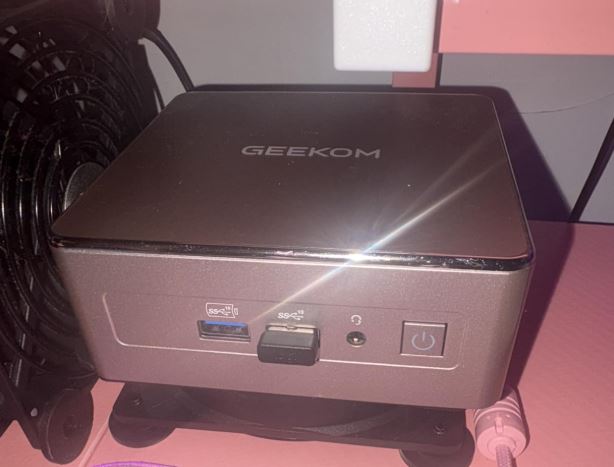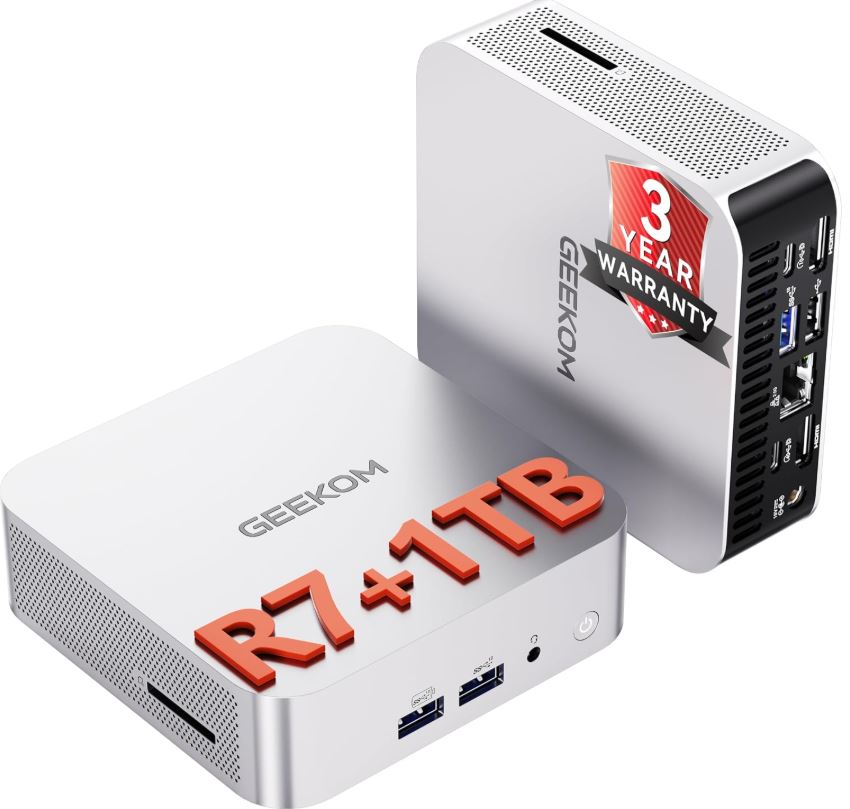
The GEEKOM A8 combines the Ryzen 7 8745HS and Radeon 780M graphics in a truly compact form factor, with modern connectivity and room for upgrades. It's a very solid option for demanding productivity tasks, multi-tab browsing, light content creation, 4K/8K multimedia, and moderate gaming.
Pros: Powerful CPU, Radeon 780M graphics, USB 4.0, Wi-Fi 6E, 2.5G LAN, PCIe 4.0 SSD, and expandable RAM.
Cons: It's not a substitute for a PC with a dedicated graphics card for AAA games, 16GB of RAM may not be enough for heavy editing, and it doesn't include a monitor or peripherals.
Conclusion: One of the most well-rounded mini PCs for those seeking real desktop power without taking up much space.
👉 Check the price and availability of the GEEKOM A8 on Amazon:
🛒 GEEKOM A8 Ryzen 7 8745HS
👉 Find international versions and offers on AliExpress:
Search for GEEKOM A8 and Ryzen 7 mini PC
📦 Unboxing and box contents
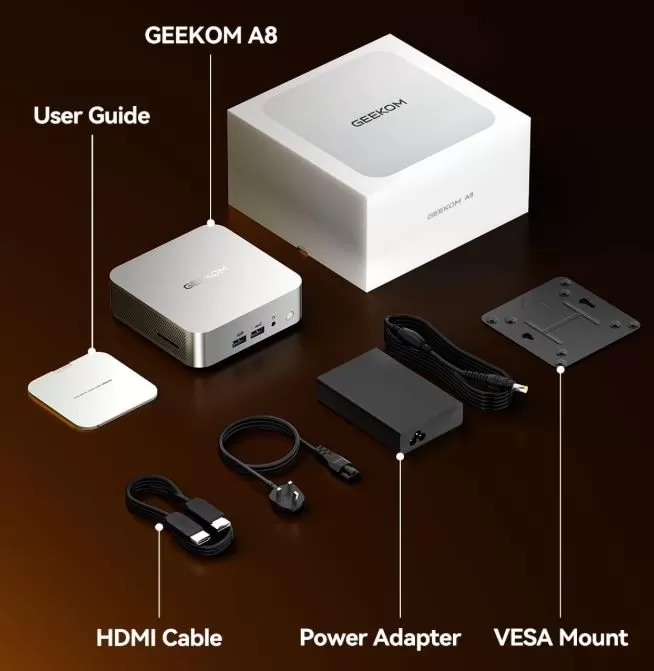
The GEEKOM A8 typically arrives in a compact and well-protected box. The packaging is consistent with a product geared towards desktop users, those working remotely, multimedia users, and those seeking a clean alternative to a traditional tower PC.
Expected content:
-
GEEKOM A8 Mini PC.
-
Power adapter and power cord.
-
HDMI cable.
-
VESA mount for attaching it behind a monitor or TV.
-
Screws for the support.
-
User manual and warranty documentation.
The VESA mount is especially useful: it allows you to hide your computer behind a monitor and keep your desk much cleaner. For an office, a multimedia setup, or a minimalist workspace, it's a practical extra.
Technical specifications
| Feature | GEEKOM A8 Mini PC |
|---|---|
| Processor | AMD Ryzen 7 8745HS |
| CPU | 8 cores and 16 threads |
| Maximum frequency | Up to 4.9 GHz |
| Integrated graphics | AMD Radeon 780M |
| Installed memory | 16 GB DDR5 in one module |
| RAM upgrade | Up to 128 GB via two slots |
| Installed storage | 1TB NVMe M.2 PCIe Gen 4 x4 SSD |
| Storage expansion | SSD up to 4 TB |
| Operating system | Windows 11 Pro |
| Wi-Fi | Wi-Fi 6E |
| Bluetooth | Bluetooth 5.2 |
| wired network | 1 x 2.5G RJ45 LAN port |
| USB4 | 1 x USB 4 Gen 3 Type-C |
| USB 3.2 Gen 2 Type-A | 3 x USB 3.2 Gen 2 Type‑A ports |
| USB 3.2 Gen 2 Type-C | 1 x USB 3.2 Gen 2 Type‑C port |
| USB 2.0 | 1 x USB 2.0 Type-A port |
| Video outputs | 2 x HDMI 2.0, 1 x USB 3.2 Gen 2 Type-C 8K and 1 x USB4 Type-C 8K |
| HDMI | 2 x HDMI 2.0 with 4K support at 120 Hz |
| Audio | 1 x 3.5mm headphone jack |
| Card reader | 1 x SD card reader |
| Dimensions | 4.43 x 4.43 x 1.46 inches |
| Metric dimensions | 11.25 x 11.25 x 3.7 cm |
| Weight | 1.1 lb |
| Metric weight | Approximately 0.5 kg |
| Warranty | 3-year limited warranty |
| Return | Up to 90 days, depending on the commercial offer |
| Access to BIOS | Press F7 or Esc repeatedly during startup |
Design and construction
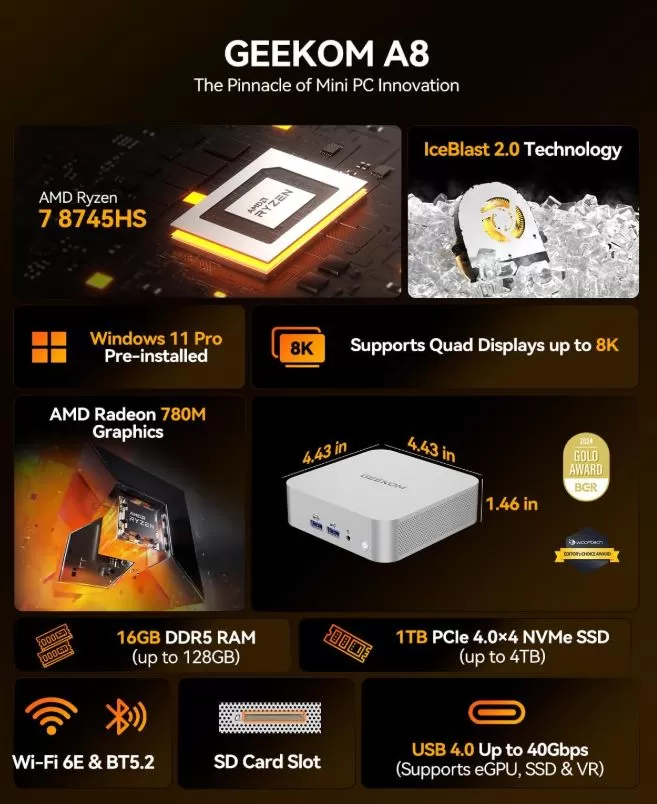
🧱 The GEEKOM A8 features a minimalist and compact design. Measuring just 11.25 cm wide and long, it can be placed next to a monitor, on a living room cabinet, on a work table, or even mounted behind the screen using a VESA mount.
The form factor conveys a clear idea: to pack powerful hardware into a small box without making the device cumbersome to integrate. Weighing approximately 500 grams, it's easy to move between rooms, take to an office, or use as a travel PC for work, presentations, or light editing.
In practice, its size also offers maintenance advantages. It's easier to clean the desk, hide cables, and use a single USB-C or HDMI monitor without a tower taking up floor space.
Screen and multimedia
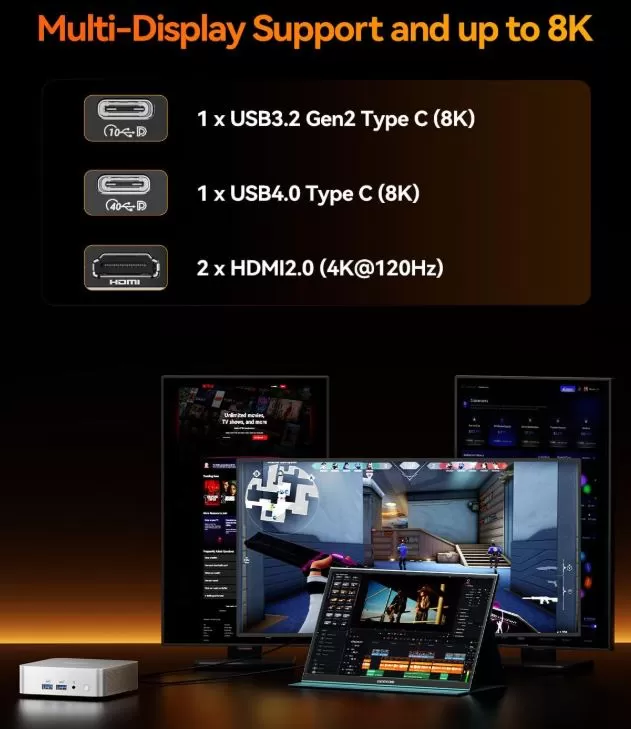
🖥️ The GEEKOM A8 does not have a built-in screen, so the viewing experience will depend on the connected monitor or TV. However, it stands out for its great flexibility for multi-screen desktops, content creation, and high-resolution multimedia use.
It has four physical video outputs:
-
1 x USB 3.2 Gen 2 Type-C, with support for resolutions up to 8K.
-
1 x USB 4.0 Type-C, with support for resolutions up to 8K.
-
2 x HDMI 2.0, with support for 4K at 120 Hz.
This setup allows you to connect multiple monitors simultaneously, which is especially useful for productivity, video editing, design, web development, SEO analysis, or managing multiple tools at once. For example, you can use two 4K monitors via HDMI and reserve the USB-C ports for an additional display, a compatible dock, or fast external storage.
🎬 For multimedia, the GEEKOM A8 is a very complete option as an entertainment center. The Radeon 780M can handle high-resolution content and offers enough power for streaming, local video playback, YouTube, on-demand platforms, and connected use with a modern TV.
8K support via USB-C is especially appealing to users with very high-resolution monitors or those who want to keep their system ready for future display upgrades. The HDMI 2.0 ports with 4K at 120Hz are also a plus for compatible high-refresh-rate monitors, smoother browsing, and light gaming.
🔊 For audio, it features a 3.5 mm jack for headphones, speakers, or analog microphones. You can also send sound via HDMI to a monitor or TV, or use wireless headphones and speakers thanks to Bluetooth 5.2.
Performance and software
⚡ The Ryzen 7 8745HS is the GEEKOM A8's strong point. Its 8 cores and 16 threads allow it to smoothly handle demanding multitasking: multiple browser windows, heavy spreadsheets, WordPress management, image editing, SEO tools, web analytics, video calls, and simultaneous multimedia playback.
For a content creator or digital professional, the equipment is especially well-suited for these tasks:
-
Photo editing in Photoshop, Affinity Photo or Lightroom.
-
Lightweight video editing and 1080p projects.
-
Local web development with PHP, Laravel, Node.js, databases and Docker with a recommended RAM upgrade.
-
Manage multiple browsers, profiles, extensions, and tabs.
-
Automation, lightweight local AI, and use of creative tools.
-
Content management for WordPress, Shopify, social media, or YouTube channels.
🪟 It includes Windows 11 Pro, an advantage over mini PCs that come with Home versions. Windows 11 Pro incorporates features especially useful for work, such as BitLocker, Remote Desktop, group policies, and greater administrative control.
Regarding bloatware, the experience on this type of computer is usually cleaner than on many laptops from traditional brands, although it's advisable to review the installed programs when turning it on for the first time. The recommended process is simple:
-
Run Windows Update until no updates are pending.
-
Check for AMD updates and manufacturer drivers.
-
Remove promotional applications that will not be used.
-
Create a restore point or system image once configured.
-
Update BIOS only when GEEKOM publishes a relevant improvement and following their documentation.
🔌 Energy consumption and cables
The GEEKOM A8 stands out for its remarkably low energy consumption, being up to 80% more efficient than a traditional desktop computer. By integrating a processor originally designed for advanced laptops, it intelligently optimizes power consumption based on usage.
The actual energy consumption measured directly on the wall is distributed as follows:
📊 Consumption according to usage level
- Off or Suspended: Less than 1.5 Watts.
- In standby mode (Windows Idle/Desktop): Between 6 and 10 Watts. Ideal if you need to leave it on all day as a server or downloading files.
- Basic Use and Office Automation: Between 15 and 30 Watts (web browsing, word processors, streaming video playback).
- Continuous workload: Around 35 to 50 Watts (media video editing or stable video games).
- Peak demand (100% load): Reaches temporary peaks of 60 to 90 Watts (heavy rendering or performance benchmarks).
🔌 Processor and power supply data
- Processor Base TDP: The AMD Ryzen 7 8745HS chip is configured with a standard power profile of 45 Watts.
- Power supply included: The device comes with a compact 120-watt (19V/6.32A) external power adapter. This provides ample power and ensures the device will never run out of energy, even when connected to multiple hard drives or high-power peripherals via its USB4 ports.
🔌 To keep your desk tidy, it's ideal to connect:
-
Power supply via its included adapter.
-
A single USB4 cable is required if your monitor supports charging, video, and USB hub functionality.
-
Or HDMI + power + wireless peripherals.
-
2.5G Ethernet network if you need maximum stability for transfers, NAS, local streaming or server work.
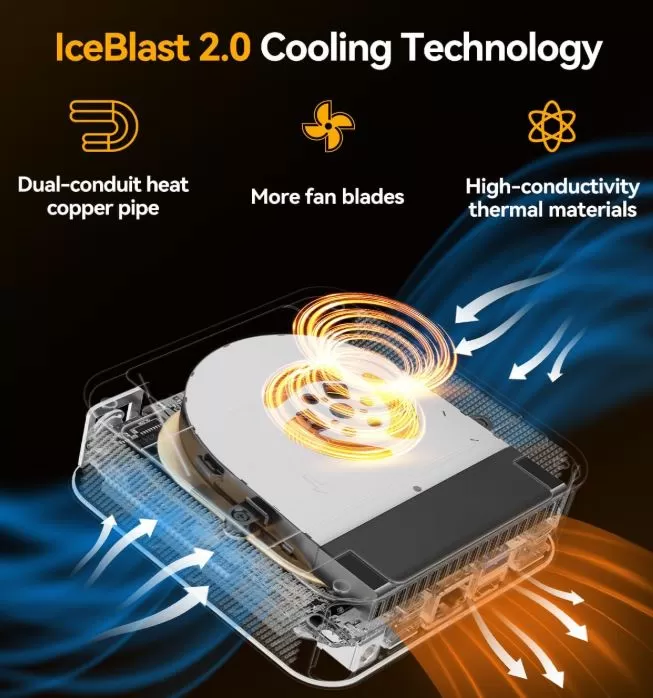
🌡️ Temperature and noise
🌡️ Temperature Management
- Basic use (office applications, browsing, idle): It stays very cool, with stable processor temperatures between 40°C and 46°C. The outer casing remains only slightly warm to the touch.
- High load and video games: When pushed to its limits continuously, the processor usually stabilizes between 75°C and 85°C.
- Extreme peaks: In synthetic stress tests (100% benchmarks), the chip can reach temporary peaks of 90°C to 92°C. In these maximum power scenarios, the system activates its protection mechanism ( thermal throttling ), slightly reducing frequencies to keep the equipment within safe ranges.
- Internal cooling: It has a metal plate and dedicated thermal pads that keep the RAM and NVMe SSD well cooled (the SSD remains protected and performs without speed drops).
🔊 Noise Levels (Fan)
- At rest or during light tasks: It is practically imperceptible (between 30 and 34 dBA ). If you are in a quiet room typing or watching a video, you will hear a faint whisper that blends in with the background noise.
- Under moderate workload: The fan starts spinning steadily but with a soft sound (around 35 to 40 dBA ), similar to the behavior of a MacBook or premium laptop under moderate load. The fan's tone is neither high-pitched nor annoying.
- Maximum demand (Performance Mode): If you play demanding games or render heavy video, the fan will operate at its maximum speed. At this point, the noise becomes noticeable, ranging from 42 to 55 dBA depending on the distance. This is a normal noise level for its size, ideal for use with speakers or headphones.
To improve temperatures and noise:
-
Don't lock it in a drawer or unventilated space.
-
Leave the air intake and exhaust vents clear.
-
Update BIOS and drivers when stable versions are available.
-
Use a balanced power profile if you don't need constant maximum performance.
-
Clean the dust regularly.
-
Avoid placing the equipment on fabrics, thick mats, or surfaces that obstruct ventilation.
Connectivity and extras
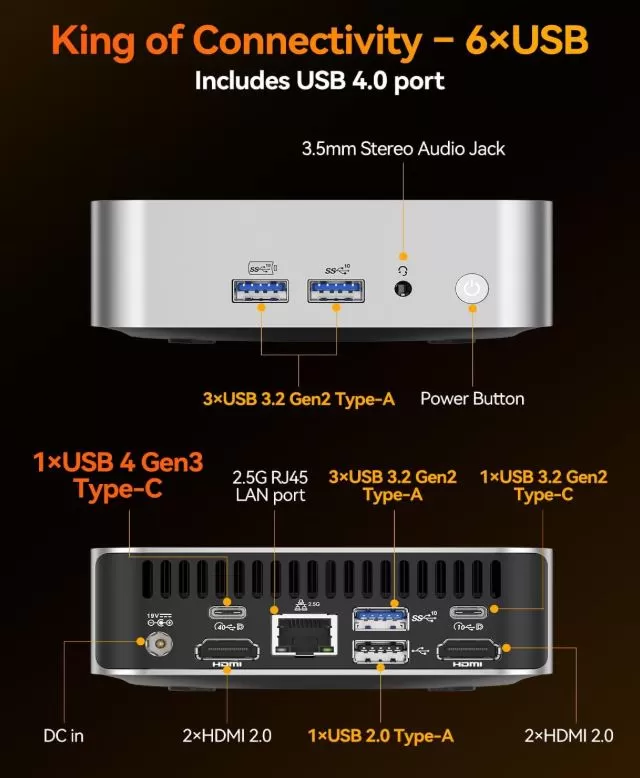
The GEEKOM A8 offers comprehensive connectivity for a mini PC of its size. It combines fast networking, modern wireless connections, high-speed USB ports, and various video output options, making it a good fit for both a professional desktop and a multimedia setup.
Network and wireless
-
1 x 2.5G RJ45 LAN port: Enables wired connections up to 2.5 Gb/s on compatible networks. Ideal for working with a NAS, transferring large files, performing quick backups, or enjoying a stable connection for video calls and streaming.
-
Wi-Fi 6E: Adds access to the 6 GHz band on compatible routers, helping to reduce congestion and improve wireless stability.
-
Bluetooth 5.2: Allows you to connect controllers, mice, keyboards, headphones, speakers, and other wireless accessories.
USB ports and external storage
The device includes a good selection of ports for peripherals, external hard drives, USB drives, capture cards, or docks:
-
1 x USB4 Gen 3 Type-C: designed for high-performance accessories, fast external storage, compatible docks, and video output up to 8K.
-
1 x USB 3.2 Gen 2 Type-C: Supports fast data transfer and video output up to 8K.
-
3 x USB 3.2 Gen 2 Type-A: useful for external SSD drives, cameras, audio interfaces, wireless receivers and modern peripherals.
-
1 x USB 2.0 Type-A: Suitable for keyboard, mouse, controller receiver or devices that do not need high speed.
-
1 x SD card reader: a particularly practical addition for importing photos and videos from cameras without using external adapters.
Video and audio
🖥️ The GEEKOM A8 can function as the center of a multi-screen desktop thanks to its four video outputs:
-
2 x HDMI 2.0, with support for up to 4K at 120 Hz.
-
1 x USB 3.2 Gen 2 Type-C, with support for up to 8K.
-
1 x USB4 Gen 3 Type-C, with support for up to 8K.
This variety makes it easy to connect two monitors via HDMI and add additional screens via USB-C, which is very useful for editing, development, analytics, trading, productivity, or managing multiple windows simultaneously.
🔊 For audio, it has a 3.5 mm jack for headphones, speakers, or a compatible microphone. It also allows you to output sound via HDMI to a monitor or television, or use Bluetooth 5.2 devices.
Extras and absences
The GEEKOM A8 incorporates the really useful extras in a compact computer: SD card reader, support for multi-screen configurations, 2.5G Ethernet connectivity and compatibility with modern accessories via USB-C.
🔧 Expansion and upgrades
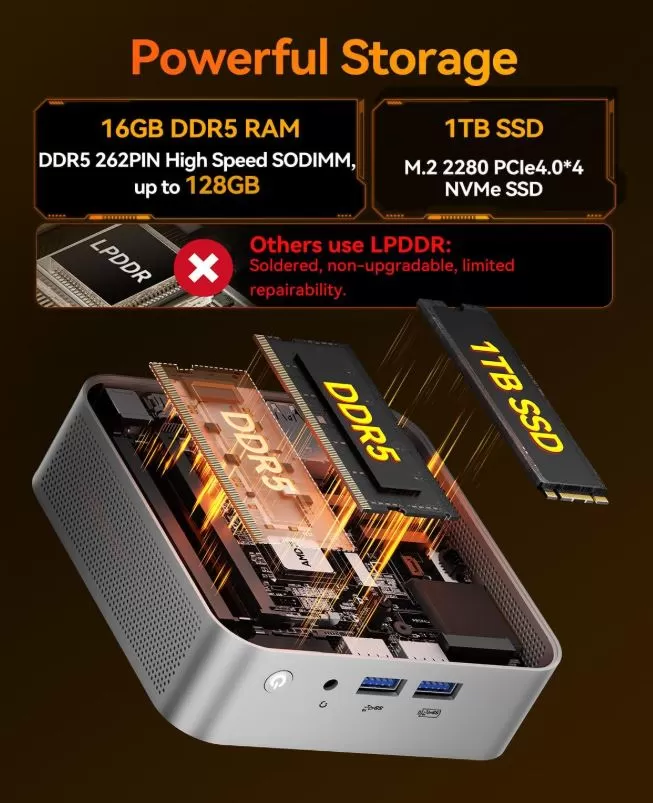
🛠️ The GEEKOM A8 offers one of the most important advantages of a mini PC over fully soldered compact computers: the possibility of upgrading internal components.
RAM: It comes with 16GB of DDR5 RAM in a single module and has two slots. According to the product specifications, it can be expanded up to 128GB of DDR5 RAM. For normal use, 16GB is still sufficient, but 32GB is the recommended upgrade for demanding users.
SSD: Includes a 1TB NVMe M.2 PCIe Gen 4 x4 SSD. This can be replaced with a higher capacity drive, up to 4TB depending on the configuration. It's a useful upgrade for game libraries, video editing, virtual machines, RAW files, or local projects.
Second M.2 or 2.5-inch drive: Based on the available information, a second M.2 slot or space for a 2.5-inch SATA drive is not confirmed. Before purchasing a second drive, it is advisable to check the manual for the specific drive or open the bottom cover to verify the internal layout.
Recommended upgrades
| Usage profile | Recommended configuration |
|---|---|
| Office suite, web browsing and multimedia | 16 GB RAM + 1 TB SSD |
| SEO, WordPress, web development and multitasking | 32 GB RAM + 1 or 2 TB SSD |
| Video editing and virtual machines | 64 GB RAM + 2 or 4 TB SSD |
| Emulation and game library | 32GB RAM + 2TB SSD or fast external storage |
🆚 Direct competitors
| Model | Processor | Integrated graphics | Memory | Outstanding connectivity | Best for |
|---|---|---|---|---|---|
| GEEKOM A8 | Ryzen 7 8745HS | Radeon 780M | 16 GB, up to 128 GB | USB4, Wi-Fi 6E, 2.5G LAN | Balance between work, multimedia and light gaming |
| GEEKOM A8 Max | Ryzen 7 8745HS or Ryzen 9 8945HS depending on the version | Radeon 780M | Variable configuration | More ports and options depending on SKU | Users who prioritize connectivity |
| Beelink SER8 | Ryzen 7 8845HS | Radeon 780M | Variable configuration | USB4 and modern connectivity | Alternative with similar performance |
| Minisforum UM890 Pro | Ryzen 9 8945HS | Radeon 780M | Variable configuration | USB4 and expansion options | Advanced users and maximum performance |
| GMKtec K8 Plus | Ryzen 7 8845HS | Radeon 780M | Variable configuration | Good value for money | Price-sensitive buyers |
| Intel NUC with Ultra Core | Intel Core Ultra, according to version | Integrated Intel Arc | Variable | Thunderbolt/USB4 depending on the model | Productivity and Intel ecosystem |
The choice will depend primarily on four factors: the actual price, the warranty available in your country, the included RAM/SSD, and expansion options. If the GEEKOM A8 is on sale with 16 GB of RAM and 1 TB of storage, it's usually a well-balanced configuration to start with without immediately spending money on upgrades.
⭐ Reviews on well-known websites
📦 In Online Stores (Amazon / Buyer Forums)
Shoppers on platforms like Amazon primarily value practicality, size, and reliability for everyday use.
- 👍 Positive Points: It's described as a perfect replacement for large office towers. They praise the sturdiness of its Apple-style aluminum chassis and the large number of ports in such a compact size. The clean boot of Windows 11 Pro and the extended 3-year warranty provide great peace of mind when buying.
- 👎 Negative Points: Some users report minor Bluetooth stability issues if they move too far away from the device or if there is interference. Others mention that the external power supply is still a bit bulky compared to the PC's tiny size.
🌐 In Enthusiast Communities (Reddit / r/MiniPCs)
In the threads on [Reddit](https://www.reddit.com/r/MiniPCs/comments/1pfz8nw/is the_geekom_a8_max_any_good/), the analysis is much more technical, focusing on the real value of the processor and the expansion capacity.
- 👍 Positive Points: They are pleasantly surprised by the graphics power of the Radeon 780M for console emulation (GameCube, PS2, Switch, etc.) and indie games. They highlight that for around $500 USD it's a fantastic multitasking machine.
- 👎 Negative Points: Critics point out that the A8 model lacks a slot for a second M.2 NVMe SSD, a feature included by cheaper competitors. They also warn about the Ryzen 7 8745HS chip: explaining that it's essentially an 8845HS processor with AMD's AI NPU disabled to better utilize the manufacturing wafers, resulting in a lack of advanced hardware-based native AI capabilities.
🎬 On Video Platforms (YouTube)
Technology content creators on YouTube focus on real-world stress tests, video editing, and testing labs.
- 👍 Positive Points: They demonstrate that the rear USB4 port allows you to connect an external graphics card (eGPU) to transform the Mini PC into a powerful desktop gaming station. It's highly praised by networking YouTubers for its versatility as a low-power home mini-server running 24/7 (using Linux, Docker, or Home Assistant).
- 👎 Negative Points: Analysts strongly criticize the BIOS firmware for being extremely restricted and limited. A recurring technical complaint is that the BIOS forces Windows to keep the hypervisor active at all times, which makes it difficult or problematic to install alternative third-party virtualization software (such as VirtualBox or VMware).
🖥️ In Blogs and Technology Press (XDA, MuyComputer)
Specialized media outlets that conduct extensive analyses seek a balance between professional performance and industrial design.
- 👍 Positive Points: They praise the sequential read speeds of the integrated SSD, which exceeds 7 GB/s (even faster than a PS5's). They applaud the IceBlast cooling system for keeping the device quiet during basic daily use.
- 👎 Negative Points: Remember that, in the 16GB RAM version with a single module from the factory, the processor works in single -channel memory . This limits the true graphics potential of the Radeon 780M, so they strongly recommend buying another identical 16GB module to enable dual-channel if you plan to use it for design or gaming.
🧪 Technical tests
⚙️ Processor and Multitasking (CPU)
The AMD Ryzen 7 8745HS chip excels in pure computing power thanks to its Zen 4 architecture:
- Cinebench R23 (Multi-Core Performance): It scores around 15,500 to 16,000 points. This result puts it on par with traditional desktop processors and demonstrates that it can handle demanding tasks such as code compilation, simulations, and 3D rendering smoothly.
- Cinebench R23 (Single Core): It scores around 1,750 points, guaranteeing an almost instantaneous response when opening applications and very agile web browsing.
- PCMark 10 (General Office Performance): Exceeds 6,400 total points. In subcategories of essential office tasks (documents, video calls, spreadsheets) the device performs exceptionally well, exceeding 9,000 points.
🎮 Graphics Power (Integrated GPU)
The AMD Radeon 780M graphics card is the current gold standard for integrated graphics:
- 3DMark Time Spy: It scores ~3,100 points. This confirms that it outperforms Intel's integrated graphics and even older dedicated cards (like the Nvidia GTX 1050 Ti) by a wide margin.
- Real Game Testing (1080p Resolution):
- Competitive Games (Valorant, LoL, CS2, Fortnite): Achieves stable rates between 100 and 150 FPS on medium/high quality.
- AAA Games (Cyberpunk 2077, Spider-Man): You can play stably at 30-40 FPS by setting the graphics to "Low/Medium" at 1080p, or by using upscaling technologies such as AMD FSR.
⚡ Storage and Networking
Internal storage is one of the highest-rated aspects in technical reviews:
- SSD Speed (CrystalDiskMark): The NVMe PCIe Gen 4 drive achieves outstanding read speeds of ~7,100 MB/s and write speeds of up to ~4,600 MB/s. Loading screens in programs and games are virtually nonexistent.
- LAN Network Test (2.5G): Labs confirm that the Ethernet port maintains stable data transfers at its maximum rated speed in both directions (upload and download), ideal for NAS environments or local servers.
🔌 Energy and Stability Limits
- Power Limits Profile: During stress testing, the device is configured for a short burst power consumption (PL2) of up to 60 Watts to accelerate the start of demanding tasks. It then stabilizes at a sustained power consumption (PL1) of 35 Watts to protect the internal components from overheating.
- Thermal Throttling: By keeping the CPU at 100% for more than 15 minutes on a test bench, the system reduces clock frequencies by approximately 8-10% to stabilize temperatures around 85-90 °C.
🎮 Gaming and emulation
The GEEKOM A8 is a little beast for casual gaming and one of the best machines on the market today for emulation. Integrating the AMD Radeon 780M graphics card (the same architecture used in premium handheld consoles like the Asus ROG Ally or the Lenovo Legion Go), it offers surprising performance for its size, although it does have a factory limitation you should be aware of.
Here is the technical analysis of how it performs in both sections:
🎮 Modern Video Games (PC Gaming)
This Mini PC isn't designed for 4K gaming or "Ultra" graphics, but it's extremely capable if you adjust your expectations:
- Competitive Gaming / Esports (1080p): In titles like Valorant, League of Legends, Counter-Strike 2, or Fortnite, performance is excellent. You can play on Medium/High settings while maintaining stable frame rates of 90 to 140 FPS, ensuring smooth gameplay.
- Demanding AAA Games (1080p): In demanding games like Cyberpunk 2077, Hogwarts Legacy, or Red Dead Redemption 2, the Radeon 780M struggles, but it's still playable. By setting the graphics to Low/Medium and enabling AMD FSR (FidelityFX Super Resolution) in performance mode, you can achieve a fairly stable 40 to 55 FPS.
The version that comes with a single 16GB RAM module (single-channel) will not perform as expected. AMD's integrated graphics can lose up to 30% or 40% of their performance in games if the memory isn't running in dual-channel mode . If you intend to use it for gaming, it's essential to purchase and install a second, identical 16GB DDR5 RAM module to unlock the full potential of the graphics card.
🕹️ Console Emulation (Its Strong Point)
If you're interested in emulators, the GEEKOM A8 is an outstanding option thanks to the extremely high per-core performance of its Ryzen 7 processor. It can practically handle the entire historical catalog of video games.
- Retro and Classic Consoles (Up to PS1, N64, Dreamcast): Runs them at 100% speed without breaking a sweat. You can upscale games to native 4K resolution for ultra-sharp visuals.
- Sixth and Seventh Generation (PS2, GameCube, Wii, PSP): Perfect performance. The PCSX2 (PS2) or Dolphin (Wii/GC) emulators work perfectly, allowing you to apply graphical enhancements such as high-definition textures and filters without dropping below 60 FPS.
- Modern Consoles (PS3, Xbox 360, Switch):
- With RPCS3 (PS3), the vast majority of commercial games run at a stable 60 FPS (except for extremely poorly optimized titles).
- On Nintendo Switch, the Radeon 780M handles the most popular games at their native speed and with excellent stability (and even allows playing at 2K resolution on living room screens).
💡 External Graphics Card (eGPU)
Thanks to its 40Gbps USB4 port on the back, this device allows you to connect a dedicated desktop graphics card (such as an Nvidia RTX or AMD Radeon) in the future. Doing so instantly transforms the Mini PC into a high-end gaming PC capable of running any modern game in 4K.
❓ Frequently Asked Questions
Is the GEEKOM A8 suitable for remote work?
Yes. The Ryzen 7 8745HS, 16 GB of RAM, NVMe SSD, and Windows 11 Pro offer enough power for office work, video calls, document management, intensive browsing, and multi-monitor use.
Is it good for video editing?
Yes, for light and medium projects, especially in 1080p. For frequent 4K editing, complex effects, multicam, or professional projects, it's recommended to upgrade the RAM to 32GB or more and consider a computer with a dedicated GPU if your workflow requires it.
Can I upgrade the RAM?
Yes. The system includes 16 GB of DDR5 RAM and, depending on the configuration, supports up to 128 GB via two SO-DIMM slots.
Can the SSD be replaced?
Yes. The 1TB NVMe M.2 PCIe Gen 4 x4 SSD can be replaced with one of higher capacity, up to 4TB according to the product specifications.
How do I enter the BIOS?
Completely shut down your computer. Turn it on and immediately press the F7 or Esc key repeatedly on your keyboard until the blue or gray BIOS screen appears.
How to increase VRAM on the GEEKOM A8?
Enter the BIOS.
Go to the Advanced tab -> AMD CBS -> NBIO Common Options -> GFX Configuration. Change the "UMA Mode" to UMA_SPECIFIED and in UMA Frame Buffer Size select 4GB or 8GB.
Save the changes by pressing F10 and restart. (Note: Requires at least 32GB of RAM in the system to safely allocate 8GB to the graphics card).
How do I disable the hypervisor in the BIOS of the GEEKOM A8?
The BIOS of this model does not allow you to disable the native hypervisor due to factory firmware limitations. You must disable it directly from Windows: open the Start menu, search for "Turn Windows features on or off," and uncheck the boxes for Hyper-V, Virtual Machine Platform, and Windows Hypervisor Platform. Restart your PC so that programs like VirtualBox function without conflicts.
Is the GEEKOM A8 suitable for 4K or AAA gaming?
Not for native 4K, but it can handle AAA games at 1080p. Its integrated Radeon 780M graphics card runs demanding modern games ( Cyberpunk 2077, Red Dead Redemption 2 ) at a stable 35-50 FPS, provided you set the graphics to Low/Medium and enable AMD FSR upscaling technology. 4K resolution is reserved exclusively for multimedia consumption (movies and streaming) or office applications.
Why does performance drop with the 16GB configuration?
Because your unit comes with only one 16GB RAM module pre-installed, the system is forced to operate in single-channel mode. Since it doesn't have a dedicated graphics card, the Radeon 780M draws its memory from the main RAM; being limited to a single channel reduces bandwidth by half, potentially killing up to 30% or 40% of gaming performance. Adding a second, identical 16GB module enables dual-channel operation and completely eliminates this bottleneck.
Can an eGPU (external graphics card) be connected via USB4?
Yes, it does so natively. Its rear USB4 port operates at 40 Gbps, allowing you to connect external graphics card enclosures (such as a Razer Core X or compatible Oculink solutions) with a single cable. This instantly transforms the Mini PC into a high-end desktop gaming computer.
Does the GEEKOM A8 have space for a second SSD drive?
No. The chassis prioritizes ultra-compact size (0.47 liters), so the motherboard only has a single M.2 2280 PCIe Gen 4x4 slot. If you need to expand storage beyond 1TB, you'll have to replace the current module with a higher-capacity SSD (it supports up to 4TB) or use fast external hard drives connected to its USB ports.
How to fix Bluetooth/WiFi problems on the GEEKOM A8?
The device body is made entirely of aluminum, which sometimes causes physical interference with the internal antennas. Follow these steps to resolve the issue:
- Install the latest official wireless network drivers from GEEKOM Technical Support.
- If you use Bluetooth peripherals (mouse/keyboard), connect them preferably using front ports or via a USB extension cable to move the dongle away from the metal chassis.
- Do not enclose the Mini PC in completely sealed compartments.
Final conclusion
🏁 The GEEKOM A8 is a very complete mini PC for users who want a powerful, compact, and modern alternative to a traditional tower. Its Ryzen 7 8745HS, Radeon 780M, USB4, Wi-Fi 6E, 2.5G LAN, and Windows 11 Pro make it a very solid foundation for productivity, content creation, multimedia, web development, and light gaming.
It's especially worthwhile for remote workers, content creators, SEO professionals, developers, advanced students, and users who want to set up a clean desktop with multiple monitors. It's also a good option for a media room or an emulation machine.
The main recommended upgrade is to add a second DDR5 RAM module to take advantage of dual-channel memory and reach 32GB. This benefits multitasking and, above all, the performance of the Radeon 780M in games and emulators.
If you need a dedicated GPU, consistent professional 4K editing, or AAA gaming at the highest quality, you should consider a conventional tower PC or a mini PC compatible with eGPU via USB4. As a direct alternative, you can compare offers from the GEEKOM A8 Max, Beelink SER8, or Minisforum UM890 Pro before making a decision.
🛒 Where to buy
👉 Check the price and availability of the GEEKOM A8 on Amazon:
🛒 GEEKOM A8 Ryzen 7 8745HS
👉 Find international versions and deals on AliExpress:
See GEEKOM A8 and Ryzen 7 mini PC on AliExpress
👉 More information and comparisons of mini PCs:
Check out our mini PC reviews and comparisons