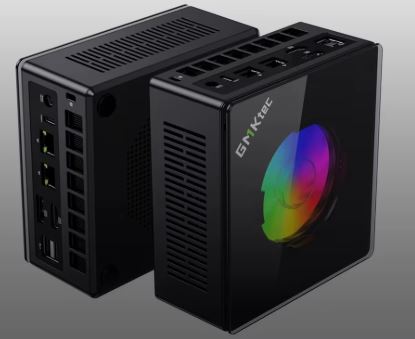
The GMKtec NucBox K11 is one of the strongest contenders in the high-performance mini PC segment.
It integrates an 8-core AMD Ryzen 9 8945HS processor with Radeon 780M graphics, OCuLink connectivity for external eGPU, and dual USB4 ports, all in a compact 132 × 125 × 58 mm chassis.
✅ Pros:
-
High-end AMD Ryzen 9 8945HS processor, up to 5.2 GHz
-
OCuLink PCIe Gen4 x4 port for external eGPU (huge difference)
-
Dual USB4 (40 Gbps) + 2 2.5 GbE LAN ports
-
Supports up to 4 simultaneous 4K displays
-
RAM expandable up to 96 GB DDR5
-
Very competitive price for its specifications
❌ Contras:
-
No integrated dedicated GPU (relies on an external iGPU or eGPU)
-
No SD card reader
🏁 Quick conclusion: For users looking for maximum power in a mini format, whether for creative work, light gaming or as a base for an eGPU, the K11 offers a performance/price ratio that will be hard to match in 2026.
👉 See Prices and Availability of the GMKtec K11 Mini PC
📦 Unboxing and Box Contents
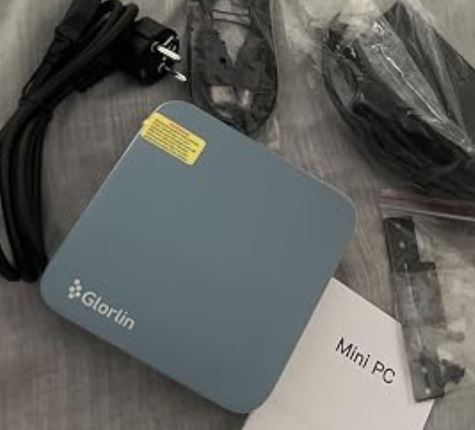
Upon opening the GMKtec K11 box, the packaging is understated and functional:
-
🖥️ Mini PC GMKtec NucBox K11
-
🔌 Power adapter (19V)
-
📺 Cable HDMI
-
🔩 VESA mounting kit
-
📄 User manual and warranty card
The packaging isn't fancy, but it includes everything you need to get started right away. The VESA mount is a welcome feature that allows you to attach it to the back of a monitor.
📊 Technical Specifications
| Component | Detail |
|---|---|
| CPU | AMD Ryzen 9 8945HS, 8C/16T, hasta 5.2 GHz, nodo 4nm |
| Integrated GPU | AMD Radeon 780M, 12 CUs, RDNA 3, hasta 2800 MHz |
| RAM | DDR5 5600 MHz dual channel, hasta 96 GB (2 slots SO-DIMM) |
| Storage | M.2 2280 PCIe 4.0 NVMe, hasta 8 TB (2 slots M.2) |
| Operating system | Windows 11 Pro 64-bit |
| Front ports | 1× USB4 Type-C (40 Gbps), 2× USB 3.1, 1× OCuLink PCIe Gen4 x4, 1× jack 3.5mm |
| Rear ports | 1× USB4 Type-C (40 Gbps), 2× USB 2.0, 1× HDMI 2.1, 1× DisplayPort 2.1, 2× RJ45 2.5 GbE |
| Screens | Up to 4 simultaneous 4K screens |
| Wi-Fi | Wi-Fi 6 (802.11ax) |
| Bluetooth | 5.2 |
| TDP | 35W base, configurable hasta 70W |
| Dimensions | 132 × 125 × 58 mm |
| Weight | ~700g |
👉 See Prices and Availability of the GMKtec K11 Mini PC
🎨 Design and Construction Quality
GMKtec NUCBOX K11 mini PC
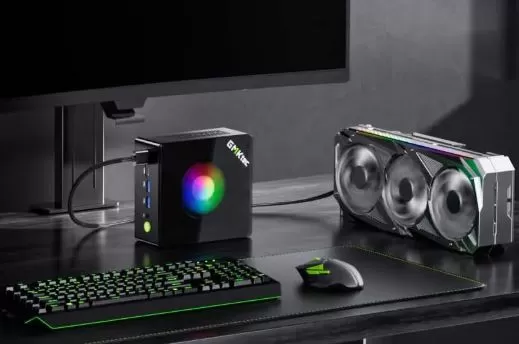
The K11 features an aluminum chassis with a matte black finish and an RGB lighting strip on the front — a gamer touch that sets it apart from other office mini PCs.
The aluminum body not only looks good but also helps to passively dissipate heat, complementing the active cooling system.
Its dimensions of 132 × 125 × 58 mm make it extremely compact: it fits perfectly behind a monitor with the included VESA mount.
The feel is premium for the price, although some users have noticed that the decorative stickers don't always come perfectly aligned from the factory — a minor detail that doesn't affect performance.
🖥️ Screen and Multimedia
The K11 supports up to 4 simultaneous 4K displays thanks to the combination of HDMI 2.1, DisplayPort 2.1 and the two USB4 ports with video output.
It's an exceptional capacity for a mini PC at this price, ideal for multi-monitor productivity setups or video editing.
In terms of audio, it includes an integrated digital microphone chip (DMIC) and a 3.5mm headphone jack on the front. It doesn't have its own speakers, which is common in this type of device. 4K video playback and HDR content are smooth thanks to the Ryzen 9 8945HS's hardware AV1 decoding support.
🚀 Performance and Software
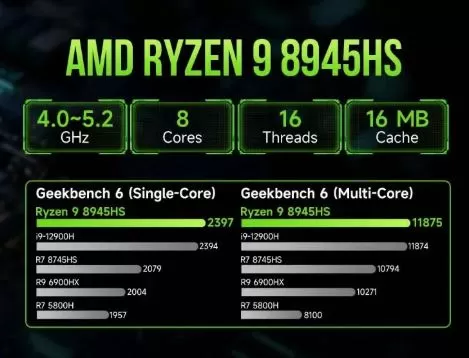
The AMD Ryzen 9 8945HS is one of the most powerful mobile processors of AMD's Zen 4 architecture, with 8 cores and 16 threads capable of reaching 5.2 GHz.
In practice, the K11 handles DaVinci Resolve video editing, intensive multitasking, and code compilation with ease, without any significant throttling.
The system comes with Windows 11 Pro pre-installed and clean, with virtually no bloatware, something that users especially appreciate.
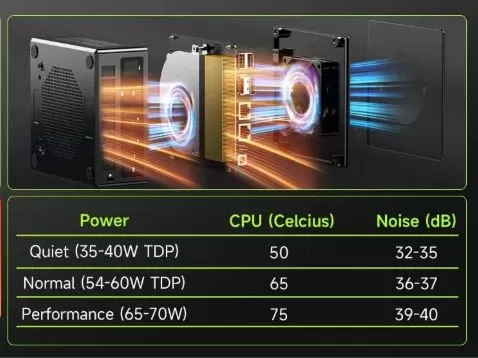
The BIOS allows you to configure the TDP between 35W and 70W, giving you room to optimize between battery life/silence or maximum performance.
The K11 also boots perfectly with Linux (Batocera included for emulation).
👉 See Prices and Availability of the GMKtec K11 Mini PC
🔋 Energy Consumption and Cables
The K11 operates at a base TDP of 35W, expandable to 70W via BIOS. This makes it efficient for everyday use: at idle it consumes only 8-12W, and under full load it can reach 65-70W.
The included power adapter is compact and provides 19V, sufficient for the standard setup.
If you connect an eGPU via OCuLink, you will need an additional external power supply for the GPU.
🌡️ Temperature and Noise (Actual Thermal)
The K11's cooling system combines a dual-fan system with a vapor heat pipe (VC) and three-dimensional air intake. Under sustained load, temperatures remain below 80°C, with no noticeable throttling.
Noise is the most discussed point: at maximum load, the fan can emit a slight high-frequency "whine" that some users find annoying, but this is not the general rule.
At medium load or in office use, the noise level is around 35 dB — perfectly acceptable.
Some users have solved the whine problem by making a small modification to the fan board without voiding the warranty.
🔌 Connectivity and Extras
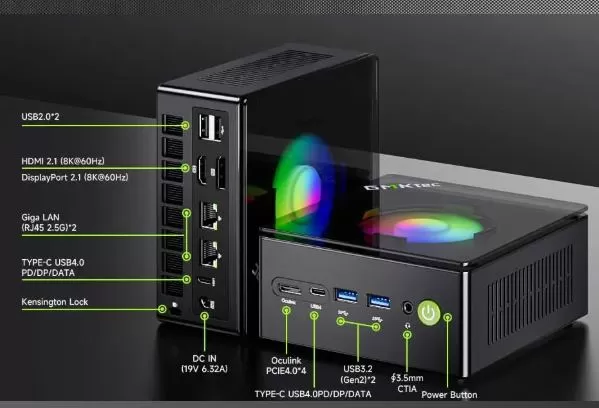
The K11's connectivity is one of its major differentiators compared to the competition:
-
2× USB4 (40 Gbps) with 100W PD charging and DP 1.4 video output
-
2× USB 3.1 on the front
-
2× USB 2.0 on the back
-
1× OCuLink PCIe Gen4 x4 — allows you to connect an external eGPU with performance almost equivalent to an internal PCIe GPU
-
2 x RJ45 2.5 GbE — ideal for NAS, local servers, or high-speed network setups
-
Wi-Fi 6 + Bluetooth 5.2
-
HDMI 2.1 + DisplayPort 2.1
It does not include an SD card reader, NFC, or IP rating for water resistance. The audio output is analog only (3.5mm jack).
🔧 Expansion and Upgrades
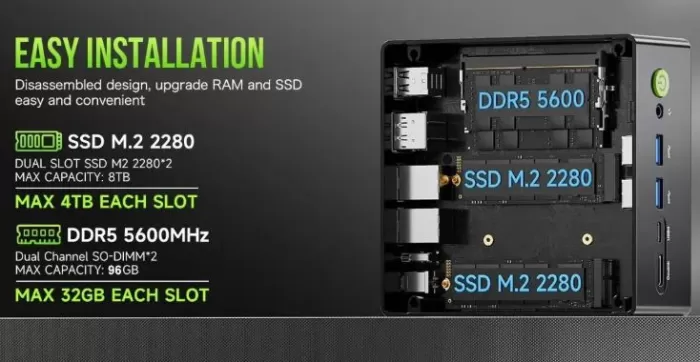
The K11 is one of the most upgradeable mini PCs in its category:
-
RAM: 2 SO-DIMM DDR5 5600 MHz slots. Maximum configuration of 96 GB (2 x 48 GB). In real-world testing, accessing the slots is easy after removing the bottom cover secured with 4 screws.
-
Primary SSD: M.2 2280 PCIe 4.0 NVMe slot, up to 8 TB. Easily replaceable.
-
Second SSD: It has a second M.2 2280 slot, also PCIe 4.0, to add additional storage without sacrificing the first one.
-
"No 2.5" bay": There is no space for a 2.5-inch SATA drive.
-
Wi-Fi: The Wi-Fi card is also replaceable (M.2 E-Key slot).
-
eGPU: The OCuLink PCIe Gen4 x4 port is the biggest upgrade advantage — allowing you to connect an external GPU (such as an RTX 4070 or RX 7800 XT) and turn the K11 into a high-performance gaming PC.
👉 See Prices and Availability of the GMKtec K11 Mini PC
🆚 Comparison with Direct Competitors
| Feature | GMKtec K11 | Minisforum HX99G | Beelink SER9 | ASUS NUC 14 Pro |
|---|---|---|---|---|
| CPU | Ryzen 9 8945HS | Ryzen 9 6900HX | Ryzen 9 8945HS | Core Ultra 9 185H |
| GPU iGPU | Radeon 780M | Radeon 680M | Radeon 780M | Arc Graphics |
| OCuLink/eGPU | ✅ OCuLink Gen4 | ✅ OCuLink | ❌ | ❌ |
| RAM max. | 96 GB DDR5 | 64 GB DDR5 | 64 GB DDR5 | 64 GB DDR5 |
| Dual 2.5 GbE | ✅ | ✅ | ❌ | ❌ |
| Dual USB4 | ✅ | ❌ | ✅ | ✅ |
| Approx. price | ~$479-$599 | ~$399-$499 | ~$449-$579 | ~$650+ |
| RGB | ✅ | ❌ | ❌ | ❌ |
The K11 clearly stands out for its combination of OCuLink + dual USB4 + dual 2.5 GbE, a connectivity trio that no direct competitor offers in this price range.
💬 Reviews on Well-Known Pages
Opinions about the K11 are mostly very positive across multiple specialist platforms:
-
TechRadar rates it as an excellent choice for professionals and creatives, especially highlighting OCuLink support as a differentiating factor.
-
Teampandory.com (in-depth review with real benchmarks) concludes that it is "one of the best Zen 4 Mini PCs you can get your hands on", with special mention of its performance in DaVinci Resolve and gaming.
-
Lon.TV (a leading source for mini PC reviews) describes it as "a good balance of price and performance," comparable in performance to Ryzen AI 9-based mini PCs but at a lower price.
-
Hostbor.com highlights the ability to reach 140 FPS in CS2 at low/medium settings, and 30-40 FPS in Cyberpunk 2077 with FSR enabled.
-
Vortex Gaming notes that the integrated Radeon 780M is equivalent in performance to an RTX 2050 Mobile.
-
On Reddit and specialized forums, the most frequent negative comments point to the fan whine under extreme load, considered to be easily solvable.
-
AliExpress. Current rating ⭐⭐⭐⭐⭐ — 5 stars (reviews) from 5 reviews. Some reviews include:
-
Very good and just as expected. Works perfectly from the start. I removed Windows and ran Linux. Everything works. It's not suitable for high-end gaming. Use an Oculink adapter for an external video card.
-
I'm really enjoying using it! Mini PC prices have generally gone up, so I did some research and found this one with good performance.
-
It works perfectly without any problems. I completely removed Windows and reinstalled it. Regarding the DP terminal, since integrated graphics don't support DP++, a standard DP-to-HDMI conversion cable is required. (Passive format, usually inexpensive products) won't work, and active DP-to-HDMI with a built-in signal conversion chip is the only option. It can only be output with a conversion cable (usually expensive). Keep this in mind if you're using DP-to-HDMI conversion cables.
-
I've only had it for 2 days and it's amazing, I'm really happy with this device.
-
🧪 Technical Tests
Benchmarks compiled from multiple independent reviewers show consistent results:
Synthetic benchmarks:
-
Cinebench R23 Multi: ~14,000-15,500 points (comparable to an Intel Core i7-12700H laptop)
-
3DMark TimeSpy: ~2.800-3.100 puntos (iGPU Radeon 780M)
-
Geekbench 6 Single: ~2.600 | Multi: ~12.500
-
Speedometer (web): High score, extremely smooth navigation
Gaming (1080p, iGPU Radeon 780M):
| Game | Configuration | FPS aprox. |
|---|---|---|
| Counter-Strike 2 | Low/Medium | ~140 FPS |
| DOTA 2 | High | 60-80 stable FPS |
| Rocket League | High | Fluid, 60+ FPS |
| Fortnite | Performance Mode | 60+ FPS |
| Tekken 8 | Media | Playable, 45-60 FPS |
| Microsoft Flight Sim 2024 | Low | 25-35 FPS |
| Cyberpunk 2077 | Low + FSR | 30-40 FPS |
| Minecraft Java | 24 chunks | No problem |
With an OCuLink eGPU (external RTX 4070): Gaming performance jumps exponentially, becoming comparable to a high-end desktop PC. This is the K11's true "ace in the hole."
🎮 Gaming and Emulation
The K11 is a surprisingly capable mini PC for casual and retro gaming without needing to spend money on an eGPU. The Radeon 780M with 12 CUs at 2800 MHz is the most powerful iGPU available in mini PCs in this price range.
Emulation (tested with Batocera Linux):
-
✅ FinalBurn Neo / MAME / Arcade: Perfecto
-
✅ PSP: No problems
-
✅ GameCube / Wii: 100% Smooth
-
✅ PS3: Playable in many titles with RPCS3
-
✅ Wii U (CEMU): Most games work well
-
⚠️ PS4 / Xbox One (KYTY/Spine): Experimental, resultados variables
-
❌ PS5 / Xbox Series: Not yet supported by emulators
For full retro gaming up to PS3/Wii U, the K11 is an excellent and more than sufficient solution.
❓ Frequently Asked Questions (FAQ)
Do I need to buy RAM and SSD separately?
It depends on the variant. The No RAM No Storage (barebone) version is the most economical but requires you to purchase DDR5 SO-DIMM RAM and an M.2 PCIe 4.0 SSD separately. The 16GB + 512GB or 32GB + 1TB versions come ready to use.
Which eGPUs are compatible with the OCuLink port?
Any OCuLink dock (such as the AOOSTAR, ADT-Link R43SG, or similar) with an AMD or NVIDIA GPU. An RX 7600 or RTX 4060 is recommended as a minimum to take advantage of the bandwidth.
Does it work well with Linux?
Yes. The K11 boots without problems with Ubuntu, Fedora, and Batocera. The AMD drivers are fully compatible with the current kernel.
Does it include a licensed copy of Windows 11?
Yes, Windows 11 Pro comes pre-installed with a legitimate, activated license.
Can I connect 4 monitors at once?
Yes, via HDMI 2.1 + DP 2.1 + 2× USB4 with video output, all in 4K.
Is it noisy?
In normal office use, it's barely audible (approximately 35 dB). Under heavy load, it can emit a high-frequency "whine," which can be fixed with a minor modification reported by the community.
🏆 Final Conclusion
The GMKtec NucBox K11 is ideal for:
-
👨💻 Creative professionals (video editing, design, programming) who need maximum power in a small space
-
🎮 Casual gamers and retro gamers who want a capable computer without spending money on a full tower.
-
🖥️ Advanced users who plan to expand with an OCuLink eGPU in the future
-
🏠 Multi-monitor setups of up to 4 4K screens for productivity
It's not ideal for those who need AAA gaming on ultra settings without an eGPU, or who want the quietest system on the market under maximum load.
Alternatives to consider:
-
💡 Beelink SER9 — similar CPU, without OCuLink, slightly cheaper
-
💡 Minisforum HX99G — has an integrated eGPU RX 6600M but an older CPU
-
💡 ASUS NUC 14 Pro — more expensive, better official support but no OCULink
In short: if you're looking for the most complete, upgradeable, and future-proof mini PC in its price range, the K11 is the one you should buy.
🛒 Where to buy the GMKtec NucBox K11?
Available in several configurations to suit your budget:
| variant | Description |
|---|---|
| 🔩 No RAM No Storage | Barebones, the most economical option, lets you add your own RAM and SSD. |
| 💾 16GB + 512GB | Dual channel DDR5, ideal for beginners |
| 💽 32GB + 1TB | The most recommended for general use and gaming |
| 🚀 Up to 64 GB + 4 TB | Maximum configuration for workstation |
👉 Buy GMKtec K11 on AliExpress — Best price guaranteed
🛒 GMKtec K11 Gaming Mini PC - Amazon (available in multiple regions)