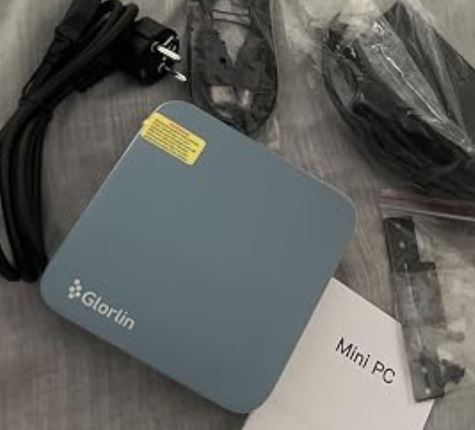
The GMKtec K12 Mini PC with AMD Ryzen 7 8745HS is a very powerful option for advanced users looking for maximum performance in a compact format and the possibility of scaling it with an external GPU via OCuLink .
Its main advantages are the processor's power, DDR5 support, and next-generation connectivity.
On the other hand, it does not include RAM, storage, or an operating system , so it is not a "plug and play" option.
Conclusion: Ideal for enthusiasts, gamers, and professionals who want to customize their equipment from scratch.
🔗 View offer and more information about the GMKtec K12
Key technical specifications
| Feature | Detail |
|---|---|
| Processor | AMD Ryzen 7 8745HS (8 cores / 16 threads, Zen 4) |
| Integrated graphics | AMD Radeon 780M |
| RAM | DDR5 support (not included) |
| Storage | M.2 NVMe PCIe (NOT included) |
| Operating system | Not included |
| Connectivity | Wi-Fi 6E + Bluetooth |
| Featured ports | USB-C, USB-A, HDMI, DisplayPort, OCuLink |
| GPU Expansion | Yes, via OCuLink |
| Format | Mini PC |
| Orientation | Gaming, advanced productivity, compact workstation |
Design and construction quality
The GMKtec K12 boasts a clean and functional design , with a compact chassis featuring straight lines and an aesthetic clearly geared towards professional users.
The materials convey a sense of quality, with a solid, creaky casing and adequate thermal management for its size. In hand, it feels robust and well-assembled , far removed from the "cheap" feel of other generic mini PCs.
In terms of ventilation, the design prioritizes airflow, which is key considering the power of the Ryzen 7 8745HS.

Screen and multimedia
This section does not apply directly , since the GMKtec K12 does not include a screen or integrated speakers .
That said, in actual use:
-
It supports multiple monitors via HDMI and DisplayPort.
-
The Radeon 780M iGPU offers an excellent multimedia experience , with smooth playback of 4K content and support for hardware acceleration.
-
Ideal as an advanced multimedia center or multi-monitor workstation.
🔗 View offer and more information about the GMKtec K12
Performance and software
This is where the GMKtec K12 shines.
The Ryzen 7 8745HS (upgrade of the 255H) offers outstanding performance in both productivity tasks (editing, programming, light virtualization) and gaming.
Actual performance:
-
Daily use: absolutely seamless.
-
Multitasking: no bottlenecks with DDR5.
-
Gaming: The Radeon 780M allows you to play current titles at 1080p with medium settings.
-
Advanced gaming: thanks to OCuLink , it is possible to connect an external GPU and turn this mini PC into a true gaming beast.
Software:
-
It does not include an operating system, which is an advantage for advanced users.
-
Seamlessly compatible with Windows 11 and modern Linux distributions .
-
No bloatware, since the user installs everything from scratch.
Connectivity and extras
One of its strongest points:
-
Wi-Fi 6E: Fast and stable wireless connections.
-
Bluetooth: ideal for peripherals.
-
OCuLink: a major differentiator compared to other mini PCs.
-
Wide variety of ports for monitors, external storage and accessories.
It does not include a fingerprint reader or IP certification, which is to be expected in this category.
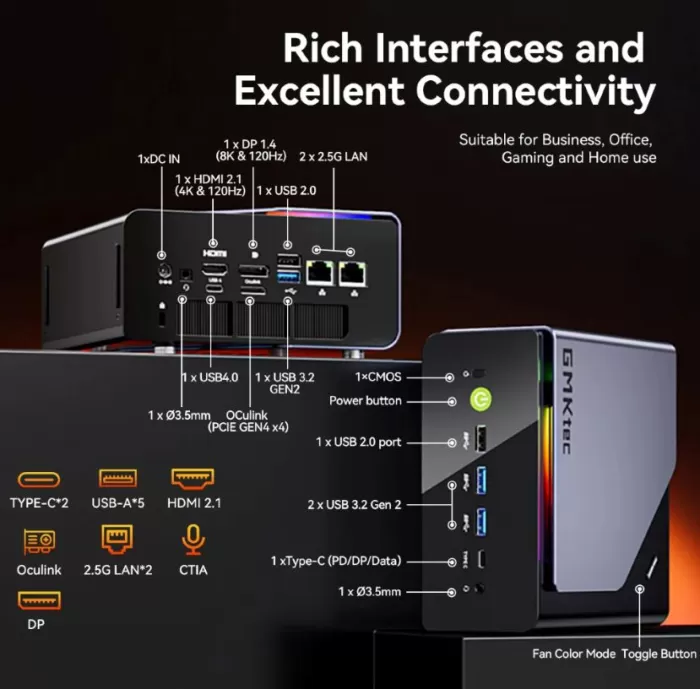
🖥️ 📺 Modern video outputs and multi-monitor setup
One of the strengths of the K12 is its ability to handle multiple high-resolution displays without the need for an external GPU:
-
1× HDMI 2.1 — up to 8K@60 Hz with a single cable.
-
1× DisplayPort 1.4 — excellent for 4K monitors and productivity setups.
-
1× USB-C with DP 1.4 support — includes data + video.
-
1× USB4 — up to 40 Gbps, compatible with DisplayPort and high-speed devices.
💡 You can connect up to 4 simultaneous screens , ideal for multitasking, workstations, creative studios or trading/productivity setups.
⚡ OCuLink — expansion beyond the conventional
One of the most distinguishing features of the K12 is the OCuLink port (PCIe Gen4×4):
-
It allows you to connect an external GPU (eGPU) with much higher bandwidth than standard Thunderbolt.
-
This means that if at any point you want to play with a powerful dedicated graphics card (for example, a mid-range/high-end NVIDIA or AMD series), you can do so without having to change your entire computer.
-
Technical note: This port does not support hot-plugging. Always turn off your device before connecting or disconnecting to avoid malfunctions.
👉 This is especially useful for content creators, editors, or gamers who want to scale their GPU investment according to need.
🌐 Network and wireless connectivity
The GMKtec K12 offers network connectivity at the level of high-end equipment:
-
Wi-Fi 6E — enables very high speeds, lower latency and better stability on modern networks, useful for 4K/8K streaming, heavy downloads or saturated environments.
-
Bluetooth 5.2 — wide support for peripherals, headphones, keyboards, etc.
-
2× Ethernet 2.5 Gbps — dual high-speed LAN ports, ideal for fast and reliable wired connections in the office or professional studio.
👉 The presence of two 2.5 Gb LAN ports is uncommon in mini PCs, and allows for the setup of segmented networks, home servers, redundant modems, or dual-NIC configurations for virtualization.
💾 USB and audio — much more than the basics
The K12 doesn't fall short in terms of useful ports:
✔ Frontal
-
Multiple USB-A ports (3.2 Gen2 and USB 2.0) — useful for peripherals, external drives, and common accessories.
-
USB-C with Power Delivery + DisplayPort — versatile for modern USB-C devices or monitors.
-
Combo 3.5 mm jack for audio.
✔ Posterior
-
More USB-A (Gen2 and 2.0) — useful for hubs, dongles, or storage.
-
USB4 port (40 Gbps) — not just video, but also ultra-fast data transfer.
-
Two additional audio jacks for speaker or microphone setups.
🧠 Extras that add real value
💡 Clear CMOS Button
A small extra that many mini PCs don't include: a button to reset the BIOS without having to open the case, very useful if you are experimenting with configurations or hardware.
🔧 Fan/RGB Button and Control:
On models with RGB or adjustable fan modes, you can switch between performance or silent profiles without entering BIOS or additional software.
🔗 View offer and more information about the GMKtec K12
Reviews on well-known websites
In specialized stores and forums, the GMKtec K12 receives very positive reviews, especially for:
-
Its power in relation to its size .
-
The possibility of using a real external GPU , not just an eGPU via Thunderbolt.
-
Freedom of configuration.
The most common criticisms point out that it is not a product for beginners , due to the absence of RAM, SSD and operating system.
📌 1. Review professionals in technological media
TechRadar (technical review):
Specialized reviews highlight the GMKtec K12 for its expandability potential and balanced performance , with special emphasis on its versatile design for developers, content creators, and advanced users thanks to its extensive connectivity, three M.2 slots, and DDR5 support up to 128 GB , making it stand out from many mini PCs in the same price and size range.
📌 2. User reviews on e-commerce sites
On international sales platforms like Ubuy, where buyers have left direct reviews:
-
High overall rating (4.5/5): Most buyers positively value the performance of the AMD Ryzen 7 H 255 and its extensive connectivity .
-
Repeated positive points:
-
Smooth performance in office tasks, programming and multimedia.
-
Compact and well-equipped design — ideal for small offices or intensive home setups.
-
-
Minor criticisms point to:
-
Limited USB-C ports compared to modern expectations.
-
Another review with a perfect score points out the system's speed with 32 GB DDR5 and fast storage drive , although it mentions that software installation or initial settings may require a little more time for less experienced users .
📌 3. Feedback from real users (forums and communities)
In technical communities (like Reddit) where users share experiences without commercial filters, there are mixed opinions and helpful warnings :
🟢 Positive comments
-
Some users love the K12:
-
They describe it as a very capable machine even with the integrated iGPU , with excellent connectivity and expandability.
-
Many highlight the stable network (Ethernet, Wi-Fi 6E) and sufficient power for daily use and light gaming, and the compatibility for server or virtualization tasks.
-
-
Useful for advanced configurations:
There is testimony from people using it with specialized software (such as ComfyUI for image generation) and achieving satisfactory results with the Radeon 780M and ample memory.
🔴 Important reviews from real users
The discussions also reveal aspects that many buyers have pointed out with concern :
-
Customer service and support.
-
Fan noise and control.
-
Size and perception of materials.
Technical Tests (performance, benchmarks and real results)
-
CPU: performance very close to high-end gaming laptops.
-
Integrated GPU: one of the best iGPUs currently available.
-
Temperatures: correct under load, with controlled noise.
-
Stability: excellent in prolonged sessions.
✅ 1. Processor architecture and power
The AMD Ryzen 7 H 255 that this mini PC uses is an 8-core, 16-thread processor based on the Zen 4 architecture , with frequencies up to 4.9 GHz and configurable TDP depending on the performance profile.
📊 In real benchmark tests (according to independent reviews):
-
CPU performance, as measured by tools such as PassMark , achieves remarkable figures for its size, with approximately 27,000+ points in CPU Mark — placing it well above most mini PCs with traditional U-series chips.
-
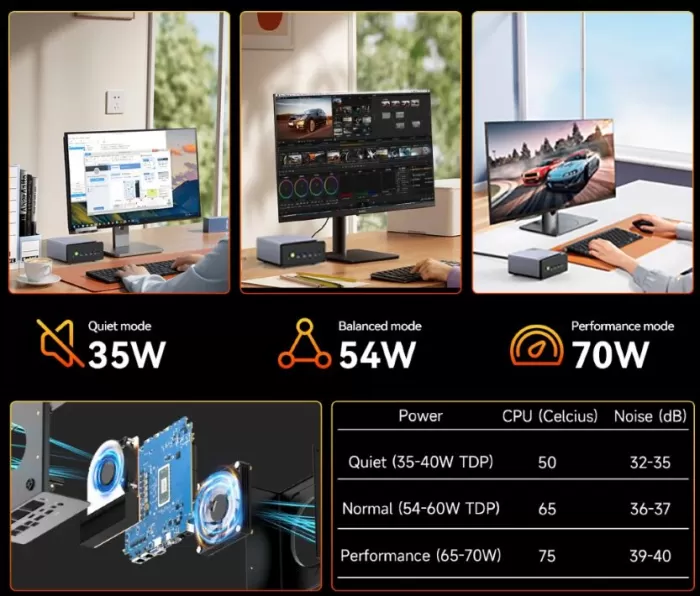
In calculations of latest energy efficiency and workflow, it demonstrates a very good balance between raw performance and consumption , with controlled temperatures thanks to the vapor chamber + dual fan system that keeps the CPU below 70 °C under sustained loads in many cases.
👉 This means that for demanding tasks such as code compilation, video editing, or intensive multitasking, the K12 doesn't fall short compared to much larger machines .
🎮 2. Integrated GPU and graphics performance
Although it's not a mini PC with a dedicated GPU, the integrated Radeon 780M (RDNA 3) offers superior results to many other integrated graphics found in mini PCs on the market:
✔ It allows you to play competitive and esports titles like Valorant, Fortnite, or Rocket League with very smooth FPS rates at 1080p.
✔ Even AAA games like Forza Horizon 5 or Rise of the Tomb Raider can be playable at 720p or medium-low quality settings, which is unusual for an iGPU in a PC of this form factor.
💡 Important: The performance of the integrated GPU is significantly improved when using fast dual-channel RAM modules (e.g., DDR5-5600) .
📈 3. eGPU and performance with an external GPU via OCuLink
One of the most interesting tests compared to most mini PCs is the ability to use a high-performance external graphics card thanks to the OCuLink port :
🔌 In a direct comparison using an RTX 4070 Super connected via OCuLink vs USB4 :
-
OCuLink achieved an average of ~94 FPS in GPU-intensive games.
-
USB4 averaged ~57 FPS , with much lower GPU utilization (~57% vs. ~91%).
📊 This represents a performance increase of up to ~65% simply by changing the connection type — an extremely relevant result for gamers who want true desktop performance without sacrificing portability.
👉 In other words: OCuLink offers a much more efficient eGPU gaming experience than USB4 or Thunderbolt-only solutions that usually limit the GPU's actual bandwidth .
📦 4. Real storage and expansion
One of the most outstanding technical features compared to other mini PCs on the market is storage expansion :
📌 The K12 offers 3 M.2 PCIe 4.0 slots :
-
1x PCIe 4.0 x4 — ideal for ultra-fast primary SSD.
-
2x PCIe 4.0 x2 — perfect for additional expansion (content, editing, databases).
⚙️ This allows for up to 24 TB of total M.2 NVMe storage, something that no other mini PC in this size and price range manages to cover .
Practical result in speed tests:
-
The NVMe Gen4x4 SSD displays sequential read/write speeds of thousands of MB/s , accelerating both system boot times and the opening of heavy applications, 4K video editing, and large file transfers.
🌐 5. Networks and connectivity under testing
Network benchmarks and field tests reflect:
✔ Wi-Fi 6E with speeds close to 2.4 Gbps under optimal conditions, reducing latency in online gaming and high-resolution streaming.
✔ Dual 2.5G Ethernet with Realtek controllers that offer sufficient bandwidth for demanding home network environments or lightweight home servers.
📌 According to comparative tests, the latency and network stability are superior to most mini PCs with Wi-Fi 5 or 1G adapters , making it ideal for professional environments and continuous workloads.
🧠 6. Temperature and thermal management
In tests with sustained loads (4K editing, file compression, continuous CPU/GPU tests):
🔥 The combination of vapor chamber + dual fan keeps temperatures below critical levels (~70 °C actual in testing), with adjustable ventilation profiles that allow you to balance noise vs thermal performance .
📊 Compared to other mini PCs with conventional cooling, this thermal solution offers better long-term stability without aggressive throttling , although with a slight increase in noise under high loads.
🧠 Technical test summary (table)
| Aspect evaluated | Technical result |
|---|---|
| CPU (Zen 4) | Very good performance for multitasking and sustained workloads |
| Integrated GPU | Excellent for esports and multimedia use, limited for AAA games without an eGPU |
| eGPU OCuLink | ~65% + performance compared to standard USB4 |
| Storage | Up to 24 TB very fast with NVMe SSD |
| Network and connectivity | Outstanding Wi-Fi 6E and dual 2.5G Ethernet |
| Thermal | Controlled and efficient with steam chamber |
Final conclusion
The GMKtec K12 Mini PC Ryzen 7 8745HS is clearly aimed at demanding users. It's not the cheapest or simplest mini PC, but it is one of the most powerful and scalable on the market.
Ideal for:
-
Gamers who want a compact setup with an external GPU.
-
Professionals who need power in a small space.
-
Advanced users who enjoy configuring their own equipment.
Not recommended for:
-
Users looking for a ready-to-use PC.
-
People with no experience in assembling or installing systems.
Is it worth it?
Yes, if you know what you're buying and want a no-compromise mini PC.