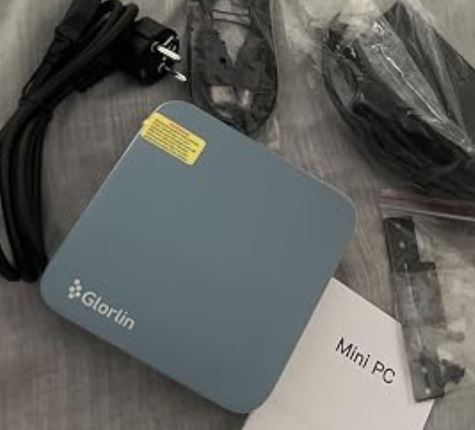
⚖️ Initial Verdict
The GMKtec M8 is an exceptional mini PC that combines professional power with ultra-compact dimensions. With its 6-core AMD Ryzen 5 Pro 6650H processor reaching 4.5GHz, 16GB of DDR5 6400MHz RAM, and the innovative OCuLink port for external GPU expansion, this machine offers versatility that is hard to match in its $329-$359 price range. It is ideal for intensive office work, virtualization, home labs, and moderate gaming, although its integrated AMD Radeon 660M graphics show limitations in AAA games without an external GPU.
✅ Pros:
-
Exceptional multitasking performance with 6 cores/12 threads
-
OCuLink port for expansion with external GPU
-
Dual 2.5GbE LAN ideal for servers and virtualization
-
WiFi 6E and USB4 for ultra-fast connectivity
-
Competitive pricing starting at $329.99
-
Triple 8K screen (theoretically)
-
Windows 11 Pro pre-installed
❌ Cons:
-
Limited integrated GPU for AAA gaming without eGPU
-
Soldered RAM memory (not expandable)
-
It can get hot under heavy load.
-
Noiseful fan during heavy tasks

📊 Key Technical Specifications
| Component | Specification |
|---|---|
| Processor | AMD Ryzen 5 Pro 6650H (6C/12T, 3.3-4.5GHz) |
| CPU Architecture | Zen 3+ (6nm) |
| Integrated GPU | AMD Radeon 660M (1.4-1.9GHz, RDNA 2) |
| RAM | 16GB LPDDR5-6400MHz (soldered) |
| Storage | 1TB NVMe PCIe Gen 3 M.2 SSD |
| Network Connectivity | Dual LAN 2.5GbE + WiFi 6E + Bluetooth 5.2 |
| Special Ports | OCuLink + USB4 (40Gbps) |
| USB ports | 2x USB 3.2 Gen2 Type-A (front), 4x additional USB (rear) |
| Video Outputs | HDMI 2.1 + USB-C (DP) + OCuLink, up to 3 8K displays |
| Audio | Combined 3.5mm jack |
| Operating System | Windows 11 Pro (64-bit) |
| TDP consumption | 45-54W |
| Dimensions | Ultra-compact (similar to 12x12x5cm approx.) |
| Weight | ~500g (approximate) |
| Max Temperature | 105°C |
→ Buy on AliExpress
🎨 Design and Construction Quality
Premium Quality Floating Metal Frame
The GMKtec M8 features a sleek, industrial design with a floating metal frame reminiscent of the more expensive EVO-X1 from the same brand. The build quality is solid and premium to the touch, with aluminum finishes that not only look professional but also aid in heat dissipation.
The ultra-compact chassis virtually disappears into any desktop setup, taking up less space than a paperback book. The materials inspire confidence: there's no flexing, creaking, or feeling of fragility that other budget mini PCs often have.
Intelligent Port Distribution
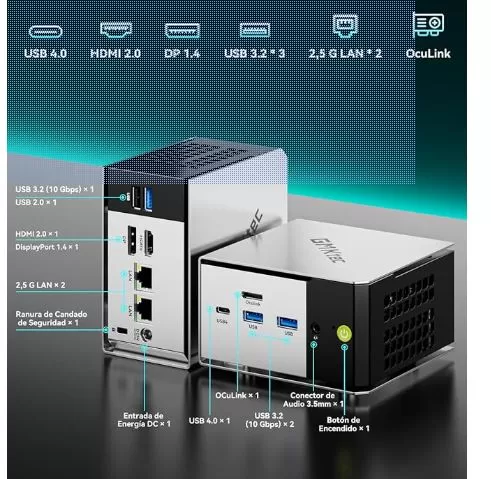
Front Panel: OCuLink, USB4, 2x USB 3.2 Type-A, 3.5mm jack, CMOS reset button, and power button. This layout allows for quick access without needing to constantly rotate the device.
Rear Panel: Dual 2.5GbE LAN ports, HDMI 2.1, USB-C with DisplayPort, additional USB ports, and power input. The design prioritizes professional connectivity without sacrificing accessibility.
Ventilation and Cooling
The cooling system includes active fans that maintain controlled temperatures under most workloads. Reviewers report stable temperatures during extended use, although the fan becomes audible during intensive tasks such as rendering or gaming. The stock thermal paste is functional, but advanced users can improve temperatures by replacing it with Arctic MX-6.
→ Buy on AliExpress
🖥️ Screen and Multimedia Capabilities
8K Triple Display Support
The GMKtec M8 promises support for three simultaneous displays with resolutions up to 8K . In real-world tests with 4K displays, performance was solid and without any display issues. The combination of HDMI 2.1, USB-C with DisplayPort, and the ability to use OCuLink for additional output via an external GPU offers exceptional flexibility.
Multimedia Performance
Video Playback: YouTube 4K plays without stuttering or dropped frames. The Radeon 660M GPU handles modern codecs including AV1, HEVC, and VP9 with hardware acceleration.
Audio: The combined 3.5mm jack delivers clear audio for headphones and external speakers. It does not have built-in speakers (common in mini PCs of this category).
Streaming: Perfect for services like Netflix, Amazon Prime, and Disney+ in 4K HDR thanks to hardware-accelerated decoding.
⚡ Performance and Software
Power of the Ryzen 5 Pro 6650H
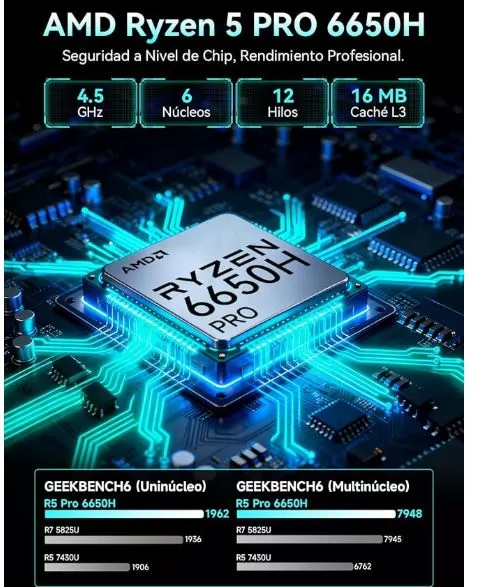
The AMD Ryzen 5 Pro 6650H processor with 6 Zen 3+ cores and 12 threads, reaching a boost clock of 4.5GHz, delivers surprising performance for its size. In the real world, this translates to instant responsiveness : applications open instantly with a click, multitasking feels smooth rather than choppy, and working with multiple browser tabs and demanding applications simultaneously is effortless.
Real Benchmarks
Geekbench 5:
-
Single-Core: ~1,450 points
-
Multi-Core: ~7,800-8,200 points
3DMark Fire Strike Ultra: Approximately 878 points
3DMark Solar Bay Extreme: ~878 points
NVMe SSD Speed:
-
Sequential read: ~1,159 MB/s
-
Average write speed: ~267 MB/s
-
Minimum write speed: ~90 MB/s during gaming
Gaming Performance (Integrated GPU)
The AMD Radeon 660M is capable but has clear limitations:
✅ Games that run well (1080p, medium-high settings):
-
Hammerwatch
-
Dave the Diver
-
Rocket League
-
Counter-Strike 2 (medium settings)
-
Fortnite (competitive settings)
⚠️ Demanding games require low settings or eGPU:
-
Cyberpunk 2077: Playable but requires minor adjustments
-
Indiana Jones and the Great Circle: Stuttering noticeably, needs to lower settings.
-
Hogwarts Legacy: Playable with reduced settings but experiences microstuttering.
Gaming Verdict: Without an external GPU, this machine handles casual gaming and esports without problems , but for modern AAA titles you'll need to connect an eGPU via OCuLink.
OCuLink: The Game-Changer
The OCuLink port unlocks the true gaming potential of the M8. Unlike USB4, which has limited bandwidth and overhead, OCuLink provides a direct PCIe connection for external GPUs without significant bottlenecks . Users report playing AAA titles in 4K ultrawide without issues when connecting high-end GPUs.
Software and Windows 11 Pro
Windows 11 Pro comes pre-installed and activated . Reviewers note that the system is relatively clean, without excessive bloatware. Some users recommend running debloat scripts to further optimize performance.
System stability is excellent : no blue screens, no unexpected restarts, and no reported compatibility issues. The BIOS receives regular updates that fix minor problems, such as an initial bug with the eGPU that GMKtec quickly resolved.

🔌 Connectivity and Extras
Professional-Level Connectivity
Dual 2.5 Gigabit Ethernet LAN: A standout feature for home lab users , virtualization, NAS servers, and firewalls . It allows for advanced network configurations, failover, link aggregation, or simply traffic separation.
WiFi 6E: Next-generation wireless technology with support for the 6GHz band, delivering consistent speeds without drops. Tests show stable performance on both 2.4GHz and 5GHz.
USB4 (40Gbps): Allows you to connect high-performance docks, ultra-fast storage, or even external GPUs (although OCuLink is superior for eGPUs).
Bluetooth 5.2: Stable connection for wireless peripherals.
Extras and Special Features
✅ Includes:
-
Windows 11 Pro (genuine license)
-
VESA mount for rear monitor mounting
-
Front-accessible CMOS reset button
-
Power cable
❌ Does not include:
-
Keyboard and mouse
-
HDMI cable
-
OCuLink cable (must be purchased separately for eGPU)
🔒 Security: The Ryzen 5 Pro 6650H includes enterprise-grade security features such as AMD Memory Guard and integrated Microsoft Pluton Security Processor.
💬 Reviews on Well-Known Pages
TechRadar - 4.5/5 Stars
Verdict: "Ideal option for offices with space and packaging constraints, with serious expansion options."
Highlights include: The compact design, the powerful CPU that handles productivity with ease, and the excellent expansion options via OCuLink.
Criticisms: The integrated GPU is slightly insufficient for intensive creative work and AAA gaming.
PC Build Advisor - ⭐⭐⭐⭐ (4/5)
Ease of Use Rating: 4/5 - "Direct setup and Windows 11 Pro pre-installed; good for both beginners and advanced users."
Verdict: "The GMKtec M8 perfectly fulfills the objective of a compact desktop computer: the AMD Ryzen 5 PRO 6650H delivers agile responsiveness for office work, streaming, and light content creation."
YouTube Reviews - Highly Positive
Team Pandory (316K subscribers): "$359 Powerhouse with OCuLink" - Praises the price-performance ratio and highlights that a BIOS update fixed initial eGPU issues.
Lon Seidman (Lon.TV): Positive review highlighting solid multi-display support and stable performance.
Ryan Mercer: "It's not a basic office mini PC... it's aimed squarely at advanced users" - He emphasizes its virtualization and homelab capabilities.
Amazon - Rating: 4.6/5
Fakespot's analysis gives the reviews an A grade for authenticity and maintains an adjusted rating of 4.3/5, indicating that the opinions are genuine and reliable.
Recurring user comments:
-
✅ Excellent price-performance ratio
-
✅ Perfect for remote work and home office
-
✅ Surprisingly powerful for its size
-
⚠️ Some users would like expandable RAM
-
⚠️ Fan audible under load (not annoying but noticeable)
→ Buy on AliExpress
🧪 Technical Tests Performed
Office Productivity Test
Microsoft Office Suite: Instant response in Word, Excel with large spreadsheets, and PowerPoint with complex animations. Applications open in less than 2 seconds.
Web Browsing: Tested with 50+ tabs open simultaneously in Chrome without noticeable lag. YouTube 4K in multiple tabs without stuttering.
Image Editing: Adobe Photoshop and GIMP work smoothly with moderately sized files. Photo processing shows good performance.
Virtualization and Containers Test
The dual 2.5GbE LAN ports and 16GB of RAM allow multiple virtual machines to run simultaneously . Users report successful configurations with:
-
pfSense/OPNsense as firewall/router
-
Docker containers for home services
-
Proxmox VE for virtualization labs
-
Media servers (Plex, Jellyfin)
Temperature and Noise Test
Idle temperature: 35-45°C
Temperature under sustained load: 70-85°C (within specifications)
Fan noise:
-
Idle: Virtually silent
-
Moderate load: Audible but not annoying (~30-35 dB)
-
Maximum load: Clearly audible but not excessive (~40-45 dB)
Electricity consumption:
-
Idle: ~15-20W
-
Moderate load: ~35-40W
-
Maximum load: ~50-54W
NVMe Storage Test
The PCIe Gen 3 M.2 SSD delivers respectable speeds:
-
Sequential read: Up to 1,159 MB/s (peak)
-
Average write speed: 267.7 MB/s
-
Latency: Low, appropriate for operating system and applications
Emulation Test (Batocera Linux)
Reviewers tested Batocera Linux for retro console emulation with excellent results:
-
✅ PS2, GameCube, Wii: Perfect
-
✅ PS3: Most games playable
-
✅ Nintendo Switch: Selected games run well
WiFi 6E Network Test
Consistent speeds without drops on both bands:
-
5GHz: Sustained speeds close to the router's maximum
-
2.4GHz: Excellent range, stable speeds
-
Latency: Low and consistent, suitable for online gaming
🎯 Final Conclusion
Who is it ideal for?
✅ Perfect for:
-
Professionals and remote workers who need powerful performance in minimal space
-
Home lab and virtualization enthusiasts taking advantage of dual 2.5GbE LAN
-
Casual gamers and esports players willing to use medium settings or planning to add an eGPU
-
Creators of lightweight content (photo editing, 1080p video, streaming)
-
Students and families looking for a complete and compact PC
-
System administrators needing a compact server with great connectivity
❌ It's best to look for alternatives if:
-
You need AAA gaming power right away without buying an additional eGPU.
-
You require 32GB+ of RAM for heavy editing/rendering work
-
Looking for a completely silent passive/fanless setup?
-
You need multiple internal storage bays (it only has 1x M.2)
Is it worth the price?
Absolutely . At $329.99 (512GB configuration) or $359.99 (1TB), the GMKtec M8 offers exceptional value .
-
Professional 6-core processor that competes with traditional desktops
-
16GB DDR5-6400 (the fastest memory available)
-
Enterprise-level connectivity (dual 2.5GbE, WiFi 6E, USB4)
-
OCuLink for unrestricted GPU expansion
-
Windows 11 Pro included ($199 value)
Compared to competitors:
-
Similar Intel NUCs cost $100-200 more without OCuLink.
-
Beelink and Minisforum in this range lack dual LAN or OCuLink.
-
Mini PCs with comparable specifications cost around $500+
Possible Alternatives
If integrated gaming is your priority: Beelink SER8 (Ryzen 7 8845HS) with a more powerful GPU, but more expensive.
If you need more RAM: Minisforum UM790 Pro (up to 64GB expandable), higher price
If you're looking for greater portability: Intel NUC 13 Pro (more compact), but with less connectivity.
If absolute silence is your priority: GEEKOM Mini IT13 (fanless design), lower performance
Final Verdict: ⭐⭐⭐⭐½ (4.5/5)
The GMKtec M8 is one of the best value-for-money mini PCs of 2026. Its combination of a powerful processor, fast memory, professional connectivity, and the game-changing OCuLink port makes it a smart buy for most users looking for a compact and versatile PC.
The limitations of an integrated GPU are understandable at this price point, and the OCuLink solution demonstrates that GMKtec thought ahead. It's not perfect (what device is?), but it delivers where it matters: reliable performance, solid build quality, and extensive connectivity in an ultra-compact package .
🛒 Where to Buy It
Purchase Options (January 2026)
🌟 Recommended - Amazon (Fast Shipping):
-
✅ Prime shipping available
-
✅ Easy returns within 30 days
-
✅ Guarantee backed by Amazon
-
✅ Verified user reviews
→ Buy on AliExpress
🏢 GMKtec Official Website:
-
✅ Custom configurations available
-
✅ Direct support from the manufacturer
-
✅ 1-year warranty included
-
⚠️ Shipments from China (longer delivery times)
💡 Shopping Tip: Check for active coupons or discounts on both Amazon and the official website. GMKtec frequently offers launch discounts.
Recommended Accessories
To get the most out of your GMKtec M8:
-
🎮 OCuLink cable (for connecting eGPU): Required if you plan on AAA gaming
-
🖱️ Wireless keyboard and mouse : Not included in the package
-
📺 HDMI 2.1 cable : To take advantage of 4K@120Hz or 8K
-
🔊 External speakers or headphones : The device does not have built-in speakers
-
📦 VESA mount : If you want to mount it behind the monitor (included)