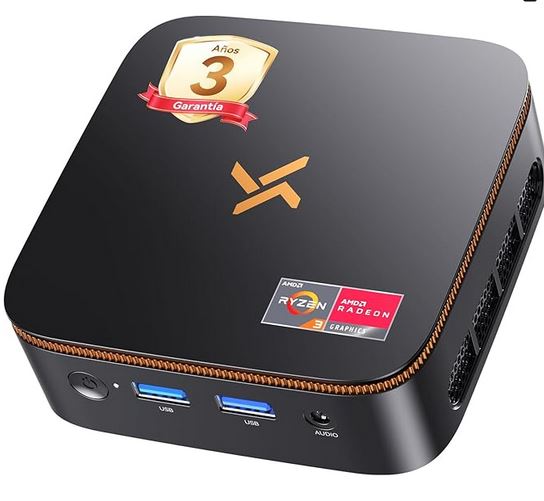
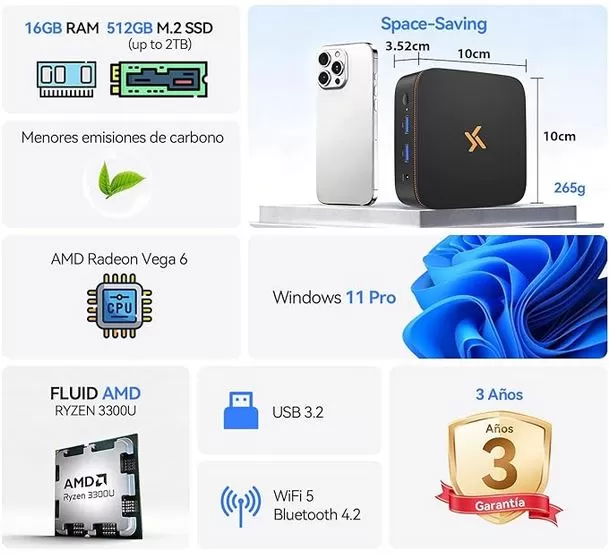
The Huidun H50 is a mini desktop PC from 2026 that opts for an ultra-compact format, only 10 × 10 × 3.52 cm and 265 grams, to offer a device for teleworking, office, multimedia and daily use without taking up virtually any space.
It comes with an AMD Ryzen 3 3300U, Radeon Vega 6, 16 GB DDR4, a 512 GB M.2 SSD, and Windows 11 Pro pre-installed, all with a maximum power consumption of 15 W and a 3-year warranty.
Pros:
-
Tiny size, ideal for desks and clutter-free living rooms
-
16 GB of RAM and 512 GB SSD, very well equipped for its price (~€499)
-
Consumes only 15W: perfect for continuous use without skyrocketing your bill
-
Dual 4K video output (HDMI 2.0 + DP 1.4): ready for dual monitor
-
Windows 11 Pro preinstalado + compatible con Linux/Ubuntu
-
3-year warranty, 24/7 support, and Amazon fulfillment
-
Silent cooling system (~25 dB according to manufacturer)
-
VESA mount included in the box
Cons:
-
2019 Ryzen 3 3300U CPU: valid but not modern
-
Official maximum RAM: 16 GB with no possibility of expansion
-
Bluetooth 4.2 and WiFi 5, more limited than WiFi 6/BT 5.x of rivals
-
The front USB 3.2 ports do not provide optimal transfer speeds for all flash drives.
📝 Conclusion in 3 lines: A very honest machine for what it promises. You're not competing in benchmarks, but in real-world use, and for office work, remote work, streaming, and everyday multimedia, it's more than adequate. If you're looking for heavy gaming or professional video editing, look at a higher budget.
🛒 Where to buy it?
🛒 Amazon:
👉 View Prices for the Huidun H50 Mini PC
🛍️ AliExpress:
👉 View Prices for the Huidun H50 Mini PC
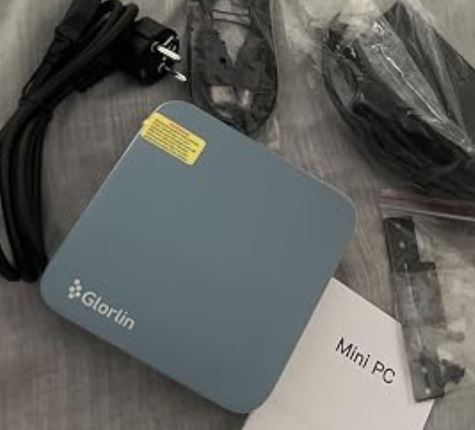
📦 Unboxing and box contents
Opening the H50 isn't a spectacular unboxing experience, but it doesn't disappoint either: everything arrives well packaged thanks to Amazon's logistics, protected and organized.
Exact contents:
-
1 × Huidun H50 Mini PC
-
1 × Power adapter
-
1 × Cable HDMI
-
1 × VESA mount with screws
-
1 × User Manual
The fact that it includes an HDMI cable and VESA mount as standard is a real plus: most mini PCs from Chinese brands don't include the cable, so here you can start using it without having to buy anything extra.
📋 Table of key technical specifications
| Specification | Detail |
|---|---|
| Processor | AMD Ryzen 3 3300U, 4C/4T, 2,1 GHz base – 3,5 GHz boost |
| Manufacturing | 12 nm Zen+, TDP 15 W |
| Graphics | Integrated AMD Radeon Vega 6, 6 CUs, up to 1200 MHz |
| RAM | 16 GB DDR4 a 2400 MHz |
| Maximum RAM | 16 GB (no expansion possible) |
| Storage | 512GB M.2 SSD |
| Expansion | 1 additional slot compatible up to 2 TB |
| Operating system | Windows 11 Pro |
| WiFi | WiFi 5 doble banda 802.11a/b/g/n/ac (2,4 + 5 GHz) |
| Bluetooth | 4.2 |
| Ethernet | RJ45 Gigabit |
| Ports | 2 × USB 3.2, 2 × USB 2.0, 1 × HDMI 2.0, 1 × DP 1.4, 1 × RJ45, 1 × DC, 1 × jack 3,5 mm |
| Video output | Simultaneous dual 4K screen |
| Max resolution | 4096 × 2160 (native) |
| Consumption | 15 W |
| Dimensions | 10 × 10 × 3,52 cm |
| Weight | 265 g |
| Refrigeration | Dual dissipation with copper pipes + silent fan |
| Noise | ~25 dB (manufacturer's specification) |
| SPROUT | 100 × 100 mm, stand included |
| Warranty | 3 years |
| Model year | 2026 |
🎨 Design and construction quality
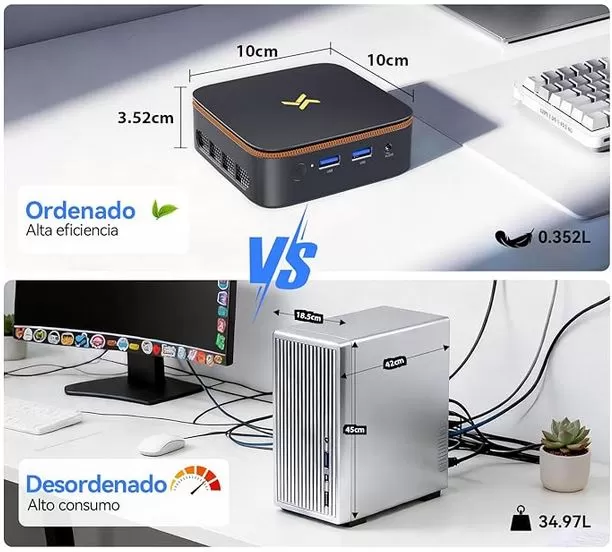
The first impression upon taking the H50 out of the box is clear: it's truly small. Not "small for a computer," but small like a paperback book. Its 265 grams and 10 x 10 cm dimensions make it easy to place, hide, or mount behind a monitor using the included VESA mount.
The chassis is made of black plastic, understated and focused on function rather than premium aesthetics. Don't expect the cool feel of a machined aluminum body or RGB lighting, but you also won't find creaking plastics or cheap buttons. The ventilation grille is well-placed to facilitate airflow to the dual-copper cooling system.
Whether for an office, a classroom, a company reception area, or as a mini-server in a closet, the design is a perfect fit. At home, it also blends seamlessly behind any screen. In short, it's a device that goes unnoticed, and that's a compliment in this case.
🖥️ Screen and multimedia
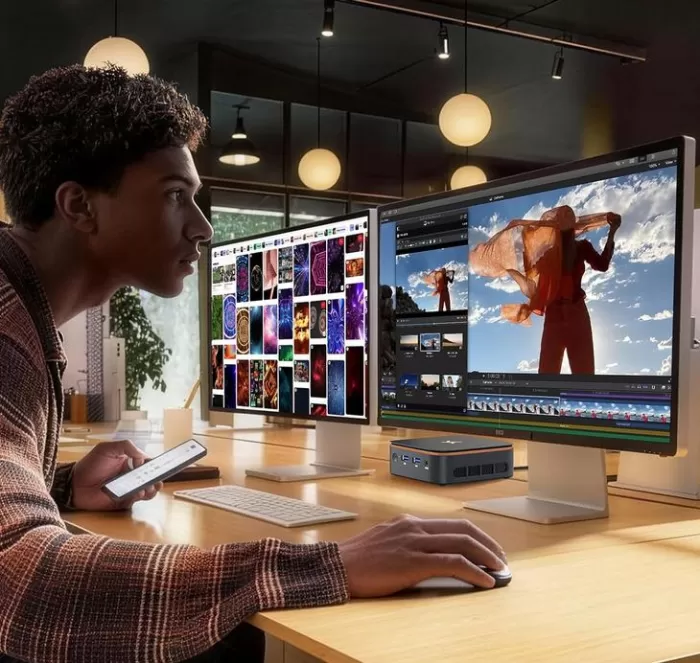
The combination of HDMI 2.0 and DisplayPort 1.4 is one of its strongest points: you can connect two 4K monitors simultaneously, which makes a real difference in productivity. Imagine a spreadsheet or CRM on one monitor and video calls or a web browser on the other, all running seamlessly.
In terms of multimedia, the experience is very good for 1080p video and generally for 4K, although some Amazon users mention that 4K playback can be choppy in certain situations. This could depend on the codec, the source, or the power settings, but it's an honest detail worth knowing before buying it, especially if you're planning on using it as a 4K media center for continuous high-demand viewing. Streaming series—YouTube, Netflix, Prime—works flawlessly.
The 3.5mm jack allows you to connect headphones or external speakers; there is no internal speaker, so you will need an audio peripheral if you use monitors without sound.
⚡ Performance and software
The Ryzen 3 3300U is a 2019 chip manufactured using a 12nm process and Zen+ architecture: 4 cores, 4 threads, base clock of 2.1 GHz and boost clock of 3.5 GHz. In PassMark CPU, it scores approximately 5684 points, placing it on par with an Intel Core i7-2700K or i5-4690K. While clearly sufficient for everyday tasks, it doesn't stand out compared to more recent generations.
In Cinebench R15 Multi, it scores around 510 points, placing it in the lower-mid range of the current catalog. This isn't something to boast about in 2026, but it provides context: for real-world use such as office applications, browsing, video conferencing, document management, a lightweight ERP system, online classes, and streaming, these numbers are more than sufficient.
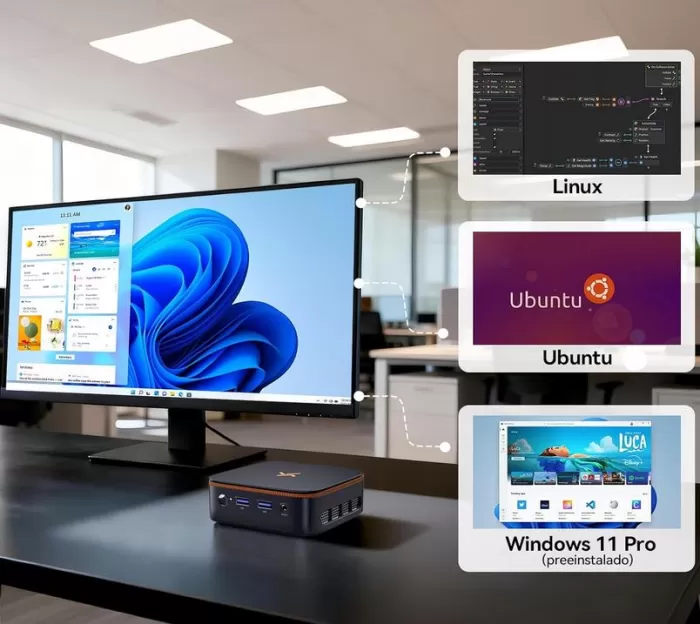
Windows 11 Pro comes pre-installed and, according to the manufacturer, without significant bloatware. Furthermore, its stated compatibility with Linux and Ubuntu is a significant advantage for technicians, homebrewers, or anyone looking to set up a mini-server or lightweight development rig.
Regarding AI —which the manufacturer explicitly mentions— it is true that models like Llama 4 in their smaller versions or basic image workflows can be run, but with very limited expectations: it is not an AI workstation, but a device that can perform light AI tasks functionally.
🔋 Energy consumption and cables
A maximum power consumption of 15W is an excellent figure, contrasting sharply with the typical 65-300W of a traditional tower PC. This implies:
-
Lower electricity costs for continuous use
-
Less generation of ambient heat
-
More stable long-term operation
-
Possibility of use in environments with limited power
The adapter included in the box covers everything, and the HDMI cable saves you from having to search for one in the drawer. Everything worked perfectly from day one.
🌡️ Temperature and noise
The dual dissipation system with copper pipes and a thermal area of 35,455 mm² is more sophisticated than expected in a device of this price and size.
The manufacturer claims a noise level of approximately 25 dB, and several verified Amazon reviews confirm this with terms like "noiseless" and "quiet." A review from chollistas.com also confirms safe operating temperatures under stress during testing, with the fan virtually imperceptible in everyday use.
The honest assessment is this: for office tasks, multimedia, and remote work, the laptop performs very comfortably in terms of temperature. Under sustained, continuous loads—long rendering sessions, compilations, demanding AI—I would expect the fan to kick in more, but it doesn't become annoying thanks to the heatsink design.
🔌 Connectivity and extras
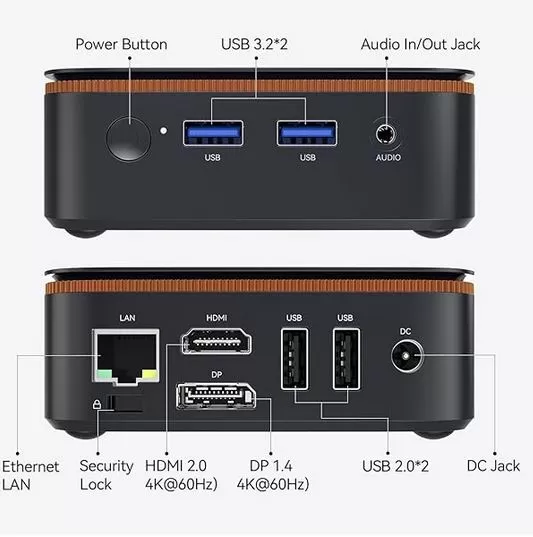
In terms of connectivity, the H50 is well-designed for its size:
-
2 × USB 3.2 (front): for peripherals and fast storage
-
2 × USB 2.0: for keyboard, mouse and low-demand accessories
-
1 × HDMI 2.0: salida principal a monitor o TV
-
1 × DisplayPort 1.4: Second 4K output for dual-monitor setup
-
1 x RJ45 Gigabit: Stable wired network for remote work
-
1 × 3.5 mm Jack: headphones or external speakers
-
Dual-band WiFi 5 (2.4 + 5 GHz): sufficient for normal use
-
Bluetooth 4.2: for wireless keyboards, mice, and headphones
The only slightly outdated point is the Bluetooth 4.2 compared to BT 5.x in more modern devices, although in practical use this is not a problem for most peripherals.
🔧 Expansion and upgrades
It's important to be clear about what the H50 offers and what it doesn't:
-
RAM: 16 GB DDR4 installed and 16 GB is the official maximum. It cannot be upgraded.
-
Main SSD: 512GB M.2, replaceable with a larger one if desired.
-
Storage expansion: Additional slot supports up to 2TB extra storage, ideal for storing projects, multimedia, or backups.
The real limitation of this computer isn't the storage (which is expandable) but the RAM, which is capped at 16 GB. For office use, remote work, and multimedia, that's more than enough, but if you're someone who opens 40 tabs, edits video, or uses multiple virtual machines, this limitation could become noticeable in the long run.
🆚 Comparison with direct competitors
| Model | CPU | RAM/SSD | Consumption | BT / WiFi | Warranty | Approximate price |
|---|---|---|---|---|---|---|
| Huidun H50 | Ryzen 3 3300U | 16GB / 512GB | 15 W | BT 4.2 / WiFi 5 | 3 years | ~150-200 € |
| Beelink SER5 | Ryzen 5 5500U | 16GB / 500GB | ~15-28 W | BT 5.0 / WiFi 6 | 1-3 years | ~220-280 € |
| Minisforum UM350 | Ryzen 5 3550H | 16GB / 512GB | ~35 W | BT 5.1 / WiFi 6 | 1 year | ~200-250 € |
| Blackview MP20 | Ryzen 3 3300U | 16GB / 512GB | ~15 W | BT 5.0 / WiFi 6 | 1 year | ~160-200 € |
The Huidun H50 stands out for its price, 3-year warranty, and energy efficiency. It falls short of Beelink and Minisforum in terms of a more modern CPU, WiFi 6, and newer Bluetooth, but it surpasses them in price and advertised after-sales support.
💬 Reviews on well-known websites
With a 4.6 out of 5 rating based on 251 verified Amazon reviews, the H50 has a solid user reputation for a mini PC from a lesser-known brand. Here's a summary of the top real-world reviews:
"It runs like a dream. It works very well, fast and smoothly. It doesn't overheat, and it's quiet." — Verified purchase, Spain, December 2025
"Very good product, it's very fast, Windows 11 runs like a dream, 500 GB is exactly what I needed." — Julio, Spain, January 2026
"For what it is, it performs quite well. I even tried RBR and it runs decently." — Verified purchase, February 2026
"Soundproof. I didn't expect such good performance." — FB F, February 2026
"Small, powerful, and delivers on its promises. The fan noise is barely noticeable." — Sandra, Spain, January 2026
The only negative point mentioned in the reviews is the USB 3.2 transfer speed, which some users found somewhat limited, and the possible stuttering when playing 4K content.
📊 Technical tests
| Benchmark | Result | Context |
|---|---|---|
| PassMark CPU | ~5,684 points | Nivel i7-2700K |
| Cinebench R15 Multi | ~510 points | Gama media-steel |
| Radeon Vega 6 — Passmark G3D | ~1,314 points | Basic integrated GPU level |
| Vega 6 — GFXBench Aztec Normal | 40,7 FPS | Graphic reference |
| Total system consumption | 15 W | Very efficient |
🎮 Gaming and emulation
The Ryzen 3 3300U with Vega 6 isn't a gaming platform, but it can do more than you might think in certain situations. Here are the approximate real-world gaming performance figures for Vega 6:
| Game | Approximate FPS (720p, low settings) |
|---|---|
| CS:GO / CS2 | ~40-56 FPS |
| Valuing | ~49-97 FPS |
| Fortnite | ~22-33 FPS |
| DOTA 2 | ~42 FPS |
| Forza Horizon 4 | ~24-27 FPS |
| Cyberpunk 2077 | ~7-10 FPS (injugable) |
| Battlefield V | ~21-22 FPS (very low setting) |
What works well?
-
Lightweight esports (Valorant, CS:GO at 720p or even low 900p)
-
Emulation up to PS2 and PSP without problems, Nintendo 64, SNES, Mega Drive, NES
-
GameCube / Wii (Dolphin) emulation with moderate settings
-
Basic PS3 emulation (RPCS3) with realistic expectations
-
2D/3D indie games and titles from 5-8 years ago
What's wrong?
-
AAA modern high resolution
-
PS4 or Switch emulation (very limited)
-
Sustained 4K rendering or editing
❓ Frequently Asked Questions (FAQ)
Is the Huidun H50 suitable for remote work?
Yes, absolutely. It's one of its key uses: Teams, Zoom, Office, ERP, email, and multitasking all run smoothly with 16 GB of RAM.
Can I connect two monitors at the same time?
Yes. The H50 has HDMI 2.0 and DisplayPort 1.4, both with 4K support, allowing for a complete dual-desktop setup.
Can the RAM be expanded?
No, the official maximum is 16 GB and it does not support additional modules.
Can the storage be expanded?
Yes. In addition to the installed 512GB M.2 SSD, there's a slot that supports up to an additional 2TB.
How quiet is it?
The manufacturer specifies ~25 dB, and multiple users on Amazon describe it as "noiseless" under normal use.
Is it compatible with Linux?
Yes, the manufacturer indicates compatibility with Linux and Ubuntu in addition to Windows 11 Pro.
Does it come with a warranty?
Yes, 3-year hardware warranty and 24/7 multilingual technical support.
Is it good for gaming?
For light esports, indie games, and retro emulation, yes. For modern AAA titles, no.
🏁 Final conclusion
The Huidun H50 Mini PC 2026 with Ryzen 3 3300U is a computer that delivers very well on its promises if you use it for what it is intended for: teleworking, office work, multimedia, classroom, reception, light entertainment center and quiet daily use.
Its greatest virtue is not raw power, which it lacks relative to the current catalog, but the combination of 16 GB of RAM + 512 GB SSD + 15 W consumption + VESA + 3-year warranty + affordable price in a format that literally fits in a coat pocket.
Who is it ideal for?
-
Remote workers with a need for dual monitors and limited space
-
Professionals, students and educational centers
-
Users who want to replace an old desktop PC without spending a lot
-
Multimedia centers or secondary living room PCs
-
Homelabbers who want a lightweight Linux server
Who wouldn't want that?
-
Gamers with modern expectations
-
Video editors or intensive professional photography
-
Users who want to upgrade the RAM later
🛒 Where to buy it?
🛒 Amazon:
👉 View Prices for the Huidun H50 Mini PC
🛍️ AliExpress:
👉 View Prices for the Huidun H50 Mini PC