The MINISFORUM MS-A2 is undoubtedly one of the most ambitious mini PCs on the market today. With an 8-core AMD Ryzen 7 7745HX processor, dual 10G network connectivity, three SSD slots, and a PCIe x16 slot, this small metal block directly competes with conventional desktop workstations.
✅ Pros:
-
Exceptional CPU performance for its size
-
Enterprise network connectivity (2x SFP+ 10G + 2x 2.5G LAN)
-
Three M.2 NVMe slots with U.2 support up to 15 TB
-
PCIe x16 slot for real expansion
-
Triple video output up to 8K@60Hz
-
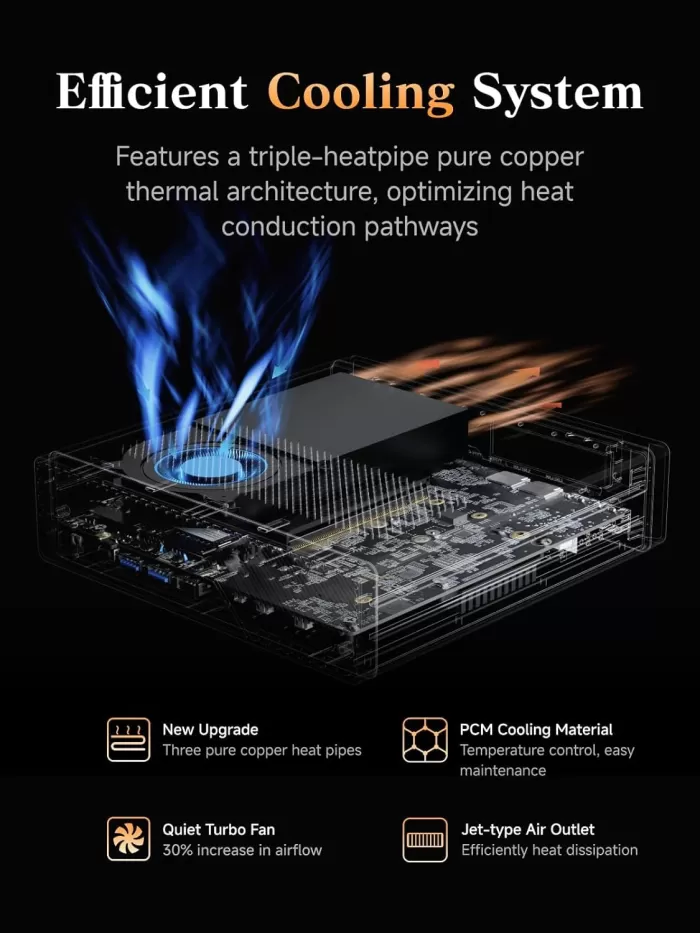
Cooling system with three copper heatpipes
❌ Cons:
-
Without USB4/Thunderbolt (unlike the MS-01)
-
Rather bulky 240W external power supply
🎯 Conclusion: If you're looking for raw power, 10G connectivity, and massive storage in a mini PC, the MS-A2 is hard to beat at this price. It's not perfect, but it's outstanding for the right user.
Amazon: 🛒 View Prices | AliExpress: See Prices
📦 Unboxing and Box Contents
The MS-A2 arrives in a sturdy, double-walled cardboard box. Inside you will find:
-
Mini PC MINISFORUM MS-A2
-
External power adapter 240W (19V/12.63A)
-
Power cable
-
VESA adapter for rear monitor mounting
-
Multilingual Quick Start Guide
-
Screws for SSD installation
The first impression upon taking it out of the box is striking: it weighs more than expected for its size, which conveys a sense of solidity. The matte black finish with visible ventilation grilles on all sides makes it clear that this is no ordinary home mini PC.
🔧 Key Technical Specifications
| Component | Specification |
|---|---|
| CPU | AMD Ryzen 7 7745HX — 8C/16T, Zen 4, up to 5.1 GHz, 32MB L3 |
| Integrated GPU | AMD Radeon 610M, 2200 MHz |
| RAM | DDR5 SO-DIMM x2, up to 96 GB, 5200 MT/s |
| Storage | 3x M.2 NVMe: 2280/22110/U.2 (up to 23TB total), PCIe 4.0 x4 |
| PCIe | 1x PCIe 4.0 x16 (x8 electrical), low profile |
| Video | 1x HDMI 2.1 (8K@60Hz) + 2x USB-C with DP 2.0 (8K@60Hz) |
| Grid | 2x SFP+ 10G (Intel X710) + 2x RJ45 2.5G |
| Wi-Fi | Wi-Fi 6E + Bluetooth 5.2 (M.2 2230 E-Key) |
| Front USB | 2x USB 3.2 Gen1 + 1x USB 2.0 + audio jack |
| Rear USB | 2x USB-C 3.2 Gen2 + 2x USB-A (Gen2/Gen1) |
| Feeding | External power supply 240W (19V/12.63A) |
| Dimensions | 196 × 189 × 48 mm · ~1.7 liters volume |
| compatible OS | Windows 11, Linux |
| Refrigeration | 3 copper heatpipes + phase change materials + turbo fans |
🏗️ Design and Construction Quality
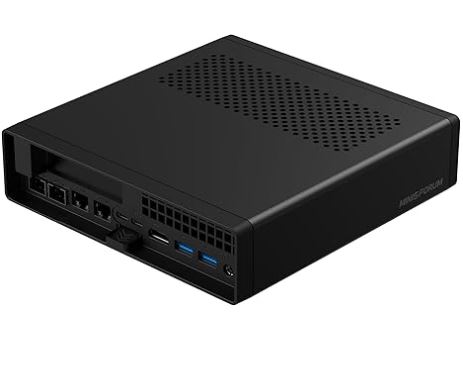
Minisforum MS-A2 rear ports
The MS-A2 uses a chassis very similar to that of the popular MS-01, with a high-density plastic and metal finish that feels solid to the touch. Its dimensions of 196 × 189 × 48 mm place it in the "small form factor" category rather than ultra-compact, but it remains perfectly manageable on a desk or mounted behind a monitor using the included VESA mount.
Access to the interior is the most noteworthy design feature: a single rear latch releases the cover without tools, greatly simplifying the installation of RAM and SSDs. Ventilation grilles run along all sides of the device—top, bottom, and sides—maximizing airflow. The rear panel is where the most visual information is located: four Ethernet ports, HDMI, two USB-C ports, two USB-A ports, and the PCIe expansion slot, all labeled in a way that could be improved, according to the reviewers themselves.
One area for improvement noted by several sources is the lack of clear labels on USB ports to distinguish speeds (Gen1 vs. Gen2) and on RJ45 ports to identify the Intel vs. Realtek controller, which matters if you manually configure drivers in Linux.
🖥️ Screen and Multimedia
The MS-A2 has some of the most capable video outputs on the market in this segment.
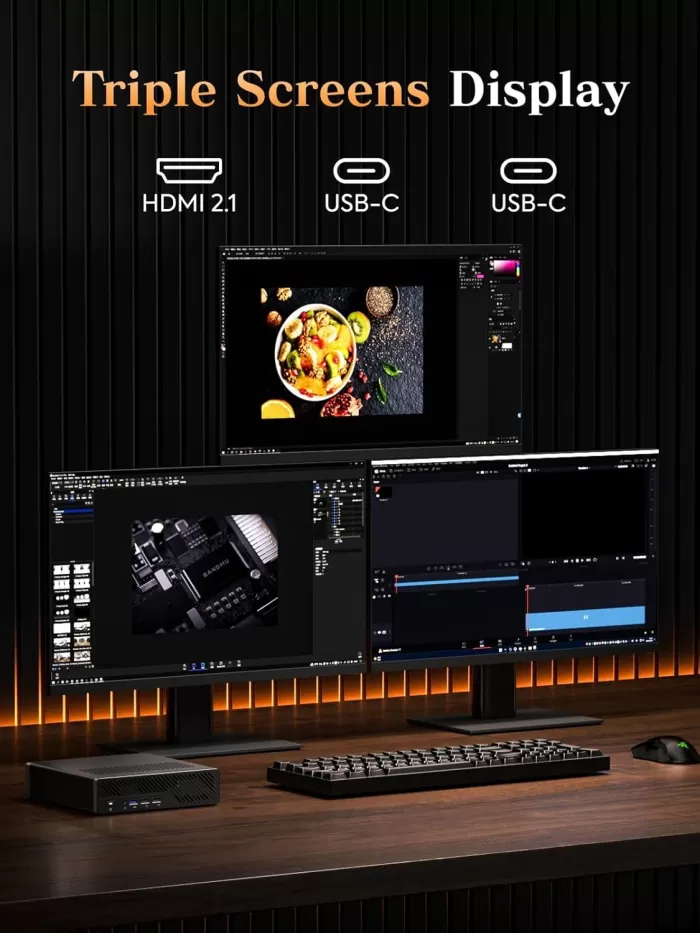
The two USB-C outputs and the HDMI 2.1 output allow you to connect up to three monitors simultaneously, with support for up to 8K@60Hz or 4K@144Hz on each one.
This makes it a serious option for multi-monitor workstations: graphic designers, video editors, or traders can connect their setups without needing an additional graphics card for non-3D use. However, it's important to clarify that the USB-C ports are USB 3.2 Gen2 at 10 Gbps, not USB4 or Thunderbolt, which limits the use of external eGPUs via that connection.
For audio, it has a 3.5mm combo jack (input/output) on the front panel, without a separate advanced HDMI audio output. For audio production, an external USB DAC will suffice.
⚙️ Performance and Software
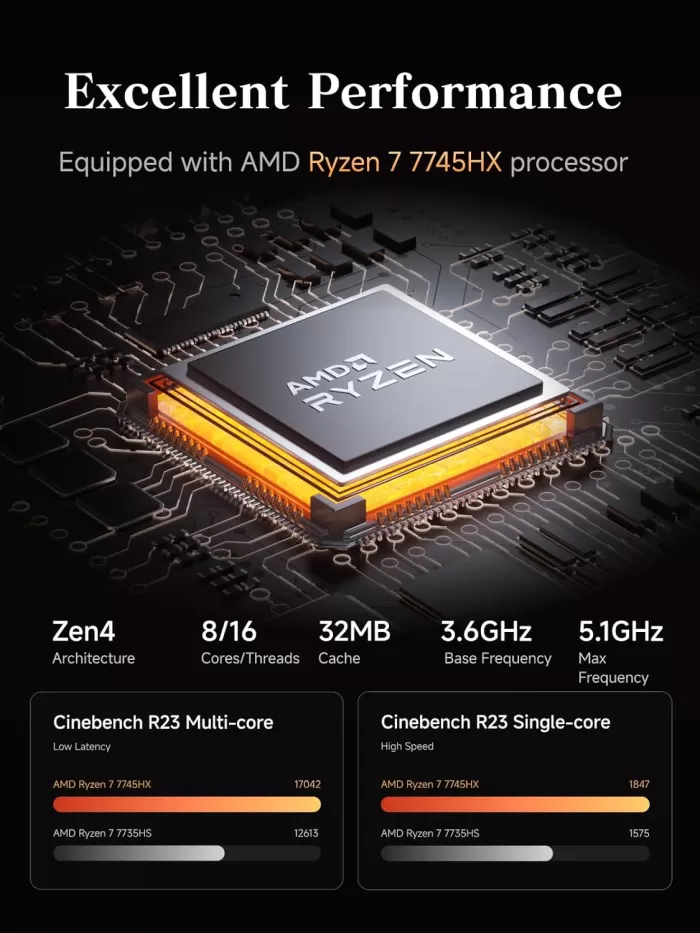
The Ryzen 7 7745HX (8 cores/16 threads, Zen 4, up to 5.1 GHz) delivers excellent performance for multithreaded tasks: code compilation, virtualization, 3D rendering, 4K video editing, and light machine learning. In the variant with 32 GB of DDR5 RAM and a 1 TB NVMe SSD that we reviewed here, the system is completely smooth under intensive multitasking.
The MS-A2 with Ryzen 9 (higher model) achieves the following in published benchmarks:
| Test | Punctuation |
|---|---|
| PCMark 10 Overall | 6,494 |
| Essentials | 11,186 |
| Productivity | 10,353 |
| Digital Content Creation | 6.418 |
| 3DMark CPU Profile (Max Threads) | 10.208 |
| SSD Read (peak) | 5.5–7.3 GB/s |
| SSD writing (peak) | up to 4 GB/s (variable) |
⚠️ Important note: SSD write speeds showed some inconsistency during extended testing in several independent reviews, something to keep in mind in write-intensive workflows.
The MS-A2 is sold without an operating system in the barebones version. Minisforum also offers versions with Windows 11 Pro pre-installed. It works perfectly on Linux (Ubuntu, Debian, Proxmox), although it requires installing three different drivers for the four network ports (Intel i226-V, Realtek RTL8125, and Intel X710).
🔌 Energy Consumption and Cables
The MS-A2 includes an external 240W (19V/12.63A) power supply, a rather bulky component compared to other mini PCs on the market. The actual power consumption measured in tests is:
| State | Consumption |
|---|---|
| Idle | 23–26W |
| Initial Start-up | 35–75W (variable, first 5 min) |
| Moderate load (~50% CPU) | 60–80W |
| Maximum load (CPU + network) | 129W |
For an 8-core PC with dual 10G connectivity, these numbers are reasonable. However, compared to a conventional mini PC used for office tasks (10-15W idle), you have to expect higher energy costs for 24/7 operation.
🌡️ Temperature and Noise (Actual Thermal)
The MS-A2's cooling system is one of its strongest features: three pure copper heatpipes, phase-change thermal compounds, and turbo fans that increase airflow by 30% compared to conventional designs. The reactor-type direct extraction design keeps temperatures under control even during continuous 24/7 operation.
Actual temperature data recorded in sustained load tests:
| Condition | Temperature |
|---|---|
| CPU at idle | 31–32°C |
| CPU under sustained load (10G + CPU) | 50–52°C |
| Front of chassis (1h of use 10G) | 41–43°C |
| Rear area (10G ports) | ~50°C |
Regarding noise: 36–38 dB at rest and 41–43 dB under load, which puts it at an acceptable level for the office, although noticeably more audible than a fanless or low-power mini PC.
⚠️ Attention: If you plan to stack multiple MS-A2s in a home rack or homelab, be aware that the top and bottom vents can transfer heat between adjacent units.
🔗 Connectivity and Extras
Minisforum MS-A2 mini PC
Connectivity, along with performance, is the MS-A2's greatest strength:
-
2x SFP+ 10G (Intel X710) — ideal for homelab, NAS, high-speed routing
-
2x RJ45 2.5G LAN (Intel i226-V + Realtek RTL8125)
-
Wi-Fi 6E — up to 2.4 Gbps wireless
-
Bluetooth 5.2
-
HDMI 2.1 (8K@60Hz)
-
2x USB-C 3.2 Gen2 with DP 2.0 (8K@60Hz) — no USB4 or Thunderbolt
-
2x rear USB-A 3.2 Gen2 + 2x front USB-A (Gen1 + USB 2.0)
-
3.5mm audio jack combo (front)
-
1x PCIe 4.0 x16 physical (x8 electrical), low profile
What it lacks and some users miss: USB4/Thunderbolt 4, NFC, fingerprint reader, IP certification for water/dust resistance, IPMI/out-of-band remote management.
🔧 Expansion and Upgrades
One of the great advantages of the MS-A2 is its expandability-oriented design:
RAM:
-
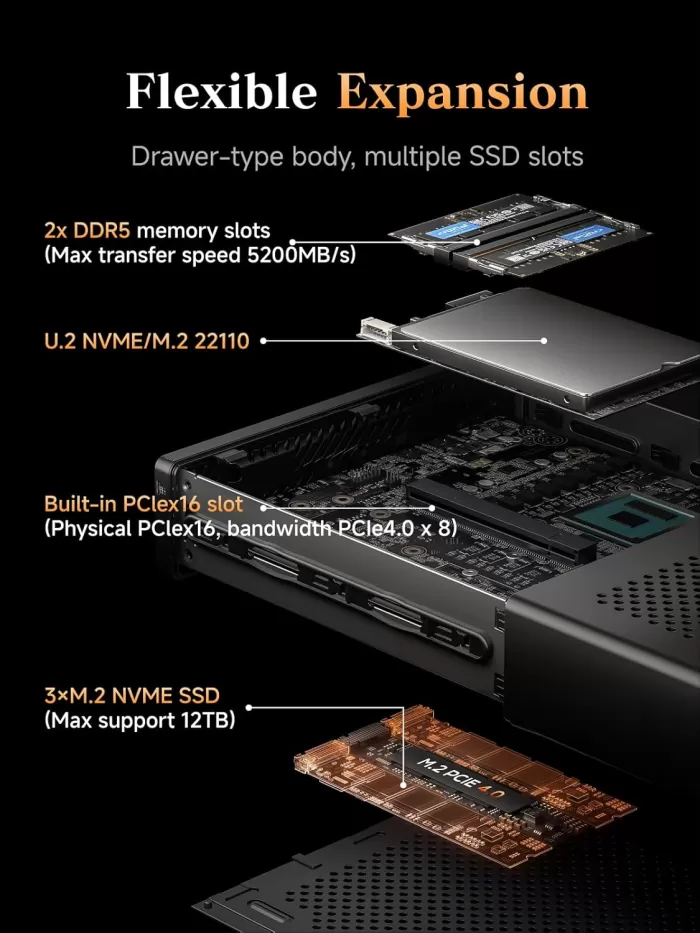
2 DDR5 SO-DIMM slots
-
Officially up to 96 GB (2x 48 GB at 5200 MT/s with Ryzen 7000)
-
Users have confirmed it works with 128 GB (2x 64 GB) in unofficial tests
-
It does not support ECC (a significant limitation for critical server use)
Storage:
-
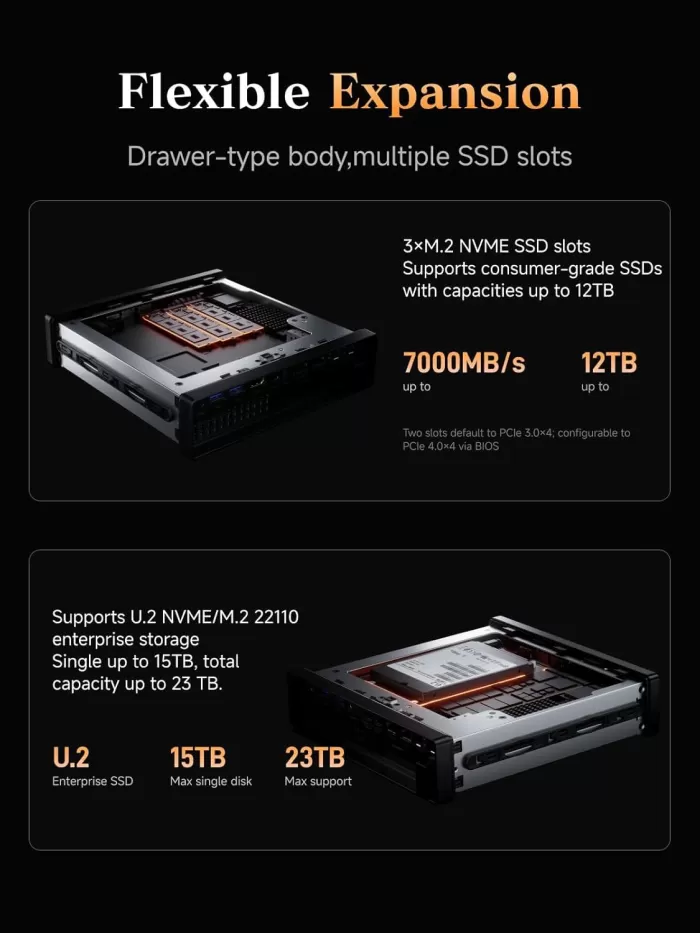
Slot 1: M.2 2280 or U.2 NVMe — up to 15 TB (max. 7mm thickness), PCIe 4.0 x4
-
Slots 2 and 3: M.2 2280 or 22110 (110mm) — up to 4 TB each, PCIe 4.0 x4
-
Supports RAID 0 and RAID 1
-
Total possible capacity: up to 23 TB in maximum configuration
-
Minisforum has planned an additional 6x M.2 PCIe expansion card (currently in development)
PCIe:
-
PCIe 4.0 x16 physical slot (x8 electrical), low profile half-height
-
It allows the installation of: additional network cards (25G, 40G), low-profile external GPUs, HBA controllers for NAS, and AI accelerators.
-
Supports splitting into 2x PCIe x4 (for two simultaneous cards)
Wi-Fi:
-
The Wi-Fi 6E module can be replaced (M.2 2230 E-Key), enabling a Google Coral module or additional network card.
🆚 Comparison with Direct Competitors
| Feature | MINISFORUM MS-A2 | MINISFORUM MS-01 | Beelink EQR6 | GMKtec G9 |
|---|---|---|---|---|
| CPU | Ryzen 7 7745HX (8C/16T) | Intel i9-13900H (14C/20T) | Ryzen 9 6900HX | Ryzen 9 7945HX |
| max RAM | 96 GB DDR5 | 64 GB DDR5 | 64 GB DDR5 | 64 GB DDR5 |
| SSD slots | 3x M.2 + U.2 | 3x M.2 | 2x M.2 | 4x M.2 + ECC |
| 10G Ethernet | ✅ 2x SFP+ | ✅ 2x SFP+ | ❌ | ❌ |
| USB4/TB | ❌ | ✅ 2x USB4 40G | ❌ | ❌ |
| PCIe expansion | ✅ x16/x8 | ✅ x8 | ❌ | ❌ |
| ECC RAM | ❌ | ❌ | ❌ | ✅ |
| Approximate price | ~$639–$839 | ~$450–$650 | ~$300–$400 | ~$400–$500 |
| Best for | Workstation/Homelab 10G | eGPU/Thunderbolt clusters | Powerful office suite | NAS/ECC storage |
💬 Reviews on Well-Known Pages
Reviews of the MS-A2 are largely positive on a technical level, with some important caveats:
ServeTheHome (May 2025) — Rating: ⭐⭐⭐⭐½
"An almost perfect homelab system… the best homelab node you can get in its class." The review highlights the robust performance and 10G connectivity, but warns that stacking units can cause overheating issues. They also confirm compatibility with 128 GB of RAM (unofficial).
NASCompares (April 2025) — Rating: ⭐⭐⭐⭐
It conditionsly rates the MS-A2 as "The MS-01 Killer": superior in CPU and storage, inferior in external connectivity (no USB4). It notes inconsistencies in SSD write speeds. "Best suited for buyers who prioritize multi-threaded performance and dense internal storage."
NotebookCheck (July 2025)
It highlights the workstation performance and upgrade options such as the GPU, but confirms that the integrated Radeon 610M GPU has limitations for intensive gaming and rendering.
HostBor.com (July 2025)
"A serious contender for professionals… but definitely not for everyone." They explicitly recommend buying it on Amazon rather than directly from Minisforum, due to the marketplace's guarantees.
Reddit r/MiniPCs — User opinions:
The most frequent comments from real users point to:
-
✅ Excellent for Proxmox, virtualization, and homelab
-
✅ Superior CPU performance to MS-01 in multithreaded situations
-
⚠️ Serious problems with Minisforum's technical service and warranty (warranty returns, depreciation fees, long response times)
-
⚠️ General recommendation: always buy through Amazon for Section 75 protection or marketplace guarantees
🔬 Technical Tests
Data extracted from independent benchmarks performed by ServeTheHome and NASCompares with the Ryzen 9 model (the Ryzen 7 in the analysis would be slightly inferior in multi-thread but comparable in single-thread):
CPU:
| Test | Result |
|---|---|
| PCMark 10 Overall | 6,494 pts |
| App Start-Up | 15,370 pts |
| Spreadsheets | 13,458 pts |
| 3DMark CPU Profile (Max Threads) | 10,208 pts |
| 3DMark CPU Profile (1 Thread) | 1,235 pts |
Integrated GPU (Radeon 610M):
| Test | Result |
|---|---|
| 3DMark Steel Nomad Light | 605 pts |
💡 The integrated GPU is suitable for 2D/office use and video, but not for AAA gaming or serious 3D rendering without an external eGPU.
Storage (SSD NVMe PCIe 4.0):
| Test | Result |
|---|---|
| Sequential Reading (AJA) | 5.5 GB/s |
| Sequential Reading (CrystalDiskMark) | 7.3 GB/s |
| Sequential Writing (peak) | up to 4 GB/s (inconsistent) |
Network (10G SFP+ Intel X710):
-
10G transfers verified, stable and within the expected ranges for an Intel X710
-
Active ventilation is recommended for SFP+ modules under sustained load.
🎮 Gaming and Emulation
The MS-A2 isn't a basic gaming mini PC, but it has interesting potential depending on the scenario:
Gaming with integrated GPU (Radeon 610M):
-
Lightweight and graphically unreliable games: ✅ Playable at 1080p
-
Recent AAA games (Cyberpunk, Alan Wake 2): ❌ Not recommended
-
Retro emulation (PS2, GameCube, Wii, Switch): ✅ Excellent — the power of the Ryzen 7 7745HX works wonders in emulators like RPCS3, Yuzu/Ryujinx, or Dolphin
Gaming with external eGPU (via PCIe x16/x8):
-
A low-profile GPU like an RTX 4060 LP would physically fit in the half-height PCIe slot
-
Several users are actively asking about this setting.
-
With an eGPU enclosure via PCIe, competitive gaming results can be achieved, although the slot operates at x8 electrical speed.
-
Important: manage the GPU temperature well in that compact chassis
Summary emulation:
| System | Performance |
|---|---|
| PS2 (PCSX2) | ⭐⭐⭐⭐⭐ Perfect |
| GameCube/Wii (Dolphin) | ⭐⭐⭐⭐⭐ Perfect |
| Nintendo Switch (Ryujinx) | ⭐⭐⭐⭐ Very good |
| PS3 (RPCS3) | ⭐⭐⭐⭐ Good/Very good |
| Xbox 360 (Xenia) | ⭐⭐⭐ Acceptable |
| PS4/Xbox One | ❌ Insufficient GPU without eGPU |
❓ Frequently Asked Questions (FAQ)
Is it compatible with Linux and Proxmox?
Yes, absolutely. It's one of its most popular configurations. It requires manually installing drivers for the three NICs (Intel X710, i226-V, Realtek RTL8125) on some distributions.
What is the maximum amount of RAM I can install?
Officially, 96 GB (2 x 48 GB DDR5 SO-DIMM). Unofficially, some users have achieved 128 GB (2 x 64 GB), although full stability is not guaranteed.
Can I install a discrete GPU?
Yes, via the half-height PCIe x16 (electrical x8) slot. It supports low-profile cards like the RTX 4060 LP or other GPUs via OCuLink/riser adapters.
Does the MS-A2 support ECC RAM?
No. This is a significant limitation for users who require data integrity on the server.
Is it better to buy it directly or on Amazon?
Amazon. Multiple reviewers and users report serious problems with Minisforum's technical support and direct warranty. Buying on Amazon offers additional protection.
Is it quiet?
At 36–38 dB at rest, it's quite discreet. Under load, it rises to 41–43 dB, audible in a quiet room but not bothersome in an office environment.
Does it run 24/7 without issues?
Designed for that. Sustained load temperatures (50–52°C on CPU) are well below the critical limit.
🏁 Final Conclusion
The MINISFORUM MS-A2 Ryzen 7 7745HX is the most workstation- and homelab-oriented mini PC on the market in its price segment. It offers a unique combination of high-end CPU performance, enterprise-grade network connectivity (4 Ethernet ports, dual 10G SFP+), expandable mass storage, and a true PCIe slot for expansion.
Who is it ideal for?
-
👨💻 Developers running multiple virtual machines (Proxmox, VMware)
-
🌐 SysAdmins with advanced homelab
-
🎬 Video editors and 4K content creators
-
📡 Users with 10G network needs (NAS, advanced router, local servers)
-
🔬 Researchers running lightweight AI models or local LLMs
-
🎮 Lovers of advanced retro emulation (PS3, Switch)
Who is it NOT ideal for?
-
Users who need USB4/Thunderbolt (MS-01 is best)
-
Gamers who prioritize GPU over CPU (best if you have a mini PC with a factory-integrated eGPU)
-
Those who need ECC RAM for critical servers
-
Users on a tight budget (cheaper alternatives exist for office use)
In short: if you need the best in a mini PC workstation and can accept its price and the well-known limitations of Minisforum's technical support, the MS-A2 is unlikely to disappoint you technically.
🛒 Where to buy the MINISFORUM MS-A2?
🛡️ We recommend always buying through Amazon for greater protection in warranty and returns.
| Version | Link |
|---|---|
| 🟡 Barebone (no RAM/SSD/OS) | 🛒 View Prices |
| 🟢 32 GB DDR5 + 1 TB NVMe | 🛒 View Prices |
| 🔵 View on AliExpress | View on AliExpress → |