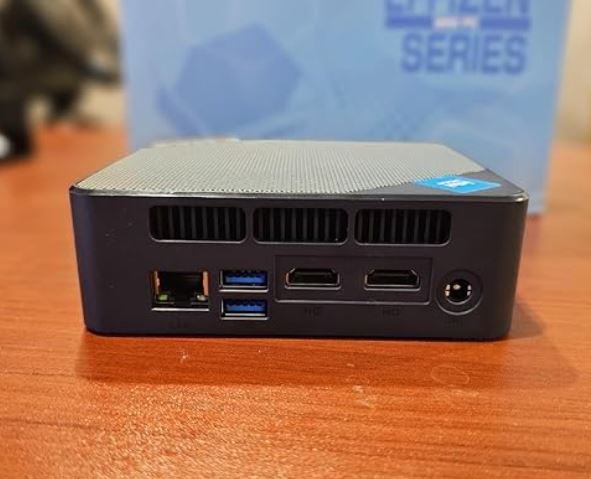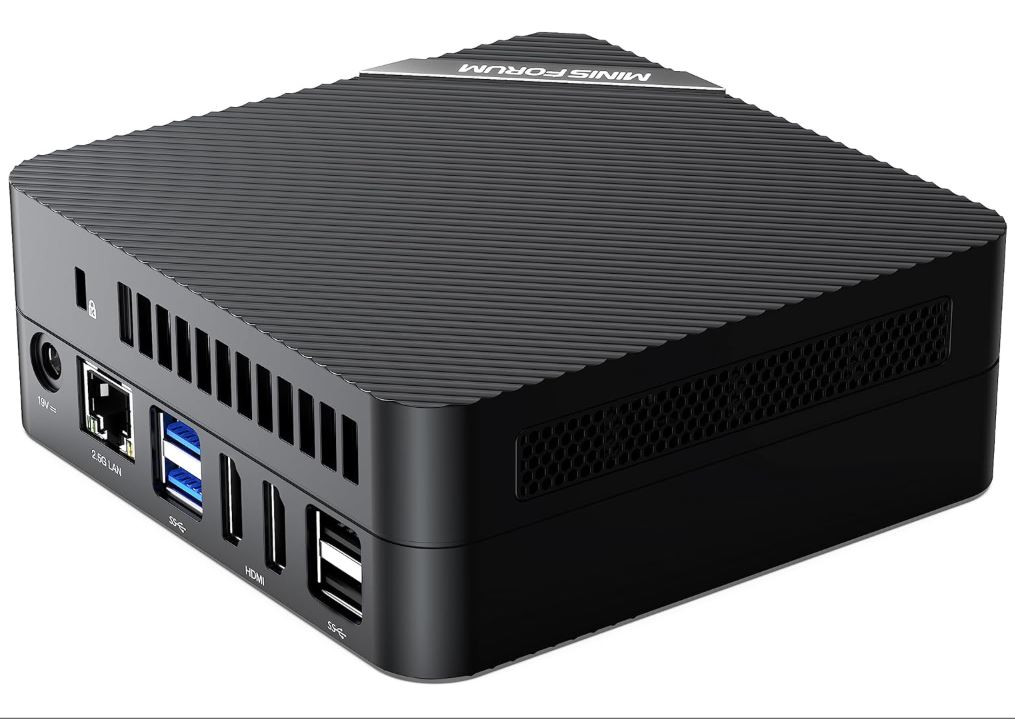
The MINISFORUM UM773 Lite is one of the strongest offerings in the mini PC segment with integrated graphics.
Its AMD Ryzen 7 7735HS processor along with the Radeon 680M make it a machine capable of covering productivity, multimedia work and even light gaming from a chassis that fits in the palm of your hand.
✅ Pros:
-
High-end AMD Ryzen 7 performance with 8 cores / 16 threads
-
Radeon 680M integrated graphics: the best iGPU on the market at the time
-
Triple video output + USB4 support with 8K@60Hz
-
DDR5 RAM expandable up to 64 GB; additional 2.5" drive slot
-
Liquid metal thermal paste for greater temperature efficiency
❌ Contras:
-
Somewhat high resting temperatures (60–70 °C in some cases)
-
No SD card reader or NFC
Quick conclusion: If you're looking for a quiet, versatile, and expandable AMD mini PC, the UM773 Lite is a very worthwhile purchase, especially in its barebone version (without RAM and without storage).
🛒 View Prices for the MINISFORUM UM773 Lite Mini PC
📦 Unboxing and Box Contents
The box arrives well protected with double-layered foam. Inside you will find:
-
Mini PC MINISFORUM UM773 Lite
-
19V DC power adapter (included)
-
Cable HDMI
-
VESA mount for attaching to the back of the monitor
-
Quick Start Guide
The packaging is simple but functional, with no extra accessories. It obviously doesn't include a monitor or keyboard.
📋 Technical Specifications
| Component | Detail |
|---|---|
| 🧠 Processor | AMD Ryzen 7 7735HS — 8C/16T, 3.2–4.75 GHz |
| 🎨 Integrated GPU | AMD Radeon 680M — 12 CUs RDNA 2, 2200 MHz |
| 💾 RAM | 32 GB DDR5 4800 MHz (2× SODIMM, up to 64 GB) |
| 💿 Storage | 1TB M.2 2280 PCIe 4.0 NVMe |
| 🔌 Connectivity | 2× HDMI 4K@60Hz, 1× USB4 (8K@60Hz / 40 Gbps), 4× USB 3.2 Tipo A, 1× USB 3.2 Tipo C (datos) |
| 🌐 Red | Wi-Fi 6, Bluetooth 5.2, RJ45 2.5G LAN |
| 🔊 Audio | 3.5 mm combo jack (audio + microphone) |
| ⚡ Nutrition | DC 19V / ~120W adapter |
| 📐 Dimensions | 12.8 × 12.8 × 5.4 cm aprox. |
| ⚖️ Weight | 1.73 kg (with adapter) |
| 💻 SO | Windows 11 Pro (version with RAM/SSD) |
| 💰 Price | Barebone: 295 € / 345$ — 32GB+1TB: 727 € / 851$ |
🏗️ Design and Construction Quality
Mini forum UM773 Lite
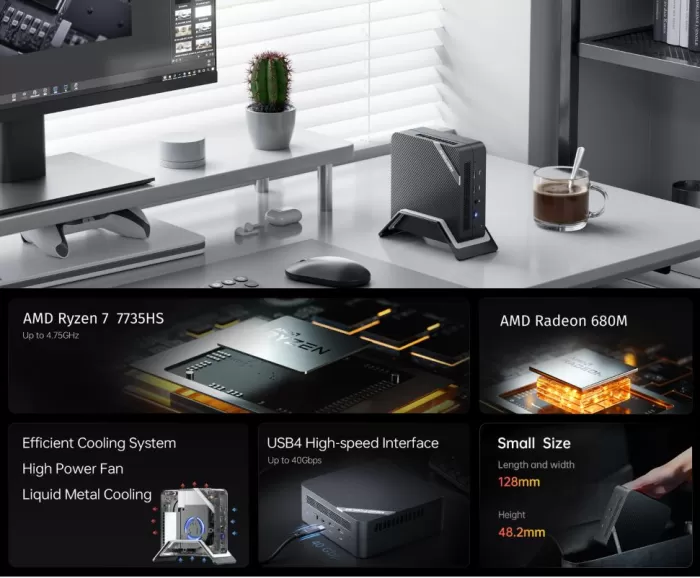
The UM773 Lite maintains the Venus series' design language: a compact, square chassis (just over 12 cm on each side) with a combination of plastic and metal that conveys solidity without appearing cold or industrial. The rounded corners and side vents give it a professional look that fits perfectly on a desk or mounted behind a monitor using the included VESA mount.
The matte black finish doesn't visibly attract dust, and the buttons (front power, reset) have a firm feel. It doesn't squeak or flex when you pick it up, which is quite remarkable for mini PCs at this price. Weighing only 1.73 kg with the included power adapter, it's perfectly portable.
🖥️ Screen and Multimedia
Minisforum UM773 Lite mini PC
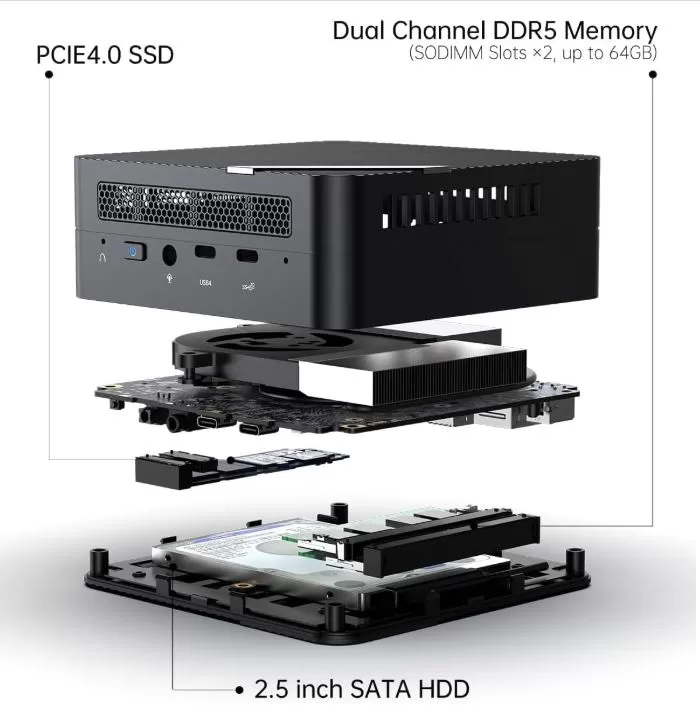
The UM773 Lite stands out for its versatile video outputs: it supports up to three simultaneous displays thanks to its two HDMI 4K@60Hz ports and a USB4 port that allows for outputs up to 8K@60Hz. This latter connection is also compatible with eGPUs (external GPUs) for those who wish to expand the graphics capabilities in the future.
In terms of audio, it has a combined 3.5 mm jack (headphones + microphone), sufficient for everyday use. It doesn't include built-in speakers, which is common in mini PCs. Support for portable touchscreens via USB4 (with 5V/5A power included in the cable) is an interesting differentiating factor for mobile setups or work environments with a portable monitor.
🚀 Performance and Software
The AMD Ryzen 7 7735HS, with 8 cores and 16 threads reaching up to 4.75 GHz, is one of the most powerful APUs available in compact mini PCs. In benchmarks, it scores approximately 2129 points in single-core and 10,376 in multi-core on Geekbench 6, placing it on par with systems using previous-generation Intel Core i9 processors. NotebookCheck awarded it a score of 41.1 in multi-core performance tests.
In real-world productivity with intensive multitasking (20+ tabs, Zoom video calls, Excel), peak RAM usage reaches 18 GB out of the available 32 GB, validating the need for that amount of memory for demanding professional work. System performance in office tasks and light video editing is excellent.
The system comes with the full version of Windows 11 Pro. Minisforum tends to keep the OS fairly clean of bloatware, although it includes its own TDP (Terminal Power Deviation) control software, which is worth knowing about to optimize performance according to usage.
🛒 View Prices for the MINISFORUM UM773 Lite Mini PC
⚡ Energy Consumption and Cables
The UM773 Lite is efficient for its performance class. Actual power consumption data from the wall outlet is:
-
🟢 Standby: ~12 W average
-
🟡 Gaming / medium load: ~71 W average
-
🔴 Maximum load (stress test): up to 93 W peak from the wall
The configurable TDP ranges from 25W to 54W from BIOS, with a boost up to 65W. The included adapter is DC 19V with a type C/EF plug (compatible with standard European plugs), making it easy to use in Spain and the Canary Islands without an additional adapter.
🌡️ Temperature and Noise (Actual Thermal)
Minisforum uses liquid metal thermal paste at the CPU-heatsink contact, along with a dual heat pipe system and a next-generation 120-blade fan. Under normal, well-configured conditions:
-
Resting temperature: 50–60 °C (CPU)
-
Light load (browsing, video): 60–70 °C
-
Gaming / full load: 80–87 °C
⚠️ Some users have reported higher idle temperatures (~70 °C), generally associated with improper application of the factory-applied liquid metal paste. If this occurs, reapplying high-quality, conventional thermal paste will immediately resolve the issue.
The noise level under load remains in the 30–40 dB range during normal use, making it acceptable for desktop workstations. Only under sustained maximum stress does the fan become clearly audible.
🔌 Connectivity and Extras
Connectivity is one of the UM773 Lite's strong points:
-
Vídeo: 2× HDMI 2.0 (4K@60Hz) + 1× USB4 (8K@60Hz, compatible eGPU)
-
USB: 4× USB 3.2 Gen 2 Type A + 1× USB 3.2 Type C (data only, right side)
-
Red: RJ45 2.5 Gigabit Ethernet + Wi-Fi 6 (802.11ax) + Bluetooth 5.2
-
Audio: Jack 3.5 mm combo
-
Kensington security slot
❌ What it doesn't have: SD card reader, NFC, certified Thunderbolt port (USB4 offers similar functionality but is not official Thunderbolt), IP rating, or fingerprint sensor.
🔧 Expansion and Upgrades
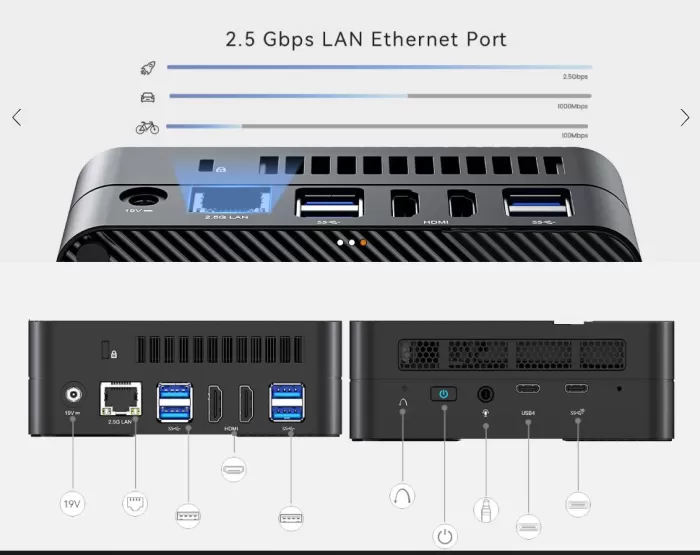
One of the great advantages of the UM773 Lite is its upgrade-oriented design:
-
RAM: 2× SODIMM DDR5 slots — expandable up to 64GB (currently comes with 2× 16GB)
-
Primary SSD: M.2 2280 PCIe 4.0 slot — replaceable with any compatible NVMe
-
Secondary drive: Additional slot for 2.5" SATA 3.0 drive (HDD or SSD) — no external space cost
-
eGPU: External GPU connection via USB4 to boost graphics performance
-
Accessing the interior requires removing 4 screws at the base — a simple and documented process
🆚 Comparison with Direct Competitors
| Model | CPU | iGPU | RAM | Approx. price |
|---|---|---|---|---|
| MINI FORUM UM773 Lite | Ryzen 7 7735HS | Radeon 680M | 32 GB DDR5 | 295 € (BB) / 727 € (32G+1TB) |
| Beelink SER6 Pro | Ryzen 9 6900HX | Radeon 680M | 32 GB DDR5 | ~400–500 € |
| MINI FORUM UM690S | Ryzen 9 6900HX | Radeon 680M | 32 GB DDR5 | ~490 € |
| Beelink GTi14 | Intel Core Ultra 5 | Arc Graphics | 32 GB DDR5 | ~400–450 € |
| GMKtec NucBox G3 Plus | Ryzen 7 7840HS | Radeon 780M | 32 GB DDR5 | ~350–500 € |
💡 Note: The GMKtec Ryzen 7840HS with Radeon 780M (RDNA 3) outperforms the 7735HS with 680M in terms of GPU performance. If gaming is your priority, consider this option. If you prioritize barebone price and triple-display connectivity, the UM773 Lite wins.
🗣️ Reviews on Well-Known Pages
External reviews of the UM773 Lite are consistently positive, especially regarding its performance/price ratio:
-
NotebookCheck highlights the dual liquid metal cooling system and rates the processor's performance at 41.1 points, placing it among the most capable APUs in its category.
-
ETA Prime (YouTube) recorded a score of ~2,650 pts in 3DMark Time Spy, slightly below the UM690 but with a more competitive starting price.
-
Reddit r/MiniPCs shows mixed opinions: users praise the raw performance but warn about the potential for uneven application of the factory-applied liquid metal paste on some units. The consensus is that Beelink has a reputation for more consistent quality, but Minisforum offers more features for the price.
-
AliExpress Wiki lists the UM773 Lite as one of the best mini PC options under $800 due to its expansion and cooling capabilities.
-
realusescore.com conducted real office environment tests, confirming that the CPU maintains headroom even at 55–70% usage with intensive professional workloads.
🧪 Technical Tests
The actual benchmarks show very consistent results:
CPU Performance
| Test | Result | Opinion |
|---|---|---|
| Geekbench 6 Single-Core | ~2.129 pts | Excellent for everyday use and single-threaded apps |
| Geekbench 6 Multi-Core | ~10.376 pts | Comparable to mid-to-high-end gaming laptops |
| Cinebench R23 Multi-Core | ~14.000–15.000 pts | Impressive for a 12cm chassis |
💬 My opinion: These numbers aren't just figures on paper. In real-world use, you notice the difference compared to previous generations: opening 15 tabs in Chrome while running Notion, Spotify, and an active video call doesn't break a sweat. For a mini PC, that's saying something.
GPU (Radeon 680M)
| Test | Result | Opinion |
|---|---|---|
| 3DMark Time Spy | ~2.600–2.700 pts | It outperforms the GTX 1050 Ti in many scenarios |
| GPU-Z maximum frequency | 2200 MHz | The fastest iGPU in RDNA 2 |
💬 My opinion: The Radeon 680M pleasantly surprised me. Don't expect miracles, but for an integrated graphics card —no dedicated card, no extra space required—running Forza Horizon 5 at 1080p with high settings is something that would have been unthinkable a few years ago on a machine this size. It's the kind of performance that makes you reconsider whether you really need a discrete GPU for casual gaming.
Storage
| Test | Result | Opinion |
|---|---|---|
| Sequential reading (PCIe 4.0) | ~5,000–6,500 MB/s | High-end speeds |
| Sequential writing | ~4,000–5,500 MB/s | Without bottlenecks |
| Windows 11 startup | < 10 seconds | Virtually instantaneous |
💬 My opinion: The PCIe 4.0 SSD is a great addition that many mini PC manufacturers still haven't implemented in this range. The difference compared to PCIe 3.0 is noticeable in large file transfers, code compilations, and loading heavy projects. It's not the fastest SSD on the market, but it's far better than you'd expect at this price.
Resource Usage Under Actual Load
| Scenery | CPU | RAM | Wall consumption |
|---|---|---|---|
| Rest (desk) | 3–5% | ~6–7 GB | ~12 W |
| Multitasking office | 55–70% | ~18 GB | ~45–60 W |
| Gaming 1080p | 70–85% | ~20 GB | ~71 W |
| Maximum stress test | 100% | ~22 GB | ~93 W |
💬 My opinion: What impressed me most is the standby power consumption: a mere 12W from the wall outlet. Compared to a conventional desktop PC that consumes 60–80W just by being switched on, the UM773 Lite is remarkably efficient. Over an 8-hour workday, the difference in the electricity bill is real and significant. For those who use it as an HTPC for many hours a day, this is a crucial factor.
Overall Performance Assessment
🏆 Personal rating: 8.5 / 10
The UM773 Lite delivers performance that far exceeds expectations for its form factor. The only thing preventing it from achieving a perfect 9 is the GPU: the Radeon 680M is fantastic for a 2023 iGPU, but by 2025, mini PCs with Radeon 780M (RDNA 3) graphics cards were available at similar prices, outperforming it by up to 30% in graphics tasks. If gaming is your top priority, that difference could be a deciding factor. If you're looking for a well-rounded and versatile machine for work and casual gaming, the UM773 Lite remains a solid choice that won't disappoint.
-
The included PCIe 4.0 SSD achieves sequential read speeds of ~5,000–6,500 MB/s, resulting in system boot times of less than 10 seconds and virtually instant application loading.
Actual resource usage:
-
Average CPU usage in professional multitasking: 55–70%
-
Peak RAM under professional load: 18 GB / 32 GB
-
Power consumption at full load: up to 93 W
🎮 Gaming and Emulation
The Radeon 680M is the most powerful iGPU of its generation (RDNA 2) and the UM773 Lite proves capable of real gaming:
Gaming moderno a 1080p:
-
Forza Horizon 5 — High settings 1080p: 30–50+ smooth FPS
-
Spider-Man Remastered — 1080p medium-low: ~37 FPS (comparable to GTX 1060 on some settings)
-
Resident Evil 4 Remake — 1080p low-medium: playable at ~40–60 FPS
-
Hi-Fi Rush — 1080p High: Very smooth experience
⚠️ 4K in modern games is not viable with this iGPU. 1080p is the sweet spot.
Retro emulation:
-
PS2 (PCSX2) — 4× native resolution: ~50 stable FPS on SSX3
-
PS3 (RPCS3) — With a TDP of 54W and 4GB of allocated VRAM: competitive performance, slightly surpasses the NUC 13 Pro
-
Nintendo Switch (Yuzu/Ryujinx) — First-party games run well at native speed
-
GameCube/Wii (Dolphin) — Perfecto a 4K sin problema
-
PS1, N64, Dreamcast, Saturn — No problem at all
❓ Frequently Asked Questions (FAQ)
Can I play without a dedicated graphics card?
Yes. The Radeon 680M allows for true 1080p gaming in many modern titles and emulation up to PS3 with good results.
Does it come with Windows pre-installed?
The version with RAM and SSD includes Windows 11 Pro. The barebone version does not include an operating system.
Is it compatible with Linux?
Yes. Ubuntu, Fedora, and others work well. AMD drivers on Linux have excellent support for this architecture.
Can I connect 3 monitors at once?
Yes: 2× HDMI + 1× USB4 (with DP adapter or compatible monitor) for a triple screen setup.
What's the difference between the UM773 and the UM773 Lite?
The UM773 Lite is the more affordable and compact version. The standard UM773 has a larger chassis with improved active cooling, but the APU is identical.
Can the RAM be expanded?
Yes, up to 64 GB DDR5 with two SODIMM modules.
How do I add a second drive?
By opening the case (4 screws) you can install a 2.5" SATA SSD or HDD in the dedicated slot.
✅ Final Conclusion
The MINISFORUM UM773 Lite is ideal for:
-
👨💼 Professionals and remote workers who need a powerful, quiet computer with multi-screen support
-
🎮 Casual gamers who want to play modern titles at 1080p without a dedicated GPU
-
🕹️ Emulation enthusiasts (PS2, PS3, Switch) looking for the best integrated iGPU
-
🖥️ HTPC users for living room with 4K/8K video support
-
💻 Web developers who need a powerful and compact secondary computer
Is it worth it? The barebone version at €295 is an excellent buy if you already have DDR5 RAM and an SSD. The 32GB + 1TB version at €727 is expensive compared to competitors like the Beelink GTi14 or the GMKtec NucBox G3 Plus (with a more modern Radeon 780M). If price isn't a barrier and you value USB4 connectivity and triple-screen support out of the box, it remains a very solid option.
Alternatives to consider:
-
GMKtec NucBox G3 Plus (Ryzen 7 7840HS + 780M) — better GPU, similar price
-
Beelink SER6 Pro (6900HX + 680M) — greater reliability perceived by the community
-
MINISFORUM UM790 Pro (Ryzen 9 7940HS + 780M) — a step up in category
🛒 Where to buy it?
Get the best price based on your platform preference:
| Platform | Link |
|---|---|
| 🛍️ Amazon ES | 🛒 View Prices for the MINISFORUM UM773 Lite Mini PC |
| 📦 AliExpress | See MINISFORUM UM773 Lite on AliExpress → |
💡 Buying tip: The barebone version on Amazon usually has better return policies (30 days). If you buy on AliExpress, make sure the seller has ratings above 95% and active buyer protection. For the version with RAM and SSD, compare prices between Amazon and the official Minisforum store, as they frequently offer direct discounts.