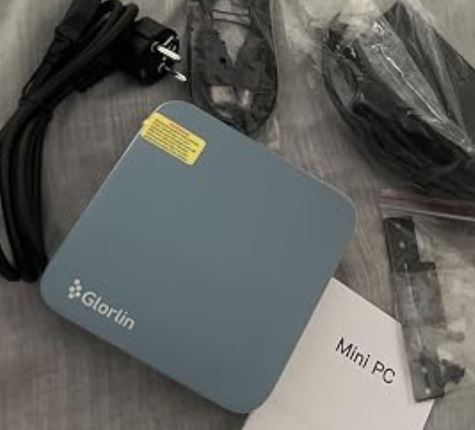
The MLLSE G1 Pro Mini PC surprises with its power in a compact format, thanks to the AMD Ryzen 7 5700U , 16GB of RAM and 512GB NVMe SSD.
It is ideal for advanced productivity, multitasking, and light to medium gaming.
Its main advantages are its compact design, modern connectivity (WiFi 6, BT 5.2) and overall fluidity.
On the downside, it falls short on integrated graphics for demanding gaming and doesn't include as many expansion options as a traditional PC.
In short: a very balanced mini PC for those looking for performance without taking up space.
→ VIEW PRICES MLLSE G1 Pro Mini PC
Key Technical Specifications Table
| Feature | Detail |
|---|---|
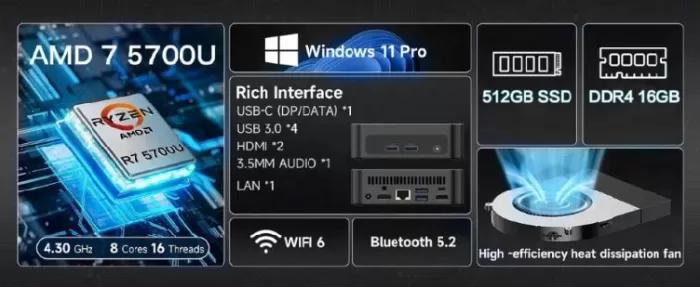
| Processor | AMD Ryzen 7 5700U (8 cores, 16 threads, up to 4.3 GHz) |
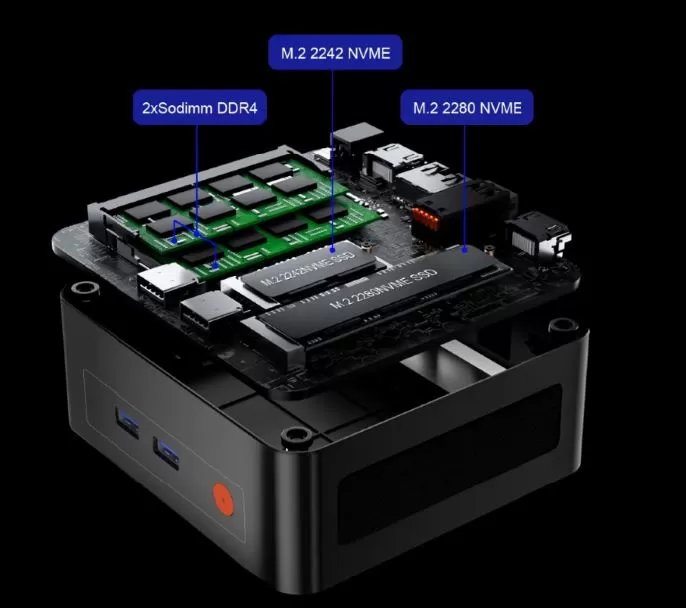
| RAM Memory | 16 GB DDR4 (ampliable) |
| Storage | NVMe SSD 512GB |
| Graphics | AMD Radeon Graphics integrados |
| Wireless connectivity | WiFi 6, Bluetooth 5.2 |
| Operating system | Windows 11 Pro preinstalled |
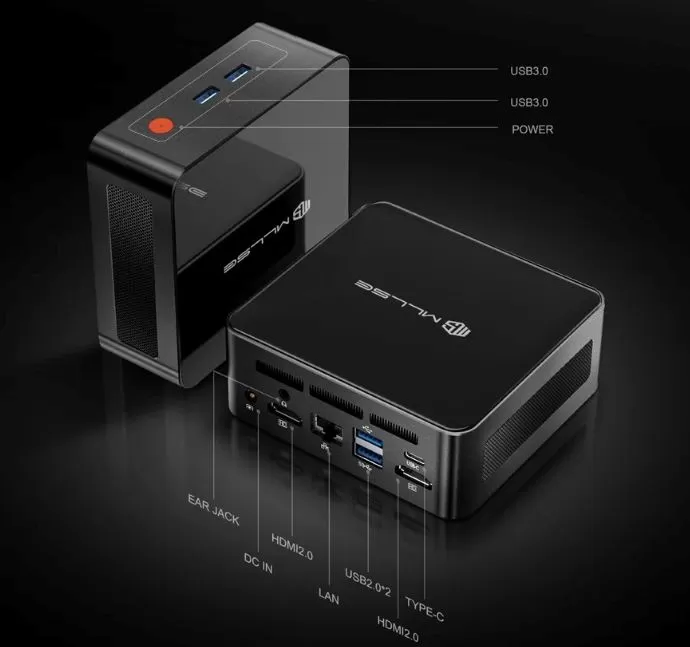
| Ports | HDMI, USB 3.0, USB-C, Ethernet Gigabit, Jack 3.5 mm |
| Dimensions/Weight | Aprox. 12 x 12 x 5 cm, <1 kg |
| Power supply | External adapter included |
Design and build quality
The MLLSE G1 Pro features a compact body with a metallic finish that conveys solidity from the first touch.
Its aluminum chassis helps dissipate heat and offers a premium appearance, far from the plastic typically found on cheaper devices.
Its small size makes it ideal for minimalist desks, small offices, or even for placing behind a monitor with a VESA mount.
Screen and Sound
It offers 4K output at 60Hz via HDMI , ensuring a good experience on high-resolution monitors.
In the sound section, it integrates audio output via 3.5 mm jack and HDMI, being sufficient to connect external speakers or quality headphones.
Performance and software
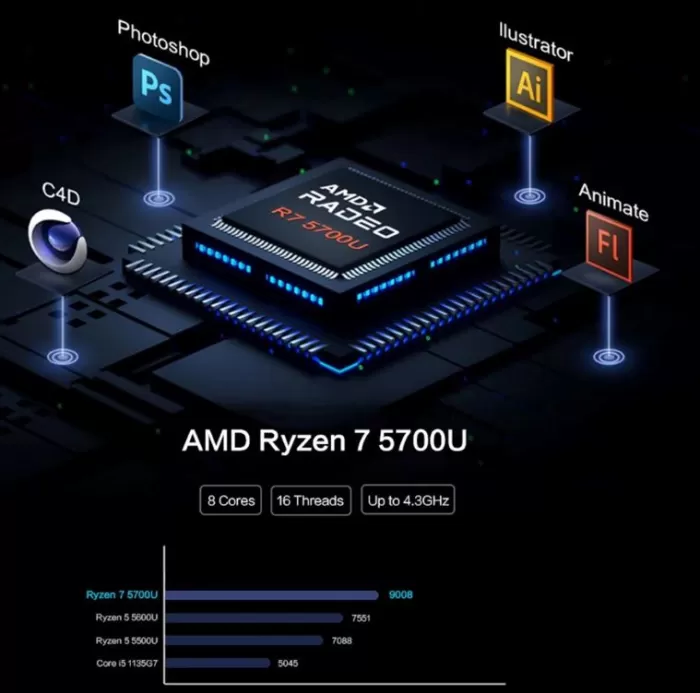
The AMD Ryzen 7 5700U is an 8-core, 16-thread processor that delivers smooth performance for both productivity tasks (office work, photo editing, multi-tab browsing) and more demanding workloads (light video editing, basic virtualization).
In gaming, the integrated Radeon graphics allow you to enjoy eSports titles like CS:GO, Valorant, and Fortnite at medium to high quality, although for newer AAA games, you'll need to reduce the resolution or details.
As for software, it comes with a clean Windows 11 Pro , without excess bloatware, and allows automatic updates from Microsoft.
Connectivity and extras
The G1 Pro stands out for its Wi-Fi 6 and Bluetooth 5.2 , which ensure fast and stable connections. As for physical ports, it has several options:
-
HDMI for video output.
-
USB 3.0 and USB-C for peripherals and fast transfer.
-
Gigabit Ethernet for those who prefer a wired connection.
-
3.5mm jack for audio.
It doesn't include extras like a fingerprint reader, NFC, or water resistance certifications (IP rating), but these aren't usually common in the mini PC category.
Opinions on well-known pages
Reddit: General discussions about the MLLSE brand
-
On r/homelab, a user is considering purchasing a MLLSE G2 Pro mini PC with an N150 CPU , and comments:
“The price for the specs is amazing, and the reviews on the AliExpress website are quite positive. However, that's where the information ends.”
The main concern here is the lack of independent reviews on long-term stability, BIOS quality, or performance under continuous load. -
Other MLLSE models, such as the M2 or M2 Pro, are mentioned in r/MiniPCs, with comments saying:
“Overall a very nice unit, offering much more performance, capacity and expansion options than any SBC (Single Board Computer) of the same price.”
AliExpress, Amazon
It has an overall rating of almost 5 out of 5 and there are opinions such as:
- A delightful mini PC, its Ryzen 7 5700U is still up to the task for various tasks, its integrated graphics are up to the task and are more than enough for emulators and indie games, everything is very fluid and more than enough for me since I don't use it to play current games (although indie games run smoothly). It stands out for how super small it is, it has an extremely small size, but it is cool, although its fan can be heard when it is at full load, but it is not at all alarming, in fact, two mini PCs that I have had before were louder.
- I have the same one, in old cases. The new one isn't very tall, and the sides are more ventilated. If there was a 32GB option at a good price, I would have bought it.
- I'm happy with the computer. I didn't expect such a small computer to perform so well. I'm using it to capture and edit video, and it's working quite well. The only drawback is that it's quite noisy; the fan is running almost all the time.
Other sources (Tom's Guide, Notebookcheck, etc.)
-
Many reviews appearing on Google or sites like Notebookcheck, Tom's Guide, Liliputing talk about the Minisforum G1 Pro with Ryzen 9 and discrete GPU , which is a completely different product (more powerful, with RTX 5060, etc.), not related to MLLSE or the Ryzen 7 5700U
Technical Test Summary
| Test / Benchmark | What it measures / scenario | Typical result for Ryzen 7 5700U or other similar mini PC | Implications for the MLLSE G1 Pro |
|---|---|---|---|
| Cinebench R23 / Cinebench R20 (multi-threaded CPU rendering) | Raw CPU performance for rendering, encoding, etc. | The Ryzen 7 5700U typically scores around 8,000-10,000 points in multi-core under optimized loads, depending on the effective TDP (25-45W mode). In single-core, it generally performs quite well, but doesn't match the performance of more recent high-end CPUs. | For office tasks, light video/photo editing, and heavy multitasking, the G1 Pro should perform without issue. For very demanding rendering or long projects, it will approach its thermal or power consumption limits. |
| 3DMark Time Spy / Fire Strike / Light Graphics Tests | Evaluates the integrated graphics capabilities for modern gaming and light 3D tasks. | On mini PCs with a 5700U, the integrated Radeon Vega graphics card allows for around 20-30 fps in AAA games at medium-low resolutions, and decent fps in eSports or less demanding games (e.g., CS:GO, Valorant ) at medium settings. The results are decent at 720p or 1080p resolutions with low-medium details. | If you use the G1 Pro for light gaming or older titles, you'll have a decent experience. In recent AAA games, you'll need to adjust the quality and resolution to avoid drops. For non-gaming work, 2D graphics, or light editing, it will be sufficient. |
| Storage speed (NVMe SSD) | Sequential and random read/write; app and OS load times. | Modern NVMe SSDs offer sequential read speeds of around 2,500-3,500 MB/s if using a PCIe 3.0 x4 interface, and slightly lower write speeds. On similarly sized mini PCs, this results in faster boot times and smoother app launches. | The G1 Pro with a 512GB NVMe SSD should deliver very good performance for operating systems, apps, and normal loads. If you have a low-end SSD, you may notice a difference in random writes or under heavy load (bulk copying). |
| Actual usage / multitasking | Multiple open applications: browser with many tabs, light editing, streaming, light virtualization. | Users report that the 5700U with 16GB RAM can handle these loads without any noticeable lag, except when using intensive virtualization, heavy VMs, compilations, etc. In those cases, temperatures or throttling may affect the performance. | For everyday use, whether it's in the office, studying, or streaming, the G1 Pro should feel responsive. If you're planning on doing intensive development, heavy VMs, or editing 4K video for long hours, you'd want to consider models with better cooling or a more powerful CPU. |
| Temperature and noise under load | How it handles heat, whether it reduces frequency due to overheating, how much noise it generates. | In mini PCs with Ryzen 7 5700U-type chips, if the cooling system is decent, temperatures under load can rise to 70–80°C , with active fans that are audible but not excessively annoying. Under light use, they tend to be very quiet. However, without a good thermal design, throttling can occur if the case and ventilation are not well-designed. | On the G1 Pro, if the metal construction and cooling system are good, it should maintain smooth performance under prolonged loads. Otherwise, I'd expect performance to drop somewhat under intense stress to prevent overheating. It would be advisable to check temperatures during long sessions. |
| Energy consumption | How much power does it consume at idle, light load, and heavy load; impact on bill, noise, and heat? | The Ryzen 7 5700U is designed for efficiency; at idle or during light tasks, it can consume very little (15-25W), while under intense loads it can rise significantly (35-45W or more if the manufacturer allows aggressive turbocharging). | For home or office use, the G1 Pro should be quite efficient. If you leave it on for long periods of time, power consumption will be higher, but not extreme. Pay attention to the adapter and ventilation if it's going to be on all the time. |
Final conclusion
The MLLSE G1 Pro Mini PC is an excellent choice for those looking for a compact, powerful, and versatile computer . It's ideal for students, home-based professionals, small offices, and casual gamers who don't need a dedicated graphics card.
If you're looking for an affordable and efficient device for productivity and multitasking, this is a great buy.
However, if your goal is to play the latest AAA titles on ultra or do intensive 4K video editing, it may fall short.
As alternatives, you could consider the Beelink SER6 Pro or the MINISFORUM UM773 , both with more powerful integrated graphics.
Where to buy
You can find the MLLSE G1 Pro Mini PC in specialized online stores and global marketplaces.