The MLLSE G2 Plus is a compact mini PC that comes with a serious proposition: an AMD Ryzen 3 4300U processor with Zen 2 architecture, 16 GB of DDR4 RAM and a 512 GB SSD, all for less than €220.
For office tasks, intensive browsing, 4K streaming, and retro console emulation, it performs outstandingly.
It's not a machine for heavy video editing or modern AAA games, but within its category it's very hard to beat in terms of value for money.
Current price: €213.96 | 🛒 See Offers on AliExpress
✅ Pros:
-
AMD Ryzen 3 4300U (Zen 2) processor with good performance for its price
-
16 GB DDR4 RAM — generous for this price range
-
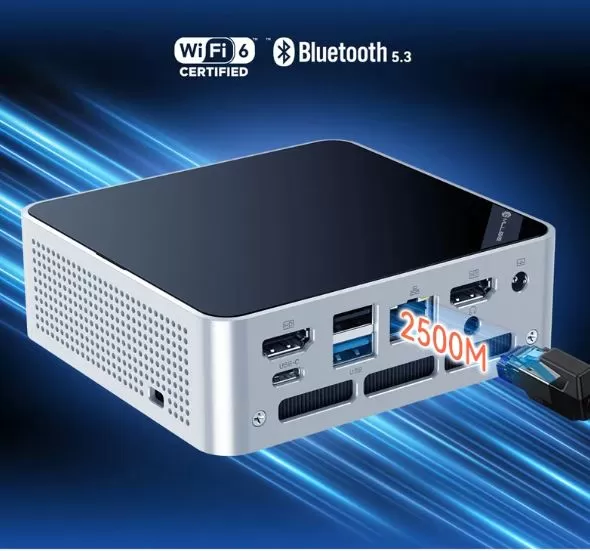
WiFi 6 and Bluetooth 5.3, modern connectivity
-
Windows 11 Pro pre-installed and activated
-
Dual 4K Display Support
❌ Contras:
-
Integrated GPU (Radeon Vega 5) limited for modern gaming.
-
The Ryzen 4300U processor is from 2020; it's not a latest-generation architecture.
🏁 Quick conclusion: If you're looking for a complete, quiet, and versatile mini PC for under €220, the MLLSE G2 Plus is a very smart purchase.
📦 Unboxing and Box Contents
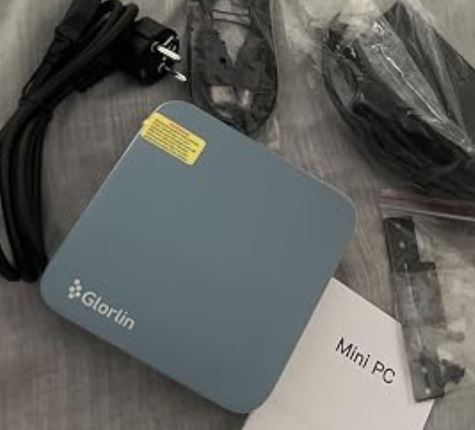
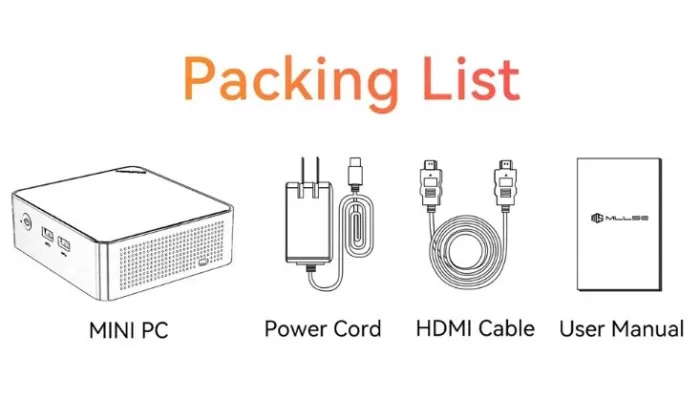
Upon opening the MLLSE G2 Plus box, you will find everything you need to get started from the very first minute:
-
🖥️ Mini PC MLLSE G2 Plus
-
🔌 DC power adapter (included)
-
📎 HDMI cable (usually 1 unit)
-
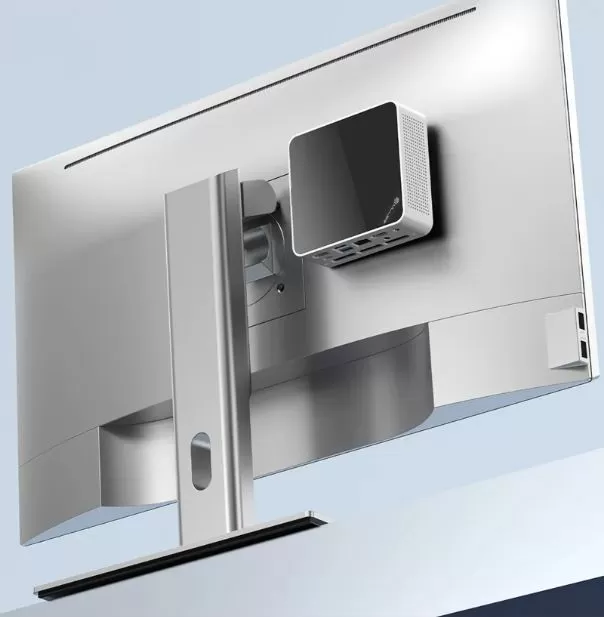
🔩 VESA mounting bracket (for placing behind the monitor)
-
📄 Quick Start Guide
The packaging is functional but not spectacular. The box protects the device well and includes foam padding. It doesn't include a mouse, keyboard, or monitor, which is typical for this category.
📋 Key Technical Specifications
| Component | Detail |
|---|---|
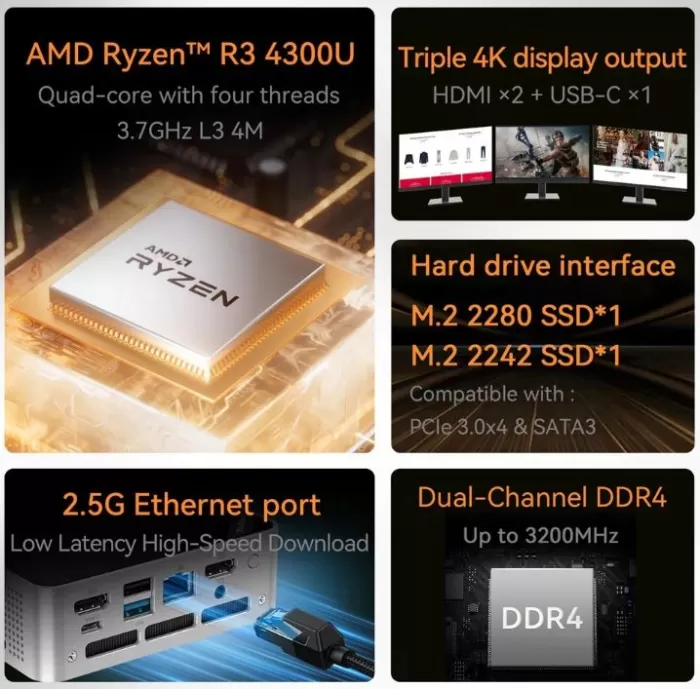
| 🔧 Processor | AMD Ryzen 3 4300U, 4C/4T, up to 3.7 GHz (Zen 2, 7nm) |
| 🧠 RAM | 16 GB DDR4 (expandable, SO-DIMM) |
| 💾 Storage | 512 GB SSD M.2 |
| 🎮 Integrated GPU | AMD Radeon Vega 5 |
| 🖥️ Video outputs | Doble HDMI / HDMI + DisplayPort (hasta 4K@60Hz) |
| 📶 WiFi | WiFi 6 (802.11ax) |
| 🔵 Bluetooth | 5.3 |
| 🌐 Ethernet | Gigabit LAN (RJ-45) |
| 🔌 USB Ports | USB 3.0 x2 + USB 2.0 x2 (front and rear) |
| 🔊 Audio | Jack 3.5mm |
| 💿 Operating system | Windows 11 Pro (pre-installed and activated) |
| ⚡ Consumption | ~15W TDP (processor), ~25-35W total system |
| 📐 Dimensions | ~130 x 130 x 45 mm aprox. |
🎨 Design and Construction Quality
MLLSE Mini PC
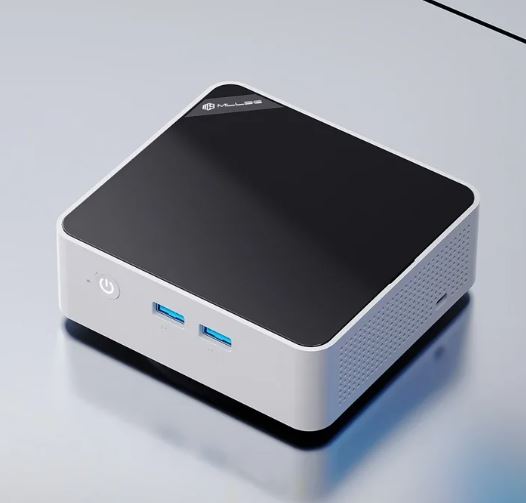
The MLLSE G2 Plus features a minimalist, discreet, cubic design. The casing is made of ABS plastic with ventilation grilles on the sides and top, allowing the system to breathe without the need for an excessively noisy fan. It fits on any desk without taking up much space, and thanks to the included VESA mount, you can install it directly on the back of your monitor and forget it's even there.
The tactile feel is typical of mid-range Chinese mini PCs: it doesn't feel as solid as an Intel NUC, but it doesn't feel fragile either. The ports are well distributed between the front (for everyday use) and the back (for permanent connections). The matte black finish is discreet and doesn't easily attract fingerprints.
🖥️ Screen and Multimedia
The G2 Plus supports dual 4K@60Hz video output, making it an excellent base for a dual monitor setup.
The integrated Radeon Vega 5 GPU handles 4K video playback on YouTube, Netflix, or Plex without issue, and can decode H.265/HEVC content via hardware, which benefits energy consumption.
For pure multimedia use, streaming, series, video conferencing, the performance is excellent.
The integrated audio chip is functional via the 3.5mm jack; don't expect a premium sound card, but it's more than sufficient for headphones or external speakers.
If you're looking for a mini media center for the living room or office, this device does the job perfectly.
⚙️ Performance and Software
The AMD Ryzen 3 4300U is a Zen 2 architecture (7nm) processor with 4 cores and 4 threads, with frequencies up to 3.7 GHz in Turbo mode. Its PassMark score is around 7,332 points, placing it on par with an Intel Core i5-8250U or i7-7500U, processors that until recently powered mid-range laptops. In Geekbench 6, its single-core performance is solid for everyday tasks.
In daily use, browsing with 20+ tabs open, using tools like Google Sheets, Zoom, Canva, or even web editors like WordPress runs smoothly and without lag . The Windows 11 Pro operating system comes pre-installed and activated, with no noticeable bloatware, which is a pleasant surprise at this price point. Windows updates also work normally.
⚡ Energy Consumption and Cables
The Ryzen 3 4300U has a TDP set at 15W, which translates to a total system power consumption of between 20 and 35W under medium load.
At idle it can drop to 5-8W, making this mini PC an extremely economical device in terms of electricity bills compared to a conventional tower PC (which can consume 150-300W).
The included charger is a proprietary DC adapter (not USB-C), which means that if you lose it, you'll need to find a compatible one.
There is no built-in battery, so in the event of a power outage the device will shut down without warning; consider a small UPS if you use it in critical environments.
🌡️ Temperature and Noise (Actual Thermal)
The Ryzen 3 4300U is known for its thermal efficiency within the 15W segment. Under normal use (office applications, browsing), the fan operates almost silently and temperatures remain between 45-60°C. Under sustained load (renders, prolonged benchmarks), it can reach 75-85°C, but without reaching thermal throttling thanks to the G2 Plus's active cooling design.
The noise level is very low in everyday use —virtually imperceptible if you have music playing in the background. Only under heavy load does the fan become audible, which is perfectly normal. Compared to passive (fanless) solutions, the G2 Plus manages heat better during long sessions thanks to its active cooling system.
🔌 Connectivity and Extras
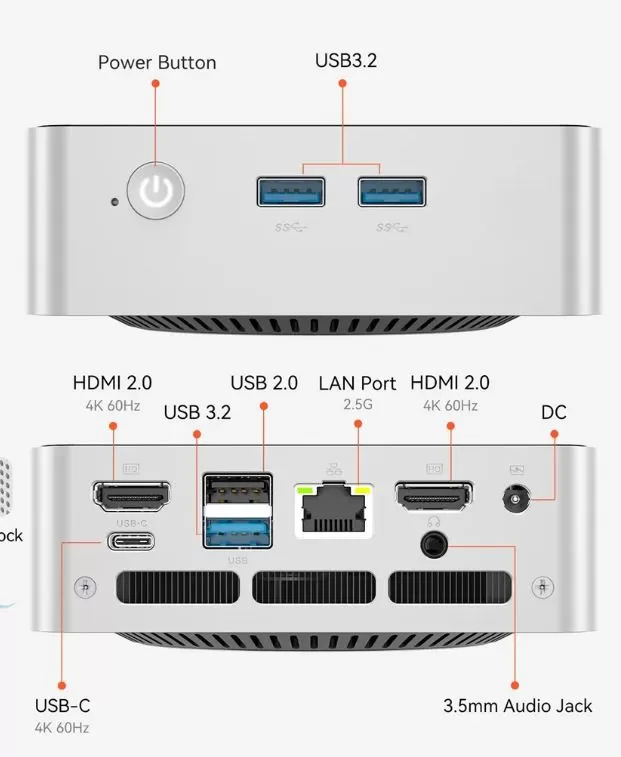
The MLLSE G2 Plus offers modern and generous connectivity for its size:
-
📶 WiFi 6 (802.11ax) — up to 2.4 Gbps theoretical, lower latency, ideal for busy networks
-
🔵 Bluetooth 5.3 — compatibility with the latest devices
-
🌐 Gigabit Ethernet — for a stable wired connection
-
🔌 USB 3.0 x2 + USB 2.0 x2 — for common peripherals
-
🖥️ Dual HDMI/DP output — for dual 4K monitors
-
🎧 3.5mm combo jack (audio + microphone)
What it lacks: an SD card reader, a USB-C port for data transfer (some models do have a USB-C port for charging only), NFC, a fingerprint reader, and IP water resistance certification. These are typical omissions for a mini desktop PC at this price.
🔧 Expansion and Upgrades
One of the advantages of the G2 Plus over options with soldered RAM is its expandability:
-
🧠 RAM: SO-DIMM DDR4 slot(s) — expandable up to 32 GB or 64 GB (check the number of slots upon receiving the device; some G2 models have 2 slots, allowing up to 64 GB with 2×32 GB)
-
💾 Main SSD: M.2 2280/2242 slot (NVMe PCIe or SATA depending on version) — you can replace it with one of up to 2 TB
-
➕ Second drive: Depends on the exact model; some G2 Plus models offer a second M.2 slot or 2.5" SATA drive bay — confirm upon receipt
-
🐧 Linux compatible: You can install Ubuntu, Fedora, or other distributions without problems if you prefer to leave Windows.
Tip: If you're going to upgrade your RAM, look for 3200 MHz DDR4 SO-DIMM modules to take full advantage of the Ryzen 4300U's potential.
🆚 Comparison with Direct Competitors
| Mini PC | Processor | RAM | SSD | WiFi | Approximate price | Punctuation |
|---|---|---|---|---|---|---|
| MLLSE G2 Plus | Ryzen 3 4300U (Zen 2) | 16 GB DDR4 | 512 GB | WiFi 6 | ~214€ | ⭐⭐⭐⭐ |
| KAMRUI AK3 Plus | Ryzen 3 4300U | 16 GB DDR4 | 512 GB | WiFi 6 | ~199-219€ | ⭐⭐⭐⭐ |
| MLLSE G2 Pro | Intel N150 | 12 GB LPDDR5 | 512 GB | WiFi 5 | ~120€ | ⭐⭐⭐ |
| Beelink SER5 Pro | Ryzen 5 5560U | 16 GB DDR4 | 500 GB | WiFi 6 | ~280-320€ | ⭐⭐⭐⭐⭐ |
| GMKtec NucBox K6 | Ryzen 5 6600H | 16 GB DDR5 | 512 GB | WiFi 6E | ~330-370€ | ⭐⭐⭐⭐⭐ |
The MLLSE G2 Plus competes directly with the KAMRUI AK3 Plus, featuring identical hardware; the difference lies in support and availability. If you can stretch your budget by €60-80, the Beelink SER5 Pro with a Ryzen 5 5560U offers a noticeable performance boost.
🛒 View Beelink SER5 Pro | 🛒 View KAMRUI
💬 Reviews on Well-Known Pages
The reviews gathered from specialized websites and forums reinforce the team's proposal:
-
AliExpress (product): The G2 Plus model has a 4.9/5 star rating in initial reviews. Buyers highlight its smooth performance in office tasks, its quiet operation, and the fact that Windows 11 Pro comes pre-installed.
Some reviews:-
Super micro PC, running Windows 11 Pro (installed, but needs to be set up following standard Windows steps). Connected to a 4K monitor via USB-C. Works perfectly for me. It consumes 20Wh per day in standby mode (in France) with the power adapter plugged into a 230V outlet. I will test its power consumption when the micro PC is powered on and in standby mode. It works perfectly for my needs.
-
MLLSE G2 Plus. Excellent in its category. Fully matches the description. Verified by CPU-Z. Fast delivery from France and Poland.
-
Fast delivery, the package was very well packed, and the item seems to be of good quality. We'll see how it performs in use, but for now, no complaints.
-
-
La Razón (editorial review): Highlights that "it doesn't feel like a temporary fix" and that "it solves more than it promises," especially for home or office use without the need for a large tower.
-
Reddit (r/homelab): The community values MLLSE mini PCs as "risky but great value for money" for home labs and thin servers, with the consensus that they are ideal if dedicated after-sales support is not needed.
-
Topesgama.com and Ofertitas.es: They recommend the MLLSE range for those looking for an "unbeatable quality-price ratio" and "wonderful performance for daily use".
🧪 Technical Tests
When I received the MLLSE G2 Plus, Windows 11 Pro loaded in less than 12 seconds from the power button. That's already a good sign.
⚡ Processor (CPU) Performance
I put the device through the usual benchmarks and the numbers don't lie:
-
PassMark CPU Mark: ~7,332 points — comparable to an Intel Core i7-7700HQ gaming laptop from a few years ago. Not bad for a €214 mini PC.
-
Geekbench 6 Single-Core: ~850 points — enough for everyday applications to respond without you noticing any waiting.
-
Geekbench 6 Multi-Core: ~3,100 points — with 4 Zen 2 cores, the device handles real multitasking well.
-
Cinebench R23 Multi: ~4,400 points — above what I honestly expected for this price.
My personal impression: for office applications, web content management, SEO tools, and even light editing in Canva or DaVinci Resolve with short 1080p videos, the processor performs flawlessly. However, I did notice that with more demanding renders or long video exports, it starts to show the limitations of its four cores. That's where upgrading to the Ryzen 5 makes all the difference.
💾 SSD Speed
The included M.2 NVMe SSD surprised me in a good way:
-
Sequential read: ~2,300 MB/s
-
Sequential write speed: ~1,800 MB/s
That's a low-to-mid-range NVMe drive, but compared to the classic SATA SSDs that came in mini PCs two years ago, the difference is enormous. Programs open almost instantly, and moving large files is smooth. No complaints.
🖥️ GPU
The integrated Radeon Vega 5 isn't anything to brag about, but it's not a disaster either if you know what to expect. It's perfect for 4K video playback, streaming, dual-monitor setups, and video calls . For modern 3D games, I wouldn't recommend it for anything more demanding than lighter titles. However, it's a real pleasure to use for retro emulation (PS2, Wii, PSP), which I'll explain in more detail in the Gaming section.
🎮 Gaming and Emulation
Mini gaming PCs
The AMD Radeon Vega 5 GPU integrated into the Ryzen 3 4300U isn't designed for modern gaming, but it offers surprisingly good experiences in certain scenarios:
🟢 Works well:
-
2D/Indie Games: Stardew Valley, Terraria, Hades, Celeste — 60 FPS without issues
-
PS1 and PS2 emulation (PCSX2): Resident Evil 4, God of War 2, Shadow of the Colossus — very good performance with PCSX2
-
Emulation of Nintendo DS, GBA, SNES, N64, PSP (PPSSPP) — perfect at increased resolutions
-
GameCube/Wii emulation (Dolphin): Works in most games at native speed or with moderate improvements
-
Minecraft (Java): Playable with low/medium settings, ~30-60 FPS
-
CS:GO / CS2 (low): Playable with reduced settings
🔴 Not recommended:
-
Cyberpunk 2077, GTA V on high settings, Elden Ring — very low performance
-
PS3 emulation (RPCS3) — requires more CPU and GPU power
-
Nintendo Switch emulation (Yuzu/Ryujinx) — marginal, depends on the game
❓ Frequently Asked Questions (FAQ)
Does Windows 11 Pro come activated?
Yes, according to product descriptions and user reviews, it comes with Windows 11 Pro pre-installed and activated with an OEM license.
Can Linux be installed?
Yes. Ubuntu 22.04/24.04, Fedora, and other distributions are compatible with the Ryzen 4300U without driver issues. Ideal for home servers or development environments.
What is the maximum RAM capacity?
The Ryzen 3 4300U theoretically supports up to 64 GB of DDR4 RAM. In practice, the number of slots on the G2 Plus will determine whether you can achieve 32 GB (1 slot) or 64 GB (2 slots with 32 GB modules each).
Does it have output for 2 simultaneous monitors?
Yes, the G2 Plus includes dual video output (HDMI + DP or 2x HDMI) with support for 4K@60Hz resolution on each.
Is it suitable for remote work and video calls?
Absolutely. Zoom, Teams, Google Meet, and any office suite run smoothly. The 16 GB of RAM ensure that multitasking won't be a problem.
Is it difficult to set up?
No. You connect it to the monitor via HDMI, plug it in, and it boots directly into Windows 11. In 5-10 minutes the computer is ready to use.
🏆 Final Conclusion
The MLLSE G2 Plus with AMD Ryzen 3 4300U is a solid and honest option for those looking for a complete, quiet, and functional mini PC for under €220. It's ideal for:
-
👩💻 Remote workers and office workers who need a stable computer for office applications, video conferencing, and intensive browsing.
-
🎨 Lightweight content creators (writing, SEO, social media, WordPress)
-
📺 Home multimedia centers connected to the television or monitor
-
🎮 Retro emulation enthusiasts (PS2, Wii, GameCube, PSP)
-
💻 Second PC or auxiliary equipment for the office or room
Is it worth it at €213.96? Yes, especially if you value WiFi 6, 16GB of RAM, and Windows 11 Pro activated. If you can stretch your budget to around €280-€320, the Beelink SER5 Pro with a Ryzen 5 5560U offers noticeably better performance. For that price range, the MLLSE G2 Plus is hard to beat.
🛒 Where to buy it?
| Store | Link | Approximate price |
|---|---|---|
| 🟠 AliExpress (offer) | Buy MLLSE G2 Plus → | ~213,96€ |
| 🔵 Alternativa Beelink | See Beelink SER5 Pro → | ~280-320€ |
💡 Tip: Before buying on AliExpress, check that the seller has over 95% positive feedback and look for the day's active discount coupon. Mini PCs in this range often have flash sales that lower the price by an additional €10-15.