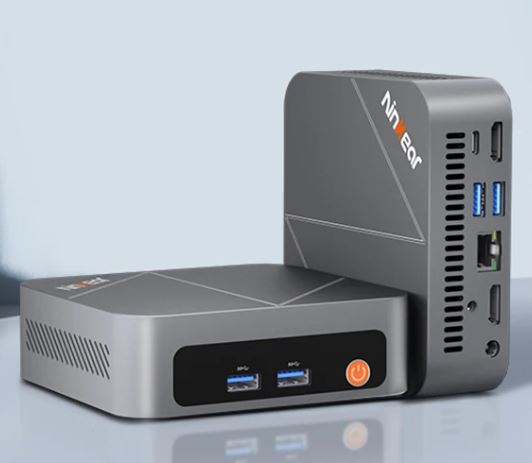
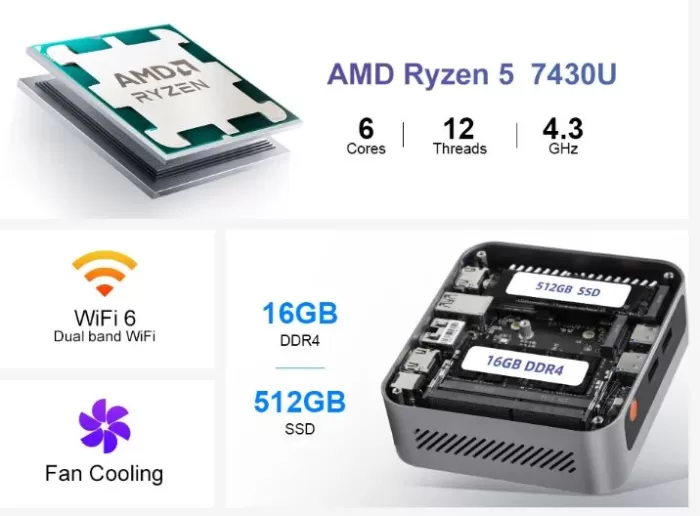
The Ninkear M7 is a compact, quiet, and well-built mini PC that stands out for its premium aluminum casing and an AMD Ryzen 5 7430U processor with more than enough performance for office work, multimedia, and light gaming.
Its launch price (~€233 on sale) makes it a very attractive option for those looking for a small, uncomplicated desktop computer.
✅ Pros:
-
100% aluminum casing, solid and elegant
-
Almost completely silent operation (~24 dB under load)
-
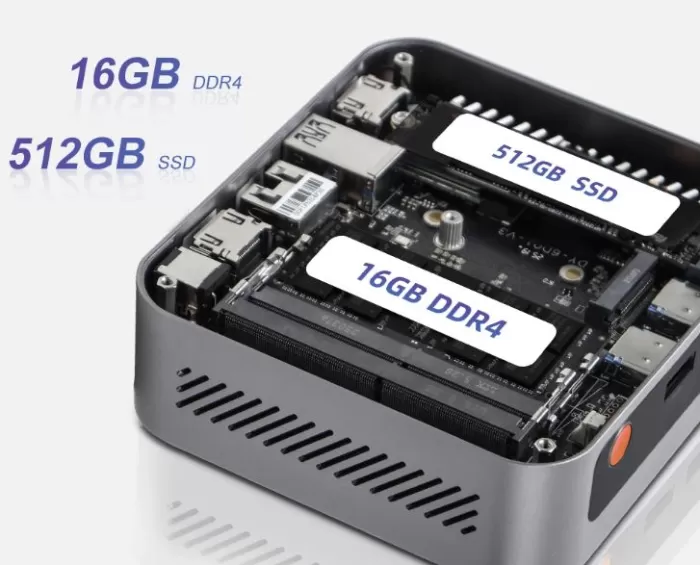
Expandable: second free M.2 slot + second SODIMM DDR4 slot
-
Windows 11 Pro activated included
-
Very competitive entry price (~€150-250 depending on configuration)
❌ Cons:
-
Factory RAM in single-channel (significantly penalizes the integrated GPU)
-
No OCuLink ni USB4 for external GPU
-
Supports Wi-Fi 6E and Bluetooth 5.2+
🎯 Quick conclusion: An honest, quiet, and well-built mini PC designed for office, studio, HTPC, and retro gaming. It's not for demanding users with modern games, but for its price and noise level, it simply has no direct competitor.
👉 Prices and Availability on Amazon (Ninkear HISTTON)
👉 Prices and Availability on AliExpress
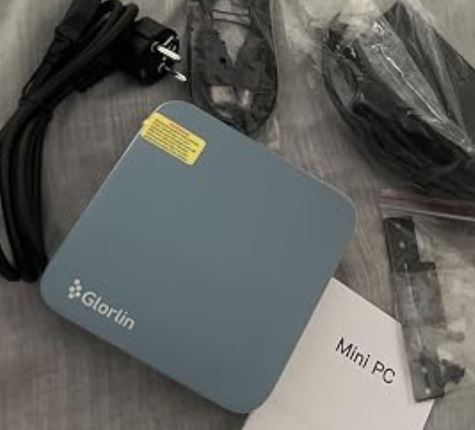
📦 Unboxing and Box Contents
Beelink mini PC
The Ninkear M7 comes in simple but functional packaging. Inside you'll find:
-
🖥️ Mini PC Ninkear M7
-
🔌 Power adapter (19V, small and compact)
-
🔩 VESA mounting bracket with included screws
-
🖥️ HDMI cable (included — a positive detail compared to the competition)
-
📄 Quick start guide in multiple languages
The packaging is understated and functional. There are no surprises or flashy extras, but it does come with an HDMI cable, something many competitors in its price range omit. The device is ready to use right out of the box.
📊 Technical Specifications
| Component | Detail |
|---|---|
| Processor | AMD Ryzen 5 7430U — 6 cores / 12 threads, 2.3 GHz base / 4.3 GHz turbo (Zen 3) |
| Integrated graphics | AMD Radeon RX Vega 7 — 7 CUs (RDNA 1 / Vega) |
| RAM Memory | 16 GB DDR4-3200 (1 SODIMM module; 2 slots, expandable to 64 GB) |
| Storage | 512GB M.2 2280 NVMe PCIe Gen 3 |
| Expansion | 1 free M.2 2280 slot + possible 2.5" SATA drive (see upgrades section) |
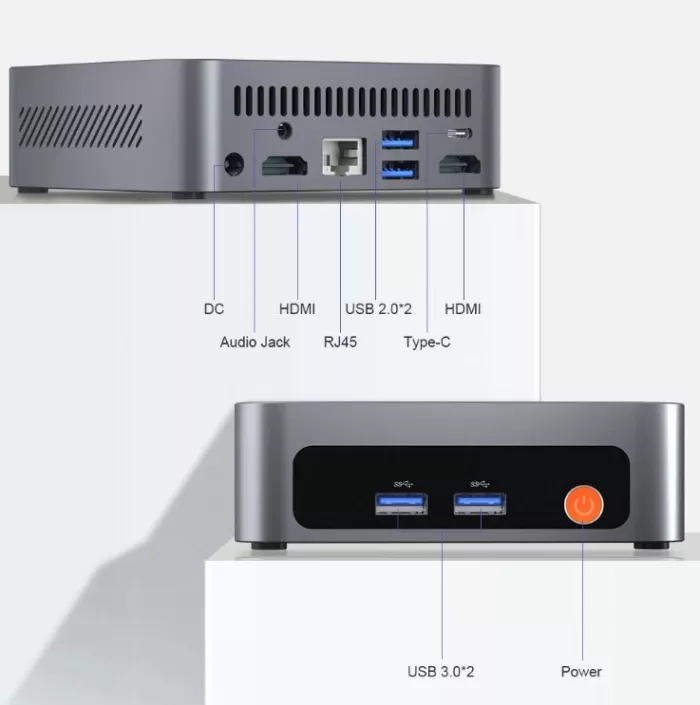
| Video outputs | HDMI 2.0 × 2 → up to 4K@60Hz |
| USB ports | USB 3.2 Gen 1 × 2, USB 2.0 × 2, USB-C × 1 (data, no charging) |
| Red | Wi-Fi 6 (802.11ax), Bluetooth 5.1, LAN 1 Gbps × 1 |
| Operating system | Windows 11 Pro pre-installed and activated |
| TDP | 15W base (configurable up to 54W in BIOS) |
| Power supply | 19V / 65W |
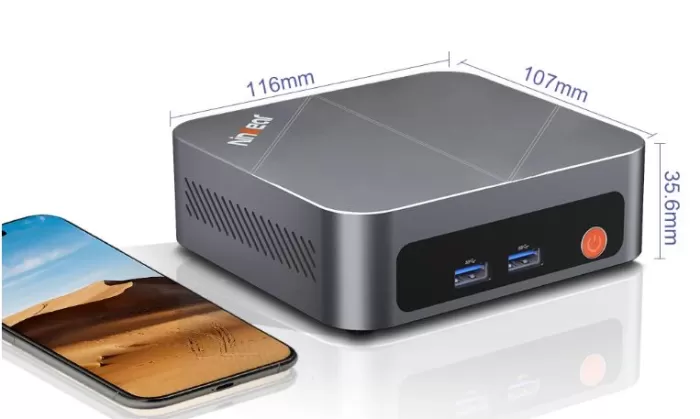
| Dimensions / Weight | ~128 × 128 × 45 mm / ~560 g |
| Maximum noise | ~24 dB (a 10 cm) / ~20 dB (a 1 metro) |
🎨 Design and Construction Quality
The Ninkear M7 impresses from the moment you pick it up: the casing is made entirely of aluminum, with a smooth matte finish and rounded corners that give it a serious and modern look. There's no cheap plastic in sight—a rarity in mini PCs at this price point.
The design is minimalist and understated: a subtle power LED, the power button, and ports logically arranged on the front, side, and back. The base has non-slip rubber feet that keep the device firmly in place on your desk, and the included VESA mount lets you attach it directly behind your monitor to free up space.
Upon opening (secured with four screws), the interior is accessible and clean: the secondary M.2 slot is clearly marked, and the two SODIMM slots are easily accessible. Build quality: 8.5/10 — above expectations for a device under €250.
🖥️ Screen and Multimedia
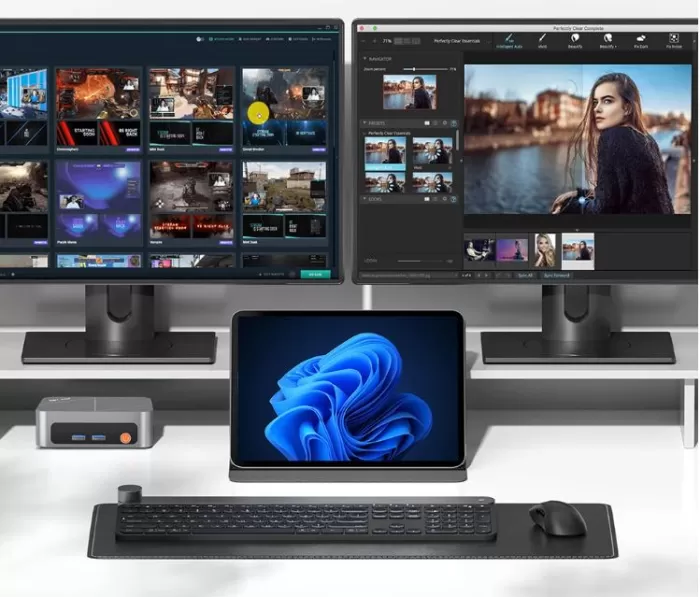
The M7 supports two simultaneous HDMI 2.0 outputs with a maximum resolution of 4K at 60 Hz each, ideal for dual monitor work setups.
In terms of multimedia, the Radeon Vega 7 effortlessly handles 4K streaming video playback (YouTube, Netflix, Amazon Prime) using hardware decoding of H.265/HEVC and VP9. Don't expect hardware AV1 acceleration like more modern chips (RDNA 3) offer, but it works perfectly for everyday content consumption.
Audio output is via HDMI or a 3.5 mm jack. For use as an HTPC connected to a TV or soundbar, the result is flawless.
⚙️ Performance and Software
CPU — Solid for everyday use
The Ryzen 5 7430U (Zen 3, 6 cores, 12 threads) offers more than enough performance for office applications, browsing with many tabs, video conferencing, and light editing. It's not a cutting-edge chip (it's based on the Zen 3 architecture, from 2021 and updated in 2022), but its efficiency and balance make it a very sensible choice for this type of PC.
Testing confirms that the TDP can be adjusted in the BIOS from 10W to 54W, allowing it to be adapted to both absolute silence and maximum performance.
Windows 11 Pro and software
It comes with Windows 11 Pro activated, with no excessive bloatware. The system boots cleanly and only includes the basic AMD software and Ninkear's TDP configuration tools. Windows updates work normally.
👉 View Prices and Availability
🔌 Energy Consumption and Cables
At idle, the M7 consumes a mere 10-12W —it can be left on all day without making a noticeable difference to your electricity bill. Under office workloads, it stays around 20-25W. Under maximum stress with a TDP of 45W, the actual consumption of the entire system is around 55-65W.
The 19V/65W power supply is compact and unobtrusive, quite unlike the 120W brick in the CHUWI AuBox. The power cable is the standard circular DC connector—not USB-C, although the device does include a functional USB-C port for data.
🌡️ Temperature and Noise (Actual Thermal)
This is where the Ninkear M7 truly shines. The low-speed fan cooling system and the aluminum casing acting as a secondary heatsink achieve something exceptional:
| Scenery | CPU temperature | Noise |
|---|---|---|
| Repose | ~40-45°C | ~19 dB (inaudible) |
| Office automation | ~55-65°C | ~20 dB (inaudible) |
| Gaming / Multimedia | ~68-75°C | ~22 dB |
| Maximum stress (45W TDP) | ~83-87°C | ~24 dB |
| Maximum stress (54W TDP) | ~90-95°C | ~26 dB |
🗣️ Opinion: 24 dB at 10 cm under maximum load is extraordinary. Many inexpensive mini PCs hover around 38-45 dB under stress. In everyday desktop use, the M7 is almost completely silent — ideal for dorm rooms, libraries, or shared offices.
One important detail: in the first benchmark runs, the device scores 20% higher than in "hot" runs, suggesting a small limitation in the firmware's thermal management that Ninkear could improve with a BIOS update.
🔗 Connectivity and Extras
The Ninkear M7 offers decent connectivity for its price, although without the premium extras of the CHUWI AuBox:
-
Wi-Fi 6 (802.11ax): Real-world speeds suitable for streaming and remote work
-
Bluetooth 5.1: for wireless mouse, keyboard and headphones
-
Gigabit LAN (1G): sufficient for most home users; the AuBox offers 2.5G here
-
Dual HDMI 2.0: Dual monitor up to 4K@60Hz simultaneously
-
USB-C: Data (no DisplayPort or PD charging) — a notable limitation
-
❌ No USB4, OCuLink, 2.5G LAN, NFC, fingerprint reader or IP rating
-
❌ Supports Wi-Fi 6E and Bluetooth 5.2
For standard home or office use, the connectivity is perfectly adequate. For more technical users or those with advanced networking needs, the AuBox is the clear winner.
🔧 Expansion and Upgrades
The expandability of the M7 is one of its strengths for an entry-level computer:
| Component | Stock | Maximum supported | Approximate upgrade costs |
|---|---|---|---|
| RAM | 16 GB (1× SODIMM DDR4) | 64 GB (2× 32 GB DDR4) | +16 GB from ~€20 |
| SSD principal | 512 GB PCIe Gen 3 | 2 TB PCIe Gen 3 | Upgrade to 1 TB ~€35 |
| Second SSD M.2 | Empty | 2TB NVMe M.2 2280 | From €30 |
| 2.5" SATA disk | No (see note) | It depends on the model. | — |
⚠️ Important note about RAM: With the single 16GB module included, the Radeon Vega 7 operates in single-channel (64-bit bus instead of 128-bit), which significantly reduces graphics performance. Adding a second 16GB DDR4 module (~€20) is the best possible upgrade from day one.
💡 Tip: The platform supports DDR4-3200. Use modules at that speed to avoid wasting performance.
👉 View Prices and Availability
🆚 Comparison with Direct Competitors
| Feature | Ninkear M7 (R5 7430U) | Beelink Mini S12 Pro (N100) | GMKtec NucBox M5 Plus (R5 5560U) | CHUWI LarkBox X (N150) |
|---|---|---|---|---|
| Processor | Ryzen 5 7430U (6C/12T) | Intel N100 (4C/4T) | Ryzen 5 5560U (6C/12T) | Intel N150 (4C/4T) |
| Architecture | It was 3 | Gracemont | It was 3 | Gracemont |
| iGPU | Radeon Vega 7 | Intel UHD (24 EU) | Radeon Vega 7 | Intel UHD (24 EU) |
| RAM | 16 GB DDR4 | 16 GB LPDDR5 | 16 GB DDR4/5 | 12 GB LPDDR5 |
| SSD | 512GB PCIe 3 | 500GB PCIe 3 | 512GB PCIe 3 | 256 GB |
| Wi-Fi | Wi-Fi 6 | Wi-Fi 5 | Wi-Fi 6 | Wi-Fi 6 |
| AND | 1× 1G | 1× 1G | 1× 2.5G | 1× 1G |
| Housing | Aluminum | Plastic | Aluminum+Plastic | Aluminum |
| TDP CPU | 15-54W | 6W | 15-45W | 6W |
| Approx. price | ~150-250€ | ~110-150€ | ~170-200€ | ~90-120€ |
| CPU performance | ⭐⭐⭐⭐ | ⭐⭐ | ⭐⭐⭐⭐ | ⭐⭐ |
| Silence | ⭐⭐⭐⭐⭐ | ⭐⭐⭐⭐ | ⭐⭐⭐ | ⭐⭐⭐⭐ |
🗣️ Comparative conclusion: The Ninkear M7 is clearly superior to the N100 or N150 in CPU (+200%) and GPU (+29%) performance, at a price only €30-50 higher. Compared to the GMKtec NucBox M5 Plus with the same Ryzen 5 5560U (similar chip), the M7 wins in quietness and build quality. If budget is the only priority, the N100 is sufficient for basic tasks; for anything else, the Ryzen 5 7430U is unrivaled in this price range.
💬 Reviews on Specialized Websites
Technical media reviews agree on a clear profile: a well-built, extraordinarily quiet mini PC, with the chronic defect of the sector (factory single-channel RAM).
-
NotebookCheck (full review) describes it as "a high-quality budget PC for everyday use," praising its aluminum construction and low noise level. It criticizes the single-channel RAM and limited BIOS. Its verdict: ideal for office and home office use, but perfectly capable of handling demanding tasks.
-
NotebookCheck (second review, multimedia focus) highlights that "the Radeon RX Vega 7 is not suitable for demanding 3D games but delivers solid results in multimedia, streaming, and light image editing." They confirm full hardware support for 4K video.
-
Chollistas.es (Spanish review) describes it as a "silent beast" for the price, especially for users upgrading from older laptops or bulky desktop PCs. They highlight the ease of VESA installation and the build quality.
-
Ninkear Blog / Internal tests (official source but with externally verified data): confirm Cinebench R23 of 1,300 pts single / 5,950 pts multi and PassMark CPU of 3,840 — consistent with NotebookCheck's results.
-
Reddit r/MiniPCs: Real users confirm that the Ryzen 5 7430U processor is genuine and not an OEM copy of another chip, something that has raised doubts about other cheap mini PCs on the Chinese market.
-
YouTube (Miky Ancona, technology channel): Video review highlights the launch price (~€233) as the strong point, with coherent hardware and no negative surprises in the unboxing.
-
AliExpress: Rated 4.4 out of 5 based on 22 reviews. Some of these reviews include:
-
Brand new computer, includes Windows license. The PPT/EDC limits are set to 25W, providing an additional speed boost (can be adjusted to 15W in the BIOS for quieter operation and lower temperatures). Solid build, all components as specified. Shipping was delayed (I assume due to the holiday season), but I received responses to my related messages within 24 hours.
L***i | 01 ENE 2026
-
The mini PC is very good. Fast and quiet, it works reliably and discreetly. The plug-in power adapter is a bit bulky, but the adjacent power outlets are still easily accessible. My device has one 16GB 2666 SODIMM installed. However, no speed reductions were detected (due to the single module). I will check if I need to upgrade to a second module later. I immediately installed Linux Debian 13 with Cinnamon upon receiving it; it runs smoothly and very quickly. For graphics output, be sure to install the "amd-graphics-firmware" drivers. I give the mini PC a solid 5+ star rating. Delivery took 14 days.
K***z | 26 DIC 2025
-
Very satisfied with the NuC; it's fast, compact, and quiet. I use it to run multiple servers on Proxmox. I'm also very happy with the seller; their price was by far the best. They were friendly and shipped the item quickly. If I need anything else, I'll definitely check their store again.
E***s | 21 SEP 2025
-
🔬 Technical Tests — Data and Opinion
🧠 CPU — Decent but not outstanding
| Test | Ninkear M7 (R5 7430U) | Intel N100 | Ryzen 7 8745HS (ref.) |
|---|---|---|---|
| Cinebench R23 Single | 1.300 pts | ~450 pts | ~1.808 pts |
| Cinebench R23 Multi | 5.950 pts | ~1.600 pts | ~16.100 pts |
| PassMark CPU | 3.840 pts | ~1.468 pts | ~19.000 pts |
| CPU Mark | 15.490 pts | ~3.838 pts | — |
🗣️ Opinion: The Ryzen 5 7430U outperforms the Intel N100 three times in multi-core performance, resulting in a noticeably smoother experience with multiple applications open, video conferencing with a virtual background, or building lightweight web projects. For a front-end developer, content manager, or administrator with 20 tabs open, this CPU level is more than sufficient.
🎮 GPU — Competent for its generation
The Radeon Vega 7 has an older architecture than the Radeon 780M in the AuBox, but it's still capable for multimedia use and retro gaming:
| Test GPU | Single-Channel (stock) | Dual-Channel (upgrade) | Approx. improvement |
|---|---|---|---|
| 3DMark FireStrike | ~1.600-1.800 pts | ~2.400-2.800 pts | ~50-60% |
| 3DMark TimeSpy | ~600-700 pts | ~900-1.000 pts | ~45-50% |
🗣️ Opinion: The Vega 7 with single-channel graphics performs approximately 50-60% worse than with dual-channel. It's not as dramatic as the 70% drop with the AuBox, but still significant. Adding the second RAM module is the most worthwhile investment you can make in this system. Unlike the 780M, the Vega 7 lacks hardware AV1 decoding—a minor but relevant detail if you frequently use 4K YouTube.
💾 SSD — Functional, but not brilliant
The included generic PCIe Gen 3 SSD offers read speeds of approximately 2,300-2,500 MB/s and write speeds of approximately 1,800-2,100 MB/s—decent for the price, though significantly lower than modern PCIe Gen 4 drives. For office work, it's practically unnoticeable. You'd only notice it when frequently copying large files.
🌡️ Thermal with TDP adjustment
| TDP configured | CPU-Z Single | CPU-Z Multi | Peak temperature |
|---|---|---|---|
| 54W | 597 pts | 4.251 pts | ~95°C |
| 45W | 543 pts | 3.492 pts | ~83-87°C |
| 15W (stock) | ~450 pts | ~2.900 pts | ~68-70°C |
🗣️ Opinion: At 15W TDP (factory setting), the device is virtually silent and stays below 70°C — an extraordinary balance. Increasing the TDP to 45W yields a 19% increase in multi-core performance at the cost of higher temperatures, but still maintains very low noise levels. At 54W, performance increases by another 9%, but temperatures approach 95°C — not recommended for prolonged continuous use.
🎮 Gaming and Emulation
The Ninkear M7 isn't a gaming PC, but the Radeon Vega 7 has its own well-defined niche:
🎮 Compatible games (with adjusted settings):
-
✅ CS 1.6 / CS:GO: 100+ FPS en HD; 60+ FPS en FullHD
-
✅ World of Tanks: 60 FPS on low settings
-
✅ GTA San Andreas / Vice City / NFS Underground: 60-100 FPS
-
⚠️ GTA V: 25-30 FPS on low settings — playable with patience
-
⚠️ CS2: ~30 FPS in HD — at the limit
-
⚠️ PUBG: ~20 FPS on minimum settings — not recommended
-
❌ Modern AAA games (Cyberpunk, Forza, etc.): Not playable
🕹️ Emulation:
-
✅ NES, SNES, GBA, PS1, N64: Perfect at 4K with shaders
-
✅ PS2 (PCSX2), GameCube, Wii: Stable in most games
-
⚠️ PS3 (RPCS3): Simple titles yes; demanding ones to the limit
-
❌ Nintendo Switch / PS4: No recomendable
🗣️ Opinion: If you're a fan of retro emulation up to PS2/GameCube, the M7 is a fantastic machine for that purpose—and it's also quiet, making it ideal for the living room or bedroom. For modern gaming, you'll need a system with a Radeon 780M (RDNA 3) or better.
👉 View Prices and Availability
❓ Frequently Asked Questions (FAQ)
❓ Does the Ninkear M7 include a monitor?
No, it's a mini desktop PC. You need to connect your own monitor via HDMI. It supports two simultaneous monitors up to 4K@60Hz.
❓ What is the maximum amount of RAM I can install?
Up to 64 GB with two SODIMM DDR4-3200 modules. It currently comes with 1 x 16 GB. Adding a second 16 GB module (~€20) is the most recommended upgrade.
❓ Does it have a second free M.2 slot?
Yes, it comes with an empty M.2 2280 slot where you can install a second NVMe SSD.
❓ Is it suitable for working from home with video calls?
Absolutely. Microsoft Teams, Zoom, and Google Meet with virtual backgrounds run smoothly.
❓ What's the difference between the Ryzen 5 7430U and the 5560U?
They are practically equivalent chips (Zen 3, same number of cores). The 7430U has a slightly higher turbo boost clock (4.3 GHz vs 4.0 GHz) and official DDR4-3200 support.
❓ Can Linux be installed?
Yes. AMD Vega drivers are fully compatible with Ubuntu, Mint, and other popular distributions.
❓ Does the fan make noise?
It's one of the quietest on the market in its class: ~24 dB under maximum load, inaudible at rest.
🏁 Final Conclusion
The Ninkear M7 is the ideal mini PC for:
-
🏢 Office and remote work: Solid CPU performance, absolute silence, dual monitor
-
🏠 Family Home PC: Browsing, 4K streaming, office applications, video calls
-
🎓 Students: Affordable price, small desk footprint, good performance
-
📺 HTPC (Home Theater PC): Silent, 4K, small — perfect behind the TV
-
🕹️ Retro emulation: PS2, GameCube, Wii, SNES running smoothly
It's not ideal if you need to do modern gaming, professional video editing, or any demanding graphics task.
Alternatives to consider:
-
💡 Beelink Mini S12 Pro (~€110-140) — If budget is the absolute priority and basic performance is acceptable
-
💡 GMKtec NucBox M5 Plus (~€170-200) — Similar performance to the M7, more economical
-
💡 CHUWI AuBox 8745HS (~€390-440) — If you want a real leap in graphics and gaming performance with RDNA 3 iGPU