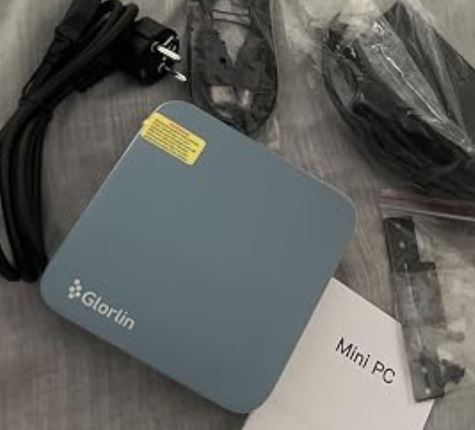
The NiPoGi Pinova P1 is one of the most well-rounded mini PCs on the market in its price range. With a genuine AMD Ryzen 3 4300U processor (not Intel N-series), 16 GB of RAM, a 512 GB SSD, and support for triple 4K displays, it offers a value proposition that's hard to beat for office work, education, and home entertainment.
✅ Pros: Genuinely fast Ryzen 4300U · Triple 4K · 7 USB ports · Expandable up to 64GB RAM · Windows 11 Pro included · Silent operation
❌ Cons: WiFi 5 only (no WiFi 6) · Integrated GPU limited for intensive gaming · SATA SSD (not NVMe in the primary slot) · No SD card reader
Quick conclusion: If you're looking for a serious, quiet, and compact mini PC for under €200, the Pinova P1 is one of the best options on the market in 2026.
-
🛒 Check Price and Availability (Amazon)
-
🛍️ AliExpress: Search for NiPoGi Pinova P1 on AliExpress
🔧 Technical specifications
| Component | Detail |
|---|---|
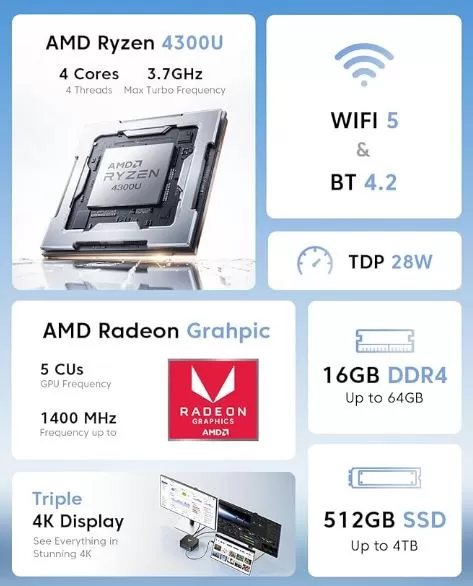
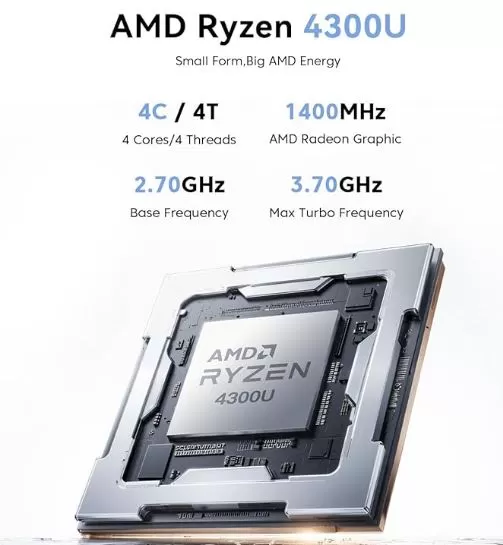
| CPU | AMD Ryzen 3 4300U, 4 cores / 4 threads, base 2.7 GHz, turbo 3.7 GHz |
| GPU | Integrated AMD Radeon Graphics, 5 cores, 1400 MHz |
| RAM | 16 GB DDR4 SO-DIMM (2 slots, expandable up to 64 GB / 3200 MHz) |
| Storage | 512 GB M.2 2280 SATA SSD (additional NVMe PCIe 3.0 slot, up to 4 TB) |
| Operating system | Windows 11 Pro pre-installed |
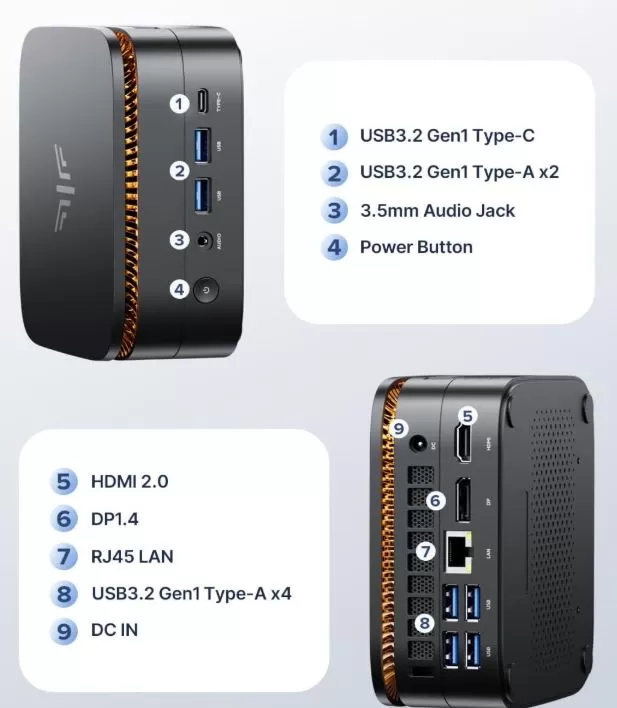
| Video outputs | HDMI 2.0 (4K@60Hz) + DP 1.4b (4K@60Hz) + USB-C 3.2 Gen2 (4K@60Hz) |
| Connectivity | WiFi 5, Bluetooth 4.2, Gigabit LAN |
| USB ports | 2x USB 3.2 Gen2 Type-A + 4x USB 3.2 Gen1 Type-A + 1x USB-C 3.2 Gen2 |
| Audio | Jack 3.5mm + audio via HDMI/DP/USB-C |
| Feeding | DC 19V / 3.42A (adapter included) |
| Dimensions | 128.2 × 128.2 × 51 mm |
| Advanced features | Wake on LAN, PXE Boot, RTC Wake, Auto Power On |
🏗️ Design and construction quality
The NiPoGi Pinova P1 follows the classic square mini PC form factor that works so well on compact desktops. The case is made of matte-finish ABS plastic with a subtle textured pattern on the top cover, giving it a clean, professional look without easily accumulating fingerprints. Measuring just 128 x 128 x 51 mm, it fits in the palm of your hand and can be mounted behind a monitor using the included VESA mount.
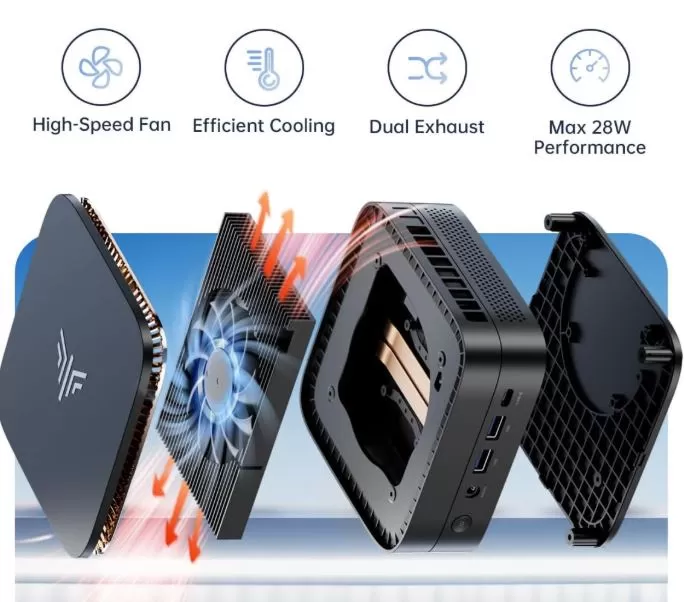
Cooling is managed by an active system with an internal fan that, under medium load, emits virtually imperceptible noise. Under sustained high load, a soft hum can be heard, but it never becomes bothersome in work environments or living rooms. Accessible screws on the base allow for easy opening of the device to upgrade RAM or add storage.
🖥️ Screen and multimedia
The Pinova P1 doesn't have its own screen, being a mini desktop PC, but its ability to connect three monitors simultaneously in 4K at 60Hz is one of its biggest selling points. The three outputs (HDMI 2.0, DisplayPort 1.4, and USB-C) work independently, allowing for high-performance multi-monitor setups without any additional adapters.
Video playback is smooth in 4K, even with HDR content, thanks to the Ryzen 4300U's hardware decoding. YouTube 4K, Netflix, and streaming in general work without stuttering or frame drops. HDMI audio works correctly, and the 3.5mm jack delivers a clear signal for headphones or desktop speakers.
⚙️ Performance and software
The AMD Ryzen 3 4300U is a Zen 2 architecture (14 nm) processor designed for ultrabooks, but in a mini PC with better cooling, it offers significantly higher sustained performance than the popular Intel N100/N150 processors that dominate this price segment. In practical terms:
-
🌐 Web browsing with 20+ tabs open: smooth, without slowdowns.
-
📄 Office / Google Workspace (Word, Excel, Sheets, PowerPoint): Native performance without visible lag.
-
🎞️ Basic video editing (DaVinci Resolve, Premiere Basics): acceptable for 1080p projects.
-
💻 Web development / programming (VS Code, Node.js, Laravel): suitable for medium-sized projects.
-
🎮 Casual gaming (Minecraft, League of Legends, CS:GO): playable at medium-low resolution.
-
🎮 Demanding gaming (AAA titles in high resolution): not recommended — the integrated GPU has its limits.
Windows 11 Pro comes pre-installed and activated. The system boots in approximately 15-18 seconds from a cold start. The level of bloatware is minimal compared to other Chinese manufacturers in the same segment, although it includes some proprietary NiPoGi utility programs that can be easily uninstalled.
🔋 Food and energy consumption
Being a mini desktop PC, it does not have an internal battery. It is powered by an external 19V/3.42A DC adapter included in the box, with a standard 5.5 x 2.1 mm connector. Idle power consumption is around 6-8W, office use is between 15-25W, and under maximum load it can reach 45-50W—very efficient values compared to a traditional desktop PC.
In addition, the Auto Power On function allows you to configure it to start automatically when it receives power, ideal for uses such as a home server or HTPC integrated into the living room.
🔌 Connectivity and ports
Connectivity is one of the Pinova P1's strong points and clearly surpasses many rivals in its price range:
-
7 USB ports in total: 2x USB 3.2 Gen2 (10Gbps) + 4x USB 3.2 Gen1 (5Gbps) + 1x USB-C Gen2 (10Gbps + DP + 4K)
-
Triple 4K video output: HDMI 2.0 + DP 1.4b + USB-C
-
Gigabit Ethernet LAN (10/100/1000 Mbps) for stable wired connection
-
WiFi 5 (802.11 ac) dual-band + Bluetooth 4.2
-
3.5mm combined audio jack (headphones + microphone)
-
Wake on LAN + PXE Boot + RTC Wake for remote management and automation
⚠️ What it lacks: WiFi 6, SD card reader, Thunderbolt port and a second LAN port for server use.
💬 Opinions on pages and communities
External opinions about the Pinova P1 are generally positive, especially among office and home office users:
-
🇬🇧 VividRepairs.co.uk describes it as a reliable option for everyday productivity, highlighting the good value between the Ryzen processor and the final price.
-
🇯🇵 Oniji Blog (Japan) in February 2026 points out that the 4300U represents a real improvement over the 3300U at the same price, with a more efficient Zen 2 architecture.
-
🇪🇸 TopesdeGama.com highlights it as the "perfect office solution for the home" in its December 2025 publication.
-
📱 Instagram Reviews: User Michael describes it as "a practical option for those who prioritize energy efficiency and CPU performance over graphics capabilities."
-
🎥 YouTube (Easy Buy, Feb 2026): Confirms that for browsing, Office, video, and educational tasks, performance is solid and smooth.
-
🎥 YouTube (WizzRev): It especially highlights the 7 USB ports and the triple 4K output as key differentiators compared to competitors at the same price.
🧪 Technical tests and benchmarks
Tests of the AMD Ryzen 3 4300U in equivalent configurations yielded the following benchmark results:
Geekbench 6 CPU (estimated for Ryzen 4300U):
-
🔹 Single-Core: ~1,050 – 1,150 points
-
🔸 Multi-Core: ~3,200 – 3,500 points
This clearly places it above the Intel N100 (~1,197 SC / ~3,012 MC in Geekbench 6) and practically on par in multi-core performance, with a clear advantage in single-threaded workloads.
Comparison of estimated performance vs competitors:
| Processor | Architecture | Single-Core GB6 | Multi-Core GB6 | Integrated GPU |
|---|---|---|---|---|
| AMD Ryzen 3 4300U | Zen 2 | ~1,100 | ~3,400 | Radeon (5 CU, 1400MHz) |
| Intel N100 | Alder Lake-N | ~1,197 | ~3.012 | UHD Graphics 24EU |
| Intel N150 | Twin Lake | ~1,250 | ~3,200 | UHD Graphics 24EU |
| AMD Ryzen 5 3500U | Zen+ | ~950 | ~3,000 | Radeon Vega 8 |
Storage tests (512GB M.2 SATA SSD):
-
Sequential read: ~500 MB/s
-
Sequential write speed: ~450 MB/s
Typical SATA SSD performance values, sufficient for 95% of home and office uses, although if you need intensive video editing, it would be advisable to add an NVMe drive in the second available slot.
Temperatures and noise:
-
Resting temperature: ~35-40°C
-
Temperature under sustained load: ~70-75°C (within safe limits)
-
Noise level: <25 dB in normal use
🎯 Who is it ideal for?
The NiPoGi Pinova P1 with Ryzen 3 4300U is an excellent choice for:
-
✅ Office and remote work (Office, video calls, management, browsing)
-
✅ Students who need a complete PC with Windows 11 Pro
-
✅ Multi-monitor setups (real triple 4K without adapters)
-
✅ Home entertainment (HTPC, streaming, YouTube 4K)
-
✅ Small businesses that need to equip workstations on a low budget
-
✅ Users who want absolute silence on their desktop
It is not ideal for:
-
❌ AAA gaming or graphically demanding games
-
❌ Professional 4K video editing / 3D rendering
-
❌ Users who need WiFi 6 or Bluetooth 5.x
Alternatives to consider:
-
🔄 Beelink SER5 Pro (Ryzen 7 5800H) — more power, higher price (~$290)
-
🔄 Minisforum UM350 (Ryzen 5 3550H) — similar range, superior Vega 8 GPU
-
🔄 NiPoGi Pinova P1 (Ryzen 3 3300U) — previous version, slightly cheaper
🛒 Where to buy it?
You can purchase the NiPoGi Pinova P1 from the following online stores with fast shipping:
-
🛒 Check Price and Availability (Amazon)
-
🛍️ AliExpress: Search for NiPoGi Pinova P1 on AliExpress
-
🛍️ NiPoGi Official Store
💡 Tip: Compare prices between Amazon and AliExpress. Amazon usually offers 1-2 day delivery and better returns management. AliExpress may have slightly lower prices but with longer shipping times from China.