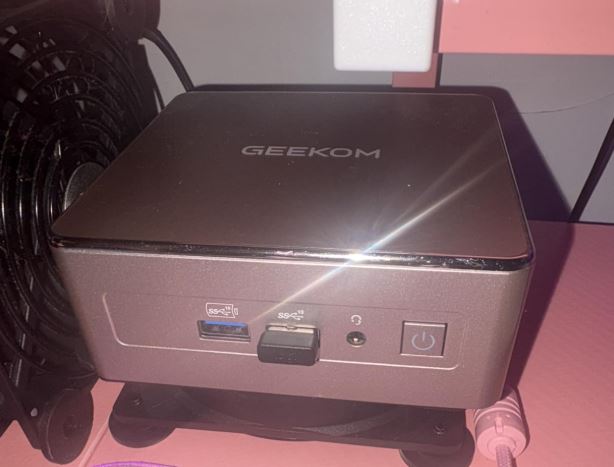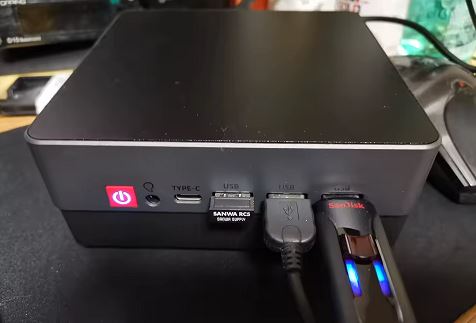
The TexHoo ZNR stands out as one of the most balanced options in terms of value for money within the compact mini-PC category. Its greatest strengths lie in its highly efficient dual copper heat pipe cooling system and its exceptional dual 2.5G LAN connectivity, a feature uncommon in its price range. On the downside, all its USB ports are located on the front panel, and it requires manual configuration of secure boot in the BIOS.
It's an outstanding purchase for tight budgets, quiet offices, and homelab or domestic firewall projects.
-
The best features: Dual high-speed 2.5G Ethernet ports, temperatures below 66°C under stress, and fully expandable RAM and M.2 storage.
-
Areas for improvement: It does not include any USB ports on the back; the Type-C port is limited to data transfer with no video output or PD charging.
→ View Prices and Variants of the TexHoo ZNR
Unboxing and Box Contents
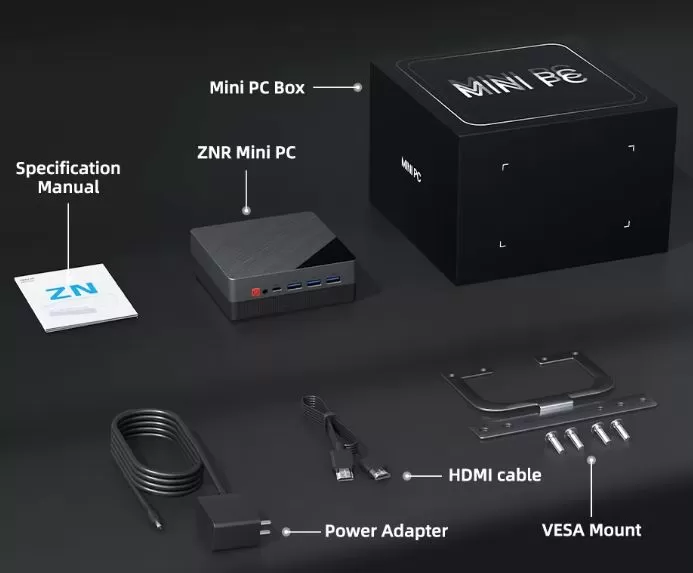
The device comes in a sleek, reinforced black box with the "MINI PC" silkscreen print. All contents are nestled in high-density protective foam to prevent damage during international shipping.
-
TexHoo ZNR Mini PC Main Unit
-
External power adapter with European/standard plug cable
-
Short HDMI video cable (approx. 50 cm)
-
Metal VESA mounting bracket with complete screws for monitors
-
ZN Series User Manual and Quick Specifications
Key Technical Specifications: TexHoo ZNR (All Versions)
| Category / Specification | TexHoo R5 5625U | TexHoo R5 5500U | TexHoo R5 5600U | TexHoo R5 7530U | TexHoo R7 7730U | TexHoo R7 4800H |
|---|---|---|---|---|---|---|
| General Chip Information | ||||||
| Commercial series | Ryzen 5 5000 | Ryzen 5 5000 | Ryzen 5 5000 | Ryzen 5 7000 | Ryzen 7 7000 | Ryzen 7 4000 |
| Architecture codename | Barcelo | Lucienne | Cezanne | Barcelo R | Barcelo R | Renoir |
| CPU Architecture | Zen 3 | Zen 2 | Zen 3 | Zen 3 | Zen 3 | Zen 2 |
| Release date | 2022-01 | 2021-01 | 2021-01 | 2023 Q1 | 2023 Q1 | 2020-01 |
| Nuclei and Frequencies | ||||||
| Cores / Threads | 6C / 12T | 6C / 12T | 6C / 12T | 6C / 12T | 8C / 16T | 8C / 16T |
| Base frequency | 2.3 GHz | 2.1 GHz | 2.3 GHz | 2.0 GHz | 2.0 GHz | 2.9 GHz |
| Max turbo frequency | 4.3 GHz | 4.0 GHz | 4.2 GHz | 4.5 GHz | 4.5 GHz | 4.2 GHz |
| L2 / L3 Cache | 3 MB / 16 MB | 3 MB / 8 MB | 3 MB / 16 MB | 3 MB / 16 MB | 4 MB / 16 MB | 4 MB / 8 MB |
| Lithographic process | TSMC 7 nm | TSMC 7 nm | TSMC 7 nm | TSMC 7 nm | TSMC 7 nm | TSMC 7 nm |
| Thermal Power (TDP) | ||||||
| Default TDP | 15 W | 15 W | 15 W | 15 W | 15 W | 45 W |
| Configurable cTDP range | 10–25 W | 10–25 W | 10–25 W | 15–25 W | 15–25 W | 35–54 W |
| Maximum temperature (Tjmax) | 95 °C | 105 °C | 105 °C | 95 °C | 95 °C | 105 °C |
| Integrated Graphics (iGPU) | ||||||
| Graphics model | Radeon Vega 7 | Radeon Vega 7 | Radeon Vega 7 | Radeon Vega 7 | Radeon Vega 8 | Radeon Vega 7 |
| CU Units / Shaders | 7 CU / 448 SP | 7 CU / 448 SP | 7 CU / 448 SP | 7 CU / 448 SP | 8 CU / 512 SP | 7 CU / 448 SP |
| GPU frequency | 1800 MHz | 1800 MHz | 1800 MHz | 2000 MHz | 2000 MHz | 1600 MHz |
| Theoretical power FP32 | ~1.6 TFLOPS | ~1.6 TFLOPS | ~1.6 TFLOPS | ~1.8 TFLOPS | ~2.0 TFLOPS | ~1.4 TFLOPS |
| Synthetic Performance (PassMark) | ||||||
| CPU Mark (Multi-core) | ~14,300 | ~8,900 | ~14,800 | ~14,900 | ~16,860 | ~18,600 |
| Single-Threaded | ~2,812 | ~2,380 | ~2.835 | ~2,968 | ~2,907 | ~2,660 |
| Relative multicore | 100% (Base) | ~62% | ~103% | ~104% | ~118% | ~130% |
| RAM | ||||||
| Available slots | 2 × SO-DIMM | 2 × SO-DIMM | 2 × SO-DIMM | 2 × SO-DIMM | 2 × SO-DIMM | 2 × SO-DIMM |
| Supported type and speed | DDR4 2666 / 3200 | DDR4 2666 / 3200 | DDR4 2666 / 3200 | DDR4 2666 / 3200 | DDR4 2666 / 3200 | DDR4 2666 / 3200 |
| Maximum allowed capacity | Up to 64 GB | Up to 64 GB | Up to 64 GB | Up to 64 GB | Up to 64 GB | Up to 64 GB |
| Sales packages | Barebone / 8G / 16G | Barebone / 8G / 16G | Barebone / 8G / 16G | Barebone / 8G / 16G | Barebone / 8G / 16G | Barebone / 8G / 16G |
| Storage | ||||||
| M.2 slots | 1 × M.2 2280 | 1 × M.2 2280 | 1 × M.2 2280 | 1 × M.2 2280 | 1 × M.2 2280 | 1 × M.2 2280 |
| Supported interface | PCIe 3.0 x4 / SATA | PCIe 3.0 x4 / SATA | PCIe 3.0 x4 / SATA | PCIe 3.0 x4 / SATA | PCIe 3.0 x4 / SATA | PCIe 3.0 x4 / SATA |
| Additional 2.5" bay | No | No | No | No | No | No |
| Standard capabilities | 256 GB / 512 GB | 256 GB / 512 GB | 256 GB / 512 GB | 256 GB / 512 GB | 256 GB / 512 GB | 256 GB / 512 GB |
| Network and Wireless Connectivity | ||||||
| Wired Ethernet ports | 2 × 2.5G LAN | 2 × 2.5G LAN | 2 × 2.5G LAN | 2 × 2.5G LAN | 2 × 2.5G LAN | 2 × 2.5G LAN |
| Wi-Fi connection | Wi-Fi 6 (802.11ax) | Wi-Fi 6 (802.11ax) | Wi-Fi 6 (802.11ax) | Wi-Fi 6 (802.11ax) | Wi-Fi 6 (802.11ax) | Wi-Fi 6 (802.11ax) |
| Bluetooth | Version 5.2 | Version 5.2 | Version 5.2 | Version 5.2 | Version 5.2 | Version 5.2 |
| Wireless chip | Realtek RTL8852BE | Realtek RTL8852BE | Realtek RTL8852BE | Realtek RTL8852BE | Realtek RTL8852BE | Realtek RTL8852BE |
| Video Ports and Outputs | ||||||
| Simultaneous video outputs | Up to 3 (4K @ 60Hz) | Up to 3 (4K @ 60Hz) | Up to 3 (4K @ 60Hz) | Up to 3 (4K @ 60Hz) | Up to 3 (4K @ 60Hz) | Up to 3 (4K @ 60Hz) |
| Video connectors | 2 × HDMI + 1 × DP | 2 × HDMI + 1 × DP | 2 × HDMI + 1 × DP | 2 × HDMI + 1 × DP | 2 × HDMI + 1 × DP | 2 × HDMI + 1 × DP |
| Front USB ports | 3 × USB 3.0 + 1 × Type-C | 3 × USB 3.0 + 1 × Type-C | 3 × USB 3.0 + 1 × Type-C | 3 × USB 3.0 + 1 × Type-C | 3 × USB 3.0 + 1 × Type-C | 3 × USB 3.0 + 1 × Type-C |
| Rear USB ports | 0 (Network and video only) | 0 (Network and video only) | 0 (Network and video only) | 0 (Network and video only) | 0 (Network and video only) | 0 (Network and video only) |
| Analog audio | 3.5 mm combo jack | 3.5 mm combo jack | 3.5 mm combo jack | 3.5 mm combo jack | 3.5 mm combo jack | 3.5 mm combo jack |
| Clear CMOS button | Yes (back hole) | Yes (back hole) | Yes (back hole) | Yes (back hole) | Yes (back hole) | Yes (back hole) |
| Chassis, Operating System and Extras | ||||||
| Chassis dimensions | 13 × 13 × 5.3 cm | 13 × 13 × 5.3 cm | 13 × 13 × 5.3 cm | 13 × 13 × 5.3 cm | 13 × 13 × 5.3 cm | 13 × 13 × 5.3 cm |
| Refrigeration system | Copper + 2 heatpipes | Copper + 2 heatpipes | Copper + 2 heatpipes | Copper + 2 heatpipes | Copper + 2 heatpipes | Copper + 2 heatpipes |
| VESA mount | Included in box | Included in box | Included in box | Included in box | Included in box | Included in box |
| Operating system included | Win 11 (except barebone) | Win 11 (except barebone) | Win 11 (except barebone) | Win 11 (except barebone) | Win 11 (except barebone) | Win 11 (except barebone) |
| OS Compatibility | Windows 11 / Linux | Windows 11 / Linux | Windows 11 / Linux | Windows 11 / Linux | Windows 11 / Linux | Windows 11 / Linux |
Design and Construction Quality
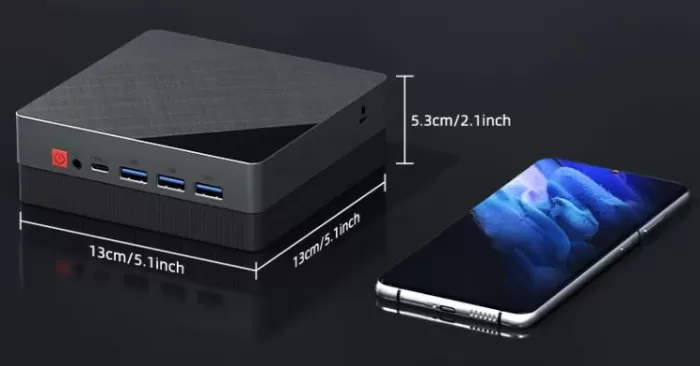
The chassis adopts a cubic format with dimensions of 13 by 13 centimeters and a profile of just 5.3 centimeters in height, occupying practically the same space on the table as a mobile phone.
The casing is constructed of reinforced polycarbonate with a two-tone finish: a polished upper half in matte dark gray and a grooved lower base in black that acts as a dissipation zone and air intake.
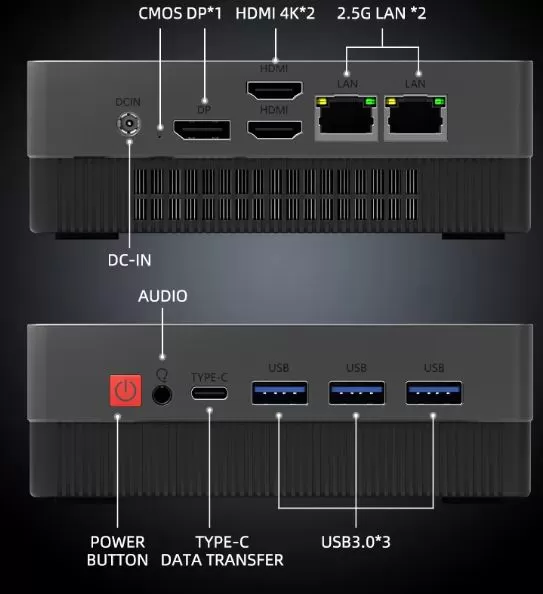
In hand, it feels like a solid block, with no structural creaking when you press on the casing. Its front-facing red power button stands out, as does a discreet hole on the back for resetting the BIOS (Clear CMOS) without having to open the device.
Multimedia Experience and Screen Output
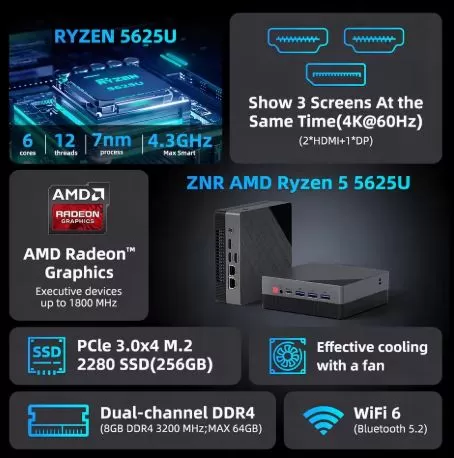
The integrated Radeon Vega graphics chip allows you to manage configurations of up to three simultaneous displays at 4K resolution at 60 Hz by combining its two rear HDMI outputs with the DisplayPort connector.
Playing multimedia content in Ultra HD using VP9 and H.264 codecs (such as streaming platforms and YouTube in 4K60) runs with absolute fluidity and without frame drops, freeing the CPU from unnecessary effort.
In terms of acoustics, it does not have its own internal speaker, so the audio output must be managed through headphones via the 3.5 mm front connector or by transmitting digital sound through HDMI/DisplayPort cables to the monitor.
Performance and Software
In everyday tasks involving intensive browsing, complex spreadsheets, and software development, the configuration with the Ryzen 5 5625U (Zen 3 architecture with 6 cores and 12 real threads) responds immediately:
-
Operating system and bloatware: In versions that come pre-configured with memory and storage, a clean image of Windows 11 Pro is included, pre-activated, free of adware or unwanted pre-installed applications.
-
Barebone version: If you purchase the chassis without RAM or SSD, you will need to provide your own installation key. In the BIOS/UEFI, it is essential to change the
Secure Boot Modefactory setting ( Custom ) to Standard, save the changes, and then enable the optionSecure Bootto ensure full compatibility with Windows 11 security policies. -
Drivers: AMD's official automatic driver detection tool flawlessly installs the chipset and graphics engine. For the Realtek RTL8852BE wireless chip, if Windows Update doesn't automatically recognize it during a clean install, simply download the .inf package from the Microsoft catalog and install it manually from Device Manager.
→ View Prices and Variants of the TexHoo ZNR
Energy Consumption
Thanks to the low power consumption profile of 15W assigned to the AMD U series, this mini PC stands out for its low electrical impact:
-
Idle: Between 6 W and 9 W measured directly at the wall socket.
-
Standard office and browsing use: Between 14 W and 22 W.
-
Continuous full load (CPU and GPU stress): Contained peaks between 38W and 42W.
These figures make it an ideal device to leave switched on for entire days or running 24 hours a day without causing a spike in your electricity bill.
Temperature and Noise: Actual Thermal (TexHoo R5 5625U version)
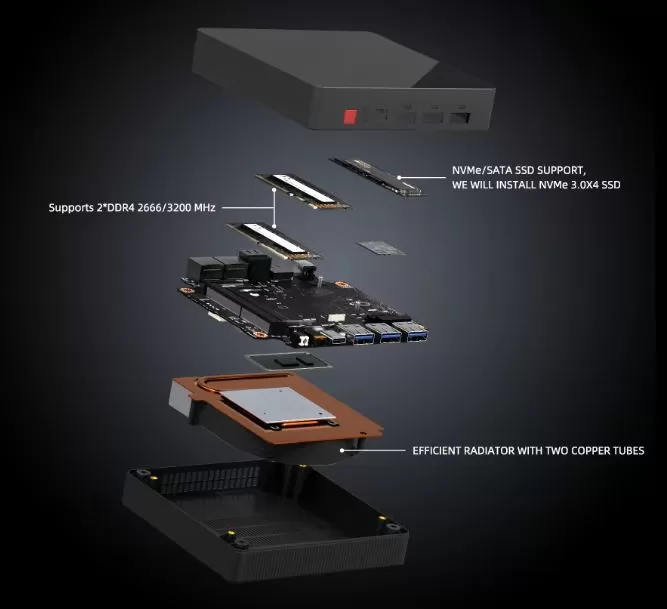
Unlike many budget mini PCs that cut costs with simple aluminum blocks, the TexHoo ZNR incorporates a copper-based heatsink and two copper heatpipes associated with a turbine-type fan.
In continuous stress tests under Cinebench R23 at an ambient temperature of approximately 23 °C:
-
The average temperature under rendering load is around 51.8 °C.
-
Under combined CPU stress while simultaneously decompressing and installing heavy software, the maximum recorded temperature did not exceed 65.1 °C.
The acoustic behavior is very discreet. At rest, the fan spins almost imperceptibly, and when it reaches its maximum load, it emits a linear and uniform hum without annoying whistling or sudden drops in frequency due to overheating ( thermal throttling ).
Connectivity and Ports
The chassis offers a unique port layout that should be taken into account before planning the cabling:
-
Front panel: It houses 3 traditional USB 3.0 ports, a USB Type-C connector (intended exclusively for data, not video output) and the combined audio jack.
-
Rear panel: Exclusively houses the DC power hole, DisplayPort output, two HDMI connectors, and two RJ45 2.5G Ethernet ports.
The main drawback of this design is the complete lack of USB ports on the back. When connecting a wired keyboard or mouse, the cable must be routed through the front panel. The best solution for maintaining a clutter-free desktop is to use wireless keyboards and mice that connect via Bluetooth 5.2 or a single, compact USB receiver.
Expansion and Updates (Upgrades)
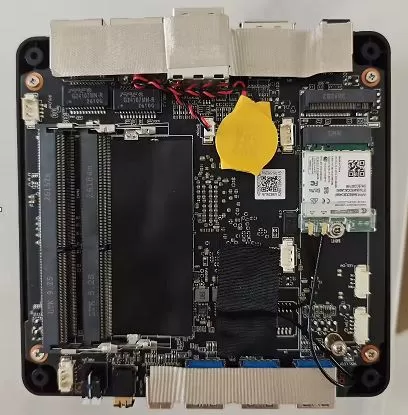
Access to the inside of the device is very easy by removing the four screws located under the lower rubber feet:
-
RAM: It has two true DDR4 SO-DIMM slots. It supports both 2666 MHz and 3200 MHz memory up to a limit of 64 GB (2 × 32 GB). To avoid throttling the performance of the integrated graphics chip, it is strongly recommended to always install two paired modules and take advantage of dual-channel mode with a DDR4 SO-DIMM RAM kit.
-
Storage: It features an M.2 2280 connector that is dual-compatible with NVMe PCIe 3.0 x4 drives and M.2 SATA drives. It does not include a secondary bay for 2.5-inch drives, but it allows for easy replacement of the internal drive with a high-capacity 1TB or 2TB M.2 NVMe PCIe 3.0 SSD.
Mini PC Comparison: TexHoo ZNR 7530U vs Direct Competitors
| Model | Processor and Graphics | RAM and Storage | Connectivity and Ports | Price (EUR / USD) | Purchase Link |
|---|---|---|---|---|---|
| TexHoo ZNR | AMD Ryzen 5 7530U (6C/12T, Zen 3, 15W) Radeon Vega 7 (2000 MHz) |
16 GB DDR4 (2× SO-DIMM) 512 GB M.2 NVMe PCIe 3.0 |
2 × 2.5G LAN Wi-Fi 6 + BT 5.2 2 × HDMI + 1 × DP (3 screens) 3 × USB 3.0 + 1 × Type-C front |
€425.69 ~$478 USD |
Buy TexHoo ZNR on AliExpress |
| KAMRUI E3B | AMD Ryzen 5 7530U (6C/12T, Zen 3, 15W) Radeon Vega 7 (2000 MHz) |
16 GB LPDDR4X 512 GB SSD M.2 |
1 × Gigabit LAN Wi-Fi 6 + BT 5.2 HDMI + DP (4K display) USB 3.0 + USB Type-C |
€377.41 ~$424 USD |
Buy KAMRUI E3B on AliExpress |
| FIREBAT AM02 | AMD Ryzen 5 6600H (6C/12T, Zen 3+, 45W) Radeon 660M (RDNA 2) |
16 GB LPDDR5 512 GB SSD M.2 |
1 x Gigabit LAN , Wi-Fi 6 + BT 5.2 , HDMI + Type-C/DP, Ultra-slim portable design |
€345.74 ~$388 USD |
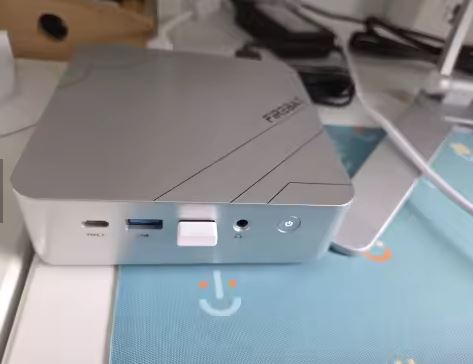
Buy FIREBAT AM02 on AliExpress |
| FIREBAT R3 | AMD Ryzen 5 7430U (6C/12T, Zen 3, 15W) Radeon Vega 7 (1800 MHz) |
16 GB LPDDR4 512 GB SSD M.2 |
1 × Gigabit LAN Wi-Fi 6 + BT 5.2 HDMI + DP 4K USB 3.0 + Type-C |
€328.30 ~$369 USD |
Buy FIREBAT R3 on AliExpress |
| Chuwi Ubox | AMD Ryzen 5 6600H (6C/12T, Zen 3+, 45W) Radeon 660M (RDNA 2) |
16 GB LPDDR5 512 GB SSD M.2 (Expansion 2× M.2) |
1 × Gigabit LAN Wi-Fi 6 + BT 5.2 4K @ 144Hz output Lightweight chassis (650g) |
€386.30 ~$434 USD |
Buy Chuwi Ubox on AliExpress |
| ACEMAGIC K1 | AMD Ryzen 5 7430U (6C/12T, Zen 3, 15W) Radeon Vega 7 (1800 MHz) |
16 GB LPDDR4 512 GB M.2 NVMe (Dual M.2 slot) |
1 × Gigabit LAN Wi-Fi 6 + BT 5.2 2 × HDMI + DP (Triple 4K) Dual M.2 SSD bay |
€491.39 ~$552 USD |
Buy ACEMAGIC K1 on AliExpress |
- TexHoo ZNR: Its price of €425.69 is higher than models like the KAMRUI or the FIREBAT R3, but it justifies the difference for advanced users by being the only one with dual 2.5G Ethernet ports and RAM in replaceable standard SO-DIMM slots (as opposed to the soldered LPDDR memory of several competitors).
-
RDNA 2 Graphics (Ryzen 6600H): If the absolute priority is light gaming, both the FIREBAT AM02 (€345.74) and the Chuwi Ubox (€386.30) feature the Ryzen 5 6600H with LPDDR5 memory and Radeon 660M graphics (RDNA 2), outperforming the Vega architecture of the 7530U and 7430U models in 3D performance.
-
Dual storage: The ACEMAGIC K1 and the Chuwi Ubox stand out for allowing the simultaneous installation of two independent M.2 drives.
Real User Reviews
On international trade platforms and user communities, reviews of this assembly show a remarkable level of satisfaction (average score of 5.0 out of 5 with more than 200 orders delivered):
-
Genuine Hardware Verification: Buyers confirm through diagnostic tools such as CPU-Z and HWiNFO that AMD Ryzen 5625U processors correspond to genuine AMD Zen 3 silicon, with no fraudulently rebranded units.
-
3200 MHz memory acceptance: Users who purchased the barebone version and installed commercial memory kits confirm that the system automatically raises profiles to 3200 MHz without requiring complex voltage adjustments.
-
The criticized detail: Unanimous agreement among users worldwide in complaining about the lack of a rear USB port, forcing the use of front hubs or peripherals.
-
Homelab environments: Multiple buyers highlight that the two Ethernet ports make it a coveted machine for setting up home virtualization environments under Proxmox VE or Docker containers.
Technical Tests and Benchmarks (models with Ryzen 5 5625U processor)
The Ryzen 5 5625U processor offers proven metrics in synthetic benchmark environments:
-
PassMark CPU Mark (Multicore): It scores around 14,300 points, leaving processors of previous architectures like the Ryzen 5 5500U (approx. 8,900 points) far behind.
-
PassMark Single-Thread: It achieves approximately 2,812 points, providing outstanding agility when opening heavy programs or loading complex web pages.
-
Cinebench R23: It achieves consistent scores of around 1,350 points in single-core and over 7,100 points in sustained multi-core, maintaining stable frequencies of 3.3 to 3.6 GHz on all cores thanks to good thermal dissipation.
Gaming and Emulation
This computer has an integrated Radeon Vega 7 graphics card with frequencies up to 1800 MHz (expandable in the 7530U version):
-
Esports Titles and Lightweight Games: Popular titles such as League of Legends, Valorant, or CS:GO 2 (with moderate settings) run stably above 60 frames per second at 1080p resolution, provided you have two RAM modules installed in Dual Channel mode.
-
Demanding AAA Games: This is not a computer designed to play next-gen releases like Cyberpunk 2077 ; in these cases, it is necessary to reduce the resolution to 720p and apply rendering scales to maintain rates of 30 FPS.
-
Retro Emulation: Outstanding in classic emulation. It smoothly handles consoles like PlayStation 1, PS2, PSP, GameCube, and Nintendo Wii with internal resolution upscaling to 1080p without any loss of fluidity.
Frequently Asked Questions (FAQ)
Is it worth buying the version without RAM or hard drive (Barebone)?
Yes, it is highly recommended if you have DDR4 modules at home or if you prefer to purchase top-tier brand components at 3200 MHz in dual channel and a reliable NVMe drive.
Can the mini PC be powered via its USB Type-C port?
No. The front USB Type-C port is enabled for data transfer only. The device must be powered exclusively through the circular DC-IN port using its included charger.
Does it support the installation of Linux distributions?
It works perfectly with modern distributions like Ubuntu, Debian, or Proxmox VE. You only need to verify that your Linux kernel includes the drivers for the Realtek RTL8852BE Wi-Fi chip if you require a wireless connection.
Final Conclusion
The TexHoo ZNR proves that you don't need to spend a fortune to get a capable, cool, and reliable mini PC. It stands out for its dual 2.5 Gbps network interface and a chassis with two copper heat pipes that keeps temperatures under control even after extended rendering sessions.
It's an ideal alternative for users looking for an invisible desktop computer for remote work, students who need a quiet machine, or enthusiasts who want to set up a small home server without drastically increasing their power consumption. If its front USB port layout doesn't interfere with your setup, it's an extremely smart purchase.
👉 Check out the prices and available options for the TexHoo ZNR: