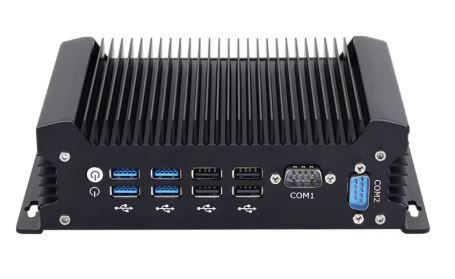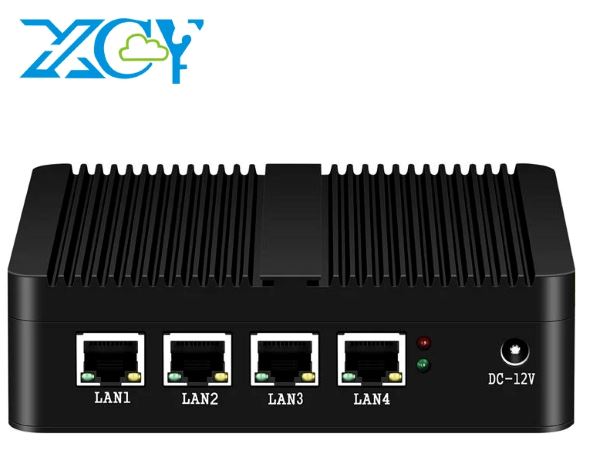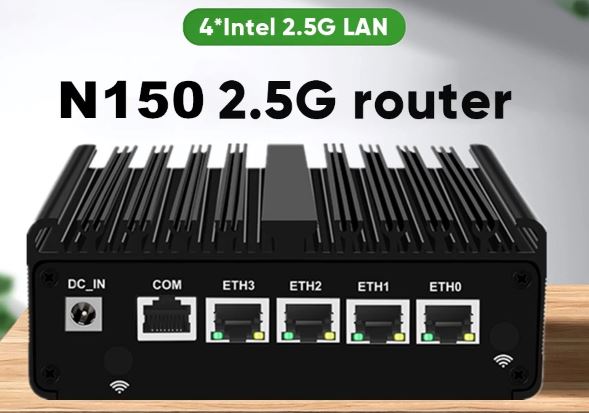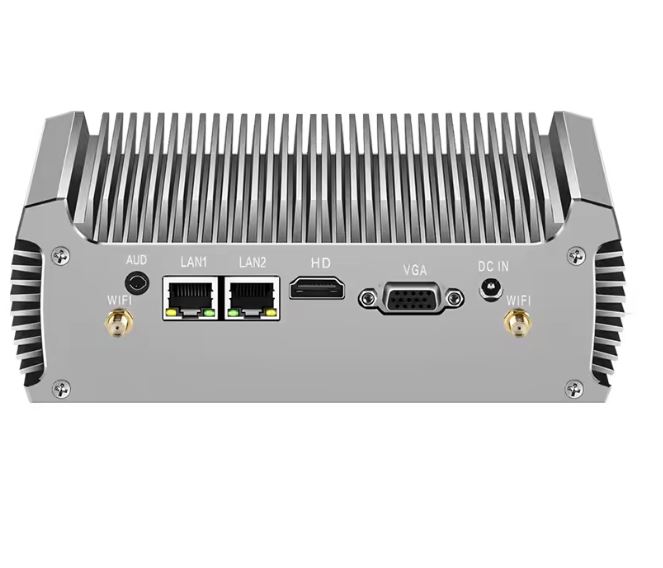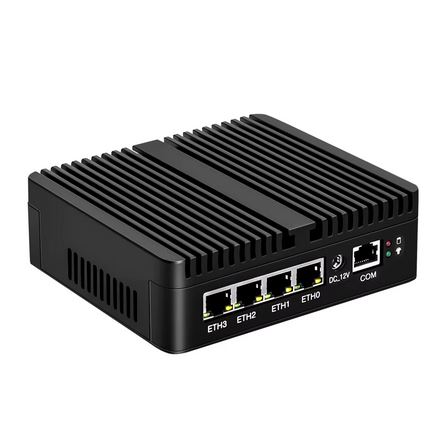
The Topton New Intel N150 Firewall Computer ( SEE PURCHASE DETAILS HERE ) is a fanless mini PC designed to act as a router, firewall, or lightweight virtualization appliance with pfSense, OPNsense, Proxmox, or ESXi.
It stands out for its 4 Intel i226 2.5GbE ports, robust metal chassis and multiple CPU, RAM and storage configurations.
In return, it's not a classic "plug & play" product: there's no official ASUS/QNAP-type support and documentation is scarce, so it requires a certain enthusiast profile.
If you accept that compromise, it's a very capable base for a low-power home or small business router.
Pros:
-
4x 2.5GbE Intel i226, ideal for WAN + multiple LAN/VLAN.
-
Options with Intel N150 DDR5 or J6412/J5005/6305 DDR4 depending on budget and use.
-
Fanless, compact and silent metal chassis, with the option of two storage units.
-
Good average rating (≈4.5–4.8/5) on AliExpress.
Contras:
-
There is no built-in Wi-Fi; it requires an M.2/mini PCIe module and external antennas depending on the version.
-
Limited documentation and poorly explained BIOS, typical of Chinese OEM manufacturers.
-
It's not the cheapest option if you upgrade to 32GB RAM and 1TB NVMe; it can cost close to $800–900.
-
Some users report doubts about the exact compatibility of 4G/5G modems and Wi-Fi.
👉 Check the Price and Availability
📦 Unboxing and box contents
In most AliExpress and Topton listings, the package includes:
-
Topton Mini PC Intel N150/J6412/J5005/6305 with metal chassis and 4x 2.5G LAN.
-
Power adapter (usually 12V or 19V depending on the batch).
-
Power cable according to region (EU/US/UK, depends on the seller).
-
Mounting brackets (in some batches, screws for fixing it to a wall or lightweight rack).
-
Very basic or non-existent documentation (often just a card with a QR code).
If you buy the "No RAM No Storage" version, it arrives barebone, ready for you to install your own RAM and NVMe/SATA SSD.
🧾 Key Specifications Table
(Data combined from AliExpress, Topton and distributor listings)
| Feature | Detail |
|---|---|
| Brand / Model | Topton New Intel N150 Firewall Computer (serie X4D/X4DF) |
| Available CPUs | Intel N150 (12ª gen), Celeron J6412, Celeron J5005, Celeron 6305 |
| Cores / TDP (examples) | N150: 4C/4T, 6 W; J6412: 4C/4T, 10 W; 6305: 2C/2T, 15 W |
| RAM | 1x DDR5 SODIMM (N150) o 2x DDR4 SODIMM (J6412/J5005/6305) |
| Maximum RAM (practical) | Up to 32 GB DDR4/DDR5 (depending on model and batch) |
| Storage | 1x M.2 NVMe 2280 + 1x 2,5" SATA 7 mm SSD/HDD |
| Network ports | 4x Intel i226-V 2.5GbE RJ45 |
| USB ports | 2x USB 3.0, 2x USB 2.0 (front/rear depending on the design) |
| Video output | 1x HDMI (sometimes additional DisplayPort depending on the variant) |
| Other ports | 1x RJ45 COM (consola), 1x ranura SIM 4G/3G |
| Format | Mini PC/embedded, fanless, metal case |
| Feeding | External DC adapter (≈12–19 V) |
| Suggested systems | pfSense, OPNsense, Proxmox VE, ESXi, PVE, routers Linux/BSD |
| AliExpress Reviews | ~4.5–4.8/5 depending on the score sheet and variant |
| Approx. price | From ~$117 barebone to ~$897 top-of-the-range with RAM/SSD |
🧱 Design and build quality
Topton X2B Mini PC
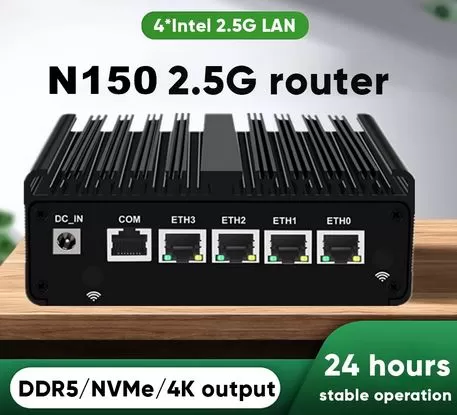
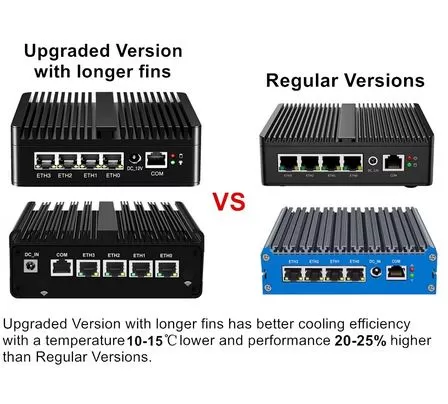
The chassis is entirely metal, with a finned aluminum case design intended for passive heat dissipation. It feels solid in hand, with enough weight to prevent movement caused by the cables, and the matte black finish fits well in a home rack, on a desktop, or next to the ONT.
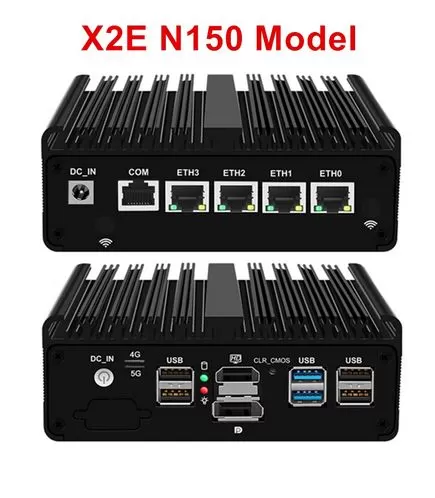
On the front/rear (depending on the variant), we find the four 2.5GbE RJ45 ports clearly aligned, along with USB, HDMI, and the console port. The absence of moving parts reduces the risk of malfunctions, but it also means that heat dissipation depends entirely on the internal contact between the CPU and the case; the factory installation on this type of device is usually adequate, but it's sometimes advisable to check the thermal paste if you're particular about performance.
👉 Check the Price and Availability
📺 Screen and multimedia
It's not your typical multimedia mini PC, but rather a network appliance, though it does include an HDMI output for installation, maintenance, or light desktop use. The supported resolution is usually at least Full HD, which is sufficient for installing operating systems, monitoring dashboards, or using a web browser occasionally.
For any audio, it will require HDMI or an external device. It's not its ideal use as a media center, but with an N150 and a fast SSD, it could run a lightweight Linux or Windows desktop for basic office tasks and monitoring.
⚙️ Performance and software
The behavior varies considerably depending on the CPU chosen:
-
Intel N150 (DDR5, 6 W): the most modern and efficient option, ideal for firewall + several containers, lightweight services and perhaps a small virtualization with Proxmox.
-
Celeron J6412 (DDR4, 10 W): very balanced between price and performance, perfect for pfSense/OPNsense with IDS/IPS and VPN at good speeds.
-
Celeron J5005 / 6305: more modest or older options, suitable for basic routing, but less recommended if you plan to use IDS or many VPNs.
This type of Topton is typically sold without an operating system, allowing the user to install pfSense, OPNsense, or their preferred Linux/BSD distribution. Several users report that with OPNsense on Proxmox and passthrough for Intel i226 NICs, the system is stable and performs well, although they find the manuals and 5G/Wi-Fi modem compatibility guide lacking. There is absolutely no bloatware: what you see is what you install yourself.
Compared to SOHO routers or equipment like Ubiquiti/TP-Link, the performance jump when using an x86 CPU with 4x 2.5 GbE is noticeable in VPNs, IDS/IPS, and complex firewall rules.
🔌 Energy consumption and cables
The product specifications indicate very low TDPs: the N150 is around 6W, while the J6412 is around 10W, with the 6305 slightly higher (15W). In practice, actual idle power consumption is usually a bit higher due to RAM, SSD, and chipset, but it's still very low compared to a desktop PC, making it ideal for running 24/7 as your main router.
The box usually contains:
-
Suitable DC power adapter.
-
Power cord varies by region.
-
They don't usually include Ethernet or HDMI cables, so it's a good idea to have them ready.
🌡️ Temperature and noise (actual thermal)
The fanless design guarantees zero noise: there are no internal fans, so the device is completely silent. Heat dissipation is handled by the aluminum casing and fins, which act as a large passive heatsink.
In similar experiences with Topton and Hunsn firewall cases (e.g., the J4125 with 4x i225 in ServeTheHome reviews), these units have been shown to maintain reasonable temperatures under moderate load, provided they have good external ventilation. If you enclose them in a cabinet without airflow, the casing heats up noticeably, although the chips are designed to operate with some thermal headroom.
📡 Connectivity and extras
Main connectivity:
-
4x RJ45 ports Intel i226-V a 2.5 GbE.
-
2x USB 3.0 + 2x USB 2.0 para periféricos, backups o dongles.
-
1x HDMI for video.
-
1x RJ45 COM port (serial console).
-
1x 4G/3G SIM slot to combine with internal module and use mobile connection.
We didn't find integrated Wi-Fi as standard; some models allow you to add a wireless or 4G/5G module, but users point out that there's no clear compatibility list and it's not well indicated whether BIOS updates are available. There's also no IP certification (dust/water resistance); it's intended for indoor use.
🔧 Expansion and upgrades
One of the great advantages of this Topton is its expandability compared to closed routers:
-
RAM:
-
Model N150/N100: 1x DDR5 SODIMM slot, supports modules up to at least 16–32 GB 4800 MHz; users report that a Crucial DDR5 16 GB works without issue.
-
Models J6412/J5005/6305: 2x DDR4 SODIMM slots, supporting 2400/2666/3200 MHz, up to 32 GB total in practice.
-
-
Storage:
-
1x M.2 NVMe 2280 PCIe 3.0 x1 for main system.
-
1x 2.5" SATA 7mm bay for additional SSD/HDD (e.g., for logs, backups, Proxmox, etc.).
-
It is relatively easy to change the SSD or increase RAM by removing the bottom cover, although it should be done carefully to avoid damaging thermal pads and antennas (if present).
🆚 Comparison with direct competitors
Similar equipment
-
Other Topton/Hunsn processors with Intel N100/N5105 and 4x i226.
-
Branded Mini PCs (Beelink, MinisForum) with 2.5GbE but fewer LAN ports.
-
Dedicated routers like Mikrotik or Ubiquiti (more closed, less flexible).
Indicative comparative table
(Example with a typical competitor N5105 4x 2.5GbE )
| Model | CPU / RAM | AND | Storage | Main focus |
|---|---|---|---|---|
| Topton N150 Firewall Mini PC | N150/J6412/6305, up to 32 GB | 4x 2.5GbE i226 | 1x NVMe + 1x 2.5" SATA | Router/firewall, lightweight virtualization |
| Topton N5105 4x 2.5G (router) | N5105, up to 16–32 GB | 4x 2.5GbE i226 | 1x NVMe + 1x 2.5" | Similar, but slightly less efficient in idle. |
| Mini PC N100 “office suite” | N100, 16 GB max. typical | 1x 2.5GbE or 1x GbE | NVMe only, sometimes without 2.5" | Desktop PC, not router |
| Mikrotik/Ubiquiti Gama Media Router | Proprietary SoC | 4–5x GbE | Fixed internal flash | Dedicated router, less flexible |
⭐ Reviews on well-known websites
AliExpress reviews for this type of Topton firewall show average ratings between 4.5 and 4.8 out of 5, with tens or hundreds of sales depending on the listing. Positive comments often emphasize:
-
Solid performance as a PFsense/OPNsense router.
-
Fast shipping and product as described.
-
Stability with RAM from well-known brands (e.g., Crucial DDR5 16 GB in the N150 model).
In specialized stores and forums, such as third-party vendors and homelab communities, users mention that the hardware works very well to replace the ISP's router, using pfSense and OPNsense, although they lament the lack of detailed manuals and BIOS/5G/Wi-Fi module compatibility guides.
Overall, the performance/price ratio is positively valued, especially compared to much more expensive brand-name appliances.
📊 Technical tests (oriented towards real use)
We can extrapolate from the CPU + i226 + pfSense/OPNsense combination and from reviews of very similar hardware:
-
Pure routing performance:
With 4x 2.5GbE Intel i226 and N150/J6412 type CPU, a 1 Gbps symmetric connection can be easily saturated, even with NAT and complex firewall rules. -
VPN (OpenVPN/IPsec/WireGuard):
Similar J4125/N5105 devices have demonstrated speeds exceeding several hundred Mbps in VPNs with modern encryption, so with the N150/J6412, speeds in that range can be expected, especially with WireGuard. -
IDS/IPS (Suricata/Snort):
Enabling deep inspection always incurs a penalty, but these CPUs have headroom to maintain high speeds in home or small office environments, especially if you don't saturate all ports to the maximum simultaneously. -
Proxmox/virtualization:
Users report success running OPNsense on Proxmox with PCIe passthrough of Intel i226 NICs, plus additional containers for web services and remote administration tools.
In short, it's not a "monster server", but for a 1-2.5 Gbps home or small office environment it's more than enough, even with advanced security services.
🎮 Gaming and emulation
This device isn't designed for gaming, but it can still affect your experience if you use it as a router for online gaming:
-
Low latency and more controlled routing (QoS, port-based rules, separate VPNs) improve the connection compared to the ISP's router.
-
The integrated GPU in these CPUs is basic; although you could install Windows or Linux and run very light 2D games or retro emulators, that's not its purpose.
-
If you're interested in emulation, it's best to combine this Topton router with a mini PC or dedicated gaming console.
❓ Frequently Asked Questions (FAQ)
Can I install pfSense or OPNsense directly?
Yes, that's one of the main uses; you just need an installation USB and the system should recognize the Intel i226 NICs without any major issues in recent versions.
Which is better, N150 or J6412?
The N150 offers DDR5 and better energy efficiency, while the J6412 DDR4 is a well-balanced option in terms of price and performance. Both are compatible with 1 Gbps and advanced services.
Does it have built-in Wi-Fi?
Not as standard; some models allow you to add a wireless module, but you'll need to install the module and antennas, and check compatibility.
Can I use it as a mini Proxmox or ESXi server?
Yes, many users do: they create a VM for pfSense/OPNsense with NIC passthrough and use the remaining resources for other VMs or containers.
Is it really silent?
Yes, the fanless design means completely silent operation; you'd only hear a mechanical SSD if you installed a 2.5" HDD, but SSDs are the norm.
🏁 Final conclusion: Who is it for and is it worth it?
The Topton New Intel N150 Firewall Computer is ideal for:
-
Advanced users who want to replace their ISP's router with pfSense or OPNsense.
-
Small offices and SMEs that need a firewall with 4x 2.5GbE, VPN and network segmentation.
-
Homelab enthusiasts who want a quiet and efficient system that's always on.
It's worthwhile if you value versatility, network performance, and quiet operation, and don't mind a more DIY experience (installing the system, configuring the BIOS, checking compatibility). If you're looking for something more closed, with official support and integrated Wi-Fi, you might be interested in alternatives like Mikrotik/UniFi routers or branded mini PCs with fewer LAN ports but a more polished ecosystem.
In terms of configuration, for most users the sweet spot would be: N150 or J6412 + 8–16 GB RAM + 256–512 GB NVMe, which gives you room for firewall, logs and some additional service without skyrocketing the price.
🔗 Purchase
If you want to build your own silent router/firewall with pfSense or OPNsense, this Topton is a very interesting base:
-
Purchase on AliExpress (reviewed model, different CPUs and RAM/SSD): search for “Topton New Intel N150 Firewall Computer 4x2.5G i226 LAN” or access the Topton seller's listing with the options N150/J6412/J5005/6305 and configurations from “No RAM No Storage” to 32 GB RAM + 1 TB NVMe.