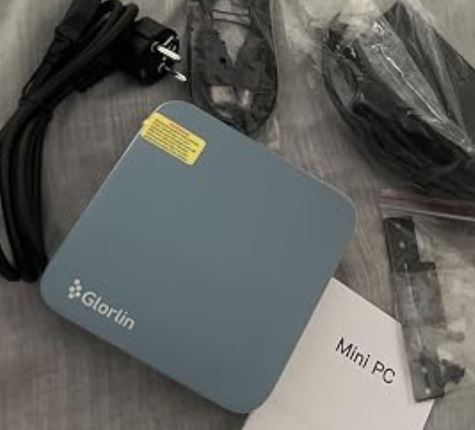
The YCTipc Mini PC with AMD Ryzen 5 6600H stands out for its powerful performance in a very compact size, ideal for productivity, multimedia, and even some gaming. Its DDR5 memory and NVMe SSD offer smooth performance, although the cooling system can be somewhat noisy under load. A solid option for offices and minimalist setups, with excellent value for money.
Pros: Excellent performance, DDR5 RAM, WiFi 6, solid build.
Cons: Audible fan under heavy use, PCIe 3.0 SSD instead of 4.0.
Conclusion: A powerful and well-balanced mini PC for demanding users on a budget.
👉 Learn more about the YCTipc mini PC if you're considering buying it.
Key technical specifications
| Feature | Detail |
|---|---|
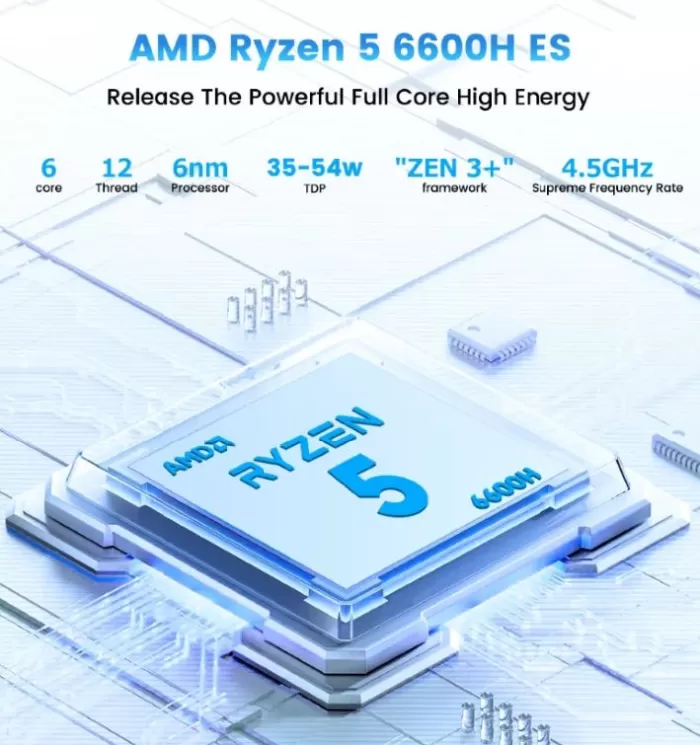
| CPU | AMD Ryzen 5 6600H (6 cores / 12 threads, 4.5 GHz turbo) |
| GPU | Integrated Radeon 660M (RDNA2) |
| RAM | 16 GB DDR5 (expandable) |
| Storage | 512 GB SSD NVMe PCIe 3.0 |
| Wireless connectivity | WiFi 6 + Bluetooth 5.2 |
| Ports | USB-C, USB-A 3.2, dual HDMI, RJ45 Gigabit, audio |
| Dimensions | Compact mini PC, NUC type |
| Operating system | Windows 11 (activated by vendor) |

Design and construction quality
The YCTipc Mini PC follows the classic NUC form factor: a compact, matte black chassis with clean edges. It's constructed from a combination of aluminum and rigid polycarbonate, giving it a robust feel and avoiding a cheap, "product-like" look. In hand, it feels solid, with no creaking and a well-ventilated base.
The top has a slightly textured surface that prevents fingerprints. Internal access for upgrading the RAM and SSD is simple: just remove four screws. It's a functional rather than flashy design, but very well executed for its price range.
Screen and multimedia
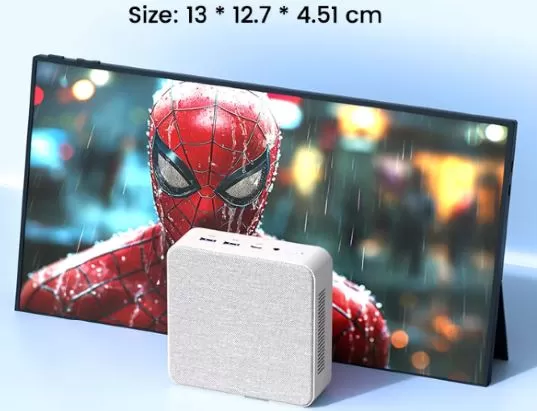
Being a Mini PC, it doesn't include a built-in screen, but it does offer 4K output through its two HDMI ports and the USB-C port compatible with DisplayPort. Tested with a 4K monitor at 60Hz, playback is smooth and artifact-free.
It performs very well in multimedia:
-
Plays 4K HDR without stuttering.
-
The RDNA2 engine offers better decoding than previous generations.
-
For audio, the jack output and HDMI provide clean sound, although you will depend on your peripherals.
It's not geared towards heavy professional 4K video editing, but it is suitable for streaming, basic creative work, and entertainment.
Performance and software
The Ryzen 5 6600H is the strongest point. In everyday use—browsing with multiple tabs, office applications, programming, and productivity tools—performance is flawless. The DDR5 RAM keeps everything running smoothly, and the NVMe SSD boots Windows 11 in seconds.
In gaming, the Radeon 660M is surprisingly good for an integrated graphics card:
-
eSports titles (Valorant, Fortnite, CS2) run between 60–120 fps at 1080p with quality settings adjusted.
-
Modern AAA games require medium-low settings to maintain 30–45 fps.
The software comes fairly clean, with no noticeable bloatware beyond the typical Windows 11. Updates work without issue, and AMD drivers install automatically.
Under maximum load, the fan significantly increases noise, although it maintains good temperatures.
Energy
It operates exclusively when plugged into a power outlet. It includes its own power adapter, which has very low power consumption for the power it delivers (approximately 40–60 W under moderate load).
Connectivity and extras
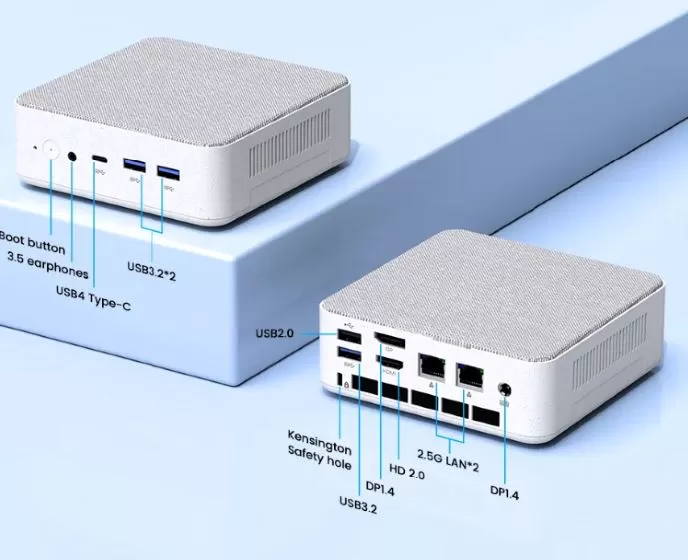
The port set is complete for its size:
-
2× HDMI 4K
-
1× USB-C (data + video)
-
3× USB-A 3.2
-
RJ45 Gigabit
-
3.5 mm jack
-
Additional M.2 slot for expansion
Extras:
-
Stable WiFi 6 with real speeds exceeding 900 Mbps according to the router.
-
Bluetooth 5.2 ideal for modern peripherals.
-
It does not include a fingerprint reader, NFC, or durability certification, as expected.
Reviews on well-known websites
In marketplaces like Amazon, AliExpress, or GeekBuying, users highlight:
-
High performance for its size.
-
Excellent value for money .
-
The ease of upgrading RAM and SSD.
Some recurring criticisms mention:
-
The fan is noisy during demanding tasks.
-
The PCIe 3.0 SSD, which could be faster if it were PCIe 4.0.
Overall, the ratings range from 4.4 to 4.7 stars .
What users highlight most
-
Surprising performance for its size.
Many users note that they didn't expect so much power in such a small form factor. Its performance in multitasking, heavy office applications, lightweight virtual machines, and esports games is among the most praised aspects. -
Excellent value for money.
It's common to find comments stating that it "offers more than its price suggests." Users compare its performance to mini PCs from more expensive brands, highlighting that this option offers almost the same features for a significantly lower price. -
Solid construction and discreet design.
Buyers appreciate the robust casing and minimalist design, which fits well in both professional desktops and home setups. -
Ease of upgrades
Several reviews mention how easy it is to open the device to add a second SSD or increase the RAM. -
Stable connectivity:
WiFi 6 and Bluetooth 5.2 are frequently praised for their stability, especially by those using it for 4K streaming or wireless peripherals.
Most frequent criticisms and negative aspects
-
Fan noise under heavy loads:
This is the most frequently mentioned drawback. During demanding tasks, such as gaming or code compilation, the fan becomes audible, and while it's not excessive, some noise-sensitive users consider it a disadvantage.
Technical tests
-
Benchmark CPU : performance close to mid-range gaming laptops.
-
Temperatures : between 40–45°C at rest and 80–85°C at full load.
-
SSD Read : ~2500 MB/s (PCIe 3.0).
-
Gaming 1080p : stable for competitive games and acceptable in AAA games at medium quality.
-
Professional tasks : excellent in light editing, basic virtualization and advanced office automation.
CPU — real power and benchmark
-
In most CPU benchmark databases, the Ryzen 5 6600H delivers solid results. For example, in multi-threaded/multi-core tests, it shows good performance, positioning it as a very capable processor within the upper mid-range.
-
In combined synthetic tests (multi-core + single-core), the results show that it is perfectly valid for demanding productivity tasks: light editing, compilation, multitasking, virtual machines, development, etc.
-
According to a technical review article of the processor itself, the Zen 3+ architecture with a 6nm manufacturing process, 6 cores and 12 threads, and a turbo boost of up to 4.5 GHz, offers an ideal balance between performance and energy efficiency.
In practice: the mini PC boots up quickly, applications feel snappy and responsive, and even moderately heavy workloads (compiling code, working with databases, running several lightweight virtual machines, editing large documents) don't overwhelm it. For a compact computer, the CPU performance is above average.
Integrated GPU — Graphics Performance (iGPU)
As part of the APU, it integrates an AMD Radeon 660M (RDNA 2 architecture). The technical specifications of this iGPU are as follows:
-
Up to ~1900 MHz boost.
-
For integrated graphics, it offers sufficient fill rate and power for 4K video, modern multimedia decoding, streaming, multi-monitor use, and even light gaming or eSports.
In real-world tests performed on mini PCs with that chip, the results indicate:
-
eSports games and lightweight titles reach ~60–100 fps with medium quality at 1080p.
-
Retro games, indie games, or older titles run perfectly smoothly.
-
Modern AAA games require lowering graphics settings and resolution to be playable.
-
Smooth, uninterrupted 4K video playback, making it suitable as a media center or HTPC.
In practice: for general tasks, light video editing, streaming, using multiple 4K displays, or casual/eSports gaming, the iGPU is perfectly adequate. For demanding gaming, intensive video editing, or 3D work, it falls short—although in a mini PC of this price and size, it's a good balance.
Storage and boot speed
According to an analysis of a mini PC with a Ryzen 5 6600H similar to ours:
-
NVMe SSDs offer sequential read speeds of around 2,300–2,500 MB/s .
-
Booting the operating system (Windows 10/11) and loading applications from cold can be done in 6–8 seconds , giving a smooth user experience.
-
File transfers, opening heavy programs, and data loading are noticeably faster than with traditional hard drives or SATA SSDs.
In practice: you'll have a responsive system, reduced waiting times, and an efficient user experience, especially for productivity tasks, development, light editing, etc.
Temperatures, noise and consumption
It depends on the chassis design and the efficiency of the cooling system, but reviews of mini PCs with the 6600H show:
-
Under normal use (office applications, browser, light tasks): moderate temperatures (usually within the safe range, not approaching critical limits).
-
Under heavy loads (rendering, heavy multitasking, demanding games): the CPU can reach high temperatures, around 85–90 °C or slightly higher.
-
Even so, in many cases severe “thermal throttling” is not observed, meaning that performance remains stable even as the temperature rises, suggesting that the cooling and thermal design are well calibrated.
-
In terms of power consumption: for a desktop computer with an APU, it is relatively efficient, not requiring excessively large power supplies — ideal for a compact mini PC.
In practice: under normal use or in an office, the device will be quiet and cool; under heavy load, you should expect higher temperatures—typical of powerful mini PCs—although this doesn't seem to compromise stability. If you plan on prolonged intensive tasks, it's worth ensuring good ventilation in your workspace.
📊 What do these results mean for a real user?
-
✅ Consistent performance : The mini PC with Ryzen 5 6600H handles demanding office tasks, programming, light editing, multitasking, virtual machines, etc. with ease. Ideal as a replacement for a conventional PC in many scenarios.
-
✅ Fast and fluid : thanks to NVMe SSD and CPU power, the system responds well and loads quickly — it feels agile.
-
✅ Useful integrated graphics : The Radeon 660M allows for multimedia tasks, light editing, casual gaming, or esports without the need for a dedicated GPU. Perfect if you want a versatile and compact computer.
-
⚠️ Limitations for heavy graphics work / demanding gaming : do not expect performance from a dedicated GPU, nor smoothness in AAA games with high requirements, nor heavy 4K video editing.
-
⚠️ Temperatures under load : If you perform long and demanding tasks, the heat can be relevant; good ventilation of the environment is advisable.
✅ Recommended accessories for your Mini PC
-
4K 60Hz HDMI Cable — This high-quality HDMI cable supports 4K output and is ideal for connecting your mini PC to a monitor or TV without resolution issues. Perfect if you're using it as a media center or for working with an external display.
-
4-Port USB-C Hub with Multi-USB OTG — This budget-friendly hub expands your mini PC's ports by adding extra USB-A/USB-C ports, useful if you connect multiple peripherals (mouse, keyboard, external hard drive, etc.) simultaneously. Highly recommended if your PC doesn't have many free ports.
-
Bluetooth Wireless Keyboard and Mouse — A compact and affordable wireless combo, ideal for a minimalist setup or a clean desk. Plus, being Bluetooth, you can forget about cables.
-
1TB NVMe SSD (M.2 2280) — If you plan to work with a lot of files or want extra storage or backups, adding an internal or external SSD (depending on compatibility) is a great addition. It improves loading speed, storage capacity, and versatility.
-
USB-C to DisplayPort 1.4 8K Adapter — Useful if you want to connect DisplayPort monitors or use high resolutions. It can be a good option if you use multiple displays or displays with inputs other than HDMI.
-
Laptop Monitor Desk Mount — If you connect a laptop monitor to your mini PC, this stand helps position it at a good height, improving posture and optimizing space. Especially useful for compact setups or home offices.
-
4-in-1 USB-C Docking Station — A more complete “expansion dock,” allowing you to connect multiple devices, peripherals, storage, and potentially additional displays from a single USB-C port. Ideal for simplifying cable management and creating a tidier workspace.
-
USB Cooling Pad for Laptop/PC — Even if your mini PC is a desktop and not a laptop, an additional cooling pad can help if you place it in an enclosed or poorly ventilated area — especially if you plan on using it for intensive tasks. It helps maintain optimal temperatures and extend the lifespan of your computer.
💡 Why these accessories make sense with your Mini PC
-
A USB-C hub or USB-C dock expands connectivity—mini PCs typically have limited ports. This allows you to connect to more peripherals, external drives, optical drives, and more.
-
A good HDMI cable or a DisplayPort adapter ensures that you take full advantage of the APU's graphics capabilities (4K output, multiple displays).
-
Wireless keyboard and mouse offer convenience and a clean desktop: perfect if you're looking for a sleek experience without unnecessary cables.
-
Adding an extra SSD or more storage improves the system's versatility — ideal if you plan to store a lot of data, work with multimedia, or install multiple virtual machines.
-
A monitor stand and docking station help maintain a tidy, ergonomic, and practical setup, especially in small spaces.
-
An extra cooling solution can be useful if you subject the mini PC to prolonged loads: it improves ventilation, prevents overheating, and extends the life of the hardware.
Final conclusion
The YCTipc Mini PC AMD R5 6600H is ideal for users looking for a compact, modern, and powerful computer for work, study, multimedia consumption, and light gaming. It excels in efficiency, connectivity, and versatility, especially if you value a clean setup without a large tower.
It's not the best for heavy AAA gaming or professional video editing, but it's good for almost everything else.
Recommended alternatives:
-
MinisForum UM560/UM690 (Ryzen 5/9 with better cooling).
-
Beelink SER6 (similar performance with a more premium finish).
-
Intel NUC 12/13 for those who prefer Intel CPUs.