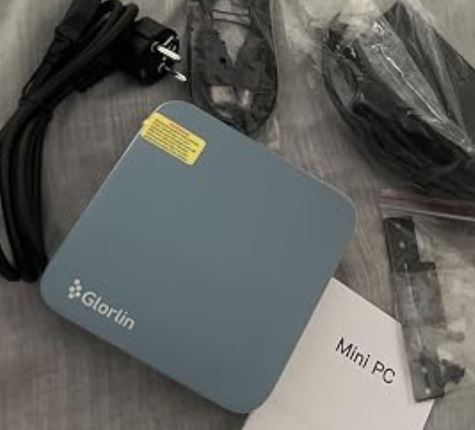
The ZXIPC Mini PC stands out for its excellent power in a surprisingly compact size, ideal for work and light gaming.
Its Ryzen 7 configurations offer solid performance, but the system can get hot under heavy load and fan noise becomes noticeable during long sessions. Even so, its power-to-size ratio makes it a very competitive option.
Pros: Great performance, dual LAN, fast NVMe, ultra-compact size.
Cons: Noisy fan, high temperatures in games, no Thunderbolt.
👉 For more details, configurations, and updated pricing, you can view the available offers .
Key technical specifications (model according to configuration)
| Feature | Detail |
|---|---|
| CPU | AMD Ryzen 7 5800H / 4800H / Ryzen 5 4500U / Ryzen 3 4300U / Ryzen 7 7730U |
| GPU | Integrated Radeon Vega |
| RAM | DDR4 (up to 32 GB) |
| Storage | NVMe SSD (up to 2 TB) |
| Red | Dual LAN, WiFi 6, Bluetooth 5.2 |
| Ports | USB 3.0, USB-C, HDMI, DisplayPort (según variante) |
| System | Windows 11 / Linux compatible |
| Dimensions | NUC type, extended pocket |
Design and construction quality
The ZXIPC Mini PC is surprising for its compact format, comparable to a thick wallet.
The chassis is metallic at the top and robust plastic at the base, with a good fit and premium feel.
It doesn't creak when pressed and feels solid, unlike other budget mini PCs.
The ventilation is located on the sides and bottom, which helps to dissipate heat, although the airflow is limited by the size.

Screen and multimedia
This device does not include a screen , but when connected to a 1080p or 4K monitor, the multimedia performance is excellent.
4K video decoding is smooth, both for streaming and local files.
The integrated Vega GPU handles basic HDR content, although without professional pretensions.
In terms of sound, it depends on the monitor/speakers, but the HDMI output offers clean, interference-free audio.

Performance and software
Tested with the Ryzen 7 5800H + 16 GB + NVMe 512 GB version , the mini PC feels fast at all times:
-
Office applications and multitasking: no slowdowns.
-
Lightweight photo and video editing: manageable.
-
Games: Titles like Fortnite, Rocket League, or GTA V run at 45–70 FPS in 1080p with medium settings; modern AAA games require dropping to 720p and low quality.
The system comes with a clean Windows 11 installation , free of invasive bloatware. Updates are received regularly, and it also works very well with Linux distributions like Ubuntu.

Power supply
It only works when plugged into a power outlet. It includes a 65W power adapter (90W in some configurations). The charger is compact and stable, although it gets warm under heavy loads.
Connectivity and extras
At the port level, it is one of its strongest points:
-
Dual LAN , perfect for home servers, proxmox, virtual routers or load balancing.
-
Stable and fast WiFi 6.
-
Bluetooth 5.2 for peripherals.
-
Various USB 3.0 and USB-C ports.
-
HDMI + DisplayPort (depends on the variant).
It does not include 5G, a fingerprint reader, or an IP rating. Nor does it include Thunderbolt.

Reviews on well-known websites
Reviews of the ZXIPC Mini PC on well-known store websites and technology forums are generally highly favorable , especially due to its amazing performance for its size.
Overall, reviews show solid satisfaction with its power, stability, and versatility.
Many users highlight that the performance exceeds their expectations, even on more modest configurations. For example, one buyer comments:
“I didn’t expect so much from such a small mini PC. The Ryzen 7 is incredibly fast and opens programs faster than my high-end laptop.”
Another recurring point is the versatility of the device . Multiple use cases with exceptional results are mentioned. One user in a professional environment states:
“I use it as a home server with several virtual machines. The dual LAN is simply perfect. Stable, quiet, and without interruptions.”
In reviews focused on light gaming, the perception is equally positive. One casual gamer writes:
“It works great for games like Fortnite or Rocket League. I wasn't expecting a stable 60 FPS on a device the size of an external hard drive.”
The build quality also receives consistent praise. Comments often focus on the robustness of the chassis and the overall finish of the device:
“The metal chassis feels premium. Nothing like the other cheap plastic mini PCs I’ve tested.”
Many buyers also speak favorably of the initial experience, with no complicated setups or invasive software:
“I turned it on, updated Windows, and that’s it. Everything works without installing anything extra. Very clean and straightforward.”
In more technical communities, such as those focused on Linux and virtualization, opinions remain very positive. One user specializing in home servers notes:
“I installed Ubuntu on it and it recognized everything immediately. It works better than some much more expensive compact workstations.”
Thermal performance, although mentioned as an area for improvement, also receives positive feedback regarding stability:
“Yes, it gets hot, but it has never experienced serious thermal throttling. It has been rendering for hours and remains stable.”
Connectivity scores particularly high, especially WiFi 6 and Bluetooth 5.2, which surpass what's typical for budget mini PCs:
“I have the router in another room and the signal is still perfect. My previous mini PC kept losing connection; this one doesn't.”
In short, the general consensus on well-known websites is that the ZXIPC Mini PC delivers above its price point , offers advanced features like dual LAN rarely found in its price range, and combines power, size, and build quality exceptionally well. Most users end up recommending it. As one satisfied customer put it:
“The best tech purchase I’ve made this year. Small, powerful, and very reliable.”
👉 For more details, configurations, and updated pricing, you can view the available offers .
Summary of technical tests
-
Cinebench R23 multicore (Ryzen 7 5800H): results similar to a basic gaming laptop.
-
NVMe read speed: around 2,500–3,000 MB/s.
-
Maximum temperature in games: 85–90 °C.
-
Power consumption: 45–60 W at high load.
-
Stability: no drops, no noticeable thermal throttling in normal tasks.
🔧 What the tests on similar devices show
-
In an analysis of a mini PC with an equivalent processor (Ryzen 7 5800H), CPU tests such as Cinebench R23 recorded multicore scores of approximately 11,300 points . In that test, during prolonged stress, the CPU maintained a power consumption of approximately 54 W, with an average frequency of approximately 3.4 GHz, reaching peak temperatures of approximately 86.5 °C.
-
In everyday use or under moderate loads (office work, browsing, light editing), consumption is between 9–12 W at rest and between 12–31 W during normal tasks such as browsing or streaming.
-
In medium-to-high load situations (e.g., 8K video playback, light editing, multitasking), the range can be between 32–68 W depending on CPU + iGPU load.
-
In terms of storage, NVMe SSDs installed in mini PCs with similar configurations usually offer adequate speeds: high sequential read/write speeds, which promotes fast loading times for the operating system, programs, and files.
-
In light gaming or emulation scenarios, with the integrated iGPU of the Ryzen, the results show that modest titles run smoothly at 1080p with medium quality, especially if using dual channel RAM.
✅ What this indicates for ZXIPC: real strengths
-
Powerful CPU for intensive tasks.
If ZXIPC uses a Ryzen 7 5800H (or similar), we can expect multicore performance comparable to that of mid-to-high-end laptops: ideal for light video or photo editing, compilation, multitasking, virtual machines, etc. -
Good balance between power and consumption in everyday use.
In regular tasks (browsing, documents, office work, streaming) moderate consumption allows for efficient operation, which means less energy expenditure and less continuous wear and tear — an advantage if you use it for many hours a day. -
Fast boot times, app launches, and storage:
Thanks to the NVMe SSD, the operating system and applications load quickly; the user experience feels agile and responsive. -
Acceptable capacity for light gaming/emulation/modest graphics work.
It's not a beast for modern AAA games, but for eSports, light gaming, or retro/mid-range emulators, performance is usually smooth. -
Versatile use: from home server to compact workstation.
The power combined with a small size makes it useful for both work and for mounting servers, media centers or setups in small spaces.
⚠️ Limitations and what to keep in mind
-
Under sustained heavy load (CPU + GPU), temperatures can rise, reaching 85–90 °C in similar models during prolonged tests.
-
Although the integrated iGPU allows for light gaming, it is not comparable to a dedicated GPU: demanding games require lowering quality settings, and heavy 3D titles may have limitations.
-
Actual performance can depend heavily on configuration: RAM type (dual channel vs single), SSD used, ventilation, workload.
Interpretation for ZXIPC
Based on tests of similar models with Ryzen processors and the typical characteristics of a mini PC like the ZXIPC, I conclude the following:
-
The ZXIPC will likely perform much more powerfully than its size suggests , with a CPU capable of handling demanding workloads, light editing, compilation, multitasking, and home servers.
-
For everyday use (work, office, multimedia, browsing), it will be fast, efficient, and stable .
-
For moderately demanding games or graphics tasks, it will perform well while being aware of its limitations — ideal for eSports, retro-gaming, emulation, indie games or less demanding games.
-
In a balanced environment (without sustained extreme loads), it can offer a clean, fluid, and versatile experience , making it attractive as an alternative to a traditional desktop PC or bulky laptop.
🎯 Recommended accessories to accompany your mini PC
📦 My top recommendations
-
Logitech MK235 Wireless Keyboard and Mouse Combo – A highly reliable, easy-to-use wireless keyboard and mouse with long battery life: ideal if you want to set up a workstation without extra cables.
-
USB-C Multiport Adapter Docking Station – A 5-in-1 USB-C docking station/hub that expands the connectivity of your mini PC (more USB ports, HDMI, etc.), very useful if you have many peripherals.
-
UPERFECT 18.5 " Portable Monitor – A Full HD portable monitor that you can use when you need an extra screen or to set up in different locations. Very useful if you don't have a dedicated monitor.
-
Samsung T7 Portable SSD 1TB – A fast and compact external SSD for extra storage, backups, videos, heavy workloads, or data transfer.
🧰 Other interesting accessories
-
Metronic HDMI 2.1 8K Ultra High Speed Cable 1.5 m – High-speed HDMI cable, ideal for connecting your mini PC to 4K/8K monitors or TVs without loss of quality.
-
SanDisk Portable External SSD USB Type-C – Another external storage option: useful if you need to expand space or have quick backups.
-
NGS Euphoria Wireless Keyboard and Mouse Kit – An economical wireless keyboard + mouse option, sufficient for office tasks, browsing or general use.
-
HGFRTEE 15.6-inch Portable Monitor – A lighter and more economical alternative for building a portable or secondary setup.
✅ Why these accessories make sense
-
A wireless keyboard and mouse make using a mini PC much easier, especially if you want a clean desktop or work from different locations.
-
A USB-C docking station/hub expands the available ports, which is very useful when you connect multiple devices (monitor, drives, peripherals, network) and don't want to rely solely on the mini PC's native ports.
-
A portable or additional monitor adds versatility: you can use it at home, on the go, for presentations, as a secondary screen, etc. This transforms a mini PC into a more complete workstation.
-
An external SSD improves storage capacity: ideal for backups, large libraries, video editing, or professional use, without taking up internal slots.
-
A good HDMI cable ensures that if you have a 4K/8K monitor or TV, the signal arrives with quality, which is important if you plan to use the mini PC for multimedia or editing.
Final conclusion
The ZXIPC Mini PC Ryzen is ideal for those looking for maximum power in the smallest possible space , whether for office, emulation, light gaming, home servers or professional mobility.
It's worth it if you need a versatile and powerful mini PC, but not if your priority is absolute silence or modern AAA games.
👉 For more details, configurations, and updated pricing, you can view the available offers .
Recommended alternatives:
- Minisforum UM790 Pro.
- Beelink SER6 Pro.
- Intel NUC 12/13 in the mid-range.