The ASUS ROG NUC Super Gaming combines the power of Intel Core Ultra 7/9 (155H/185H) processors with RTX 4060/4070 graphics in a compact form factor.
It stands out for its outstanding performance in AAA games and content creation , as well as its next-generation connectivity.
On the downside, the price is high and it is not as quiet under load.
In short, an ideal mini PC for those who want desktop power in a small size.
Check availability and prices for the ASUS ROG NUC Super Gaming
Key technical specifications
| Feature | Detail |
|---|---|
| Processor | Intel Core Ultra 7 155H / Intel Core Ultra 9 185H |
| GPU | NVIDIA GeForce RTX 4060 / RTX 4070 |
| RAM memory | Up to 64GB DDR5 |
| Storage | NVMe PCIe Gen4 SSD (configurable) |
| Wireless connectivity | Wi-Fi 6E, Bluetooth 5.3 |
| Ports | USB-C, USB-A, HDMI, DisplayPort, Thunderbolt 4, Ethernet |
| Dimensions | Compact NUC type |
| Operating system | Windows 11 Home / Pro |
| Refrigeration | ROG Advanced Ventilation System |
| Weight | ~1.2 kg (depending on configuration) |
Design and build quality
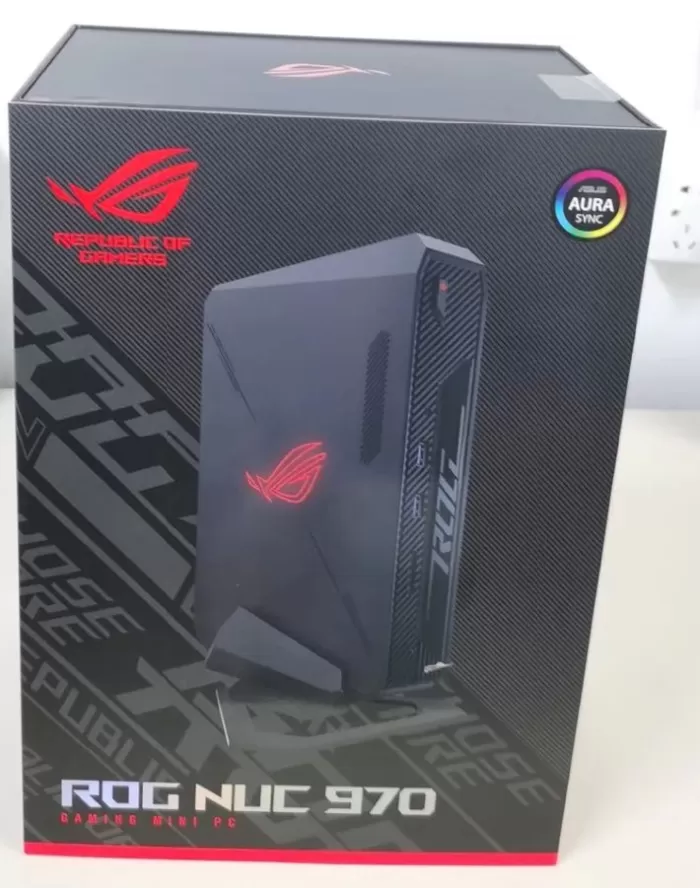
The ROG NUC Super Gaming maintains the ASUS gamer design line: a compact chassis with metal and reinforced polycarbonate finishes , with the illuminated ROG logo.
It feels solid in hand, with good side and rear ventilation.
Despite its small size, it feels like a premium device built to last.
Screen and multimedia
Since this is a mini PC , it doesn't include a built-in display. The multimedia experience will depend on the monitor you connect, but thanks to the HDMI and DisplayPort 1.4 outputs , it supports 4K resolutions at high refresh rates, even 8K in certain scenarios.
The audio, handled by the integrated sound card and digital output, is clear and powerful, although the experience is enhanced with headphones or dedicated speakers.

Performance and software
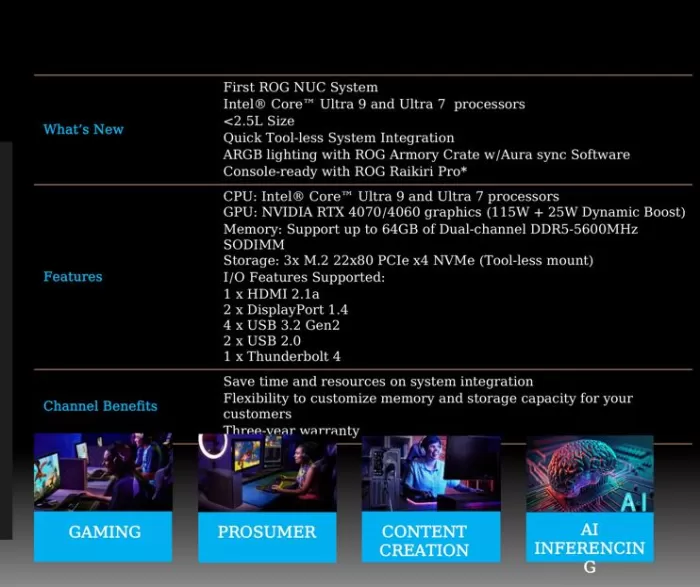
Powered by the latest generation Intel Core Ultra 7/9 processors and RTX 4060/4070 dedicated graphics , this mini PC can run AAA games at 1080p and 1440p with high or ultra settings , and even 4K with balanced settings.
In productivity, the CPU + GPU combination is perfect for video editing, 3D modeling, and heavy multitasking .
It comes with Windows 11 pre-installed , with almost no bloatware, and with frequent driver updates thanks to the ASUS ecosystem.
Connectivity and extras
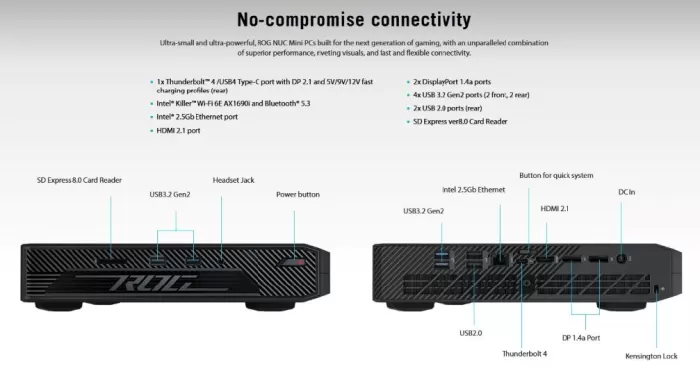
The connectivity section is one of its strong points:
-
Wi-Fi 6E and Bluetooth 5.3 for fast and stable wireless connections.
-
Multiple USB-A and USB-C ports , plus Thunderbolt 4 , ideal for external storage or additional monitors.
-
High-speed Ethernet for competitive gaming.
-
Compatible with VR and high refresh rate monitors.
It doesn't include extras like a fingerprint reader, NFC, or water resistance certifications, as they aren't designed for this type of device.
Opinions on well-known pages
-
TechRadar highlights its gaming performance in a compact form factor , although it mentions that the price limits it to enthusiasts.
-
Tom's Hardware calls it a "NUC that finally lives up to high-end gaming."
-
In specialized forums, users praise its fluidity in AAA games and see it as a real alternative to a traditional desktop PC.
Professional reviews and technology media
-
ServeTheHome
highlights in their review that the ROG NUC combines an Intel Core Ultra 9 + RTX 4070 with an advanced internal configuration, making it much more capable than previous generations of NUCs. They point out that, although it is larger (about 2.5 liters), it has an excellent thermal design and a fairly complete port layout.
They point out as cons the high price and the fact that it doesn't behave like "traditional" lightweight NUCs, meaning it's no longer an ultra-compact solution without compromises. -
In their article "Asus ROG NUC 2025 review: Mini PC in size, massive in performance," PCWorld
describes it as a very strong option for those looking for gaming or work power without the space for a large tower. They mention that the cooling system can generate some noise under load, that upgrade options are limited, and that "you pay a premium" for the compact form factor. -
Notebookcheck
In their analysis of the model with Ultra 9 185H + RTX 4070 , they value the cooling system very positively, as it maintains good temperatures (the SoC reached around 86 ° C under load, without severe throttling) and maintains stable performance.
However, they also warn of certain "buts": DPC latencies (use with audio/streaming) are high, which can affect sensitive multimedia scenarios.
Another point noted is that the card reader (SD) is somewhat slow (UHS-I) compared to the rest of the high-speed connectivity. -
TechRadar
’s review of the ROG NUC 970 acknowledges that the device is “easy to love,” though it does emphasize that the price is a barrier: it’s hard to justify when you can get a high-end laptop or a more versatile desktop for less money. It also mentions that there were some “niggling issues” during the initial setup (driver installation, BIOS). -
In their review of the ROG NUC 970, Tom's Guide
describes it as one of the most powerful mini PCs they've tested, with performance comparable to that of good gaming laptops. They highlight its excellent multitasking capabilities (multiple open browser tabs, etc.) and the fact that it comes with minimal pre-installed software (bloatware). -
Overclock3D
In the “ASUS ROG NUC 970 Review”, the miniaturization (“a true mini gaming PC”) stands out, as well as how ASUS has managed to assemble high-performance hardware in a very compact chassis (27 × 18 × 6 cm) using laptop components. -
In their personal review, ALKtech
describes the NUC 970 as a very capable 1080p/1440p gaming machine, albeit at a premium. They cite real-world benchmark figures (e.g., Cyberpunk 2077 at 1440p Ultra) to illustrate its limitations. -
ETA PRIME / SFF.Network
In their review they highlight that the Ultra 9 185H CPU + RTX 4070 (mobile version) scores around 11,280 points in 3DMark Time Spy, placing it below a powerful desktop GPU, but still very respectable for such a “small” system.
It is also mentioned that under load the CPU temperature reached high values (up to ~102 °C in extreme tests), which suggests that in intense scenarios throttling can come close. -
In their review of the ROG NUC 2025, they highlight
that ASUS has prioritized GPU performance without neglecting the CPU: they point out that in many cases the GPU consumes more power than the processor itself to maximize gaming performance. They also praised the port offering (USB-C, Thunderbolt, etc.).
However, they indicate that the price is still high for many users, which would make it less attractive compared to traditional PCs.
User reviews (forums, Reddit)
-
Reddit / r/intelnuc
“The ROG NUC achieves what ASUS designed it for—it's an excellent compact gaming PC. It performs quite well in synthetic benchmarks and in real-world gameplay at 1440p…”
In the conversation, some users comment that the fans aren't “particularly loud,” though they are noticeable during demanding use. -
Reddit / r/pcmasterrace
“The ROG NUC gets the job done… It performs quite well in synthetic benchmarks and in real-world gameplay at 1440p, particularly with games that support NVIDIA-specific technologies like DLSS 3.0.”
“Sitting less than two feet away… I don’t find the fans distracting while gaming…” -
Reddit / r/MiniPCs
"It is really good. Contrary to popular beliefs, the cooling on this device is better than most laptops. It stays relatively cool."
“I put a laptop cooling pad under to see if it makes any difference… it actually helped keep the device even cooler.” -
Reddit / r/ASUSROG
In a personal review by user “Chingachcooked,” he notes that firmware updates (both system and GPU) worked without a hitch for his unit. His unit didn’t reach extreme temperatures under load in “performance mode.” He does note that the price was his only major complaint.
Another user added that the GPU maintained temperatures below 80°C, but noted that the CPU would climb above 100°C when in “boost mode,” something that some professional reviewers have also noted.
Summary of opinions — common points and discrepancies
Positively highlighted common points:
-
Remarkable power in a compact form factor : Both media and users agree that the ROG NUC delivers worthy performance for demanding gaming (1080p, 1440p, some 4K titles).
-
Good cooling system : it is capable of maintaining acceptable temperatures under load, although not without limitations.
-
Robust connectivity and a variety of ports : Reviewers appreciate that ASUS includes Thunderbolt, USB-C, DisplayPort, etc., which expands its possibilities.
-
Compact and well-utilized design : It is often mentioned that it is impressive what ASUS manages to pack into a small size.
-
High price as the main recurring criticism : Almost all user reviews or complaints mention that the cost puts it in direct competition with larger systems that can offer better value.
Critical points with the most discrepancies:
-
Noise/fans : Some users don't find it bothersome, especially if the device isn't right next to their ear; other outlets note that the fan is quite noticeable under load.
-
DPC Latency / Driver Optimization : Notebookcheck reported high latency values, which can be a problem for fine-tuning audio/streaming tasks
-
Thermal Throttling and Extreme Temperatures – While sustained performance is good, in extreme testing some observers saw the CPU approach its thermal limits (past 100°C) under certain conditions.
-
Driver Updates/Support : Some users report that the initial driver or BIOS installation wasn't perfect, with some niggling issues requiring manual intervention.
Technical Test Summary
-
Cinebench R23 : Excellent multi-core performance thanks to Ultra processors.
-
3DMark Time Spy : Results close to those of a tower gaming PC with an RTX 4070.
-
Temperatures : They remain controlled in normal use, but under intense load the fans make themselves felt.
-
Gaming : Titles like Cyberpunk 2077 and Hogwarts Legacy run at 1440p ultra above a stable 60 FPS with the RTX 4070.
1) Synthetic results (Cinebench, 3DMark, PCMark)
-
Cinebench / CPU (Multi-core): The Intel Core Ultra 9 (185H) processors in the ROG NUC deliver very high multi-core scores for a machine of this size—performing at the high end of mobile CPUs—which translates to excellent performance in creative and productivity tasks (rendering, compiling, exporting). This is reflected in multiple reviews using Cinebench and synthetic CPU benchmarks.
-
3DMark (Time Spy / Fire Strike): GPU scores place the ROG NUC (RTX 4070 mobile version) at levels close to high-end gaming laptops; based on public benchmarks and 3DMark results, the system delivers GPU scores that place it as a “mini” option with serious gaming performance. There are also public 3DMark entries related to RTX 4060/4070 variants.
-
PCMark / Battery (if applicable to mobile variants): Productivity tests indicate that, in office tests, the platform performs well in efficiency when compared to similarly specified laptops (although as a desktop mini-PC, “battery” typically doesn’t apply).
2) Game testing (real examples and FPS)
-
Performance by title and resolution: Reviews with real-world games (NotebookCheck and others) collect specific FPS figures: for example, titles like Shadow of the Tomb Raider, Metro Exodus, Cyberpunk 2077 , and GRID Legends show figures that regularly exceed 60 FPS at 1080p with high presets; at 1440p, many combinations with the RTX 4070 remain above 60 FPS in many titles, and at 4K the experience depends a lot on the use of DLSS/Frame Generation and settings — some tests show 4K playable with reduced settings or with DLSS enabled. This data comes from battery of gaming tests in controlled reviews.
-
Concrete examples from testing: Notebookcheck lists FPS for several games (e.g. ~125 FPS in certain titles at 1080p/High in benchmarks), and AlkTech and other reviews published results at 1440p/4K with the RTX 4070 where the machine reaches ~60–90 FPS depending on the game and settings (DLSS/FG on/off). This positions the ROG NUC as suitable for serious gaming, especially at 1080/1440p.
3) Temperatures, throttling and thermal stability
-
CPU/GPU Temperatures: Testing shows that the CPU (Core Ultra 9 185H) can operate at high thermal stacks under sustained load — typical values around ~80–86°C in intense tests reported by Tom's Hardware and Notebookcheck — and in extreme scenarios some tests have recorded spikes close to or exceeding 100°C under very intense loads (depending on the performance profile and test), suggesting that in certain scenarios it may approach thermal limits and activate throttling mechanisms if the ventilation/environment favors it.
-
Thermal behavior in gaming: The GPU typically stays cooler than the CPU (e.g., GPU around ~60–70°C in many tests), so sustained graphics performance is good; however, CPU+GPU combined behavior under prolonged load can push the fans and raise the overall chassis temperature.
4) Noise and acoustic experience
-
Noise levels under load: Measurements and reviews agree that the fans are noticeable under intense load. ServeTheHome and user measurements show reference figures of ~46–48 dBA under combined synthetic loads (CPU+GPU), which is audible in a quiet office environment; other reviews (Tom's Hardware) indicate that the machine was "barely audible" in some cases during stress tests, which shows variation depending on the unit and configuration. In short: this is not a quiet machine under maximum load .
5) Power consumption and energy management
-
Power Consumption: Using high-performance mobile components (Core Ultra + RTX 40-series mobile GPU), power consumption under load is noticeable (similar to equivalent gaming laptops); reviews show a robust power adapter and figures that place the NUC above low-power compact PCs, but below towers with higher-power desktop GPUs. The design aims to balance power and efficiency to fit into the small chassis.
6) Storage and I/O (NVMe performance, ports)
-
NVMe PCIe Gen4: Test units typically come with NVMe PCIe Gen4 SSDs; observed speeds are as expected for Gen4 (high read/write speeds), and the system offers multiple M.2 slots (depending on the variant/edition) — this facilitates high transfer rates and fast load times in games and applications.
-
Ports and connectivity: Reviews highlight a large number of ports for its size: multiple USB-A/C ports, DisplayPort/HDMI, Thunderbolt 4 on some variants, 2.5Gb Ethernet, and Wi-Fi 6E + Bluetooth 5.3. This favors multi-monitor and high-speed peripheral scenarios.
7) Problems observed and technical “buts”
-
DPC latencies / real-time audio: Notebookcheck reported relatively high DPC latencies on its unit during certain tests, which may affect real-time audio tasks or streaming with very demanding requirements. If your use includes music production or professional streaming, this is a point to consider.
-
Variability between units/BIOS/drivers: Several reviews and user threads mention that in some cases, initial driver installation or BIOS/firmware configuration may have required updates or manual intervention to achieve the best thermal/performance balance; this isn't a widespread issue, but it's something some users have noticed.
8) Quick numerical summary (the most representative that appears in the tests)
-
3DMark Time Spy / GPU: Scores in line with RTX 4070 mobile gaming laptops (varies by configuration).
-
Gaming FPS (examples): Typical reported results: 100–150+ FPS in less demanding titles at 1080p; 60–120 FPS at 1440p in many AAA titles with RTX 4070 and DLSS; 4K with high settings is reported to be playable but dependent on DLSS/FG or lower settings (specific examples at Notebookcheck and AlkTech).
-
Sustained temperatures (CPU package): 80–86°C during extended testing; peaks reported in extreme tests approaching 100°C in some cases (test and version dependent).
-
Noise: ~46–48 dBA measured under synthetic loads by some testers; audible in quiet environments.
9) Practical conclusion of the technical section
-
Technical strengths: Exceptional CPU/GPU performance for its size; excellent for 1080/1440p gaming and creative tasks; Full I/O and Gen4 SSD ensure fast load times.
-
Technical limitations: Thermal control, while good for the form factor, is limited in extreme tests (possible near-throttling under very heavy sustained loads); noticeable fans under load; some drives may require a BIOS/driver update to fine-tune performance.
Main sources consulted
-
Notebookcheck — battery-powered benchmarks, in-game FPS, and thermal tests.
-
Tom's Hardware — stress test results (frequencies, temperatures, fan behavior). Tom's Hardware
-
TechRadar / Windows Central — Overall impressions of performance and value/product positioning. TechRadar
-
3DMark (public results) — GPU/CPU scores and benchmarks for RTX 4060/4070 variants. 3DMark
-
PCWorld / AlkTech — Noise reviews, upgrade options, and additional gaming tests. PCWorld
El ASUS ROG NUC Super Gaming combina la potencia de los procesadores Intel Core Ultra 7/9 (155H/185H) con gráficas RTX 4060/4070 en un formato compacto.
— Mini PC Review (@miniPcReview) October 3, 2025
Destaca por su rendimiento sobresaliente en juegos
Ver Analisis Completo 👉https://t.co/t2jlQzMzdZ pic.twitter.com/yBJoKrvEl4
Final conclusion
The ASUS ROG NUC Super Gaming is a mini PC that breaks the mold: compact, powerful, and ready for both demanding gaming and professional content creation .
It's not cheap or completely silent, but if you're looking for the power of a gaming desktop in the space of a book , this is one of the best options available.
Alternatives: Intel NUC Extreme , MSI Cubi with external GPU or even an ASUS ROG Strix gaming laptop for those who prioritize mobility.
Where to buy?
You can find more information and configurations of the ASUS ROG NUC Super Gaming at authorized retailers such as AliExpress.
Check availability and prices for the ASUS ROG NUC Super Gaming