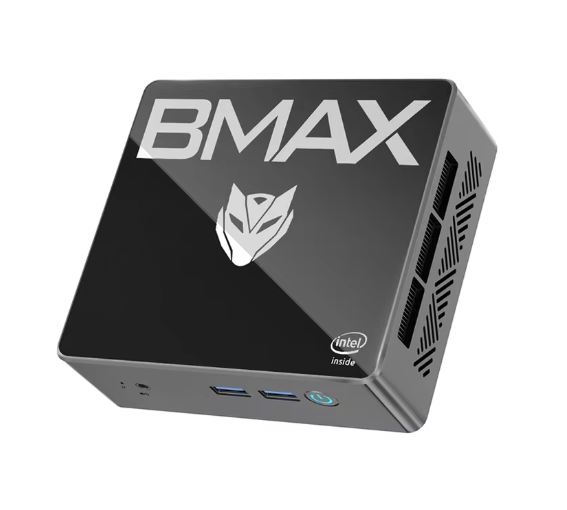
The BMAX B4 with Intel N95 is an honest choice for those who need a compact, quiet, and efficient PC for everyday tasks.
Its strong point is the price and the generous 16GB of RAM; its weak point is the SATA SSD and after-sales support that generates mixed opinions.
If you're looking for a PC for browsing, office work, 4K streaming, or using it as a lightweight home server, it's more than adequate. For gaming or demanding video editing, it falls short.
✅ Advantages:
-
Very competitive price (usually under €200)
-
16GB DDR4 RAM, generous for its class
-
Dual 4K via HDMI 2.0 (dual output)
-
Very quiet in normal use thanks to the smart fan.
-
Storage expansion with additional 2.5" tray
-
Windows 11 Pro pre-installed and activated
-
VESA mount included in box
-
Low power consumption
📋 Technical Specifications
| Feature | Detail |
|---|---|
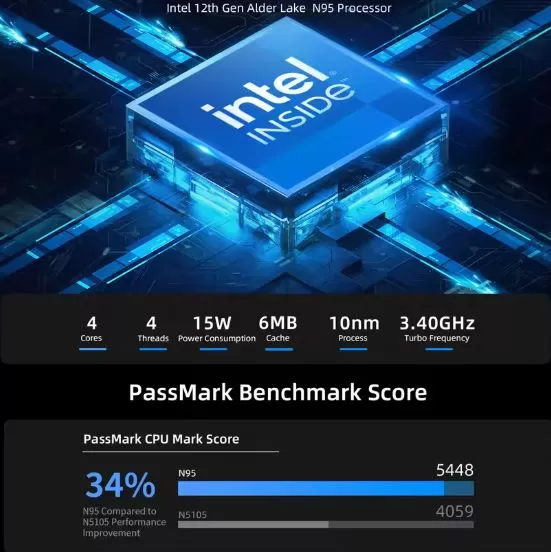
| CPU | Intel Alder Lake N95 (4C/4T, up to 3.4GHz, 6M cache) |
| Integrated GPU | Intel UHD Graphics 24EUs (Alder Lake-N) |
| RAM | 16 GB DDR4-2666 MHz (1 slot) |
| Storage | 512 GB M.2 2280 SATA SSD + extra 2.5" slot |
| Operating system | Windows 11 Pro (pre-installed) |
| Wi-Fi | Dual Band 2.4 GHz / 5 GHz (802.11 ac) |
| Bluetooth | 4.2 |
| Ethernet | Gigabit RJ45 (1000 Mbps) |
| Video outputs | 2× HDMI 2.0 (dual 4K@60Hz) |
| USB ports | 2× USB 3.0 + 2× USB 2.0 |
| Audio | 3.5mm combo jack |
| Feeding | DC barrel (adapter included, 12V) |
| VESA mount | ✅ Included in box |
| Dimensions | Ultra-compact (approx. 12×12×4 cm) |
🎨 Design and Construction Quality
The BMAX B4 has a black plastic finish with a smooth, slightly glossy top surface, which attracts fingerprints easily. The chassis feels solid for a device in this price range, although it lacks the metallic robustness of more expensive options. The design is understated and generic, without any flashy embellishments, making it ideal for an office or living room environment.
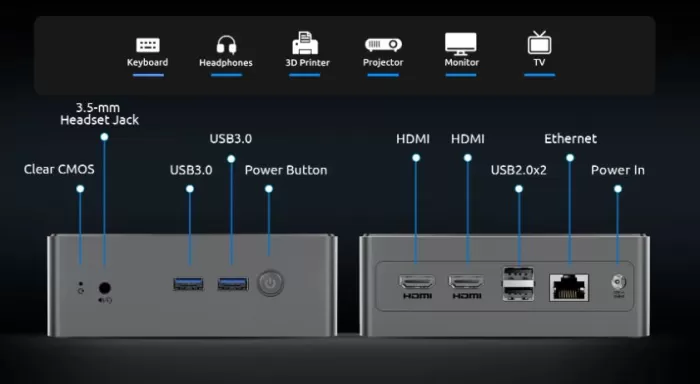
The front panel includes USB 3.0 and 2.0 ports, an audio jack, and a power button. The rear panel features two HDMI ports, an Ethernet port, and a power input. The included VESA mount allows you to attach it directly behind the monitor, freeing up valuable desk space.

🖥️ Screen and Multimedia
The B4 supports two 4K@60Hz monitors simultaneously via its two HDMI 2.0 ports, which is unusual at this price point. 4K video playback is smooth when streaming (Netflix, YouTube, Prime Video), although occasional dropped frames were recorded during DPC latency tests in lab trials.
It does not include its own screen or digital audio output. The 3.5mm jack works perfectly for headphones or speakers. To get the most out of multimedia, it is recommended to connect external speakers or use the monitor's audio output via HDMI.
⚙️ Performance and Software
The Intel N95 is a quad-core processor from the Alder Lake-N family , designed for efficiency rather than raw power. Its 15W TDP makes it a very efficient choice. It outperforms the popular N100 in single-core performance and matches the N97; however, it falls short of chips like the Core i3-1115G4 in demanding multi-threaded tasks.
For everyday use—browsing, Office, video calls, light photo editing—performance is smooth and without annoying delays. Under heavy multitasking (many tabs + video editing), some users report slowdowns, which in many cases are mitigated by restarting the system or performing a clean installation of Windows.
Windows 11 Pro comes pre-installed and activated, with the option to also install Ubuntu Linux. No excessive bloatware was detected, although it is recommended to review startup programs before first use.
🔋 Energy Consumption and Cables
The BMAX B4 is a prime example of energy efficiency:
-
🟢 Standby: ~6–8W
-
🟡 Typical load (office use): ~15–20W
-
🔴 Maximum sustained load: ~25–30W
Power is supplied via a 12V DC power adapter (barrel connector), included in the box. It does not have USB-C charging, so if you lose the original adapter, you'll need a compatible 12V/center positive adapter. Its low power consumption makes it perfect as a Plex server, lightweight NAS, or living room PC that can be left running continuously without significantly increasing your electricity bill.
🔌 Connectivity and Extras
The B4 comfortably covers basic needs, although without any premium extras:
-
Dual Band WiFi (2.4 GHz / 5 GHz, ac) — without WiFi 6
-
Bluetooth 4.2 — a somewhat outdated standard
-
Gigabit Ethernet (RJ45)
-
2× HDMI 2.0 (dual 4K@60Hz simultaneous)
-
2× USB 3.0 + 2× USB 2.0
-
3.5mm combo audio/microphone jack
-
Additional 2.5" SATA slot for expanded storage
-
VESA mount included
-
One-key smart recovery
❌ Does not include USB-C, fingerprint reader, NFC, IP certification, WiFi 6/6E or Thunderbolt.
💬 Reviews on Well-Known Pages
The reviews are generally positive for basic use, with important nuances regarding performance under load and technical support:
📰 MiniPCReviewer.com (full review): Highlighted the combination of 16GB of RAM and the N95 as "a solid foundation for everyday tasks and 4K streaming." However, it noted mixed customer feedback , with an average rating of 3.9/5 stars, and criticized the lack of clear warranty information and the slowness of technical support. It concluded that it is a valid option for budget-conscious users who don't demand extreme performance.
📰 NotebookCheck.net (review of the BMAX B4 Turbo/N150, equivalent line): Described the device as "suitable for basic HTPC, print server, music, and light workloads." It criticized the WiFi speed and dropped frames during 4K playback. Its verdict: "Don't expect a fast processor for under $200, but it's adequate for 1080p streaming. "
📹 YouTube — WizzRev (May 2025): Defined the B4 as "a fantastic choice for anyone looking for a compact, efficient, and affordable solution." It highlighted the USB ports, office performance, and SSD's fast boot time. It admitted that it's not for demanding gaming or graphics-intensive applications.
📹 YouTube — Anonymous channel review (October 2025): Positively assessed the dual 4K output, the smart fan, and the expandable storage. It noted that Bluetooth 4.2 is the weakest connectivity point compared to rival models.
🛒 Amazon (verified buyers):
-
"Sleek and modern design, fits perfectly in any workspace "
-
"Good value for money for office and everyday use "
-
"Fast boot-up and smooth multitasking with 16GB of RAM "
-
"Excellent customer support from Bmax" — although countered by others who indicate the opposite.
🧪 Technical Tests
The benchmarks of the N95/N100/N150 family (same Alder Lake-N architecture) offer a clear picture of the expected performance:
🔵 CPU — Cinebench R23 (Intel N95 / N150 comparison)
-
Single-core: ~950 pts (beats N100 by ~15%)
-
Multi-core: ~2,700–2,850 pts
-
Temperature under load: moderate thanks to the 15W TDP
🔵 CPU — Geekbench 6 (N100 benchmark)
-
Single-core: ~1,345 pts
-
Multi-core: ~2,966 pts
🔵 GPU — 3DMark Fire Strike (UHD 24EUs Alder Lake-N)
-
~1,271 pts — low end of the integrated UHD range
-
GTA V (768p, minimum): ~44–59 fps (playable)
-
Dota 2 (720p, minimum): ~44–80 fps
-
Cyberpunk 2077 (720p, low): barely playable with frequent frame rate drops
🔵 Storage — M.2 SATA SSD
-
Sequential read speed: ~500 MB/s max.
-
Sequential write speed: ~400 MB/s
-
Well below an NVMe PCIe (>2,000 MB/s) — clear weak point
🔵 PCMark 10 — Full System
-
~3,050 pts in overall score
-
Sufficient for daily productivity; below more modern chips like the N355 or Core 7 150U
🔵 Dual Band WiFi (ac)
-
Speeds suitable for home use, but not reaching WiFi 6/6E levels.
-
An Ethernet connection is recommended for large transfers or online gaming.
🏁 Final Conclusion
The BMAX B4 Intel N95 is ideal for:
-
🏠 Home media center (4K streaming, Plex, Kodi)
-
🖥️ Second monitor or lightweight desktop PC
-
📚 Students and basic educational use
-
🖨️ Lightweight home NAS or print server
-
💼 Remote work and office automation without high demands
-
💰 Very tight budget (below €150)
Is it worth it? Yes, within its limitations. Don't make the mistake of comparing it to a Ryzen mini PC: they're different categories. If your usage is as described in this article, it will provide years of trouble-free service. If you can add another €50–80, the ACEMAGIC K1 Ryzen 5 7430U offers a significant performance boost.
Alternatives to consider:
| Model | Chip | Advantage over B4 |
|---|---|---|
| ACEMAGIC K1 | Ryzen 5 7430U | 3× superior performance, triple 4K |
| Beelink EQ14 | Intel N150 | More stable WiFi, better support |
| BMAX B4 Turbo | Intel N150 | Newer, similar price |
| Trigkey G5 Pro | Ryzen 5 5500U | Much more powerful GPU |
🛒 Where to buy it?
Get the best price at these stores:
-
🟠 🛒 BMAX B4 Intel N95 (Amazon)
-
🔴 AliExpress → BMAX B4 Mini PC on AliExpress
-
🔵 BMAX official website → bmaxit.com