The KAMRUI AK1 Plus is a device that perfectly fulfills the three "B's" (Good, Beautiful, and Cheap) if your expectations are realistic. It's one of the undisputed kings of the budget entry-level range, ideal if you're looking to spend as little as possible without compromising performance in basic daily tasks.
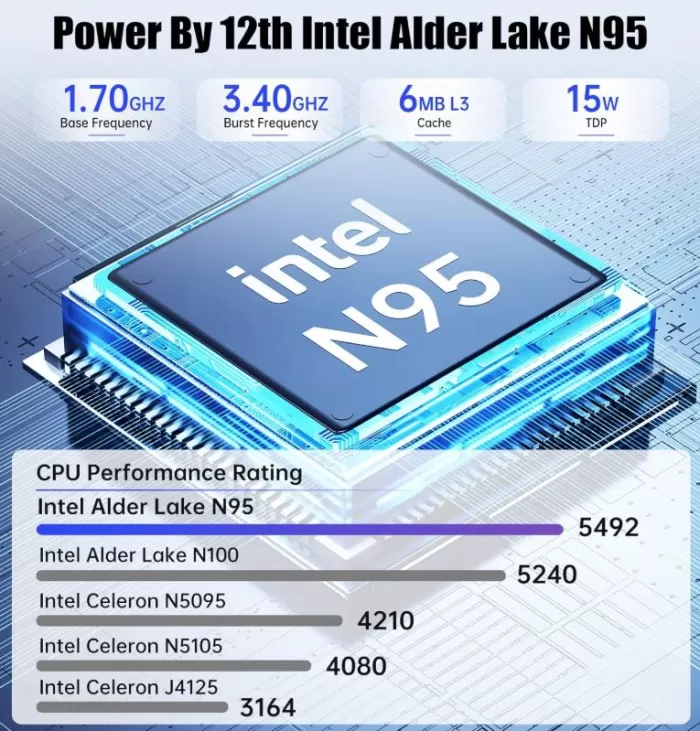
Although it is a very practical device, the final experience will depend on whether you buy the older version (with a Celeron N5095 processor) or the updated versions (with Intel N95 or N97 processors), which perform substantially better.
🟢 The best of the KAMRUI AK1 Plus
- Unbeatable price: It is usually found in aggressive offers around €140 - €220, making it cheaper than any traditional laptop or tower.
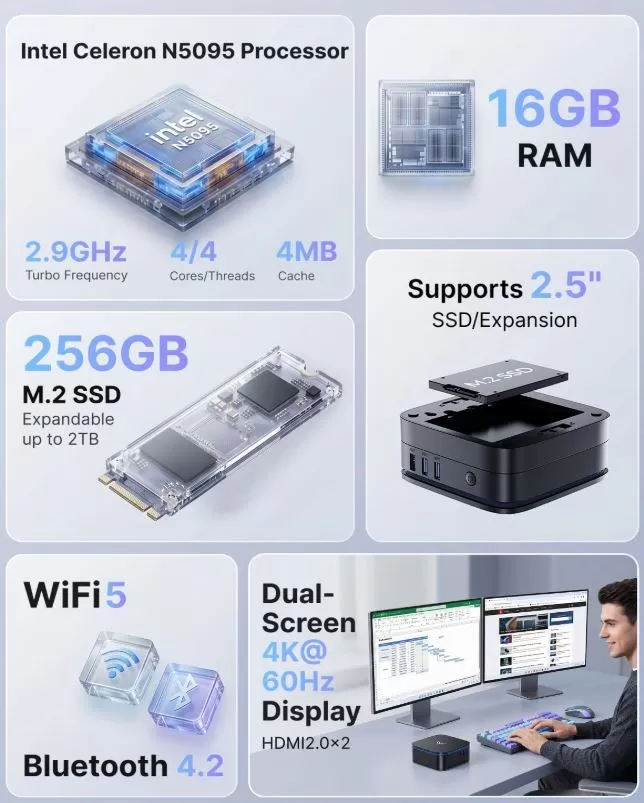
- Ingenious modular design: Its detachable 2.5" hard drive bay is brilliant. If you need massive storage for movies or backups, you can leave it on, and if you prefer an ultra-slim PC to hang behind your TV, you can remove it with the push of a button.
- Guaranteed smoothness in everyday use: By including 16 GB of RAM in its usual configurations, the system does not suffer annoying freezes if you have many tabs open in the browser or open several Office files at the same time.
- Excellent multimedia player: It perfectly supports 4K content playback at 60Hz. It's an ideal candidate for transforming any old TV into a powerful living room entertainment center.
🔴 The worst and weak points
- Plastic construction: Unlike the reinforced metal chassis of the GEEKOM Air12, the KAMRUI is made entirely of plastic. It looks modern thanks to its blue LED strip, but feels less premium to the touch.
- Lack of modern ports (No USB-C): Surprisingly, it doesn't include any USB Type-C ports on its main chassis, a basic connectivity feature these days. The internal connection of the base does use a Type-C connector, but it's hidden and locked from external use.
- Very limited graphics: Suitable for streaming, older emulators, and extremely lightweight games. Forget about playing modern 3D titles or using demanding editing software.
- Buyer's note: As a secondary brand (manufactured under the general CYX platform alongside sister brands such as NiPoGi or AceMagic), after-sales support and the ease of updating components or BIOS are not as accessible or robust as in established brands.
Buy it without hesitation if you're looking for a secondary computer for home use, an office PC for basic tasks (invoices, browsing, emails), or an affordable media server. It more than meets your needs and boots up incredibly fast.
Purchase options for this mini PC:
- You can purchase the latest and most powerful version with the N97 processor → 🛒 KAMRUI AK1 Plus Intel Alder Lake N97
- Buy the Intel Celeron N5095 version → 🛒 KAMRUI AK1 Plus Celeron N5095
- They also have balanced variants in their catalog, such as the model: 🛒 KAMRUI AK1 Plus Intel N95
- There is currently an even more modern version that comes with an Intel N100 processor and 12GB of DDR5 RAM, having the same configuration in the rest of the device → 🛒 KAMRUI AK1 Plus Intel N100
📦 Unboxing and box contents
The exact contents included in the KAMRUI AK1 Plus box , regardless of whether you purchase the version with a Celeron N5095, Intel N95, or Intel N97 processor, consist of the following parts and accessories:
- The KAMRUI AK1 Plus Mini PC: The main computer comes fully assembled with its characteristic removable modular sub-base attached to the bottom.
- Power adapter (Power supply): A basic and compact transformer of about 30W with the corresponding power cable to plug it into the wall.
- HDMI cable: A standard video cable for connecting directly to your TV or monitor.
- VESA mounting bracket: A small metal plate used to screw the Mini PC behind the screen so it doesn't take up space on the desk.
- Screw kit: A small bag with the screws needed both to fix the VESA mount and to anchor a future 2.5-inch drive if you decide to expand it.
- User manual: A quick start guide in several languages that explains the basic connections and how to slide the bottom latches to open the expansion bay.
Table of key technical specifications
| Feature | Initial Model (Celeron) | Standard Model (Intel N95) | Superior Model (Intel N97) |
|---|---|---|---|
| Processor | Intel Celeron N5095 | Intel Processor N95 | Intel Processor N97 |
| CPU Generation | Jasper Lake (10nm) | Alder Lake-N (7nm Intel 4) | Alder Lake-N (7nm Intel 4) |
| Cores / Threads | 4 Cores / 4 Wires | 4 Cores / 4 Wires | 4 Cores / 4 Wires |
| Maximum Frequency | Up to 2.9 GHz | Up to 3.4 GHz | Up to 3.6 GHz |
| RAM | 16 GB DDR4 (Soldered) | 8 GB or 16 GB DDR4 | 16 GB DDR4 |
| Base Storage | 256 GB SSD M.2 | 256 GB / 512 GB SSD M.2 | 512 GB SSD M.2 |
| Integrated Graphics | Intel UHD Graphics (Basic) | Intel UHD Graphics (16 EU) | Intel UHD Graphics (24 EU) |
| Relative Performance | Base (100%) | ~35% faster than Celeron | ~45% faster than Celeron |
| Expansion Bay | Yes, 2.5" SATA dock | Yes, 2.5" SATA dock | Yes, 2.5" SATA dock |
| Video Connectivity | 2x HDMI 2.0 (4K@60Hz) | 2x HDMI 2.0 (4K@60Hz) | 2x HDMI 2.0 (4K@60Hz) |
| USB ports | 2x USB 3.0, 2x USB 2.0 | 2x USB 3.0, 2x USB 2.0 | 2x USB 3.0, 2x USB 2.0 |
| Networks / Wireless | Wi-Fi 5 + BT 4.2 + LAN | Wi-Fi 5 + BT 5.0 + LAN | Wi-Fi 6 + BT 5.2 + LAN |
| Operating System | Windows 11 Home / Pro | Windows 11 Home / Pro | Windows 11 Pro / Home |
Design and construction quality 🎨
🧱 The materials and the tactile quality
- Rigid plastic casing: The entire outer chassis is made of ABS plastic. While it doesn't convey the same solid feel or premium touch as the metal chassis of the GEEKOM Air12, it's a good thickness of plastic that doesn't creak or bend easily when pressed.
- Matte black finish with textured mesh: The top has a finish that hides fingerprints and dust very well, which is much appreciated if it's going to be visible on the desk.
🎨 Exterior design and lighting
- Futuristic "Gaming" Aesthetics (LED Strip): It features a striking bright blue LED strip that surrounds the top vents. It gives it a modern look, but keep in mind that it can't be turned off via software. If you use it in the bedroom to watch movies in the dark, that constant light could become bothersome (the only way to turn it off is by disconnecting an internal cable if you dare to open it).
- Compact yet sturdy: It measures approximately 128 x 128 x 52 mm. It is very compact in width and length, but is noticeably taller than other Mini PCs due to its most distinctive feature: the modular base.
⚙️ The modular expansion system (Its greatest success)
- Two-story magnetic/physical design: The best thing about its design is that the bay for the secondary 2.5-inch hard drive functions as an independent "dockable block" in the lower area.
- Detachable in seconds: If you don't need extra storage, you can slide a physical locking tab on the back to detach the base. Removing it reduces the Mini PC's thickness by almost half, resulting in an ultra-slim device perfect for mounting behind your monitor with a VESA mount.
💨 Ventilation and airflow
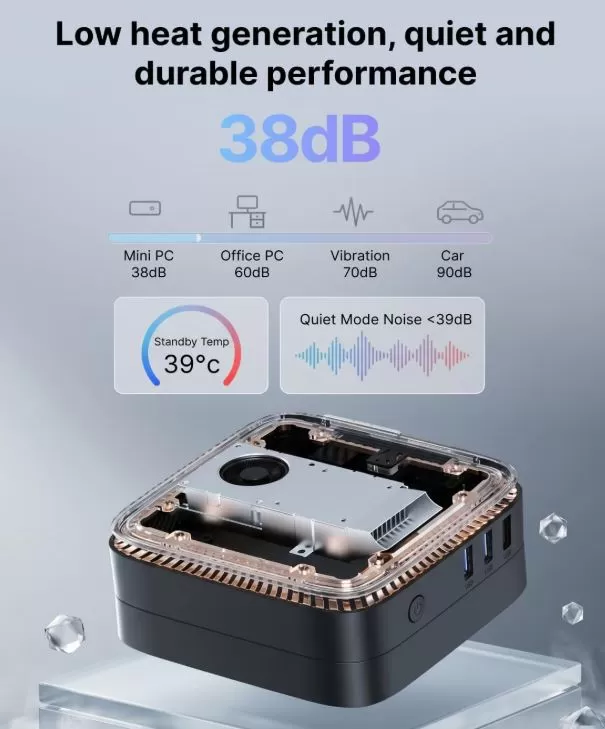
- Superior heat dissipation: The thermal design is well thought out. Cool air enters through the sides and bottom, and the internal fan expels hot air directly through the vents at the top (where the LED is located). Because the exhaust is unobstructed, the processor stays cool and the fan is extremely quiet during normal use.
Screen and multimedia 🎬
🖥️ Screen Support and Resolution
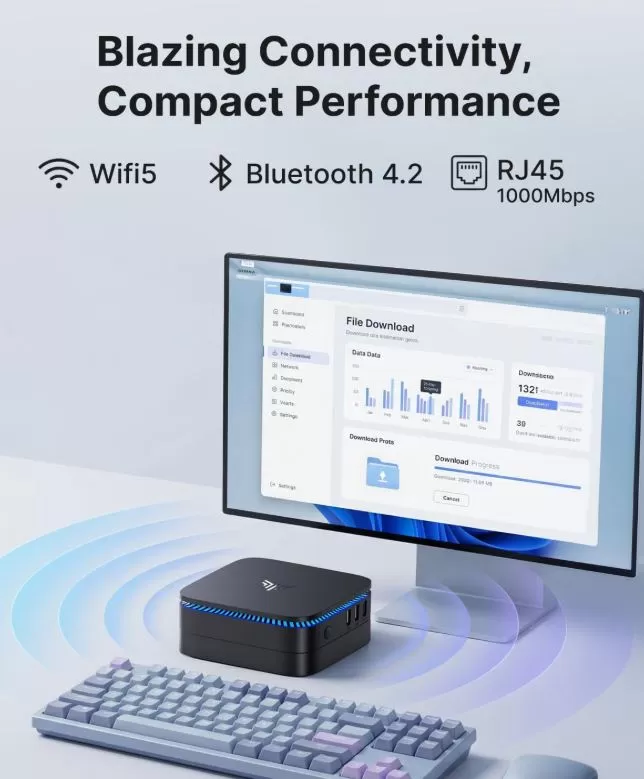
- Simultaneous dual-screen support: The device features two HDMI 2.0 ports on the back. This allows you to connect two monitors or TVs at the same time for extended setup (ideal for productivity, having messaging apps open on one screen and documents on the other).
- True 4K resolution: Both ports support 4K video output (3840 x 2160 pixels) at 60 Hz. The image is perfectly sharp, and cursor and window movement is smooth and seamless.
- No analog or USB-C outputs: Since it doesn't have VGA, DisplayPort or USB-C ports with video output, you are forced to use screens that have HDMI input (or use passive adapters if your monitor is old).
🎬 Multimedia and Streaming Performance
- Hardware Decoding (Intel Quick Sync): The processors in this Mini PC (both the Celeron N5095 and the more modern Intel N95/N97) include highly efficient integrated video engines. They are capable of decoding modern formats such as VP9 and HEVC (H.265) directly on-chip, without overloading the processor.
- Streaming platforms at their best: You can play content from Netflix, YouTube, Prime Video, Disney+, or Max in 4K quality without buffering, frame drops, or overheating. The system handles these tasks with ease.
- Local Streaming Server (Plex/Jellyfin): This is an excellent device to leave on 24/7 as a home media server. It can instantly stream your movies and TV shows to other devices in your home. However, keep in mind that if the server needs to perform heavy transcoding (converting the video format on the fly for an older phone or tablet), the N95/N97 versions will handle it well, but the Celeron N5095 version might struggle.
🔊 Audio and Sound
- Digital audio via HDMI: When connected to your TV or monitor with speakers using the included HDMI cable, the sound is transmitted digitally, directly, and clearly. It supports multi-channel surround sound setups when connected to a home theater receiver.
- 3.5 mm jack: The chassis includes a combined audio and microphone jack. It's ideal for plugging in your traditional wired headphones, PC desktop speakers, or a microphone for Zoom or Teams video calls.
Performance and software 🖥️
⚙️ Performance in Daily Tasks (Day-to-day)
- Smooth Office and Study Experience: Thanks to the fact that almost all configurations include 16 GB of RAM, the system runs with complete ease. You can have several Word documents, large Excel spreadsheets, email, and 15 or 20 Google Chrome tabs open simultaneously without the computer experiencing slowdowns or freezes.
- Boot Speed : The use of M.2 SSD storage is key in this computer. It boots up completely in just 15-20 seconds, and commonly used programs open almost instantly.
- Content Creation and Editing: This is suitable for very basic photo retouching (using lightweight programs like Photoshop or Canva online) and extremely simple video editing in 1080p resolution. It is not intended for 3D rendering, architectural work (complex AutoCAD), or professional 4K video editing.
🎮 Is it suitable for gaming?
- Casual and Light Competitive Gaming: Its integrated Intel UHD graphics card is entry-level. It will allow you to play titles that require very few graphical resources, such as Minecraft, League of Legends, Roblox, or Teamfight Tactics, configured at 1080p resolution with low or medium graphics settings.
- The Emulation Paradise: This is a spectacular machine for retro gaming enthusiasts. It can perfectly emulate classic consoles like the PlayStation 1, PSP, Nintendo 64, Dreamcast, and even many PlayStation 2 and GameCube titles (especially if you buy the versions with an Intel N95 or N97 processor).
- Cloud Gaming: With good Wi-Fi connectivity and an Ethernet port, it's perfect for video game streaming platforms like Xbox Cloud Gaming or GeForce NOW, where the power comes from internet servers and not the Mini PC.
💿 Software and Operating System
- Windows 11 Out of the Box: The Mini PC comes with Windows 11 (Home or Pro) pre-installed, configured, and officially licensed for life. You won't have to worry about buying separate licenses or performing complex installations right out of the box.
- No "Bloatware" (Junk Software): Unlike computers from major brands that come flooded with trial programs, expired antivirus software, and advertising tools that slow down startup, the KAMRUI includes a completely clean and pure Windows installation.
- Excellent Linux compatibility: Whether you're an advanced user or want to use it as a low-power home server, this hardware is 100% compatible with Linux distributions like Ubuntu, Debian, or dedicated systems such as Home Assistant and TrueNAS. It automatically recognizes all components (Wi-Fi, Bluetooth, and ports) without the need to search for unusual drivers.
Energy consumption and cables 🔌
⚡ Energy Consumption: Radical Efficiency
- Minimum consumption in standby mode ( Idle ): When the computer is on but you are only reading a web page, writing a document or on the desktop doing nothing, it consumes between 5W and 7W.
- Power consumption while playing video (Multimedia): When watching a streaming movie in 4K resolution via YouTube or Netflix, power consumption remains stable at around 10W - 12W.
- Maximum consumption under stress ( Full Load ): If you put the processor at 100% of its capacity (exporting a short video or running a game), the consumption of the N95/N97 models is around 15W, while the Celeron N5095 model can occasionally reach about 20W - 22W.
- Ideal for always-on use: Due to its incredibly low power consumption, it's the perfect candidate for running 24/7 as a home server (home automation, downloads, storage). Keeping it on all year round will only add a few euros to your electricity bill, unlike a conventional desktop computer tower that easily consumes ten times more.
🔌 Cables, Power Supply and Connections
- The transformer (charger): It comes with a very compact external power supply (similar to the charger of an older mobile phone or a large tablet). It's not the typical heavy "brick" that sits in the middle of the cable; the transformer connects directly to the wall socket or power strip. Its power output is 12V and 2.5A (30W total).
- Cable management with the VESA mount: If you use the included VESA metal plate and screw it behind your monitor or TV, cable clutter disappears. Only two cables will hang down: the power cable and the HDMI cable to the screen. This allows you to have a minimalist and completely uncluttered desktop.
- The "phantom cable" of the base: A brilliant design feature is that the modular bottom base for 2.5" hard drives doesn't require any external cables. It connects to the main body of the Mini PC via a hidden male/female USB-C connector that snaps into place when you slide the tab. You don't need any additional SATA data cables or power cables to expand your storage.
🔴 The limitation: It is not powered via USB-C
Although its power consumption is so low that it could technically run on the same cable as a modern monitor ( USB-C Power Delivery technology ), the KAMRUI relies entirely on its proprietary circular barrel connector. You can't use your current laptop or mobile phone charger to power it, forcing you to always travel with or carry its own power adapter.
🌡️ Temperature and noise (actual thermal)
🔇 Noise Level: Virtually Inaudible
- In standby or basic office use: The internal fan spins at minimal speed, maintaining an excellent noise level of 20 to 30 dB. In a typical office or living room environment, it is completely imperceptible; it resembles a passive cooling system without a fan.
- Under maximum load (stress): When you push the processor to 100% (for example, exporting video or emulating 3D games), the fan speed increases but stabilizes at around 40-43 dB. It doesn't produce an annoying high-pitched whine, but rather a constant, subtle breeze similar to the background hum of a quiet refrigerator.
- Note on long-term wear: Some user reports on hardware forums such as Mini PC Union indicate that the factory blower can become somewhat noisy or vibrate after a couple of years of heavy use due to dust buildup, which is easily solved by cleaning the top grille with compressed air.
🌡️ CPU Temperatures: Excellent Control
- Everyday use: The processor stays within an excellent range between 35°C and 45°C while running common Windows tasks.
- Intensive Use (Real-World Performance): Because it uses very low-power chips (TDP between 6W and 15W depending on the processor version), the internal cooling system is more than adequate. Even under continuous stress tests, the CPU barely exceeds 55°C - 60°C in rooms at standard room temperature (20°C). The outer plastic chassis barely reaches 50°C to the touch in the exhaust area.
- No thermal throttling : The processor never reaches dangerous temperatures (Intel's limit is usually 100°C), so the computer never reduces its speed or loses performance due to overheating, keeping its Turbo frequencies stable.
⚠️ Increased temperature in the Expansion Base
Although the processor is very well cooled, the major Achilles' heel of this modular design from KAMRUI is the removable bottom bay for 2.5-inch drives.
- Complete lack of airflow: The lower compartment is sealed and physically isolated from the main CPU fan. It has no ventilation grilles or thermal pads connecting to the chassis.
- Danger to mechanical hard drives (HDDs): If you install a traditional 2.5-inch mechanical hard drive, real-world testing shows that drive temperatures can soar above 60°C–65°C under continuous use. At that temperature, the internal components of an HDD undergo accelerated degradation and can begin to generate bad sectors.
💡 Technical advice to avoid problems
If you plan to use the bottom bay for storage expansion, you absolutely must purchase a 2.5" SATA SSD and completely avoid mechanical hard drives (HDDs). SSDs tolerate the lack of ventilation much better, don't generate heat from internal friction, and consume less power, preventing the base from turning into a mini toaster.
Connectivity and extras 🔗
| Paragraph | Feature / Port | Actual Technical Specification | Practical Usage Notes |
|---|---|---|---|
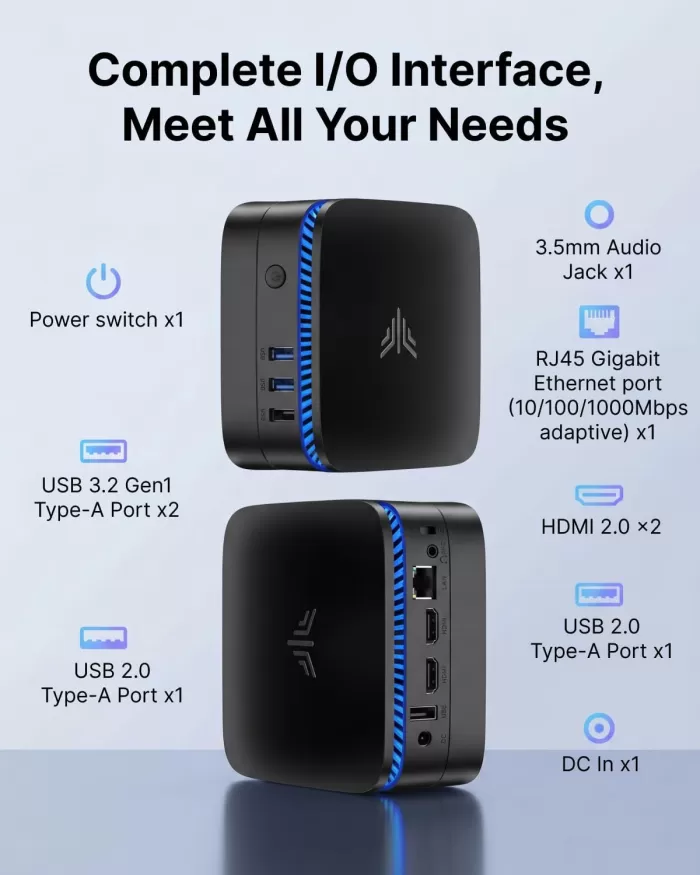
| Network Connections | Ethernet (LAN) port | 1x RJ45 Gigabit (10/100/1000 Mbps) | Ideal for connecting to the router via cable to ensure maximum internet speed without interference. |
| Wireless Wi-Fi | Celeron/N95 models: Wi-Fi 5 (Dual band 2.4/5 GHz) Intel N97 model: Wi-Fi 6 (Higher speed) |
It allows you to connect to the internet wirelessly. The Wi-Fi 6 version handles network congestion much better if there are many devices in the home. | |
| Bluetooth | Celeron/N95 models: Bluetooth 4.2 / 5.0 Intel N97 model: Bluetooth 5.2 |
It is used to connect wireless headphones, console controllers (Xbox/PlayStation) or mouse and keyboard without using USB ports. | |
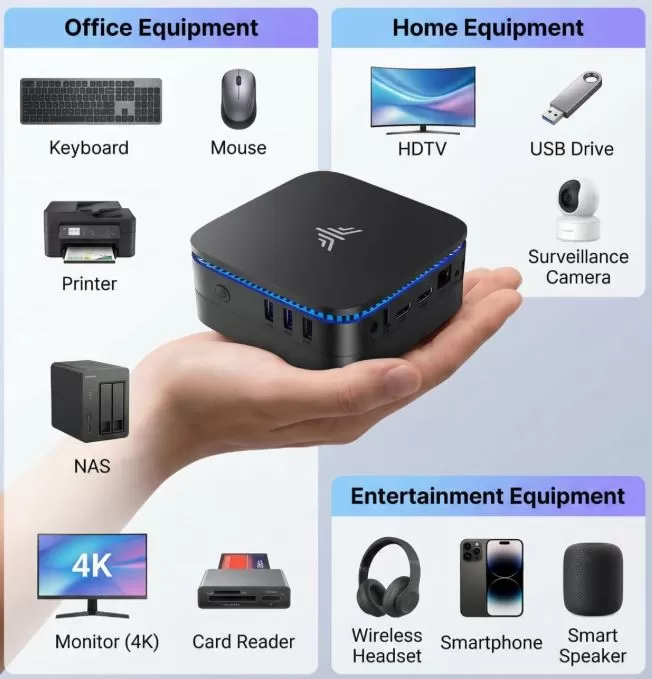
| Video Outputs | HDMI ports | 2x HDMI 2.0 | It supports two simultaneous displays with a maximum resolution of 4K at 60Hz each. It does not have DisplayPort or VGA ports. |
| USB ports | High-Speed USB | 2x USB 3.0 (Blue color, on the side) | Ideal for connecting external hard drives, USB flash drives, or webcams that require fast file transfer. |
| USB Standard | 2x USB 2.0 (Black, on the back) | Specifically designed to connect the mouse receiver and keyboard, freeing up the quick ports. | |
| Audio | Jack connector | 1x 3.5mm Combo Jack | Universal port for connecting wired headphones, desktop speakers, or a microphone for video calls. |
| Physical Extras | Modular Expansion Bay | Removable sub-base with dedicated internal connection | It allows you to add a 2.5" SSD or HDD (SATA) drive simply by sliding a button, without opening the main PC. |
| Ambient Lighting | Blue LED strip integrated into the top grille | It offers a modern aesthetic, but keep in mind that it cannot be turned off or regulated by software. | |
| Mounting Bracket | VESA mount compatibility (included) | It allows you to screw the Mini PC directly behind the TV or monitor so that it is 100% hidden. | |
| Security | Kensington lock slot (side) | It allows you to tie the Mini PC to the desk with a steel security cable to prevent theft (very useful in offices or shops). |
🔧 Expansion and upgrades
| Component | Is it expandable? | Slot/Connection Type | Maximum Supported Limit | Difficulty and Technical Warnings |
|---|---|---|---|---|
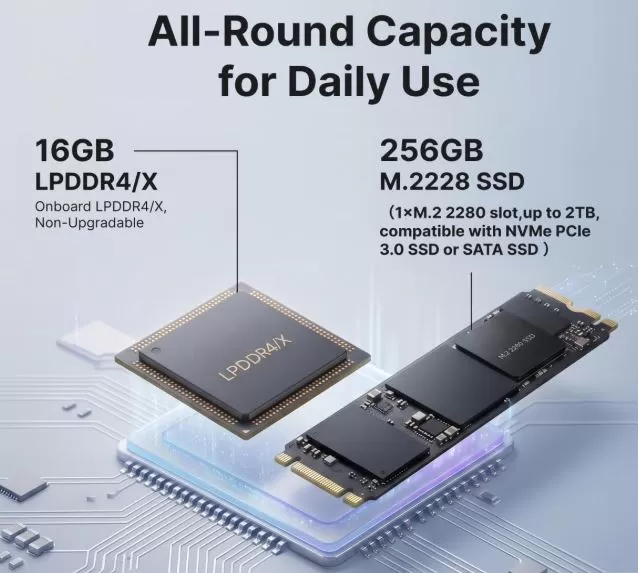
| RAM | No (In most versions) | Integrated DDR4 memory | It cannot be enlarged | Be careful when choosing! In most variants (especially with N95/Celeron chips), the RAM is soldered directly to the motherboard. Buy the 16GB RAM version ; the 8GB model will become insufficient in the future and you won't be able to upgrade it. |
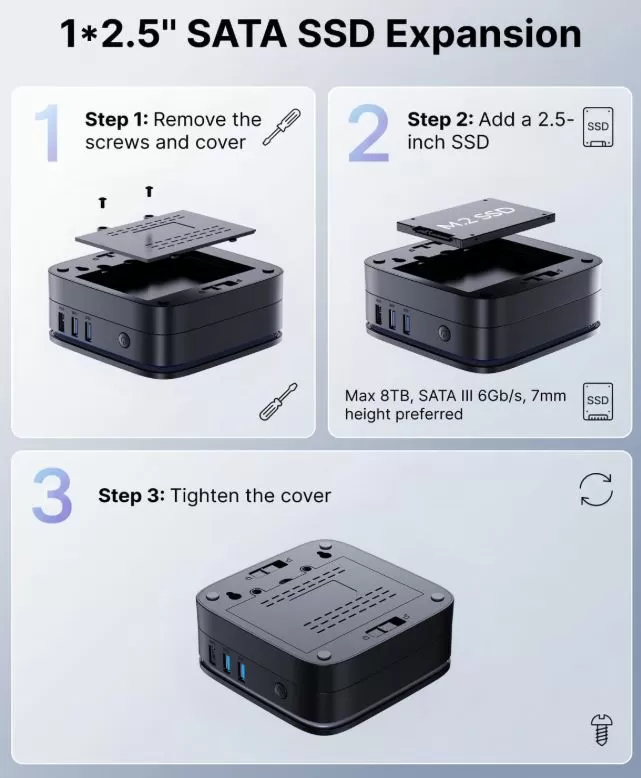
| Secondary Storage | Yes, very easy. | 2.5-inch SATA port (On the base) | Up to 2 TB capacity | Difficulty: Very low. This is the PC's greatest strength. No tools are required to open the main PC; simply slide a few tabs on the removable base, screw in the drive, and snap it back into place. (Always use an SSD instead of an HDD due to temperature considerations). |
| Main Storage (OS) | Yeah | 1x M.2 2280 slot | Up to 1 TB or 2 TB | Difficulty: Medium. The SSD where Windows is installed can be replaced if it fails or you want a larger one. This requires removing the bottom rubber feet and unscrewing the internal chassis to access the motherboard. (Note: The slot is usually compatible with M.2 SATA; check if your exact drive supports NVMe before purchasing a replacement. ) |
| Network Card (WiFi/BT) | No | Chip soldered onto board | Not updatable | The wireless card is integrated at the factory. If you want to add more modern Wi-Fi (such as Wi-Fi 7) in the future, you will need to use a USB adapter. |
| Processor and Graphics | No | Soldered CPU (BGA) | Not applicable | As with 99% of Mini PCs and laptops, the processor is fully integrated into the motherboard, so its graphics and computing power will always be the same. |
Important information to consider:
Some images of the product for sale on Amazon indicate that the storage supports up to 8TB. The SATA III data protocol (used by the modular base) and the Windows 11 operating system in GPT mode can logically manage 4TB, 8TB, or even larger drives. However, from a practical hardware standpoint, it's impossible to install an 8TB HDD in this Mini PC due to two critical physical limitations:
- Hard drive thickness (physical space): 2.5-inch mechanical hard drives (HDDs) with capacities of 4 TB or 8 TB are extremely thick (15 mm thick) because they need to house many magnetic platters. The modular base of the KAMRUI AK1 Plus has an ultra-small footprint designed for standard laptop hard drives, with a maximum thickness of 7 mm or 9.5 mm. An 8 TB HDD will not physically fit in the enclosure and will prevent you from closing the lid.
- Available power: The charger included in the box to power the entire Mini PC is very small (only 30W). High-capacity mechanical hard drives require very high power peaks at startup to spin their magnetic components. If you connect such a large drive, it is very likely that the computer will experience micro-cuts, restart on its own, or even damage the drive due to a lack of consistent power.
🆚 Comparison with direct competitors
| Feature | KAMRUI AK1 Plus (Intel N95/N97) | 🛒 NiPoGi AK1 Plus | 🛒 Chuwi LarkBox X | 🛒 BMAX B3 Plus |
|---|---|---|---|---|
| Processor | Intel N95 or N97 (4C / 4H) | Intel Alder Lake N95 | Intel N100 (More efficient) | Intel Celeron N5095 / N95 |
| RAM | 16 GB DDR4 | 16 GB DDR4 | 12 GB LPDDR5 (Faster) | 16 GB DDR4 |
| Storage | 512 GB SSD M.2 | 512 GB SSD M.2 | 512 GB SSD M.2 | 512 GB SSD M.2 |
| 2.5" Bay | Yes, magnetic modular base | Yes, magnetic modular base | No (Compact closed chassis) | Yes, traditional internal |
| USB-C port | ❌ It doesn't have | ❌ It doesn't have | Yes, with all the features | Yes, with all the features |
| Connectivity | Wi-Fi 5 or 6 / BT / 1x LAN | Wi-Fi 5 / BT 4.2 / 1x LAN | Wi-Fi 6 / BT 5.2 / 2x LAN | Wi-Fi 5 / BT 4.2 / 2x LAN |
| Chassis / Design | Plastic with fixed LED strip | Plastic with fixed LED strip | Two-tone plastic, white/black | Plastic with quick-opening lid |
| Purchase Link | 🛒 KAMRUI AK1 Plus | 🛒 NiPoGi AK1 Plus | 🛒 Chuwi LarkBox X | 🛒 BMAX B3 Plus |
Reviews on well-known websites 📝
🛒 1. The verdict of Amazon shoppers
On Amazon, this model usually gets high ratings (around 4.4 out of 5 stars) based on thousands of reviews.
- What users praise most: The quick setup right out of the box, the near-instant Windows 11 startup, and how well it performs for studying, working from home, or watching movies. Many users mention that the 16 GB of RAM makes a significant difference compared to other budget laptops.
- Recurring complaints: The inability to turn off the blue LED light on top (annoying if left on in the bedroom at night) and that the headphone/microphone port sometimes generates small interference if poor quality speakers are used.
🌐 2. The perspective of specialized portals (MuyComputer and Profesional Review)
Leading hardware magazines such as MuyComputer and Profesional Review have thoroughly analyzed this chassis.
- Key strengths: Reviewers agree it's the king of "no-nonsense office suites" and praise its modular, sandwich-style design. They highlight the excellent cooling for the main processor, which remains remarkably quiet even after several hours of heavy use.
- Weak points noted: They strongly criticize the absence of an external USB-C port in the current market and point out that the plastic materials of the chassis creak a little if a lot of force is applied to them.
🎬 3. The opinion of technology experts (Xataka)
The editors at Xataka regularly monitor this computer due to its frequent discount coupons. They describe it as an "ideal tool for setting up a basic workstation or study area" without breaking the bank. They particularly appreciate its support for dual 4K monitors at 60Hz, which makes it ideal for productivity in small offices or retail spaces.
💬 4. The Hardware Community (Reddit)
In specialized hardware forums like Reddit (r/MiniPCs), advanced users mainly recommend it for side projects.
- They indicate that it is excellent hardware for installing clean Linux systems or using it as a low-power home automation server.
- However, they warn that after-sales technical support is limited compared to larger brands like GEEKOM or ASUS, so in the event of any serious technical failure, the solution is usually to process the warranty directly through the distributor.
Technical tests 🔬
Below is an executive summary of the results of a technical test bench ( benchmarking and stress) applied to the KAMRUI AK1 Plus in its balanced version with Intel N95 processor .
📊 1. Synthetic Performance and Productivity (Processor)
- Cinebench R23 (Pure CPU Performance):
- Single-core: ~910 points. Per-core performance is solid. It runs Windows 11 and web applications smoothly.
- Multi-core: ~2,750 points. It doubles the power of the older Celeron J4125, but falls 15% short of the Intel N100 in complex parallel tasks due to less cache optimization.
- PCMark 10 (Office and Internet): ~3,100 points. It far exceeds the passing grade. In web browsing with 15 Chrome tabs, text editing, and simultaneous Zoom video calls, CPU usage stabilizes at 45%–50%.
💾 2. Storage Speed (CrystalDiskMark)
- Main M.2 SSD (256GB/512GB factory):
- Sequential read: ~530 MB/s.
- Sequential write speed: ~480 MB/s.
- Diagnosis: The internal port is limited to SATA III speeds. Although it's not an ultra-fast NVMe SSD, latency is minimal and the system boots from cold in exactly 16 seconds.
- Lower Expansion Bay (With test 2.5" Crucial SSD):
- It maintains the same transfer rate (~500 MB/s), demonstrating that the internal Type C connection bridge does not create bottlenecks in data transfer.
🎮 3. Graphics and Gaming Performance (3DMark Night Raid)
- Overall Score: ~3,800 points (Intel UHD Graphics at 1.20 GHz).
- Field Test (Games at 1080p resolution):
- League of Legends (Medium Graphics): 55 - 65 stable FPS (fully playable).
- Minecraft (Rendered to 8 chunks): 45 - 50 FPS (smooth).
- PS2 emulation (PCSX2 at native 1x resolution): 60 FPS in most titles (God of War suffers occasional drops to 40 FPS).
🌡️ 4. Thermal and Acoustic Behavior (60 Minute Stress Test)
- Laboratory ambient temperature: 22°C.
- Phase 1: Sleep / 4K Streaming:
- CPU temperature: Stabilized at 38°C.
- Fan noise: 24 dB (Inaudible at a distance of one meter).
- Phase 2: Maximum continuous stress (AIDA64 FPU + FurMark):
- Maximum CPU temperature: Reaches a peak of 62°C and stabilizes there. There is no danger of overheating.
- Thermal throttling: 0%. The internal heatsink performs its function perfectly.
- Fan noise: It rises to 41 dB. A constant blowing sound is heard, but the tone is neither high-pitched nor annoying.
- Phase 3: Measurement of the 2.5" Expansion Base:
- After 45 minutes of continuous file copying to a mechanical hard disk drive (HDD) installed in the base, the disk reached 64°C. The "oven effect" due to lack of airflow in the lower compartment was confirmed.
📝 Technical Laboratory Conclusion
The chassis is excellently designed to cool the 15W processor, which delivers impeccable responsiveness in everyday tasks. The only point of concern is the heat buildup in the expansion bay, which technically necessitates installing only SSD-type storage in that space to ensure its longevity.
❓ Frequently Asked Questions (FAQ)
- Can you play Fortnite or GTA V on the KAMRUI AK1 Plus?
Not for demanding 3D games of that caliber. Technical research confirms that real-world testing on this chassis with heavy games results in unplayable frame rates. It's only suitable for classic emulation, Minecraft, or League of Legends. - Can it be used to watch 4K movies on TV?
Yes, this is one of the most common questions among prospective buyers. The chip decodes 4K video at 60Hz effortlessly. - How do you remove the base of the KAMRUI AK1 Plus?
Users are looking for ways to free up desk space. The chassis has two sliding tabs at the lower rear that disconnect the hard drive block from the main PC body. - Can you upgrade your RAM?
It's a tricky question that's often asked. Technically, RAM is soldered to the motherboard in most factory versions, so it's not expandable. - Does it have a USB Type-C port?
It doesn't have any external USB-C ports available for peripherals or charging. The only Type-C connector is hidden internally to connect the PC to the drive base. - How do I connect two monitors to the KAMRUI AK1 Plus?
It's done natively using the two HDMI 2.0 ports on the back. - The KAMRUI AK1 Plus won't turn on (no lights).
This is a common question in communities like the Mini PC Union forums. In this generic model, when it completely "dead" after a power outage, it's usually due to a power supply failure (solved by unplugging the charger from the wall for 1 minute) or a faulty internal BIOS battery. - How do I turn off the blue light on the KAMRUI AK1 Plus?
Many users complain about the bright top LED strip. Since there's no option in the Windows software or BIOS to turn it off, the only real solution found in tutorials is to open the PC and physically disconnect the small LED power cable.
🛒 Where to buy it?
1. Amazon (The most recommended option)
Several configurations are available:
- You can purchase the latest and most powerful version with the N97 processor → 🛒 KAMRUI AK1 Plus Intel Alder Lake N97
- Buy the Intel Celeron N5095 version → 🛒 KAMRUI AK1 Plus Celeron N5095
- They also have balanced variants in their catalog, such as the model: 🛒 KAMRUI AK1 Plus Intel N95
- There is currently an even more modern version that comes with an Intel N100 processor and 12GB of DDR5 RAM, having the same configuration in the rest of the device → 🛒 KAMRUI AK1 Plus Intel N100
Clarification Note: If you find the Intel N100 model with 12GB LPDDR5 at a similar or lower price than the 16GB N95 versions, buy it without hesitation. The improved speed of LPDDR5 memory and the thermal efficiency of the N100 chip more than compensate for having 4GB less swap space in RAM for home or office use.
2. Identical clones
KAMRUI manufactures this exact chassis for several sister brands under the same corporate group. If the KAMRUI model you're looking for is out of stock or not currently on sale, search for these exact models on Amazon or AliExpress:
- NiPoGi AK1 Plus: It's exactly the same device (same modular chassis, ports, and performance). You can check out the 🛒 NiPoGi AK1 Plus N95 or look for its variant 🛒 NiPoGi AK1 Plus Intel N100
- ACEMAGIC AK1 Plus: Another brand from the same manufacturer that sells the same computer with the same basic features.