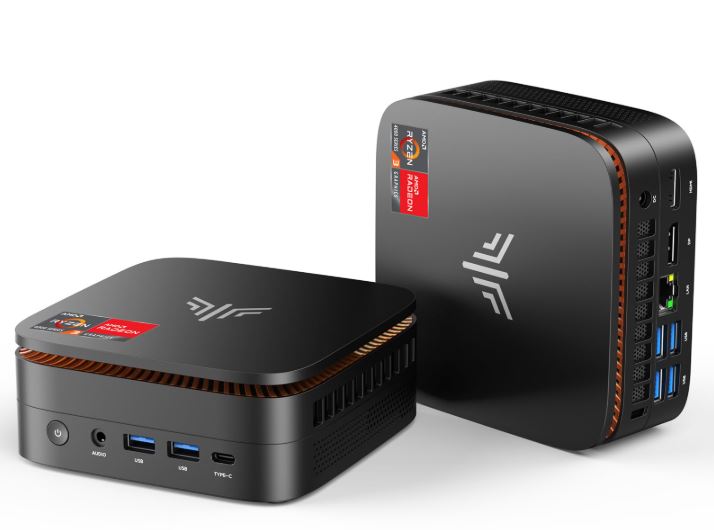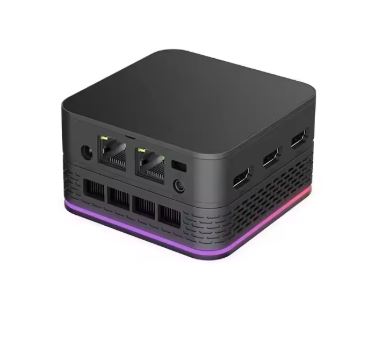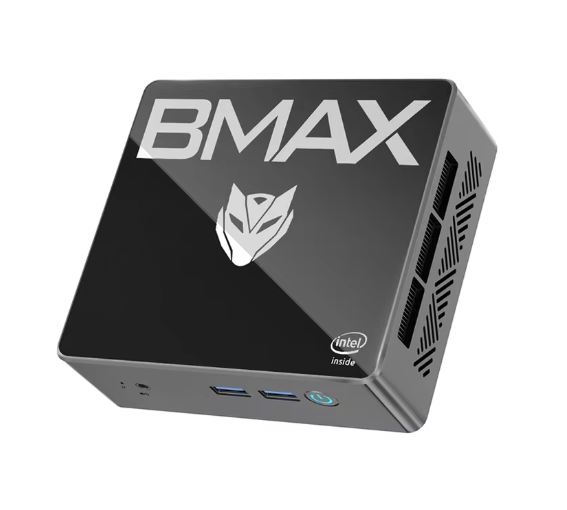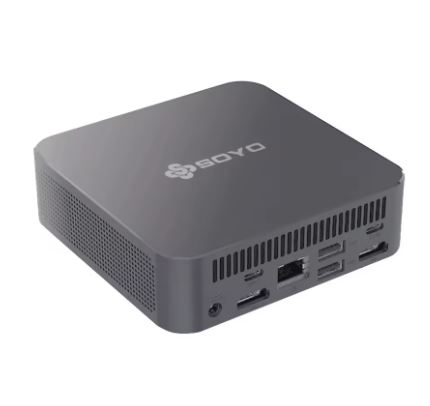
The SOYO M4 Air is one of the most complete mini PCs in its price range. With an Intel N95 processor based on Alder Lake architecture, 16 GB of DDR4 RAM, and up to 512 GB of SSD storage, it offers a smooth experience for office work, browsing, multimedia, and retro gaming. Its biggest selling point is its support for up to three simultaneous 4K displays, something almost unheard of in this price segment.
✅ Pros: Large amount of RAM for the price · Supports triple 4K displays · Windows 11 Pro included · Very low power consumption · Compact and quiet design
❌ Cons: Limited integrated graphics for modern gaming · Wi-Fi 5 (not Wi-Fi 6) · RAM likely soldered (no upgrades)
🏆 Quick conclusion: For office work, home office, media center, or a lightweight server, it's a highly recommended purchase . For AAA gaming, look elsewhere.
🛒 View Prices and Availability
📦 Unboxing and Box Contents
Upon opening the SOYO M4 Air box, you'll find carefully designed packaging for a product in this price range. The typical contents include:
-
🖥️ SOYO M4 Air Mini PC
-
🔌 Power adapter (DC 12V)
-
📡 External Wi-Fi antenna (on some models)
-
🔩 VESA mounting kit for installation behind the monitor
-
📄 User manual in English and Chinese
-
🖱️ HDMI cable (in some bundles)
The unit arrives ready to use: you connect the screen, mouse, keyboard and boot directly into Windows 11 Pro.
🔧 Technical Specifications
| Feature | SOYO M4 Air (N95 / 16GB) |
|---|---|
| Processor | Intel Alder Lake N95, 4C/4T, up to 3.4 GHz |
| Integrated GPU | Intel UHD Graphics (16 EU), hasta 1.2 GHz |
| RAM | 8 GB or 16 GB DDR4 |
| Storage | 256 GB or 512 GB M.2 SSD |
| Operating System | Windows 11 Pro (activated) |
| Screens | Up to 3 simultaneous 4K screens |
| Video outputs | HDMI 2.0 + DisplayPort 1.4 + USB-C (DP Alt) |
| Red | Gigabit Ethernet + Wi-Fi 5 (802.11ac) |
| Bluetooth | BT 5.0 |
| USB | 3× USB 3.0 + 2× USB 2.0 + 1× USB-C |
| Audio | Jack 3.5 mm combo mic/auriculares |
| TDP | 15W (configurable) |
| Standby power consumption | ~5-7W |
| Power consumption under load | ~18-25W |
| Dimensions | ~12 × 11 × 4 cm (aprox.) |
| Weight | ~200-300 g |
🎨 Design and Construction Quality
SOYO M4 Air Mini PC
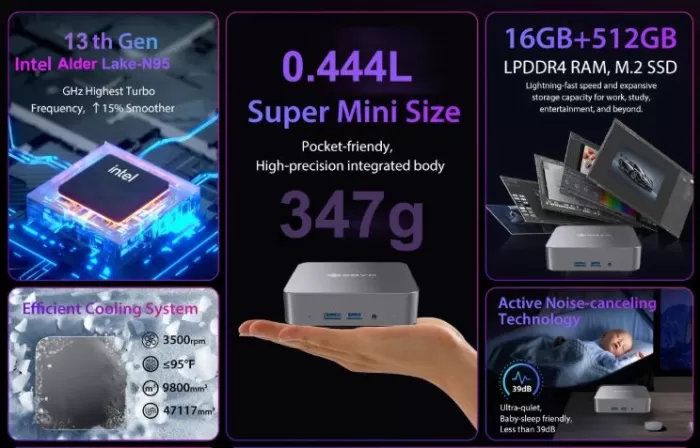
The name "Air" is no coincidence: the SOYO M4 Air is surprisingly small and light, fitting in the palm of your hand and attaching to the back of a monitor with the included VESA mount. The chassis is made of rigid, matte-finish plastic that resists fingerprints well and feels solid, with no creaks or loose parts—a welcome feature in a budget-friendly device.
The overall design is neutral and understated, in gray/silver tones, perfect for office or living room environments. Ventilation is well distributed on the sides and bottom, promoting airflow during extended use.
🛒 View Prices and Availability
🖥️ Screen and Multimedia
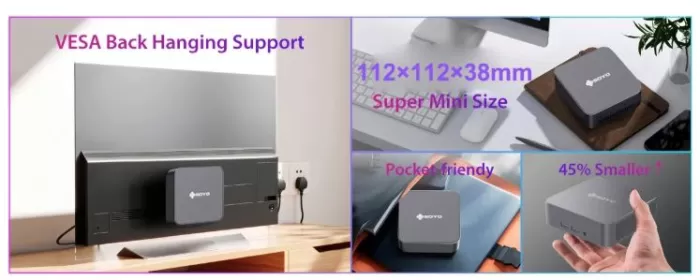
One of the most striking features of the M4 Air is its ability to handle up to three 4K monitors simultaneously via HDMI 2.0, DisplayPort 1.4, and USB-C with DisplayPort Alternate Mode. This makes it an exceptional tool for traders, programmers, or any user who needs expanded workspace.
In terms of multimedia, the integrated Intel UHD Graphics GPU can smoothly play 4K HDR content on platforms like Netflix, YouTube, and Plex. There are no built-in speakers, so you'll need to connect external speakers or headphones to the 3.5 mm jack.
⚙️ Performance and Software
SOYO M4 Air Mini PC
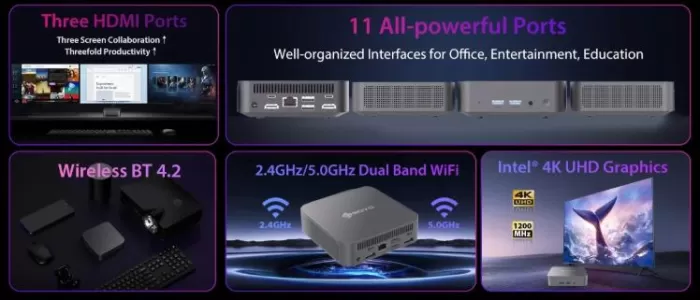
The Intel N95 is a fourth-generation (Alder Lake) energy-efficient processor with 4 cores and 4 threads, capable of reaching 3.4 GHz in boost mode. For everyday tasks—web browsing with dozens of tabs, Office applications, video conferencing on Zoom or Teams, and basic document editing—it performs remarkably smoothly. The 16 GB of DDR4 RAM makes a real difference compared to 8 GB models, avoiding the typical bottlenecks of entry-level systems.
Windows 11 Pro comes pre-installed and activated, which is a definite advantage. As is common with Chinese mini PCs, it may include some bloatware (unnecessary pre-installed software), but it's easy to remove during the initial setup. Windows updates work normally since it's a legitimate license.
🛒 View Prices and Availability
🔋 Energy Consumption and Cables
The SOYO M4 Air is one of the most efficient desktop computers you can buy. It consumes between 5 and 7W at idle , and under heavy load it rarely exceeds 18-25W. For comparison, a conventional desktop PC consumes between 200 and 400W. This translates to a virtually negligible electricity bill, even if you leave it on all day.
The device is powered by a 12V DC adapter included in the box. It does not use USB-C PD for primary power, so a proprietary cable is required. Using a surge protector is recommended.
🌡️ Temperature and Noise (Actual Thermal)
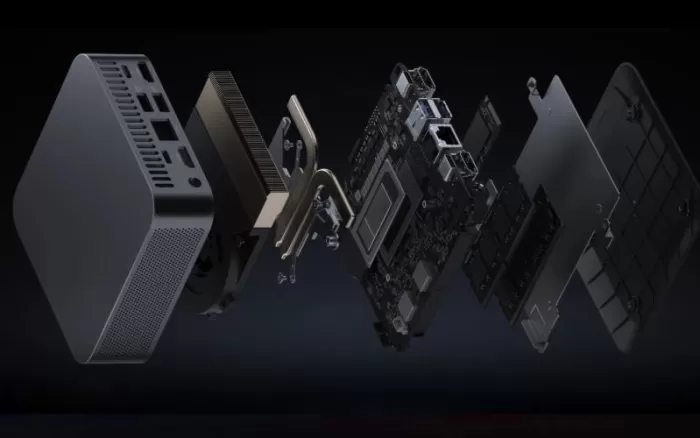
Thanks to its low TDP of 15W, the SOYO M4 Air is remarkably quiet during everyday use. The internal fan is barely noticeable while browsing or working in an office. Under sustained load (long renders, continuous gaming), the temperature rises and the fan becomes more audible, but it remains much quieter than any conventional laptop or desktop computer.
Similar Soyo models in temperature tests have demonstrated stable thermal behavior, with CPU temperatures remaining below 75°C even under prolonged stress. There is no significant throttling during productivity tasks.
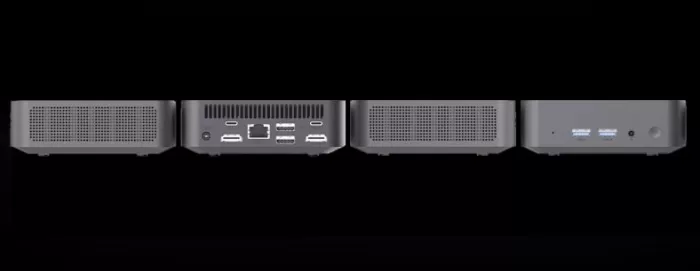
🔌 Connectivity and Extras
SOYO M4 Mini PC
The M4 Air offers generous connectivity for its size:
-
📺 Video: HDMI 2.0 + DisplayPort 1.4 + USB-C (DP Alt Mode) → up to 3 4K displays
-
🌐 Red: Gigabit Ethernet (RJ45) + Wi-Fi 5 (802.11ac)
-
📡 Bluetooth: 5.0
-
🔌 USB: 3× USB 3.0 + 2× USB 2.0 + 1× USB-C
-
🎧 Audio: Jack 3.5mm combo
-
❌ No NFC, no integrated fingerprint reader, no 5G (Wi-Fi only)
-
❌ No IP rating (not water/dust resistant)
The lack of Wi-Fi 6 support can be a drawback if you have a modern router, although Wi-Fi 5 is still more than sufficient for most homes. A Gigabit Ethernet wired connection is the preferred option for maximum stability.
🔧 Expansion and Upgrades
This is one of the areas where budget mini PCs often disappoint, and the M4 Air is no exception:
-
🧠 RAM: Probably soldered to the motherboard (not expandable). This makes choosing the right initial configuration (8 GB vs. 16 GB) crucial. We always recommend the 16 GB version.
-
💾 Primary SSD: M.2 slot (usually SATA, not NVMe). It can be replaced if you open the computer, although this requires disassembling the chassis.
-
➕ Second drive: In most M4 variants, there is no slot for a second M.2 drive or 2.5" bay. Extra storage must be via external USB.
-
📶 Wi-Fi module: In some models it is replaceable (M.2 E-Key), which would allow upgrading to Wi-Fi 6.
💡 Tip: If your primary use is for work or multimedia, the N95 + 16 GB + 512 GB version for €182 is the best investment. The jump from 256 to 512 GB justifies the cost.
🆚 Comparison with Direct Competitors
| Model | CPU | RAM | SSD | Approximate price | Wi-Fi | Triple screen |
|---|---|---|---|---|---|---|
| SOYO M4 Air | Intel N95 | 16 GB DDR4 | 512 GB | 182 € | Wi-Fi 5 | ✅ Yes |
| Beelink Mini S12 Pro | Intel N100 | 16 GB DDR4 | 500 GB | ~180 € | Wi-Fi 5 | ✅ Yes |
| GMKtec NucBox M5 | Intel N100 | 16 GB DDR4 | 512 GB | ~170 € | Wi-Fi 6 | ✅ Yes |
| Minisforum UM350 | AMD Ryzen 5 3550H | 16 GB DDR4 | 512 GB | ~280 € | Wi-Fi 5 | ✅ Yes |
| MiniPC ACEMAGIC AM08 | Intel N95 | 16 GB DDR4 | 512 GB | ~190 € | Wi-Fi 6 | ✅ Yes |
The SOYO M4 Air's N95 chipset slightly outperforms the N100 in CPU performance due to its higher base TDP. The GMKtec M5 offers Wi-Fi 6 at the same price, but the SOYO wins in terms of availability and display support. For higher budgets, the Minisforum with a Ryzen processor offers a different level of graphics performance.
🛒 View Prices and Availability
💬 Reviews on Well-Known Pages
The SOYO M4 Air receives consistently positive reviews on benchmark platforms within its segment:
-
iGeekPhone highlights its combination of triple 4K screen and 16 GB of RAM as "standout value for productivity" that is hard to match at this price.
-
Topesdegama.com positions the SOYO M4 line as "one of the best options in the mini PC market."
-
AliExpress users report clean boot times to Windows in under 15 seconds, stable performance, and a good unboxing experience.
-
Reviews on YouTube (cbm80amiga, HardReset.Info) confirm standby power consumption of 5.5-6.4W and under load power consumption of 18-30W, in line with expectations.
The main recurring criticism is the lack of Wi-Fi 6 and the soldered RAM that prevents future upgrades.
📊 Technical Tests
Based on benchmarks of models with Intel N95/N100 from the same Alder Lake generation:
| Proof | Estimated result N95 |
|---|---|
| Cinebench R23 (Single Core) | ~750-800 pts |
| Cinebench R23 (Multi-Core) | ~2.800-3.200 pts |
| PCMark 10 (Productivity) | ~5.000-5.500 pts |
| 3DMark Night Raid (GPU) | ~5.000-6.500 pts |
| CrystalDiskMark (SSD Lectura) | ~500-550 MB/s (SATA M.2) |
| Windows 11 Boot | ~12-15 seconds |
| Resting consumption | ~5-7W |
| Power consumption under load | ~18-25W |
The N95 outperforms the N100 by about 10-15% in CPU performance thanks to its higher configurable TDP, although both share the same efficient Alder Lake architecture. The SATA SSD is slower than NVMe drives, but for everyday use the difference is barely noticeable.
🎮 Gaming and Emulation
The SOYO M4 Air isn't a gaming PC, but it's not useless in this area either:
✅ Works well with:
-
🟢 LoL, DOTA 2, CS2 (medium-low settings, 720p-1080p)
-
🟢 Minecraft Java/Bedrock (runs smoothly with light mods)
-
🟢 Stardew Valley, Terraria, Hades, Celeste (no problems)
-
🟢 Emulators: NES, SNES, Mega Drive, PS1, N64, GameCube, Wii (DOLPHIN with adjustments), PS2 (PCSX2 with simple scenes)
-
🟡 Nintendo Switch (Yuzu/Ryujinx): 2D/simple titles work; demanding 3D games, poorly
❌ Not recommended for:
-
🔴 Cyberpunk 2077, Elden Ring, GTA V (high quality), modern COD
-
🔴 PS3/Xbox 360 emulation (uneven performance)
-
🔴 VR or ray tracing of any kind
🎯 For retro gaming and emulation up to the PS2/Wii era, the M4 Air is a compact and quiet emulation machine ideal for connecting to your living room TV.
🛒 View Prices and Availability
💬 See video game reviews at videogame-console-reviews.com
❓ Frequently Asked Questions (FAQ)
❓ Does Windows 11 Pro come activated?
Yes, it comes with an activated OEM license. You can upgrade and use all the Pro features right away.
❓ Can Linux be installed?
Yes. Ubuntu, Mint, or Debian work seamlessly with the N95's Intel hardware.
❓ What's the difference between 8GB and 16GB of RAM?
With 8GB, you'll experience limitations when opening many tabs or applications simultaneously. With 16GB, the experience is noticeably smoother. It's worth the price difference (~€29).
❓ Can I use it as a NAS or home server?
Yes, it's ideal for that thanks to its low power consumption of 5-7W in standby mode. You can install Jellyfin, Plex, or even a Home Assistant server.
❓ Does it have a digital audio output (S/PDIF or optical)?
No. It only has a 3.5mm analog jack. For digital audio, you need a USB adapter.
❓ Does it work well for video conferencing?
Perfectly for Zoom, Teams, or Google Meet in 1080p with an external USB camera.
🏁 Final Conclusion
The SOYO M4 Air with Intel N95 and 16 GB of RAM is a solid purchase for those looking for a compact, quiet, and efficient desktop.
It is ideal for:
-
👨💼 Remote workers who need a secondary or travel-sized device
-
🖥️ Users who want to set up a multi-monitor configuration without spending a lot
-
🏠 Media centers connected to the living room TV
-
🕹️ Fans of retro emulation up to PS2/GameCube
-
🏢 Small businesses and points of sale (POS) that need a discreet team
This isn't for you if you're looking for modern gaming, 4K video editing, or need to upgrade in the future. In that case, consider the GMKtec NucBox M5 (Wi-Fi 6) or the Minisforum UM350 (more powerful integrated AMD GPU).
Final verdict: 8/10 — Exceptional value for money within its well-defined limits.
🛒 Where to Buy It at the Best Price?
| Configuration | Price | Link |
|---|---|---|
| N95 · 8 GB · 256 GB | 153€ | 🛒 Shop on AliExpress |
| N95 · 16 GB · 512 GB ⭐ Recommended | 182€ | 🛒 Shop on AliExpress |