The GMKtec NucBox M5 Ultra is a solid and versatile mini PC, ideal for work, office tasks, multimedia, and emulation.
Its AMD Ryzen 7 7730U processor offers good performance in everyday tasks, very complete connectivity (dual 2.5GbE LAN, WiFi 6E) and great expansion capacity.
✅ Pros:
-
Dual M.2 slots + up to 64GB expandable RAM
-
Dual 2.5 GbE LAN ports (ideal for NAS or server)
-
WiFi 6E y Bluetooth 5.2
-
Windows 11 Pro included
-
Compact, quiet in balanced mode
-
Simultaneous triple video output
❌ Contras:
-
Integrated Vega 8 GPU is modest for demanding gaming.
-
Without NPU (no dedicated AI acceleration)
👉 View Prices and Availability on AliExpress
📦 Unboxing and Box Contents
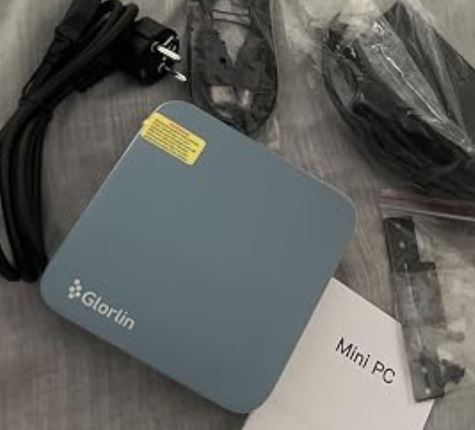
Upon opening the box, we found the mini PC in neat and compact packaging. The contents include:
-
🖥️ Mini PC GMKtec NucBox M5 Ultra
-
🔌 19V DC Power Adapter
-
📺 Cable HDMI
-
🔩 VESA mount for attaching it to the back of your monitor
-
📄 Quick start guide and warranty card
The first impression is good: solid construction and a well-organized box. The included VESA mount is a very welcome feature, especially if you plan to place it next to your monitor without taking up valuable desk space.
📊 Key Technical Specifications
| Component | Specification |
|---|---|
| 🧠 CPU | AMD Ryzen 7 7730U (Zen 3+, 8C/16T, up to 4.5 GHz) |
| 🎨 GPU | AMD Radeon Vega 8 (up to 2.0 GHz) |
| 🧮 RAM | DDR4-3200, hasta 64 GB (2 slots SO-DIMM) |
| 💾 SSD | M.2 2280 PCIe Gen 3 (up to 8 TB per slot) |
| 🔌 USB Ports | 1x USB-C 3.2 Gen 2, 2x USB-A 3.2 Gen 2, 2x USB 2.0 |
| 📺 Video | 1x HDMI 2.0 + 1x DisplayPort 1.4 + 1x USB-C DP |
| 🌐 Red | 2x 2.5GbE (Realtek RTL8125), WiFi 6E, BT 5.2 |
| 🔊 Audio | 3.5 mm jack (combined headphone/microphone) |
| 💿 SO | Windows 11 Pro (pre-installed) |
| ⚡ Consumption | 15 W base (configurable hasta 35 W) |
| 📐 Dimensions | 127 × 128.8 × 47.8 mm · 1.44 kg |
🎨 Design and Construction Quality
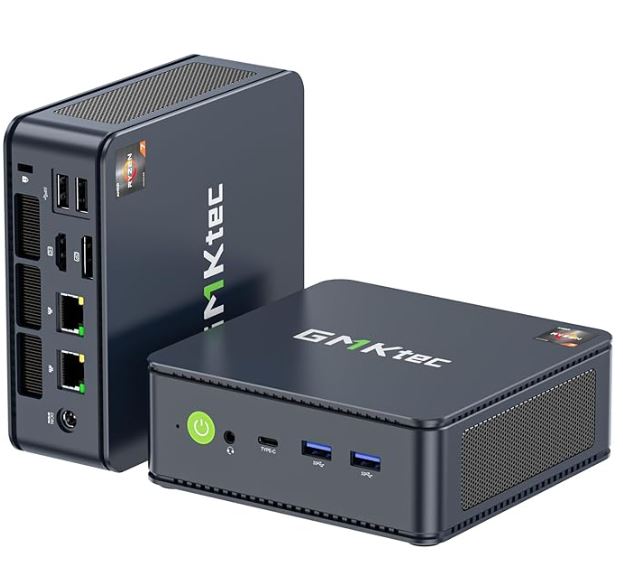
The NucBox M5 Ultra has an all-black design, with a plastic finish that's well-assembled and creak-free. It's compact without being tiny: it's smaller than a paperback book. Its side ventilation grilles are large and well-placed.
The cover is easy to remove, greatly facilitating access to the internal components for upgrades. The product labels and GMKtec logo are well integrated without looking cheap. It lacks RGB LEDs or colored lights, making it discreet and professional for work or office environments.
🖥️ Screen and Multimedia
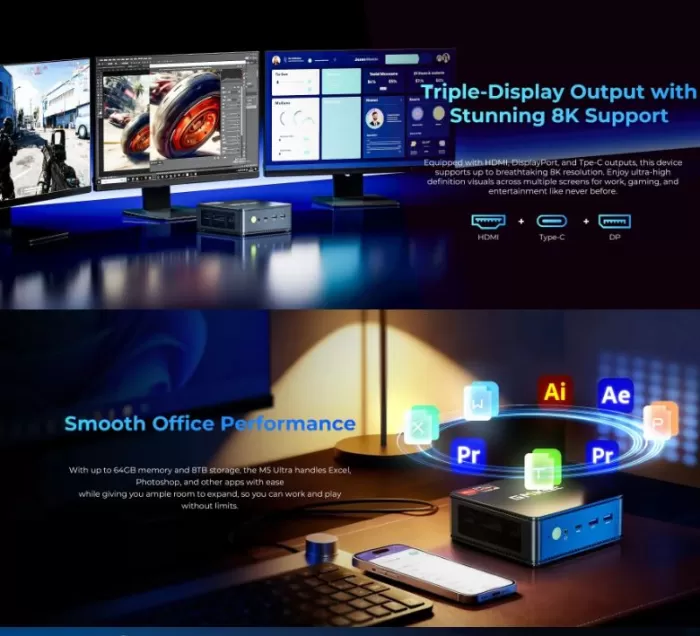
The M5 Ultra supports triple simultaneous video output thanks to HDMI 2.0, DisplayPort 1.4, and USB-C with DisplayPort. This makes it perfect for multi-monitor setups.
Video playback is smooth: 4K at 60 Hz without problems on YouTube, Netflix, Prime Video, etc.
The sound comes out through the 3.5 mm jack or via HDMI/DP on the monitors. It doesn't have built-in speakers, which is common in this category.
🚀 Performance and Software
The Ryzen 7 7730U is an 8-core, 16-thread Zen 3+ architecture processor with a base TDP of 15W, configurable up to 35W. While not the most modern architecture, it offers solid performance for everyday tasks: office work, light video editing, multitasking, web browsing, and web development.
Windows 11 Pro comes pre-installed with active activation. The system boots in under 15 seconds with the NVMe SSD. There's no excessive bloatware; just GMKtec's software for managing power profiles (Quiet/Balanced/Performance).
👉 View Prices and Availability on AliExpress
⚡ Energy Consumption and Cables
The included adapter is a compact and easy-to-use DC 19V/3.42A power adapter . Standby power consumption is around 8-10W, balanced mode around 15-20W, and performance mode can reach 35W under full load. It's a very efficient device compared to a traditional desktop computer.
The USB-C port also supports power delivery (PD), so you can power it up with a powerful portable charger if needed, which is useful for travel or presentations.
🌡️ Temperature and Noise (Actual Thermal)
In Quiet mode (10 W): virtually silent, ideal for quiet work. The CPU is limited to ~1.8 GHz but is sufficient for office applications and browsing.
In Balanced mode (15 W): the fan activates smoothly, barely audible at a distance of 40-50 cm. Stable CPU temperatures between 55-70°C.
In Performance mode (35W): the system can become noisy. Some users have reported that the secondary fan (the one that cools the RAM and SSD) can be bothersome on certain models and is not regulated in the BIOS. Temperatures can reach 85-90°C under sustained load.
💡 Tip: For everyday use, Balanced mode is the sweet spot between performance and quiet operation. Reserve Performance mode for occasional heavy tasks.
🔌 Connectivity and Extras
| Port/Function | Detail |
|---|---|
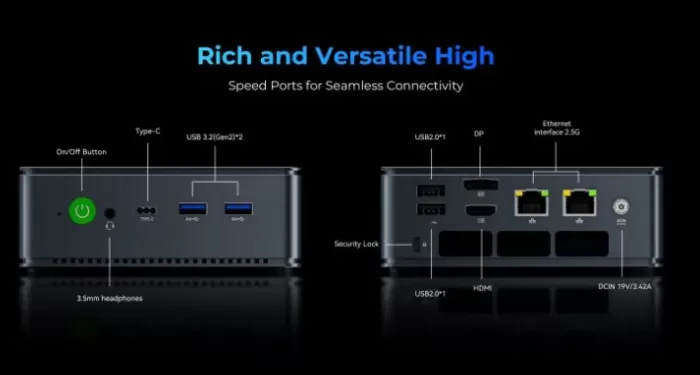
| 🔵 USB-C | 3.2 Gen 2, DP + PD, 10 Gbps |
| 🔵 USB-A ×2 | 3.2 Gen 2, 10 Gbps (front) |
| ⚪ USB-A ×2 | USB 2.0 (rear, for mouse/keyboard) |
| 📺 HDMI | 2.0 (4K@60Hz) |
| 🖥️ DisplayPort | 1.4 (4K@60Hz) |
| 🌐 LAN ×2 | 2.5 GbE Realtek (dual NIC) |
| 📡 WiFi | 6E (tri-band, high speed) |
| 🔵 Bluetooth | 5.2 |
| 🎧 Audio | 3.5 mm combination jack |
| 💳 SD Card | SD card reader (on some models) |
It lacks NFC, a fingerprint reader, and 5G connectivity, which is normal for a desktop mini PC.
🔧 Expansion and Upgrades
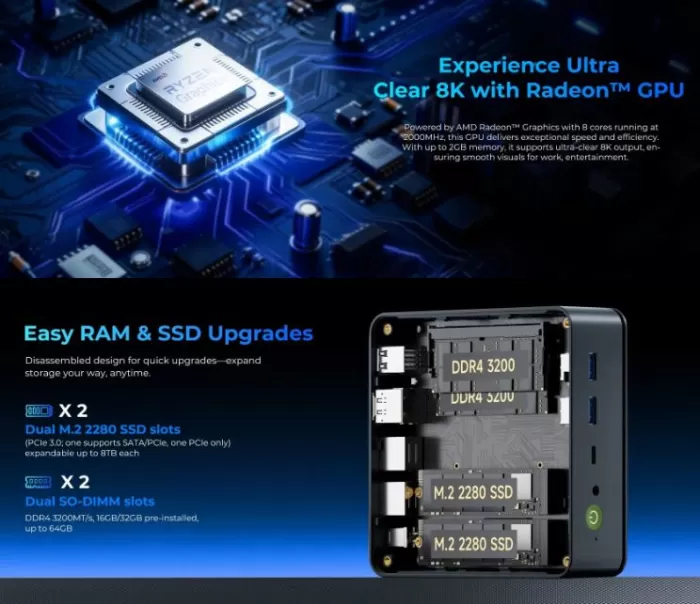
This is one of the great strengths of the M5 Ultra:
-
🧮 RAM: 2 SO-DIMM DDR4-3200 slots. Expandable up to 64 GB (2 x 32 GB). The factory configuration of 16 GB operates in dual channel from the start.
-
💾 Primary SSD: 1× M.2 2280 PCIe Gen 3 (supports up to 8 TB).
-
💾 Secondary SSD: 1× Additional M.2 2280 (one supports SATA and PCIe, the other only PCIe). Total theoretical capacity up to 16 TB.
-
🔧 Accessing the slots: Open the top cover with a screwdriver. Simple and documented process.
-
❌ It does not have a 2.5" slot for a traditional format mechanical hard drive or SATA SSD.
-
❌ It is not possible to upgrade the GPU (integrated into the processor).
🆚 Comparison with Direct Competitors
| Feature | GMKtec M5 Ultra | Beelink SER7 | Minisforum UM780 XTX | GMKtec M6 Ultra |
|---|---|---|---|---|
| CPU | Ryzen 7 7730U (Zen 3+) | Ryzen 7 7735HS (Zen 3+) | Ryzen 7 8745HS (Zen 4) | Ryzen 5 7640HS (Zen 4) |
| Integrated GPU | Radeon Vega 8 | Radeon 680M | Radeon 780M | Radeon 760M |
| RAM max. | 64 GB DDR4 | 64 GB DDR5 | 64 GB DDR5 | 64 GB DDR5 |
| Dual LAN 2.5G | ✅ | ❌ | ✅ | ❌ |
| WiFi | 6E | 6E | 6E | 6E |
| Approx. price | from €353 | from ~€390 | from ~€420 | from ~€349 |
| Ideal for | Work/server | Gaming ligero | Gaming + IA | Balanced gaming |
👉 View Prices and Availability on AliExpress
⭐ Reviews on Well-Known Pages
TechRadar (★★★½/5) rates the M5 Ultra as "a do-it-all PC, but a master of nothing": it highlights its excellent dual LAN connectivity and dual M.2 slots, although it points out that the Zen 3+ processor is no longer the most competitive on the market compared to options with Zen 4 and Radeon 780M.
NotebookCheck presents it as an affordable option with a mature but functional processor, suitable for those who don't need the latest generation and prioritize expansion flexibility.
Guru3D particularly highlights the total storage capacity of up to 16 TB by combining both M.2 slots, positioning it as a serious option for small servers or home NAS devices.
Reddit (r/MiniPCs): The most frequent complaints from users point to the noise of the secondary fan on some models, although most agree that Balanced mode is perfectly quiet for everyday use. Several users are using it as a Proxmox server or NAS with great satisfaction.
🔬 Technical Tests
All benchmarks were performed in Performance mode (35W TDP) unless otherwise stated. The tested system is equipped with 32GB of dual-channel DDR4 RAM and a PCIe Gen 3 SSD.
🧠 CPU – Processor Performance
| Benchmark | GMKtec M5 Ultra (7730U) | Alliwava U58 (5825U) | Difference |
|---|---|---|---|
| CineBench R24 Single | 78 pts | 85 pts | -8% |
| CineBench R24 Multi | 414 pts | 473 pts | -12.5% |
| CineBench R23 Multi | ~10.856 pts | ~10.751 pts | +1% |
| Geekbench 6 Single | 1.806 pts | 1.978 pts | -8.7% |
| Geekbench 6 Multi | 5.939 pts | 7.941 pts | -25% |
| Passmark (Balanced) | ~15.000 pts | — | — |
| Passmark (Performance) | ~20.000 pts | — | — |
💡 CPU Conclusion: The Ryzen 7 7730U performs very well in Cinebench R23 (8-core Zen 3+ architecture), but in more modern tests like Geekbench 6 and Cinebench R24, it shows its limitations compared to Zen 4 chips. The difference is noticeable in multi-core performance (~25%), which is apparent in rendering, compilation, or extended video editing tasks. For office applications, browsing, and web development, the difference is imperceptible in everyday use.
🎨 GPU – Graphics Performance
| Benchmark | GMKtec M5 Ultra (Vega 8) | Alliwava U58 (Vega 8) | Difference |
|---|---|---|---|
| 3DMark WildLife | 6.711 | 8.218 | -18% |
| 3DMark FireStrike | 3.154 | 3.764 | -16% |
| 3DMark TimeSpy | 1.264 | 1.402 | -10% |
| 3DMark Steel Nom. | 1.035 | 1.307 | -21% |
| Geekbench 6 OpenCL | 12.823 | 16.925 | -24% |
| Geekbench 6 Vulkan | 11.472 | 15.457 | -26% |
💡 GPU Conclusion: The Radeon Vega 8 is an older generation integrated GPU, and the numbers confirm it: it clearly falls behind the Radeon 680M (7735HS) and especially the Radeon 780M (8745HS). For light gaming, emulation up to PS2/GameCube, and 4K multimedia content, it performs well enough. For modern games at 1080p or PS3/Switch emulation, it's not the right tool, and here the M5 Ultra loses out to direct competitors with newer GPUs.
💾 Storage – SSD Speed
| Proof | GMKtec M5 Ultra | Alliwava U58 | NVMe Gen 3 Reference |
|---|---|---|---|
| Sequential Reading | 3.624 MB/s | 3,650 MB/s | ~3,500 MB/s |
| Sequential Writing | 2.642 MB/s | 2.717 MB/s | ~2,500 MB/s |
💡 SSD Conclusion: The results are excellent for PCIe Gen 3, nearly reaching the interface's theoretical limit. The SSD surpasses the average for mini PCs in this price range and guarantees fast boot times, responsive application loading, and very smooth file transfers. The additional secondary M.2 slot allows for easy expansion without sacrificing the primary drive.
📊 Global Performance Summary Table
| Category | Punctuation | Verdict |
|---|
| Category | Punctuation | Verdict |
|---|---|---|
| 🧠 CPU Single-Core | ⭐⭐⭐☆☆ | Correct, surpassed by Zen 4 |
| 🧠 CPU Multi-Core | ⭐⭐⭐⭐☆ | Solid for everyday use and server |
| 🎨 GPU Graphics | ⭐⭐☆☆☆ | Limited for modern gaming |
| 💾 SSD Speed | ⭐⭐⭐⭐⭐ | Excellent, Gen 3 roof |
| ⚡ Energy efficiency | ⭐⭐⭐⭐⭐ | Very efficient (15W base) |
| 🌡️ Resting thermal | ⭐⭐⭐⭐⭐ | Silent and cold |
| 🌡️ Thermal under load | ⭐⭐⭐☆☆ | Acceptable, audible fan |
🏁 Test Conclusions
The GMKtec NucBox M5 Ultra presents an honest and balanced picture in these benchmarks. Its strengths are clear: outstanding energy efficiency (15W in Balanced mode with ~15,000 Passmark), an SSD that reaches the PCIe Gen 3 ceiling, and multi-core performance in Cinebench R23 that remains competitive against options with older chips like the Ryzen 7 5825U.
Its weaknesses are also laid bare: the Radeon Vega 8 GPU is up to 26% slower than a Radeon 680M in the 7735HS in OpenCL, and up to 40% slower than the Radeon 780M in Zen 4 models. In Geekbench 6 Multi, it also loses ~25% compared to newer models. This isn't a problem if you're using it for office work, server applications, or retro emulation, but it is a real limitation if you're looking to play games or handle GPU-intensive workloads.
In short: if the entry-level price (especially the barebone at €353 or the 16GB + 1TB version at €563 ) fits your budget and you don't need demanding gaming capabilities, the tests support that it's a sensible purchase. If gaming or AI are priorities, you're better off looking at the GMKtec M6 Ultra (Zen 4 + Radeon 760M) or the Minisforum UM780 XTX (Radeon 780M).
🎮 Gaming and Emulation
The Radeon Vega 8 GPU is functional but has its limitations. Real-world results in native gaming:
| Game | Configuration | Approximate FPS |
|---|---|---|
| League of Legends | Half | 90–100 FPS |
| Rocket League | Performance (1080p) | ~47 FPS |
| Tekken 7 | Medio (1080p) | ~30 FPS |
| Counter-Strike 2 | Low (1080p) | 40–60 FPS |
| Cyberpunk 2077 | Low | Not recommended |
Retrogaming emulation: this is where it shines for content and casual enjoyment:
-
✅ PS1 / N64 / SNES / GBA: perfect, no problems
-
✅ PS2 (PCSX2): Runs at full speed in 1080p with most titles
-
✅ GameCube / Wii (Dolphin): fluido en 1080p
-
⚠️ PS3 (RPCS3): Some games run at playable speed, others do not. Requires patience and configuration.
-
⚠️ Wii U / Switch: Very limited or not functional. You would need a more powerful chip (Ryzen 7 8745HS or higher).
❓ Frequently Asked Questions (FAQ)
Can I use the M5 Ultra as a NAS or Proxmox server?
Yes, it's one of its best uses. The dual 2.5G LAN ports and two M.2 slots make it ideal for this.
Does it come with Windows activated?
Yes, Windows 11 Pro comes pre-installed and factory activated.
How much RAM does it come with from the factory, and can I upgrade it myself?
Depending on the configuration you choose, it comes with either 16 or 32 GB. You can upgrade it to 64 GB (2 x 32 GB DDR4-3200) yourself; the process is simple.
Does it support Linux?
Yes. Users have installed Proxmox, Ubuntu, and Pop!_OS without problems.
Is it quiet?
In Quiet and Balanced modes, yes. In Performance mode it can be noisy, especially if the secondary fan is set to a high factory speed.
🏁 Final Conclusion
The GMKtec NucBox M5 Ultra is an excellent choice for those seeking a versatile, quiet, and highly expandable mini PC without breaking the bank. It's not a gaming powerhouse or the most cutting-edge option, but it more than delivers for demanding office tasks, web development, home servers, emulation up to PS2/PS3, and multi-monitor setups.
Who is it ideal for?
-
👨💻 Professionals who need a quiet and efficient computer
-
🖥️ Users with multi-monitor setups (up to 3 screens)
-
🗄️ NAS/Home Server Enthusiasts
-
🎮 Fans of retro emulation (PS1, PS2, GameCube, Wii)
-
💰 For those looking for the best value for money in AMD mini PCs
Alternatives to consider:
-
🔄 GMKtec M6 Ultra: similar price, Zen 4 + Radeon 760M, better GPU but without dual LAN
-
🔄 Minisforum UM780 XTX: better GPU (780M) and Zen 4, but more expensive
-
🔄 Beelink SER7: Native DDR5, good gaming performance