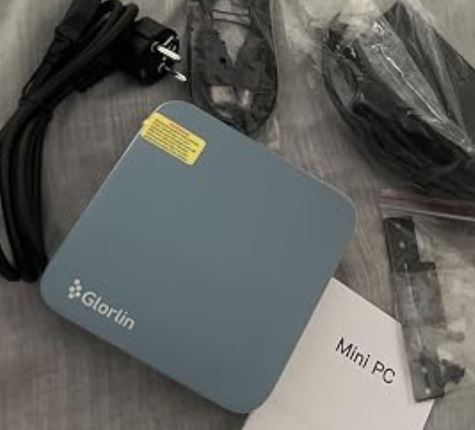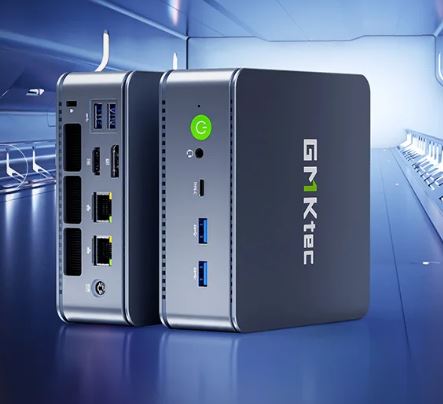
The GMKtec M6 Ultra offers very solid performance thanks to the Ryzen 5 7640HS, DDR5 RAM and PCIe 4.0 SSD, with an important bonus: USB4, dual 2.5G LAN and WiFi 6E in a very compact chassis.
It's ideal as an all-rounder mini PC (heavy office work, 4K multimedia, light virtualization and some competitive gaming), while maintaining an aggressive price compared to better-known brands.
Its weaknesses: mostly plastic construction, audible fan under load, and lack of a dedicated GPU that limits demanding AAA games.
Even so, for the price, it's one of the most well-rounded mini PCs on the market right now if you prioritize performance and connectivity over "premium" finishes.
Pros ✅
-
Ryzen 5 7640HS + Radeon 760M: very good performance for its size.
-
Dual M.2 PCIe 4.0, up to 128 GB DDR5: plenty of upgrade room.
-
USB4 (40 Gbps, video up to 8K, PD), WiFi 6E, BT 5.2, dual 2.5G LAN.
-
Highly competitive price/performance ratio compared to direct rivals.
Contras ❌
-
Mostly plastic chassis, less "premium" feel than aluminum mini PCs.
-
Fan clearly audible under load, curve could be improved.
-
No SD card reader, no dedicated GPU: AAA games only on low/medium settings and 1080p.
>> VIEW PRICES AND AVAILABILITY of the GMKtec M6 Ultra mini PC
📦 Unboxing and box contents
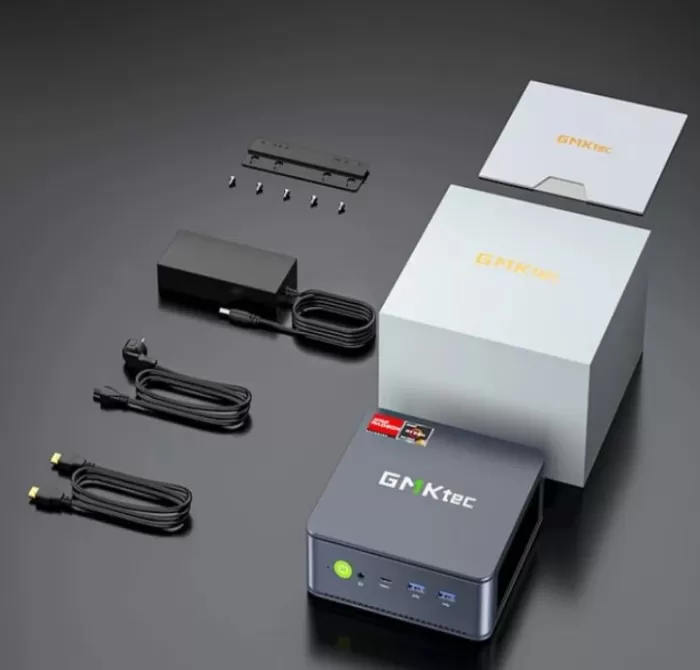
In the GMKtec M6 Ultra box you'll find: the mini PC, a 120W (19V/6.32A) power supply, an HDMI cable, a VESA mount, a user manual, and a warranty card. It doesn't usually include a keyboard or mouse, so you'll need to provide your own or reuse the ones you already have.
Key technical specifications 🧾
Main specifications of the GMKtec M6 Ultra
| Feature | Detail |
|---|---|
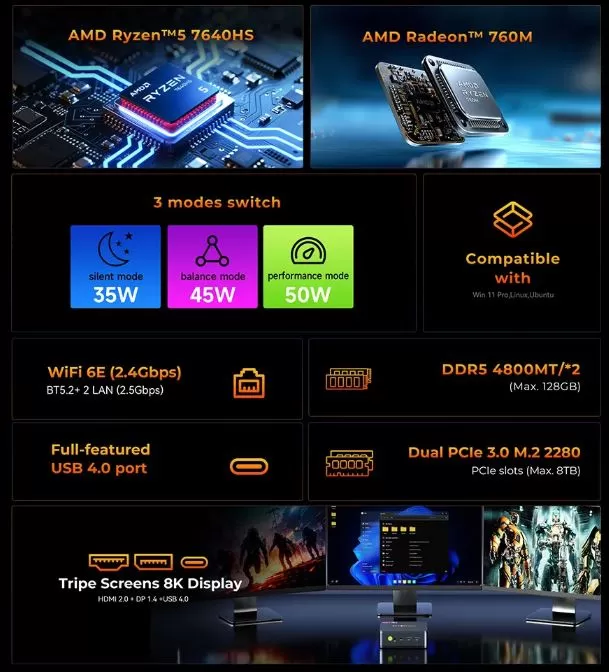
| CPU | AMD Ryzen 5 7640HS, 6 cores / 12 threads, up to 5.0 GHz, 35–50 W TDP. |
| Integrated GPU | AMD Radeon 760M (RDNA 3, 8 CUs up to 2600 MHz). |
| RAM | 2× SO‑DIMM DDR5 4800 MT/s, max. 128 GB. |
| Storage | 2× M.2 NVMe PCIe 4.0 (up to 8 TB total). |
| Video | HDMI 2.0 (4K 60 Hz) + DisplayPort 1.4 (4K 60 Hz) + USB4 (hasta 8K). |
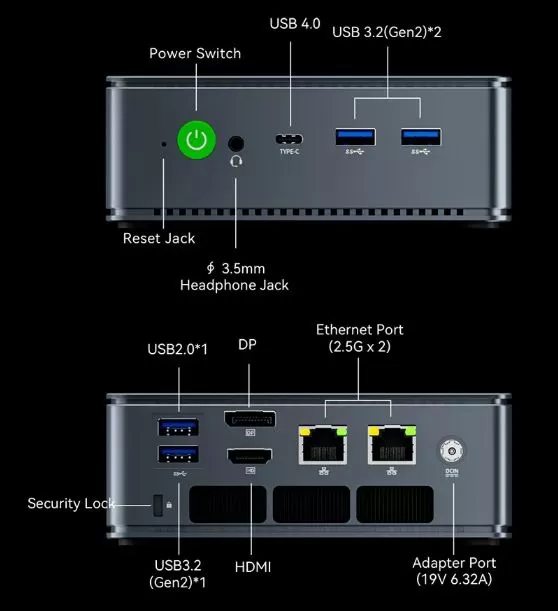
| USB ports | 2× USB 3.2 Gen2 front, 1× USB 3.2 Gen2 rear, 1× USB 2.0 rear, 1× USB4 front. |
| Red | WiFi 6E, Bluetooth 5.2, doble RJ45 2.5G. |
| Audio | Jack 3,5 mm CTIA. |
| Feeding | DC 19V / 6.32A, 120W adapter |
| Operating system | Windows 11 Pro. |
| Dimensions | 128,8 × 127 × 47,8 mm, ~528 g. |
>> VIEW PRICES AND AVAILABILITY of the GMKtec M6 Ultra mini PC
Design and build quality 🧱
GMKtec NucBox M6 Mini PC
The M6 Ultra boasts a very compact, almost square design, with slightly rounded edges and plenty of ventilation grilles on the sides and top. The finish is understated and functional, designed more to blend in on a desk or behind a monitor than to be a flashy, RGB-laden gaming accessory.
The chassis is mostly plastic, which is noticeable to the touch compared to mini PCs with aluminum bodies like some MinisForum or Beelink models. On the other hand, it keeps the weight down and has no play or creaking: the build quality is well done for the price range, although it doesn't convey the same premium feel as more expensive models.
Multimedia (use with monitors/TV) 📺🔊
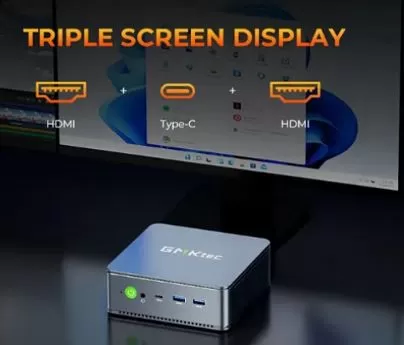
The multimedia experience is one of its strengths as an HTPC or 4K media center. It supports triple monitors: HDMI 2.0, DisplayPort, and USB4, with output up to 4K 60Hz via HDMI/DP and up to 8K via USB4, according to the manufacturer. In practice, reviewers have been able to play 4K60 video on YouTube and streaming services.
The audio quality depends on your connection: HDMI/DP to a monitor/TV or soundbar, or the 3.5 mm jack for speakers/headphones. The built-in DAC is adequate for everyday use, video calls, and multimedia consumption; however, if you're particularly demanding when it comes to music, you'll likely opt for an external USB DAC/amp.
Performance and software ⚙️💻
Smooth desktop and multitasking
The Ryzen 5 7640HS (Zen 4, 6C/12T) offers a clear leap forward compared to previous-generation APUs and Intel's lower-end CPUs in this price range. In synthetic benchmarks like Cinebench R23, the 7640HS performs on par with or better than some previous-generation mobile Core i9 processors, resulting in a very smooth desktop experience even with many tabs, Office applications, productivity tools, and some demanding apps running simultaneously.
Independent reviews mention that the system boots up quickly, opens applications without waiting, and handles light photo editing and some 4K video editing smoothly, provided you have enough RAM (16–32 GB) and a fast SSD.
Gaming and integrated GPU
The Radeon 760M (RDNA 3) is one of the most capable iGPUs currently available for a mini PC without a dedicated graphics card. In tests by Notebookcheck and other reviewers, it achieves the following results:
-
eSports games (LoL, Valorant, CS2, Fortnite) at 1080p with medium settings and very playable rates.
-
Recent AAA games at 1080p with low/medium details and FSR when available; it's not an "ultra" PC but it allows you to enjoy many titles if you adjust your expectations.
If you're coming from an older Vega iGPU or an office laptop, the leap is huge; if you're looking for a purely gaming setup, you'll be more interested in a combination with a dedicated GPU or using streaming (GeForce Now, Xbox Cloud) from this mini PC.
Operating system, bloatware, and updates
The computer comes with Windows 11 Pro pre-installed and an active license. Reviews agree that it comes relatively clean: some GMKtec shortcuts and utilities for power modes, but without a layer of bloatware comparable to that of some brand-name laptops.
Windows Update is working normally and there are no serious driver issues; the AMD APU drivers can be updated from the AMD app or website, which is recommended to improve graphics performance and stability.
>> VIEW PRICES AND AVAILABILITY of the GMKtec M6 Ultra mini PC
Energy consumption and cables 🔌
With a 120W adapter, the M6 Ultra has enough headroom for the Ryzen 5 7640HS at up to 50W TDP along with SSDs and peripherals.
Actual consumption measurements are usually around:
-
Light standby/desk use: around 10–15 W.
-
Average load (heavy browsing, 4K video, intensive office work): 25–40 W.
-
Full load (CPU+GPU stress or demanding gaming): 60–80 W peak, far from the adapter's 120 W.
The box includes a power cable for the adapter and an HDMI cable to connect it to a monitor/TV, so you can start using it without buying additional cables unless you need DisplayPort or longer cables.
🌡️ Temperature and noise (actual thermal)
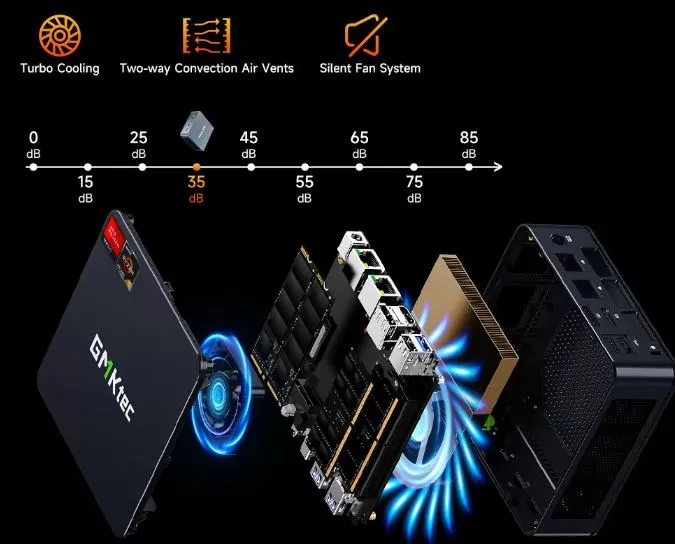
The cooling system combines a blower-style fan with heat pipes and multiple vents, including dual-sided convection to improve airflow. Under light use, the fan remains unobtrusive, and the mini PC is barely audible in a typical office environment.
Under sustained load (benchmarks, gaming, rendering), the CPU temperature can approach or exceed 90°C, and the fan becomes clearly audible. Reviews emphasize that performance remains stable (no severe throttling), but the fan curve is aggressive; maintaining a high frequency is prioritized, even at the cost of increased noise. If you plan to use it in server mode or for demanding tasks, it's advisable to leave some space around it and avoid enclosed cabinets.
Connectivity and extras 🔗
In terms of connectivity, this mini PC stands out significantly within its price range:
-
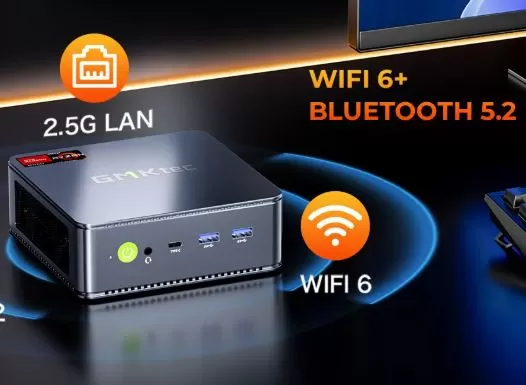
WiFi 6E with support for 6 GHz bands, ideal for modern routers and high wireless speed.
-
Bluetooth 5.2 for peripherals, controllers, and wireless audio.
-
Dual 2.5G LAN, perfect for NAS, firewall, home router, lab virtualization or home servers with multiple VLANs.
-
Front USB4 with 40 Gbps, DisplayPort and Power Delivery support (up to 100W input), which opens the door to docks, eGPU (unofficial but possible) and USB-C monitors.
It does not have 5G mobile, NFC, a fingerprint reader or IP certification; these are common extras in laptops or mobile phones, but not in mini PCs of this type.
🔧 Expansion and upgrades
One of the great attractions of the GMKtec M6 Ultra is how easy it is to expand. Simply remove the bottom cover to access:
-
2 SO-DIMM DDR5 4800 slots, with official support for up to 128 GB of RAM.
-
2 M.2 NVMe PCIe 4.0 slots (2280 form factor), with a combined capacity of up to 8 TB according to the manufacturer.
There's no 2.5" SATA bay, so all storage expansion goes through M.2 SSDs. This simplifies the interior and prioritizes performance and size, but if you have a lot of older SATA SSDs/HDDs, you'll need an external USB enclosure.
-
Barebone version (~$316.67): ideal if you already have DDR5 modules and PCIe 4.0 SSD or want to install 32/64 GB and 1–2 TB directly.
-
16/512 GB version (~$461.92): ready to use, sufficient for office work and light gaming, but you'll probably want to upgrade to 1 TB if you handle a lot of content.
🆚 Comparison with direct competitors
Comparing similar mini PCs (price and segmentation)
| Model | CPU | Typical RAM/SSD | Key ports | Strengths | Weak points |
|---|---|---|---|---|---|
| GMKtec M6 Ultra | Ryzen 5 7640HS | 16–32GB / 512GB–1TB | USB4, 2×2.5G LAN, WiFi 6E | Great value for money, dual M.2, USB4, dual LAN. | Plastic chassis, noisy fan under load. |
| Beelink SER6 Pro | Ryzen 7 7735HS | 16–32GB / 500GB–1TB | USB-C (not always USB4), 1×2.5G LAN | Slightly more raw CPU power, better finish in many models. | Usually more expensive, fewer network ports, not always USB4. |
| MinisForum UM790 Pro | Ryzen 9 7940HS | 32GB / 1TB | USB4, 2.5G LAN, improved chassis | Much more powerful, premium chassis, better heat dissipation. | Significantly higher price, higher consumption. |
| Previous NUCBox M5 / M6 | Ryzen 5 6600H | 16GB / 512GB | Fewer ports, no USB4 | Cheaper on clearance, sufficient for office work. | It performs worse, lacks USB4, and has worse connectivity than the M6 Ultra. |
In summary, the M6 Ultra positions itself as a very balanced mid-range option: it doesn't reach the power of the Ryzen 9 with a metal chassis, but it offers better connectivity and price than many rivals with similar features.
Reviews on well-known websites ⭐
Opinions in specialized media 📰
-
Notebookcheck
-
He describes it as a "robust, very good value for money" mini PC, highlighting that the newest hardware is not needed to achieve very solid performance.
-
It highly values the Ryzen 5 7640HS with DDR5 and PCIe SSD, the support for up to 128 GB of RAM and 8 TB of SSD storage, and above all, the presence of USB4 and dual 2.5G LAN as differentiating elements compared to other cheap mini PCs.
-
Criticisms: plastic chassis with a less premium feel than aluminum rivals and a clearly audible fan under load, with a ventilation curve that they describe as "immature".
-
-
TechRadar
-
It describes an "affordable mini PC with great potential for the price," aimed at office users, light content creators, students, and mid-level gamers.
-
It highlights that, although the 7640HS and Radeon 760M are not the latest, they offer "exceptionally balanced" performance for productivity, multimedia, and some gaming tasks.
-
They give it a rating of 4/5, highlighting that it starts up quickly, works very smoothly in Word, Excel, browsing and streaming, and performs like equipment that costs considerably more.
-
-
Lon.TV (Lon Seidman)
-
In his video/blog review, he describes it as a "value-packed mini PC" for general use, light video editing, home server, and light gaming.
-
It notes that the system feels very fast on desktop, navigates well, and plays 4K with only small frame drops, and that it can even handle basic editing in DaVinci Resolve.
-
It also values positively that it works well with Linux (Ubuntu) and that it is a strong option as a compact workstation or home server.
-
-
YouTubers de mini PCs / gaming
-
Channels focused on mini PCs and emulation (such as Team Pandory) point out that "for the price, it's a surprisingly good mini PC," testing more than 20 games and confirming that the Radeon 760M handles eSports titles and many AAA games well at low/medium quality.
-
Other reviewers (e.g., Robtech) point out that the barebone, starting at ~$260–$350, offers CPU performance that rivals previous-generation flagships, with “average” fan noise when using balanced mode.
-
User and community opinions 🗣️
-
Trustpilot / GMKtec reputation
-
Opinions about the GMKtec brand in general are around average ratings (around 3.5/5), with users satisfied with the performance/price ratio.
-
Specifically, there are cases of users who use the M6 Ultra or similar models as 24/7 servers and report occasional stability problems (restarts, crashes), which they have had to address with support.
-
-
Reddit / mini PC forums
-
In Reddit threads about the M6/M6 Ultra, several users highlight the outstanding performance for emulation (PS2, GameCube, etc.), the ease of connecting Bluetooth controllers, and the good experience using NAS/streaming from routers and home servers.
-
Common comments: Windows installation without forcing a Microsoft account, fairly clean system, but sometimes with pre-installed installers (e.g., Office) that some users prefer to uninstall or directly do a clean install.
-
-
AliExpress (4.7 out of ⭐⭐⭐⭐⭐ )
-
This is a well-packaged NUC computer and much lighter than any I've used before. I installed Linux Mint without any problems. It has a full suite of ROMs and system tools for monitoring heat, checking RAM, and so on. It has two SSD slots and two RAM slots with a maximum capacity of 64GB, which I think is more than enough for my needs. I like all the connectivity options, as they allow for adding both legacy and new devices. Overall, it's excellent value for money.
-
I bought the barebones at a good price. As soon as it arrived, I replaced the thermal pad and swapped the top fan for an 80mm fan using a modification kit. When mounted vertically, it reaches a maximum of 85 degrees Celsius under full load, and under heavy load it's usually around 70 degrees, and around 50 degrees under normal conditions. Not bad; it's sufficient for light video editing at 1080p.
-
It's faster than I expected, and adjusting the fan speed in the BIOS keeps the noise under control. However, there are no components that require RAM overclocking, so it would be best to set the RAM to 5600 MHz from the start.
-
Technical tests 🔬
Based on evidence published by specialized media:
-
CPU (Cinebench R23) : The Ryzen 5 7640HS offers multi-core performance that rivals previous generations' high-end mobile CPUs, and excellent single-core responsiveness for desktop tasks.
-
GPU (3DMark, games) : The Radeon 760M is clearly above older Vega iGPUs and some 11th/12th gen Intel integrated GPUs, allowing modern games with moderate settings and good performance in eSports.
-
Storage : With PCIe 4.0 SSDs, very high read/write speeds are achieved, substantially reducing loading times for games and applications.
-
Temperature and noise : the system keeps the CPU frequency fairly stable under prolonged stress, but the fan enters an aggressive curve, becoming easily audible in quiet environments.
These tests support the fact that the M6 Ultra is not just an "office" mini PC, but a valid option for more serious workloads as long as you control the ventilation and accept some noise at maximum performance.
🎮 Gaming and emulation
For competitive gaming and less demanding titles, the M6 Ultra performs really well if you adjust the graphics and resolution:
-
E-sports and competitive shooters: 1080p, medium quality, very playable rates in most modern titles.
-
AAA Games: 1080p with low/medium quality, FSR or upscaling enabled; ideal for users who prioritize gameplay over ultra graphics.
In emulation, the combination of a Zen 4 CPU and Radeon 760M shines:
-
8/16 bit consoles, PS1, Dreamcast, PSP: perfect emulation with frontends like RetroArch.
-
PS2, GameCube/Wii: very good performance in most titles with correct settings and scaled rendering.
-
PS3, Switch: selective; some games will run well, others will still be demanding, but as an emulation center up to 6th/7th generation it's more than enough.
If you're interested in selling it or recommending it as an emulation machine/media center, it has very strong arguments without needing to add a dedicated GPU.
❓ Frequently Asked Questions (FAQ)
Can it be used as a NAS server or home router?
Yes; its dual 2.5G LAN, WiFi 6E and Linux/ESXi support make it very attractive for a lightweight NAS, a router with pfSense/opnSense, or a home virtualization lab.
How much RAM does it actually support?
Up to 128 GB DDR5 4800 MT/s in dual channel (2× SO-DIMM), according to official GMKtec specifications.
Is it quiet?
At idle and during office use it's quite discreet, but when gaming or with heavy rendering, the fan is clearly audible, according to reviewer measurements.
Does it come with Windows activated?
Yes, the SSD versions usually come with Windows 11 Pro pre-installed and activated; on barebone you will have to install your own license.
Can I connect an external GPU (eGPU)?
The USB4 port supports 40 Gbps and DisplayPort, which technically allows the use of some compatible eGPU enclosures, although GMKtec doesn't officially promote it; it's more of an "enthusiast" use case.
Final conclusion 🎯
The GMKtec M6 Ultra is a highly recommended mini PC if you're looking for a small but powerful machine for advanced office tasks, light content creation, competitive gaming, emulation, and home server use thanks to its two 2.5G ports.
Its performance/price ratio, the presence of USB4 and the high expandability (RAM + dual M.2 PCIe 4.0) put it ahead of many direct rivals in this price range.
It is especially worthwhile:
-
If you already have DDR5 RAM/SSD and opt for the barebone to save money.
-
If you highly value connectivity (dual LAN, WiFi 6E, USB4) and are not obsessed with aluminum finishes.
Alternatives to consider: mini PCs with Ryzen 7/9 and aluminum chassis if you prioritize raw power, less noise and a more premium build, but be prepared for a significantly higher price.
Shop 🔗🛒
If you're interested in this model, you can find it at:
-
AliExpress (GMKtec official store) – barebone and 16/512 GB versions, usually with coupons and flash sales:
-
Amazon – usually has 16/512 and 32/1 TB versions with fast shipping and better warranty for many countries:
-
🛒 GMKtec M6 Ultra Ryzen 5 7640HS at your local Amazon store for current pricing and availability.
-