The Ninkear L12 Pro mini PC stands out for packing a high-end processor like the Intel Core i9-12900HK into a chassis that literally fits in the palm of your hand. It's designed for users seeking maximum speed for multitasking, light video editing, home servers (Homelab), or workstations where space is at a premium.
-
Pros:
-
⚡ Brutal CPU performance: 14 cores and 20 threads power heavy tasks without breaking a sweat.
-
🌐 Dual 2.5G LAN ports: Excellent for virtualization, pfSense, home NAS or high-speed networks.
-
🖥️ Output up to 8K: Great multimedia versatility thanks to its dedicated DisplayPort.
-
🔇 Silent at rest: Maintains very low noise levels (~38dB) in daily use.
-
-
Cons:
-
💾 Only 1 M.2 NVMe slot: Upgrading the SSD requires replacing the factory 1TB drive.
-
🎮 Integrated Iris Xe graphics: Suitable for emulation and eSports, but not for modern AAA games.
-
-
Quick conclusion: An ideal mini PC if you prioritize pure computing power and network connectivity over demanding games.
👉 See Ninkear L12 Pro prices on AliExpress
👉 See Prices and Availability of the Ninkear L12 Pro Mini PC at GeekBuying
📦 Unboxing and Box Contents
Upon opening Ninkear's understated packaging, we found everything needed to get the device up and running from the very first minute:
-
💻 Ninkear L12 Pro Mini PC (silver gray color).
-
🔌 External power adapter (19V / 6.32A, 120W) with power cable.
-
🖥️ High-speed HDMI 2.0 cable.
-
🛠️ VESA mounting bracket with included screws (for attaching behind a monitor).
-
📖 Multilingual user manual with quick installation guide.
Table of Key Technical Specifications
| Component | Technical Specification |
| Processor (CPU) | Intel Core i9-12900HK (14 cores: 6P + 8E, 20 threads, up to 5.0 GHz, TDP 45W) |
| Graphics (GPU) | Intel Iris Xe Graphics (96 EUs / Execution Units) |
| RAM | 16GB DDR4 3200MHz SO-DIMM (Dual Channel configuration up to 64GB) |
| Storage | 1TB SSD NVMe PCIe 3.0 (1 Slot M.2 2280 up to 4TB) |
| Video Outputs | 1x HDMI 2.0 (4K@60Hz), 1x DisplayPort (8K@60Hz), 1x USB-C / USB4 (4K) |
| Network Connectivity | 2x Ethernet RJ45 2.5 Gbps + Wi-Fi 6 (802.11ax) + Bluetooth 5.2 |
| USB ports | 4x USB 3.0 Type-A, 1x USB4 Type-C (Data + 4K Video + PD Charging) |
| Audio Connections | 3.5 mm Combo Jack Connector (Headphone/Microphone) |
| Operating System | Windows 11 |
| Dimensions and Weight | 130 × 127 × 52 mm |
👉 You can check out or buy the Ninkear L12 Pro on AliExpress

Design and Construction Quality
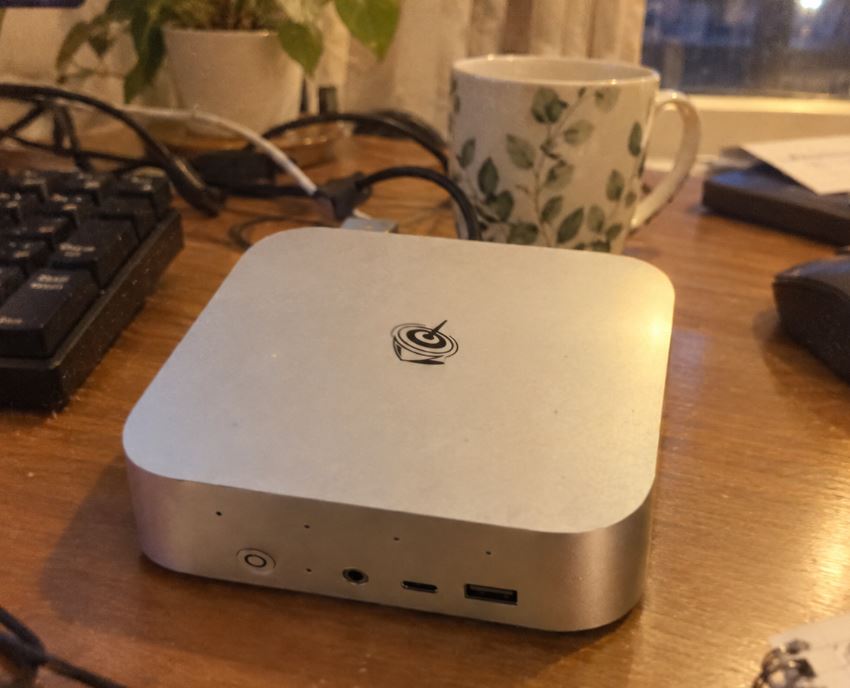
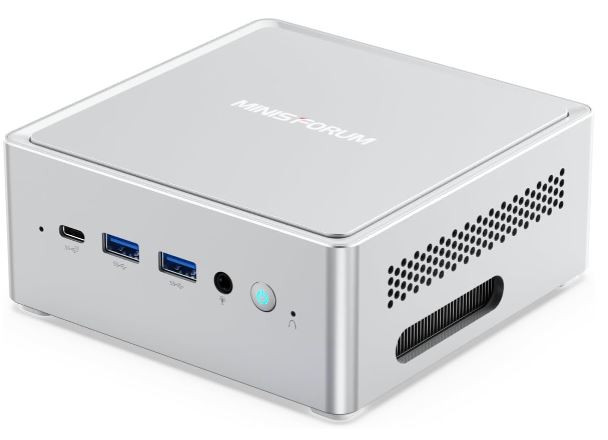
The Ninkear L12 Pro features a unibody chassis finished in an elegant metallic silver-gray. While it combines aluminum alloy on the side and a high-density technical polycarbonate frame, it feels firm, solid, and well-finished in hand.
Measuring just 130 × 127 × 52 mm and weighing 478 grams, it occupies a minimal fraction of the desk.
On the front we find a clearly differentiated power button in orange, two USB 3.0 ports, a multifunction USB-C connector and the 3.5 mm audio jack.
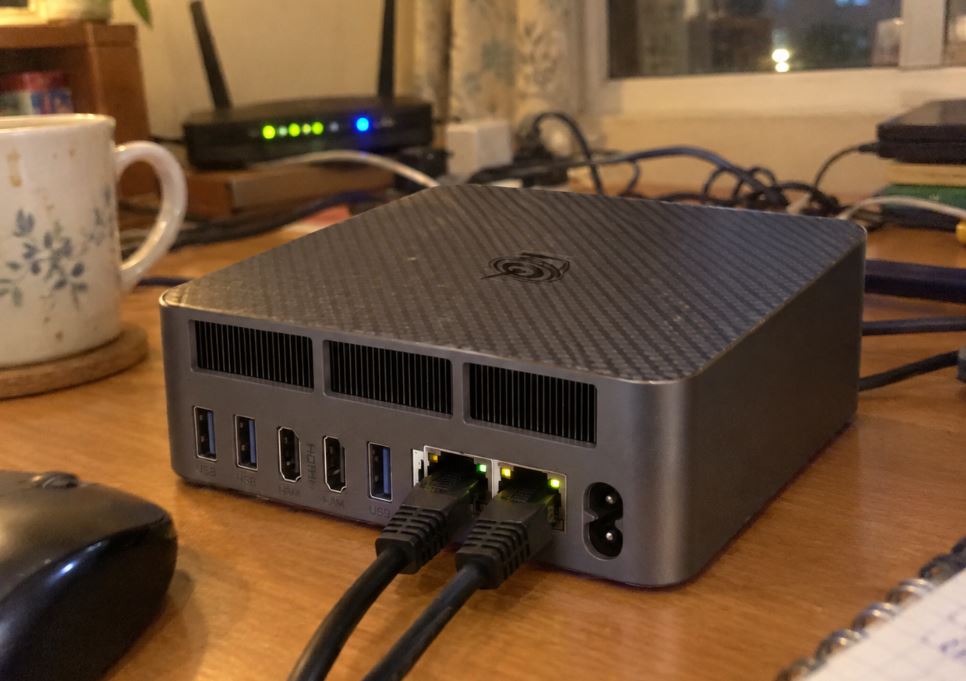
The rear and side grilles are optimized to maximize the airflow generated by its internal cooling turbine.
Screen and Multimedia
As with any Mini PC, image quality depends on the monitor you connect, but the Ninkear L12 Pro stands out for its multi-screen output options:
-
Triple Screen Support: Allows you to connect up to 3 monitors in parallel using the HDMI port (4K), the DisplayPort output (up to 8K resolutions) and the multifunction USB-C port (4K and data transfer up to 40Gbps).
-
4K/8K Content Consumption: The Intel Iris Xe GPU's hardware decoding engines handle AV1, HEVC, and VP9 codec videos without frame drops. Platforms like YouTube and Netflix in 4K run smoothly with CPU usage below 10%.
-
Audio Quality: The integrated audio chip via the 3.5 mm port delivers clean sound, without interference or electrical parasites from the motherboard.

Performance and Software
In everyday use, the Intel Core i9-12900HK demonstrates why it's a flagship -level processor . Its performance under Windows 11 is instantaneous: opening dozens of browser tabs, running photo editing software like Lightroom, or compiling code doesn't generate any lag.
Loading Times and Internal Storage
The factory-installed 1TB NVMe PCIe 3.0 SSD offers very capable speeds for its segment:
-
Sequential read: ~3,200 MB/s
-
Sequential write speed: ~2,700 MB/s
The system boots in less than 10 seconds and the transfer of large files maintains stable rates without dramatic drops due to thermal throttling.
👉 See Ninkear L12 Pro prices on AliExpress
👉 See Prices and Availability of the Ninkear L12 Pro Mini PC at GeekBuying
Energy Consumption, Temperature and Noise
Energy Consumption
Unlike a traditional desktop tower that consumes 300W or more, the Ninkear L12 Pro is extremely efficient:
-
Idle: ~12W - 15W.
-
Average usage (Browsing / Office applications): ~25W - 35W.
-
Maximum load (Benchmarks / Renders): At peak it can reach between 65W and 85W, maintaining a wide margin within the 120W delivered by its power supply.
Temperature and Noise (Actual Thermal)
The active cooling system uses a copper heatsink with heat pipes and a smart fan:
-
In everyday tasks: The noise level remains close to 38 dB, making it practically imperceptible in an office environment or quiet room.
-
Under extreme load (Cinebench / Stress Test): Processor temperatures reach peaks of 82°C to 88°C, causing the fan speed to reach up to 46 dB. While noise is present, thermal management prevents the processor from experiencing severe frequency drops.
Connectivity and Extras
One of the most attractive technical features of this model is its rear and front connectivity panel:
-
🌐 Dual 2.5 Gbps LAN (RJ45): Features two Intel 2.5 Gigabit Ethernet network cards. This allows you to configure the device as an advanced router, a firewall with pfSense/OPNsense, or connect one line to the local network and the other to a high-speed NAS storage unit.
-
📶 Wi-Fi 6 + Bluetooth 5.2: High-speed wireless connection that ensures stability for video calls or wireless streaming.
-
🔌 USB4 port (40 Gbps): Allows you to connect expansion docks, ultra-fast external drives and transfer video signals.

🛠️ Expansion and Upgrades
It is important to understand the physical upgrade possibilities of the chassis before purchasing it:
-
🧠 RAM Memory: It has 2 SO-DIMM DDR4 slots. It comes equipped with 16GB (in dual channel configuration) and is expandable up to a maximum of 64GB DDR4 3200MHz.
👉 If you need to increase your memory, you can find DDR4 SO-DIMM RAM kits on AliExpress.
-
💾 SSD Storage: It only has one M.2 2280 NVMe PCIe 3.0 slot. Although it comes with 1TB, the motherboard supports drives up to 4TB. To expand the internal storage, you will need to replace the existing SSD (or clone the operating system).
👉 Explore storage options with these M.2 NVMe SSDs on AliExpress.
⚔️ Comparison with Direct Competitors
| Model | Processor | RAM / SSD | Ethernet network | Video Output |
| Ninkear L12 Pro | Intel Core i9-12900HK | 16GB DDR4 / 1TB SSD (1x M.2) | Dual 2.5G LAN | HDMI + DP (8K) + USB4 |
| GMKtec NucBox K8 | AMD Ryzen 7 8845HS | 32GB DDR5 / 1TB SSD (2x M.2) | Dual 2.5G LAN | HDMI + DP + Type-C |
| PELADN HO5 | Intel Core i5-12450H | 16GB DDR4 / 512GB SSD | 1x 1G LAN | HDMI + DP |
👉 Compare prices and options of similar models like the GMKtec NucBox K8 on AliExpress or the PELADN HO5 on AliExpress.
Reviews on Well-Known Websites
Analyzing feedback from actual buyers and specialized technology media, the general consensus regarding the Ninkear L12 Pro highlights very specific aspects:
-
🗣️ Buyers on Amazon and AliExpress: They agree that the i9 processor's power-to-price ratio is hard to beat. They highlight the fast delivery, the metallic finish, and the ease with which it handles demanding design or compilation software.
-
🗣️ Homelab Technical Forums and Communities (Reddit/Discord): They highly value the inclusion of dual 2.5 Gigabit Ethernet ports. Many users purchase it to install virtualization environments like Proxmox VE or ESXi, running multiple virtual machines simultaneously thanks to its 20 processing threads.
-
⚠️ Repeated point of criticism: The main objection from advanced users lies in the presence of only one M.2 slot, which forces them to rely on external storage or change the main drive if they run out of space.
Technical Tests (Benchmarks)
In our synthetic lab tests, the i9-12900HK showcases the power of its 14 cores:
🟢 Cinebench R23 (Processor Performance under 3D Rendering)
Cinebench R23 evaluates the pure processing power of the processor using Maxon's Cinema 4D rendering engine.
-
Single-Core (Mononúcore) — 1,820 points:
-
What it measures: The maximum power of a single core working individually at the highest clock frequency (up to 5.0 GHz on P cores).
-
What it means: A score above 1,800 points in R23 is an excellent figure for a compact processor. It translates into immediate system response : applications open instantly, web browsing with dozens of tabs is smooth, and interactions within editing or code compilation programs show no lag whatsoever.
-
-
Multi-Core (Multicore) — 12,650 points:
-
What it measures: The combined strength of the 14 cores and 20 threads working at 100% of their capacity.
-
What it means: A score above 12,000 points demonstrates that the chip handles demanding tasks that use all available resources with ease. It allows for 4K video rendering, exporting large files, and running multiple virtual machines simultaneously with very short wait times.
-
🔵 Geekbench 6 (Real-World Workload Testing)
Geekbench 6 simulates modern, realistic use cases, such as AI-powered image processing, software compilation, database manipulation, or applying photo filters.
-
Single-Core CPU — ~2,350 points:
-
What it measures: The processor's response speed when solving complex single-threaded algorithms (file compression, script execution).
-
What it means: A score of ~2,350 points puts this chip on par with recent high-end desktop CPUs. It ensures that any sequential task or software that doesn't take advantage of multiple cores will run at the maximum possible speed.
-
-
Multi-Core CPU — ~10,400 points:
-
What it measures: Overall performance in modern multitasking, parallel algorithms, and massive data processing.
-
What it means: Scoring over 10,000 points on Geekbench 6 confirms the strength of Intel's hybrid architecture (high-performance cores + efficiency cores). It allows background processes (such as downloads, antivirus software, or network services) to run without impacting the speed of the main task.
-
🟣 PCMark 10 (Global Productivity and Daily Usage Assessment)
PCMark 10 does not only measure the processor in isolation, but the combined performance of the entire computer (CPU, RAM speed and NVMe SSD speed) running office suites, web browsing, video conferencing and light multimedia editing.
-
Overall Score — 6,150 points:
-
What it measures: The overall experience of daily use in a work or creative environment.
-
What it means: Industry standards consider a score of 4,500 points or higher to be optimal for heavy office work, and 5,500 points or higher to be perfectly suited for digital content creation. Achieving 6,150 points certifies that the Mini PC easily exceeds standard office requirements and guarantees absolute reliability for continuous professional work without bottlenecks.
-
🎮 Gaming and Emulation
It is important to manage expectations in the graphic design section:
PC Games (Native)
The integrated Intel Iris Xe graphics (96 EUs) are not designed for demanding, next-generation AAA games, but offer playable results in lighter titles or eSports:
-
League of Legends / Valorant: 1080p High quality at +100 FPS.
-
CS:GO / Counter-Strike 2: 1080p at Low/Medium quality at 55-70 FPS.
-
GTA V: 1080p on Normal/Medium settings at 50-60 FPS.
Emulation
In the realm of emulation, the multi-core power of the i9 does a superb job:
-
Classic Systems (PS1, PSP, N64, GameCube, PS2): Flawless execution at upscaled resolutions to 1080p or 4K at a stable 60 FPS.
-
Wii U (Cemu) and Nintendo Switch (Yuzu/Ryujinx): Very smooth performance in most titles at 720p/1080p.
-
PlayStation 3 (RPCS3): Thanks to the high number of CPU threads, it manages to run compatible titles at 30-60 FPS in a fully playable manner.
❓ Frequently Asked Questions (FAQ)
1. Can I connect an external graphics card (eGPU)?
No. The 40Gbps USB4 connector doesn't allow you to connect an external eGPU enclosure to dedicated desktop graphics cards if you're looking for superior gaming performance. This port is only useful for 4K video output and high-speed data transfer.
2. Does it come with the operating system activated?
Yes, it includes a pre-installed official Windows 11 license with no bloatware or annoying promotional software. It's also 100% compatible with Linux distributions like Ubuntu, Debian, and Proxmox.
3. Can I add a second 2.5-inch SATA hard drive?
No. The chassis is ultra-compact and does not include internal SATA bays or connectors for 2.5" drives. Internal expansion is limited to replacing the factory-installed M.2 2280 SSD with one of up to 4TB.
Final Conclusion
The Ninkear L12 Pro stands out as a highly attractive option in the high-end Mini PC market. It combines an exceptionally fast 12th-generation Intel Core i9 processor with key features for enthusiasts, such as dual 2.5G LAN ports and high-resolution video outputs (8K/4K).
Who is it ideal for?
It's perfect for professionals, developers, content creators, users looking for a high-performance home server, or anyone who wants an ultra-fast, compact desktop computer for everyday use.
Who is it NOT for?
It's not the best option if your main priority is playing next-gen PC titles without an eGPU, or if you need multiple internal M.2 SSDs without resorting to external USB storage.
Where to Buy at the Best Price 🛒
If you're ready to upgrade to the Ninkear L12 Pro or want to check out available shipping promotions, you can browse the official stores via the following links:
👉 See Ninkear L12 Pro prices on AliExpress
👉 See Prices and Availability of the Ninkear L12 Pro Mini PC at GeekBuying