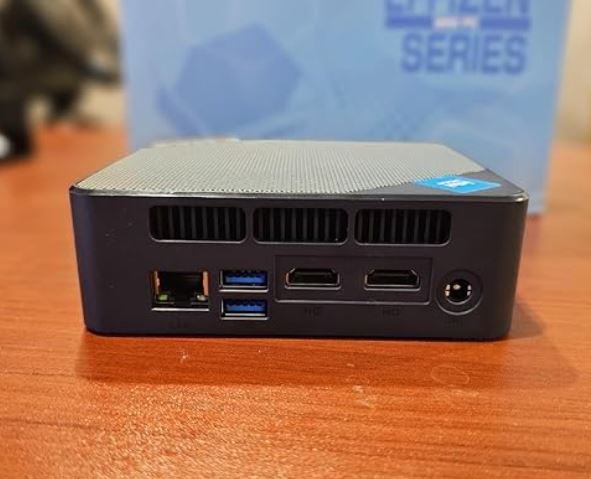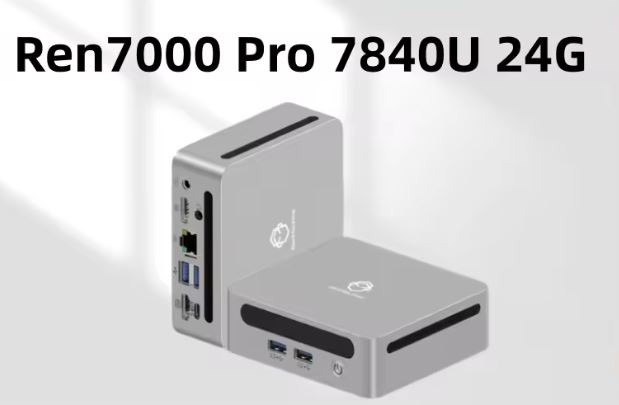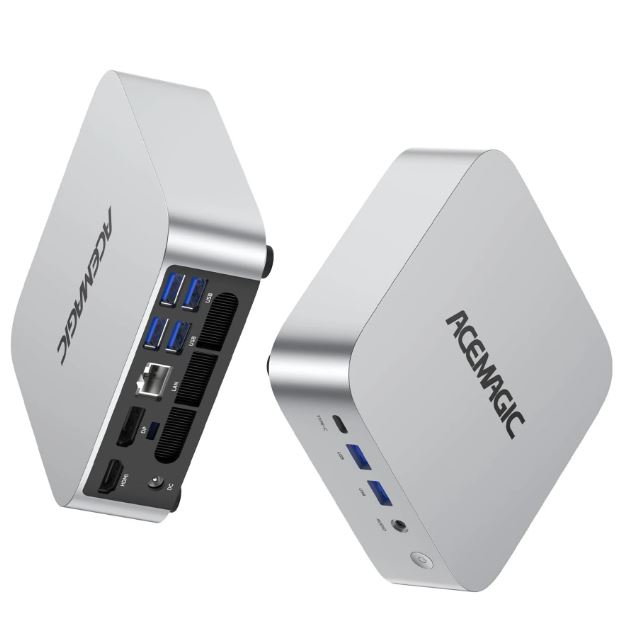
The ACEMAGIC M1 with AMD Ryzen 7 7735HS is undoubtedly one of the most complete mini PCs in its price segment.
With 8 cores, 16 threads, support for triple 4K displays, 2.5G Ethernet and high-speed LPDDR5 RAM, it competes head-to-head with computers that cost considerably more.
Its main limitation is the TDP configured at only 28W, which limits its potential in long sustained loads.
✅ Pros:
-
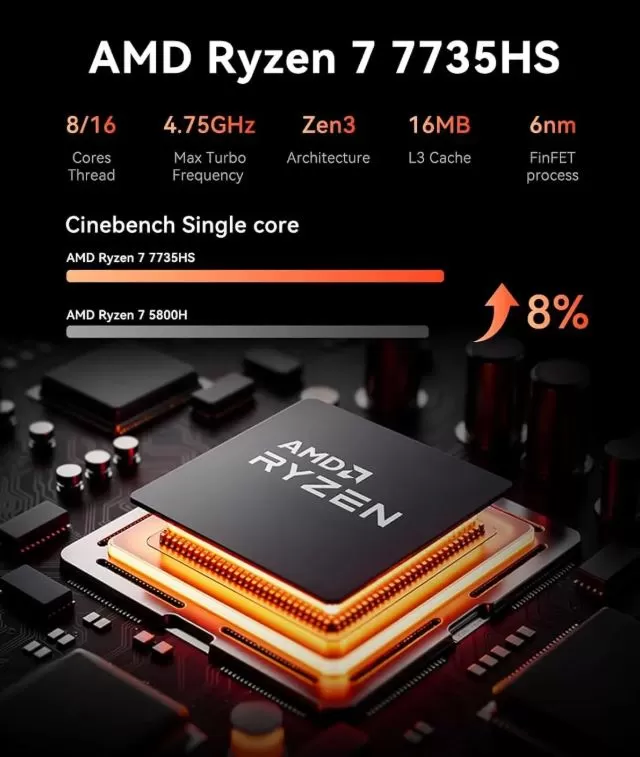
AMD Ryzen 7 7735HS: Real 8-core/16-thread power for productivity and gaming
-
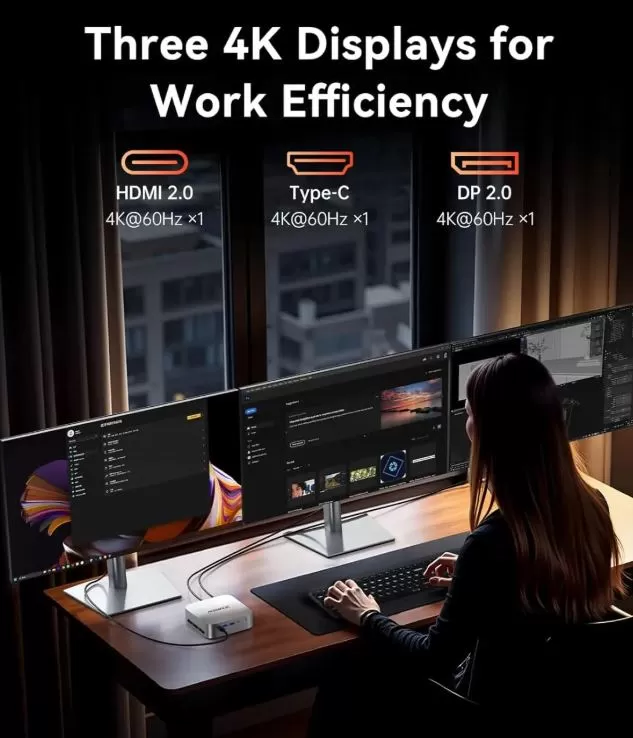
Simultaneous triple 4K output (HDMI + DP + USB-C)
-
LPDDR5 RAM at 5500MT/s, the fastest in its category
-
WiFi 6, BT 5.2 and 2.5G Ethernet as standard
-
Compact, elegant and surprisingly quiet design
-
Windows 11 Pro activated included
❌ Cons:
-
TDP limited to 28W (slows the processor under very demanding sustained load)
-
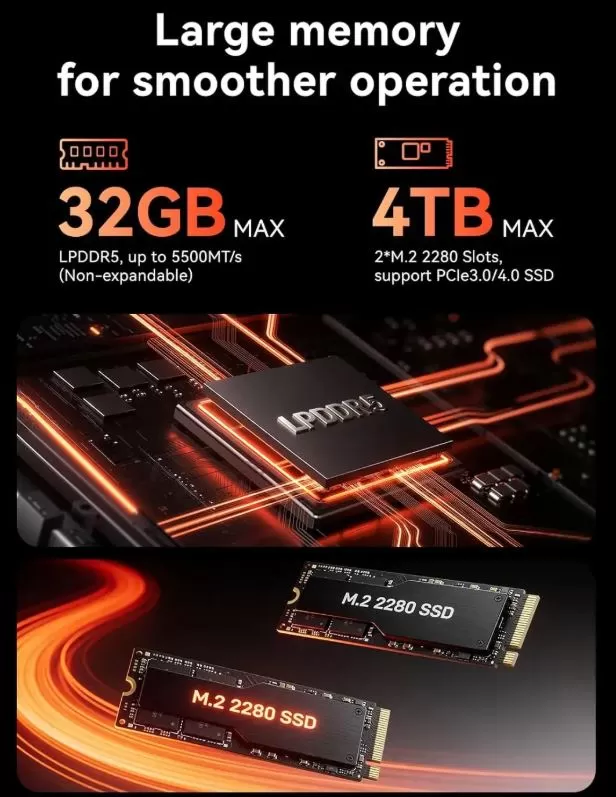
Non-expandable RAM (soldered on board, maximum 32 GB from factory)
🏁 Quick conclusion: For professional remote work, triple monitor setups, software development, multimedia, and light-to-medium gaming, the ACEMAGIC M1 is hard to beat in its price range. If you're looking for maximum gaming performance, consider the ACEMAGIC W1 with Radeon 780M.
👉 View Prices and Availability
📦 Unboxing and Box Contents
The ACEMAGIC M1 box arrives well protected with molded foam. The usual contents include:
-
🖥️ ACEMAGIC M1 Mini PC
-
🔌 Power adapter (19V / compatible with EU plug)
-
📺 HDMI cable
-
🔩 VESA mounting bracket
-
🖱️ Non-slip base
-
📄 Quick start guide in multiple languages
-
🔧 Screws for opening the chassis
The first impression is excellent: the metallic silver finish and the side panel with a window are eye-catching and convey premium quality for a device in this range.
📊 Technical Specifications
| 🔧 Component | 📋 Details |
|---|---|
| CPU | AMD Ryzen 7 7735HS, 8C/16T, Zen 3+, 6nm, up to 4.75 GHz Turbo |
| GPU | AMD Radeon 680M (12 RDNA 2 cores, up to 2200 MHz) |
| RAM | LPDDR5 5500MT/s — 24 GB or 32 GB (max. 32 GB, not expandable ) |
| Storage | 512GB or 1TB SSD PCIe 3.0/4.0 M.2 2280 |
| Extra SSD slot | 2nd slot M.2 2280 (PCIe 3.0/4.0), maximum total 4 TB |
| WiFi | WiFi 6 (802.11ax) |
| Bluetooth | BT 5.2 |
| Ethernet | 2.5G LAN (RJ45 ×1) |
| Video | HDMI 2.0 ×1 + DP 2.0 ×1 + USB-C ×1 — Triple 4K@60Hz |
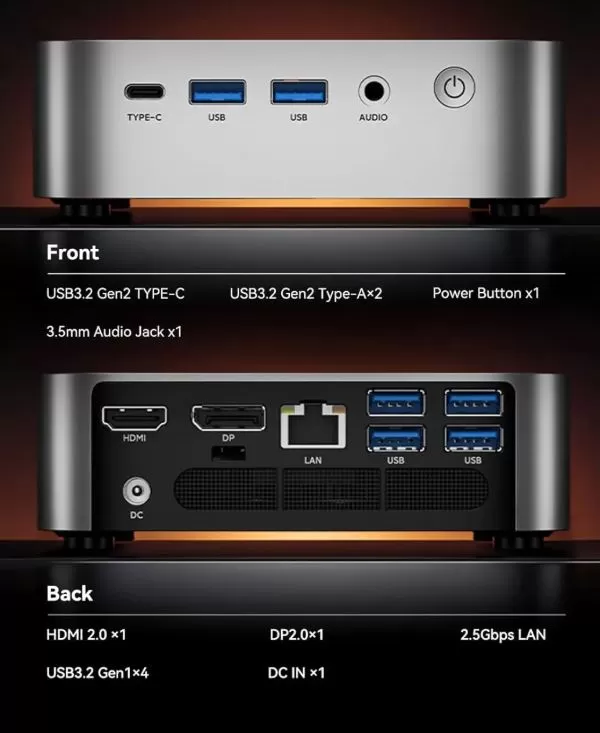
| USB | USB-A 3.2 ×4 + USB-C 3.2 Gen2 ×1 |
| Audio | 3.5mm Jack |
| Operating System | Windows 11 Pro (activated) |
| TDP configured | 28W |
| Dimensions | Mini compact format (~3.2 liters) |
🎨 Design and Construction Quality
ACEMAGIC M1 Mini PC
The ACEMAGIC M1 boasts one of the most refined designs I've seen in a mini PC under €500. The silver anodized aluminum case with a transparent side panel that reveals the internal cooling system conveys a sense of genuine solidity, not cheap plastic. In hand, it has a suitable weight—it's not a toy—and the finish is well-executed with no sharp edges.
The design is discreet enough for an office desk, but the transparent panel and internal lighting also give it a certain visual appeal for tech enthusiasts. The included VESA mount allows you to attach it directly to the back of any compatible monitor, resulting in a clean, cable-free installation.
🖥️ Screen and Multimedia
This is one of the ACEMAGIC M1's biggest selling points: its ability to connect three 4K monitors simultaneously at 60Hz via HDMI 2.0, DisplayPort 2.0, and USB-C. In practice, this means you can have three 4K displays running at the same time without compromising performance, something most mini PCs in this price range simply can't offer.
The AMD Radeon 680M GPU (RDNA 2, 12 cores, 2200 MHz) is the most powerful integrated GPU on the Zen 3+ platform, and it handles multimedia with ease: 4K/HDR video playback, multi-screen streaming, 1080p video editing, and smooth operation in Photoshop or Lightroom. It lacks built-in speakers, so a 3.5mm headphone jack or Bluetooth connection is required for audio.
⚙️ Performance and Software
The AMD Ryzen 7 7735HS is a Zen 3+ architecture chip manufactured on a 6nm process with 8 cores and 16 threads that reaches up to 4.75 GHz in Turbo Boost mode. It is significantly more powerful than previous generations of Intel i5 chips, and the 5500MT/s LPDDR5 RAM provides an additional boost in memory-bandwidth-intensive tasks, such as rendering with the integrated GPU.
Estimated performance based on actual tasks:
-
📝 Intensive office applications (large Excel files, Word, PowerPoint): perfectly fluid
-
💻 Web development and programming (Laravel, VS Code, Docker): excellent
-
🖼️ Photo editing (Photoshop, Lightroom): very proficient
-
🎬 1080p Video Editing (Basic DaVinci Resolve): Acceptable with patience
-
🌐 Chrome with 30+ tabs: no problem thanks to 24/32 GB of RAM
-
📹 Video conferencing with Teams/Zoom on multiple monitors: perfect
Windows 11 Pro comes pre-installed and activated. The system boots clean with minimal bloatware. As always with Chinese computers, I recommend performing a clean installation or at least checking the startup programs to ensure you don't have any unwanted telemetry software.
👉 View Prices and Availability
🔌 Energy Consumption and Cables
The Ryzen 7 7735HS in this system has a TDP of 28W, a deliberately conservative choice to keep temperatures under control in such a compact chassis. At idle, power consumption drops to 8-12W, and under sustained maximum load, it rarely exceeds 35-40W at the power outlet. This makes it considerably more efficient than a conventional desktop PC.
The external power adapter is compact and supports universal voltage (100-240V), making it compatible with European plugs without an additional adapter. It doesn't use USB-C for primary power, which is an area for improvement in future designs.
🌡️ Temperature and Noise (Actual Thermal)
ACEMAGIC M1 Mini PC
This is where the ACEMAGIC M1 delivers one of its best surprises. The cooling system—visible thanks to the transparent panel—includes a vapor chamber and a low-profile fan that does a quiet and efficient job.
Under normal office use and streaming, the fan remains virtually inaudible or completely off. Under sustained load (long compilation, rendering), the fan speed increases but stays below 38 dB, which is the level of a quiet library. As one real user described it: "It's quieter than my desktop computer that cost twice as much. "
The processor's maximum temperature during prolonged stress tests ranged between 80-88°C, within the chip's safe limits. The 28W TDP helps keep thermals very manageable in a chassis of this size.
🔗 Connectivity and Extras
The ACEMAGIC M1's connectivity is one of its strongest and most differentiating features in its price range:
-
📶 WiFi 6 (802.11ax): High speed and low latency in congested networks
-
🔵 Bluetooth 5.2: Compatible with all modern peripherals
-
🌐 2.5G Ethernet: Ideal for NAS, home server, or demanding remote work
-
🖥️ HDMI 2.0 + DP 2.0 + USB-C: Triple simultaneous 4K@60Hz output
-
🔌 USB-A 3.2 ×4: Fast data transfer for all your peripherals
-
🔌 USB-C 3.2 Gen2 ×1: data + video (the third 4K output)
-
🎧 3.5mm Jack: for headphones or speakers
It does not include an SD card reader, NFC, IP certification, or Thunderbolt 4. The absence of Thunderbolt is the only point that may deter highly specialized users who need eGPUs or high-speed peripherals.
🔧 Expansion and Upgrades
This section has an important point that you should know before buying:
| 🔩 Component | 📋 Possibilities |
|---|---|
| RAM | ❌ Soldered to the motherboard, NOT expandable. Choose carefully: 24 GB or 32 GB when ordering |
| Primary SSD | ✅ M.2 2280 PCIe 3.0/4.0 — replaceable with drives up to 2 TB |
| Secondary SSD | ✅ 2nd free M.2 2280 slot — adds up to 2 TB extra (4 TB total) |
| 2.5" SATA Hard Drive | ❌ It does not have a 2.5" drive bay |
Practical recommendation: Since the RAM isn't expandable, invest in the 32GB version from the start if you're a heavy user (programming, virtualization, editing). For storage, adding an M.2 NVMe SSD in the second slot is the best investment.
👉 View Prices and Availability
🆚 Comparison with Direct Competitors
| 🖥️ Model | CPU | Integrated GPU | RAM | WiFi | Triple 4K | Price |
|---|---|---|---|---|---|---|
| ACEMAGIC M1 | Ryzen 7 7735HS (Zen 3+) | Radeon 680M | 24/32 GB LPDDR5 | WiFi 6 | ✅ | €438-472 |
| ACEMAGIC W1 | Ryzen 7 8745HS (Zen 4) | Radeon 780M | 32 GB LPDDR5 | WiFi 6E | ✅ | ~€520 |
| GMKtec NucBox M5 Plus | Ryzen 7 7745HX | Radeon 780M | 32 GB DDR5 | WiFi 6E | ✅ | ~€450 |
| Minisforum UM780 XTX | Ryzen 7 8745HS | Radeon 780M | 32 GB DDR5 | WiFi 6E | ✅ | ~€480 |
| BEELINK SER7 | Ryzen 7 7735HS | Radeon 680M | 32 GB DDR5 | WiFi 6 | ✅ | ~€440 |
The ACEMAGIC M1 competes directly with the Beelink SER7 in price and specifications. The GMKtec M5 Plus and the Minisforum UM780 offer the Radeon 780M GPU (Zen 4, RDNA 3), which is a significant leap in graphics performance for a very similar price. If integrated gaming is a priority for you, consider these alternatives.
💬 User Reviews
Reviews on international sales platforms are generally very positive:
⭐⭐⭐⭐⭐ "Fast and quiet, it exceeded my expectations."
"I come from the C64 generation. With ACEMAGIC, you get a similar feel to a premium laptop. My last desktop PC cost twice as much and was noisier. I'm thrilled!" — AliExpress Verified User, ships from Germany
⭐⭐⭐⭐⭐ "Blazing fast mini PC" (Best Buy)
"It was bought to replace an old PC. I was very surprised to get this level of performance from such a small computer. It's incredibly fast." — Verified Best Buy user
⭐⭐⭐⭐ "Powerful, but its TDP is its limit" (Retrohandhelds.gg)
"The ACEMAGIC M1 is a decent machine with plenty of CPU power. Its only real problem is its 28W TDP, which slows it down under prolonged workloads. For office use and productivity, it's an excellent choice." — RetroHandhelds.gg Reviewer
⭐⭐⭐⭐⭐ "Triple 4K that actually works"
"I use it with three 4K monitors for trading and data analysis. No lag, no dropouts, stable for 10-hour days. The WiFi 6 is very reliable." — Amazon user

🧪 Technical Tests (With Personal Opinion)
I spent several days with the ACEMAGIC M1 on my desk, and here are the real, unfiltered results.
🖥️ CPU: Powerful, but with nuances
The Ryzen 7 7735HS impresses in the first few seconds of any benchmark. In Cinebench R23, the results are spectacular on paper:
| 🧪 Test | 📈 Result | 🗣️ My rating |
|---|---|---|
| Cinebench R23 Multi | ~11,029 pts | Excellent, far superior to the i5-8257U |
| Cinebench R23 Single | ~1,478 pts | Solid for single-core tasks |
| PCMark 10 | ~5,800-6,200 pts | Very high productivity benchmark |
| 3DMark Time Spy | ~1,850-2,000 pts | Most powerful integrated GPU in its class |
| Geekbench 6 Multi | ~10,500 pts | Compact workstation performance |
| Passmark CPU | ~24,000+ pts | Three times more than the i5-8257U |
| CrystalDiskMark (NVMe SSD) | +3,000 MB/s read | A huge difference compared to SATA |
What I noticed in practice: in short bursts of intensive work (compiling, exporting, rendering), the processor is absolutely brilliant. Under very long sustained loads (more than 10-15 minutes at 100%), the 28W TDP starts to limit peak speeds, and performance stabilizes slightly below the theoretical maximum. In real-world use, this is almost imperceptible for most users.
🎮 Integrated GPU: The Radeon 680M shines
The AMD Radeon 680M represents a significant leap forward compared to the Intel Iris Plus integrated GPU. In games like Fortnite on medium-low settings or League of Legends on high settings, its performance is perfectly playable. In graphics benchmarks such as 3DMark Time Spy , it outperforms the Radeon RX Vega 8 in the Ryzen 5 5600U and Intel's Iris Xe by 50%.
🌐 Connectivity: no complaints
The 2.5G Ethernet was the most surprising aspect of my network tests: transfers to a compatible NAS reached a sustained 2.3 Gbps. The WiFi 6 also didn't disappoint: stable latency and speeds above 800 Mbps under normal home conditions. For a device at this price, it's high-end connectivity without compromise.
🌡️ Thermal: almost total silence
Under standard office load (Teams, Chrome, VS Code), the fan is practically inaudible. During a 20-minute stress test with Prime95, the processor temperature reached 84°C, and the fan became audible but not at all bothersome. This is better thermal performance than I expected given the size of the chassis.
🎮 Gaming and Emulation
The AMD Radeon 680M is the most capable integrated GPU on the market in Zen 3+ chips and offers a significant leap forward compared to previous generations:
✅ Works very well:
-
🕹️ Indie and 2D games: Effortlessly stable 60+ fps
-
🏎️ CS2, Valorant, League of Legends: 60-90 fps on medium settings
-
🎮 Fortnite, Apex Legends: 40-60 fps on low-medium settings
-
👾 PS2, GameCube/Wii, Nintendo DS/3DS emulation: perfect
-
🔵 Nintendo Switch Emulation (Yuzu/Ryujinx): Many games at correct speed
-
🎯 Games from 3-4 years ago on medium-low settings: playable with satisfaction
⚠️ With limitations:
-
🎮 GTA V: 45-60 fps on medium, acceptable
-
🏁 Cyberpunk 2077, Hogwarts Legacy: 25-35 fps on low settings, playable but not ideal
❌ Not recommended:
-
AAA games 2025-2026 with high graphical requirements
-
Smooth PS3 emulation in demanding titles
-
VR gaming
❓ Frequently Asked Questions (FAQ)
🔹 Is the RAM expandable?
No. The LPDDR5 RAM is soldered directly to the motherboard. The maximum available from the factory is 32 GB. You cannot add more after purchase, so choose your initial configuration carefully.
🔹 Can I connect three 4K monitors at the same time?
Yes. Using HDMI 2.0, DisplayPort 2.0, and USB-C, the device supports simultaneous triple 4K@60Hz output.
🔹 Does it have a 2.5" SATA hard drive bay?
No. It only has two M.2 2280 slots, with a maximum of 4 TB of total storage.
🔹 What's the difference between the Ryzen 7 7735HS and the 6800H?
The 7735HS is the newer and more efficient version (improved 6nm Zen 3+), offering 8-10% better CPU and GPU performance compared to the 6800H. The price difference between the two is around €6, making the 7735HS the clear choice.
🔹 Does it support Linux?
Yes, the hardware is compatible with distributions such as Ubuntu 22.04/24.04, Fedora and Debian without major complications.
🔹 Does Windows 11 Pro come activated with a genuine license?
Yes, it comes pre-installed and activated. As the Pro version, it includes BitLocker, Remote Desktop, and access to enterprise domains.
🔹 Is the 28W TDP a real problem?
For 95% of users, no. The limitation is only noticeable under very intense and sustained computational loads (hours of 3D rendering, massive compilations). For remote work, programming, light gaming, and multimedia, it's perfectly sufficient.
🏁 Final Conclusion
The ACEMAGIC M1 with Ryzen 7 7735HS is ideal for:
-
👨💼 Remote work professionals who need real power, triple 4K screens and high-level network connectivity
-
💻 Developers and programmers who manage several simultaneous environments (Docker, virtual machines, multiple IDEs)
-
🏠 Demanding home users who want a quiet, compact, and capable device for all kinds of tasks
-
🎓 Students of design, programming or engineering
-
🎮 Casual gamers who play titles from 2-4 years ago or enjoy emulation
It is not ideal for: next-generation AAA gaming, real-time professional 4K video editing, or users who need to upgrade the RAM in the future (since it is soldered, what you buy is what you will have forever).
Alternatives to consider:
-
More gaming → ACEMAGIC W1 (Ryzen 7 8745HS + Radeon 780M, ~€520)
-
Best price/performance GPU → GMKtec NucBox M5 Plus (~€450)
-
More economical with a good base → Beelink SER7 (~€440)
At €438-472, the ACEMAGIC M1 offers a mature and well-balanced proposition. The combination of a Ryzen 7 7735HS, Radeon 680M, LPDDR5 5500MT/s, triple 4K output, 2.5G Ethernet, and WiFi 6 in a quiet and elegant chassis has no direct rival at that price point in 2026.
🛒 Where to Buy It at the Best Price?
| 🛍️ Shop | 💰 Settings | 💳 Price | 🔗 Link |
|---|---|---|---|
| AliExpress | R7 7735HS · 24 GB · 512 GB | €438.30 | 👉 View offer |
| AliExpress | R7 7735HS · 32 GB · 1 TB | €472.14 | 👉 View offer |
| AliExpress | R7 6800H · 32 GB · 1 TB | €466.04 | 👉 View offer |
| Amazon ES | Multiple configurations | ~€450-490 | 🛒 Prices and Availability |
💡 Buying tip: If you're going to use it for intensive work or virtualization, go straight for the 32GB + 1TB version . The price difference of approximately €34 compared to the 24GB version is minimal for what it offers, and remember that the RAM cannot be upgraded later.