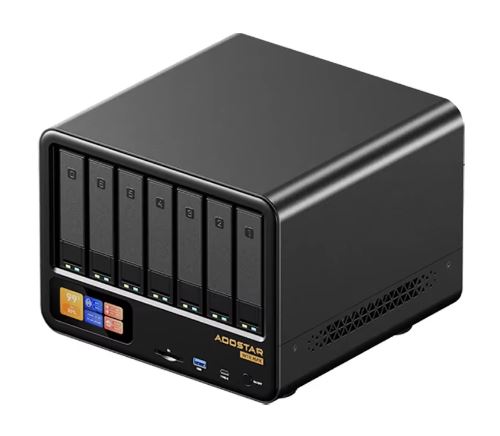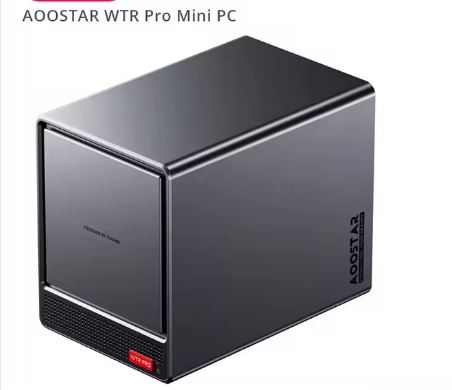
The AOOSTAR WTR Pro is a barebone mini PC that positions itself between NAS and homelab: it features an AMD Ryzen 7 5825U (8 cores/16 threads) much more powerful than any CPU in a commercial NAS in this price range, along with 4 SATA bays and dual M.2 NVMe.
Pros:
-
🚀 Ryzen 7 5825U CPU with more than enough power for virtualization, 4K transcoding, and even light local AI
-
💾 4 SATA 2.5"/3.5" bays + 2 M.2 NVMe slots, up to 88TB combined according to independent testing
-
🔌 SATA connected directly to the AMD FCH (not a cheap ASMedia chip), quality comparable to an LSI card
-
🌐 2×LAN 2.5Gbps, WiFi 6 and Bluetooth 5.2
-
🖥️ Triple 4K screen and total operating system freedom (Windows, Linux, TrueNAS, Unraid, iStoreOS)
-
⚡ Standby power consumption of only 11W according to actual measurements by a Powertop buyer
-
⭐ Good rating on AliExpress (4.7/5, 70 ratings, 600+ sold)
Cons:
-
🔧 Sold as a barebone: no RAM or storage included, these must be purchased and installed separately
-
🔊 Noisier than a conventional mini PC, confirmed by some independent buyers
-
🌡️ The factory-applied thermal paste could be improved: one experienced user reports reaching 70°C with minimal effort and recommends replacing it.
-
📀 Without a pre-installed NAS operating system, it requires technical knowledge to set it up yourself.
In short: the AOOSTAR WTR Pro is one of the best barebone mini PC NAS/homelabs in its price range. It's ideal if you like to configure your own software (TrueNAS, Proxmox, Unraid) and want significantly more raw power than a brand-name NAS at the same price, but it's not for those looking for a "plug and play" NAS solution.
🛒 Where to buy it?
📦 Unboxing and Box Contents
The package includes just the essentials, as it's a barebone product:
-
The AOOSTAR WTR Pro mini PC
-
1 HDMI cable
-
1 power supply (120W, 19V-6.32A)
-
1 user manual
It does not include RAM, SSDs, or hard drives. You will need to purchase and install these yourself: 2 SO-DIMM DDR4-3200 modules and the drives/SSDs you need for your 4 SATA bays and 2 M.2 slots.
🛠️ Technical Specifications Table
| Component | Specification |
|---|---|
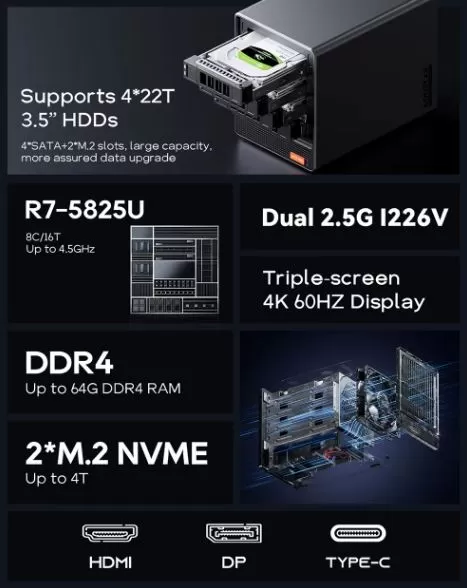
| Processor | AMD Ryzen 7 5825U (8 cores/16 threads, up to 4.5GHz, TDP 15W/30W boost) |
| GPU | Integrated AMD Radeon Vega 8 (up to 2000MHz) |
| RAM | DDR4-3200 dual SO-DIMM, up to 64GB (not included) |
| Storage | 2×M.2 2280 NVMe + 4×SATA 2.5"/3.5" bays (not included, up to 88TB combined in real-world testing) |
| SATA Controller | Direct from AMD's FCH, without an intermediate ASMedia chip |
| Grid | 2xLAN 2.5Gbps |
| WiFi/BT | WiFi 6 + Bluetooth 5.2 |
| Video | Triple 4K display: HDMI 2.1, DP 1.4 (144Hz), Type-C (100W PD) |
| Ports | 2×USB 2.0, 2×USB 3.0, 1×HDMI 2.1, 1×DP 1.4, 1×Type-C, 1×TF card, 1×Audio Jack |
| compatible OS | Windows, Linux, TrueNAS, Unraid, iStoreOS and others |
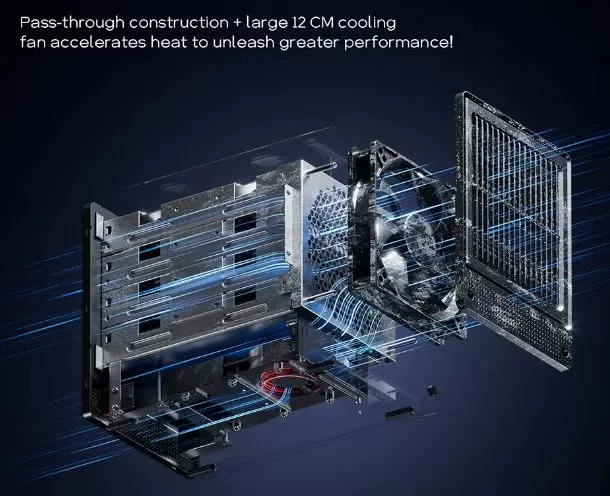
| Refrigeration | 12cm fan + pass-through design |
| Feeding | 120W, 19V-6.32A |
| Dimensions | 22.8×15×18.5cm |
| Weight | 5.0kg |
| Extras | Magnetic cover, anti-accidental touch switch |
🎨 Design and Construction Quality
Weighing 5kg and with a chassis of 22.8×15×18.5cm, the WTR Pro feels robust and designed for 24/7 use, a far cry from the "toy" aesthetic of some budget mini PCs.
One expert buyer describes it as "a real beast" in terms of build quality. It features a magnetic quick-access cover for the drives and a sliding power switch to prevent accidental touches, a detail designed to avoid unintentional shutdowns or restarts in a machine expected to run continuously as a server.
🖥️ Screen and Multimedia
The WTR Pro supports triple 4K displays via HDMI 2.1, DisplayPort 1.4 (up to 144Hz) and Type-C, a generous configuration that goes beyond what a pure NAS would need, again showing its hybrid vocation towards use as a desktop mini PC as well as a server.
The integrated Radeon Vega 8, although modest for gaming, allows 4K streaming and video transcoding smoothly for typical media server tasks (Plex, Jellyfin).
🎮 Performance and Software
Independent testing confirms that the Ryzen 7 5825U is "a good choice for NAS tasks," with enough power to run multiple virtual machines simultaneously. In PCMark 10 and CrossMark, system performance far surpasses Intel N100/N150-based configurations, confirming that this Ryzen variant is recommended for any use beyond basic NAS tasks.
Real customer reviews confirm this performance in practice:
-
A user installed Proxmox and TrueNAS with a mirrored 4TB pool, and it's working smoothly.
-
Another buyer runs Paperless, Plex, PhotoPrism, and Ollama (local AI) simultaneously "without issues," though he notes that the AI "is slow" because it would need a dedicated GPU for that specific use case.
-
A Reddit user has been using it as a 24/7 virtualization server for 6 months, highlighting "its energy efficiency and robust performance"
🛒 Where to buy it?
🔌 Energy Consumption and Cables
Here's one of the highlights: its idle power consumption is only 11W, with a full configuration of 2×SO-DIMM + 2×NVMe + 4×SSD SATA installed.
With active disks we obtain figures similar to 21-24W and 64-66W under full load with all 4 disks in simultaneous use and CPU at 40-50%.
The 120W (19V-6.32A) power supply provides ample headroom even with all 4 SATA bays and 2 M.2 slots fully occupied.
🌡️ Temperature and Noise (Actual Thermal)
Here it is necessary to clarify with real data.
Noise levels can range from 37-37.8dB at idle and 41.5-42.9dB under load for the Ryzen 7 variant, noting that "we did not observe elevated temperatures... the SoC remained consistently cool" thanks to conservative power limits from the manufacturer.
However, one AliExpress reviewer experienced a different story: the CPU reached 70°C with the factory settings under minimal load, and recommended replacing the thermal paste with a higher-quality one to improve thermal performance. This discrepancy could be due to variations in quality between units, differences in the tested workload, or the buyer's demand for higher sustained performance than the lab test measured. Another buyer also cited fan noise as "the only drawback," suggesting replacing it with a Noctua fan for quieter operation.
Recommendation: If you are very concerned about noise or temperature under sustained load (e.g., constant 4K transcoding or several active VMs), consider applying quality thermal paste yourself when assembling it, something common in the homelab/DIY culture that this product is aimed at.
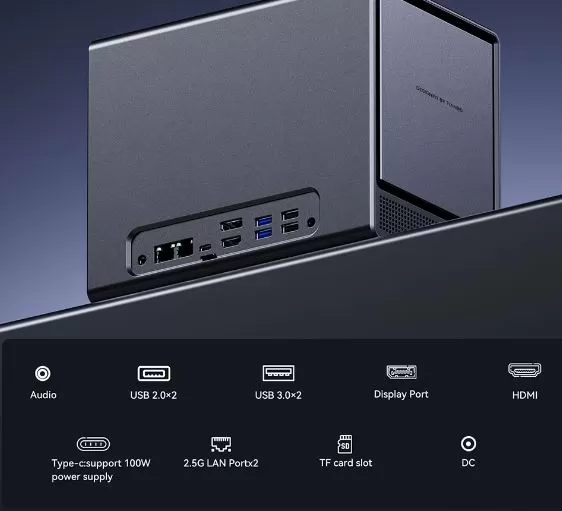
🔗 Connectivity and Extras
-
🔵 2× USB 2.0
-
🔵 2× USB 3.0
-
🖥️ 1× HDMI 2.1
-
🖲️ 1× DisplayPort 1.4 (up to 144Hz)
-
🔗 1× Type-C (up to 100W Power Delivery)
-
💾 1× TF/microSD slot
-
🎧 1× Audio Jack
-
🌐 2× LAN 2.5Gbps
-
📡 WiFi 6 + Bluetooth 5.2
-
🔒 Anti-accidental touch sliding switch
-
🧲 Magnetic access cover for disks
The two 2.5Gbps LAN ports are a highly valued extra ("Pro: 2x 2.5G LAN"), allowing advanced network configurations such as link aggregation or NAS/homelab traffic segmentation.
🧩 Expansion and Upgrades
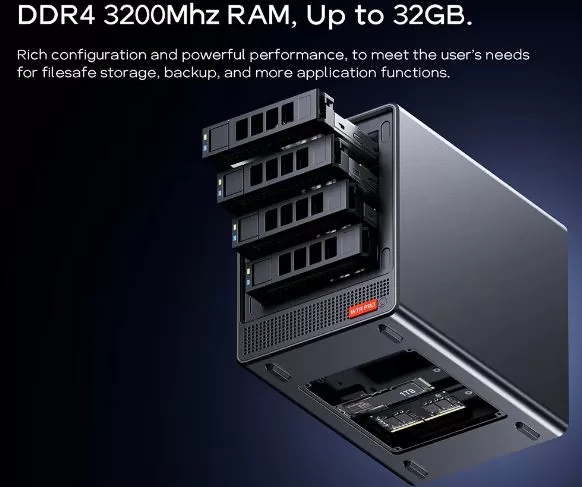
The WTR Pro, along with the SOYO S5 Air, is one of the devices with the greatest expandability in this series of reviews, although it has the peculiarity that it does not include anything from the factory:
-
RAM: 2 SO-DIMM DDR4-3200 slots, up to 64GB combined. Not included, must be purchased separately.
-
NVMe storage: 2 M.2 2280 slots, up to 4TB each according to the listing. Not included.
-
SATA storage: 4 x 2.5"/3.5" bays, compatible with drives up to 22TB each based on independent testing, allowing up to 88TB combined across all 4 bays. Drives not included.
This barebone philosophy is common in the homelab culture: many buyers already have RAM or SSDs from previous equipment that they can reuse, as confirmed by a buyer who reused 32GB of RAM and a 512GB NVMe from an old PC, avoiding that additional cost.
🛒 Build your AOOSTAR WTR Pro with these components on AliExpress:
⚔️ Comparison with Direct Competitors
These devices share the same concept: a mini PC motherboard integrated into a chassis with multiple 3.5" drive bays, designed for the user to install their own NAS/homelab operating system.
| Model | CPU | RAM / Extras | Storage | Approx. price | Strength | Buy on AliExpress |
|---|---|---|---|---|---|---|
| AOOSTAR WTR Pro | Ryzen 7 5825U (8C/16T) | Up to 64GB DDR4 (not included) | 4 SATA bays + 2 M.2 NVMe bays (not included) | ~373-579€ | Best price/power balance in the range | View offer |
| AOOSTAR WTR Pro (Intel N100) | Intel N100 (4C) | Same chassis and slots as the Ryzen version | 4 SATA bays + 2 M.2 NVMe bays (not included) | More economical | GPU with QuickSync, ideal for low-cost Plex/Jellyfin | View offer |
| AOOSTAR WTR Max | Ryzen 7 PRO 8845HS | Extended chassis, same manufacturer | 11 bays (6×SATA 3.5" + 5×NVMe) | ~€500-800 | Maximum expansion + 2×SFP+ 10Gbps | View offer |
| Minisforum N5 Pro / N5 | Ryzen AI (latest generation) | Supports ECC memory + Oculink port for external GPU | Multiple bays (premium chassis) | ~€600-700 | More powerful CPU, native 5G/10G network, ECC | View offer |
The AOOSTAR WTR Max is the big brother of the WTR Pro within the AOOSTAR catalog: it updates the CPU to a Ryzen 7 PRO 8845HS and radically expands the storage to an 11-bay chassis (6 for 3.5" SATA drives + 5 for NVMe SSDs), in addition to incorporating two 10Gbps SFP+ fiber ports, making the leap to next-generation networks that the WTR Pro does not offer [web:youtube-wtrmax].
⭐ Reviews on Well-Known Pages
Advantages
- Unbeatable performance against the Intel N100: Forums like r/HomeServer (Reddit) highlight that the Ryzen version outperforms the budget version with the Intel N100 chip. Not only does it have 8 cores and 16 threads (compared to Intel's 4), but its PCIe lanes are not restricted, allowing the use of two NVMe SSDs at maximum speed for the server cache.
- Robust and heavy chassis: Reviews on specialized YouTube channels mention that the metal body feels premium in construction, very similar to Synology's commercial cases, offering great structural stability.
- Proven 24/7 reliability: Users who have been using it as a server with Proxmox, Unraid or Ubuntu Server for over a year report absolute stability, with no crashes or long-term hardware failures.
Disadvantages
- Fan noise: The most criticized aspect on r/HomeNAS is that the stock fan can become very noisy under heavy load. Some Unraid users report that the operating system doesn't properly detect the motherboard's integrated temperature sensors to automatically adjust the fan curve.
- Multimedia transcoding limitations: In the r/selfhosted community, users clarify that playing content directly (Direct Play) on Plex or Jellyfin works perfectly. However, if you need to transcode multiple large 4K video streams simultaneously to a lower resolution, Intel's integrated graphics (QuickSync) are still more efficient and easier to configure than AMD's.
- Factory hot SSD: Those who bought the version with pre-installed storage (not the barebone version) noticed that the generic brand M.2 NVMe SSD that comes by default tends to work at high temperatures (around 50 °C at idle), so they recommend replacing it with a better quality one.
AliExpress
On AliExpress, it boasts a 4.7/5 rating with 70 reviews and over 600 units sold. Genuine buyer reviews are consistently positive, with recurring mentions of "excellent value for money," good communication from sellers regarding shipping delays, and direct, favorable comparisons to commercial NAS devices like QNAP: one buyer states that it "blows all the proprietary ones like QNAP and Synology out of the water" in terms of raw power at the same price or less.
🔬 Technical Tests
1. Network and Storage Performance
- Network Saturation (2.5 GbE): With four mechanical hard drives configured, transfer tests maintained a sustained speed of 279 MB/s. This means that the internal storage fully saturates the physical bandwidth of a 2.5 Gbps port without any performance drops.
- Link Aggregation: By unifying the two 2.5 Gbps LAN ports, massive file transfer rates virtually doubled the bandwidth stably, demonstrating that the integrated controllers (Intel I226-V) handle heavy traffic without packet loss.
- M.2 NVMe SSD Speed: Tests confirm that internal M.2 slots take advantage of their allocated lanes without the PCIe lane bottlenecks that Intel N100-based mini PCs suffer from.
2. Actual Electricity Consumption
Measurements at the plug show excellent energy efficiency for a continuously switched-on household device:
- At idle (Idle) without mechanical disks: Consumption of only 15W to 18W (only with the NVMe SSDs of the operating system).
- At idle with 4 hard drives installed: Power consumption rises to a range of 23W to 24W.
- Peak Load: Running a simultaneous CPU stress test (Cinebench) along with a read/write benchmark on all disks, the maximum peak power consumption recorded reached 65W.
3. Thermal Tests (Temperature)
AOOSTAR published its own official thermal stress tests ("baking test") with 4 mechanical disks installed and an ambient temperature of 26°C to 28°C:
- Desktop Use / Idle: The processor is kept at 41°C and the hard drives at 37°C with the fan at low revolutions (1000 RPM).
- Under maximum load (CPU at 100% + Continuous data copying):
- With the fan at 1300 RPM: The CPU stabilizes at 50°C and the HDDs at 42°C.
- With the fan at maximum speed (1500 RPM): The processor temperature drops to 49°C and the hard drives remain at 41°C.
(Technical note: The chassis dissipates heat very well, so removing the front magnetic cover does not affect the temperatures).
❓ Frequently Asked Questions (FAQ)
Does it include RAM and hard drives?
No. It is sold as a barebone: you must buy and install the SO-DIMM DDR4-3200 RAM and storage (M.2 SSD and/or SATA drives) yourself.
Is it better than a commercial NAS like QNAP or Synology?
In terms of CPU power, yes, significantly so. However, in terms of "out-of-the-box" ease of use with its own software, no: you'll have to install TrueNAS, Unraid, or another system yourself.
Does it get hot or noisy?
There's some disagreement: independent tests haven't detected high temperatures, but one experienced user reports 70°C with the factory thermal paste and recommends replacing it. As for noise, it can reach 41.5-42.9dB under load, which is slightly louder than a typical mini PC.
How much can I expand the storage?
Up to 64GB of RAM, 2 additional M.2 NVMe SSDs and 4 hard drives of up to 22TB each in the SATA bays, totaling a theoretical maximum of 88TB of mass storage.
What operating systems can I install?
Windows, Linux, TrueNAS, Unraid, iStoreOS, and virtually any compatible x86 distro, according to both the manufacturer and buyers.
Is it suitable for local AI?
To a limited extent. One buyer confirms that it works but is "slow" for generative AI tasks, as these greatly benefit from a dedicated GPU, which this device does not include.
🏁 Final Conclusion
The AOOSTAR WTR Pro is one of the best documented options in this review series for anyone looking to build a DIY NAS/homelab server with more than enough power for virtualization, multimedia streaming, and home applications (Plex, Paperless, PhotoPrism). Backed by both independent tests and very positive real-world user reviews, its combination of a powerful CPU, dual 2.5G LAN, and four SATA bays with a direct AMD FCH controller clearly positions it above similarly priced commercial NAS devices.
The final price will depend on how much RAM and storage you need to add, as it's sold without either included. If you already have reusable components from previous systems, the savings are even greater. Recommended for technically savvy users who value software flexibility over a turnkey NAS solution.