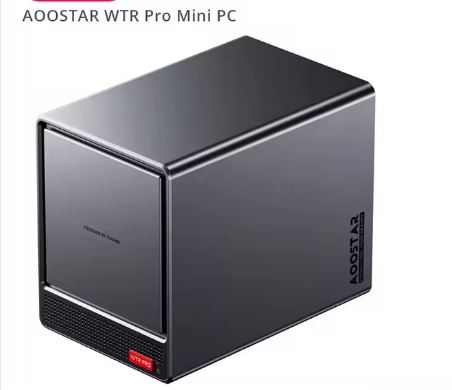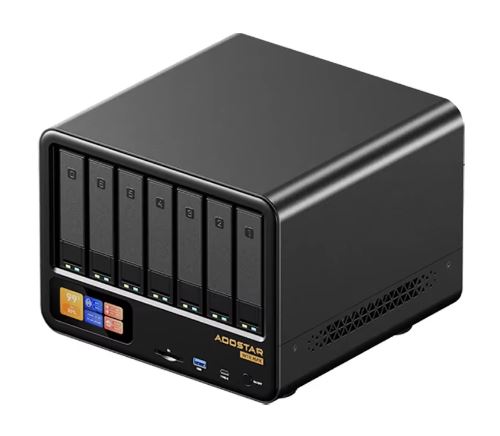
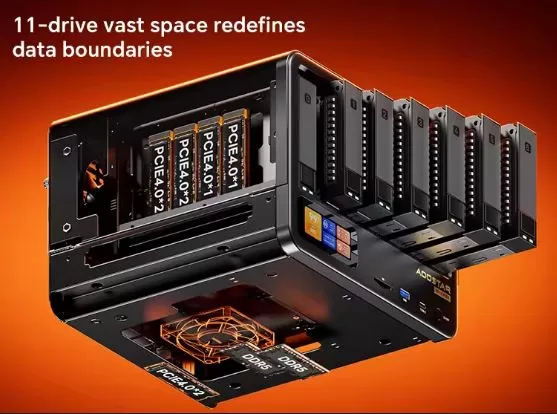
The AOOSTAR WTR Max is the bigger brother of the WTR Pro within the brand's catalog, and it takes the NAS/homelab proposal to another level: up to 11 storage bays (6 SATA + 5 M.2 NVMe), dual 10GbE SFP+ optical network , USB4 and OCuLink for external expansion.
There are two CPU variants under the same commercial name —Intel Core i5-1235U and AMD Ryzen 7 PRO 8845HS— with differences verified on the manufacturer's official pages that go far beyond the processor: the supported RAM speed changes, as does the PCIe generation of the M.2 slots and even the exact compatibility of memory modules.
🛒 Where to buy it?
Pros:
-
💾 Up to 11 storage bays (6 SATA 3.5"/2.5" + 5 M.2 NVMe) in a compact "shoebox" chassis
-
🌐 Dual 10GbE SFP+ ports + dual 2.5GbE ports, network connectivity rarely seen in this price segment
-
🔌 USB4 (40Gbps) + OCuLink (PCIe 4.0 x4) for external expansion, including external GPUs
-
🧠 ECC memory support in both variants, confirmed in the manufacturer's official specifications
-
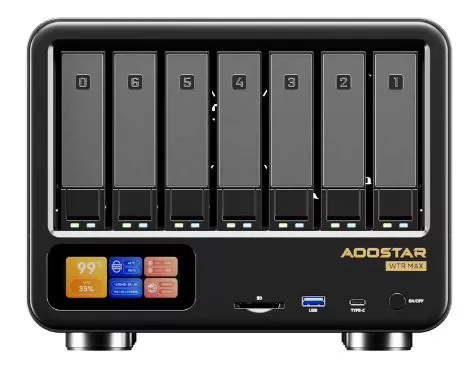
🖥️ Front LCD screen with real-time statistics (CPU, RAM, network, storage)
-
🌡️ Good thermal and acoustic performance according to independent testing (35-49°C, 35-44dBA)
-
🏗️ Anodized aluminum chassis with build quality rated 10/10 by a specialist media outlet
Cons:
-
⚠️ Two CPU variants with completely different maximum RAM, memory speed, and PCIe M.2 generation
-
🧩 The AMD variant has a documented oddity: it doesn't support 2x48GB in standard modules ; that 96GB combination only works if they are ECC modules.
-
🔻 The Intel variant uses M.2 at PCIe 3.0, one generation behind the PCIe 4.0 of the AMD variant
-
🔀 Shared bandwidth bottlenecks between internal M.2 slots (internal transfer speeds limited to ~500-600MB/s)
-
💻 The LCD panel software is only for Windows, not very useful if you use TrueNAS/Proxmox/Linux
-
📀 No NAS operating system pre-installed, requires technical setup by you
In short: the AOOSTAR WTR Max is one of the most complete barebone NAS/homelab systems on the market in its price range, boasting a connectivity architecture (10G SFP+, USB4, OCULink) typically found only in much more expensive enterprise NAS devices. The AMD Ryzen 7 PRO 8845HS variant is superior in almost every verifiable technical aspect (faster RAM with more headroom, full PCIe 4.0 M.2 support), while the Intel i5-1235U variant compensates with significantly lower power consumption and improved efficiency for multimedia transcoding thanks to Quick Sync.

📦 Unboxing and Box Contents
Being a barebone product, the contents of the box are minimal:
-
The AOOSTAR WTR Max mini PC/NAS
-
Power adapter (200W according to product specifications)
-
Quick Start Guide
It does not include RAM, SSDs, or hard drives of any kind. The buyer must purchase and install all memory and storage according to their needs.
📌 Note about the adapter: the manufacturer explicitly states that, although the power supply label indicates "100V-120V", the actual and safe input range is 100V to 240V, so it works without problems in any electrical region.
🛠️ Technical Specifications Table
⚠️ The WTR Max exists in two CPU variants with differences verified directly on the manufacturer's official product pages, not only in the processor but also in memory and fast storage.
| Component | AMD Ryzen 7 PRO 8845HS variant | Intel i5-1235U variant |
|---|---|---|
| Processor | AMD Ryzen 7 PRO 8845HS (8C/16T, 3.8-5.1GHz, 16MB L3 cache) | Intel Core i5-1235U (10C/12T: 2P+8E, 1.3-4.4GHz, 12MB cache) |
| Graphics | AMD Radeon 780M (12 CU, up to 2700MHz) | Intel Iris Xe Graphics (80EU) |
| Supported RAM speed | DDR5-5600 dual-channel | DDR5-4800 dual-channel |
| Official maximum RAM (AOOSTAR board) | Up to 128GB (2×64GB) | Up to 96GB (2×48GB) |
| maximum RAM of the CPU itself | 256GB (the motherboard doesn't reach that limit) | Intel Ark's official 64GB figure; the manufacturer confirms a stable 96GB in internal tests, even though it exceeds Intel's "official" figure. |
| ECC Compatibility | Yes, but with a peculiarity: it doesn't support 2x48GB non-ECC ; that combination only works with ECC modules. | Yes, compatible with DDR5 ECC |
| SATA Bays | 6 x 3.5"/2.5", up to 24TB per drive | 6 x 3.5"/2.5", up to 24TB per disk (identical) |
| M.2 slots | 5× M.2 2280 NVMe PCIe 4.0 (1×x2 + 2×x2 + 2×x1) | 5× M.2 2280 NVMe PCIe 3.0 (3×x2 + 2×x1) — one generation behind |
| Optical network | 2× SFP+ 10GbE (Intel X710) | 2× SFP+ 10GbE (Intel X710) — identical |
| Copper network | 2× 2.5GbE RJ45 | 2× 2.5GbE RJ45 — identical |
| Expansion | USB4 (40Gbps) + OCuLink (PCIe 4.0 x4) | Identical |
| Refrigeration | Glacier Pro 1.0: steam chamber + 4 fans | Identical |
| Screen | Front LCD (Windows only software) | Identical |
| Feeding | 200W | 200W |
🧠 Why the RAM speed is different between the two variants
This is a point that often causes confusion: although both motherboards physically use the same type of SO-DIMM DDR5 slots, the maximum memory speed is determined by the integrated memory controller (IMC) of each CPU, not the motherboard design.
The Ryzen 7 PRO 8845HS is certified by AMD for DDR5-5600, while the Intel i5-1235U is only certified by Intel up to DDR5-4800.
This is typical between processor generations: the AMD chip is newer (Hawk Point architecture, 2024) than the Intel chip (Alder Lake-U, 2022), and each new generation usually boasts higher memory speeds. It's not a limitation of the AOOSTAR motherboard or an arbitrary decision by the vendor; it's a factory-defined limitation of the silicon itself within each processor.
🎨 Design and Construction Quality
The WTR Max comes in an anodized aluminum chassis, described by a specialist publication as "compact, dense, and built to last," with a 10/10 build quality rating . Despite housing up to 11 storage drives, its size remains comparable to that of a large shoebox, with removable access panels secured with thumbscrews (no tools required) and "click-and-load" fast-loading trays for the six front SATA bays.
A notable feature is the modular 4-slot M.2 tray located at the end of the bay stack, with a cartridge-type loading system similar to that of rack servers, which allows SSDs to be swapped without complete disassembly of the chassis.
🖥️ Screen and Multimedia
The WTR Max features a customizable front LCD screen that displays real-time statistics: CPU temperature, RAM usage, network traffic, and storage status, with several visual themes available. This is an unusual feature in this product segment, although it has a significant limitation: the screen configuration software only works on Windows, which reduces its usefulness if the device uses TrueNAS, Unraid, or Proxmox as its primary operating system.
🎮 Performance and Software
This is where the two CPU variants make a real difference, and not just in raw power but also in how they take advantage of fast storage:
AMD Ryzen 7 PRO 8845HS variant: In Proxmox tests, the system simultaneously ran six Windows 10 virtual machines and two Ubuntu LTS virtual machines, each with 2-4 vCPUs and 2-4GB of RAM, without instability or memory errors during several days of testing. In Plex, it handled four simultaneous 4K/8K video transcodings while keeping CPU usage below 50%, thanks to the Radeon 780M's hardware acceleration (VAAPI). Its five full PCIe 4.0 M.2 slots also allow for the use of modern NVMe SSDs at their full speed.
The Intel i5-1235U variant, according to independent benchmarks, achieves a PassMark CPU Mark score of approximately 8,700-9,000 points and a Geekbench 6 score of 1,860 single-core / 5,735 multi-core, figures significantly lower than the Ryzen 7 PRO 8845HS. Furthermore, since its M.2 slots are limited to PCIe 3.0, any modern NVMe SSD installed will not reach its full potential speed, although this limitation is less relevant for NAS use with SATA drives as primary storage.
🛒 Where to buy it?
🔌 Energy Consumption and Cables
🔋 1. Energy Consumption
Power consumption varies greatly depending on the processor and, above all, on how many hard drives you install (each mechanical HDD consumes about 6-9W while spinning and up to 20W when booting). [ 1 ]
- Idle Mode (No Discs):
- Intel i5: ~12W - 15W from the wall.
- AMD Ryzen 7: ~18W - 21W (the AMD processor is a bit more "power-hungry" at absolute idle).
- Sleep mode with the NAS full (6 HDDs + 5 NVMe):
- Both models increase to a constant 55W - 65W just to keep the discs spinning.
- Maximum Load (Processor at 100% + Disk Scrub):
- Intel i5: Reaches peak power consumption of around 75W - 85W.
- AMD Ryzen 7: Reaches peaks of 100W to 110W.
🔌 2. Power Supply and Cables
- The Power Supply: Both systems include an external 200W power supply. It is intentionally oversized to handle the peak power demand of six mechanical hard drives spinning up simultaneously ( spin-up ).
- Internal Cables: You don't need any cables. The chassis uses an internal rigid backplane . The six 3.5" SATA hard drives slide into trays and connect directly to the backplane.
- Network Cables: If you're using the 10G SFP+ ports , you'll need fiber optic cables with transceivers or direct-attach copper cables ( SFP+ DACs ). If you're using the 2.5G ports, a standard RJ45 Ethernet cable (Category 6 or higher) will suffice.
The 200W power supply offers sufficient headroom in both variants even with additional expansion via OCuLink.
🌡️ Temperature and Noise (Actual Thermal)
🌡️ Temperature
The system features the Glacier Pro 1.0 cooling architecture , which divides the airflow into 3 independent zones: []
- Processor (CPU): At idle, it stays at around 35°C - 50°C. Under continuous maximum stress, the i5 reaches around 60°C and the Ryzen reaches 65°C - 72°C. This is well below the danger limit (100°C).
- Hard Drives (HDDs): This is the strong point of this chassis. The rear fans keep the mechanical drives at an excellent 34°C - 38°C under normal operation.
- Solid State Drives (M.2 NVMe): Because they are concentrated in an internal tray, they can get a bit hotter (45°C - 55°C) if you perform large data transfers. It is highly recommended to use thermal pads.
🤫 Noise
The system has 4 internal fans (1 on the CPU, 1 on the base for the motherboard and 2 rear 90mm fans for the drives).
- At standby/low load: The noise level is around 35 dB. It's a very soft whisper, ideal for an office or bedroom if you're not extremely sensitive to noise.
- Under CPU load (compression, VMs): The fans increase speed and reach 40-44 dB. A noticeable airflow is audible, but it's not as annoying as a traditional rack server.
- The hidden factor (Mechanical Drives): The chassis fans are fairly quiet, but if you install six high-capacity mechanical hard drives (like the 16TB or 20TB enterprise-level drives), the physical noise of the read/write heads and vibration will add up to about 42 dB on their own. No compact chassis can completely mitigate the noise of six drives spinning at 7200 RPM.

🔗 Connectivity and Extras
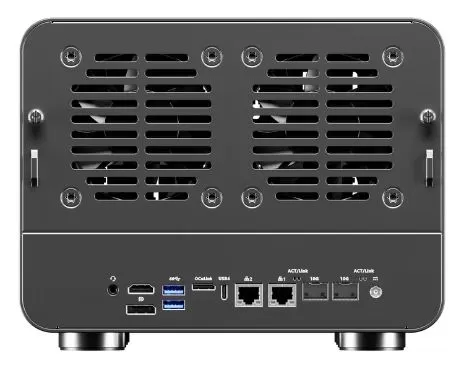
-
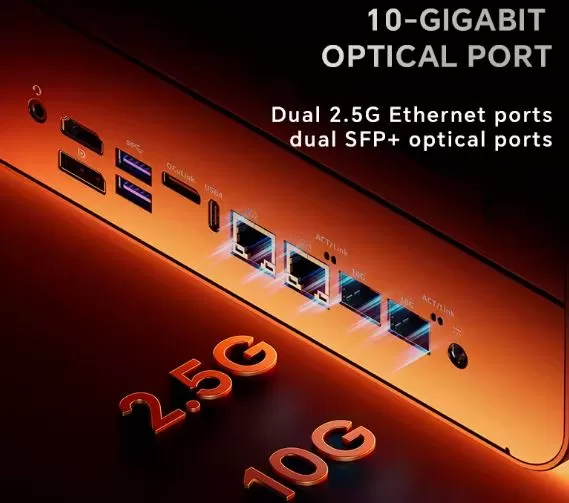
🌐 2× SFP+ 10GbE (Intel X710), with confirmed saturation of ~9.5Gbps in iPerf3 tests
-
🌐 2× 2.5GbE RJ45 (addable, isolatorable or bridgeable)
-
🔗 1× USB4 (40Gbps) with video support and Power Delivery
-
🔗 1× OCuLink (PCIe 4.0 x4), without hot-swap
-
🔵 Front panel: 1×USB-C (5Gbps), 1×USB-A 3.2 Gen1, 1×SD reader
-
🔵 Rear panel: 2× Additional USB-A 3.2 Gen2
-
🎧 1× 3.5mm Audio Jack
-
📺 Front LCD screen with real-time statistics
Both variants share identical network connectivity and external expansion; the differences are exclusively in CPU, RAM and PCIe generation of the M.2.
🧩 Expansion and Upgrades
The WTR Max is, by far, the device with the greatest expansion capacity in this entire series of reviews, with limits that we can now confirm with official precision:
-
RAM (AMD variant): Up to 128GB with DDR5-5600 modules (2 x 64GB). ⚠️ If you want to reach 96GB with 2 x 48GB, they must be ECC modules ; standard 48GB laptop modules in that combination are not compatible, according to the manufacturer.
-
RAM (Intel variant): up to 96GB with DDR5-4800 modules (2×48GB), confirmed in internal manufacturer tests even though the "official" CPU limit according to Intel is 64GB.
-
SATA storage: 6 hot-swappable 3.5"/2.5" bays, up to 24TB per drive, identical in both variants.
-
M.2 NVMe storage: 5 slots, but at PCIe 4.0 in the AMD variant and PCIe 3.0 in the Intel variant — a real difference in maximum achievable performance.
⚠️ Also remember the nuance detected in the independent test: internal transfers between M.2 slots (M.2 to M.2) were limited to about 500-600MB/s in the AMD variant tests, suggesting a shared bandwidth bottleneck not announced by the manufacturer.
🛒 Build your AOOSTAR WTR Max with these components from AliExpress:
⚔️ Comparison with Direct Competitors
| Model | CPU | Official max. RAM | Storage | Approximate price | Strength | Buy on AliExpress |
|---|---|---|---|---|---|---|
| AOOSTAR WTR Max (AMD) | Ryzen 7 PRO 8845HS (8C/16T) | 128GB DDR5-5600 | 6 SATA + 5 M.2 PCIe 4.0 | ~€600 | Maximum performance, full PCIe 4.0 | View offer |
| AOOSTAR WTR Max (Intel) | i5-1235U (10C/12T) | 96GB DDR5-4800 | 6 SATA + 5 M.2 PCIe 3.0 | ~€500 | Lower consumption, Quick Sync for Plex/Jellyfin | View offer |
| AOOSTAR WTR Pro | Ryzen 7 5825U (8C/16T) | 64GB DDR4 | 4 SATA bays + 2 M.2 NVMe | ~373-579€ | The most compact and economical option in the family | View offer |
| Minisforum N5 Max/Pro | Ryzen AI Max+ 395 (16C/32T) with NPU | ECC + Oculink | 5 SATA + 3 M.2 NVMe | ~900-3000€ | CPU far superior + NPU for AI, much more expensive | View offer |
The Minisforum N5 Max offers a significantly superior CPU (16 cores/32 threads with a dedicated NPU for AI) but at almost four times the price of the WTR Max, with fewer total bays (5 SATA + 3 M.2 compared to the AOOSTAR's 11). For pure NAS/homelab use, the WTR Max wins in storage density and price; the N5 Max is only justified if you need serious local AI computing.
⭐ Reviews on Well-Known Pages
🟢 What the analyses praise most (Strengths)
- Unbeatable Price-Performance Ratio: The NASCompares website and the Reddit community highlight that, given its starting price (around $699 for the barebone version without RAM or SSD), it offers incredible value. A traditional pre-built NAS with a powerful processor, dual 10G SFP+ ports (Intel X710), and 11 drive bays would cost almost twice as much.
- Tool-Free Design and Installation: Reviewers praise its solid metal construction. The 3.5-inch hard drive trays feature a quick-click rail system that requires no screwdrivers, making assembly much easier.
- Absolute Operating System Compatibility: Virtualization sites like VirtualizationHowTo report that the AMD model is a "dream" for open-source software. Systems such as Proxmox VE 8, TrueNAS Scale, and Unraid work natively, detecting all Intel network controllers and SATA controllers without requiring additional drivers.
- Computing Power: Joey's Retro Handhelds proved that the hardware is so powerful that it not only functions as a massive NAS, but can simultaneously run complex virtual machines, heavy emulation, and streaming tasks without flinching.
🔴 What people like least (Weak Points and Technical Limitations)
In-depth analysis by YouTube has revealed the "cuts" AOOSTAR made to achieve this compact size and low price:
- M.2 NVMe Slot Speed: Of the five available slots for high-speed SSDs, the manufacturer had to limit bandwidth to accommodate so many simultaneous connections. Reviews indicate that some M.2 slots operate electrically at PCIe Gen 4 x1 or x2 speeds, instead of the standard x4. While this is still very high speed for a NAS, you won't be taking full advantage of the peak speed of a high-end NVMe SSD.
- No Internal PCIe Expansion Slots: Unlike tower servers or large NAS devices, this chassis has no internal space for standard PCIe cards (such as for adding more network cards or a dedicated graphics card). All external expansion relies on the OCuLink port or the USB4 port.
- Noise Under Continuous Stress: Reviewers confirm that although the processor fan is relatively quiet at idle, the airflow generated to cool 6 traditional mechanical disks produces noticeable noise when the NAS is under maximum stress.
🔬 Technical Tests
-
SSD speed (Gen4 x1 slots, AMD variant): ~1.6GB/s read / ~1.5GB/s write
-
SSD speed (Gen4 x2 slots, AMD variant): ~2.9GB/s read / ~2.8GB/s write
-
Internal M.2 to M.2 transfer: limited to ~500-600MB/s (possible shared bus bottleneck)
-
10GbE Network: Confirmed saturation of ~9.5Gbps on both SFP+ ports
-
Power consumption (AMD variant): 18W (idle without disks) to 89W (maximum load)
-
Temperature (AMD variant): 35°C idle, 47-49°C maximum load
-
CPU-certified RAM: DDR5-5600 (AMD) vs DDR5-4800 (Intel), according to official AMD and Intel specifications.
-
PassMark i5-1235U: ~8,700-9,000 points; Geekbench 6: 1,860 single-core / 5,735 multi-core
❓ Frequently Asked Questions (FAQ)
Why does RAM run at different speeds depending on the processor?
Because the maximum memory speed is certified by each CPU's integrated memory controller (IMC), not the motherboard. The Ryzen 7 PRO 8845HS is certified by AMD up to DDR5-5600; the Intel i5-1235U only up to DDR5-4800. This is a factory limitation of the chip itself, not an AOOSTAR design limitation.
How much RAM can I actually install in each variant?
Up to 128GB (2×64GB DDR5-5600) in the AMD variant, and up to 96GB (2×48GB DDR5-4800) in the Intel variant, according to the manufacturer's official product specifications.
Is it true that the 96GB RAM only works with ECC modules in the AMD variant?
Yes. The manufacturer itself warns that the 2x48GB (96GB) combination does not work with standard laptop RAM modules, only with ECC DDR5 SODIMM modules. This has also been documented by users on Reddit.
Which variant should I buy, Intel or AMD?
If your budget allows, go for the AMD variant: faster RAM with more headroom (128GB vs. 96GB), full PCIe 4.0 M.2 (compared to Intel's PCIe 3.0), and a better integrated GPU. The Intel variant compensates with lower power consumption and Quick Sync for efficient transcoding.
Does it include RAM and hard drives?
No. It's a barebone product: you must purchase and install all DDR5 RAM and storage separately.
Why are transfers between my own M.2 SSDs slower than expected?
An independent test found that internal M.2-to-M.2 transfers are limited to ~500-600MB/s due to a possible shared bandwidth bottleneck not specified by the manufacturer.
Is the AOOSTAR brand reliable?
Opinions are mixed: some users are very satisfied using these devices with Unraid/TrueNAS for months, but there are also reports of poor customer service. We recommend researching the reputation of the specific seller before purchasing.
🏁 Final Conclusion
According to available official tests and specifications, the AOOSTAR WTR Max is one of the best barebone NAS/homelab systems on the market in its price category, thanks to its combination of 11 storage bays, dual 10GbE SFP+ network and expansion via OCuLink/USB4.
The choice between variants is no longer ambiguous: the AMD Ryzen 7 PRO 8845HS offers faster RAM with more headroom (128GB DDR5-5600), full PCIe 4.0 M.2 and better overall performance, while the Intel i5-1235U is the option to choose if you prioritize low 24/7 power consumption and efficient transcoding via Quick Sync, accepting the limit of 96GB of RAM at a lower speed (DDR5-4800) and PCIe 3.0 M.2.