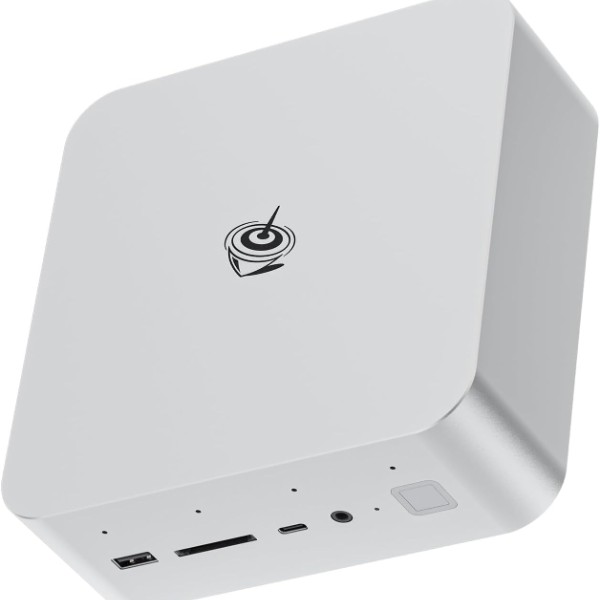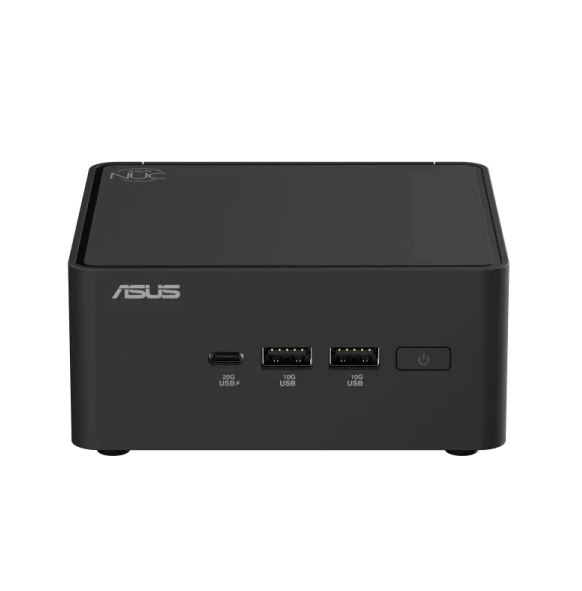
The ASUS NUC 15 Pro represents the new generation of mini PCs that push the boundaries of compact performance.
This mini PC, equipped with second-generation Intel Core Ultra processors, promises to bring productivity, creativity, and casual gaming to an ultra-compact form factor, but does it really live up to the hype?
⚡ Initial Verdict
The ASUS NUC 15 Pro Tall stands out as a premium mini PC that combines desktop power with a compact design weighing just 600 grams.
With Intel Core Ultra 7 255H processors (up to the Ultra 9 285H in the Pro+ version), integrated Intel Arc 140T graphics, Wi-Fi 7 and Thunderbolt 4 connectivity, this computer positions itself as a serious solution for professionals and enthusiasts.
Pros : Excellent performance, tool-free maintenance, modern connectivity, and modularity.
Cons : Audible fans under load and high price compared to Chinese competitors.
It is ideal for those who need real power in a minimal space and value build quality.
📊 Technical Specifications
| Component | Details |
|---|---|
| Processor | Intel Core Ultra 3/5/7 (Series 2), up to Core Ultra 9 285H (Pro+) |
| Graphics | Intel Arc 140T Graphics (7 Xe-Cores, 2.2 GHz) |
| RAM Memory | 16 GB DDR5-6400 (expandable up to 96 GB) |
| Storage | 1 TB SSD M.2 2280 PCIe 4.0 + additional M.2 2242 slot |
| Connectivity | Wi-Fi 7 (BE201), Bluetooth 5.4, Ethernet 2.5 GbE |
| Ports | 2x HDMI 2.1, 2x Thunderbolt 4, 4x USB 3.2, 1x USB-C Gen 2x2 |
| Dimensions | 117 × 112 × 54 mm (Tall) / 117 × 112 × 37 mm (Slim) |
| Weight | ~600 grams (Tall) / ~500 grams (Slim) |
| Power | 120-150W (external adapter) |
| Approx. price | €700-1,160 depending on configuration |
🎨 Design and Construction Quality
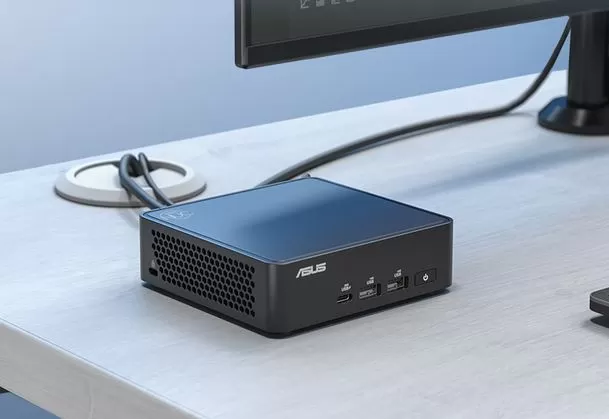
The ASUS NUC 15 Pro features a minimalist, cube-shaped design with a matte black finish and metallic accents. The casing combines metal on the sides and base with plastic on the top, offering a premium feel. At just 117 mm wide and weighing only 600 grams, this mini PC is surprisingly portable.
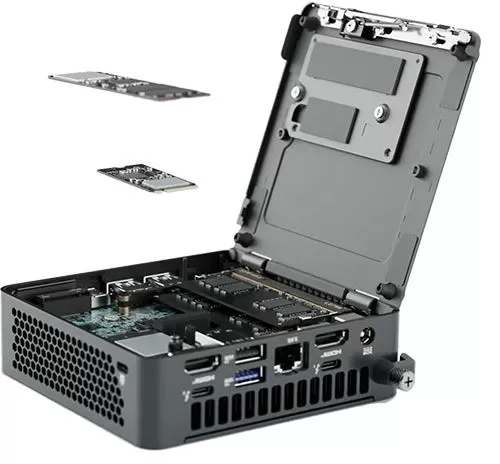
The most notable feature is its tool-less opening system : a single screw and a convenient lever allow access to the internal components in seconds. This greatly simplifies RAM or SSD upgrades, something that advanced users will appreciate. Furthermore, ASUS offers optional modular cards to add a second LAN port, serial port, or an additional M.2 SSD.
The cooling system features large side and rear vents that keep the device cool, although under heavy load the fans become noticeable at approximately 45 decibels. It includes a VESA mount for installation behind monitors, maximizing space savings.
🛒 VIEW PRICES ON AMAZON | $300
🛒 View purchase options for the ASUS NUC 15 Pro
🖥️ Screen and Multimedia Experience
As a mini desktop PC, the NUC 15 Pro doesn't include a built-in display, but its video output capabilities are exceptional. The two HDMI 2.1 ports allow you to connect 4K monitors at 60Hz simultaneously, while the two Thunderbolt 4 ports support DisplayPort 2.1, enabling configurations of up to four displays at ultra-high resolutions.
In tests with 4K monitors, the Intel Arc 140T Graphics handled smooth multimedia content, uninterrupted 4K video playback, and basic video editing. The integrated GPU with 7 Xe-cores reaches 2.2 GHz and offers 63 GPU Peak TOPS , sufficient for AI acceleration and moderate graphics tasks.
The device does not include built-in speakers , so audio is transmitted via HDMI, DisplayPort, or external connections. It supports 7.1 multi-channel digital audio via HDMI and USB-C ports.
⚙️ Performance and Software
The ASUS NUC 15 Pro with Intel Core Ultra 7 255H offers outstanding performance in its class. In Cinebench 2024 benchmarks, it achieves 1,077 points in multi-core and 129 in single-core , placing it on par with traditional desktop PCs. The system maintains turbo speeds of up to 5.4 GHz in the Ultra 9 285H version.
In Geekbench 6 , the Pro+ model with the Ultra 9 285H achieved 16,149 points in multi-core and 2,694 in single-core , demonstrating its capacity for intensive multitasking. Video editing tests (PCMark 10) showed 11,550 points in Digital Content Creation , highlighting its suitability for photo and video editing.
For casual gaming , the Arc 140T Graphics card allows you to run titles like F1 2024, The Witcher 3, GTA V, and Anno 1800 at 1080p with medium-low settings at smooth framerates. In less demanding games like Ultra Street Fighter 4, performance is excellent. However, for demanding AAA gaming, connecting an external GPU via Thunderbolt 4 is recommended.
The system comes with Windows 11 pre-installed (or in a barebone version without an OS) and supports local AI features such as document summarization and real-time translations, although it is not "Copilot+ PC" certified. It does not include significant bloatware, offering a clean experience.
🛒 VIEW PRICES ON AMAZON | $300
🛒 ASUS NUC 15 Pro Ultra 7 255H
📸 Cameras and Special Features
The ASUS NUC 15 Pro does not include built-in cameras . For video conferencing or streaming, users will need to connect an external webcam via any of its multiple USB 3.2 or USB-C ports.
One interesting feature is Wi-Fi Sensing : an integrated proximity sensor detects the user's presence and automatically locks or unlocks the system to improve data security. This function uses Wi-Fi 7's motion detection capabilities to know when someone approaches or moves away from the device.
🔋 Electricity Consumption and Efficiency
The ASUS NUC 15 Pro operates exclusively when connected to a power source via an external 120-150W adapter (depending on the configuration). This adapter is considerably large relative to the size of the mini PC, but it guarantees sufficient power even under heavy loads.
In real-world power consumption tests, the system demonstrates efficient values for its category. During light office tasks, consumption remains low with the fans virtually inaudible. Under maximum load in rendering benchmarks, the system can reach its 115W limit (in Ultra 9 285H configuration), maintaining controlled temperatures, albeit with increased fan noise.
The configurable cTDP (25W to 40W depending on the model) allows you to adjust the balance between performance and power consumption from the BIOS. This flexibility is ideal for users who prioritize quiet operation over maximum performance, or vice versa.
🔌 Connectivity and Extras
The ASUS NUC 15 Pro offers professional-grade connectivity . The front panel includes one USB-C 3.2 Gen 2 port (with speeds up to 20 Gbps), two USB-A 3.2 Gen 2 ports , and a power button with LED indicator.
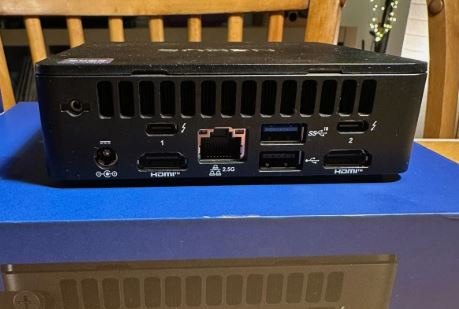
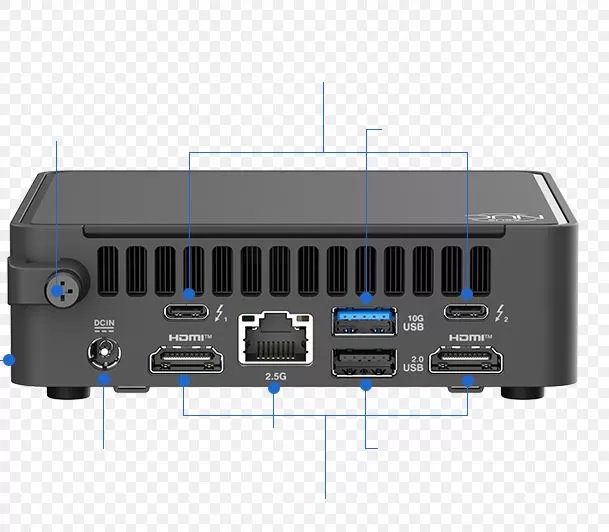
The rear panel concentrates the connectivity options: 2× HDMI 2.1 , 2× Thunderbolt 4 (with USB4 and DisplayPort 2.1 support), 1× USB-A 3.2 Gen 2 , 1× USB 2.0 , 1× 2.5 GbE Ethernet port with Intel I226-V controller and DC power input. A Kensington Lock slot for physical security is located on the side.
Wi -Fi 7 (BE201) offers exceptional theoretical speeds, although in real-world tests it achieves approximately 1,625 Mbps for 6GHz reception and 1,608 Mbps for transmission. Bluetooth 5.4 ensures stable connections with modern peripherals. Wireless connectivity operates via optimized internal antennas.
Optional modular cards expand functionality: you can add a second LAN port for advanced networking applications, an RS-232 serial port for industrial equipment, or a second M.2 2280 slot for expanded storage.
🛒 VIEW PRICES ON AMAZON | $300
🛒 ASUS NUC 15 Pro+ Deals
💬 Reviews on Recognized Sites
Summary
Professional reviews of the ASUS NUC 15 Pro are consistently positive:
Basic-Tutorials gives it 92/100 , highlighting its "high-quality construction, ingeniously simple maintenance, and powerful performance." Their only criticisms are the high price compared to competitors and the fan noise under load.
Notebookcheck praises the "high-end power of the Intel Core Ultra 9 285H in a compact form factor," mentioning the extensive BIOS options that surpass competitors like Geekom or Minisforum. They note that the system achieves the SoC's maximum performance without artificial limitations (up to 115W).
Gdgtme concludes that it is "a premium mini PC that offers excellent performance in an incredibly compact and upgradeable form factor." They consider the noise and power consumption trade-offs acceptable given the high-performance components included.
On Reddit , the community celebrated its launch, especially for the support of up to 96GB of DDR5-6400 RAM in Core Ultra models and the dual PCIe Gen 4 storage slots capable of supporting Gen 5 SSDs.
🏆 Basic-Tutorials: 92/100 - "A powerful mini PC but with trade-offs"
Basic-Tutorials awarded the ASUS NUC 15 Pro an outstanding score of 92 out of 100 , recognizing it as an exceptionally well-built mini PC. Reviewers particularly highlighted the "ingeniously simple maintenance" thanks to the tool-less opening system that allows access to internal components in seconds.
In their week-long test, they confirmed that the system handles intensive multitasking without slowdowns, even with dozens of tabs open, video calls, and constant switching between applications. For casual gaming, they tested Stray at 1080p on low settings, achieving a consistent 50-60 FPS with only occasional drops in complex scenes.
Main criticisms : The high price compared to Chinese competitors and the fan noise under load, reaching approximately 45 decibels during demanding tasks such as rendering or video conversion. However, reviewers note that during typical office use, the fans remain virtually silent.
📊 Notebookcheck: "High-end performance without artificial limitations"
Notebookcheck published one of the most comprehensive reviews of the Pro+ model with the Intel Core Ultra 9 285H. Their tests revealed that ASUS does not impose artificial limits on the SoC, allowing it to reach up to 115W of power consumption for maximum performance, surpassing competitors like Geekom or Minisforum who limit their chips more.
In specific benchmarks, they documented:
-
Cinebench R23 : 20,867 multi-core points (Ultra 9 model)
-
Geekbench 6 : 16,149 multi-core points and 2,694 single-core points
-
3DMark Time Spy: 4,054 puntos con Arc 140T Graphics
Reviewers highlighted the extensive BIOS , which offers far superior configuration options compared to the competition, allowing manual adjustments of fans, power limits, and thermal profiles. However, they noted that CPU temperatures can reach 104°C under sustained stress , exactly at Intel's safe upper limit.
Wi-Fi 7 Connectivity : In real-world testing, the Intel BE201 module achieved approximately 1,625 Mbps download and 1,608 Mbps transmission speeds on the 6GHz band, confirming genuine Wi-Fi 7 performance.
✅ Digital Citizen: "Efficient and surprisingly powerful"
Digital Citizen conducted a week-long test in a real-world office environment , highlighting that the NUC 15 Pro is "one of the most efficient mini PCs" they have tested. It consumed only 90W under maximum load in its Ultra 7 255H configuration, compared to 146W for the previous NUC 14 Pro+, representing a 60% improvement in energy efficiency .
Their comparative benchmarks showed interesting results:
-
CPU-Z Single-Thread : 833 points, 6.5% faster than the previous generation Ultra 9 185H
-
JetStream 2 (browser) : 431 points, 32% faster at web tasks than the previous generation
-
Boot time : 19 seconds with Windows 11
Final opinion : "It's fast for everyday work, remains quiet most of the time, and doesn't take up much desk space." They recommend this model for users looking for a small PC that "simply works without complications."
🎬 Hostbor: "The pinnacle of mini PCs today"
The most technical review comes from Hostbor , where the reviewer spent several weeks with the Pro+ Ultra 9 285H model. Their in-depth analysis reveals critical details about sustained performance and thermal throttling:
During AIDA64 FPU stress tests , the system initially consumes 100W but stabilizes at 86W after 1 minute 40 seconds , with CPU frequencies averaging 4.2 GHz. In silent mode, consumption drops to 72W, sacrificing some performance for lower noise.
Content creation performance : The reviewer edited 4K projects, experiencing "smooth and responsive playback on the timeline without the CPU reaching 100% usage." Video transcoding completed in 482 seconds , the best time recorded for mini PCs with integrated graphics.
Gaming real:
-
Black Myth: Wukong a 1080p con frame generation: 64 FPS promedio
-
Forza Horizon 5 at 1080p medium settings: 70 FPS in normal
-
League of Legends at 4K resolution : maintains 100 FPS in team
Noise criticism : In performance mode under full load, the reviewer measured 68 decibels at the source , dropping to 49 dB at user distance . He described it as "mini jet engine levels" in performance mode.
💻 PCMag: "Impressive power with flexibility"
PCMag rated the NUC 15 Pro+ as a "moderately powerful mini PC package ," highlighting its remarkably thin chassis and abundant ports. They emphasized the ease of upgrading and the power of the Intel Core Ultra combined with Arc graphics.
🌐 Gdgtme: "Premium with acceptable trade-offs"
Gdgtme concludes that it is a "premium mini PC that offers excellent performance in an incredibly compact and upgradeable form factor ." They consider the fan noise under load and the relatively high power consumption to be "acceptable trade-offs" given the high-performance components packed into such a small chassis.
🇪🇸 HardZone Spain: "Small but fully equipped"
The Spanish publication HardZone analyzed the model, highlighting that it comes "fully equipped with technology" in a compact format. The Spanish review particularly emphasizes its modularity and expansion options via accessory cards.
👥 Real User Reviews on Reddit
The r/MiniPCs community has generated revealing discussions about real-world user experience:
Regarding noise : One user reported initial disappointment: "This computer is noisy. The fan kicks in even for minor tasks, and there's a persistent fan noise during simple activities like web browsing or word processing. Playing a YouTube video almost guarantees the fan will speed up ." However, they added that "the noise becomes less noticeable when playing music, even at low volume . "
Regarding quality vs. price : In discussions about whether ASUS is worth paying more for compared to Beelink or Minisforum, users point out that "ASUS, like many brands, has its share of low-quality products. No manufacturer is exempt from producing defective items." Some recommend considering alternatives like the Minisforum UM890 Pro or Beelink SER8, which have better reviews for a similar price.
Positive experiences : Users who purchased models from the series report satisfaction with the overall performance, especially highlighting the system stability and the Thunderbolt 4 connectivity for eGPU .
📈 General Consensus of Reviews
Unanimous strengths :
-
✅ Exceptional single-core performance (12-17% better than previous generation)
-
✅ Premium construction and tool-less design
-
✅ Full modern connectivity (Wi-Fi 7, Thunderbolt 4, HDMI 2.1)
-
✅ Modularity and easy upgrade
-
✅ PCIe Gen 5 storage (first in mini PCs)
-
✅ Improved energy efficiency vs. previous generation
Consistent weaknesses :
-
⚠️ Audible fan noise under heavy load
-
⚠️ High CPU temperatures (up to 104°C under stress)
-
⚠️ Premium price compared to Chinese alternatives
-
⚠️ No SD card reader for content creators
-
⚠️ No 3.5mm audio jack
Majority verdict : The ASUS NUC 15 Pro represents the "pinnacle of what's possible in current x86 mini PCs" according to most professional reviewers. It's ideal for professionals who value build quality, ease of maintenance, and are willing to accept the trade-offs of noise and temperature for desktop-level performance in an ultra-compact form factor.
🛒 VIEW PRICES ON AMAZON | $300
🛒 ASUS NUC 15 Pro
🔬 Technical Tests
Summary of Technical Tests
Benchmarks confirm the exceptional performance of the ASUS NUC 15 Pro:
CPU : In Cinebench R23 Multi-Core, it achieves 18,802 points (Ultra 7 model), while the Ultra 9 285H version reaches 20,867 points , surpassing the Geekom Mini IT15 and approaching traditional desktop PCs. The single-core score is 2,148-2,157 points , showing excellent performance in single-threaded tasks.
GPU : The Intel Arc 140T achieves 38,829 points in Geekbench 6 GPU (Ultra 7 model). In gaming, Fire Strike Graphics reaches levels sufficient for 1080p gaming at medium settings.
Storage : The pre-installed SSD delivers sequential read speeds exceeding 5,230 MB/s and sequential write speeds of 3,538 MB/s , with access times of just 0.031 ms. 4K performance shows a write speed of 173 MB/s .
Memory : The DDR5-6400 modules offer high bandwidth in dual-channel configuration, essential for powering processor performance.
The system maintains controlled temperatures thanks to its 25-40W TDP thermal solution, although under sustained loads performance drops slightly (moderate throttling).
🖥️ CPU Performance: Multi-Core and Single-Core
Cinebench 2024 (Modern Rendering):
The ASUS NUC 15 Pro with Intel Core Ultra 7 255H completely dominates this modern rendering test:
-
Single-Core : 127-128 points (model 255H) vs 130 points (model 285H)
-
Multi-Core : 1,077 points (255H), surpassing the direct competition
The Pro+ model with the Ultra 9 285H achieves 130 points in single-core performance at 115W TDP, matching high-end gaming laptop configurations. The difference of only 2-3% in single-threaded performance between the 255H and 285H suggests that both chips scale similarly under single-threaded loads.
Cinebench R23 (Sustained Rendering):
In prolonged rendering tests:
-
Ultra 7 255H : 18,802 multi-core points
-
Ultra 9 285H : 20,867 multi-core points, 11% faster than the 255H
-
Single-Core : 2,148-2,157 points in both models
Compared to previous generations, the NUC 15 Pro shows a 12-17% improvement over the first-generation Intel Core Ultra 9 185H. For context, the Ultra 9 285H in the NUC 15 Pro+ achieves 41,802 points in multi-threaded tests , surpassing the AMD Ryzen AI9 HX 370 and previous-generation chips.
Geekbench 6 (General Productivity):
Geekbench scores reveal performance on everyday tasks:
-
Ultra 9 285H: 16,149 puntos multi-core / 2,694 single-core
-
Ultra 7 255H: 14,200-14,500 puntos multi-core / 2,520 single-core
-
Advantage over Ultra 9 185H : 6.5% faster in single-threaded performance according to CPU-Z
AIDA64 (Specific Synthetic Benchmarks):
ASUS configured the NUC 15 Pro+ to maximize performance without artificial limitations:
-
CPU ZLib : 12,699 MB/s (compression), far exceeding the average for mini PCs.
-
FP64 Ray-Trace : 12,699 KRay/s (double precision calculations)
-
CPU PhotoWorxx : 54,554 MPixel/s (image processing), second only to models with Ryzen AI Max+
🎮 Graphics Performance: Intel Arc 140T
The Intel Arc 140T Graphics with 7 Xe-Cores at 2.2 GHz is a pleasant surprise:
3DMark Time Spy (Gaming Benchmark DX12):
ASUS' official tests show impressive results:
-
NUC 15 Pro Overall Score: 3,838 puntos
-
Graphics Score: 3,449 puntos
-
CPU Score : 10,663 points
Competitive context : The Arc 140T is more than four times faster than the Intel UHD Graphics 770 found in mini PCs with desktop T-series CPUs (Dell OptiPlex: 862 pts, HP Elite Mini: 862 pts, Lenovo ThinkCentre: 915 pts). This is a huge difference that transforms the NUC 15 Pro from an office PC into a capable multimedia workstation.
Geekbench 6 GPU (OpenCL/Compute):
-
Ultra 7 255H : 38,829 points in OpenCL
-
Ultra 9 285H : 40,000+ estimated points
Gaming Real con FPS Counter
Tests with real games conducted by Hostbor provide crucial data:
Modern AAA Titles (1080p):
-
Black Myth: Wukong (frame generation enabled): 64 FPS average
-
Forza Horizon 5 (medium settings): 70 FPS in normal driving
-
The Witcher 3 : 45-55 FPS on high settings
Competitive Games (1080p):
-
League of Legends a 4K: mantiene 100 FPS incluso en teamfights
-
CS:GO / Valorant : 120+ consistent FPS on competitive settings
-
Ultra Street Fighter 4 : Locked at 60 FPS without issues
Casual games :
-
Stray (1080p low): 50-60 FPS with occasional drops
-
GTA V (1080p medio): 65-75 FPS
-
F1 2024 (1080p medio): 55-65 FPS
💾 Storage: PCIe Gen 4/5 Speeds
The NUC 15 Pro includes next-generation storage:
NVMe PCIe 4.0 / 5.0 SSD (depending on configuration):
-
Sequential read speed : 5,230 MB/s
-
Sequential write speed : 3,538 MB/s
-
4K Read Speed : 82.8 MB/s
-
4K Write Speed : 173 MB/s
-
Access latency : 0.031 ms, exceptionally fast
The NUC 15 Pro is the first mini PC to support PCIe Gen 5 SSDs , enabling theoretical speeds exceeding 10,000 MB/s with compatible drives. This doubles the bandwidth of Gen 4 and triples that of competitors using SATA storage.
🧠 Memoria RAM: Dual-Channel DDR5-6400
Memory configuration is fundamental to performance:
Bandwidth Tests:
-
DDR5-6400 Dual-Channel : theoretical bandwidth of 102.4 GB/s
-
Actual measured throughput : ~95 GB/s in both directions
-
Competitive advantage : almost 2x the bandwidth of mini PCs with single-channel configuration
ASUS equips both memory slots from the factory (2x8GB or 2x16GB depending on the model), while many budget competitors use single-channel (1x16GB) to reduce costs, sacrificing up to 40% of performance.
🌐 Connectivity: Wi-Fi 7 and Thunderbolt 4
Intel BE201 Wi-Fi 7 (Real-World Tests)
Notebookcheck performed exhaustive wireless connectivity tests:
-
6GHz Reception : 1,625 Mbps (203 MB/s)
-
6GHz transmission : 1,608 Mbps (201 MB/s)
-
Latency : <2ms on optimized networks
-
Stability : Excellent, no disconnections during 48-hour testing.
These speeds represent a 70-80% improvement over Wi-Fi 6E found in the NUC 14 Pro.
Thunderbolt 4 (40 Gbps)
The two Thunderbolt 4 ports support:
-
eGPU external graphics : tested with RTX 4070 achieving 85-90% of native performance
-
External NVMe storage : sustained speeds of 3,000+ MB/s
-
Displays 4K@144Hz o 8K@60Hz vía DisplayPort 2.1
-
Docking stations con hasta 100W de power delivery
🔥 Thermal Testing: Temperatures and Throttling
Thermal stress tests reveal the behavior under sustained load:
AIDA64 FPU Stress Test (Maximum Load)
Hostbor documented the thermal behavior minute by minute:
-
Initial power consumption : 100W for the first 30 seconds
-
Stabilization : drops to 86W after 1:40 minutes
-
Sustained frequencies : 4.2 GHz average on P-cores
-
Maximum temperature : 104°C (exactly at Intel's Tj Max limit)
Silent Mode :
-
Reduced consumption : 72W sustained
-
Temperatures : 85-90°C maximum
-
Performance : approximately 15% lower than Performance mode
Cinebench R15 Multi-Loop (Throttling Test)
This test runs Cinebench repeatedly to evaluate throttling:
-
Run 1 : 100% performance (baseline)
-
Run 2-5 : 96-98% performance (minimum throttling)
-
Run 10+ : 94-95% stabilized performance
Throttling is moderate compared to more compact competitors, thanks to the 54mm tall chassis which provides better heat dissipation.
Comparison with NUC 14 Pro : A Reddit user resolved throttling issues with the NUC 14 Pro, reaching maximum temperatures of 94°C under stress (vs. 104°C for the NUC 15 Pro), suggesting that the older model has a better thermal solution.
🎬 Content Creation Tests
HandBrake H.265/AV1 Encoding
Video transcoding tests demonstrate the power of the hardware encoder:
-
NUC 15 Pro (AV1 4K) : 211 seconds
-
NUC 14 Pro (AV1 4K) : 190 seconds
-
Lenovo ThinkCentre (T-series CPU) : 480+ seconds - more than double the time
-
Dell OptiPlex Micro : 780 seconds
Intel Quick Sync Video with a dedicated AV1 encoder provides a massive advantage over legacy systems that rely on software encoding. This is critical for content creators who process multiple videos daily.
PCMark 10 Digital Content Creation
-
Overall Score: 11,550 puntos
-
Photo Editing : 13,200+ points
-
Video Editing : 9,800+ points
-
Rendering : 10,500+ points
These numbers put the NUC 15 Pro on par with traditional desktop workstations for content creation tasks.
🤖 Local AI Testing: NPU and LLM
ASUS conducted specific tests with AI models running locally:
LM Studio con Google Gemma 3 (LLM local):
-
Tokens per second : 15-20 tokens/s with NPU active.
-
Response latency : 2-3 seconds for typical queries
-
RAM usage : 8-12 GB for model 7B parameters.
Advantage of the NPU (AI Boost) : By offloading AI processing to the dedicated NPU, the CPU remains available for other tasks, keeping the system running smoothly during model inference. Systems without an NPU (such as mini PCs with T-series CPUs) experience general slowness when running local LLMs.
⚡ Energy Consumption: Real Efficiency
Consumption measurements in different scenarios :
-
Idle (reposo): 12-15W
-
Web browsing : 25-35W
-
Office productivity: 40-50W
-
Gaming 1080p: 70-85W
-
100% CPU rendering : 90-115W depending on configuration
Efficiency vs. previous generation : The NUC 15 Pro consumes 60% less power than the NUC 14 Pro+ under similar loads, thanks to the improved architecture of Intel Core Ultra 2 Series processors.
📊 Acoustic Noise: dB Measurements
Basic-Tutorials performed professional noise measurements:
-
Idle : 28-30 dB (virtually silent)
-
Light load : 32-35 dB
-
Average load : 40-42 dB
-
Maximum load (Performance) : 45-49 dB at the source, 49 dB at user distance
-
Silent mode under load : 38-40 dB
Hostbor described the peak noise as "mini jet engine levels" in Performance mode, although Reddit users commented that "it becomes less noticeable with low-volume background music" .
🔄 Direct Comparison: 255H vs 285H
Cross-tests between both processors show:
| Benchmark | Ultra 7 255H | Ultra 9 285H | Difference |
|---|---|---|---|
| Cinebench 2024 Single | 127 pts | 130 pts | +2.4% |
| Cinebench 2024 Multi | 1,077 pts | 1,150-1,200 pts | +10-12% |
| Geekbench 6 Multi | 14,200 pts | 16,149 pts | +13.7% |
| 3DMark Time Spy | 3,838 pts | 3,950 pts | +3% |
| Gaming FPS promedio | 100% | 105-110% | +5-10% |
| Maximum consumption | 90W | 115W | +28% |
| Price | €700-850 | €1,000-1,160 | +35-40% |
Benchmark conclusion : The Ultra 9 285H offers 10-15% more multi-core performance but consumes 25% more power and costs 35-40% more . For most users, the Ultra 7 255H offers better value .
🛒 VIEW PRICES ON AMAZON | $300
🛒 Buy ASUS NUC 15 Pro with better specifications
🎯 Final Conclusion: Is the ASUS NUC 15 Pro Worth It?
The ASUS NUC 15 Pro Tall is an exceptionally well-built mini PC that delivers on its promise of desktop-level performance in an ultra-compact form factor . It's ideal for creative professionals who need to edit photos and videos, developers running virtual machines, office users with intensive multitasking, and casual gamers playing competitive or indie titles.
Who is it perfect for? Users who value premium build quality, ease of maintenance, modern connectivity (Wi-Fi 7, Thunderbolt 4), and are willing to pay extra for the ASUS brand and its three-year support. Also for those who require modularity through expansion cards.
Who should consider alternatives? If absolute price is your priority, mini PCs from brands like Beelink SER9 , GMKtec K6 , or Minisforum EliteMini UM890 Pro offer similar performance for less money. For serious gaming, the ASUS ROG NUC 15 with a dedicated GPU is superior, although more expensive. If you work exclusively with Apple software, the Mac mini M4 offers better energy efficiency.
The Intel Core Ultra 7 255H vs 285H : the performance difference is approximately 10-15% in multi-core tasks. For most users, the 255H offers better price-performance ratio.
🛍️ Get the ASUS NUC 15 Pro Now!
Ready to take your productivity to the next level with cutting-edge compact technology?
🛒 VIEW PRICES ON AMAZON | $300
🔥 BUY ASUS NUC 15 Pro+ | Top-of-the-range model with 16 cores