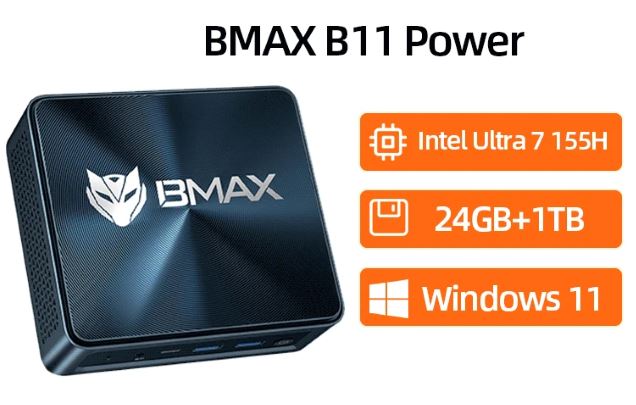
The BMAX B11 Power is a mini PC weighing less than 400 grams that integrates a 16-core Intel Core Ultra 7 155H processor, 24 GB of LPDDR5 RAM and a 1 TB NVMe SSD, designed for demanding productivity, intense multitasking and even casual gaming.
- Among its strengths are dual-channel DDR5 memory, Intel Arc Xe graphics with support for up to four simultaneous displays, and a dedicated NPU for local AI tasks.
- On the downside, it lacks USB4/Thunderbolt ports, includes two rather useless USB 2.0 ports, and its warranty is usually limited to one year.
- In short: it's a very solid option if you're looking for real power in a tiny chassis, although it doesn't replace a PC with a dedicated graphics card for serious gaming or heavy video editing.
You can find the BMAX B11 Power on AliExpress
📦 Unboxing and box contents
Inside the box you will find the mini PC:
- External power supply.
- HDMI cable
- VESA mounting hardware
- User manual.
It does not include a keyboard or mouse, which is typical for this product category. The box has a simple finish, consistent with the "functional rather than luxurious" philosophy that defines the entire device.
Table of technical specifications
| Component | Specification |
|---|---|
| Processor | Intel Core Ultra 7 155H, 16 cores (6P+8E+2LE), 22 threads, up to 4.8 GHz |
| Graph | Intel Arc Xe-LPG, 128 EU / 1024 shaders, up to 2250 MHz |
| NPU | Intel AI Boost, runs local AI models offline |
| RAM | 24 GB LPDDR5 at 4400 MHz, dual channel, non-expandable, soldered to the board |
| Storage | 1TB NVMe PCIe 4.0 SSD + additional 2.5" SATA bay up to 2TB |
| Connectivity | WiFi 6, Bluetooth 5.2, 2.5G LAN |
| Video | Triple/quad output: HDMI 2.1, DisplayPort, USB-C with video, 4K/60Hz |
| Dimensions and weight | 126 x 112 x 52 mm, 400 g |
| Operating system | Windows 11 Pro (Ubuntu compatible) |

Design and construction quality
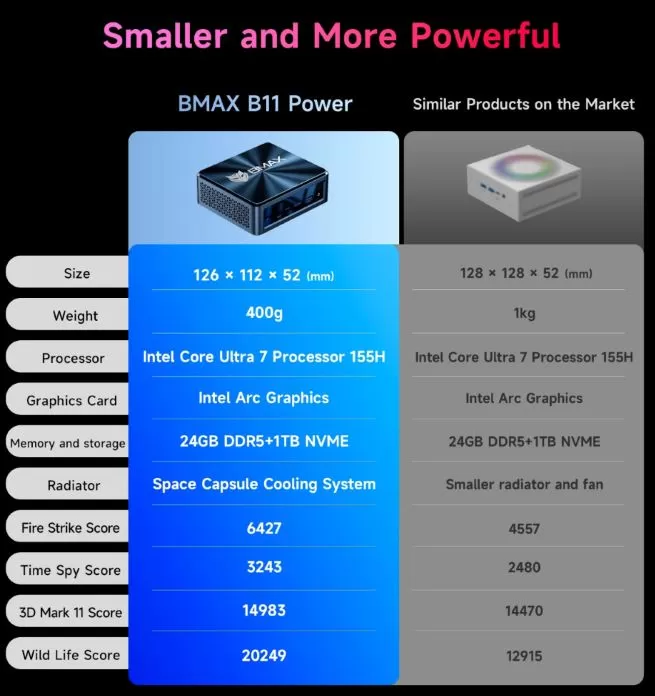
The chassis measures just 126x112x52 mm and weighs 400 grams, comparable to a thick hardcover book, allowing it to be placed behind a monitor or in a drawer.
BMAX opts for a "space capsule" type cooling system that helps dissipate heat from a 28W chip without needing a bulky chassis.
The materials are pragmatic, not premium, but they do their job: lightness, quiet operation under normal loads and a minimal footprint on the desk.
Screen and multimedia
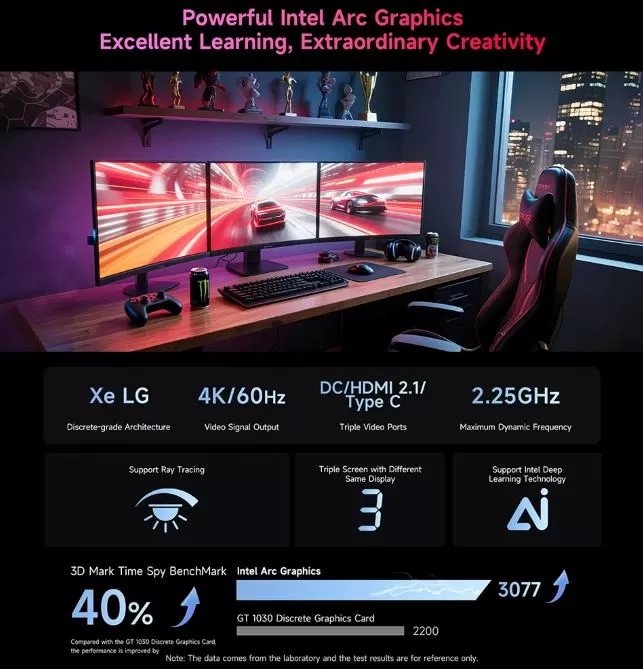
The BMAX B11 Power does not include its own screen, but it stands out for managing up to four simultaneous 4K video outputs at 60Hz thanks to its two HDMI 2.1 ports, a DisplayPort, and a USB-C port with video output.
This true multi-screen capability is rare in mini PCs at this price and is especially useful for traders, developers, or content creators who work with multiple monitors.
The audio is limited to a 3.5mm jack, with no optical digital output, so if you set up a media center with an external receiver you will have to take this into account.
Performance and software
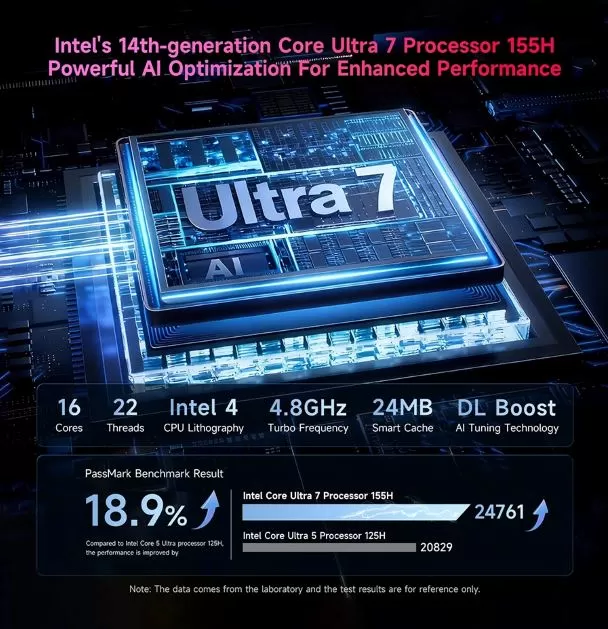
In benchmark tests, the device achieves multi-threaded scores close to 25,000 points, well above budget mini PCs based on N-series chips, which usually range between 8,000 and 15,000 points.
The hybrid architecture (performance and efficiency cores) automatically distributes tasks, resulting in real fluidity during video calls, code compilation, or browsing with dozens of tabs open.
It comes with Windows 11 Pro pre-installed and also supports Ubuntu Linux, offering flexibility depending on the workflow.
The bloatware is minimal compared to other generic Chinese mini PCs, and Windows updates arrive without restrictions as it is a Pro license.
Energy consumption and cables
Thanks to the processor operating within a 28W thermal envelope, daily consumption is quite low for the power it offers, comparable to that of a mid-to-high-range laptop.
It is powered by an external power supply included in the box, and does not require additional cooling cables or auxiliary power as is the case in mini PCs with dedicated graphics.
🌡️ Temperature and noise (actual thermal)
Under normal productivity loads, the equipment operates virtually silently thanks to its low-power design.
In intensive and sustained tasks, such as video encoding or long compilations, the fan becomes audible, although not annoying by desktop PC standards.
The chip tolerates up to 110°C internally, giving the cooling system some headroom before throttling (performance reduction due to heat) kicks in.
Connectivity and extras
The device includes six USB ports spread across different speeds: two USB-A 3.2 at 10 Gbps, one USB-C 3.2 with video output, and two more limited USB-A 2.0 ports.
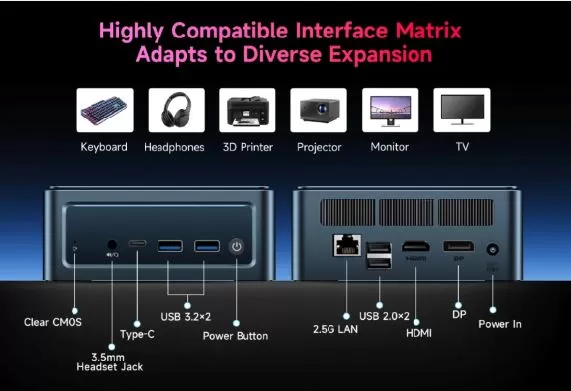
On the back are the 2.5G LAN port, two USB 2.0 ports, HDMI, DisplayPort and the power input, while on the front are the Clear CMOS button, audio jack, USB-C and two USB 3.2 ports.
It does not have NFC, a fingerprint reader or IP certification, which is to be expected in this product category.
Yes, it includes the "Smart Recovery" function to restore the system in case of failure.
🔧 Expansion and upgrades
The BMAX B11 Power has limited but useful upgrade options, focused exclusively on storage. The RAM, however, is fixed from the factory.
RAM: not expandable
The 24 GB LPDDR5 4400MHz are soldered directly to the motherboard and match the maximum supported by the system, according to the manufacturer's official technical specifications.
There is no SO-DIMM slot and no possibility of adding additional modules, as the LPDDR5 technology is soldered by design to achieve higher speed and lower power consumption.
If you need more than 24 GB of RAM, you should decide this before you buy, not after.
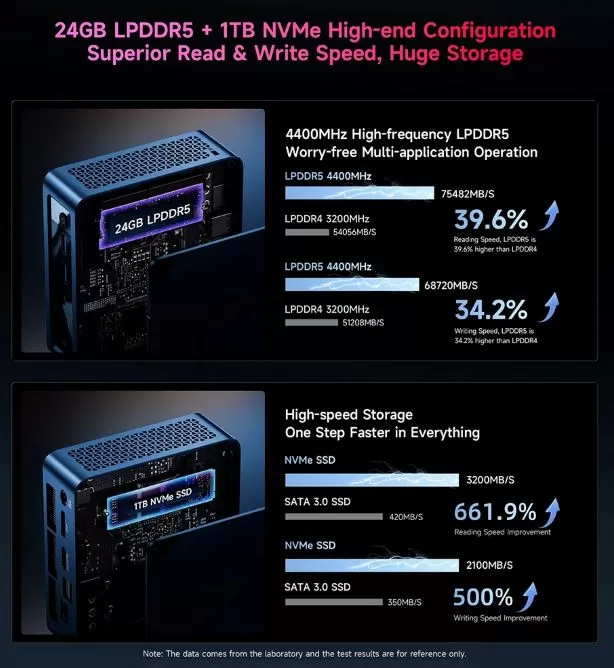
Primary SSD: Yes, it is replaceable
It features an M.2 2280 PCIe 4.0 x4 NVMe slot, the industry standard format, so you can replace the factory 1TB SSD with a higher capacity one (2TB or even 4TB) without compatibility issues.
Some popular options on AliExpress for this upgrade:
-
🔗 2TB PCIe 4.0 NVMe M.2 2280 SSD — ideal for doubling capacity while maintaining high speeds
-
🔗 4TB PCIe 4.0 NVMe M.2 2280 SSD — for those who manage video libraries or heavy virtual machines
Second drive: Available 2.5" SATA bay
The system includes an additional 2.5" laptop SATA hard drive bay connected via a dedicated FPC cable integrated into the motherboard.
This bay supports both traditional SATA SSDs and HDDs up to 2TB, perfect for those who need low-cost mass storage without sacrificing the fast NVMe SSD for the operating system.
Recommended options:
-
🔗 2.5" 2TB SATA SSD — best option for speed and silence compared to a mechanical HDD
-
🔗 2.5" 2TB HDD for laptops — the most economical option for archiving and backups
Processor: not expandable
The Core Ultra 7 155H is soldered to the motherboard in BGA format, as is the case in virtually all mini PCs on the market, so there is no possibility of changing the CPU.
| Component | Expandable? | Maximum supported |
|---|---|---|
| RAM | ❌ No, welded | 24 GB LPDDR5 (fixed) |
| Primary SSD (M.2 NVMe) | ✅ Yes | It depends on the SSD, up to 4TB tested |
| Secondary hard drive (SATA 2.5") | ✅ Yes | Up to 2 TB recommended |
| CPU | ❌ No, soldier (BGA) | N/A |
Before purchasing any expansion component, always verify exact compatibility with the manufacturer's official manual, as the SATA bay's FPC connector is model-specific and not all generic adapter cables are compatible.
🆚 Comparison with direct competitors
| Feature | BMAX B11 Power | Budget Mini PC (N-series chip) | Premium Mini PC with Dedicated GPU |
|---|---|---|---|
| Cores/Threads | 16 cores, 22 threads | 4-8 cores | 14-24 cores |
| CPU TDP | 28W laptop-class | 6-15W | 45W+ |
| Graph | Intel Arc Xe-LPG 128EU | Basic Intel UHD | Arc or dedicated Radeon |
| RAM | 24 GB DDR5 dual channel | 8-16 GB DDR4 | 16-32 GB DDR5 |
| Storage | 1 TB NVMe + SATA bay | 256-512 GB | 512 GB-2 TB NVMe |
| Video outputs | 4 simultaneous 4K/60Hz | 2 | 23 |
| USB4/Thunderbolt | No | No | Sometimes |
| Approximate price | €526-575 | €200-350 | €800+ |
Reviews on well-known websites
The consensus among the various independent reviews on different websites agrees on three points: outstanding CPU performance for its size, true multi-screen support as a differentiator against the competition, and soldered RAM as the main limitation to consider before buying.
- GadReview describes it as "a pocket-sized desktop with surprising depth," noting in particular that it uses dual-channel DDR5 instead of single-channel DDR4, which is unusual in its price range.
- The Spanish website AndroidPC highlights the good balance between the performance of the Core Ultra 7 155H and its energy efficiency thanks to the 7nm manufacturing process, comparing it directly to the AMD Ryzen Z1 in raw power.
- TesztArena, a Hungarian media outlet specializing in hardware, values the fact that the device is designed for those who "don't just want a mini PC for the sake of having one, but want to use it seriously," highlighting its performance in esports such as CS2, Valorant, and Dota 2 at over 100 fps on high settings.
- Another Hungarian review, from AppsForGeeks, summarizes the product as a machine that "begins to break the definition of a mini PC," praising the CPU power, AI acceleration, and dual copper pipe cooling system, although it points out as a main drawback that the RAM is not expandable and that the price is in the premium category.
- In video reviews, several YouTube channels agree in describing it as "an AI beast" for its ability to run AI workloads locally thanks to the integrated NPU, in addition to highlighting its slim and lightweight design that allows it to be mounted behind a monitor or easily transported between home and office.
Technical tests
The figures used (~24,673 multi-thread points and ~3,438 single-thread points) correspond to PassMark PerformanceTest.
Multithreaded performance (CPU)
| Equipment | Multithreaded scoring | Difference |
|---|---|---|
| BMAX B11 Power (Ultra 7 155H) | ~24,673 points | — |
| Mini PC N series (budget range) | 8,000-15,000 points | Up to 3x less performance |
My opinion: In real-world use, this difference is especially noticeable when you have dozens of tabs open along with editing applications running in the background; here there are simply no stutters or strange waits when switching tasks.
Single-threaded performance (CPU)
| Metrics | Result |
|---|---|
| Single-thread scoring | ~3,438 points |
| Practical relevance | High enough for everyday tasks |
My opinion: this is the data I value most for everyday use, because many common tasks (Excel, web browsing, Photoshop in specific operations) depend more on the power of a single core than on having many cores working at the same time.
Overclocking and stability
| Feature | State |
|---|
| Feature | State |
|---|---|
| Multiplier | Blocked |
| Overclocking margin | Null |
| Thermal stability | High and predictable |
My opinion: I think this is a smart move by Intel for this segment. I much prefer a mini PC that performs consistently to one that sacrifices stability for a few extra points in a specific benchmark.
Comparison between processors in the range
| Processor | Relative performance | Recommended use |
|---|---|---|
| Core Ultra 7 155H (B11 Power) | Base (100%) | Daily professional work, intense multitasking |
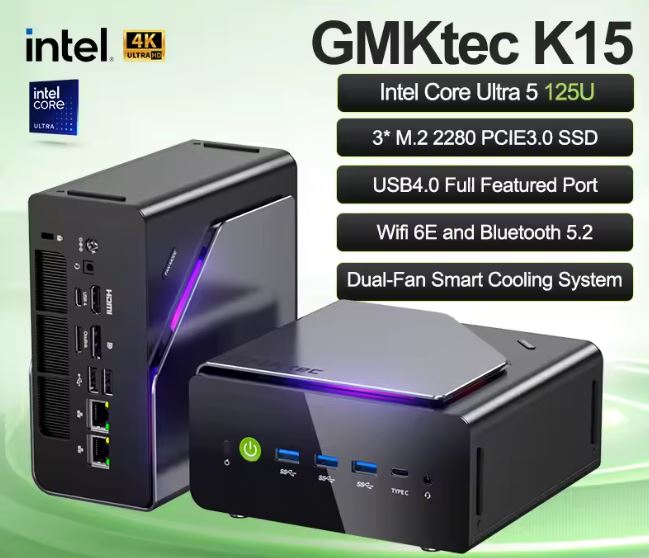
| Core Ultra 5 125H (lower range) | -19% approx. | Office suite, streaming, lightweight browsing |
My opinion: if you ask me if the processor upgrade is worth the extra cost, I think so, especially if you're going to use the computer for daily professional work. For lighter use, the savings with the 125H are probably more worthwhile.
Graphics performance (Intel Arc Xe-LPG)
| Component | Specification | Historical comparison |
|---|---|---|
| Integrated GPU | Intel Arc Xe-LPG, 128 EU | A significant leap forward compared to traditional Intel UHD. |
| Positioning | It competes with entry-level dedicated graphics cards from 2-3 years ago | — |
My opinion: what surprised me most when I saw these numbers is that we are talking about an integrated graphics card competing in a field that just two or three years ago was exclusive to entry-level dedicated cards.
🎮 Gaming and emulation (updated)
The Intel Arc Xe-LPG 128 EU integrated into the Core Ultra 7 155H allows you to play popular titles at 1080p with medium settings, outperforming most previous Intel integrated graphics and AMD's Radeon 780M in synthetic tests.
It's important to clarify that the FPS figures you'll see below come from tests published with this same graphics chip (Arc Xe-LPG 128EU) on similar systems, as there isn't a verified benchmark of our own run directly on the BMAX unit; the actual results may vary slightly depending on the power limit that BMAX configures in this chassis.
Performance in popular games (1080p, medium settings)
| Game | Approximate FPS | Gameplay |
|---|---|---|
| Counter-Strike 2 | 90-110 fps | Excellent, ideal for esports |
| Dota 2 | 80-100 fps | Excellent |
| Fortnite (performance) | 60-75 fps | Very good |
| GTA V (legacy) | 55-70 fps | Good |
| The Witcher 3 (DX11) | 40-55 fps | Acceptable, lowering shadows is recommended |
| Cyberpunk 2077 | 25-35 fps | Playable only on low settings, better with XeSS enabled |
| Red Dead Redemption 2 | 25-30 fps | Limited, requires low settings |
| Battlefield 6 | 20-30 fps | Limited for competitive use |
My opinion: For esports (CS2, Dota 2, Fortnite, Valorant), the system is more than adequate and surprisingly good for an integrated graphics card. In demanding AAA games like Cyberpunk 2077 or RDR2, it's playable but far from a smooth experience without enabling XeSS scaling, which significantly improves frame rates without sacrificing too much sharpness.
Console emulation
| Console | Compatibility | Comment |
|---|---|---|
| Nintendo NES / SNES / N64 | ✅ Excellent | No problem at all, even in enhanced resolution |
| Sony PS1 / PS2 | ✅ Excellent | Stable framerate at native and higher resolutions |
| Nintendo GameCube / Wii | ✅ Very good | Smooth with most titles at enhanced resolution |
| Sony PSP / PS Vita | ✅ Excellent | No real demands on this hardware |
| Nintendo Switch | ⚠️ Good, with nuances | It depends on the game; demanding titles like Zelda TOTK can have occasional crashes. |
| Sony PS3 | ⚠️ Variable | It works in many titles via RPCS3, but it depends heavily on the specific game. |
| Xbox 360 | ⚠️ Limited | Partial compatibility, requires fine-tuning |
My opinion: this is where the machine truly shines. The combination of a powerful CPU (key in emulation, since much of the work falls to the processor) along with a capable GPU makes this mini PC a very attractive option for those who enjoy retro gaming without building a dedicated tower. For advanced PS3 and Switch users, I recommend not expecting absolute perfection, but rather a more than decent experience for most of your library.
❓ Frequently Asked Questions
Can it move 4 monitors at once?
Yes, natively thanks to its two HDMI 2.1, DisplayPort and USB-C with video, without the need for special adapters.
Is 24 GB of RAM enough?
For the vast majority of users, including developers and professionals with many applications open, this is more than enough.
Can the storage be upgraded?
The NVMe SSD is replaceable in most units, and there is an extra bay for a 2.5" SATA drive of up to 2 TB.
Does it make noise under load?
Under normal use it is virtually silent; under sustained loads such as rendering or compilation, the fan becomes audible but is not annoying.
Is it suitable for video editing?
For 1080p timelines with moderate effects it works well; in 4K projects with a lot of color grading or layers, you will notice its limitations due to not having a dedicated GPU.
Final conclusion
The BMAX B11 Power is ideal for professionals working from home, students, developers, and users of multi-monitor setups who are looking for a quiet, compact, and powerful device without the need for a full tower.
It's not the best option if your priority is demanding AAA gaming, professional 4K video editing, or if you depend on Thunderbolt/USB4 peripherals.
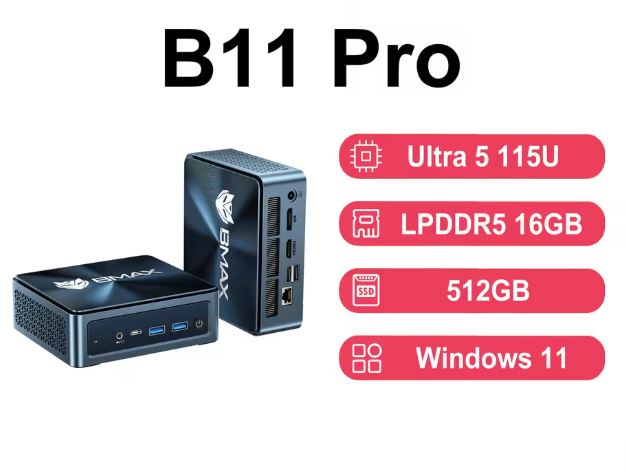
As alternatives within the BMAX range there is the B11 Pro with Intel Ultra 5 115U, more economical but with less raw power.
🛒 Where to buy it
You can find the BMAX B11 Power on AliExpress from approximately €570 with discount coupons.
-
🔗 Shop on AliExpress — best price with active coupons