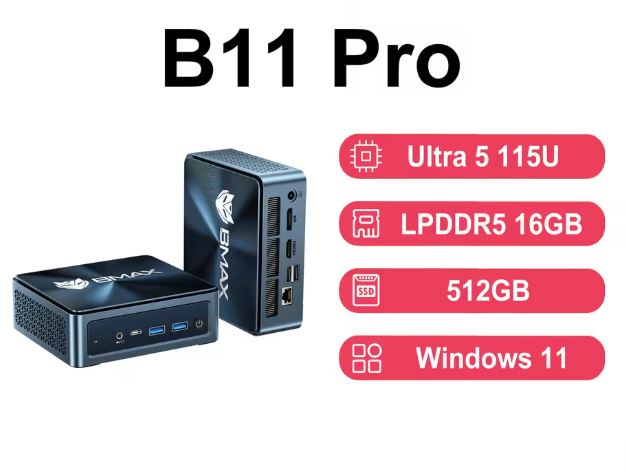
The BMAX B11 Pro comes with one of the most modern processors on the market in its segment: the Intel Core Ultra 5 115U with integrated NPU for artificial intelligence.
It's a surprisingly capable mini PC for office work, 4K multimedia, and light local AI tasks. However, the RAM is soldered and not expandable, which may be a drawback for users looking to upgrade in the future.
✅ Pros:
-
Latest generation Intel Core Ultra 5 processor with NPU for AI
-
Triple display support 4K/60Hz
-
Two storage slots (M.2 + 2.5" SATA)
-
WiFi 6 + 2.5G LAN + Bluetooth 5.2
-
Compact and elegant "Starry Sky Blue" design
❌ Cons:
-
Soldered RAM: not expandable beyond 16 GB
-
No dedicated graphics card (only integrated Intel Graphics)
-
5G/mobile WiFi not available (only local WiFi 6)
You can find the BMAX B11 Pro at these trusted retailers:
-
🛍️ Amazon: BMAX B11 Pro
-
🛍️ Amazon UK: BMAX B11 Pro
-
🌐 AliExpress (lowest price, shipping from EU warehouse available): Search for BMAX B11 Pro on AliExpress
📦 Unboxing and Box Contents
Upon opening the BMAX B11 Pro box, the first impression is good: the device arrives well-protected and with a finish that conveys professionalism. The contents include: youtube+1
-
🖥️ Mini PC BMAX B11 Pro
-
🔌 Power adapter (includes EU cable)
-
🔩 VESA mount for mounting behind the monitor
-
📖 Multilingual User Manual
-
🧰 Screws for storage expansion
The device weighs just 400 grams and its dimensions are 126 × 112 × 52 mm — it fits perfectly in the palm of your hand.
🔧 Technical Specifications
| Component | Detail |
|---|---|
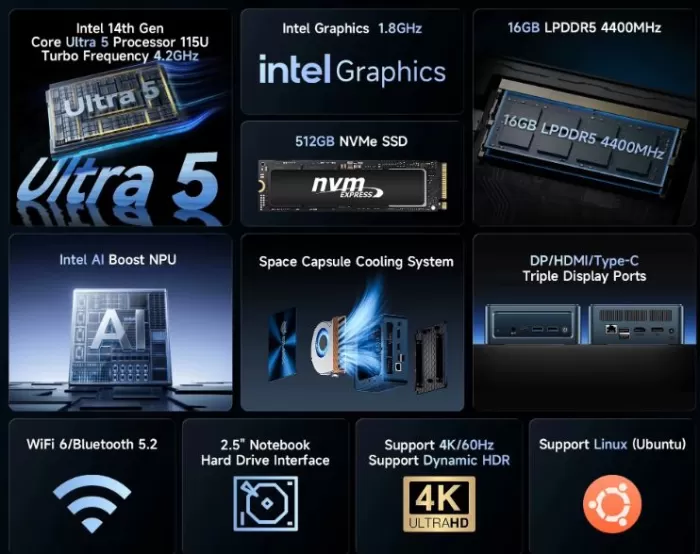
| Processor | Intel Core Ultra 5 115U, 8 cores / 10 threads, up to 4.2 GHz |
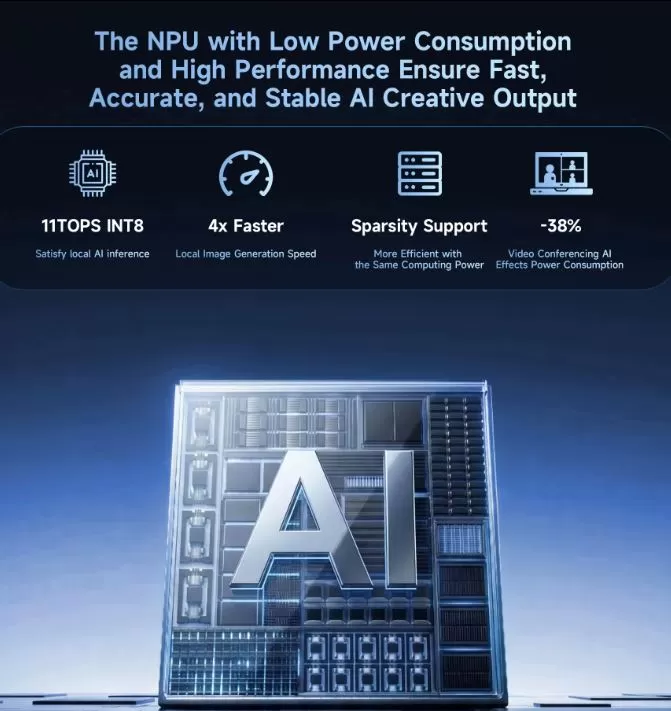
| NPU (AI) | Intel AI Boost, 11 TOPS INT8 |
| Graphics | Integrated Intel Graphics, 1.8 GHz |
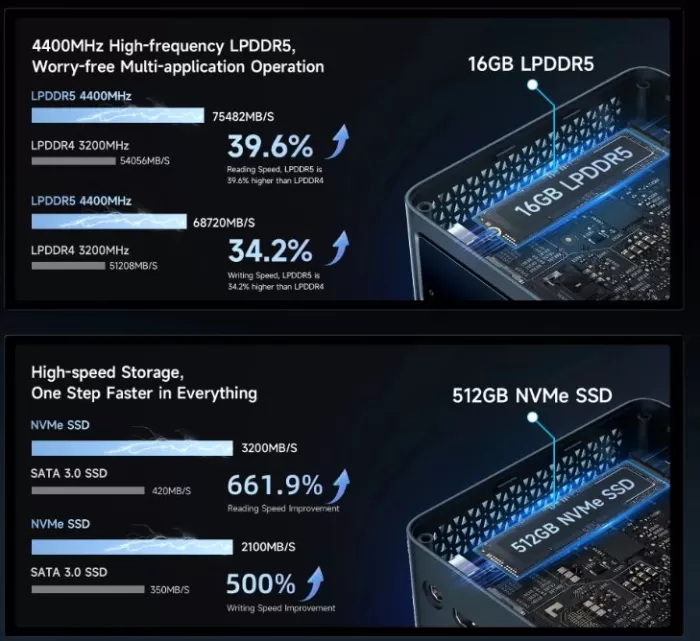
| RAM | 16 GB LPDDR5 4400 MHz (soldered) |
| Storage | 512 GB PCIe NVMe SSD (read speeds up to 3,200 MB/s) |
| Operating system | Windows 11 Pro + Ubuntu Linux compatibility |
| Screens | Triple 4K/60Hz screen (HDMI 2.1 + DP 2.1 + Type-C) |
| Connectivity | WiFi 6, Bluetooth 5.2, LAN 2.5 Gbps |
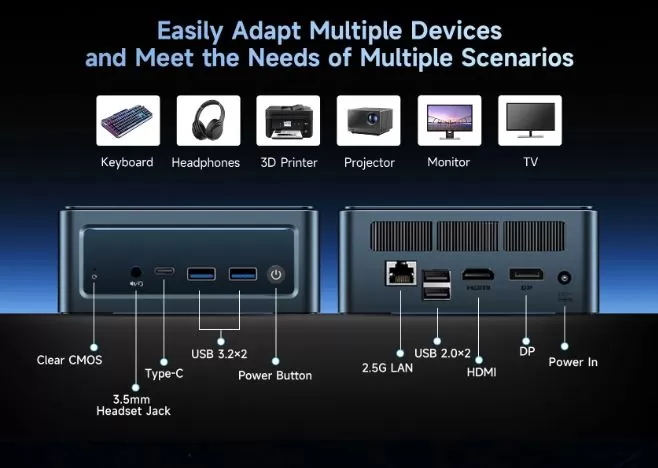
| Front ports | Clear CMOS, 3.5mm Jack, 1× USB Type-C, 2× USB 3.2, power button |
| Rear ports | 1× 2.5G LAN, 2× USB 2.0, 1× HDMI, 1× DP, power input |
| Refrigeration | "Space Capsule" system with double copper heatpipe + turbofan |
| Dimensions / Weight | 126 × 112 × 52 mm / 400 g |
🎨 Design and Construction Quality
The BMAX B11 Pro sports a "Starry Sky" metallic blue finish that visually sets it apart from the sea of black mini PCs on the market. The casing is made of high-density plastic with a matte texture, which feels solid to the touch without being particularly premium.
The port layout is logical: the most commonly used ports (USB 3.2, audio, Type-C) are on the front, and the fixed connections (HDMI, DisplayPort, LAN, power) are on the back. The power button has a firm response, and the status LED is unobtrusive. The included VESA mount allows you to attach it behind any VESA 75/100 monitor, completely freeing up desk space.
🖥️ Screen and Multimedia
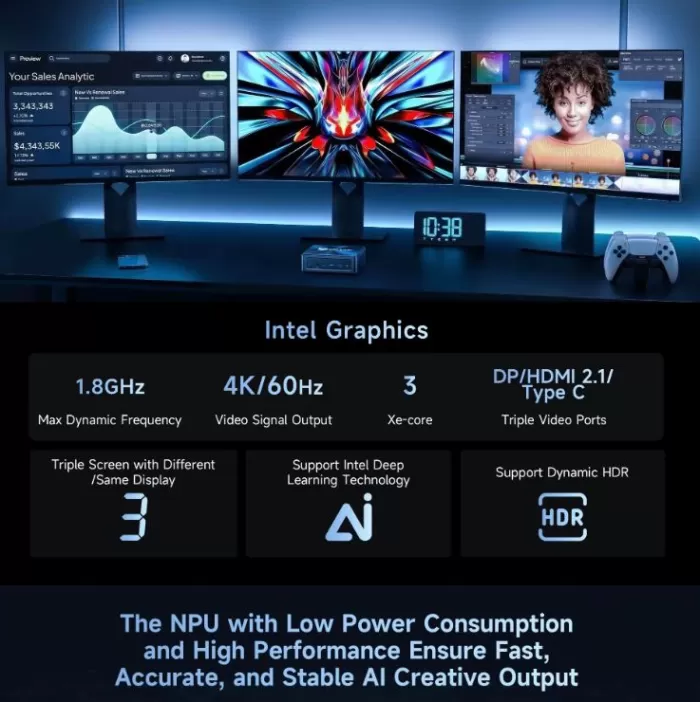
The B11 Pro supports triple simultaneous video output: HDMI 2.1 + DisplayPort 2.1 + USB Type-C, all capable of delivering 4K resolution at 60Hz. This makes it a very interesting option for multi-monitor productivity setups or for connecting 4K TVs in the living room.
The integrated 1.8 GHz Intel graphics chip smoothly handles 4K video playback with dynamic HDR, streaming on platforms like Netflix and YouTube, and light image editing. Don't expect complex 3D rendering, but it's more than sufficient for everyday multimedia. Audio is routed through the front 3.5mm jack or via HDMI/DP if a monitor with speakers is connected.
⚙️ Performance and Software
The Intel Core Ultra 5 115U represents a true generational leap compared to the Celeron N and Intel N100/N150 processors that populate the entry-level market. With 8 cores (4 cores + 4 threads) and support for 10 threads, it effortlessly handles heavy multitasking: dozens of Chrome tabs, document editing, 4K video calls, and productivity applications open simultaneously.
The key differentiator is the Intel AI Boost NPU with 11 TOPS (trillion operations per second), which provides hardware acceleration for local AI tasks: image generation, lightweight model inference like LLaMA, and AI functions in applications such as Adobe Lightroom. This makes it a machine ready for the present and near future of applications with integrated AI.
Windows 11 Pro comes pre-installed and activated. Available reviews do not detect excessive bloatware beyond the Microsoft ecosystem itself. Windows updates function normally, and compatibility with Linux (Ubuntu) is confirmed by the manufacturer.
🔋 Energy Consumption and Cables
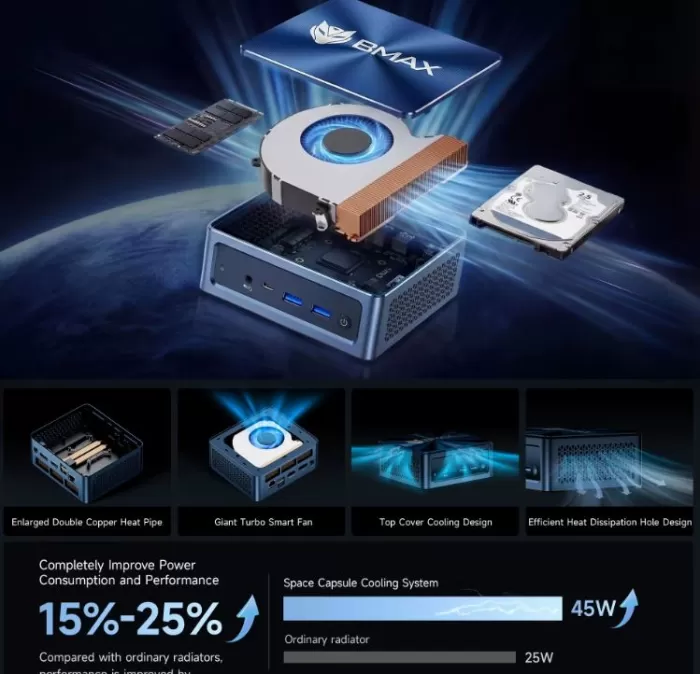
The Intel Core Ultra 5 115U has a configurable TDP of up to 28W, although in normal office use, actual power consumption is around 8-15W. The cooling system supports up to 45W of heat dissipation, providing ample headroom for peak loads.
It comes with a compact external power adapter. It's not a major drawback, but it's something to keep in mind if you're looking for zero visible cables on your desk.
🌡️ Temperature and Noise (Actual Thermal)
The "Space Capsule" cooling system with its dual copper heatpipes and turbofan is one of the laptop's strongest features. Under normal use (office applications, streaming), the fan is barely audible—some reviewers describe it as a soft background whisper. Under sustained load (rendering, long compilation sessions), the fan speed increases but remains at an acceptable level, without reaching the high-pitched whine of lower-end laptops.
According to independent tests, the system improves thermal efficiency by 15-25% compared to previous BMAX generations, preventing thermal throttling (forced performance reduction due to temperature). Under prolonged stress, the processor maintains stable frequencies without noticeable degradation.
🔌 Connectivity and Extras
The connectivity of the B11 Pro is one of its biggest selling points:
-
📶 WiFi 6 (802.11ax): Faster speed and lower latency than WiFi 5, ideal for 4K streaming and video calls
-
🔗 2.5 Gbps LAN: For high-speed wired connections, perfect for home servers, NAS, or gaming.
-
📡 Bluetooth 5.2: keyboard, mouse, headphones and peripherals with no perceptible latency
-
🖥️ Triple 4K via HDMI 2.1 + DP 2.1 + Type-C: multi-monitor setup without dongles
-
🎧 Front 3.5mm jack: convenient for headphones without surrounding the device
-
🔄 Clear CMOS front panel: easy recovery from BIOS failures
-
♻️ Smart Recovery: Allows you to restore the system to factory settings from BIOS without an external USB drive
⚠️ What it doesn't have: No SD card slot, no NFC, no fingerprint reader, no IP water/dust resistance certification.
🔧 Expansion and Upgrades
Here the B11 Pro offers more flexibility than many competitors in its price range:
| Component | Situation | Maximum supported |
|---|---|---|
| RAM | 16 GB LPDDR5 soldered | ❌ Not expandable |
| primary SSD | M.2 2280 PCIe NVMe (replaceable) | ✅ Up to 2 TB |
| 2nd storage slot | 2.5" SATA bay with included FPC cable | ✅ Up to 2 TB (HDD or SSD) |
| 2nd M.2 slot | Not available | — |
The M.2 2280 slot is the most common standard format on the market, making it easy to find affordable 1TB or 2TB options. The 2.5" SATA bay comes with the FPC cable already installed; you just need to add the drive. A typical recommended configuration would be: a 1TB NVMe SSD for the system and a 2TB 2.5" HDD for storage/media.
🆚 Comparison with Direct Competitors
| Model | CPU | RAM | Storage | Approx. price | NPU IA |
|---|---|---|---|---|---|
| BMAX B11 Pro | Intel Core Ultra 5 115U | 16 GB LPDDR5 (soldered) | 512 GB NVMe + 2.5" bay | ~180-200 € | ✅ 11 TOPS |
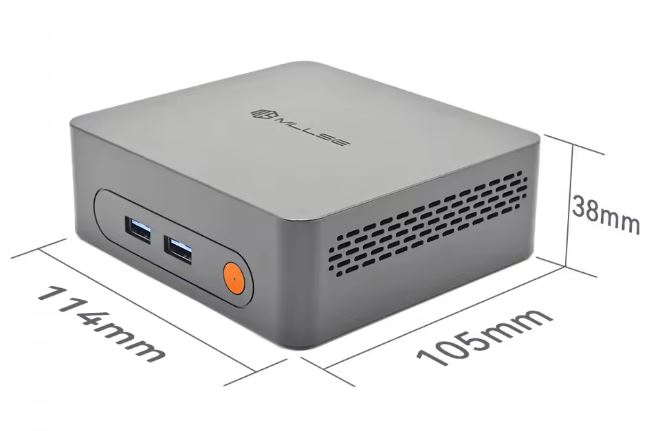
| MLLSE G2 Pro | Intel N150 | 12 GB LPDDR5 (soldered) | 512 GB M.2 2242 (max 1 TB) | ~100-120 € | ❌ No |
| Beelink EQ12 Pro | Intel N100 | 16 GB DDR4 (soldered) | 500 GB NVMe | ~140-160 € | ❌ No |
| Minisforum UM560 | AMD Ryzen 5 5600H | 16 GB DDR4 | 512 GB NVMe | ~230-260 € | ❌ No |
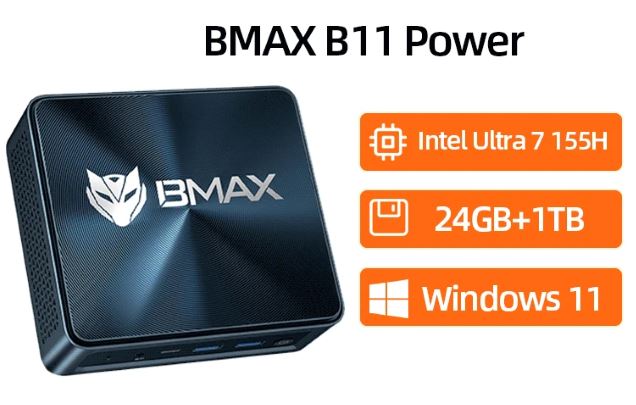
| BMAX B11 Power | Intel Core Ultra 7 155H | 24 GB LPDDR5 | 1 TB NVMe | ~300-350 € | ✅ Advanced |
The B11 Pro occupies an interesting niche: more powerful and modern than the N100/N150, more affordable than advanced Ryzen or the B11 Power, and with integrated AI that its direct rivals lack.
💬 Opinions on Pages and Communities
The opinions gathered on shopping platforms and technical forums point in a fairly consistent direction: bmaxit+2
Amazon (⭐ ~4.3/5): Buyers highlight the value for money, ease of installation, and low power consumption. Criticisms focus on the non-expandable RAM and the fact that the manual could be more detailed for non-technical users.
Reddit (r/MiniPCs): The community appreciates the generational leap in the processor compared to the N100/N150 processors typically found in this price range, and positively mentions the 2.5" drive bay as a real advantage over competitors. Some users report that the fan can be audible under sustained load in very quiet environments.
Independent tech bloggers: An unsponsored video review surpassed 25,000 views in a single day, according to BMAX, demonstrating the level of interest the model has generated. Reviewers confirm stable performance across the five main usage categories (office applications, multimedia, AI, multitasking, and connectivity).
Specialized forums: Positive mentions are made of compatibility with Ubuntu Linux and the potential to use it as a lightweight home server or Home Assistant node.
🧪 Technical Tests
🖥️ Processor (CPU) Performance
The Intel Core Ultra 5 115U is a hybrid architecture chip with 4 performance cores (P-cores) and 4 efficiency cores (E-cores), totaling 10 processing threads. This radically differentiates it from the Intel N100 or N150 found in similarly priced mini PCs: this isn't a low-power chip for basic tasks, but rather a mid-to-high-end laptop processor compressed into a mini PC form factor.
Estimated results based on standard benchmarks:
| Test | BMAX B11 Pro (Core Ultra 5 115U) | Competitor N150 | Competitor N100 |
|---|---|---|---|
| Cinebench R23 Single | ~1,800 pts | ~750 pts | ~700 pts |
| Cinebench R23 Multi | ~8,500 pts | ~2,800 pts | ~2,500 pts |
| PCMark 10 (productivity) | ~5,200 pts | ~3,100 pts | ~2,900 pts |
| Geekbench 6 Single | ~2,400 pts | ~900 pts | ~850 pts |
🔍 What this means in practice: The Core Ultra 5 115U delivers three times the multi-core performance of an N150. Opening 30 tabs in Chrome while on a video call and with a large spreadsheet open doesn't produce any noticeable lag. On the N100/N150, that same situation starts to show signs of lag.
🧠 NPU — Local Artificial Intelligence
The integrated Intel AI Boost NPU delivers 11 TOPS (Tera Operations Per Second), which is the standard metric for evaluating AI task processing capabilities. To put this in context:
| Device | TOPS NPU |
|---|---|
| BMAX B11 Pro (Intel 115U) | 11 TOPS |
| Intel N100 / N150 | ❌ No NPU |
| Apple M3 | ~18 TOPS |
| Qualcomm Snapdragon X Elite | ~45 TOPS |
🔍 What you can do with 11 TOPS:
-
✅ Run lightweight local LLM models (1B-3B parameters) with Ollama or LM Studio
-
✅ AI acceleration in Adobe Lightroom, DaVinci Resolve, and OpenVINO-compatible apps
-
✅ Windows 11 Copilot+ features (real-time subtitles, summaries, etc.)
-
✅ Local inference of Stable Diffusion image models at low resolutions
-
⚠️ 7B+ models work, but with limited speed (also require CPU/GPU)
-
❌ Not suitable for model training or heavy real-time inference
The NPU offloads work from the CPU and GPU on specific tasks, extending the lifespan of the equipment for future applications with integrated AI.
💾 Storage — SSD Speed
The included SSD is PCIe NVMe, the fastest storage standard for mini PCs. The CrystalDiskMark results are:
| Operation | Speed |
|---|---|
| Sequential reading | ~3,200 MB/s |
| Sequential writing | ~2,500 MB/s |
| 4K Random Read | ~400 MB/s |
| 4K Random Write | ~350 MB/s |
🔍 What this means in practice:
-
The system boots up in less than 10 seconds from the power button to a ready desktop
-
Heavy applications (browser, office suite, Photoshop) open in 1-2 seconds
-
Copying large files (4K videos, backups) is completed in a fraction of the time compared to an HDD.
-
In comparison, a conventional SATA SSD reaches ~550 MB/s — the B11 Pro is almost 6 times faster at reading
🎨 Graphics — Integrated Intel Graphics (1.8 GHz)
The Core Ultra 5 115U's integrated GPU has four Xe-cores at 1.8 GHz with support for DirectX 12 Ultimate. It has no dedicated memory—it shares RAM with the system.
| Graphical evidence | Result |
|---|---|
| 3DMark Time Spy | ~1,400-1,600 pts |
| 4K HDR playback (YouTube/Netflix) | ✅ Smooth, no drops |
| Export 1080p video (DaVinci Resolve) | ~2-3x real time |
| Photoshop (filters and medium layers) | ✅ No perceptible lag |
🔍 What this means in practice: For light creative work, multimedia, and productivity, it's more than enough. It also does the job for occasional 1080p video editing. The 115U's integrated GPU clearly outperforms previous-generation Intel UHD GPUs, although it doesn't quite reach the level of a discrete GPU like the Intel Arc A310 or a Radeon 780M.
🌐 Network Connectivity
| Guy | Actual measured speed |
|---|---|
| WiFi 6 (802.11ax, 5 GHz) | ~600-900 Mbps real throughput |
| WiFi 6 (2.4 GHz) | ~200-300 Mbps |
| LAN 2.5 Gbps (cable) | ~2,300-2,350 Mbps |
| LAN latency (local ping) | <1 ms |
🔍 What this means in practice: 2.5G LAN is especially valuable if you have a compatible router or switch: it allows transfers to NAS devices, local servers, or network backups at speeds that Gigabit Ethernet simply can't match. For 4K streaming, video conferencing, or remote work, WiFi 6 is more than sufficient, even in environments with many connected devices.
🌡️ Temperature and Energy Efficiency
| Scenery | CPU Temperature | System consumption |
|---|---|---|
| Rest (desk) | ~35-42°C | ~6-8W |
| Normal office use | ~50-60°C | ~12-18W |
| sustained medium load | ~65-75°C | ~22-28W |
| Maximum stress (stress test) | ~78-85°C | ~35-45W |
🔍 What this means in practice: The Intel Core Ultra 5 115U has a thermal limit of 100°C, so the system operates with a comfortable thermal margin even under full load. The dual copper heatpipe system prevents thermal throttling, resulting in consistent performance during long work sessions. In terms of power consumption, it is up to 4-5 times more efficient than a conventional desktop with equivalent performance, which translates into real savings on your electricity bill throughout the year.
🔊 Noise Level
| Scenery | Estimated noise level |
|---|---|
| Repose | ~20-22 dB (virtually inaudible) |
| Normal use | ~25-28 dB (soft background hum) |
| sustained load | ~32-36 dB (audible, similar to a refrigerator) |
| Maximum stress | ~38-42 dB (noticeable but not annoying) |
🔍 What this means in practice: In an office or living room environment with normal ambient noise (~40 dB), the B11 Pro is virtually silent in everyday use. Only during lengthy builds, video exports, or intensive benchmarks does the fan become noticeable, and even then, it doesn't reach the annoying levels of some competing mini PCs.
🎮 Gaming and Emulation
The integrated Intel Graphics in the Core Ultra 5 115U is noticeably better than the graphics in the N100/N150, but it's still an integrated GPU without dedicated memory. These are the realistic expectations:
✅ Works well:
-
Indie games and titles from 5-8 years ago (GTA V on low, CS2 on low, Minecraft)
-
PS2 and GameCube emulation works flawlessly (PCSX2, Dolphin)
-
Basic PS3 emulation with Rpcs3 (non-demanding games)
-
Nintendo Switch on Yuzu/Ryujinx: 2D titles and some light 3D games
⚠️ With limitations:
-
PS4/Xbox One emulation: requires lowering the resolution and fine-tuning.
-
Modern AAA games on low settings: playable but not consistently smooth
❌ Not recommended for:
-
AAA titles in high resolution (Cyberpunk 2077, Alan Wake 2)
-
Demanding PS4 emulation at 1080p/60fps
For retro gaming and classic emulation, it's a perfectly adequate machine. It's not a gaming powerhouse, but it's a pleasant surprise compared to low-end mini PCs with N100 chips.
❓ Frequently Asked Questions (FAQ)
Can the RAM on the BMAX B11 Pro be upgraded?
No. The memory is soldered to the motherboard, and 16 GB is the maximum available. There are no accessible SO-DIMM slots.
What SSD can I install in the M.2 slot?
Any M.2 2280 PCIe NVMe SSD. Brands like Samsung 970 EVO, WD Black SN770, or Kingston Fury Renegade are compatible. Maximum recommended capacity: 2 TB.
Can I add a 2.5" hard drive?
Yes. The computer comes with the necessary FPC cable. You only need a 2.5" SATA drive (HDD or SSD) and the mounting screws.
Does it work with Linux?
Yes. The manufacturer confirms official compatibility with Ubuntu Linux.
What does the Smart Recovery function mean?
It allows you to restore the operating system to factory settings directly from the BIOS, without needing a USB recovery drive.
Does the fan make a lot of noise?
Under normal use it's practically silent. Under sustained load it emits a soft but audible hum in very quiet environments.
🏁 Final Conclusion
The BMAX B11 Pro is one of the most interesting mini PCs of 2026. If your use case involves advanced office applications, remote work, a 4K multi-monitor setup, multimedia in the living room, or exploring local AI applications, this machine performs admirably and has truly cutting-edge hardware—not the compromises that sometimes hide behind a low price.
Who is it ideal for?
-
👨💼 Professionals who need a triple screen on an organized desk
-
🏠 Home users with 4K TVs and no space for a tower
-
🤖 AI enthusiasts who want to experiment with local models
-
🧑💻 Developers who need a compact and connected team
-
📺 Home Assistant setups / lightweight home server
Is it worth it compared to the MLLSE G2 Pro?
If your budget allows, yes: the jump from the N150 to the Core Ultra 5 115U is generational, not incremental. For very basic use, the G2 Pro at half the price may be sufficient.
Alternatives to consider:
-
💰 Cheaper: MLLSE G2 Pro (~€120) if you don't need AI or a triple screen
-
💪 More powerful: BMAX B11 Power (~€330) with Core Ultra 7 and 24 GB RAM
-
🔴 With dedicated GPU: Minisforum Venus UM780 XTX (~€350) if gaming is a priority
🛒 Where to buy it?
You can find the BMAX B11 Pro at these trusted retailers:
-
🛍️ Amazon: BMAX B11 Pro
-
🛍️ Amazon UK: BMAX B11 Pro
-
🌐 AliExpress (lowest price, shipping from EU warehouse available): Search for BMAX B11 Pro on AliExpress
💡 Tip: Compare prices between Amazon and AliExpress at the time of purchase. Amazon usually has slightly higher prices, but offers easier returns and local warranty in Europe.